Ableton Note

Ableton Note

다운로드: App Store
Spark by MWM logo
로고: Ableton Note

Ableton Note: 음악 아이디어를 위한 모바일 스케치북

영감이 떠오르는 순간을 포착하세요. 엄선된 사운드로 아이디어를 형성하고, 주변 환경에서 샘플을 녹음하고, 프로젝트를 Ableton Live와 원활하게 동기화하여 트랙을 완성하세요.

개발사

Ableton AG

카테고리

Music

다운로드

391K+

사용자 평점

4.2/5

총 평가 수

600

지원 언어

5

불꽃을 포착하세요

이 인터페이스를 사용하는 391K+ 명의 사용자.

Ableton Note 앱이 표시된 스마트폰으로, 분홍색 드럼 시퀀서 그리드와 '비트로 시작'이라는 텍스트가 표시됩니다.

Ableton Note 앱이 표시된 스마트폰으로, 분홍색 드럼 시퀀서 그리드와 '비트로 시작'이라는 텍스트가 표시됩니다.

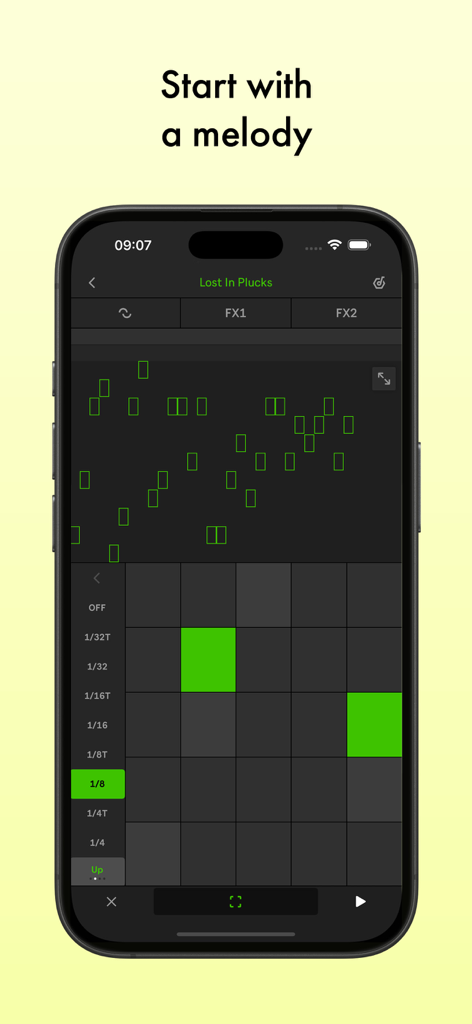
스마트폰 화면에 녹색 MIDI 그리드가 있는 멜로디 편집기를 보여주는 Ableton Note 모바일 앱 인터페이스.

스마트폰 화면에 녹색 MIDI 그리드가 있는 멜로디 편집기를 보여주는 Ableton Note 모바일 앱 인터페이스.

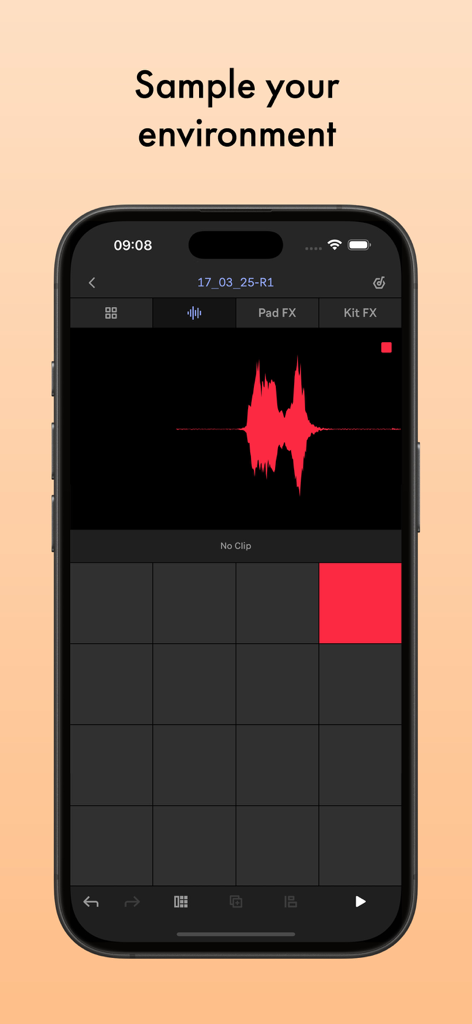
오디오 파형과 샘플링 사운드를 위한 드럼 패드를 보여주는 Ableton Note 앱 인터페이스

오디오 파형과 샘플링 사운드를 위한 드럼 패드를 보여주는 Ableton Note 앱 인터페이스

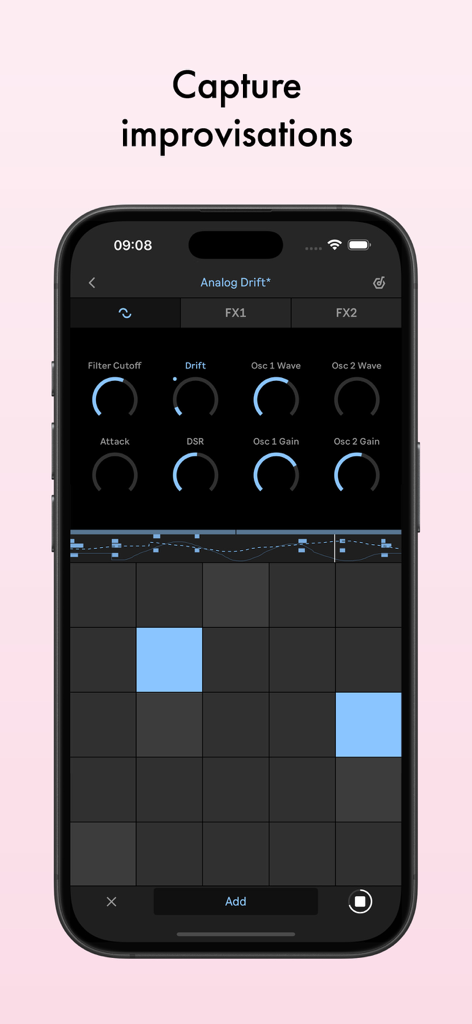
스마트폰에서 음악적 즉흥 연주를 캡처하기 위한 신디사이저 매개변수와 MIDI 그리드를 보여주는 Ableton Note 앱 인터페이스

스마트폰에서 음악적 즉흥 연주를 캡처하기 위한 신디사이저 매개변수와 MIDI 그리드를 보여주는 Ableton Note 앱 인터페이스

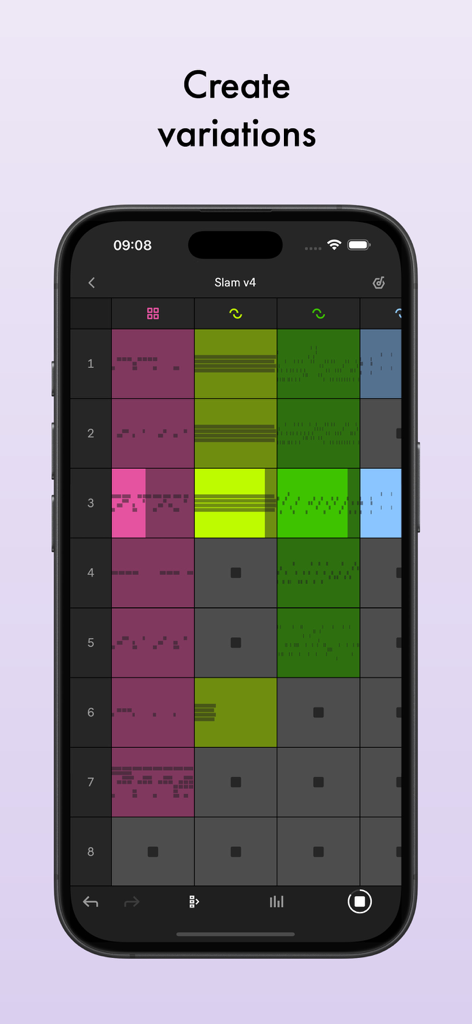
음악 클립의 다채로운 그리드를 보여주는 iPhone의 Ableton Note 세션 보기로, 노래 변형을 만들 수 있습니다.

음악 클립의 다채로운 그리드를 보여주는 iPhone의 Ableton Note 세션 보기로, 노래 변형을 만들 수 있습니다.

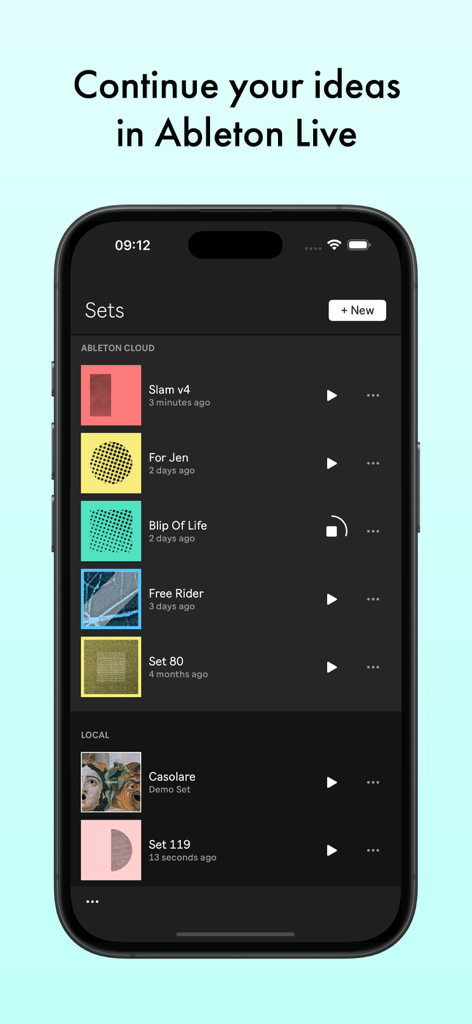
음악 세트 목록과 클라우드 동기화 옵션을 보여주는 Ableton Note 앱이 있는 스마트폰 화면.

음악 세트 목록과 클라우드 동기화 옵션을 보여주는 Ableton Note 앱이 있는 스마트폰 화면.

창의적인 불꽃을 포착하세요

이 앱을 돋보이게 하는 도구, 391K+ 명의 사용자가 선택.

🎙️

주변 환경 샘플링

주변의 모든 소리를 독특한 악기로 바꾸세요. 휴대폰의 내장 마이크를 사용하여 텍스처를 녹음, 자르고 모양을 만들어 맞춤형 사운드 팔레트를 만드세요.

모든 분위기 포착

멜로디를 다시는 놓치지 마세요. '캡처' 기술은 연주한 후에도 최고의 즉흥 연주를 복구하여 창의적인 흐름을 유지합니다.

☁️

스튜디오 레디 동기화

이동 중에 시작하고 스튜디오에서 마무리하세요. Ableton Cloud를 사용하여 모바일 프로젝트를 Ableton Live에서 직접 열어 전문적인 프로덕션을 하세요.

전 세계 사용자들에게 사랑받는 앱

Trusted by 391K+ 명이 이 앱을 사랑합니다.

"

"Ableton Note는 제 통근 시간을 완전히 바꿔 놓았습니다. 이전에는 음성 메모로 아이디어를 녹음했지만, 이제는 지하철에서 실제로 그루브를 만들 수 있고 집에 스튜디오에 도착할 때쯤이면 MIDI가 이미 준비되어 있습니다. 샘플링 기능은 도시의 텍스처를 포착하는 데 판도를 바꾸는 기능입니다."

Marcus J., 음악 프로듀서
"

"데스크톱 DAW가 항상 약간 부담스럽게 느껴졌던 사람으로서 Note는 완벽한 진입점입니다. 캡처 버튼은 마법과 같습니다. 녹음을 누르는 것을 잊더라도 연주했던 것을 기억합니다. 기술적인 마찰 없이 갑작스러운 멜로디를 전체 음악 스케치로 바꾸는 데 가장 직관적인 도구입니다."

Elena R., 싱어송라이터

앱 소개

에 대해 알아야 할 모든 것 Ableton Note.

설명

Start new musical ideas with a curated selection of sounds and effects. Create beats and melodic parts, sample your world, and continue your tracks in Ableton Live. Note is a place to form ideas, explore new sounds and find direction. Get your ideas out or just experiment until inspiration hits, using a selection of Ableton Live’s drum kits, synths and melodic instruments. Create your own sound palette by sampling with your phone’s built-in microphone. And use Note’s built-in MIDI Editor to sequence notes, beats and chords or make tweaks as you listen back Follow your ideas wherever they lead by sending your projects to Live without leaving the app with the help of Ableton Cloud. Open projects from Live’s browser and keep working – you can edit all your MIDI notes, and all your samples and sounds from Note are exactly the same. Ableton Note users get a free license for Ableton Live Lite – simple, intuitive software used by musicians, producers and DJs around the world to write, record, and perform. For Ableton Move users, Note also offers the chance to keep working on a Set from your phone. Begin with a beat: • Choose from 76 Drum Sampler kits • Tap out a beat using the 16-pad grid, or sequence one with the MIDI Editor • Play each drum hit melodically using 16 Pitches mode • Quantize your beat or nudge notes to fix loose timing or mistakes • Add more layers of rhythm • Create beat repetitions with Note Repeat • Change parameters to shape your sound • Experiment with effects or apply swing for variations Start with a melody: • Choose from 317 synth sounds and 60 Melodic Sampler instruments • Play or program your melody or chord progression with the 25-pad grid, piano roll or MIDI Editor • Set a key and scale to get instantly harmonic results • Add more layers of harmony • Change parameters to shape your sound • Add effects to experiment with sound design Sample your environment: • Create your own kits by recording percussive sounds into Note’s Drum Sampler • Record tonal sounds to create your own Melodic Sampler instruments • Manipulate your samples by cutting, filtering or repitching them • Sequence samples into beats, melodies and chords using the MIDI Editor • Shape or transform your sounds with effects • Import your own samples or audio directly from videos Capture improvisations: • Play something, then tap the Capture button to keep it • Play at a tempo that feels comfortable and Note will detect it • Note will recognize the length of the phrase and create a loop • Quantize it, add to it, or change the sound • Connect MIDI hardware to play keys and change the sound of your instruments Create variations: • Note features a grid-based Session View layout • Double your loops to create variation within clips • Duplicate your clips and create different versions of your ideas • Add, delete or adjust multiple notes at once with the MIDI Editor • Create eight tracks with up to eight clips on eight scenes • Try different clip combinations and song structures • Export your work as an audio file to listen and share

최신 버전

1.7.3

크기

907.5 MB

출시일

2022년 10월 18일

오늘 다음 트랙을 시작하세요

Ableton Note로 음악 아이디어를 현실로 만드세요. 프로젝트를 Live와 원활하게 동기화하고 어디서든 창의적인 흐름을 이어가세요.

다운로드: App Store
FAQ

자주 묻는 질문

에 대해 알아야 할 모든 것 Ableton Note

Ableton Note는 무엇인가요?

Ableton Note는 이동 중에 새로운 음악 아이디어를 생성하기 위한 앱입니다. 사용자는 비트와 멜로디를 만들고, 사운드를 샘플링하고, Ableton Live에서 트랙을 추가로 개발할 수 있습니다.

Ableton Note 프로젝트를 Ableton Live로 전송할 수 있나요?

예, Ableton Cloud를 사용하여 Ableton Note 프로젝트를 Ableton Live로 전송할 수 있습니다. 이를 통해 여러 장치에서 아이디어 작업을 원활하게 계속할 수 있습니다.

Ableton Note에 Ableton Live Lite의 무료 라이선스가 포함되어 있나요?

예, Ableton Note 사용자는 Ableton Live Lite의 무료 라이선스를 받습니다. 이 소프트웨어는 음악가, 프로듀서 및 DJ가 음악을 작곡, 녹음 및 공연하는 데 사용됩니다.

Ableton Note에서 비트를 어떻게 만드나요?

Ableton Note는 76개의 Drum Sampler 키트를 사용하여 비트 생성을 용이하게 합니다. 16패드 그리드에서 비트를 탭하거나 MIDI Editor로 시퀀싱한 다음 노트의 양자화 또는 조정을 할 수 있습니다.

Ableton Note에서 멜로디를 어떻게 만드나요?

Ableton Note는 멜로디 생성을 위해 317개의 신디사이저 사운드와 60개의 Melodic Sampler 악기를 제공합니다. 사용자는 25패드 그리드, 피아노 롤 또는 MIDI Editor로 멜로디와 코드 진행을 프로그래밍할 수 있습니다.

Ableton Note로 제 샘플을 녹음할 수 있나요?

예, Ableton Note를 사용하면 휴대폰의 내장 마이크를 사용하여 타악기 또는 음색 사운드를 녹음하여 사용자 정의 키트 또는 악기를 만들 수 있습니다. 기존 샘플을 가져올 수도 있습니다.

Ableton Note는 외부 MIDI 하드웨어를 지원하나요?

예, Ableton Note는 외부 MIDI 하드웨어 연결을 지원합니다. 이를 통해 사용자는 키보드를 연주하고 악기 사운드를 변경하여 앱 내에서 즉흥 연주 및 제작 프로세스를 향상시킬 수 있습니다.

Ableton Note에서 음악을 어떻게 내보내나요?

Ableton Note에서 작업을 오디오 파일로 내보낼 수 있습니다. 이를 통해 음악 아이디어와 작곡을 듣고 다른 사람과 공유할 수 있습니다.

Ableton Note는 Ableton Move와 함께 작동하나요?

예, Ableton Note를 사용하면 휴대폰에서 직접 Set 작업을 계속할 수 있습니다. 이 기능은 Ableton Move와의 통합을 위해 특별히 설계되었습니다.

Ableton Note의 Session View는 무엇인가요?

Ableton Note는 그리드 기반 Session View 레이아웃을 제공합니다. 이를 통해 사용자는 루프를 두 배로 만들고, 클립을 복제하고, 최대 8개의 트랙과 8개의 클립을 8개의 장면에서 배열하여 변형 및 노래 구조를 만들 수 있습니다.