Splice: Make music now

Splice: Make music now

다운로드: App Store
Spark by MWM logo
로고: Splice: Make music now
Splice: 지금 바로 음악을 만드세요—주머니 속 전문 사운드 라이브러리

수백만 개의 로열티 프리 샘플과 전문가급 녹음 도구로 모든 영감의 불꽃을 포착하세요. 단 몇 초 만에 스택을 구축하고 DAW로 직접 내보내 모바일 아이디어를 다음 히트작으로 만드세요.

개발사

Distributed Creation Inc

카테고리

Music

다운로드

833K+

사용자 평점

3.5/5

총 평가 수

1K+

지원 언어

1

시각화된 스튜디오

이 인터페이스를 사용하는 833K+ 명의 사용자.

Lowkey Drip 및 AmaPercussion과 같은 추천 음악 샘플 팩이 포함된 탐색 섹션을 보여주는 Splice 모바일 앱의 인터페이스.

Lowkey Drip 및 AmaPercussion과 같은 추천 음악 샘플 팩이 포함된 탐색 섹션을 보여주는 Splice 모바일 앱의 인터페이스.

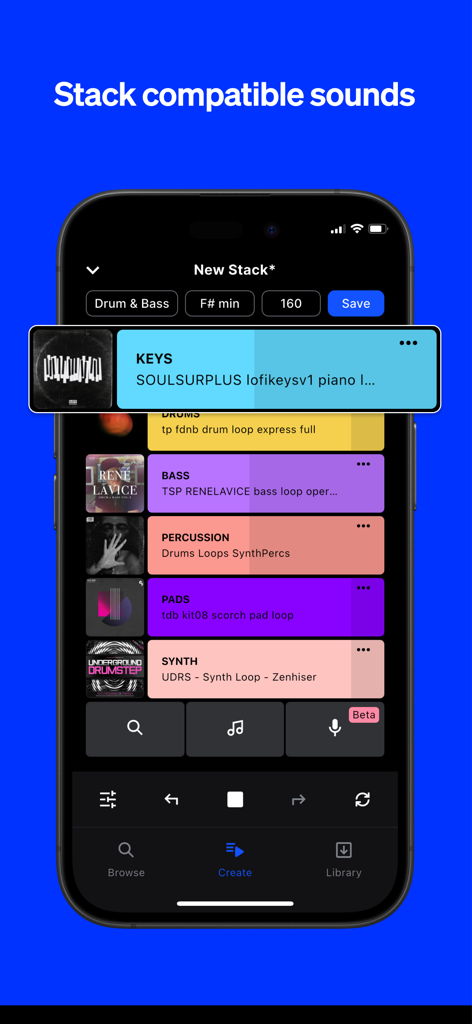
호환되는 음악 루프를 쌓기 위한 Splice 앱 인터페이스를 보여주는 휴대폰 화면.

호환되는 음악 루프를 쌓기 위한 Splice 앱 인터페이스를 보여주는 휴대폰 화면.

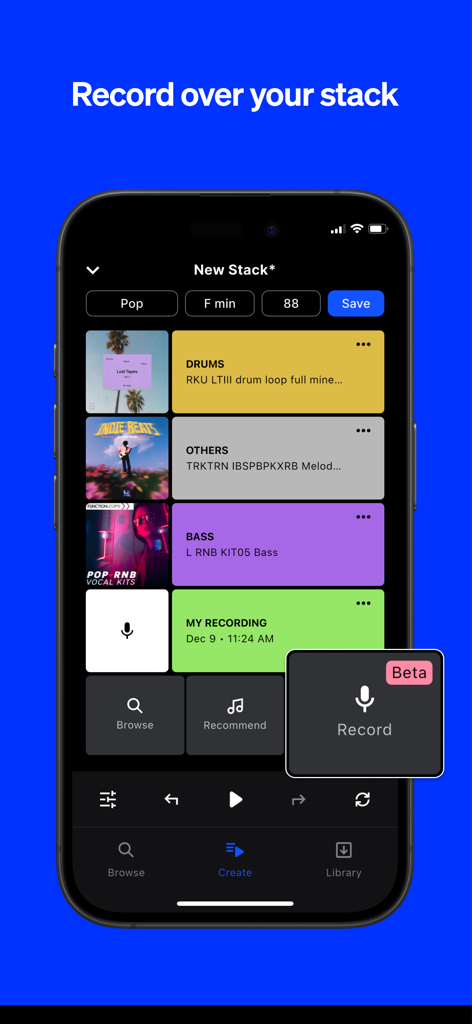
멀티 트랙 루프와 음성 녹음 기능이 있는 Splice 앱의 Create 모드를 보여주는 iPhone 화면.

멀티 트랙 루프와 음성 녹음 기능이 있는 Splice 앱의 Create 모드를 보여주는 iPhone 화면.

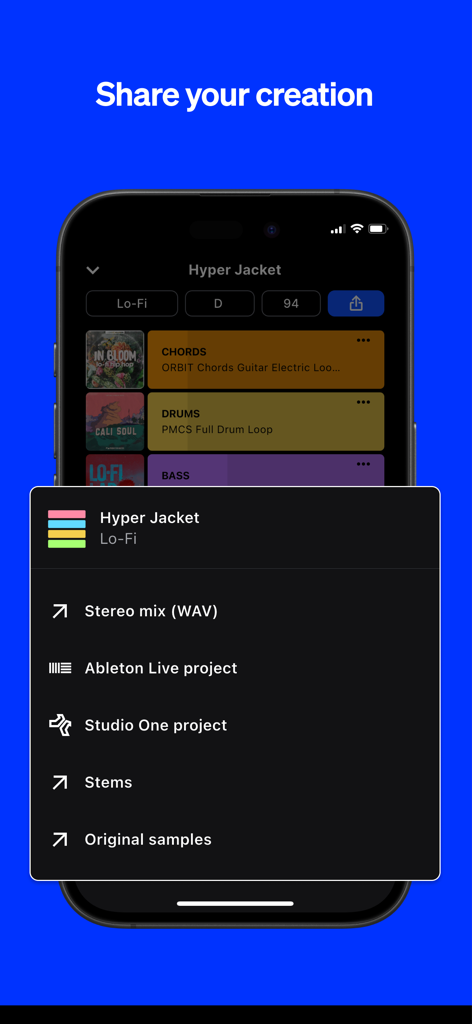
음악 프로젝트를 스테레오 믹스, 스템 또는 Ableton Live 및 Studio One용 DAW 파일로 내보내는 옵션을 보여주는 Splice 앱의 스크린샷.

음악 프로젝트를 스테레오 믹스, 스템 또는 Ableton Live 및 Studio One용 DAW 파일로 내보내는 옵션을 보여주는 Splice 앱의 스크린샷.

어디서나 즐기는 나만의 전문 스튜디오

이 앱을 돋보이게 하는 도구, 833K+ 명의 사용자가 선택.

🎧

전문가급 샘플 라이브러리

차트 상위권 프로듀서들이 사용하는 수백만 개의 로열티 프리 사운드를 탐색하여 다음 프로젝트를 위한 완벽한 분위기를 찾아보세요.

Create 모드로 즉각적인 분위기 연출

함께 들었을 때 잘 어울리는 호환 루프를 몇 초 만에 자동으로 쌓아 창작의 고통을 극복하세요.

🎤

즉석에서 멜로디 캡처

Splice Mic을 사용하여 루프 위에 보컬 아이디어나 리프를 녹음하고, 스튜디오로 돌아와 DAW로 직접 내보내세요.

전 세계 사용자들에게 사랑받는 앱

Trusted by 833K+ 명이 이 앱을 사랑합니다.

"

"Splice Mobile은 저의 출퇴근 시간을 완전히 바꿔 놓았습니다. 예전에는 소셜 미디어를 보며 시간을 낭비하곤 했지만, 이제는 기차 안에서 전문적인 사운드의 스택을 만들고 다음 트랙을 위한 희귀한 샘플을 찾습니다. Ableton Live로 원활하게 내보낼 수 있어 모바일 스케치를 홈 스튜디오에 도착하자마자 바로 다듬을 수 있습니다."

Marcus J., 프로듀서 겸 비트메이커
"

"작곡가로서 멜로디가 떠오르는 순간 바로 포착해야 합니다. Splice Mic은 정말 구세주 같아요. 휴대폰에서 직접 세계적인 수준의 루프 위에 보컬 탑라인을 녹음할 수 있거든요. 복잡한 설정 없이 다양한 분위기와 장르를 테스트하기 정말 쉽고, 모든 것이 로열티 프리라는 것을 알기에 TikTok에 작업물을 공유하는 것도 마음이 편합니다."

Chloe Reese, 싱어송라이터

앱 소개

에 대해 알아야 할 모든 것 Splice: Make music now.

설명

Splice is a royalty-free sample library, trusted and used by your favorite music creators. With Splice Mobile, you now have the power to browse the entire Splice catalog, organize your favorite sounds, discover hidden gems, record your own audio, and start countless new ideas with Create mode—right from your phone. Splice Mobile keeps inspiration within reach wherever you are. DISCOVER NEW SPLICE SOUNDS ON THE GO Inspiration isn’t limited to the studio, and now, neither is your creativity. With our mobile app, you can browse the entire Splice catalog all from your phone. Dive deep into packs and genres and discover hidden gems. Search by keyword and filter by tags to find the perfect sound for your project. Quickly audition loops, tap the heart icon to save your favorite sounds, and organize them into Collections. VOICE TO VERSE—ANYWHERE The latest mobile feature, Splice Mic, redefines mobile music creation for songwriters who know inspiration doesn’t wait. More than just a recording app, it lets you hear every topline, verse, or riff in full musical context over Splice sounds—right from your phone. Instantly test ideas, explore genres, and unlock new creative possibilities. Humming a melody? Strumming a riff? Working out lyrics? Splice Mic turns spontaneous moments into real musical opportunities. Every take is a step toward your next track. When you're ready, export to your DAW and turn those mobile ideas into full songs. INSTANT INSPIRATION WITH CREATE MODE Generating new musical ideas and starting beats on the go has never been easier. Simply tap on the Create icon, select your desired genre, and immediately drop into a Stack of loops from the Splice library. You may find the generated Stack fits what you’re looking for perfectly, but if not, that’s great too. Developing a musical idea is often about trying combinations of sounds and figuring out what feels good to you—Create Mode is a great companion for that process. Create Mode leaves creative control in your hands—shuffle to create a whole new Stack or add new layers of compatible sounds and your own recordings. If you want to replace a single loop with a new option of the same type of sound, swipe right. If you want to delete the layer altogether, swipe left. You can also solo a layer by holding down, or tap the layer to mute. Once you’ve chosen your Stack layers, you can fine-tune your loop with volume adjustments and BPM control. When your idea hits the spot, save it with a click. You can also click the Stack icon to hear any individual loop in the Splice library in musical context with Create mode. SAVE IT. SEND IT. SHARE IT. Creating and saving your Stack is just the beginning. Not only is the Stack accessible from anywhere you can access your Splice account, but you can also share it directly with a unique link, AirDrop it to friends, or upload to Dropbox, Drive, or another cloud service right from your device for seamless collaboration. If you work in Ableton Live or Studio One, you can export your Stack as a DAW file and open it up with key and tempo information synced when you’re back in the studio. You can also save as a bounced stereo mix to hear the full idea rendered. START WITH SPLICE Subscribe to use Splice's expansive library of royalty-free samples, presets, MIDI, and creative tools in your music. Use Splice samples to create anything—they’re cleared for commercial use in new works. Cancel your subscription anytime and keep everything you've downloaded. Privacy Policy: https://splice.com/privacy-policy Terms of Use: https://splice.com/terms

최신 버전

v.3.6.5+6279

크기

80.0 MB

출시일

2016년 5월 17일

창의적인 영감을 업계 표준 트랙으로 바꾸세요

세계에서 가장 신뢰받는 로열티 프리 라이브러리를 주머니 속에서 이용하세요. 몇 초 만에 다음 비트를 시작하고, 스튜디오로 돌아와 DAW로 직접 내보낼 수 있습니다.

다운로드: App Store
FAQ

자주 묻는 질문

에 대해 알아야 할 모든 것 Splice: Make music now

Splice 모바일 앱이란 무엇인가요?

Splice 모바일은 사용자가 Splice의 전체 로열티 프리 카탈로그를 탐색하고, 사운드를 정리하고, Splice Mic로 오디오를 녹음하고, 휴대폰에서 바로 Create 모드를 사용하여 새로운 음악 아이디어를 시작할 수 있는 앱입니다.

Splice 모바일 앱에서 Splice 전체 카탈로그를 탐색할 수 있나요?

네, Splice 모바일 앱을 사용하면 휴대폰에서 직접 Splice의 전체 카탈로그를 탐색할 수 있습니다. 사용자는 키워드로 검색하고, 태그로 필터링하고, 루프를 미리 들어보고 특정 사운드를 찾을 수 있습니다.

Splice 모바일 앱에서 나만의 오디오를 녹음할 수 있나요?

네, Splice 모바일에는 Splice Mic라는 기능이 포함되어 있어 사용자가 자신만의 오디오를 녹음할 수 있습니다. 이 기능은 녹음된 사운드를 기존 Splice 사운드 위에 음악적 맥락으로 통합합니다.

Splice 모바일의 Create 모드는 어떻게 작동하나요?

Splice 모바일의 Create 모드는 새로운 음악 아이디어를 즉시 생성합니다. 사용자는 Create 아이콘을 탭하고, 장르를 선택하고, Splice 라이브러리의 루프 스택으로 드롭하여 비트를 시작하고 아이디어를 개발합니다.

Splice 앱의 Splice 샘플은 상업적 용도로 사용이 허가되었나요?

네, Splice 샘플은 상업적 용도로 사용이 허가되었습니다. 사용자는 이를 사용하여 새로운 작품을 만들 수 있으며, 음악 프로젝트에 대한 법적 준수를 보장받을 수 있습니다.

Splice 모바일에서 만든 창작물의 내보내기 옵션은 무엇인가요?

Splice 모바일은 스테레오 믹스(WAV), Ableton Live 프로젝트, Studio One 프로젝트, Stems, 원본 샘플 등 다양한 내보내기 옵션을 제공합니다. 창작물은 고유 링크나 클라우드 서비스를 통해 공유할 수도 있습니다.

Splice 모바일 앱에서 Splice 라이브러리를 사용하려면 구독이 필요한가요?

네, Splice 앱 내에서 Splice의 방대한 로열티 프리 샘플, 프리셋, MIDI 및 창작 도구 라이브러리에 액세스하려면 구독이 필요합니다.

Splice 구독을 언제든지 취소할 수 있나요?

네, 사용자는 Splice 구독을 언제든지 취소할 수 있습니다. 다운로드한 모든 콘텐츠는 구독 취소 후에도 계속 액세스할 수 있습니다.