ActiveCaptain®

ActiveCaptain®

다운로드: App Store다운로드: Google Play
Spark by MWM logo
로고: ActiveCaptain®

ActiveCaptain®: Garmin 선원을 위한 궁극의 모바일 제어 센터

모바일 기기를 선박의 전자 장비에 원활하게 연결하여 차트를 동기화하고, 경로를 계획하며, 글로벌 보트 커뮤니티에 액세스하십시오. 원격 모니터링부터 수상 제어까지, 손바닥 안에서 Garmin 에코시스템의 강력함을 경험해 보세요.

개발사

Garmin International

카테고리

Navigation

다운로드

1M+

사용자 평점

3.9/5

총 평가 수

4K+

지원 언어

31

어디서나 확인하는 당신의 조타실

이 인터페이스를 사용하는 1M+ 명의 사용자.

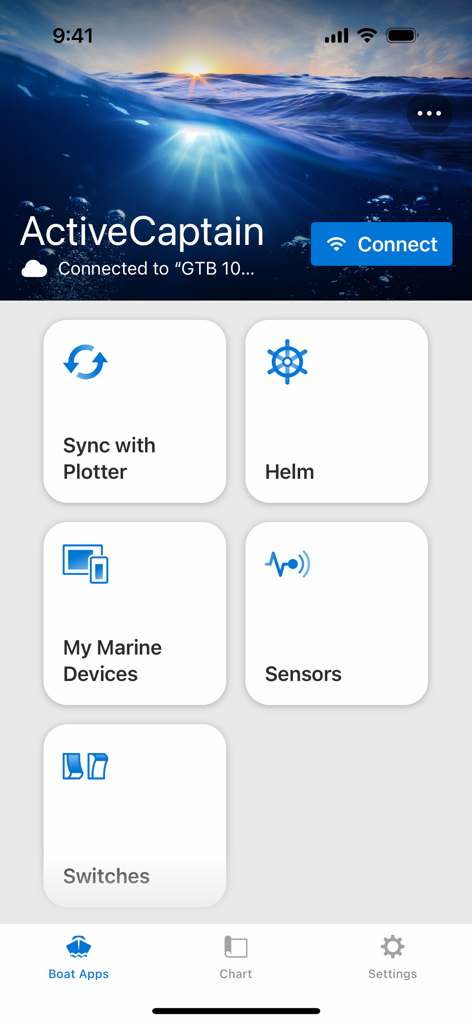
플로터와의 조타실 동기화 및 해양 기기 관리를 위한 대시보드 타일을 보여주는 ActiveCaptain 앱 홈 화면

플로터와의 조타실 동기화 및 해양 기기 관리를 위한 대시보드 타일을 보여주는 ActiveCaptain 앱 홈 화면

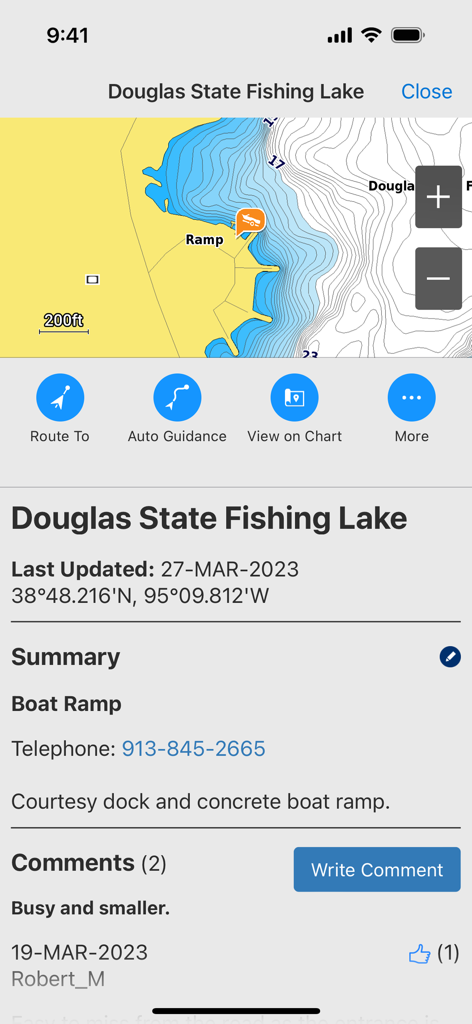
Douglas State Fishing Lake의 보트 경사로에 대한 등심선 및 커뮤니티 리뷰를 표시하는 ActiveCaptain 앱 인터페이스.

Douglas State Fishing Lake의 보트 경사로에 대한 등심선 및 커뮤니티 리뷰를 표시하는 ActiveCaptain 앱 인터페이스.

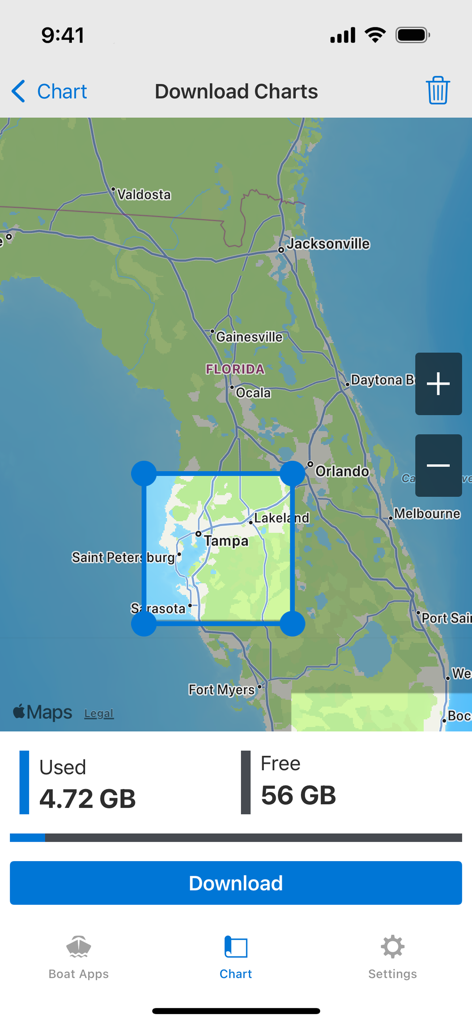
플로리다 지도가 포함된 해양 차트 다운로드용 ActiveCaptain 앱 화면

플로리다 지도가 포함된 해양 차트 다운로드용 ActiveCaptain 앱 화면

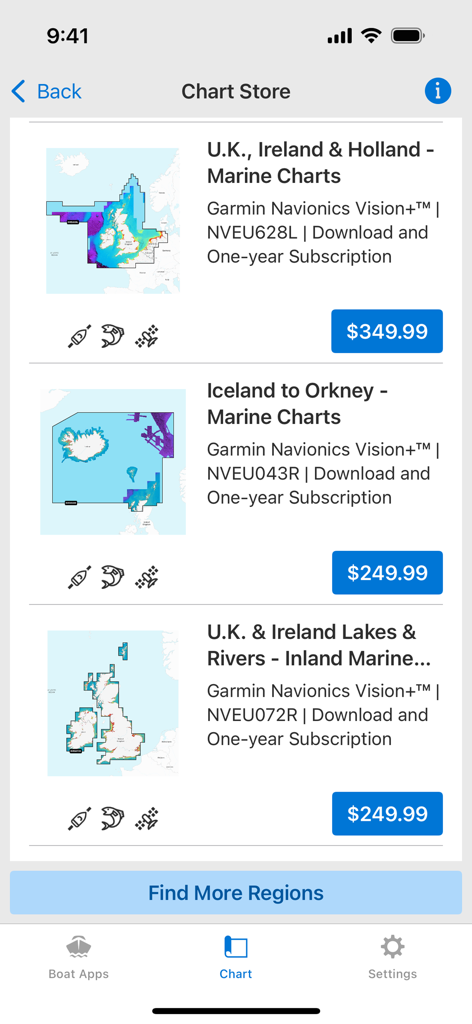
구매 가능한 지역별 해양 지도를 표시하는 Garmin ActiveCaptain 앱 차트 스토어

구매 가능한 지역별 해양 지도를 표시하는 Garmin ActiveCaptain 앱 차트 스토어

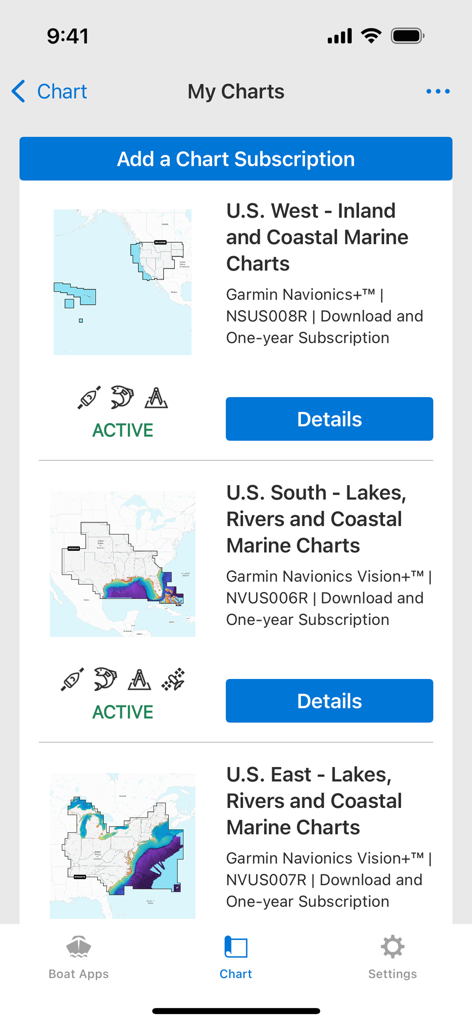
다양한 미국 지역에 대한 활성 Garmin Navionics 해양 차트 구독 목록을 표시하는 ActiveCaptain 앱의 내 차트 화면

다양한 미국 지역에 대한 활성 Garmin Navionics 해양 차트 구독 목록을 표시하는 ActiveCaptain 앱의 내 차트 화면

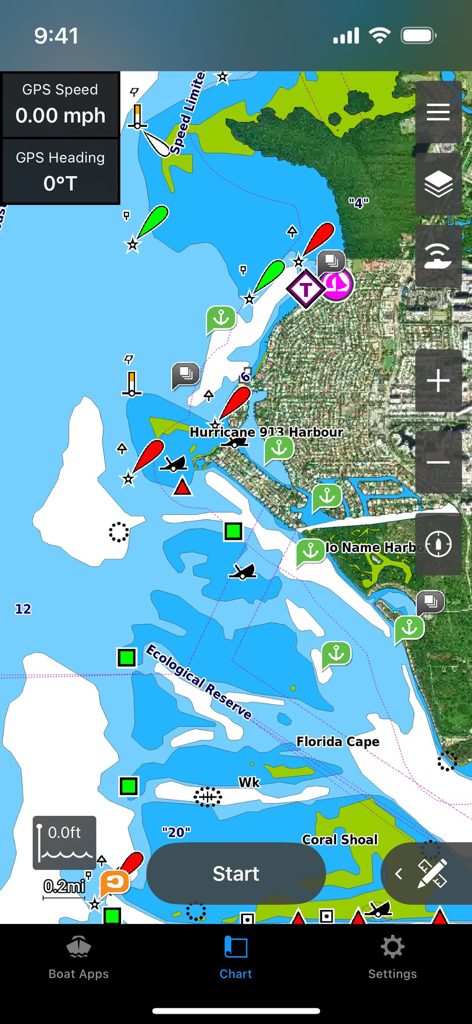
해안 마커 및 GPS 데이터가 포함된 상세한 해양 항법 차트를 보여주는 Garmin ActiveCaptain 앱의 인터페이스

해안 마커 및 GPS 데이터가 포함된 상세한 해양 항법 차트를 보여주는 Garmin ActiveCaptain 앱의 인터페이스

조타실에서 집까지, 당신의 경험을 지휘하세요

이 앱을 돋보이게 하는 도구, 1M+ 명의 사용자가 선택.

🗺️

스마트 여행 계획 및 동기화

소파에 앉아 새로운 낚시 포인트를 탐색하고 복잡한 경로를 계획한 다음, 원활한 출발을 위해 데이터를 선박의 차트플로터로 무선 전송하십시오.

ActiveCaptain 커뮤니티 정보

숙련된 선원들의 글로벌 네트워크가 제공하는 마리나, 연료 가격 및 현지 위험 요소에 대한 크라우드 소싱 리뷰를 활용하여 자신 있게 항해하십시오.

📱

완벽한 원격 보트 제어

보트 어디에서나 태블릿으로 조타실을 확인 및 제어하고, OnDeck™을 통해 선박의 보안 및 빌지 상태에 대한 즉각적인 문자 알림을 받으십시오.

전 세계 사용자들에게 사랑받는 앱

Trusted by 1M+ 명이 이 앱을 사랑합니다.

"

"ActiveCaptain 커뮤니티 리뷰는 제 주말 낚시 여행의 판도를 완전히 바꾸어 놓았습니다. iPad에서 새로운 지점을 미리 탐색하고 부두를 떠나기도 전에 웨이포인트를 차트플로터에 무선으로 동기화할 수 있어 수상에서 시간을 훨씬 절약할 수 있습니다."

마이크 S. 선장
"

"마리나에서 떨어져 있을 때 마음의 평안이 가장 중요합니다. OnDeck 통합을 통해 어디서나 보트의 배터리와 빌지 상태를 확인할 수 있습니다. 또한, 휴대폰 알림이 디스플레이에 바로 표시되므로 조타 중에도 기기를 안전하고 건조하게 유지할 수 있습니다."

사라 R.

앱 소개

에 대해 알아야 할 모든 것 ActiveCaptain®.

설명

The free ActiveCaptain app creates a powerful connection between your compatible mobile device and Garmin chartplotter, charts, maps and the boating community. Whether you use your Garmin products for cruising, fishing, sailing or diving, this all-in-one app will help you enjoy your time on the water. Just pair the app with your compatible chartplotter to wirelessly transfer and access charts and maps, software updates, routes, waypoints and helpful feedback from the ActiveCaptain Community. And, with the purchase of the OnDeck™ hub(1), you can track and monitor your boat from virtually anywhere. Please note that this app is intended for Garmin chartplotter owners and is not recommended for use as a stand-alone navigational app. FEATURES AVAILABLE: - ONECHART™: > New Garmin Navionics+™ and premium Garmin Navionics Vision+™ cartography, featuring a Navionics® style appearance, advanced Auto Guidance+™ technology(2) and a one-year subscription to daily updates, is available now for North America and Europe, and coming soon to the rest of the world. Purchase our newest-generation charts or legacy BlueChart® g3 charts from your mobile device, and upload them to registered Garmin chartplotters on your vessel. You will get exceptional coverage, clarity and detail with charts that feature integrated Garmin and Navionics data and much more. Plus, the NOAA raster cartography(3) and premium features can be downloaded for free through the ActiveCaptain app. Visit Garmin.com/marinemaps. - PLAN A TRIP: Plan your trip, or e-scout a new fishing spot before you’re on the water. Then, transfer your data to your chartplotter where you can view your routes and waypoints. - USER DATA SYNC: Automatically back up and sync your data between your chartplotter and the ActiveCaptain app. - ACTIVECAPTAIN COMMUNITY: Join a community of boaters to get up-to-date feedback on marinas, boat ramps and other points of interest (POI). Check ratings, read reviews, and view pictures of POIs to make informed decisions on the water. Contribute your own POI, reviews and pictures from your compatible mobile device. - CONTROL YOUR CHARTPLOTTER: Using the built-in Helm™ feature, the ActiveCaptain app lets you view and control your compatible(4) chartplotter from your smartphone or tablet, even when someone else is at the helm(5). - EASY SOFTWARE UPDATES: Receive notifications about software updates from the app, and update your chartplotter wirelessly. - ONDECK HUB: Use the ActiveCaptain app to track, monitor and control any number of switches with the OnDeck system(1) from nearly anywhere. Door open? Bilge running? Peace of mind comes in the form of text alerts and updates. - GARMIN QUICKDRAWTM COMMUNITY: Download the latest 1’ HD contour maps shared by your fellow boaters, and sync with your chartplotter. You can also upload your own Quickdraw Contours map data. - SMART NOTIFICATIONS: Connect the app to your chartplotter, and turn on smart notifications(4) to see calls, text messages and more on the chartplotter display while your phone is somewhere safe and dry. FOOTNOTES 1)OnDeck hub sold separately and requires an active subscription plan 2)Auto Guidance+ is for planning purposes only and does not replace safe navigation operations 3)NOAA raster cartography cannot be viewed on echoMAP™ CHIRP and ECHOMAP™ Plus combos but can be viewed on mobile devices via the ActiveCaptain mobile app 4)Helm feature is not compatible with ECHOMAP series chartplotters 5)Check device compatibility on the ActiveCaptain app web page; visit https://www.garmin.com/c/marine/marine-apps/ End User License Agreement: https://www.garmin.com/en-US/legal/marine-mobile-eula/

최신 버전

42.0

크기

188.6 MB

출시일

2017년 11월 7일

해양 경험을 마스터할 준비가 되셨나요?

백만 명 이상의 선원들과 함께 모바일 기기와 Garmin 차트플로터 사이의 연결을 완성해 보세요. 지금 무료 ActiveCaptain® 앱을 다운로드하여 지도를 동기화하고, 커뮤니티 정보에 액세스하며, 수상에서 언제나 연결 상태를 유지하십시오.

다운로드: App Store다운로드: Google Play
FAQ

자주 묻는 질문

에 대해 알아야 할 모든 것 ActiveCaptain®

ActiveCaptain 앱은 무엇을 위한 앱인가요?

ActiveCaptain 앱은 모바일 기기와 Garmin 차트플로터, 차트, 그리고 보트 커뮤니티 간의 강력한 연결을 생성합니다. 다양한 해양 활동을 위한 지도, 소프트웨어 업데이트, 경로 및 웨이포인트의 무선 전송을 가능하게 합니다.

ActiveCaptain은 독립형 내비게이션 앱인가요?

아니요, ActiveCaptain 앱은 독립형 내비게이션 앱이 아닙니다. Garmin 차트플로터 소유자가 기존 Garmin 제품에 연결하여 보트 경험을 향상시키도록 설계되었습니다.

ActiveCaptain 앱으로 차트플로터를 제어할 수 있나요?

네, ActiveCaptain 앱에는 내장된 Helm™ 기능이 있습니다. 이를 통해 호환되는 Garmin 차트플로터를 스마트폰이나 태블릿에서 원격으로 직접 보거나 제어할 수 있습니다.

ActiveCaptain 앱을 사용하여 여행을 어떻게 계획할 수 있나요?

ActiveCaptain 앱을 사용하면 물 위에 있기 전에 여행을 계획하거나 새로운 낚시터를 미리 탐색할 수 있습니다. 그런 다음 계획된 경로와 웨이포인트를 Garmin 차트플로터로 전송할 수 있습니다.

ActiveCaptain에서 어떤 종류의 차트를 사용할 수 있나요?

ActiveCaptain은 고급 Auto Guidance+™ 기술을 특징으로 하는 Garmin Navionics+™ 및 프리미엄 Garmin Navionics Vision+™ 항해 차트를 제공합니다. 또한 사용자는 기존 BlueChart® g3 차트와 무료 NOAA 래스터 항해 차트에 액세스할 수 있습니다.

ActiveCaptain 앱이 사용자 데이터를 동기화하나요?

네, ActiveCaptain 앱은 사용자 데이터를 자동으로 백업하고 동기화합니다. 여기에는 경로, 웨이포인트 및 기타 정보가 모바일 기기와 Garmin 차트플로터 간에 포함됩니다.

ActiveCaptain 앱을 통해 해양 차트를 구매할 수 있나요?

네, ActiveCaptain 앱을 사용하여 모바일 기기에서 직접 최신 세대의 Garmin Navionics+™ 및 프리미엄 Garmin Navionics Vision+™ 차트를 구매할 수 있습니다. 그런 다음 등록된 Garmin 차트플로터에 업로드할 수 있습니다.

ActiveCaptain의 해양 차트 가격은 얼마인가요?

ActiveCaptain의 해양 차트 가격은 지역 및 차트 유형에 따라 다릅니다. 예를 들어, 영국, 아일랜드 및 네덜란드 해양 차트는 $349.99이며, 아이슬란드에서 오크니 해양 차트는 $249.99이며, 일반적으로 1년 구독이 포함됩니다.

ActiveCaptain이 차트플로터 소프트웨어를 어떻게 업데이트하나요?

ActiveCaptain 앱은 Garmin 차트플로터에 대한 사용 가능한 소프트웨어 업데이트에 대한 알림을 제공합니다. 그런 다음 앱을 사용하여 차트플로터에 직접 무선 업데이트를 수행하여 최신 기능을 보장할 수 있습니다.

ActiveCaptain 앱으로 보트 모니터링이 가능한가요?

네, OnDeck™ 허브와 페어링하면 ActiveCaptain 앱으로 보트 모니터링이 가능합니다. 이 시스템을 통해 거의 모든 곳에서 보트 스위치를 원격으로 추적, 모니터링 및 제어할 수 있습니다.

ActiveCaptain은 내 휴대폰의 스마트 알림을 표시하나요?

네, ActiveCaptain 앱은 스마트 알림을 지원합니다. 앱을 Garmin 차트플로터에 연결하면 수신 전화, 문자 메시지 및 기타 경고를 차트플로터 디스플레이에서 직접 볼 수 있습니다.

ActiveCaptain 커뮤니티는 무엇인가요?

ActiveCaptain 커뮤니티는 보트 타는 사람들을 연결하여 마리나, 보트 램프 및 관심 지점에 대한 피드백을 제공합니다. 사용자는 등급, 리뷰 및 사진을 볼 수 있으며 자신의 POI 정보와 통찰력을 기여할 수도 있습니다.

ActiveCaptain으로 HD 등고선 지도를 다운로드할 수 있나요?

네, ActiveCaptain 앱을 사용하면 Garmin Quickdraw™ 커뮤니티에서 최신 1’ HD 등고선 지도를 다운로드할 수 있습니다. 또한 사용자는 자신의 Quickdraw Contours 지도 데이터를 업로드할 수 있습니다.

ActiveCaptain은 Garmin Navionics+ 항해 차트를 지원하나요?

네, ActiveCaptain은 새로운 Garmin Navionics+™ 및 프리미엄 Garmin Navionics Vision+™ 항해 차트를 지원합니다. 이 차트는 Navionics® 스타일의 모양을 특징으로 하며 고급 Auto Guidance+™ 기술을 포함합니다.

ActiveCaptain에서 차트 다운로드 크기는 얼마인가요?

ActiveCaptain의 차트 다운로드 크기는 선택한 지역에 따라 다릅니다. 예를 들어, 플로리다의 특정 지역을 다운로드하면 4.72GB의 저장 공간을 사용하고 56GB가 무료로 남게 됩니다.