Audio Extractor-Audio Editing

Audio Extractor-Audio Editing

다운로드: App Store
Spark by MWM logo
로고: Audio Extractor-Audio Editing

오디오 추출기-오디오 편집: 올인원 바이럴 사운드 스튜디오

모든 비디오를 즉시 고품질 오디오로 전환하세요. 인기 사운드를 추출하고, 사용자 지정 벨소리를 만들고, 전문가처럼 편집하여 소셜 미디어 창의성을 향상시키세요.

다운로드: App Store

개발사

正军 刘

카테고리

Music

다운로드

54K+

사용자 평점

4.9/5

총 평가 수

1K+

지원 언어

2

손끝에서의 정밀도

이 인터페이스를 사용하는 54K+ 명의 사용자.

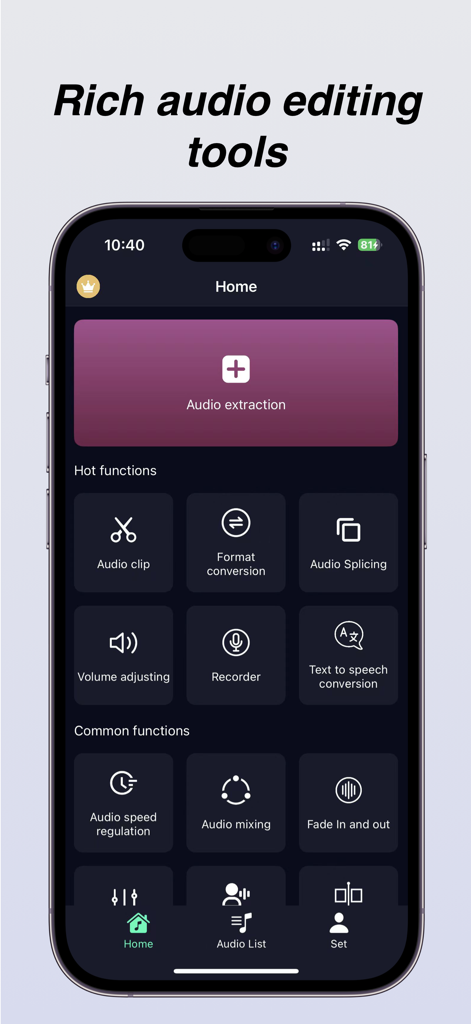
오디오 추출, 클리핑 및 형식 변환 도구를 보여주는 오디오 추출기 앱의 홈 화면.

오디오 추출, 클리핑 및 형식 변환 도구를 보여주는 오디오 추출기 앱의 홈 화면.

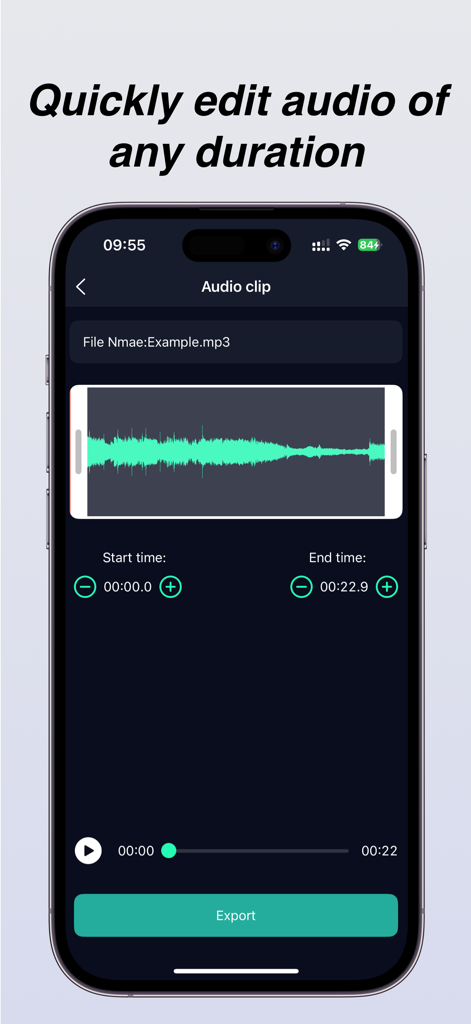
파형 표시 및 내보내기 버튼이 있는 오디오 클립 편집 화면

파형 표시 및 내보내기 버튼이 있는 오디오 클립 편집 화면

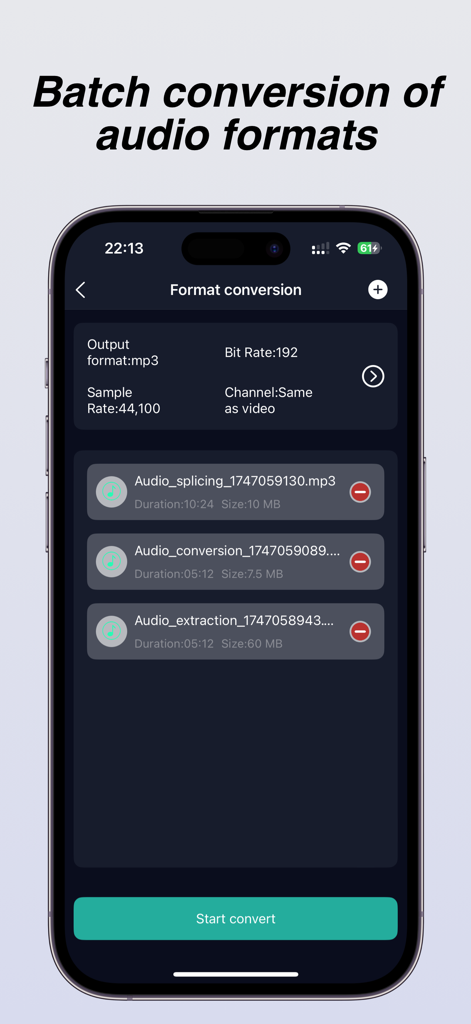
비트 전송률 및 샘플 전송률 설정이 있는 일괄 오디오 형식 변환 기능을 보여주는 오디오 추출기 앱의 인터페이스.

비트 전송률 및 샘플 전송률 설정이 있는 일괄 오디오 형식 변환 기능을 보여주는 오디오 추출기 앱의 인터페이스.

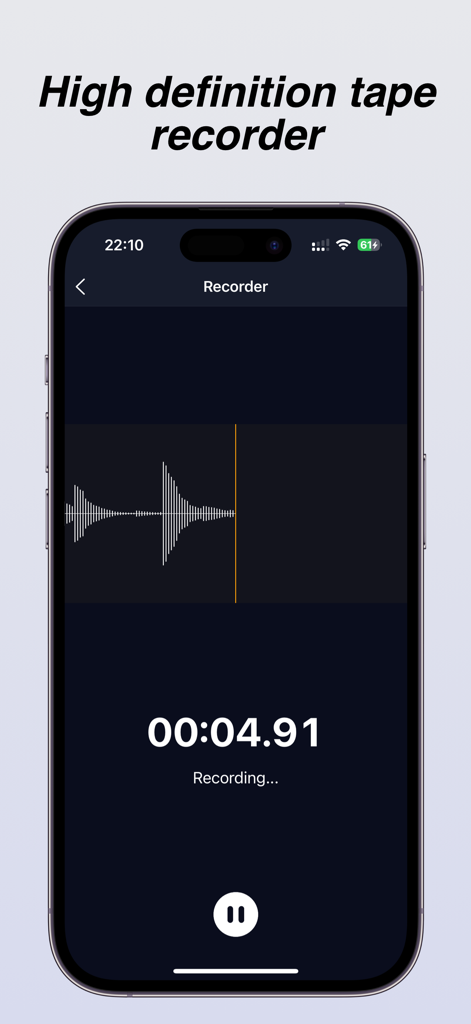
라이브 파형 및 타이머 표시가 있는 고화질 테이프 레코더 인터페이스

라이브 파형 및 타이머 표시가 있는 고화질 테이프 레코더 인터페이스

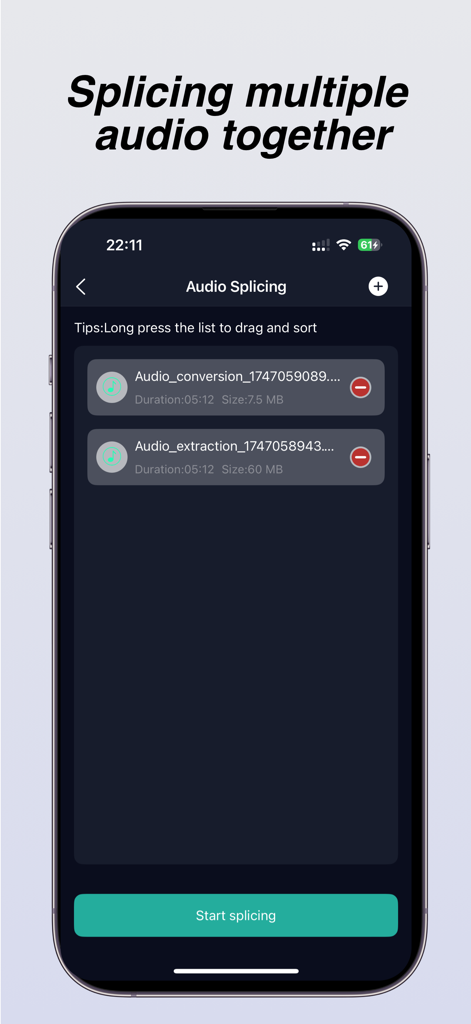
여러 오디오 파일을 함께 병합하는 데 사용되는 오디오 분할 기능을 보여주는 iPhone 앱 화면

여러 오디오 파일을 함께 병합하는 데 사용되는 오디오 분할 기능을 보여주는 iPhone 앱 화면

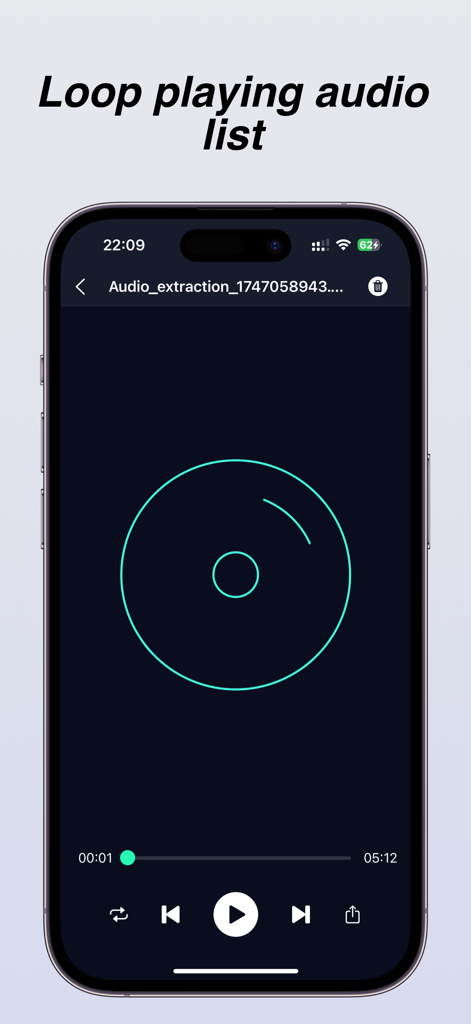
루프 재생 기능 및 표준 재생 컨트롤이 있는 앱의 오디오 플레이어 인터페이스를 보여주는 스마트폰 디스플레이

루프 재생 기능 및 표준 재생 컨트롤이 있는 앱의 오디오 플레이어 인터페이스를 보여주는 스마트폰 디스플레이

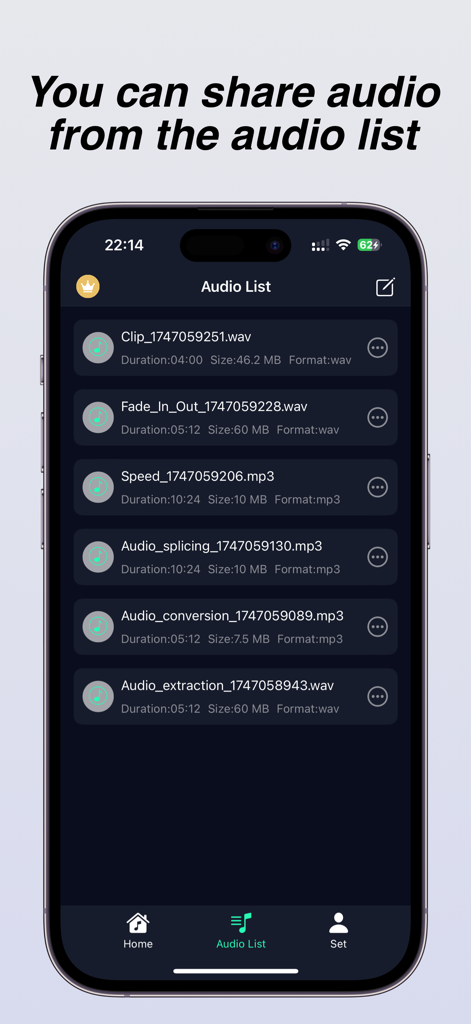
추출 및 분할과 같은 처리된 오디오 파일 목록을 보여주는 모바일 앱 인터페이스, 공유용

추출 및 분할과 같은 처리된 오디오 파일 목록을 보여주는 모바일 앱 인터페이스, 공유용

모바일 오디오 파워하우스

이 앱을 돋보이게 하는 도구, 54K+ 명의 사용자가 선택.

즉각적인 비디오-오디오 변환

카메라 롤에 있는 모든 비디오에서 인기 사운드나 배경 음악을 가져오세요. 품질 손실 없이 고음질 MP3로 저장하세요. 사용자 지정 벨소리에 완벽합니다.

✂️

정밀 스튜디오 편집

0.1초 정확도로 트랙을 다듬고, 병합하고, 믹싱하세요. 페이드인 추가, 재생 속도 조절, 또는 배경 음악 레이어링으로 눈에 띄는 콘텐츠를 만드세요.

🔄

범용 형식 마스터

모든 파일을 MP3, AAC, FLAC 또는 WAV로 변환하세요. 비트 전송률과 샘플링 전송률을 사용자 지정하여 모든 플랫폼에서 오디오가 전문적으로 들리도록 하세요.

전 세계 사용자들에게 사랑받는 앱

Trusted by 54K+ 명이 이 앱을 사랑합니다.

"

"컴퓨터 없이도 인기 있는 TikTok 사운드를 사용자 지정 벨소리로 전환할 수 있는 방법을 드디어 찾았습니다. 추출이 즉각적이며, 페이드인 기능 덕분에 전화가 울릴 때 휴대폰이 놀라게 하지 않습니다! iPhone의 오디오 사용자 지정에 필요한 유일한 도구입니다."

Riley J.
"

"모바일 크리에이터로서 이 앱은 생명의 은인입니다. 갤러리에 있는 모든 비디오에서 고품질 오디오를 가져와 밀리초 단위로 다듬고 프로젝트용 WAV로 변환할 수 있습니다. 일괄 변환 및 믹싱 도구로 인해 홈 화면의 다른 세 가지 앱을 공식적으로 대체했습니다."

Marcus Chen

앱 소개

에 대해 알아야 할 모든 것 Audio Extractor-Audio Editing.

설명

Audio extractor is a simple and professional audio extraction and editing tool that can quickly extract sound from videos, while ensuring that the audio is not distorted or damaged. It also supports defining and extracting audio segments from the video. You can specify which audio segment to extract from the video. When you find a beautiful background music while watching a short video and want to set it as your phone ringtone but cannot obtain the source audio, you can download and save the short video to your phone album, and then use an audio extractor to extract the music from the video. After extraction, you can directly set it as the ringtone. At the same time, the audio extractor also provides professional audio processing tools such as audio format conversion, batch conversion of audio formats, audio merging and splicing, volume adjustment, audio acceleration and deceleration, fade in and fade out, audio mixing, recording, etc., which can meet most of your audio processing needs and no longer worry about downloading a push of applications just to process a song. Main features: [Audio Extraction] The audio extractor can quickly extract and save the audio from the video to the phone, and the extracted audio has the same sound quality as the original video, ensuring the quality of the audio [Audio Editing] The audio extractor provides audio cropping function, which extracts a selected segment from your favorite audio to generate a new audio file. It supports splitting and deleting the middle segment of the audio, accurate to 0.1 seconds, and supports loading long audio [Format Conversion] The audio extractor provides mutual conversion between multiple audio formats to meet your needs for different audio formats, and supports custom parameter settings such as bit rate, sampling rate, channel, etc. The supported formats include mp3, flac, aac, wav.m4a, wma, and many other commonly used audio formats [Audio Splicing] The audio extractor can merge and splice multiple audio files into one MP3 format audio file, and can manually drag and sort the list of audio files to be spliced. Volume adjustment The audio extractor can amplify and reduce the volume of MP3 or other format audio files (in decibels) Audio speed regulation The audio extractor can adjust the playback speed of audio files, achieving faster or slower playback of audio, helping you create personalized music, and supporting speed adjustment range of [0.5-2.0] [Fading in and out] The fade in/fade out function allows you to add fade in/fade out when making phone ringtones, so that the ringtone will not suddenly play loudly when the phone calls [Audio Mixing] The audio mixing function can add background music to existing music, making your music more distinctive [Recorder] You can record your desired voice anytime, anywhere, during meetings, class notes, business negotiations, and other occasions. Member subscription: Payment: The "continuous monthly/annual subscription" product is an automatic renewal product. After confirming the purchase, the fee will be deducted from your Apple iTunes account; Renewal: 24 hours before the expiration of your subscription period, Apple will automatically deduct the fee from your iTunes account, and the membership benefits will be automatically extended upon success; To cancel automatic renewal, please manually disable it in your Apple ID account settings at least 24 hours before the subscription period expires. Once disabled, no further charges will be made. The automatic renewal subscription price is ¥ 15 per month and ¥ 69 per year The non automatic renewal subscription price is: ¥ 9 for weekly members, ¥ 19 for monthly members, and ¥ 99 for annual members Privacy Policy: http://appmanager.cn/privacy/app/ios/privacy/audio_editor_privatestatement_ios.html User Agreement: http://appmanager.cn/privacy/app/ios/userAgreement/audio_editor_user_agreement_ios.html 【 Contact Us 】 Email: yuanshundevelop@163.com

최신 버전

1.8.0

크기

37.1 MB

출시일

2024년 5월 23일

모바일 오디오 마스터할 준비가 되셨나요?

54,000명 이상의 크리에이터와 함께 바이럴 사운드를 추출하고, 사용자 지정 벨소리를 디자인하고, 하나의 강력한 앱에서 전문가 수준의 정확도로 오디오를 편집하세요.

다운로드: App Store
FAQ

자주 묻는 질문

에 대해 알아야 할 모든 것 Audio Extractor-Audio Editing

비디오에서 오디오를 추출하려면 어떻게 해야 하나요?

네, 오디오 추출기-오디오 편집을 사용하면 비디오에서 사운드를 빠르게 추출할 수 있습니다. 특정 오디오 세그먼트를 정의하고 추출할 수 있으며, 추출된 오디오는 원본 음질 그대로 휴대폰에 저장됩니다.

오디오 추출기-오디오 편집에서 변환을 지원하는 오디오 형식은 무엇인가요?

오디오 추출기-오디오 편집은 mp3, flac, aac, wav.m4a, wma를 포함한 다양한 오디오 형식 간의 상호 변환을 지원합니다. 사용자는 비트 전송률, 샘플링 전송률, 채널과 같은 매개변수를 사용자 정의할 수도 있습니다.

오디오 추출기-오디오 편집에서 여러 오디오 파일을 병합할 수 있나요?

네, 오디오 추출기-오디오 편집은 여러 오디오 파일을 단일 MP3 형식 파일로 병합합니다. 사용자는 스플라이스하기 전에 오디오 파일 목록을 수동으로 드래그하여 정렬할 수 있습니다.

오디오 추출기-오디오 편집 앱에 녹음 기능이 있나요?

네, 오디오 추출기-오디오 편집 앱에는 녹음 기능이 포함되어 있습니다. 사용자는 회의, 수업 또는 비즈니스 협상 중에 애플리케이션 내에서 언제든지 음성을 녹음할 수 있습니다.

오디오 추출기-오디오 편집의 구독 비용은 얼마인가요?

오디오 추출기-오디오 편집은 월 15엔 또는 연 69엔의 자동 갱신 구독을 제공합니다. 자동 갱신이 아닌 옵션으로는 주 9엔, 월 19엔, 연 99엔이 있습니다.

오디오 추출기-오디오 편집에서 형식 변환 중에 사용자 정의 오디오 매개변수를 설정할 수 있나요?

네, 오디오 추출기-오디오 편집은 오디오 형식 변환을 위한 사용자 정의 매개변수 설정을 허용합니다. 사용자는 특정 오디오 형식 요구 사항을 충족하기 위해 비트 전송률, 샘플링 전송률 및 채널을 조정할 수 있습니다.

오디오 추출기-오디오 편집으로 오디오 재생 속도를 조정할 수 있나요?

네, 오디오 추출기-오디오 편집은 사용자가 오디오 파일의 재생 속도를 조정할 수 있도록 합니다. 속도 조정 범위는 0.5에서 2.0 사이로, 더 빠르거나 느린 오디오 재생이 가능합니다.

오디오 추출기-오디오 편집에서 오디오 파일을 자르는 기능을 지원하나요?

네, 오디오 추출기-오디오 편집은 오디오 자르기 기능을 제공합니다. 사용자는 0.1초 정확도로 선택한 세그먼트를 추출하거나, 분할하거나, 중간 부분을 삭제할 수 있으며, 긴 오디오 파일에서도 가능합니다.

오디오 추출기-오디오 편집의 개인 정보 보호 정책은 어디에서 찾을 수 있나요?

오디오 추출기-오디오 편집의 개인 정보 보호 정책은 http://appmanager.cn/privacy/app/ios/privacy/audio_editor_privatestatement_ios.html 에서 확인할 수 있습니다.

오디오 추출기-오디오 편집의 자동 갱신을 취소하려면 어떻게 해야 하나요?

오디오 추출기-오디오 편집의 자동 갱신을 취소하려면, 구독 기간이 만료되기 최소 24시간 전에 Apple ID 계정 설정에서 수동으로 비활성화해야 합니다.