Brusfri

Brusfri

다운로드: App Store
Spark by MWM logo
로고: Brusfri

Brusfri: 탭 한 번으로 전문적인 수준의 노이즈 제거

어떤 공간이든 스튜디오로 바꿔보세요. 팟캐스트, 음악, 동영상의 히스, 험, 배경 잡음을 쉽게 제거하면서 모든 사운드 디테일을 그대로 유지하세요.

다운로드: App Store

개발사

Klevgrand Produkter AB

카테고리

Music

다운로드

194K+

사용자 평점

3.7/5

총 평가 수

200

지원 언어

1

선명하고 간편한 사운드

이 인터페이스를 사용하는 194K+ 명의 사용자.

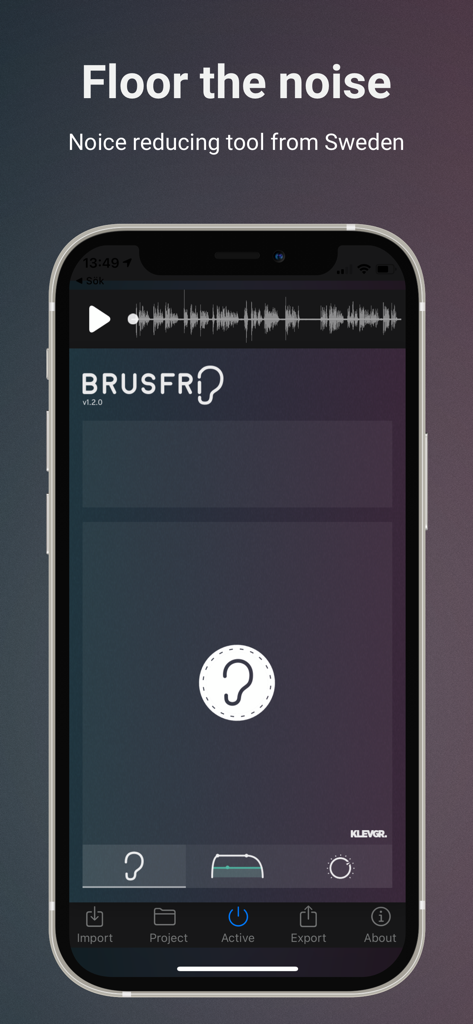
Brusfri 오디오 노이즈 제거 앱 인터페이스, 귀 모양 학습 버튼과 사운드 파형 표시

Brusfri 오디오 노이즈 제거 앱 인터페이스, 귀 모양 학습 버튼과 사운드 파형 표시

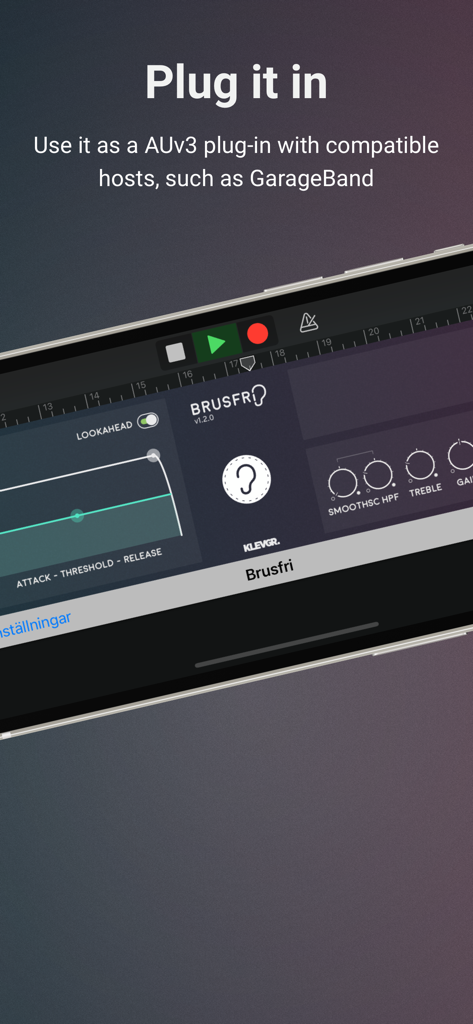
Brusfri 오디오 노이즈 제거 앱 인터페이스, AUv3 플러그인으로 표시됨

Brusfri 오디오 노이즈 제거 앱 인터페이스, AUv3 플러그인으로 표시됨

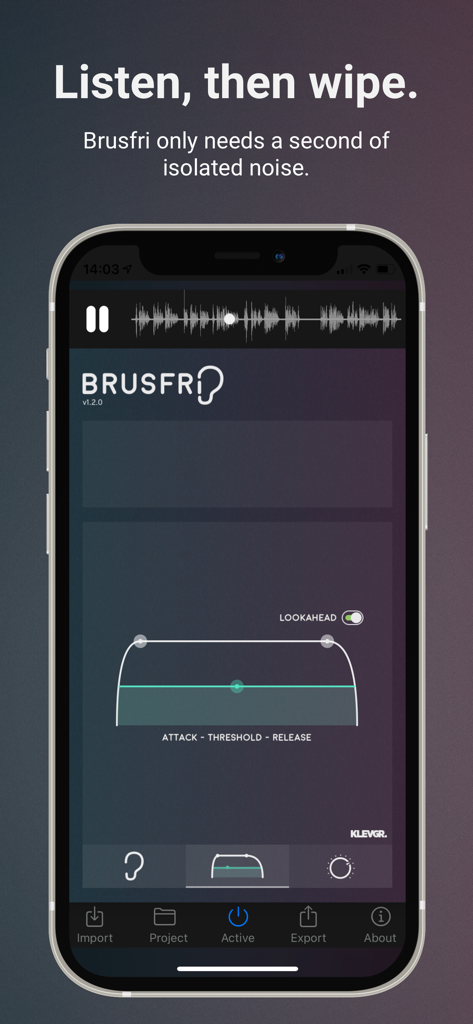
Brusfri 노이즈 리듀서 앱 인터페이스, iPhone에서 오디오 처리 제어 표시

Brusfri 노이즈 리듀서 앱 인터페이스, iPhone에서 오디오 처리 제어 표시

어디서 녹음하든 전문적인 사운드

이 앱을 돋보이게 하는 도구, 194K+ 명의 사용자가 선택.

👂

원탭 지능형 학습

복잡한 매개변수는 잊으세요. 학습 버튼을 1초 동안 누르면 배경 잡음을 자동으로 프로파일링하고 제거합니다.

🛡️

아티팩트 없는 제거

아마추어 도구의 금속성 '위상' 현상에 작별을 고하세요. 당사의 다중 게이트 기술은 보이스와 음악을 선명하게 유지하면서 히스와 험을 제거합니다.

📱

원활한 크리에이터 워크플로우

독립형 앱 또는 GarageBand 및 LumaFusion 내에서 직접 AUv3 플러그인으로 작동하여 모바일 프로덕션 제품군에 완벽하게 통합됩니다.

전 세계 사용자들에게 사랑받는 앱

Trusted by 194K+ 명이 이 앱을 사랑합니다.

"

"집에서 녹음할 때 노트북 팬과 에어컨 소음 때문에 어려움을 겪었지만 Brusfri가 모든 것을 바꿨습니다. '학습' 버튼을 한 번 누르면 오디오가 선명해집니다. iOS에서 사용해 본 노이즈 리듀서 중 단연 최고입니다."

Sarah Jenkins, 팟캐스트 진행자
"

"AUv3 지원은 GarageBand 세션에 혁신을 가져왔습니다. 다른 앱에서 발생하는 이상한 위상 현상 없이 드디어 시끄러운 기타 페달과 빈티지 장비를 정리할 수 있게 되었습니다. 히스는 제거하면서 사운드의 영혼은 그대로 유지합니다."

Marcus Chen, 독립 음악가

앱 소개

에 대해 알아야 할 모든 것 Brusfri.

설명

Brusfri* is a highly advanced audio noise reducer, packed into a simple and straight-forward interface. It is very well suited for cleaning up noisy audio recordings, while retaining sound quality. Unlike many other noise reducers on the market, Brusfri doesn't mess with audio phasing to suppress noise (a technique that often comes with audible side effects). Instead, multiple fine-tuned gates are used to silence unwanted noise. Brusfri can also be used as a AUv3 plug-in in compatible hosts, for example in GarageBand. *Brusfri means "Noise free" in Swedish. Here are some examples of sound conditions that Brusfri handles well: * Guitar amp * Noisy vintage gear * Boosted pre-amp * iPhone/iPad and external mic hiss * Room reverb removal * Fan noise * Background ambiance * Mains hum / Electric hum Usage In short, press “Learn” during a couple of seconds of isolated noise to create a "profile" for noise. This may be all you need to do. Brusfri can be used in two ways, either standalone or as a AUv3 plug-in. Standalone Import the audio, either by extracting audio from a video, by importing from iTunes, or by using the “Open In…” option in any other app that can export audio. Press and hold the Learn button (the ear) while playing unwanted noise. (It’s important that the Ear is only fed with isolated noise). When Learn is released, Brusfri will start reducing noise. AUv3 plug-in Open Brusfri in any AUv3 compatible host. Find a region in the recording that only contains noise and play it. Tap and hold the “LEARN” button for a short while (a second will be enough). When the LEARN button is released, Brusfri will start reducing noise. There are a bunch of parameters available that affect the noise reduction algorithm: ATK / THRS / REL (Attack Time / Threshold / Release Time) Threshold - basically determines how much noise to be removed. A lower value means more reduction. Attack and Release sets the time it will take for the reducer to start working. LOOKAHEAD Makes transient processing a bit smoother. EDGE Controls the reduction aggressivity. A lower value gives a smoother reduction. HPF Reduces low frequencies. HIGH Compensates high frequencies by boosting them. MIX Mixes between dry and noise reduced signal. NOTE! Brusfri is CPU intensive and iPhone 6 / iPad AIR 2 or better is recommended. When used as an AUv3 plug-in, we highly recommend freezing/bouncing tracks to reduce CPU usage.

최신 버전

1.2.1

크기

41.0 MB

출시일

2017년 10월 11일

전문적인 사운드를 경험할 준비가 되셨나요?

Brusfri를 사용하여 배경 히스와 험을 즉시 제거하는 194,000명 이상의 크리에이터 및 음악가들과 함께하세요. 지금 iPhone 또는 iPad에서 스튜디오 품질의 오디오를 경험하세요.

다운로드: App Store