Camo Studio – Stream & Record

Camo Studio – Stream & Record

다운로드: App Store
Spark by MWM logo
로고: Camo Studio – Stream & Record
Camo Studio – 스트리밍 및 녹화: iPad의 전문가용 프로덕션 스튜디오

iPad를 스튜디오급 제어 센터로 바꾸세요. Twitch로 콘솔 게임을 스트리밍하고, 전문가용 오버레이로 4K 녹화를 하고, 가방에 들어가는 데스크톱 설정의 성능으로 어디에서든 라이브 방송을 하세요.

다운로드: App Store

개발사

Reincubate Ltd

카테고리

Photo & Video

다운로드

258K+

사용자 평점

4.6/5

총 평가 수

2K+

지원 언어

1

당신의 스튜디오, 어디에나

이 인터페이스를 사용하는 258K+ 명의 사용자.

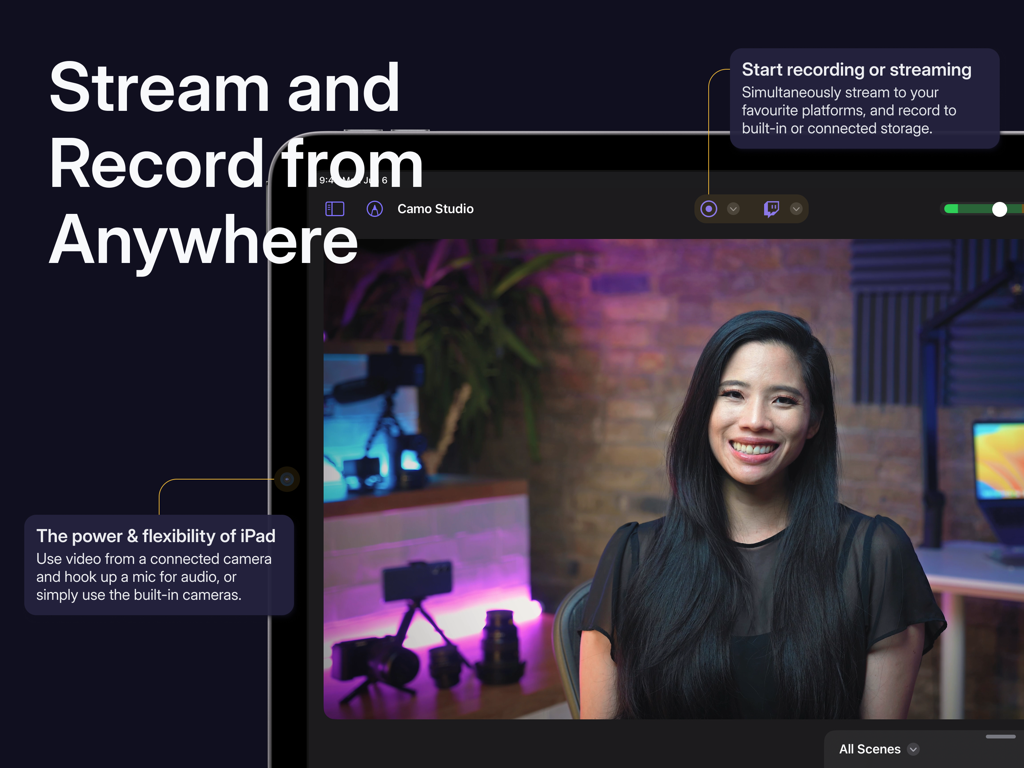
라이브 비디오 스트림과 녹화 컨트롤을 보여주는 iPad의 Camo Studio 앱 인터페이스

라이브 비디오 스트림과 녹화 컨트롤을 보여주는 iPad의 Camo Studio 앱 인터페이스

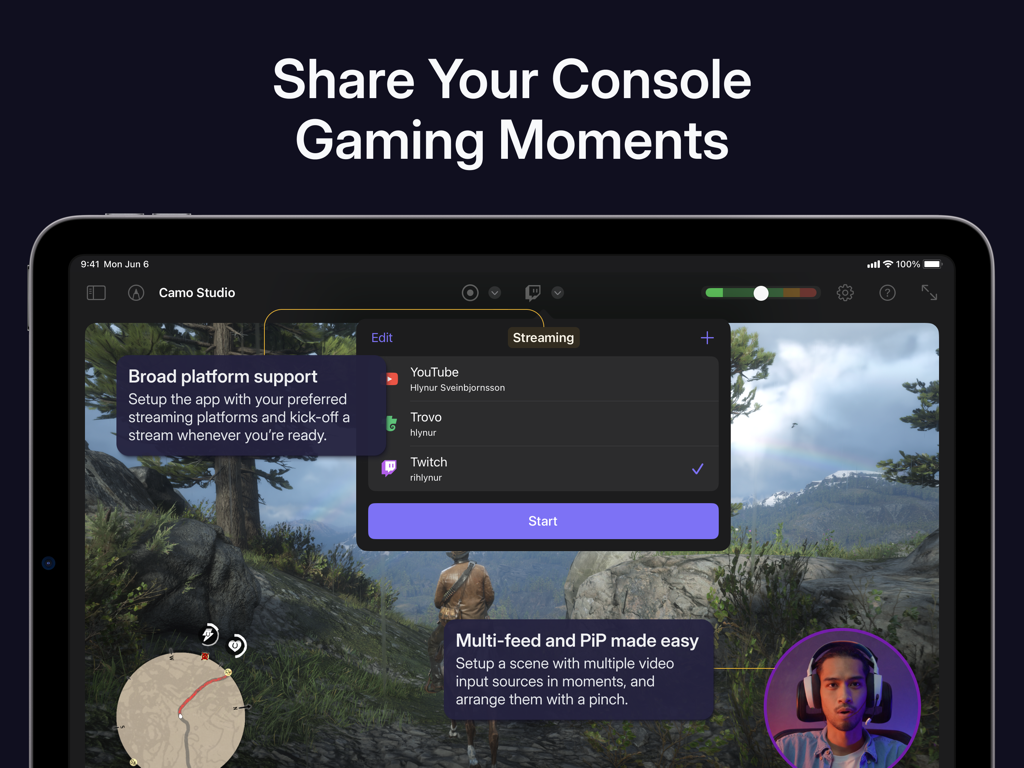
플랫폼 옵션과 picture-in-picture가 있는 콘솔 게임 스트림 설정인 Camo Studio의 iPad 인터페이스

플랫폼 옵션과 picture-in-picture가 있는 콘솔 게임 스트림 설정인 Camo Studio의 iPad 인터페이스

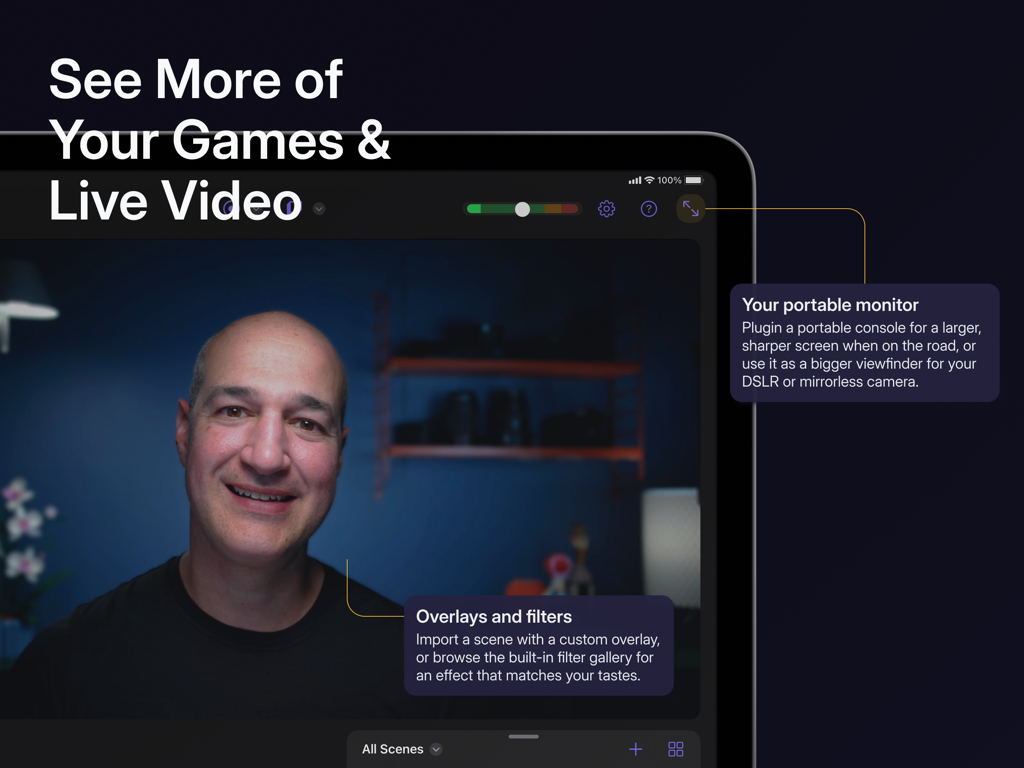
사용자 정의 오버레이와 필터를 사용하여 라이브 비디오 및 게임용 휴대용 모니터로 iPad에서 Camo Studio를 사용하는 사람

사용자 정의 오버레이와 필터를 사용하여 라이브 비디오 및 게임용 휴대용 모니터로 iPad에서 Camo Studio를 사용하는 사람

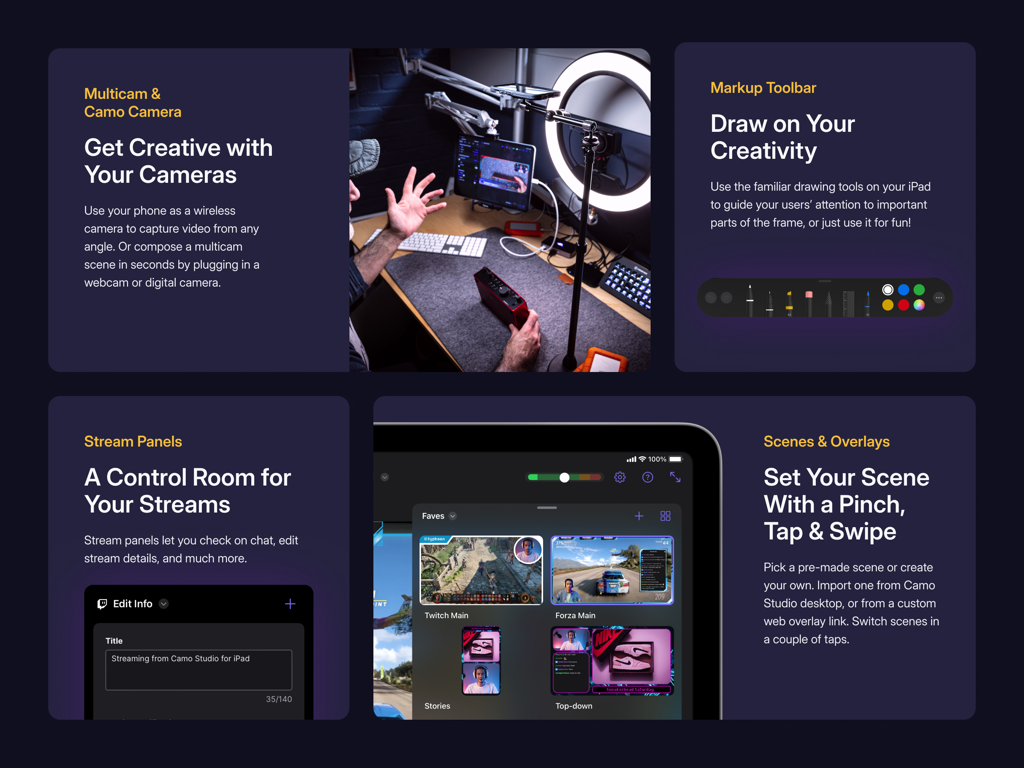
멀티캠 지원 스트림 패널 및 장면 오버레이를 보여주는 Camo Studio 앱 인터페이스

멀티캠 지원 스트림 패널 및 장면 오버레이를 보여주는 Camo Studio 앱 인터페이스

전문가처럼 창작하는 데 필요한 모든 것

이 앱을 돋보이게 하는 도구, 258K+ 명의 사용자가 선택.

🎮

최고의 게임 설정

캡처 카드를 통해 콘솔을 연결하여 iPad를 선명한 휴대용 모니터로 사용하고 동시에 좋아하는 플랫폼으로 라이브 스트리밍하세요.

🎨

전문가용 오버레이 및 장면

StreamElements의 웹 오버레이로 브랜드를 향상시키고 동적이고 상호작용적인 시청자 경험을 위해 여러 장면을 사용자 정의하세요.

🚀

AI 기반 비주얼

영화 같은 배경 보케, 지능형 자동 프레이밍, 그리고 초점이 정확히 당신에게 맞춰지는 4K 녹화로 돋보이세요.

전 세계 사용자들에게 사랑받는 앱

Trusted by 258K+ 명이 이 앱을 사랑합니다.

"

"Camo Studio는 여행 스트림을 위해 부피가 큰 PC 설정을 완전히 대체했습니다. Switch의 고화질 모니터로 iPad를 사용하면서 전문적인 오버레이로 Twitch로 동시에 방송할 수 있다는 것은 놀랍습니다. 제 크리에이터 도구 중에서 가장 다재다능한 도구입니다."

Marcus T., 인디 스트리머
"

"항상 이동 중인 콘텐츠 크리에이터로서 이 앱은 생명의 은인입니다. 4K 녹화 및 내장 보케 효과는 미러리스 카메라가 필요했던 영화 같은 느낌을 제 동영상에 선사합니다. 인터페이스는 직관적이며 개인 정보를 우선시하는 로컬 저장은 큰 장점입니다."

Elena R., 라이프스타일 Vlogger

앱 소개

에 대해 알아야 할 모든 것 Camo Studio – Stream & Record.

설명

Dive into streaming, or record your next video, in just a few taps – hone your scene, connect your camera, and start creating with ease – all directly from your iPad. Why not try the iPad version of the 2023 Apple Design Award finalist app today? — STREAM & RECORD FROM ANYWHERE — Connect a camera and mic to your iPad and start streaming on the move, and simultaneously record your video to built-in storage or a connected SD card for editing and uploading high-quality content later. — SHARE YOUR CONSOLE GAMING MOMENTS — Stream console games with a capture card to Twitch, YouTube, Trovo and more. Setup your scene with tactile controls that make multi-feed and PiP (picture-in-picture) simple to configure. Take your streams to another level with web overlays, and always stay in control with integrated stream controls. — SEE MORE OF YOUR GAMES & LIVE VIDEO — Connect your iPad to your portable console, such as a Nintendo Switch, via a dongle or USB hub and use it as a bigger, sharper screen to heighten your gaming experience when you’re on the road. Or, if you’re looking to get a better viewfinder for your camera, plug it into your iPad and use it as a video monitor through Camo Studio. — SWITCH UP YOUR SCENES — Quickly switch between a collection of built-in or custom scenes with a tap to help engage your audience or show a different shot. Each scene can be configured individually with different cameras, video and audio sources, and output profiles. — PRO STREAMS WITH WEB OVERLAYS — Imbue your streams with your personal aesthetic, or a professional touch, with support for web overlays from StreamElements, Streams Labs, Uno Overlays and more. Import template or custom web overlays, with live content, alerts, embedded control panels, and a wide array of other widgets. — A ONE-APP STREAM CONTROL CENTRE — Stay in touch with your chat, trigger in-stream events, and check on your mods, all through Camo Studio’s stream panels. Add exactly the panels you need – each is custom to the streaming service you use, and gives you powerful controls for your livestreams. — POWERFUL VIDEO ENHANCEMENTS & ADJUSTMENTS — Camo Studio comes loaded with functionality that helps you stand out. Easily apply a subtle “Bokeh” effect to your background, or replace it or remove it entirely! Adjust the framing and orientation of each input feed, including Auto-framing modes that help you stay in-shot. — MAKE THE MOST OF YOUR IPAD — Your iPad supports connecting a breadth peripherals, external devices and cameras; making Camo Studio for iPad the most versatile Camo experience yet. M1 and M2 powered iPads can even run Camo Studio in the background while streaming or recording, capturing the device’s screen at the same time, and can integrate with your Stream Deck. — SECURITY AND PRIVACY FIRST — Camo Studio transmits your video directly to the streaming services of your choosing, and all recordings are entirely local to your iPad, connected storage device or selected storage service. Your data is your business, not ours. — NOT ONLY BUT ALSO! — - Pro-quality video in a range of resolutions, including 4K UHD, 1080p HD, and 720p - Built-in galleries come preloaded with backgrounds and filters to try in your videos - Work in landscape or portrait orientations, great for TikTok-style shots at 9:16 aspect ratio - Use your iPad’s front and back cameras as part of your scene - Looks great in light and dark mode - No ads in the app, ever — WE’RE HERE TO HELP — With millions of users trying our apps over the last decade, Reincubate is one of the UK’s most-loved software companies. We’re fanatical about supporting our users, and we’d love to help you make the most of Camo Studio on your iPad. Reach out to us any time: support@reincubate.com — LEARN MORE — About us: https://reincubate.com/camo/ipad/ How to make the most of Camo: https://reincubate.com/support/camo-ipad/how-to-use-camo-ipad/ FAQ: https://reincubate.com/support/camo-ipad/camo-ipad-faq/

최신 버전

2.4.1

크기

112.1 MB

출시일

2023년 9월 18일

콘텐츠 수준을 높일 준비가 되셨나요?

250,000명 이상의 크리에이터와 함께 iPad를 전문가용 방송 파워하우스로 바꾸세요. 가방에 들어가는 수상 경력에 빛나는 4K 스트리밍 스튜디오를 경험하세요.

다운로드: App Store
FAQ

자주 묻는 질문

에 대해 알아야 할 모든 것 Camo Studio – Stream & Record

What is Camo Studio for iPad?

Camo Studio for iPad allows users to stream and record video, connect cameras and mics, and manage live content directly from their iPad. It was a 2023 Apple Design Award finalist.

Can Camo Studio record video directly on an iPad?

Yes, Camo Studio simultaneously records video to the iPad's built-in storage or a connected SD card while streaming. This enables high-quality content editing later.

Which platforms does Camo Studio support for streaming console games?

Camo Studio supports streaming console games to platforms including Twitch, YouTube, and Trovo. Users configure scenes with multi-feed and picture-in-picture options for their streams.

Can I use my iPad as a monitor with Camo Studio?

Yes, Camo Studio transforms your iPad into a portable monitor. Connect it to consoles like Nintendo Switch for a larger screen or to DSLR/mirrorless cameras for a better viewfinder.

Does Camo Studio support custom web overlays for streams?

Yes, Camo Studio supports web overlays from services such as StreamElements, Stream Labs, and Uno Overlays. Users import custom or template overlays with live content, alerts, and widgets.

What video enhancements are available in Camo Studio?

Camo Studio offers powerful video enhancements like 'Bokeh' background effect, background replacement or removal, and framing adjustments. It also includes auto-framing modes to keep subjects in shot.

Is my data private when using Camo Studio for streaming and recording?

Yes, Camo Studio prioritizes user privacy. It transmits video directly to selected streaming services, and all recordings remain local to the iPad or connected storage. Your data is not collected.

What video resolutions does Camo Studio support?

Camo Studio supports pro-quality video resolutions including 4K UHD, 1080p HD, and 720p. It also accommodates both landscape and portrait orientations for diverse content creation.

Can Camo Studio for iPad run in the background?

Yes, M1 and M2 powered iPads enable Camo Studio to run in the background during streaming or recording. This functionality also supports simultaneous screen capture from the device.

Does Camo Studio include ads?

No, Camo Studio for iPad does not feature any advertisements within the application, ensuring an uninterrupted user experience.