Commerzbank photoTAN

Commerzbank photoTAN

다운로드: App Store
Spark by MWM logo
로고: Commerzbank photoTAN

Commerzbank photoTAN: 어디서든 안전하고 원활한 거래 승인

Commerzbank 뱅킹을 위한 최고의 보안을 경험하세요. 원클릭 푸시 알림과 디지털 우선 활성화를 통해 몇 초 안에 거래를 승인하고, 국제적인 라이프스타일에 맞춰 제공됩니다.

다운로드: App Store

개발사

Commerzbank AG

카테고리

Finance

다운로드

3M+

사용자 평점

4.7/5

총 평가 수

242K+

지원 언어

15

한눈에 보는 원활한 보안

이 인터페이스를 사용하는 3M+ 명의 사용자.

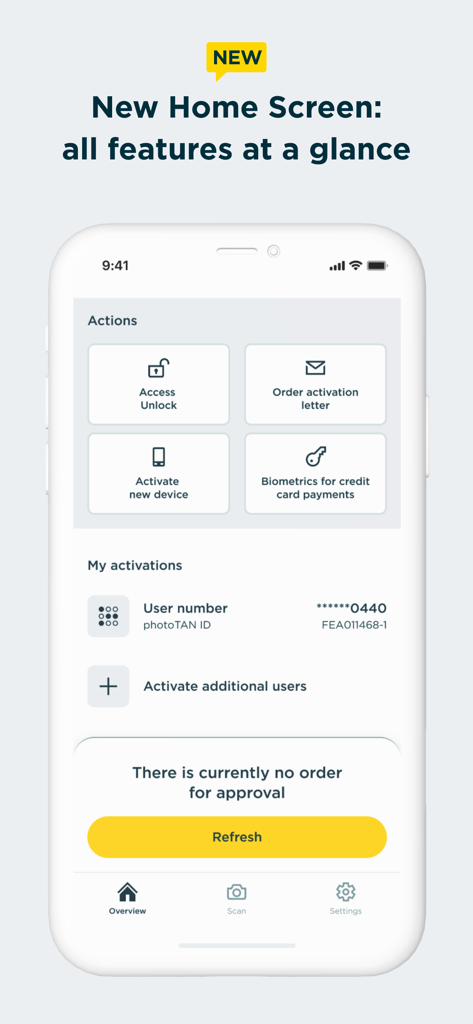
Commerzbank photoTAN 앱 홈 화면, 동작 바로가기 및 계좌 활성화 상태 표시

Commerzbank photoTAN 앱 홈 화면, 동작 바로가기 및 계좌 활성화 상태 표시

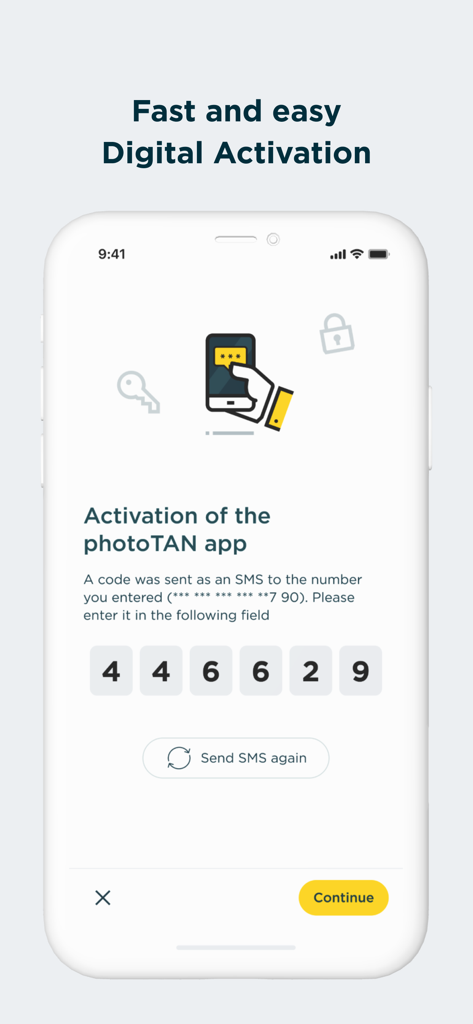
Commerzbank photoTAN 앱 디지털 활성화 화면, 6자리 SMS 코드 입력 필드 표시

Commerzbank photoTAN 앱 디지털 활성화 화면, 6자리 SMS 코드 입력 필드 표시

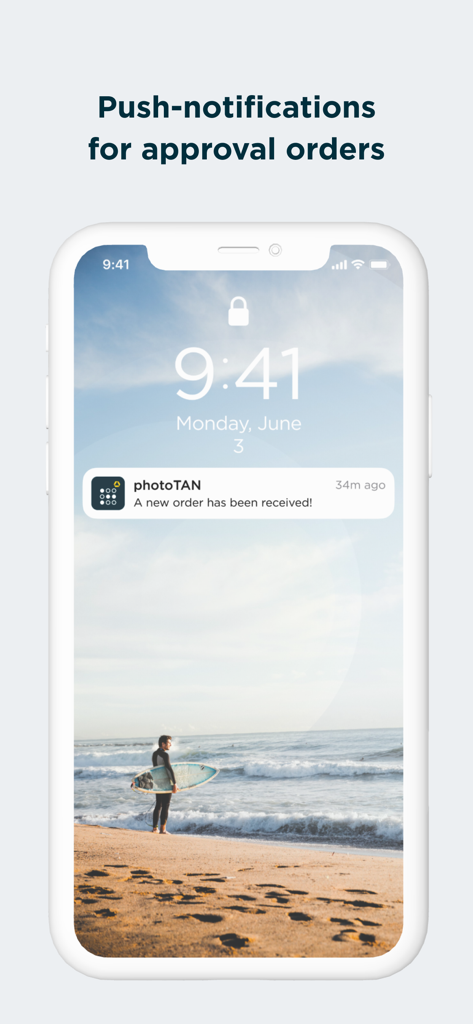
주문 승인을 위한 Commerzbank photoTAN 푸시 알림

주문 승인을 위한 Commerzbank photoTAN 푸시 알림

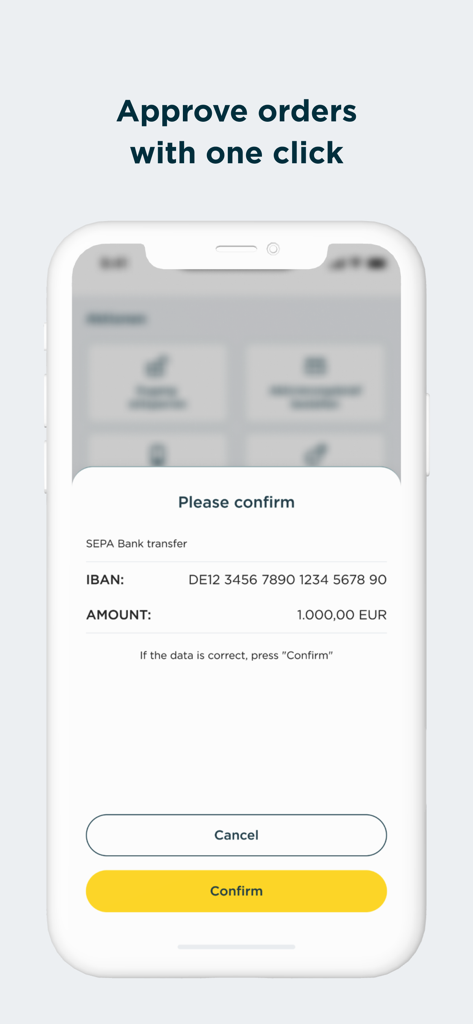
Commerzbank photoTAN 앱 모바일 화면, 1000유로 SEPA 은행 송금 확인 요청 표시, 노란색 확인 버튼 포함

Commerzbank photoTAN 앱 모바일 화면, 1000유로 SEPA 은행 송금 확인 요청 표시, 노란색 확인 버튼 포함

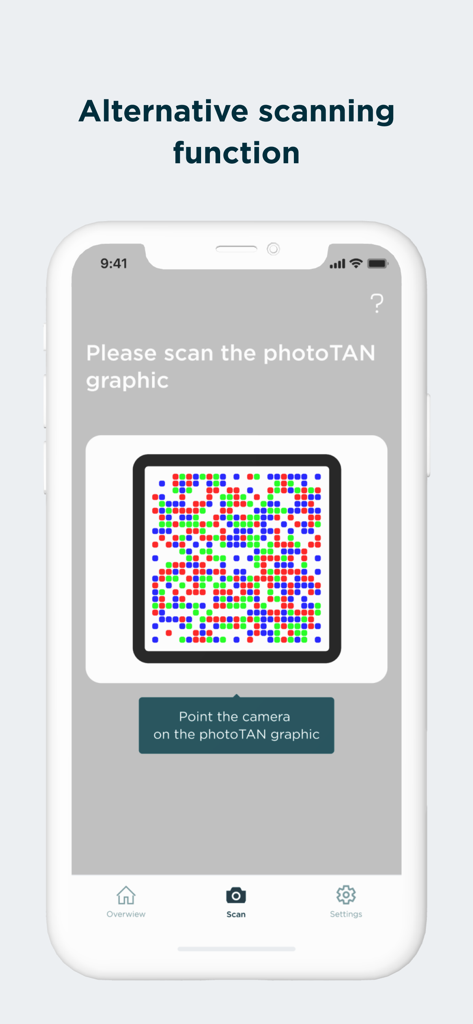
보안 그래픽에 대한 대체 스캔 기능을 표시하는 Commerzbank photoTAN 앱 화면

보안 그래픽에 대한 대체 스캔 기능을 표시하는 Commerzbank photoTAN 앱 화면

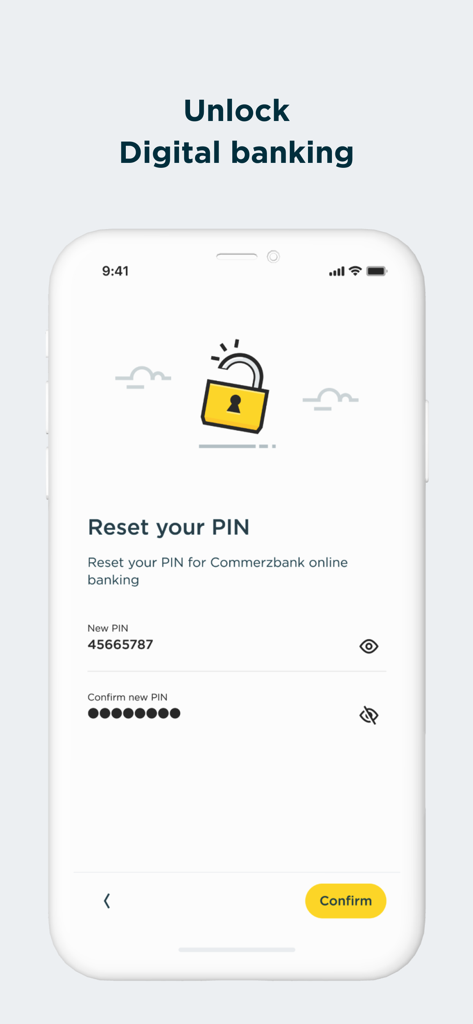
디지털 뱅킹 PIN 재설정을 위한 Commerzbank photoTAN 앱 화면

디지털 뱅킹 PIN 재설정을 위한 Commerzbank photoTAN 앱 화면

타협 없는 보안, 쉬운 접근성

이 앱을 돋보이게 하는 도구, 3M+ 명의 사용자가 선택.

원탭 푸시 승인

photoTAN-Push로 끊김 없는 뱅킹을 경험하세요. 수동 코드 입력 없이 보안 알림을 통해 즉시 송금을 승인하세요.

🛡️

최고 수준의 보안 표준

독일 최고 혁신 보안 기술을 활용하세요. 실시간 하드웨어 검사 및 고급 암호화를 통해 귀하의 국제 자산을 보호하세요.

🌍

글로벌 디지털 활성화

국제 우편을 기다릴 필요가 없습니다. VideoIdent를 사용하여 몇 시간 안에 신속하게 디지털 활성화를 진행하고, 기기가 오프라인 상태에서도 거래를 인증하세요.

전 세계 사용자들에게 사랑받는 앱

Trusted by 3M+ 명이 이 앱을 사랑합니다.

"

"미국에서 독일 은행 계좌를 관리하는 것이 예전에는 실물 TAN 생성기 때문에 번거로웠습니다. VideoIdent를 통한 새로운 디지털 활성화 덕분에 국제 우편을 몇 주씩 기다리는 시간을 절약했습니다. 이제 아이폰에서 한 번의 탭으로 송금을 승인할 수 있습니다. 빠르고 안전하며 해외 거주자에게 완벽합니다."

Lukas M.
"

"저는 비즈니스 출장이 잦고 데이터가 제한적인 경우가 많습니다. 오프라인 스캔 기능은 연결되어 있지 않을 때도 거래를 승인할 수 있게 해주는 생명줄과 같습니다. 엄격한 보안 검사에 정말 감사드리며, 최고의 기술로 제 금융 데이터가 보호된다는 사실에 완전히 안심할 수 있습니다."

Sarah J.

리뷰 분석

사용자 리뷰 인사이트.

감정 점수

27%
부정적

요약

Users widely report critical functionality issues with the app, particularly regarding camera scanning and activation on newer iOS devices like the iPhone 15 Pro Max and iPhone 16 Pro. Many encounter a persistent camera focus problem, preventing them from scanning activation graphics or photoTANs, leading to frequent error codes such as E-L-020 and E-X-001. A major frustration is the recurring need to reinstall and reactivate the app, often after iOS updates (e.g., iOS 26.0.1, 18.7, 18.3.1), which sometimes requires a new, and often expired, physical activation letter. This unreliability significantly hampers online banking access and results in a highly frustrating user experience, compounded by inadequate customer support.

주요 테마

Bugs & Reliability(20)
Activation Process(17)
Camera Functionality(15)
iOS Compatibility(10)
Reinstallation Frequency(10)
Online Banking Access(8)
Customer Support(5)

앱 소개

에 대해 알아야 할 모든 것 Commerzbank photoTAN.

설명

Commerzbank's new photoTAN app. Receive push message, check order, approve - with the new photoTAN push function, you can approve orders quickly and securely with just one click. With the photoTAN scan function, you still have the option of scanning a photoTAN graphic to generate a TAN. It is now possible to fully legitimize yourself from the comfort of your own home with the VideoIdent app. With our new feature, the digital first activation, you can after the legitimation with VideoIdent in the next 3 hours easily and quickly activate the photoTAN app with a code that you receive by SMS. This means you no longer have to wait for the activation graphic The photoTAN app is our most innovative security method. The app offers the highest possible security through a modern and convenient TAN procedure - for all customers who use Commerzbank's online and / or mobile banking. ####################### Hard-/software checks of your device: At runtime, we check known, security-relevant attack vectors (e.g. rooted/jailbreak, malicious apps, etc.) To do this, we need your consent. If you do not agree to do such a security checks, we kindly ask you not to install our photoTAN app and instead to use our reading device to use the online banking offer on the Internet (https://www.commerzbank.de/). You can also revoke your consent at any time for the future by uninstalling our photoTAN app from your device. ####################### What do I need the photoTAN app for? The photoTAN app is one of our security factors. The photoTAN is an important part of every login and transaction in your online and mobile banking. It is used to verify the order data you have entered and to generate the transaction number (TAN). How does photoTAN-Push work? The push function of our new photoTAN app is particularly convenient. As soon as a new order is available for you to approve, we send you a notification to your smartphone when you use photoTAN-Push. When you then open the photoTAN app, the order to be approved is displayed directly for you to check. If the data displayed is correct, you release the order with just one click. How does photoTAN scan work? After placing an order in Online Banking, a mosaic-like colorful graphic appears on the monitor. You scan this with the photoTAN app. A TAN is displayed immediately. To check, you then see the essential details of your order again in the app. If everything is correct, simply enter the TAN on the computer and the order is confirmed. By the way: With our mobile banking, you can make transfers even faster and easier than on your computer. To do this, use the free Commerzbank banking app! The advantages of the new photoTAN app at a glance: • Security: Commerzbank's most innovative TAN procedure. • Uncomplicated: You receive a notification on your smartphone when a new order is ready for approval. • Fast: You can approve orders with just one click. • Free of charge: The use of photoTAN is free of charge for you. • Mobile banking: Quick order approvals via the banking app using the App2App function. • Offline usability: If your smartphone is offline, you can continue to approve orders easily with the scan function. For more information on the new photoTAN process, visit http://www.commerzbanking.de/phototan.

최신 버전

15.1.0

크기

61.5 MB

출시일

2012년 11월 23일

한 번의 클릭으로 안전한 뱅킹을 경험하세요

지금 바로 photoTAN 앱을 다운로드하고, 3백만 명 이상의 사용자들이 독일 최고 혁신 보안 절차를 통해 전 세계 거래를 안심하고 이용하는 것에 동참하세요.

다운로드: App Store
FAQ

자주 묻는 질문

에 대해 알아야 할 모든 것 Commerzbank photoTAN

Commerzbank photoTAN 앱은 무엇을 위한 것인가요?

Commerzbank photoTAN 앱은 온라인 및 모바일 뱅킹을 위한 보안 방법입니다. 푸시 알림 또는 그래픽 스캔을 사용하여 거래 번호(TAN)를 생성하여 주문 데이터를 확인하고 로그인 및 거래를 보호합니다.

Commerzbank 앱에서 photoTAN 푸시 기능은 어떻게 작동하나요?

photoTAN 푸시 기능은 새 주문에 대한 알림을 보냅니다. 사용자는 앱을 열고 주문을 검토한 다음 한 번의 클릭으로 승인합니다. 이를 통해 Commerzbank 앱 내에서 빠르고 안전하게 거래를 승인할 수 있습니다.

Commerzbank photoTAN 앱을 디지털 방식으로 활성화할 수 있나요?

네, 사용자는 VideoIdent 앱으로 자신을 완전히 인증할 수 있습니다. 인증 후 SMS를 통해 코드를 받아 3시간 이내에 photoTAN 앱을 신속하게 디지털 방식으로 활성화할 수 있으며, 활성화 그래픽을 기다릴 필요가 없습니다.

Commerzbank photoTAN 앱은 무료인가요?

네, Commerzbank photoTAN 앱 사용은 모든 사용자에게 무료입니다. 앱 서비스의 주요 이점 중 하나로 명시되어 있습니다.

Commerzbank photoTAN 앱은 어떤 보안 검사를 수행하나요?

Commerzbank photoTAN 앱은 루팅/탈옥 장치 및 악성 앱과 같은 알려진 공격 벡터에 대한 런타임 보안 검사를 수행합니다. 사용자는 앱 설치 및 사용에 대한 이러한 검사에 동의해야 합니다.

Commerzbank photoTAN 앱을 오프라인으로 사용할 수 있나요?

네, Commerzbank photoTAN 앱은 오프라인 사용을 지원합니다. 스마트폰이 오프라인 상태인 경우에도 스캔 기능을 사용하여 쉽게 주문을 승인할 수 있습니다.

Commerzbank 앱에서 photoTAN 스캔 기능은 어떻게 작동하나요?

온라인으로 주문을 한 후 모자이크와 같은 그래픽이 나타납니다. 사용자는 이 그래픽을 photoTAN 앱으로 스캔하여 TAN을 생성합니다. 앱은 TAN을 입력하기 전에 주문 세부 정보를 표시하여 확인합니다.

photoTAN 앱을 통해 Commerzbank 온라인 뱅킹 PIN을 재설정할 수 있나요?

네, Commerzbank photoTAN 앱에는 Commerzbank 온라인 뱅킹 PIN을 재설정하는 기능이 포함되어 있습니다. 이 기능은 앱 인터페이스를 통해 직접 액세스할 수 있습니다.

Commerzbank photoTAN 앱이 신용카드 결제에 생체 인식을 지원하나요?

네, Commerzbank photoTAN 앱은 신용카드 결제에 생체 인식을 지원합니다. 이 기능은 사용자의 편의와 보안을 위해 새로운 홈 화면에서 사용할 수 있는 작업 목록에 포함되어 있습니다.