UBS Access – secure login

UBS Access – secure login

다운로드: App Store
Spark by MWM logo
로고: UBS Access – secure login
UBS Access – 국제 계좌를 위한 안전하고 원활한 로그인

손끝에서 이루어지는 기관급 보안을 경험하십시오. 스캔 한 번 또는 생체 인식 터치만으로 디지털 뱅킹에 로그인하고, 결제를 승인하며, 실시간 보안 알림을 받을 수 있습니다.

개발사

UBS AG

카테고리

Finance

다운로드

1M+

사용자 평점

4.7/5

총 평가 수

80K+

지원 언어

7

눈으로 확인하는 보안

이 인터페이스를 사용하는 1M+ 명의 사용자.

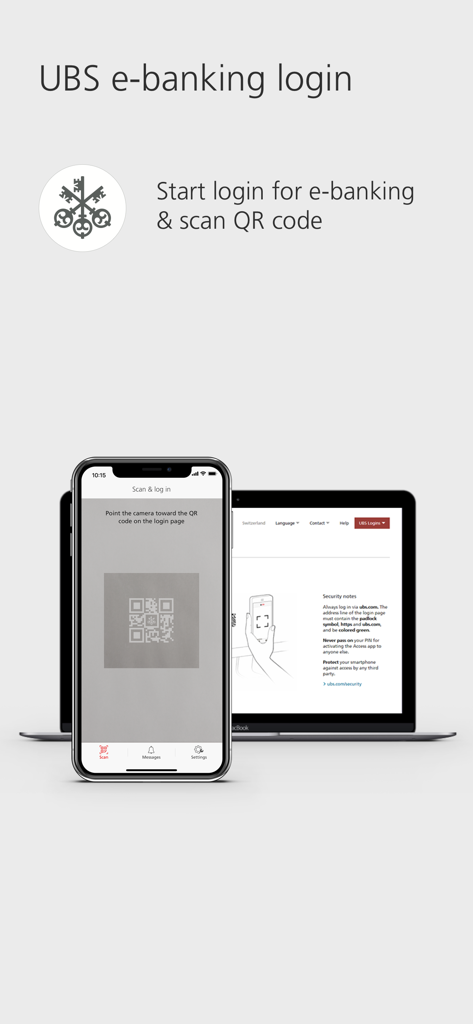
UBS e-뱅킹에 안전하게 로그인하기 위해 노트북 화면의 QR 코드를 스캔하는 스마트폰

UBS e-뱅킹에 안전하게 로그인하기 위해 노트북 화면의 QR 코드를 스캔하는 스마트폰

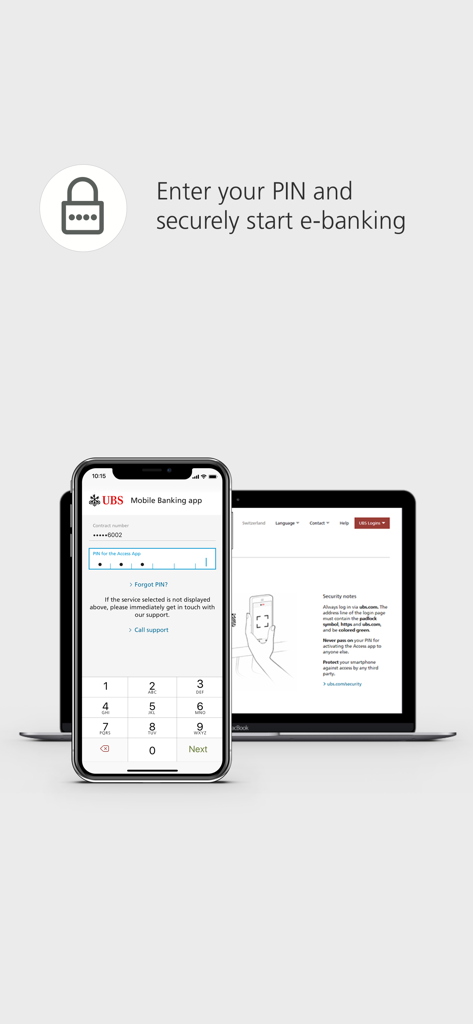
e-뱅킹 로그인 포털이 표시된 노트북 옆에 UBS Access용 PIN 입력 화면이 표시된 스마트폰

e-뱅킹 로그인 포털이 표시된 노트북 옆에 UBS Access용 PIN 입력 화면이 표시된 스마트폰

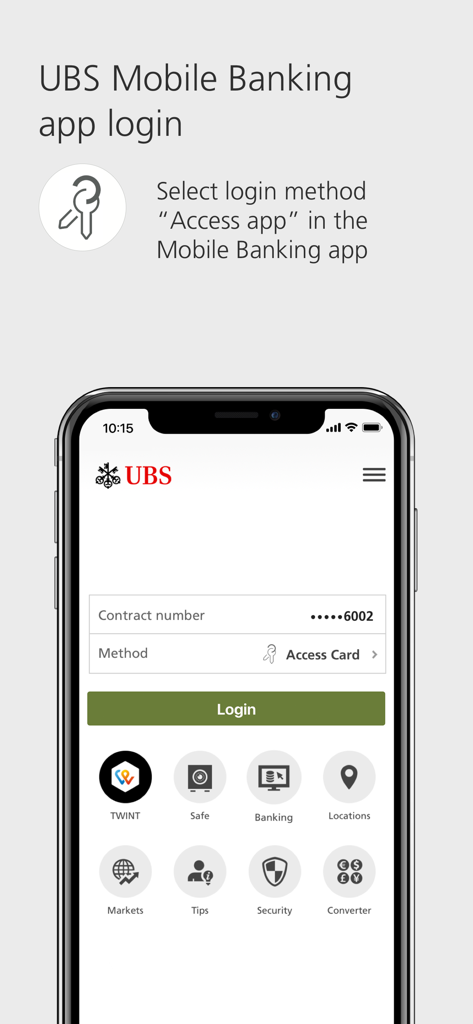
로그인 방법으로 Access 앱을 선택하라는 지침이 표시된 UBS 모바일 뱅킹 로그인 화면

로그인 방법으로 Access 앱을 선택하라는 지침이 표시된 UBS 모바일 뱅킹 로그인 화면

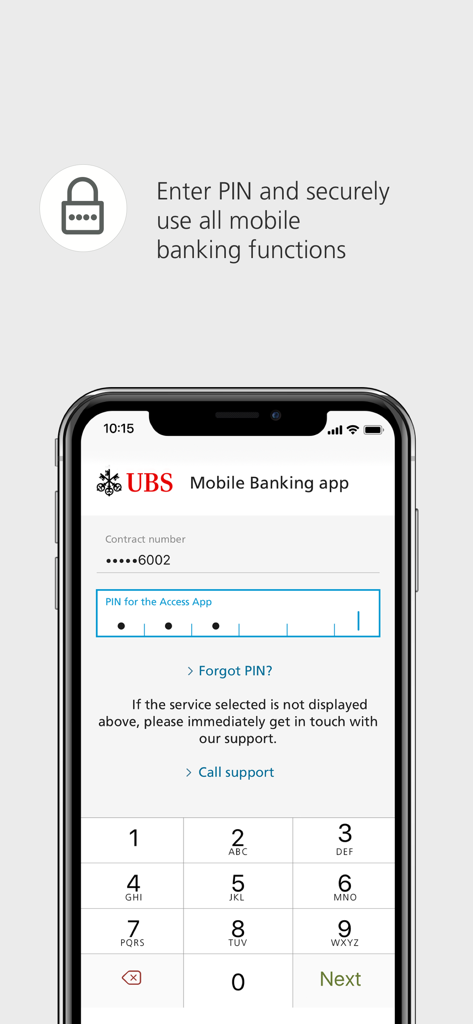
모바일 뱅킹 접속을 위해 보안 PIN을 입력하는 UBS Access 앱 로그인 화면

모바일 뱅킹 접속을 위해 보안 PIN을 입력하는 UBS Access 앱 로그인 화면

글로벌 자산을 위한 타협 없는 보안

이 앱을 돋보이게 하는 도구, 1M+ 명의 사용자가 선택.

👤

즉각적인 생체 인식 로그인

FaceID 또는 TouchID를 사용하여 보안을 유지하면서도 번거로움 없이 안전하게 e-뱅킹 및 모바일 뱅킹에 접속하세요.

🛡️

전체 거래 모니터링

은행 수준의 다요소 인증을 통해 스마트폰에서 직접 신규 수취인을 확인하고 고액 온라인 구매를 승인하세요.

🔔

사전 예방적 사기 방지

보안에 중요한 변경 사항에 대한 즉각적인 알림을 받아, 귀하가 가장 먼저 내용을 파악하고 재정 정보를 독점적으로 제어할 수 있도록 합니다.

전 세계 사용자들에게 사랑받는 앱

Trusted by 1M+ 명이 이 앱을 사랑합니다.

"

"취리히와 뉴욕을 자주 오가는 임원으로서, 저는 뱅킹이 철저하면서도 효율적이어야 합니다. QR 코드 로그인과 FaceID 통합 덕분에 계좌 접속이 원활해졌으며, 수취인 승인에 대한 즉각적인 알림은 고액 거래 시 필요한 안심을 제공합니다."

Marc-André L., 수석 전무 이사
"

"드디어 신뢰할 수 없는 국제 SMS 코드에 의존하지 않는 보안 앱이 나왔습니다. UBS Access 앱은 안전한 인증을 위한 필수 도구입니다. 푸시 알림은 즉각적이며 인터페이스는 전문적이고 직관적입니다. 국제 자산을 안전하게 관리하기 위한 표준입니다."

Elena S., 기술 창업자 & 글로벌 시티즌

앱 소개

에 대해 알아야 할 모든 것 UBS Access – secure login.

설명

With the UBS Access App you can log in to E-Eanking and the Mobile Banking App easily and securely. The UBS Access App also allows you to confirm new payees and online purchases made using credit or prepaid card, and it informs you about security-related events. 1. Log in easily to Digital Banking - E-Banking: Open the login page, scan the QR code with the Access App, enter your PIN or use biometrics and you’ll be immediately and securely logged in to E-Banking. - Mobile Banking: Launch the Mobile Banking App and select “Access App” as the login method. Afterwards, you can easily and securely log in using a PIN or biometrics. 2. Approve online payments securely - When you make online payments by credit or prepaid card, you will receive a push notification and can simply confirm the payment. - The highest standards in security reduce the risk of fraud. 3. Confirm new payees - Unblock the Access App with a PIN or using biometrics, check payees and approve payments. 4. Receive security messages - Receive information concerning security-related events such as changes to your security settings or contact details. Using the UBS Access App is this secure: - A PIN of your choice protects the Access App – even if you lose your smartphone. - The Access App always checks the security of your smartphone before you log in to Digital Banking. - The security code for the login is calculated automatically and transferred directly to UBS. Data transmission is protected by multi-level security. - The Access App is always up-to-date and offers optimum protection. - Set up biometrics to log in more easily and to confirm new payees. UBS Switzerland AG and other non-US affiliated companies of UBS Group AG only make the use of the UBS Access App (“App”) available to existing clients of UBS Switzerland AG and of other non-US affiliated companies of UBS Group AG. Other persons are not permitted to use the App. The App is not intended for US persons nor persons domiciled in Australia. The provision of the App for download in the Apple App Store does not constitute a solicitation, offer or recommendation to enter into any transaction, nor is it to be understood as a solicitation or offer to establish a client relationship between the person who downloads the App and UBS Switzerland AG or other non-US affiliated companies of UBS Group AG. Requirements: Banking relationship at UBS Switzerland AG, UBS Europe SE (Germany, Italy) or UBS AG (Hong Kong, Singapore) with Digital Banking contract: For activation, you will need a mobile number stored in Digital Banking for security messages. Enter this mobile number in the profile of your Mobile Banking App: Tap on your name and go to "Phone". You can also do this in E-Banking via your profile: In "My contact details" click on the pencil symbol and then "Phone numbers". Please enter your phone number without the initial 0 and modify the country code if you do not have a Swiss mobile number. Banking relationship at UBS Europe SE (UK, France, Monaco or Luxembourg): For activation, you will need a saved mobile number. Please contact your client advisor to set this up. Banking relationship at UBS Europe SE (Jersey) with a "Digital Banking" contract: For activation, you will need an Access Card with card reader or an Access Card Display. The range of functions may differ depending on the country. We hope you will enjoy using the UBS Access App. We look forward to receiving your feedback and your rating in the Apple App Store.

최신 버전

7.12

크기

52.3 MB

출시일

2018년 12월 11일

안심하고 글로벌 자산을 보호하세요

디지털 보안의 표준을 경험하십시오. UBS Access 앱을 다운로드하여 로그인을 관리하고 생체 인식을 통해 고액 거래를 손쉽게 승인하세요.

다운로드: App Store
FAQ

자주 묻는 질문

에 대해 알아야 할 모든 것 UBS Access – secure login

UBS E-Banking에 UBS Access 앱으로 로그인하려면 어떻게 해야 하나요?

UBS E-Banking에 로그인하려면 로그인 페이지를 열고 UBS Access 앱으로 QR 코드를 스캔한 다음 PIN을 입력하거나 생체 인식을 사용하세요. 이렇게 하면 안전하게 로그인할 수 있습니다.

UBS Access 앱이 생체 인식 인증을 지원하나요?

네, UBS Access 앱은 E-Banking 및 모바일 뱅킹 로그인 모두에 생체 인식 인증을 지원합니다. 사용자는 보안 및 편의성을 높이기 위해 신규 수취인 확인을 위해 생체 인식을 설정할 수도 있습니다.

UBS Access 앱은 어떤 보안 조치를 제공하나요?

UBS Access 앱은 선택한 PIN으로 보호하고, 스마트폰 보안을 확인하며, 로그인 코드를 자동으로 계산하고, 다단계 데이터 전송 보안을 사용합니다. 항상 최적의 보호 기능을 제공합니다.

UBS Access 앱이 온라인 카드 결제를 어떻게 승인하나요?

신용카드 또는 선불카드로 온라인 결제를 할 때 UBS Access 앱에서 푸시 알림을 보냅니다. 사용자는 앱 내에서 결제를 확인하기만 하면 되므로 높은 보안 표준으로 안전한 거래를 보장합니다.

누가 UBS Access 앱을 사용할 수 있나요?

UBS Access 앱은 UBS Switzerland AG 및 기타 미국 외 계열 UBS Group AG 회사의 기존 고객을 위한 것입니다. 미국인이나 호주 거주자는 사용할 수 없습니다.

UBS Access 앱의 활성화 요구 사항은 무엇인가요?

활성화하려면 특정 UBS 법인과의 은행 거래 관계 및 보안 메시지를 위한 디지털 뱅킹에 저장된 휴대폰 번호가 필요합니다. 액세스 카드와 같은 요구 사항은 지역마다 다릅니다.