DeArrow for YouTube

DeArrow for YouTube

다운로드: App Store
Spark by MWM logo
로고: DeArrow for YouTube

DeArrow for YouTube: 클릭베이트로부터 피드를 되찾으세요

과장된 썸네일과 소리치는 제목을 정직하고 커뮤니티에서 투표한 대안으로 대체하여 더 차분하고 집중적인 탐색 경험을 제공합니다.

개발사

Ajay Ramachandran

카테고리

Productivity

다운로드

7K+

사용자 평점

4.7/5

총 평가 수

0

지원 언어

1

진실을 보세요

이 인터페이스를 사용하는 7K+ 명의 사용자.

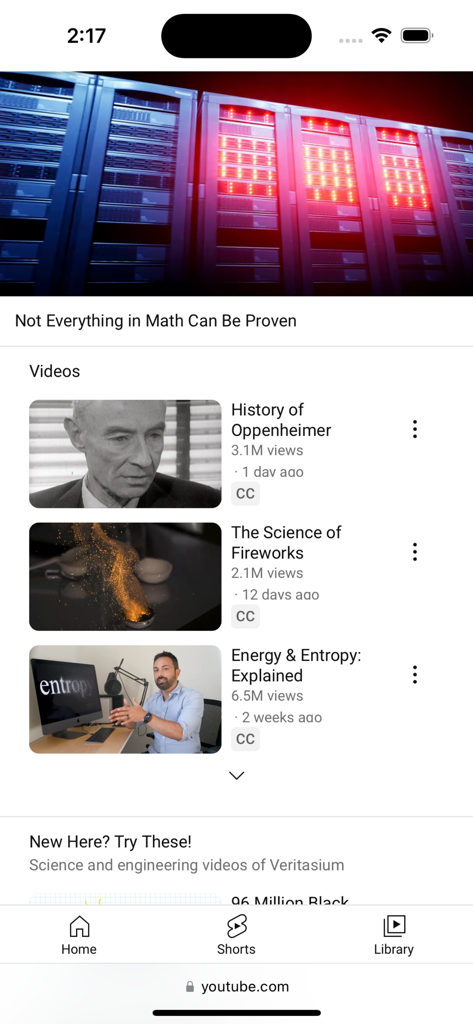
DeArrow 확장 프로그램이 제공하는 깔끔한 동영상 썸네일과 제목이 있는 YouTube 모바일 웹사이트

DeArrow 확장 프로그램이 제공하는 깔끔한 동영상 썸네일과 제목이 있는 YouTube 모바일 웹사이트

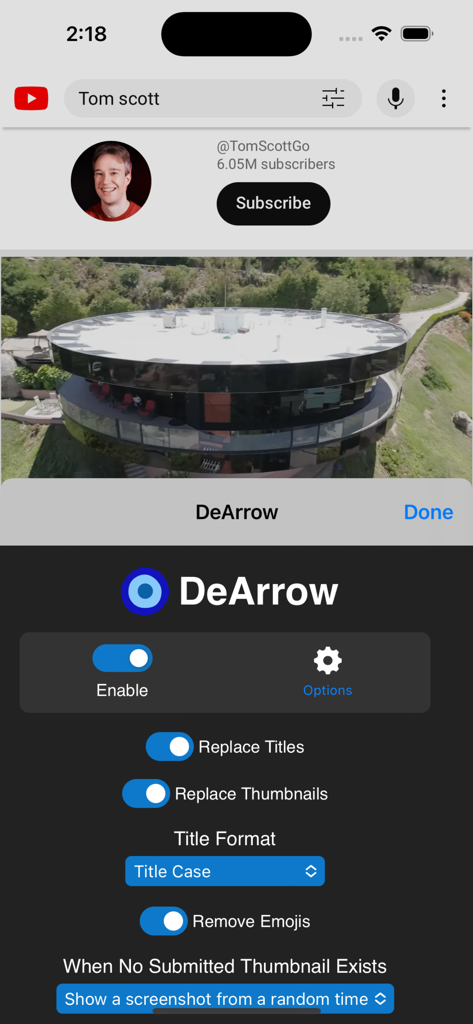
DeArrow for YouTube iOS 앱 인터페이스에서 동영상 제목과 썸네일을 대체하기 위한 설정을 보여줍니다.

DeArrow for YouTube iOS 앱 인터페이스에서 동영상 제목과 썸네일을 대체하기 위한 설정을 보여줍니다.

알고리즘으로부터 집중력을 되찾으세요

이 앱을 돋보이게 하는 도구, 7K+ 명의 사용자가 선택.

👥

커뮤니티 기반 정확성

실제 제목과 썸네일을 크라우드소싱하는 글로벌 사용자 네트워크에 참여하세요. 클릭하기 전에 실제 동영상의 내용이 무엇인지 투표하고 최고의 표현을 확인하세요.

🚫

알고리즘 노이즈 제거

더 이상 빨간색 화살표, 과장된 반응 얼굴 또는 오해의 소지가 있는 이미지가 없습니다. 조작적인 썸네일을 동영상에서 직접 가져온 중립적이고 무작위로 선택된 스크린샷으로 대체하세요.

✍️

더 스마트한 제목 서식

소리치는 모든 대문자 제목을 전문적인 제목 대소문자 또는 문장 대소문자로 자동 변환합니다. 정교한 엔진이 약어와 고유 명사를 유지하여 깔끔하고 읽기 쉬운 피드를 제공합니다.

전 세계 사용자들에게 사랑받는 앱

Trusted by 7K+ 명이 이 앱을 사랑합니다.

"

"DeArrow는 정말 신선한 바람입니다. 알고리즘의 시끄러운 썸네일과 선정적인 제목에 조종당하는 것에 지쳤습니다. 이제 제 피드는 깔끔하고 조용하며 정직합니다. 커뮤니티를 위해 더 나은 제목을 제공할 수 있다는 것은 전체 경험을 훨씬 더 인간적으로 느끼게 합니다. SponsorBlock의 완벽한 동반자입니다."

David K., 풀스택 개발자
"

"저는 주로 튜토리얼과 심층 다큐멘터리를 위해 YouTube를 사용하는데, 클릭베이트 때문에 미칠 지경이었습니다. DeArrow는 즉시 해결해 줍니다. 문장 대소문자 서식과 무작위 타임스탬프 스크린샷은 탐색을 다시 정상으로 만듭니다. 시간과 집중력을 소중히 여기는 사람에게는 필수적인 삶의 질 도구입니다."

Sarah L., 디지털 연구원

앱 소개

에 대해 알아야 할 모든 것 DeArrow for YouTube.

설명

DeArrow is a browser extension for crowdsourcing better titles and thumbnails on YouTube. The goal of DeArrow is to make titles accurate and reduce sensationalism. Titles can be any arbitrary text. Thumbnails are screenshots from specific timestamps in the video. These are user submitted and voted on. By default, if there are no submissions, it will format the original title to the user-specified format, and set a screenshot from a random timestamp as the thumbnail. This can be configured in the options to disable formatting, or show the original thumbnail by default. If the original thumbnail is actually good, you can still vote for it in the submission menu, and then it will act like a submission. No more dealing with clickbait, arrows, or annoying faces. Users can submit better titles and thumbnails for each video and vote on them. How does DeArrow differ from Clickbait Remover for YouTube? - Unlike Clickbait Remover, DeArrow's main purpose is for crowdsourcing better titles and thumbnails - When a crowdsourced title is not available, DeArrow will auto-format it according to your setting, but does it in a more sophisticated way than Clickbait Remover. Instead of only setting all words to lower case, or capitalizing every word, DeArrow supports casing systems such as "Title Case" and "Sentence case". These will still allow acronyms and proper names to remain capitalized. - When a crowdsourced thumbnail is not available, DeArrow by default shows a screenshot at a random timestamp in the video. Clickbait Remover's thumbnails use YouTube auto-generated thumbnails, and while they are seemingly random, they are chosen by a machine learning algorithm to favor faces with expressions, and other overstimulating features. DeArrow uses truly random timestamps generated by its own server. DeArrow will also check the SponsorBlock database to ensure the randomized thumbnail is not inside of a sponsor segment. --- Source code: https://github.com/ajayyy/DeArrow Permissions: Access your data for youtube.com, www.youtube-nocookie.com: - Used to modify the YouTube webpage This add-on may also **ask*" to access data for any website: - You can add your own instances of 3rd party YouTube front-ends, and it will ask for permission to modify each site you add - It will never ask for permission for all sites, only the sites you request - Invidious support is not finished at the moment

최신 버전

2.2.3

크기

18.4 MB

출시일

2023년 7월 20일

YouTube 피드를 되찾을 준비가 되셨나요?

수천 명의 파워 유저들이 클릭베이트 대신 명확성을 선택했습니다. 오늘 DeArrow Safari 확장 프로그램을 설치하고 iPhone 및 iPad에서 더 깔끔하고 크라우드소싱된 인터넷을 경험해 보세요.

다운로드: App Store