Ferrite Recording Studio

Ferrite Recording Studio

다운로드: App Store
Spark by MWM logo
로고: Ferrite Recording Studio
Ferrite Recording Studio: 주머니 속의 전문 멀티트랙 오디오 제작 환경

팟캐스터, 저널리스트, 성우를 위해 설계된 수상 경력에 빛나는 모바일 스튜디오로 워크플로우를 간소화하세요. 효율적인 녹음부터 자동 무음 제거 기능이 포함된 고급 멀티트랙 편집까지, 이야기가 있는 곳 어디에서나 방송 수준의 콘텐츠를 제작할 수 있습니다.

개발사

Wooji Juice Ltd

카테고리

Music

다운로드

625K+

사용자 평점

4.6/5

총 평가 수

100

지원 언어

5

사운드를 눈으로 확인하세요

이 인터페이스를 사용하는 625K+ 명의 사용자.

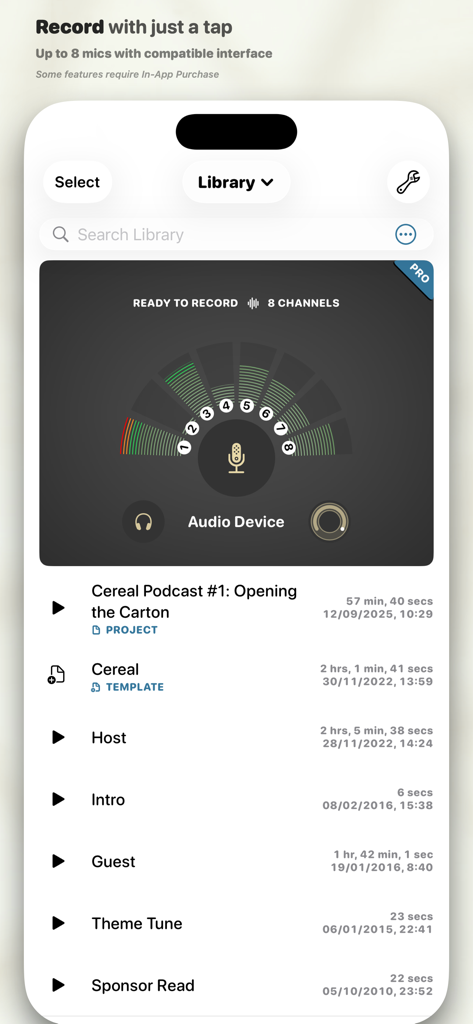
팟캐스트 프로젝트 목록과 8채널 오디오 레벨 미터가 표시된 Ferrite Recording Studio 앱 인터페이스

팟캐스트 프로젝트 목록과 8채널 오디오 레벨 미터가 표시된 Ferrite Recording Studio 앱 인터페이스

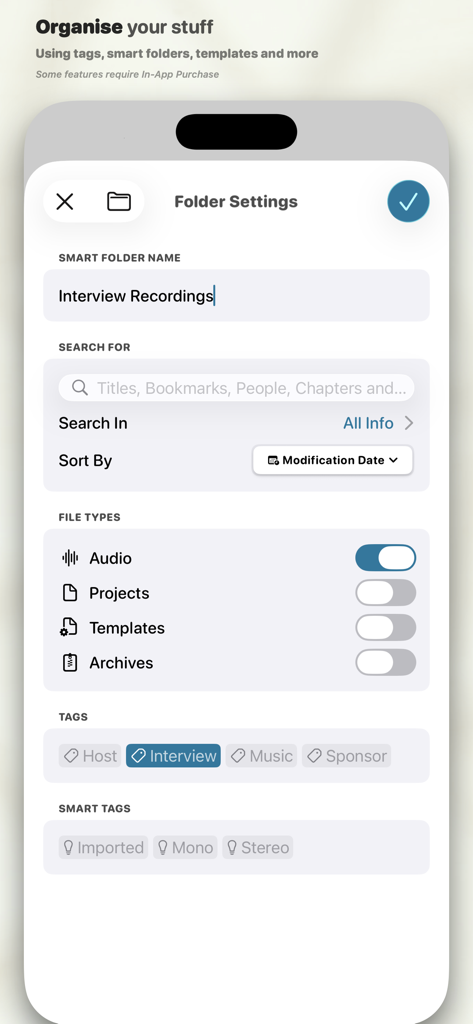
인터뷰 녹음 태그가 포함된 스마트 폴더 설정을 보여주는 Ferrite Recording Studio 인터페이스

인터뷰 녹음 태그가 포함된 스마트 폴더 설정을 보여주는 Ferrite Recording Studio 인터페이스

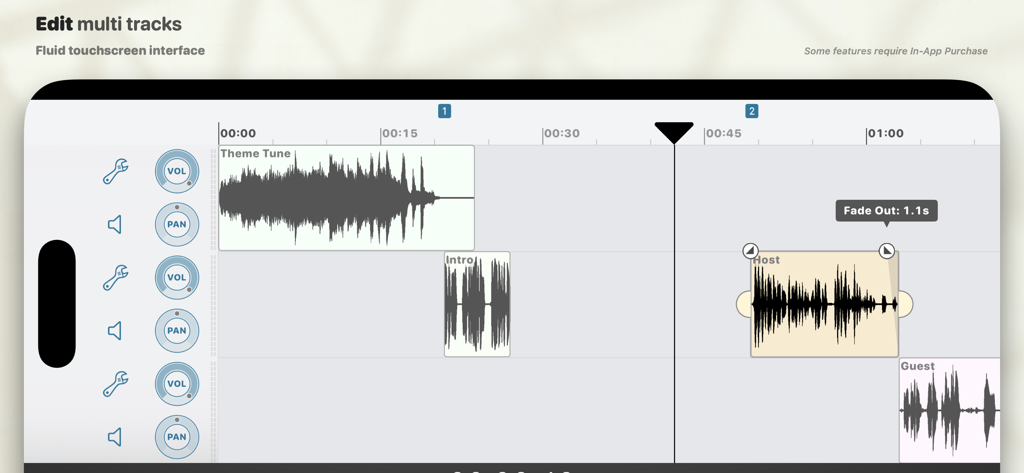
테마곡, 호스트, 게스트의 파형 클립과 볼륨 및 팬 컨트롤이 표시된 Ferrite Recording Studio의 멀티트랙 오디오 편집 타임라인

테마곡, 호스트, 게스트의 파형 클립과 볼륨 및 팬 컨트롤이 표시된 Ferrite Recording Studio의 멀티트랙 오디오 편집 타임라인

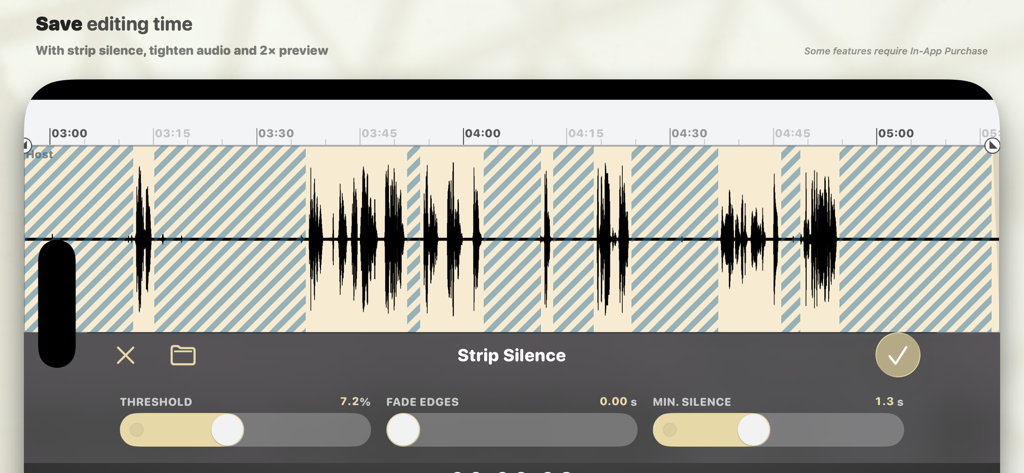
오디오 녹음에서 무음 공백을 자동으로 제거하는 Ferrite Recording Studio 앱의 Strip Silence 기능

오디오 녹음에서 무음 공백을 자동으로 제거하는 Ferrite Recording Studio 앱의 Strip Silence 기능

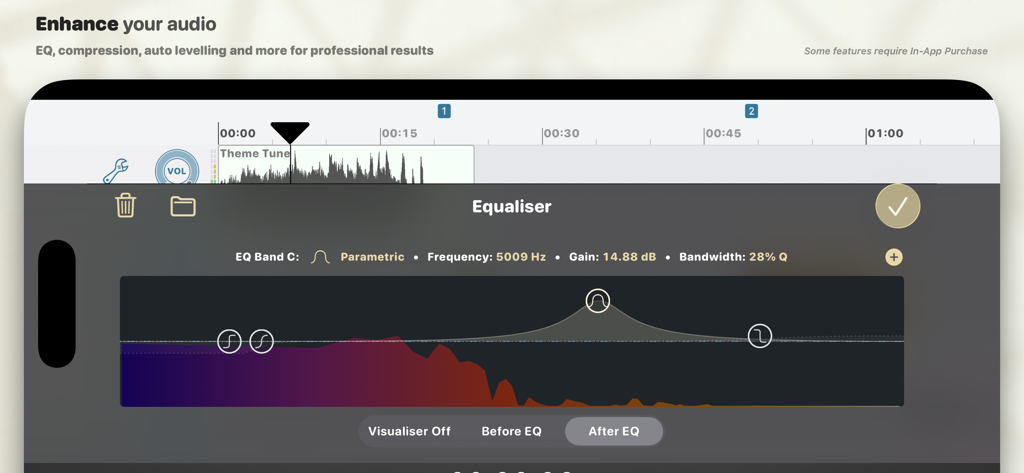
모바일 오디오 편집을 위한 Ferrite Recording Studio의 전문 파라메트릭 이퀄라이저 도구

모바일 오디오 편집을 위한 Ferrite Recording Studio의 전문 파라메트릭 이퀄라이저 도구

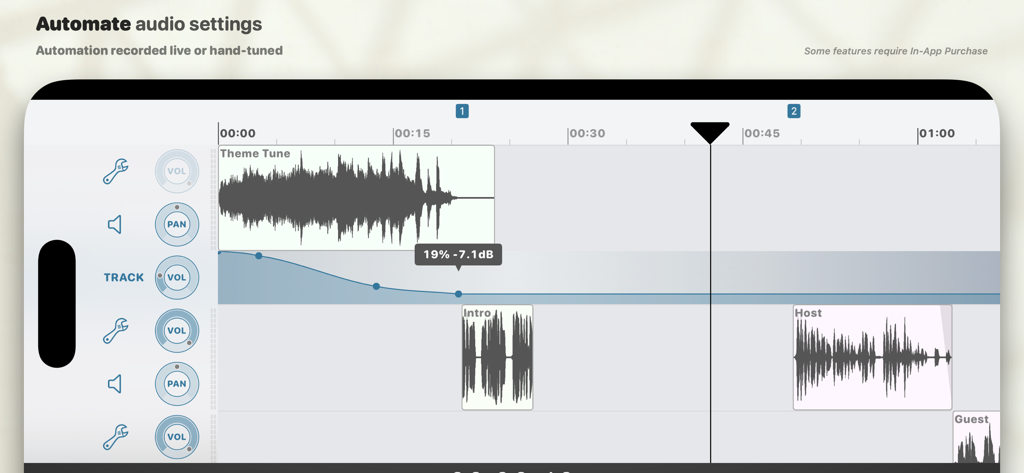
전문 팟캐스트 제작을 위한 볼륨 자동화 곡선이 표시된 멀티트랙 오디오 편집 인터페이스

전문 팟캐스트 제작을 위한 볼륨 자동화 곡선이 표시된 멀티트랙 오디오 편집 인터페이스

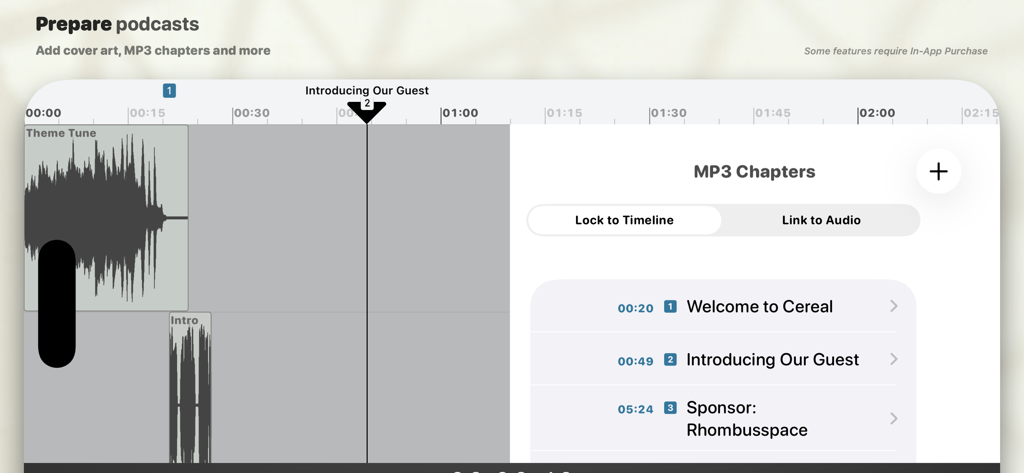
팟캐스트 에피소드의 타임스탬프 제목이 포함된 MP3 챕터 편집 도구를 보여주는 Ferrite Recording Studio 인터페이스

팟캐스트 에피소드의 타임스탬프 제목이 포함된 MP3 챕터 편집 도구를 보여주는 Ferrite Recording Studio 인터페이스

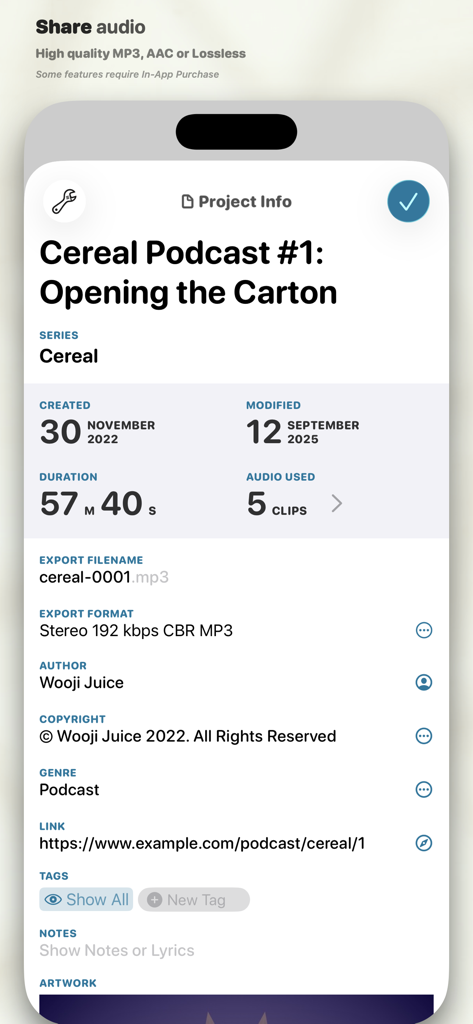
팟캐스트 메타데이터 및 내보내기 설정이 표시된 Ferrite Recording Studio의 프로젝트 정보 화면

팟캐스트 메타데이터 및 내보내기 설정이 표시된 Ferrite Recording Studio의 프로젝트 정보 화면

어디서나 프로덕션의 힘을 발휘하세요

이 앱을 돋보이게 하는 도구, 625K+ 명의 사용자가 선택.

✂️

데스크톱의 성능, 터치의 간편함

직관적인 제스처로 멀티트랙 프로젝트를 손쉽게 관리하세요. 기존 마우스로는 따라올 수 없는 정밀함과 속도로 클립을 자르고, 크롭하고, 크로스페이드할 수 있습니다.

🎙️

자동으로 완성되는 전문가급 품질

지루한 편집 시간을 대폭 단축하세요. Strip Silence를 사용하여 공백을 즉시 제거하고, 자동 더킹(Automatic Ducking)으로 배경 음악과 음성의 밸런스를 완벽하게 맞출 수 있습니다.

🚀

현대 크리에이터를 위한 설계

iPad Split View 지원으로 멀티태스킹을 마스터하세요. 하나의 간소화된 인터페이스 안에서 대본을 읽으면서 동시에 고음질 내레이션을 녹음할 수 있습니다.

전 세계 사용자들에게 사랑받는 앱

Trusted by 625K+ 명이 이 앱을 사랑합니다.

"

"Ferrite는 제 제작 워크플로우를 완전히 바꿔 놓았습니다. 'Strip Silence'와 자동 더킹 기능 덕분에 수동 편집 시간을 수 시간 절약할 수 있었고, 여행 중에도 iPad에서 직접 방송 수준의 팟캐스트 에피소드를 제작할 수 있게 되었습니다. 진정으로 제 주머니 속의 데스크톱급 스튜디오입니다."

Marcus Thorne, 독립 팟캐스터
"

"저널리스트로서 저는 강력하면서도 신뢰할 수 있는 도구가 필요합니다. 녹음하는 동안 Split View로 대본을 읽을 수 있는 기능과 더불어, 놀라운 비파괴 편집 및 수개월 전의 작업까지 되돌릴 수 있는 기록 덕분에 Ferrite는 긴 내레이션 프로젝트에 제가 유일하게 신뢰하는 앱이 되었습니다."

Sarah Jenkins, 프리랜서 라디오 저널리스트

앱 소개

에 대해 알아야 할 모든 것 Ferrite Recording Studio.

설명

Ferrite is the award-winning app you need for creating podcasts, radio journalism, or other professional voice production work — lectures, speeches, voice-overs and more. It combines the ease-of-use of a “voice memo” audio recorder, with a versatile multi-track editing studio. Powerful tools like effects and automation are available when you need them. With time-saving features and a UI designed to get out of your way, people around the world are switching to Ferrite. — Streamlined Recording — Open Ferrite and with just one tap you’re recording. No fuss, and it won't break a sweat even with hours-long sessions. Just make sure your device has enough free space! Recording an interview and you want to highlight a few quotes? Have to take out some inappropriate language? Or just fluffed a sentence and need to fix it? Bookmark moments during your recording and they’ll be flagged up during edits, so you can jump right to them. Monitor levels with live recording meters, or listen through headphones. Tag your audio to find it quickly later. And of course you can import audio from your Music Library, iCloud, and other services such as Dropbox. Please note: the free version has limited duration for recording & editing projects. Upgrade to Pro and you can edit projects up to 24 hours long! — Editing is a Snip — Ferrite features full multi-track editing, from quick cuts, to producing a complete podcast or broadcast package. Zoom out to see hours at a glance, or zoom in all the way down to individual samples. Take a single clip, or a bunch, and arrange them in an editing project: move, crop, slice, fade in and out, or crossfade between clips just by overlapping them. You have full control over each track’s volume and panning, and can Mute or Solo as needed. And best of all, you needn’t fear trying out changes: Ferrite has great Undo/Redo — even if you quit the app and come back a month later, you can still undo all the way back to the moment you created your project! — Advanced Features — Need more? Ferrite also includes: • Automatic ducking: set tracks to “duck under” others (e.g. ducking music behind voiceovers). • Strip Silence: Carves away all the silent sections from a recording, making it easy to edit the remaining audio. • (iPad only) Split View and Slide Over support: Use Ferrite side-by-side with other apps. Recording a narration? Open another app with your script and place Ferrite down the side of the screen. Or open the User Guide in Safari on one side while you learn Ferrite on the other. With a single In-App Purchase, you can unlock many additional tools, including: • Preview at up to 2× speed • Prepare your audio for production with Noise Reduction and Auto Levelling. • Add professional effects to your tracks such as EQ, Noise Gate and Dynamic Range Compression, for projects that sound clean and engaging. • Automate volume, panning and effects settings so they vary over time, both on individual tracks and the final mix. • Tighten Audio can automatically take out awkward pauses and gaps. • Producing a podcast or series? Create a template to get each new episode off to a flying start. • Add cover art, chapters and more. • Found the perfect settings for an effect or tool? Save them as a Preset for re-use in other projects. • Audio Unit Extensions: if you have other apps installed that provide effects as Audio Unit Extensions, they’ll show up in Ferrite, where you can add them to tracks or projects. • Advanced search, smart folders, and template folders.

최신 버전

3.2.2

크기

24.9 MB

출시일

2015년 11월 5일

전문 스튜디오가 준비되었습니다.

책상을 벗어나 수상 경력에 빛나는 모바일 워크플로우를 선택한 625,000명 이상의 크리에이터와 함께하세요. 지금 바로 iPhone 또는 iPad에서 Ferrite를 다운로드하고 방송 수준의 오디오 제작을 시작해 보세요.

다운로드: App Store
FAQ

자주 묻는 질문

에 대해 알아야 할 모든 것 Ferrite Recording Studio

Ferrite Recording Studio는 무엇인가요?

Ferrite Recording Studio는 팟캐스트, 라디오 저널리즘, 강의, 연설 및 보이스오버 제작을 위해 설계된 수상 경력이 있는 앱입니다. 간편한 녹음과 다재다능한 멀티트랙 편집을 결합하여 전문적인 오디오 제작을 위한 강력한 도구를 제공합니다.

Ferrite Recording Studio는 멀티트랙 편집 기능을 제공하나요?

네, Ferrite는 멀티트랙 편집을 지원하여 사용자가 여러 오디오 클립을 정렬하고, 볼륨 및 패닝을 조정하며, 페이드 및 크로스페이드를 적용할 수 있습니다. 이를 통해 포괄적인 팟캐스트 또는 방송 패키지 제작이 가능합니다.

Ferrite Recording Studio에서 프로젝트 길이에 제한이 있나요?

네, Ferrite의 무료 버전은 녹음 및 편집 프로젝트 길이에 제한이 있습니다. Pro 버전으로 업그레이드하면 최대 24시간 길이의 프로젝트를 편집할 수 있습니다.

Ferrite Recording Studio에서 이펙트를 사용하여 오디오 품질을 향상시킬 수 있나요?

네, Ferrite Recording Studio는 전문적인 결과를 위해 오디오 품질을 향상시키기 위해 인앱 구매를 통해 노이즈 감소, 자동 레벨링, EQ, 노이즈 게이트 및 다이내믹 레인지 압축과 같은 고급 기능을 제공합니다.

Ferrite Recording Studio는 오디오 녹음을 어떻게 지원하나요?

Ferrite는 원탭 활성화와 몇 시간 동안 지속되는 세션을 처리할 수 있는 기능으로 간소화된 녹음을 제공합니다. 사용자는 순간을 북마크하고, 라이브 미터로 레벨을 모니터링하며, iCloud 및 Dropbox와 같은 다양한 소스에서 오디오를 가져올 수 있습니다.

Ferrite Recording Studio에서 오디오 프로젝트를 어떻게 구성할 수 있나요?

네, Ferrite는 녹음을 정리하기 위해 스마트 폴더와 템플릿을 생성할 수 있습니다. 사용자는 제목, 북마크, 사람 및 챕터별로 검색하고 파일 형식 및 사용자 지정 태그별로 필터링할 수 있습니다.

Ferrite Recording Studio는 오디오 설정 자동화를 지원하나요?

네, Ferrite는 오디오 자동화를 지원하여 사용자가 시간에 따라 볼륨, 패닝 및 효과 설정을 자동화할 수 있습니다. 이는 동적인 사운드 제어를 위해 개별 트랙과 최종 믹스에 적용됩니다.

Ferrite Recording Studio에서 녹음에서 무음을 제거하는 데 도움이 되나요?

네, Ferrite Recording Studio에는 'Strip Silence' 및 'Tighten Audio'와 같은 기능이 포함되어 있습니다. Strip Silence는 무음 부분을 제거하고, Tighten Audio는 편집 시간을 절약하기 위해 어색한 휴지 및 간격을 자동으로 제거합니다.

Ferrite에서 팟캐스트에 챕터 및 커버 아트를 추가할 수 있나요?

네, Ferrite를 사용하면 사용자가 커버 아트를 추가하고 MP3 챕터를 생성하여 팟캐스트를 준비할 수 있습니다. 이는 청취자를 위한 오디오 콘텐츠를 구성하는 데 도움이 되고 전문적인 마무리를 더합니다.

Ferrite Recording Studio에는 실행 취소/다시 실행 기능이 있나요?

네, Ferrite Recording Studio는 광범위한 실행 취소/다시 실행 기록을 제공합니다. 이를 통해 사용자는 앱을 종료하고 나중에 다시 열더라도 변경 사항을 되돌릴 수 있습니다.