SoundLab - Audio Editor

SoundLab - Audio Editor

다운로드: App Store
Spark by MWM logo
로고: SoundLab - Audio Editor

SoundLab: 전문가용 16트랙 오디오 편집기 및 모바일 스튜디오

데스크톱급 정밀도를 주머니 속에 담으세요. 뮤지션과 팟캐스터를 위해 설계된 강력하고 무손실 워크스테이션에서 로컬 AI로 녹음, 믹싱, 보컬 분리를 하세요.

개발사

孛 刘

카테고리

Music

다운로드

4M+

사용자 평점

4.6/5

총 평가 수

26K+

지원 언어

12

주머니 속의 전문가 스튜디오

이 인터페이스를 사용하는 4M+ 명의 사용자.

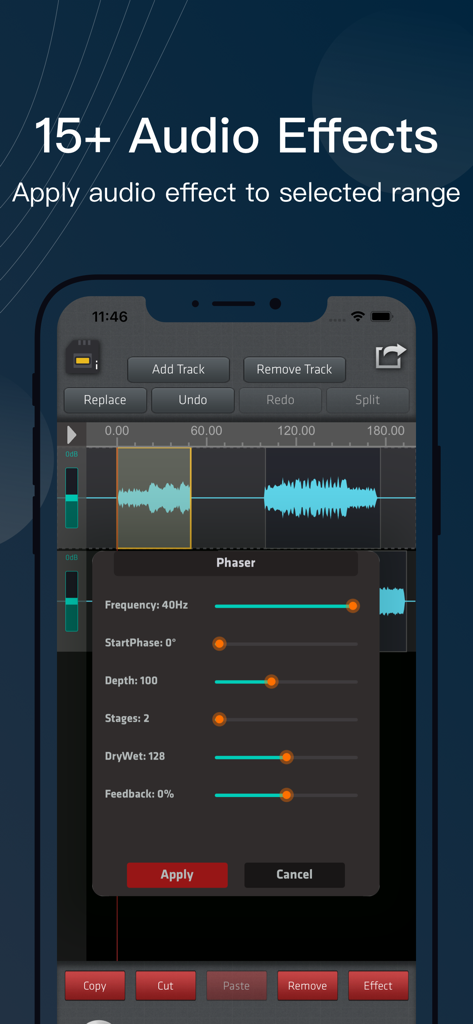
SoundLab 모바일 앱 인터페이스, 선택된 오디오 트랙 파형에 페이저 효과가 적용된 모습

SoundLab 모바일 앱 인터페이스, 선택된 오디오 트랙 파형에 페이저 효과가 적용된 모습

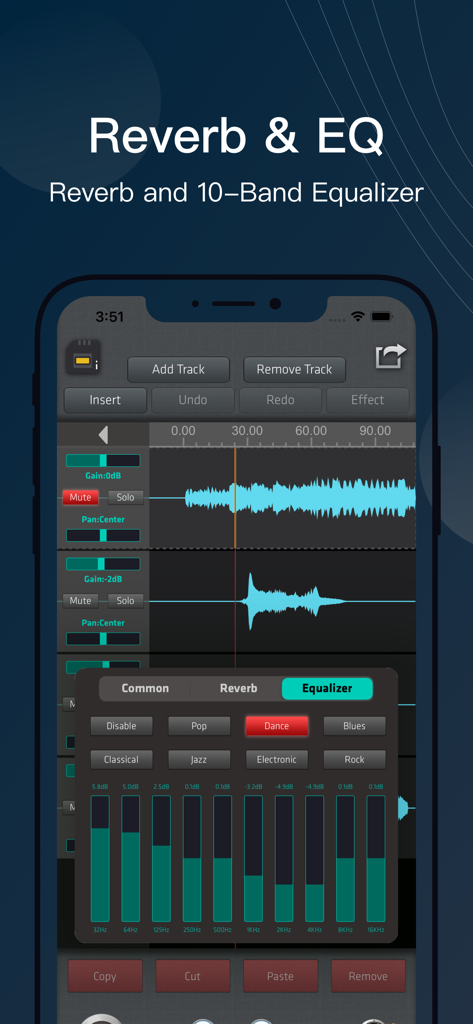
SoundLab 모바일 앱 10밴드 이퀄라이저 및 오디오 편집 인터페이스

SoundLab 모바일 앱 10밴드 이퀄라이저 및 오디오 편집 인터페이스

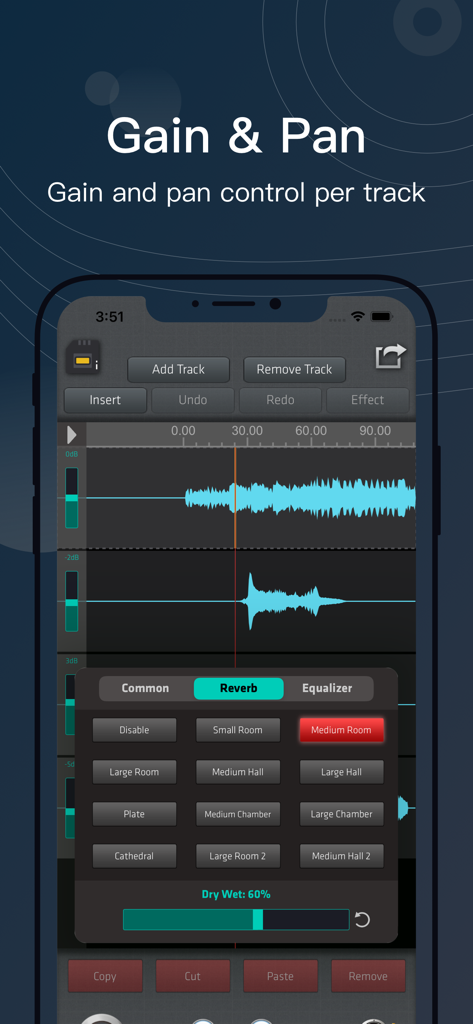
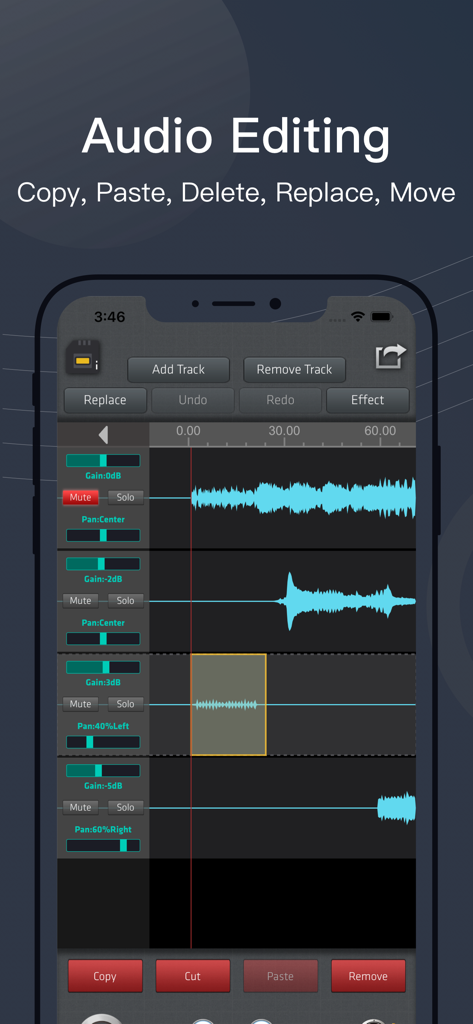
SoundLab 멀티트랙 오디오 편집기, 게인 및 팬 컨트롤, 리버브 효과 메뉴 표시

SoundLab 멀티트랙 오디오 편집기, 게인 및 팬 컨트롤, 리버브 효과 메뉴 표시

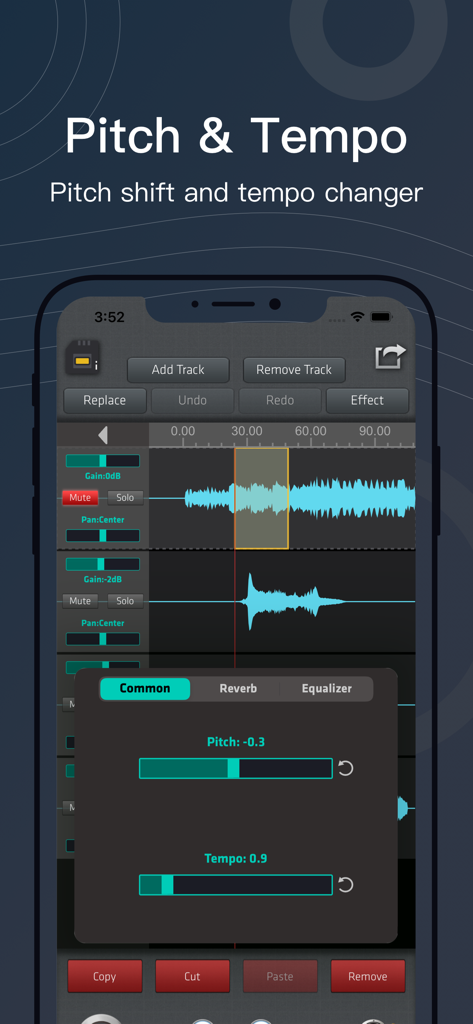
SoundLab 앱 인터페이스, 여러 오디오 트랙에서 피치 시프트 및 템포 변경 컨트롤 표시

SoundLab 앱 인터페이스, 여러 오디오 트랙에서 피치 시프트 및 템포 변경 컨트롤 표시

SoundLab 모바일 앱의 멀티 트랙 오디오 편집 인터페이스, 파란색 파형 및 믹싱 컨트롤 표시

SoundLab 모바일 앱의 멀티 트랙 오디오 편집 인터페이스, 파란색 파형 및 믹싱 컨트롤 표시

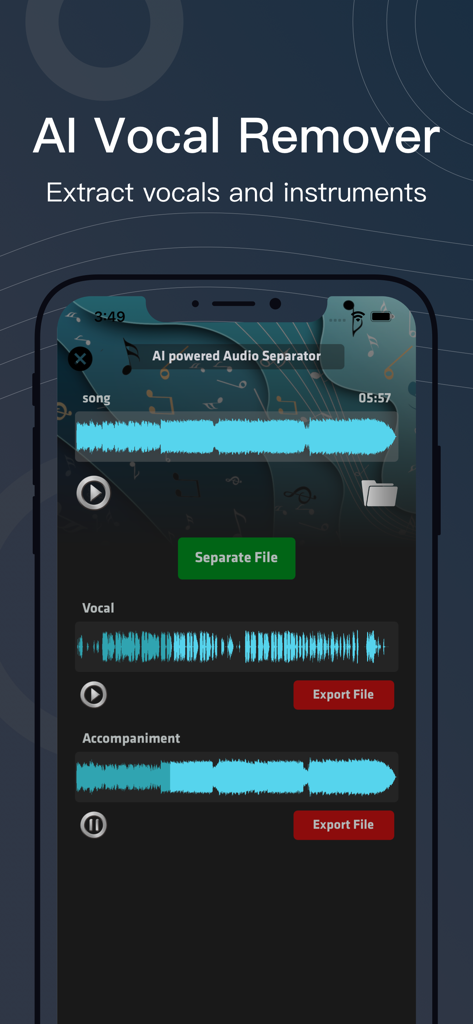
SoundLab 앱 인터페이스, AI 보컬 제거 기능이 노래를 보컬과 반주 트랙으로 분리하는 모습

SoundLab 앱 인터페이스, AI 보컬 제거 기능이 노래를 보컬과 반주 트랙으로 분리하는 모습

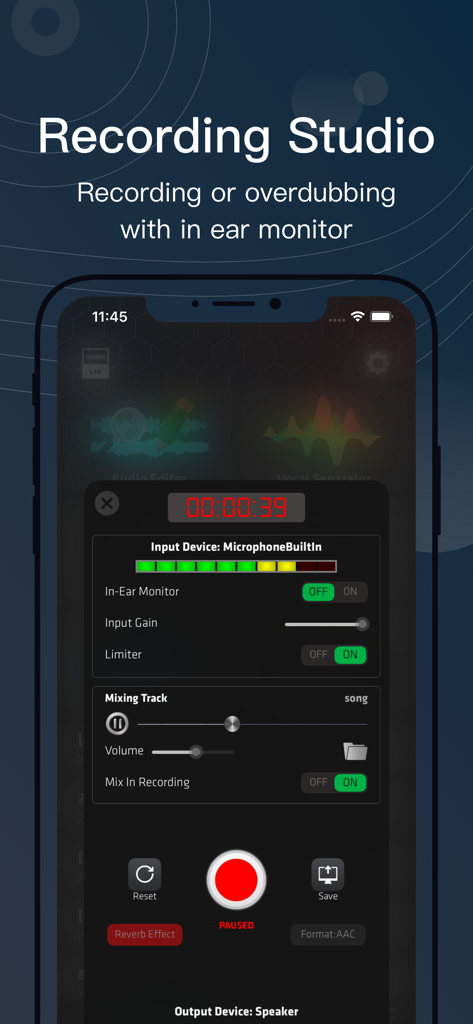
SoundLab 앱 인터페이스, 스마트폰에서 전문가용 녹음 스튜디오 도구 및 오디오 레벨 표시

SoundLab 앱 인터페이스, 스마트폰에서 전문가용 녹음 스튜디오 도구 및 오디오 레벨 표시

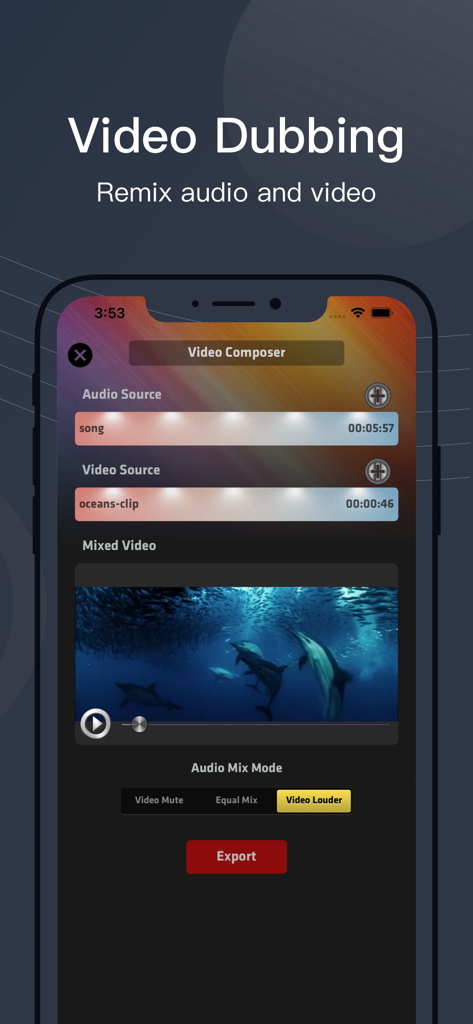
SoundLab 앱 인터페이스, iPhone 화면에서 비디오 더빙 및 오디오 믹싱 기능 표시

SoundLab 앱 인터페이스, iPhone 화면에서 비디오 더빙 및 오디오 믹싱 기능 표시

주머니 속의 데스크톱급 오디오 파워

이 앱을 돋보이게 하는 도구, 4M+ 명의 사용자가 선택.

🤖

로컬 AI 보컬 분리

온디바이스 머신러닝을 사용하여 보컬 또는 악기를 즉시 분리하세요. 기다림도, 업로드도 없으며, 창작 프로젝트의 완벽한 개인 정보 보호를 보장합니다.

🦹

16트랙 전문가 편집 엔진

Audacity 또는 Audition에 익숙한 사용자를 위해 설계된 밀리초 단위의 정밀도를 지원하는 강력한 멀티트랙 편집기로 믹스를 마스터하세요.

🎙️

스튜디오급 모바일 녹음

외부 전문가용 마이크를 연결하고 실시간 모니터링을 사용하여 어디서든 팟캐스트 또는 음악 세션을 위한 고품질 오디오를 캡처하세요.

전 세계 사용자들에게 사랑받는 앱

Trusted by 4M+ 명이 이 앱을 사랑합니다.

"

"AI 보컬 분리 기능은 제 커버 곡에 완전히 새로운 차원을 선사합니다. 클라우드 업로드를 기다릴 필요 없이 로컬에서 스템을 분리할 수 있어 시간을 절약할 수 있습니다. 사실상 제 주머니 속에 들어가는 전문가급 DAW입니다."

Marcus J., 독립 뮤지션
"

"드디어 모바일에서 Audacity와 같은 느낌을 주는 오디오 편집기를 찾았습니다! 밀리초 단위의 파형 줌과 16트랙 믹싱은 제 팟캐스트 제작에 완벽합니다. 이동 중에 고품질 오디오를 편집하는 데 있어 제가 찾은 가장 안정적인 도구 상자입니다."

Sarah Chen, 팟캐스트 프로듀서

앱 소개

에 대해 알아야 할 모든 것 SoundLab - Audio Editor.

설명

SoundLab bring desktop grade audio editing to mobile, as a audio editor in your pocket with following features:
 • Audio Editor: includes a 16-track, over 20 audio effects, and lossless output formats, complemented by an intuitive waveform interface with smooth zoom support. • AI Vocal Separator: employs machine learning to isolate vocal and instrumental stems.
 No need to upload files or wait in line, all AI processing is done locally on your device. • Audio Recorder: Minimalist yet powerful, used to seize fleeting recording opportunities. Supports selecting input device, recording format, sample rate, channel mode, and bitrate. • Recording Studio: Supports in-ear monitor, input gain control, and anti-popping. You can add accompaniment tracks while recording. Compatible with various common professional external microphones on the market. • Video Composer: Minimalistic audio-video mixing function, helping you add video to your audio creations, create soundtrack videos. SoundLab is more than just an audio editor, it strives to meet various spontaneous scenarios in the process of music and podcast production, allowing you to start creating anytime, anywhere on your iPhone or iPad. 
We won't claim that it can replace a professional DAW, but when you need a simple and convenient toolbox, when you don't want to open your computer and wait for a heavyweight DAW to start for tens of seconds, it is definitely a reliable choice. SoundLab is perfect for: • Lovers of music • Podcast producer • Music students and teachers • Especially for users who are familiar with Audacity or Audition Feature Highlights: • Unbeatable audio editing and mixing engine: support copy, cut, paste, remove, trim, insert, replace, split, move, etc. with full undo/redo. Exclusive dither algorithm ensure all editing process will never introduce click sound. • Selection-based Effects: process any selected part instead of the entire track, over 20 audio effects: AI Vocal Separator, AI Noise Suppression, 10-Bands EQ, Reverb, Bass Boost, Amplify, Compressor, Change Pitch / Tempo, De-essing, Normalize, Fade In / Out, Phaser, Reverse, Silence Remover... • Master Effects: supports real-time adjustment of global output, including speed, pitch, reverb, and equalizer. The same project can be exported with different styles without the need for modification. • High performance waveform: supporting smooth scaling, enable editing within millisecond level range, help you tweak the details of tiny sound. • Support export AAC / ALAC / MP3 / FLAC / WAV format. All format supports write ID3 metadata and cover art, even for WAV file. SoundLab Pro subscription and permanent purchase unlock all PRO features and remove all ads. 
• Subscription is billed monthly or annually at the rate corresponding to the selected plan. In addition, a one-time permanent purchase will be offered if needed, which is not one of the subscription plan. Subscriptions or permanent purchases can be shared with up to 5 family members. • Subscription with a free trial period will automatically renew to a paid subscription unless auto-renewal is turned off. Payment will be charged to iTunes account at confirmation of purchase. Subscription automatically renews unless auto-renew is turned off at least 24 hours before the end of the current period. Account will be charged for renewal within 24 hours prior to the end of the current period, and identify the cost for the renewal. Subscriptions may be managed by the user and auto-renewal may be turned off going to the user’s Account Settings after purchase. Customer Support • You can contact us in app: Setting -> Contact Us • Official Website: https://www.castpeer.net • Youtube Channel: https://www.youtube.com/@soundlab-app

최신 버전

2.10.3

크기

174.5 MB

출시일

2020년 8월 8일

이제 주머니 속의 데스크톱 스튜디오

DAW가 로드될 때까지 기다리지 마세요. 4백만 명 이상의 크리에이터와 함께 iPhone 또는 iPad에서 바로 AI 파워를 갖춘 전문가급 오디오 편집을 경험하세요.

다운로드: App Store
FAQ

자주 묻는 질문

에 대해 알아야 할 모든 것 SoundLab - Audio Editor

SoundLab - 오디오 편집기는 무엇인가요?

SoundLab은 iPhone 및 iPad용 모바일 오디오 편집기로, 16트랙 편집, 20가지 이상의 효과, AI 보컬 분리기, 녹음 스튜디오와 같은 데스크톱 수준의 기능을 제공합니다. 이동 중에도 음악 및 팟캐스트 제작을 지원합니다.

SoundLab으로 보컬을 악기에서 분리할 수 있나요?

네, SoundLab은 기계 학습을 사용하여 보컬 및 악기 스템을 분리하는 AI 보컬 분리기 기능을 갖추고 있습니다. 이 처리는 업로드나 대기 없이 기기에서 로컬로 수행됩니다.

SoundLab에는 어떤 오디오 효과가 있나요?

SoundLab은 AI 보컬 분리기, AI 노이즈 억제, 10밴드 EQ, 리버브, 베이스 부스트, 증폭, 컴프레서, 피치/템포 변경, 디에서, 정규화, 페이드 인/아웃, 페이저, 역방향, 무음 제거 등 20가지 이상의 오디오 효과를 제공합니다.

SoundLab은 멀티트랙 오디오 편집을 지원하나요?

네, SoundLab은 16트랙 오디오 편집을 지원하며, 부드러운 줌 기능과 직관적인 파형 인터페이스를 제공합니다. 복사, 잘라내기, 붙여넣기, 제거, 다듬기, 삽입, 바꾸기, 분할, 이동과 같은 포괄적인 편집 작업을 실행 취소/다시 실행 기능과 함께 사용할 수 있습니다.

SoundLab은 어떤 내보내기 형식을 지원하나요?

SoundLab은 AAC, ALAC, MP3, FLAC 및 WAV 형식으로 오디오를 내보낼 수 있습니다. 지원되는 모든 형식은 ID3 메타데이터 및 앨범 아트 쓰기를 지원하며 WAV 파일도 포함됩니다.

SoundLab으로 오디오를 녹음할 수 있나요?

네, SoundLab은 미니멀하면서도 강력한 오디오 녹음 기능을 포함하고 있습니다. 입력 장치, 녹음 형식, 샘플 속도, 채널 모드 및 비트 전송률을 선택하여 오디오를 캡처할 수 있습니다.

SoundLab Pro 구독이 가능한가요?

네, SoundLab Pro 구독 또는 영구 구매를 통해 모든 PRO 기능을 잠금 해제하고 광고를 제거할 수 있습니다. 구독은 월간 또는 연간으로 청구되며 최대 5명의 가족 구성원과 공유할 수 있습니다.

SoundLab은 비디오와 오디오 믹싱을 어떻게 처리하나요?

SoundLab은 미니멀한 오디오-비디오 믹싱을 위한 비디오 컴포저 기능을 제공합니다. 이 기능을 통해 사용자는 오디오 제작물에 비디오를 추가하고 앱 내에서 직접 사운드트랙 비디오를 제작할 수 있습니다.

SoundLab은 글로벌 출력을 위한 실시간 효과를 제공하나요?

네, SoundLab은 글로벌 출력을 실시간으로 조정할 수 있는 마스터 효과 기능을 제공합니다. 사용자는 속도, 피치, 리버브 및 이퀄라이저를 제어하여 수정 없이 동일한 프로젝트에 대해 다른 스타일을 적용할 수 있습니다.

SoundLab에서 외부 마이크를 사용할 수 있나요?

네, SoundLab의 녹음 스튜디오는 시중의 다양한 일반적인 전문 외부 마이크와 호환됩니다. 이어폰 모니터링 및 입력 게인 제어와 같은 기능을 지원합니다.