Notion: Music Notation and Tab

Notion: Music Notation and Tab

다운로드: App Store
Spark by MWM logo
로고: Notion: Music Notation and Tab
Notion: 음악 표기법 및 타브

손끝에서 펼쳐지는 전문 작곡으로 창의력을 발휘하세요. 직관적인 필기 인식부터 세계적인 수준의 런던 심포니 오케스트라 사운드까지, iPhone, iPad 및 Mac에서 악보를 손쉽게 만들고 동기화하세요.

개발사

PreSonus Audio Electronics, Inc.

카테고리

Music

다운로드

563K+

사용자 평점

2.8/5

총 평가 수

600

지원 언어

9

머릿속에서 악보까지

이 인터페이스를 사용하는 563K+ 명의 사용자.

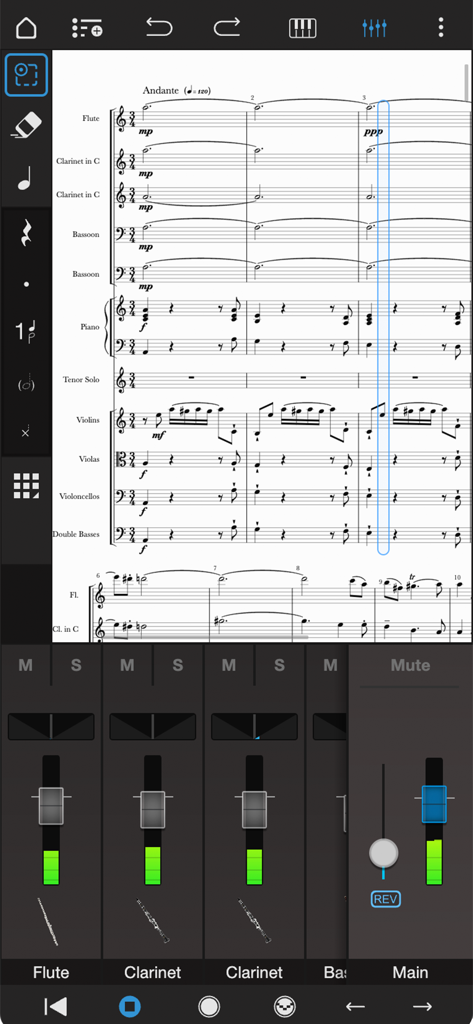
Notion 모바일의 전문 오케스트라 악보 편집 및 오디오 믹서 인터페이스.

Notion 모바일의 전문 오케스트라 악보 편집 및 오디오 믹서 인터페이스.

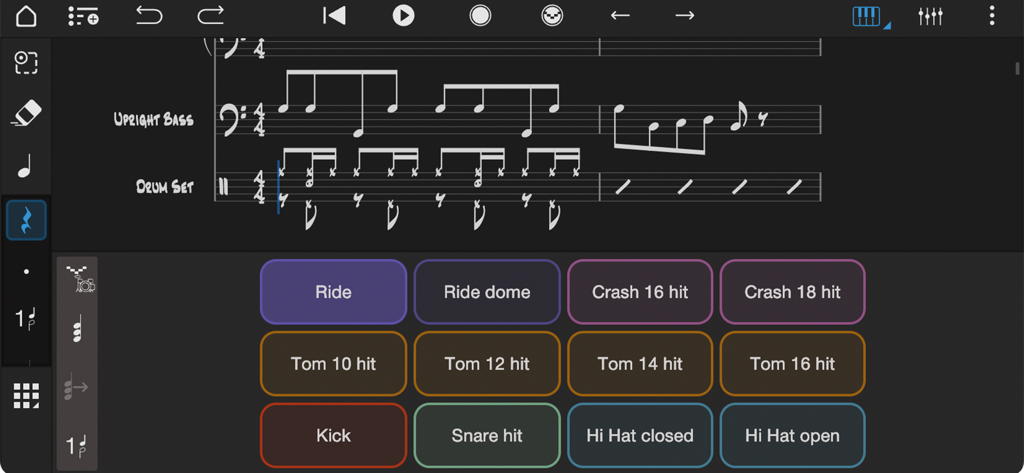
Notion 음악 앱 인터페이스로, 업라이트 베이스와 드럼을 위한 드럼 패드 컨트롤러와 음악 표기법을 보여줍니다.

Notion 음악 앱 인터페이스로, 업라이트 베이스와 드럼을 위한 드럼 패드 컨트롤러와 음악 표기법을 보여줍니다.

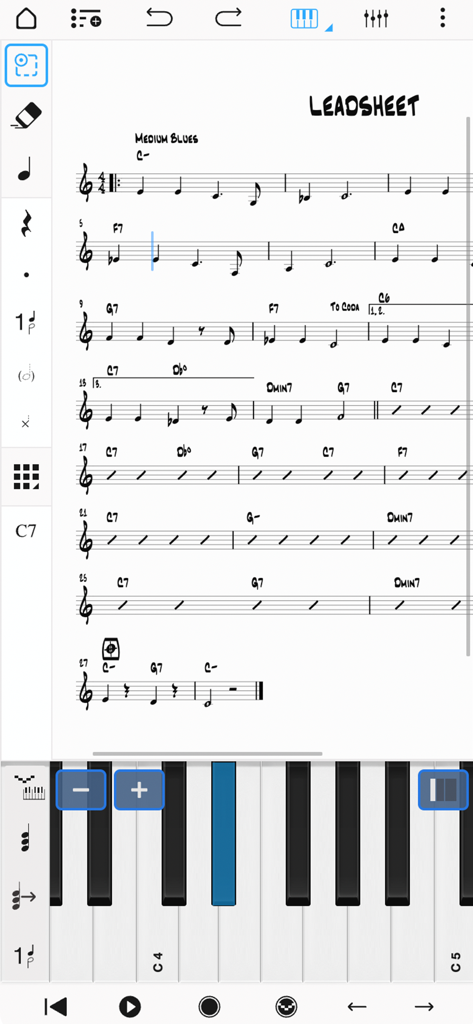
음표 입력을 위한 가상 피아노 건반이 있는 음악 리드 시트를 보여주는 Notion 모바일 앱 인터페이스.

음표 입력을 위한 가상 피아노 건반이 있는 음악 리드 시트를 보여주는 Notion 모바일 앱 인터페이스.

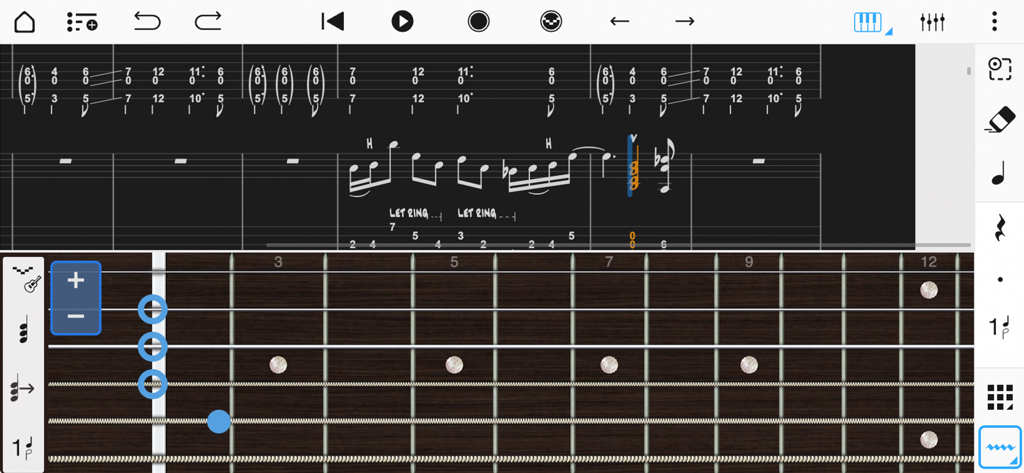
Notion 모바일에서 음표 입력을 위한 가상 프렛보드가 있는 음악 표기법 및 기타 타브 인터페이스.

Notion 모바일에서 음표 입력을 위한 가상 프렛보드가 있는 음악 표기법 및 기타 타브 인터페이스.

언제 어디서든 전문적인 작곡

이 앱을 돋보이게 하는 도구, 563K+ 명의 사용자가 선택.

✍️

자연스러운 필기 입력

음악을 원하는 대로 쓰세요. Apple Pencil을 사용하여 악보에 직접 음표를 스케치하고, 고급 인식 엔진이 이를 전문적인 디지털 표기법으로 변환하는 것을 지켜보세요.

🎻

전설적인 음질

런던 심포니 오케스트라가 연주하는 여러분의 작품을 경험하세요. 상징적인 애비 로드 스튜디오에서 녹음된 실제 오디오 샘플을 사용하여 놀랍도록 사실적인 재생을 즐기세요.

🔄

원활한 프로 워크플로우

제약 없이 작곡하세요. iPhone에서 시작하고 iPad에서 다듬은 후 Studio One 또는 Notion 데스크톱과 손쉽게 동기화하여 걸작을 완성하세요.

전 세계 사용자들에게 사랑받는 앱

Trusted by 563K+ 명이 이 앱을 사랑합니다.

"

"전문 영화 작곡가로서 영감은 종종 책상에서 멀리 떨어져 있을 때 떠오릅니다. Notion 모바일은 제 워크플로우를 완전히 바꾸어 놓았습니다. 런던 심포니 오케스트라 샘플 덕분에 제 초안이 놀랍도록 들리며, Studio One과의 원활한 동기화 덕분에 기차에서 시퀀스를 시작하여 스튜디오에서 한 비트도 놓치지 않고 완성할 수 있습니다."

Julian M., 미디어 작곡가
"

"시중의 모든 악보 앱을 사용해 봤지만, Notion의 필기 인식만큼 좋은 것은 없습니다. Apple Pencil을 사용하여 악보에 직접 음악을 쓰는 것은 마치 전통적인 악보 용지처럼 느껴지지만, 디지털 스튜디오의 힘을 가지고 있습니다. 제 음악 이론 수업과 작곡 프로젝트에 가장 필수적인 도구가 되었습니다."

Sarah L., 음악 연주 학생

앱 소개

에 대해 알아야 할 모든 것 Notion: Music Notation and Tab.

설명

With over 10 years in the App Store, Notion Mobile is a free, award-winning music composition tool for iOS, iPadOS®, macOS and more! You’ll effortlessly create dynamic compositions in traditional musical notation or guitar tablature with its intuitive touch-based interface and incredibly broad editing capabilities. With a user-friendly interface and simple interactive piano keyboard, fretboard, drum pad, and even optional Handwriting Recognition, Notion Mobile makes it easy to get started composing your music. You can also hear your music performed with the most realistic playback possible, using real audio samples recorded by the London Symphony Orchestra at Abbey Road Studios. Notion Mobile is a native cross-platform app, meaning you can write anywhere on any device without requiring a constant Internet connection. And when you’re back online, you’ll be able to sync your work across multiple devices — either through your preferred cloud provider, or through the optional wireless transfer between PreSonus applications on any device. Start your work on one device and finish it on another. Once you are happy with your creation you can share the Notion file, or export as MIDI, MusicXML, PDF or as an audio file. Compose, edit, and play back your music performed with real piano and orchestral samples recorded by the London Symphony Orchestra at Abbey Road Studios — along with outstanding sampled guitar, bass, drums and other popular instruments. And when you’re ready for more sounds, you’ll find the extensive library of Notion Add-on Soundsets to purchase as part of the Feature Bundle. To save space, the initial app download contains just piano — you can then manage which of the bundled Soundsets to have on your device or keep in the cloud, just tap on Sound Installation. Notion has been featured in various Apple campaigns including the 2014 YourVerse television commercials and has won several awards, including a prestigious music industry NAMM TEC Award for Best Smartphone/Tablet App. What you get: Notion Mobile includes unlimited staves, comprehensive editing features and core orchestral and rhythm section Soundsets — all for free. You can optionally register (also for free!) to unlock an additional Soundset (containing Solo Strings, Classical Saxophones and Glockenspiel), and the multivoice function that allows writing in up to 4 voices per staff. Then for the full experience, either sign in with your Studio One+ membership or purchase the Notion Feature Bundle. This unlocks Handwriting Recognition, Layout Controls, all the Expansion Soundsets (including many auxiliary instruments and additional articulations and effects), additional audio export formats (m4a, OPUS, FLAC) and direct file transfer between any PreSonus application running on the same network (including Notion Mobile, Notion Desktop, and Studio One.) Free: Unlimited staves All editing features Core Soundsets Export as MusicXML, Compressed MusicXML, MIDI, PDF, wav, mp3 Welcome Pack (register for free): Soundset including Solo Strings, Glockenspiel, Classical Saxophones Additionally write for voices 3 and 4 in a single staff Feature Bundle (in-app purchase or sign in with Studio One+): Handwriting Recognition, powered by MyScript Available on iPhone, iPad and macOS (macOS with supporting graphics tablet or using Sidecar with compatible iPad) Automatic pen vs. finger recognition to switch between handwriting and edit mode Pressure-sensitive support for Apple Pencil Adjustable timer for Handwriting Recognition Override handwriting timer by double tapping Apple Pencil (2nd Gen) Layout Control All Expansion Soundsets Additional audio export formats (m4a, OPUS, FLAC) Direct file transfer between any PreSonus application running on the same network (including Notion Mobile, Notion Desktop, and Studio One)

최신 버전

3.5.1

크기

146.0 MB

출시일

2011년 12월 16일

영감이 떠오를 때 언제 어디서든 작곡하세요.

수상 경력에 빛나는 악보 도구, 필기 인식, 전설적인 런던 심포니 오케스트라 사운드를 사용하는 50만 명 이상의 뮤지션과 함께하세요. 지금 Notion 모바일 무료 버전을 다운로드하세요.

다운로드: App Store
FAQ

자주 묻는 질문

에 대해 알아야 할 모든 것 Notion: Music Notation and Tab

Fender Notion: Music & Tab의 가격은 얼마인가요?

Fender Notion: Music & Tab은 무료로 다운로드하여 사용할 수 있으며, 무제한 악보와 핵심 사운드셋을 제공합니다. 필기 인식 및 확장 사운드셋과 같은 추가 기능은 인앱 구매 기능 번들 또는 Fender Studio Pro+ 멤버십을 통해 이용할 수 있습니다.

Fender Notion: Music & Tab이란 무엇인가요?

Fender Notion: Music & Tab은 iOS, iPadOS 및 macOS를 위한 수상 경력에 빛나는 음악 작곡 도구입니다. 직관적인 터치 기반 인터페이스를 사용하여 전통적인 악보 또는 기타 타블라투어로 역동적인 작곡을 할 수 있습니다.

Fender Notion에서 기타 타블라투어를 사용하여 음악을 작곡할 수 있나요?

예, Fender Notion: Music & Tab을 사용하면 기타 타블라투어로 역동적인 작곡을 쉽게 할 수 있습니다. 이 앱은 기타 타블라투어 입력 및 편집을 위한 전용 인터페이스를 제공합니다.

Fender Notion은 필기 인식을 지원하나요?

예, Fender Notion: Music & Tab은 MyScript 기반의 필기 인식 기능을 제공합니다. 이 기능은 기능 번들의 일부이며 호환되는 장치에서 압력 감지 입력을 위해 Apple Pencil을 지원합니다.

Fender Notion은 재생을 위해 어떤 사운드 샘플을 사용하나요?

Fender Notion은 Abbey Road Studios에서 런던 심포니 오케스트라가 녹음한 실제 오디오 샘플을 사용하여 사실적인 재생을 제공합니다. 또한 포괄적인 작곡을 위해 샘플링된 기타, 베이스, 드럼 및 기타 인기 악기를 포함합니다.

Fender Notion은 여러 기기에서 음악을 동기화할 수 있나요?

예, Fender Notion: Music & Tab은 여러 기기에서 작업을 동기화하는 것을 지원합니다. 사용자는 선호하는 클라우드 제공업체를 통해 또는 모든 장치의 애플리케이션 간 무선 전송을 통해 이를 달성할 수 있습니다.

Fender Notion에서 사용할 수 있는 내보내기 형식은 무엇인가요?

Fender Notion은 무료로 MIDI, MusicXML, PDF, WAV 및 MP3 파일로 작곡을 내보낼 수 있습니다. 기능 번들은 M4A, OPUS 및 FLAC와 같은 추가 오디오 형식을 제공합니다.

Fender Notion은 크로스 플랫폼 애플리케이션인가요?

예, Fender Notion: Music & Tab은 네이티브 크로스 플랫폼 애플리케이션입니다. 사용자는 지속적인 인터넷 연결 없이도 iOS, iPadOS 및 macOS를 포함한 다양한 장치에서 음악을 작성할 수 있습니다.

Fender Notion에는 작곡을 위한 드럼 패드가 포함되어 있나요?

예, Fender Notion: Music & Tab에는 인터랙티브 드럼 패드가 포함되어 있습니다. 이 기능을 사용하면 애플리케이션 내에서 다양한 악기 타격을 직접 사용하여 드럼 파트를 쉽게 작곡할 수 있습니다.

Fender Notion을 오프라인으로 사용할 수 있나요?

예, Fender Notion: Music & Tab은 오프라인으로 작동합니다. 지속적인 인터넷 연결 없이도 모든 장치에서 언제 어디서든 음악을 작곡할 수 있는 네이티브 크로스 플랫폼 앱입니다.