Open Library Reader

Open Library Reader

다운로드: App Store다운로드: Google Play
Spark by MWM logo
로고: Open Library Reader

Open Library Reader: 수백만 권의 책으로 가는 관문

호기심 많은 마음을 위한 필수 iPad 동반자. 디지털 책장을 관리하고 세계 최대의 개방형 아카이브에서 몰입감 있고 방해 없는 읽기 경험을 즐기세요.

개발사

Loomis House, LLC

카테고리

Books

다운로드

182K+

사용자 평점

2.8/5

총 평가 수

100

지원 언어

1

나만의 디지털 독서 공간

이 인터페이스를 사용하는 182K+ 명의 사용자.

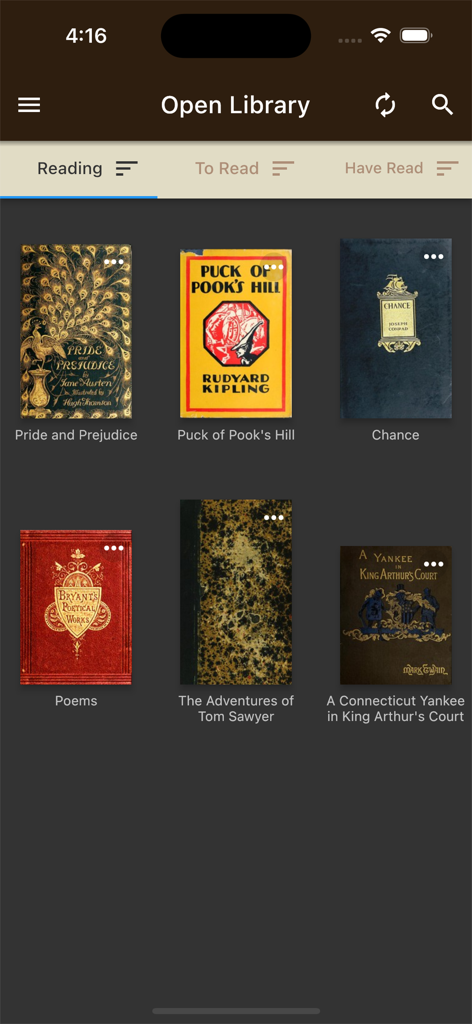
클래식 책 표지가 있는 Open Library Reader 앱의 디지털 책장 인터페이스.

클래식 책 표지가 있는 Open Library Reader 앱의 디지털 책장 인터페이스.

수백만 권의 볼륨에 대한 개인 포털

이 앱을 돋보이게 하는 도구, 182K+ 명의 사용자가 선택.

📚

시각적 도서관 관리

사용자 지정 책장에 저장된 책을 손쉽게 정렬, 추적 및 관리하고 Open Library 계정과 즉시 동기화하세요.

📖

방해 없는 몰입

원터치로 전체 화면 모드로 전환하여 모든 디지털 노이즈를 제거하고 화면의 한계까지 모든 페이지를 확장하여 깊이 읽을 수 있도록 합니다.

🔍

학술 발견 도구

아카이브의 깊이를 탐색하도록 설계된 내장 검색 및 관련 제목 도구를 사용하여 다음 희귀 자료 또는 학술 자료를 찾으십시오.

전 세계 사용자들에게 사랑받는 앱

Trusted by 182K+ 명이 이 앱을 사랑합니다.

"

"학술 연구원으로서 저는 Open Library 웹사이트에서 몇 시간을 보냈지만 브라우저에서 읽는 것은 항상 어려웠습니다. 이 앱은 제 워크플로우를 완전히 바꿔 놓았습니다. 기존 책장과 완벽하게 동기화되며 iPad의 방해 없는 전체 화면 모드는 심층 학습을 즐겁게 만듭니다. 아카이브의 방대한 컬렉션과 프리미엄 읽기 경험을 연결하는 완벽한 다리입니다."

Dr. Sarah Jenkins
"

"마침내 Internet Archive의 사명에 걸맞은 인터페이스입니다. '읽고 싶은 책' 목록을 관리하고 관련 제목 검색을 통해 절판된 역사 문서를 찾을 수 있다는 것이 좋습니다. 레이아웃은 깔끔하고 직관적이며 모바일 웹보다 훨씬 접근하기 쉽습니다. 소파에서 밤늦게 읽을 때 꼭 사용하는 앱이 되었습니다."

Robert L. Miller

앱 소개

에 대해 알아야 할 모든 것 Open Library Reader.

설명

Open Library is an online library with millions of books to browse or check out. You can track the books that you're reading, want to read, etc. and read many of them right there. PLEASE NOTE: This app is an interface to the openlibrary.org web site — if you don't use that site to read books, you may have trouble figuring out what the app is for. I encourage you to familiarize yourself with the site first, and then you'll understand what the app offers. This app is one reader's effort to create the ideal portable experience for taking advantage of Open Library's amazing collection. You'll get the best experience out of this app on an iPad, but you can use it on a smaller screen (if you don't mind squinting). The moment you open the app and log in, any books you've already saved on the Open Library site are laid out on your screen. You can sort them by title, author, publication date, and date saved, see which books are available to read, and open them with a single tap. Once you've opened a book in the familiar reading interface, a tap at the top of the screen will trigger the full screen mode, removing every distraction and expanding the book pages to the limits of your screen for the perfect reading experience. Other features include: - Built-in search: find and add books to your shelves from inside the app. - Shelf management: move books between shelves, remove books, change the edition of a book. - Related title search: choose a book on your shelf and quickly find more books like it. - Checkout tracking: see at a glance how long you have left on limited-access books you've checked out. - Customization: choose which shelves you want to see and manage the size of the books and their titles. This app is essentially an alternative interface to the Open Library site — all of your data is stored there, and the books you read are hosted online, not in the app. As a result, an active internet connection is required when you are using this app. Open Library is an initiative of the Internet Archive, a 501(c)(3) non-profit, building a digital library of Internet sites and other cultural artifacts in digital form. The developer of this app has no legal or contractual relationship with Open Library or the Internet Archive, and bears no responsibility for the content found there.

최신 버전

1.0.16+23

크기

26.1 MB

출시일

2021년 8월 5일

세계 최대 도서관을 iPad로 가져가세요

수천 명의 연구자와 평생 학습자와 함께하세요. 깊은 몰입과 손쉬운 책장 관리를 위해 설계된 방해 없는 전체 화면 리더로 Open Library 경험을 향상시키세요.

다운로드: App Store다운로드: Google Play
FAQ

자주 묻는 질문

에 대해 알아야 할 모든 것 Open Library Reader

Open Library Reader 앱이란 무엇인가요?

Open Library Reader는 openlibrary.org의 인터페이스 역할을 하는 앱입니다. 사용자는 Open Library 플랫폼에서 직접 수백만 권의 책을 탐색하고, 대출하고, 추적하고, 읽을 수 있습니다.

Open Library Reader 앱을 사용하려면 인터넷 연결이 필요한가요?

네, Open Library Reader는 활성 인터넷 연결이 필요합니다. 모든 사용자 데이터와 책은 앱 자체 내에 있는 것이 아니라 openlibrary.org의 온라인에 호스팅됩니다.

Open Library Reader 앱으로 책을 어떻게 추적할 수 있나요?

네, Open Library Reader 앱을 사용하면 '읽는 중', '읽을 예정', '읽은 책' 선반을 관리하여 책을 추적할 수 있습니다. 또한 대출한 제한된 액세스 책의 남은 시간도 추적합니다.

Open Library Reader는 어떤 책 관리 기능을 제공하나요?

Open Library Reader는 내장 검색, 선반 관리(책 이동/제거, 판 변경), 관련 도서 검색, 선반 및 책 표시 사용자 지정 기능을 제공합니다.

Open Library Reader 앱은 iPad 사용자에게 최적화되어 있나요?

네, Open Library Reader는 iPad에 최적화되어 해당 장치에서 최고의 사용자 경험을 제공합니다. 또한 작은 화면에서도 작동합니다.

사용자는 Open Library Reader에서 어떻게 책을 검색하나요?

사용자는 내장 검색 기능을 통해 또는 저장된 컬렉션을 탐색하여 책을 찾습니다. 이 앱은 또한 선택한 제목에서 직접 유사한 책을 발견하기 위한 관련 도서 검색을 지원합니다.

Open Library Reader는 책을 어떻게 표시하나요?

Open Library Reader는 Open Library 웹사이트에 저장된 책을 화면에 배열하여 표시합니다. 사용자는 제목, 저자, 출판 날짜 및 저장 날짜별로 이러한 책을 정렬할 수 있습니다.

Open Library Reader는 전체 화면 읽기 모드를 제공하나요?

네, Open Library Reader의 읽기 인터페이스에서 책을 연 후 화면 상단을 탭하면 전체 화면 모드가 활성화됩니다. 이렇게 하면 읽기 영역을 최대화하고 방해 요소를 제거합니다.