Parental Control App - Kidsee

Parental Control App - Kidsee

다운로드: App Store
Spark by MWM logo
로고: Parental Control App - Kidsee

Kidsee: 화면 시간 다툼을 끝내고 자녀를 안전하게 보호하세요

현대 부모를 위한 올인원 디지털 비서. 하나의 직관적인 대시보드를 통해 실시간 위치를 추적하고, 앱을 차단하고, 집안일을 얻은 화면 시간으로 바꾸세요.

개발사

Alenrom sp. z o.o.

카테고리

Lifestyle

다운로드

208K+

사용자 평점

4.7/5

총 평가 수

4K+

지원 언어

39

한눈에 보는 안전

이 인터페이스를 사용하는 208K+ 명의 사용자.

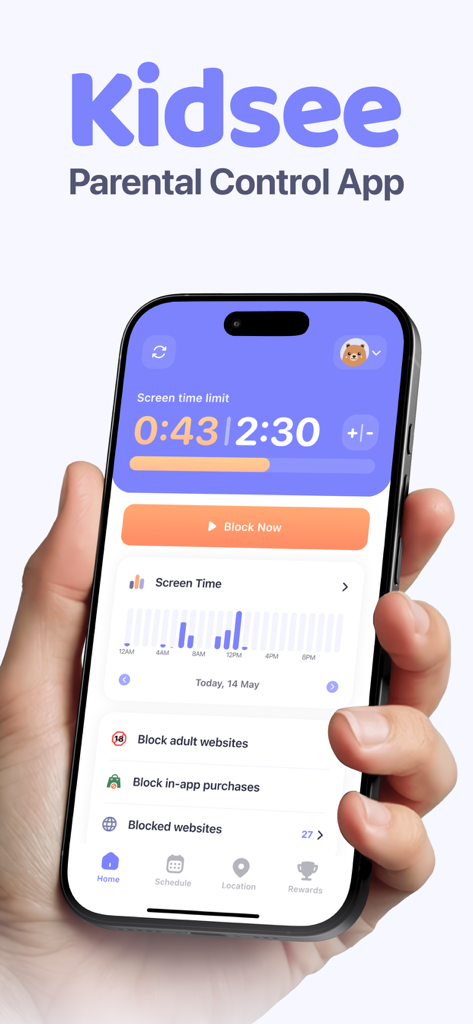
Kidsee 자녀 보호 앱 대시보드를 보여주는 iPhone 화면으로, 화면 시간 제한 및 앱 차단 기능이 표시됩니다.

Kidsee 자녀 보호 앱 대시보드를 보여주는 iPhone 화면으로, 화면 시간 제한 및 앱 차단 기능이 표시됩니다.

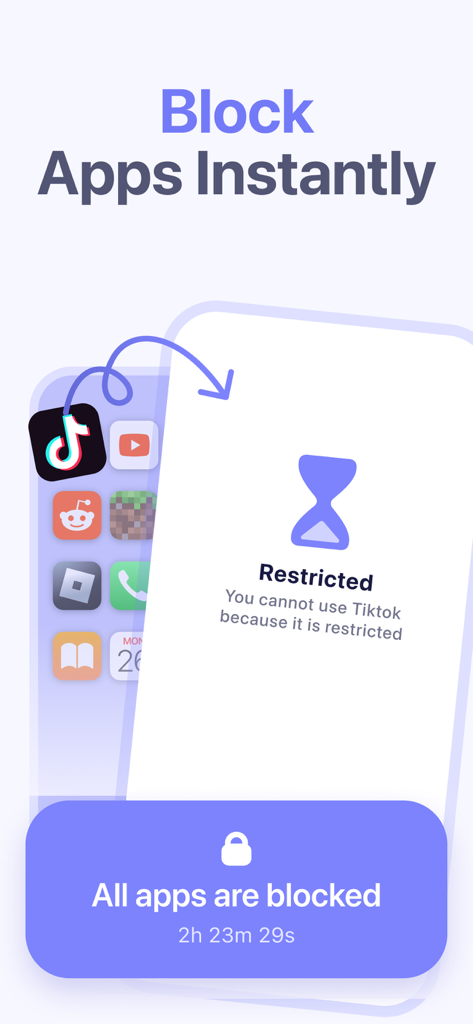
TikTok과 같은 애플리케이션을 차단하는 Kidsee 앱 기능을 보여주는 스마트폰 화면입니다.

TikTok과 같은 애플리케이션을 차단하는 Kidsee 앱 기능을 보여주는 스마트폰 화면입니다.

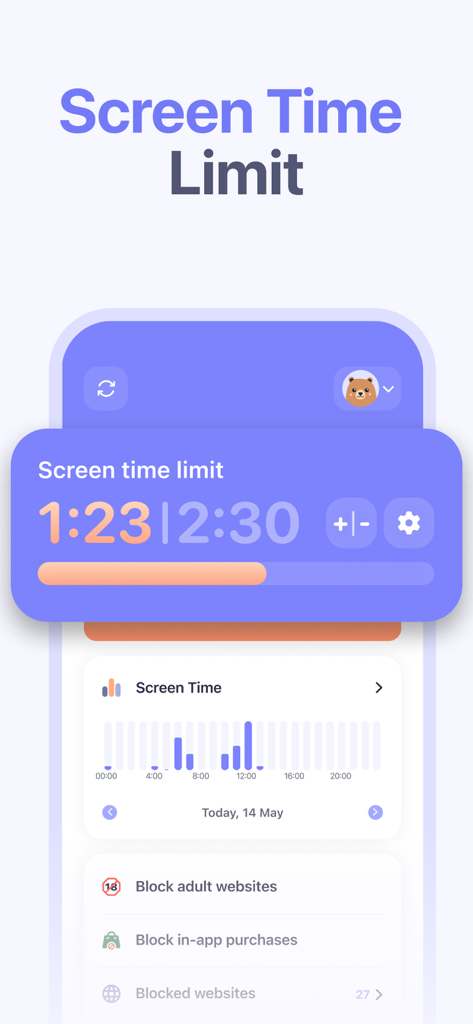
Kidsee 앱 대시보드는 화면 시간 제한, 일일 사용 통계 그래프 및 웹사이트 차단 제어를 표시합니다.

Kidsee 앱 대시보드는 화면 시간 제한, 일일 사용 통계 그래프 및 웹사이트 차단 제어를 표시합니다.

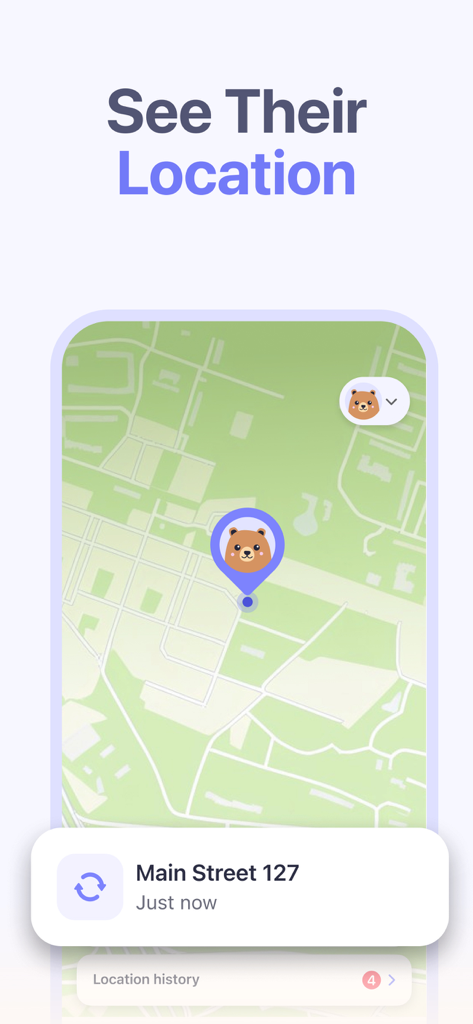
지도 인터페이스에서 실시간 아동 위치 추적을 보여주는 Kidsee 자녀 보호 앱입니다.

지도 인터페이스에서 실시간 아동 위치 추적을 보여주는 Kidsee 자녀 보호 앱입니다.

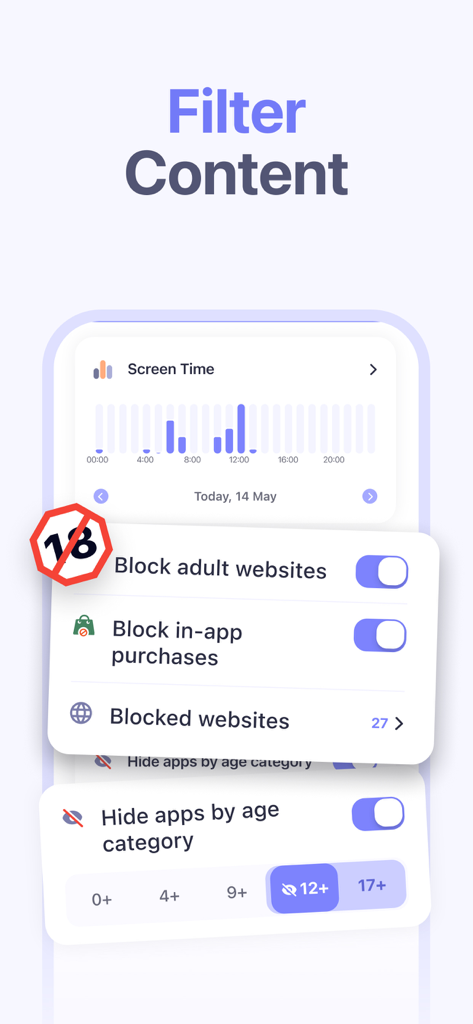
성인 웹사이트를 차단하고 연령별로 앱을 숨기는 설정을 보여주는 Kidsee 앱의 인터페이스입니다.

성인 웹사이트를 차단하고 연령별로 앱을 숨기는 설정을 보여주는 Kidsee 앱의 인터페이스입니다.

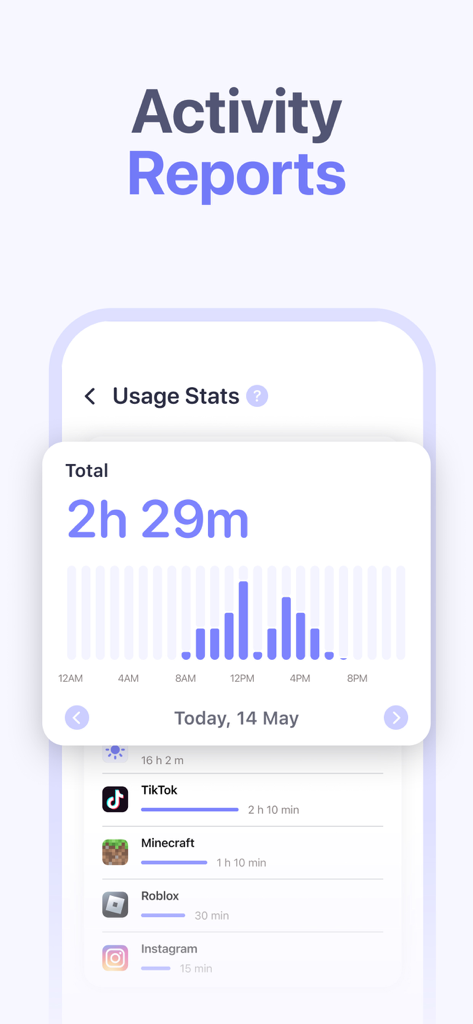
Kidsee 앱의 대시보드는 TikTok 및 Roblox와 같은 앱에 대한 일일 화면 시간 사용량 및 활동 보고서를 표시합니다.

Kidsee 앱의 대시보드는 TikTok 및 Roblox와 같은 앱에 대한 일일 화면 시간 사용량 및 활동 보고서를 표시합니다.

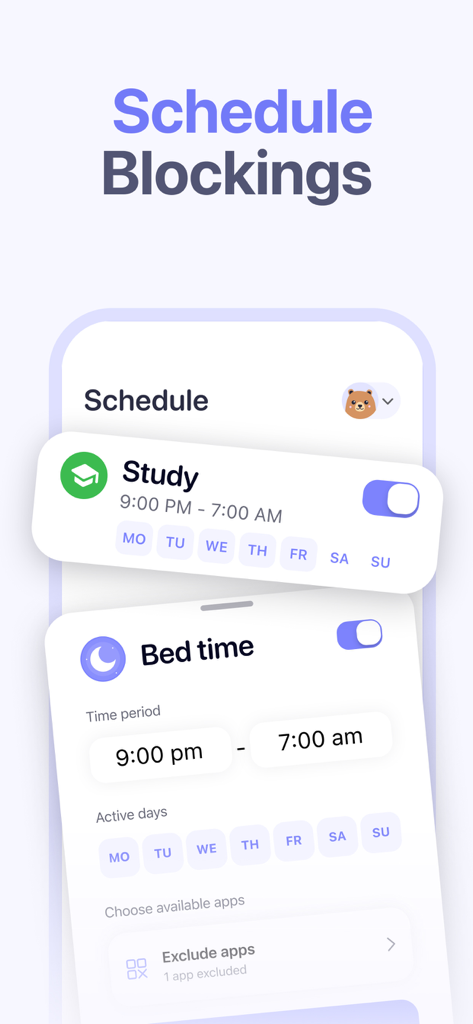
학습 시간 및 취침 시간을 위한 예약 차단 기능을 보여주는 Kidsee 앱의 인터페이스입니다.

학습 시간 및 취침 시간을 위한 예약 차단 기능을 보여주는 Kidsee 앱의 인터페이스입니다.

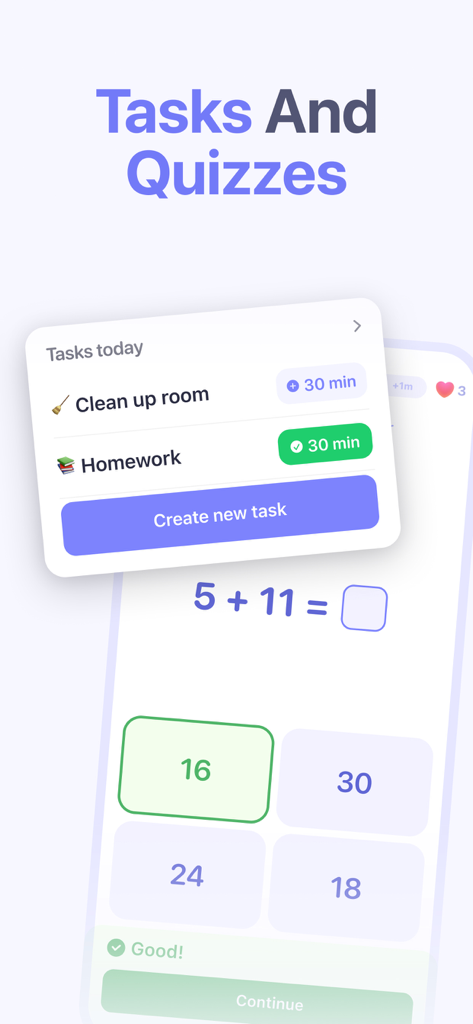
화면 시간 보상을 얻기 위한 일일 작업과 수학 퀴즈를 보여주는 Kidsee 앱 인터페이스입니다.

화면 시간 보상을 얻기 위한 일일 작업과 수학 퀴즈를 보여주는 Kidsee 앱 인터페이스입니다.

균형 잡힌 어린 시절을 위한 스마트한 경계

이 앱을 돋보이게 하는 도구, 208K+ 명의 사용자가 선택.

보상 기반 책임

집안일과 숙제를 보상으로 바꾸세요. 자녀가 작업을 완료하여 추가 화면 시간을 얻도록 하여, 무의미한 스크롤보다 근면의 가치를 가르치세요.

📍

실시간 마음의 평화

탐험할 자유를 주면서 정보를 얻으세요. 자녀가 학교나 친구 집에 가는 동안 안전한지 확인하기 위해 자녀의 실시간 위치와 경로 기록을 추적하세요.

화면 시간 다툼 끝내기

자동화된 제한으로 '나쁜 사람'이 되는 것을 멈추세요. 학교 또는 취침 시간을 위한 앱 없는 시간을 예약하고 자신의 기기에서 탭 한 번으로 방해가 되는 앱을 차단하세요.

전 세계 사용자들에게 사랑받는 앱

Trusted by 208K+ 명이 이 앱을 사랑합니다.

"

"마침내 화면 시간 다툼을 보상 시스템으로 바꾸는 앱이 나왔습니다! 제 8살짜리 아이가 지금은 마인크래프트 시간을 얻기 위해 집안일을 돕고 싶어합니다. 제 아이폰에서 두 아이의 일정을 모두 관리할 수 있다는 것이 제 일상의 정신 건강에 완전히 도움이 되었습니다."

Sarah Jenkins
"

"실시간 위치 추적은 아들이 학교에서 집으로 걸어오는 동안 제 마음의 평화를 많이 줍니다. 수업 시간에는 방해가 되는 앱을 차단하면서도 교육용 도구를 사용할 수 있도록 허용할 수 있다는 점이 마음에 듭니다. 안전과 디지털 독립의 완벽한 균형입니다."

David Thompson

리뷰 분석

사용자 리뷰 인사이트.

감정 점수

25%
부정적

요약

The app receives overwhelmingly negative feedback due to pervasive issues with its core functionality, such as unreliable screen time limits, inconsistent locking/unlocking mechanisms, and general operational failures. Many users express frustration over billing, citing unexpected charges, features locked behind paywalls, and the app not working even after payment, leading to a perceived poor value for money. Additional concerns include children easily bypassing controls, app instability, difficulties with initial setup, and inaccurate location tracking. While the app's parental control concept and responsive customer support are occasionally praised, these positive aspects are largely overshadowed by its significant technical problems.

주요 테마

Core Functionality Issues(20)
Subscription & Pricing(10)
Screen Time Management(9)
App Stability(6)
Child Bypass(4)
Monitoring Capabilities(2)
Customer Support(1)

앱 소개

에 대해 알아야 할 모든 것 Parental Control App - Kidsee.

설명

Kidsee is your trusted parental control assistant. It is an innovative app designed to keep your children safe and in control of their mobile device usage. A handy screen time tracker that helps parents see how much time their child spends playing games, in apps and on social media. Kidsee allows you to set time limits for your kids on various apps and games. Key features: - Monitoring Multiple Devices: Now you can track screen time and digital activity for not just one, but multiple children simultaneously. Manage all your children's devices from one parent phone by creating individual profiles for each child and setting personalized limits for each device. - Location Tracking: Monitor your child's real-time location and view their route history to ensure their safety. - Device Synchronization: Connect your child's devices to yours to access the information they need. Create and edit their profiles to customize settings for each child. - Set time limits: Define time limits for phone use by day of the week to keep a balance between fun and responsibilities. - Block apps: Block unwanted apps so your child can focus on school and other important tasks. - Usage Statistics: View detailed app usage statistics to understand your child's digital habits. Know which apps your child is using, at what time, and for how long. - Motivational Tasks: Create useful tasks for your child — for example, do homework, clean their room or help a younger sibling. For completing tasks, kids get extra screen time, which helps form responsible behavior and encourages good habits. - Push notifications: Receive notifications when usage time limits are reached to stay up to date with your child's activity. Kidsee is your trusted assistant in creating a safe and balanced digital world for kids! Installing Kidsee is an important step toward fostering responsible technology users. Download Kidsee and provide your children with a safe digital environment! Welcome to Kidsee! The app offers subscriptions - Payment for the subscription will be charged to your Apple ID account upon confirmation of purchase. - Subscriptions automatically renew unless auto-renewal is turned off at least 24 hours before the end of the current period. - Your account will be charged for renewal within 24 hours before the end of the current period, at the rate of the renewal. - You can manage subscriptions and turn off auto-renewal after purchase by going to the App Store account settings. - Subscriptions can be canceled at any time in your Apple ID settings. All prices include applicable local sales taxes. - If a trial period is offered, after the 3-day trial, the subscription will automatically renew at the regular rate unless canceled before the end of the 3-day trial period. - Any unused portion of the free trial period, if offered, will be forfeited when purchasing a subscription. If you have any technical issues, questions, or suggestions, you can always contact Kidsee support via email: support@kidsee.app Privacy Policy: https://www.kidsee.app/terms-and-conditions/privacy-policy Terms of Use: https://www.kidsee.app/terms-and-conditions/terms-of-use

최신 버전

15.3

크기

156.6 MB

출시일

2024년 11월 16일

오늘 화면 시간 다툼을 끝내세요

Kidsee를 사용하여 건강한 습관에 보상하고, 안전을 보장하고, 가족의 디지털 생활에 균형을 되찾는 200,000명 이상의 부모님과 함께하세요. 지금 3일 무료 체험을 시작하세요.

다운로드: App Store
FAQ

자주 묻는 질문

에 대해 알아야 할 모든 것 Parental Control App - Kidsee

Kidsee 앱은 무엇인가요?

Kidsee는 자녀의 안전을 지키기 위해 설계된 혁신적인 자녀 보호 앱입니다. 화면 시간 추적, 앱 차단, 위치 모니터링, 책임감 있는 디지털 습관 장려를 통해 모바일 기기 사용을 관리하는 데 도움을 줍니다.

Kidsee로 자녀의 위치를 추적할 수 있나요?

네, Kidsee는 실시간 위치 추적 기능을 제공합니다. 부모는 자녀의 현재 위치를 모니터링하고 앱 내에서 경로 기록을 직접 확인할 수 있어 안전을 보장합니다.

Kidsee는 부모가 화면 시간 제한을 설정하도록 허용하나요?

네, Kidsee는 부모가 다양한 앱과 게임에 대해 자녀의 일일 화면 시간 제한을 설정할 수 있도록 합니다. 이 기능을 통해 사용 경계를 정의하여 재미와 책임감의 균형을 맞출 수 있습니다.

Kidsee는 앱 사용량 관리에 어떻게 도움이 되나요?

Kidsee는 부모가 원치 않는 앱을 차단하여 자녀가 집중할 수 있도록 돕습니다. 또한 자녀가 어떤 앱을 언제 얼마나 사용하는지에 대한 자세한 사용 통계를 제공합니다.

Kidsee 앱은 여러 자녀의 기기를 모니터링할 수 있나요?

네, Kidsee는 여러 기기를 동시에 모니터링하는 것을 지원합니다. 부모는 각 자녀에 대한 개별 프로필을 생성하고 개인화된 제한을 통해 하나의 부모 휴대폰에서 모든 기기를 관리합니다.

Kidsee는 자녀를 위한 동기 부여 기능을 제공하나요?

네, Kidsee에는 '동기 부여 과제' 기능이 포함되어 있습니다. 자녀는 숙제나 청소와 같은 과제를 완료하면 추가 화면 시간을 얻어 책임감 있는 행동과 좋은 습관을 장려합니다.

Kidsee의 구독은 어떻게 작동하나요?

Kidsee는 구매 확인 시 결제가 Apple ID로 청구되는 구독 상품을 제공합니다. 구독은 기간 종료 24시간 전에 자동 갱신을 해제하지 않는 한 자동으로 갱신됩니다.

Kidsee 구독을 취소할 수 있나요?

네, 언제든지 Kidsee 구독을 취소할 수 있습니다. 구매 후 Apple ID 계정 설정에서 구독을 관리하고 자동 갱신을 해제할 수 있습니다.

Kidsee는 무료 평가판 기간을 제공하나요?

네, Kidsee는 3일 무료 평가판을 제공할 수 있습니다. 이 기간이 지나면 평가 기간이 끝나기 전에 취소하지 않는 한 자동으로 정기 요금으로 갱신됩니다.

Kidsee는 앱 사용에 대한 어떤 유형의 활동 보고서를 생성하나요?

Kidsee는 자세한 앱 사용 통계를 생성합니다. 이러한 보고서는 자녀가 어떤 앱을 언제 얼마나 사용하는지 보여주어 디지털 습관에 대한 통찰력을 제공합니다.

Kidsee는 성인용 콘텐츠 및 웹사이트를 차단할 수 있나요?

네, Kidsee는 부모가 성인 웹사이트를 차단하여 콘텐츠를 필터링할 수 있도록 합니다. 이 기능은 더 안전한 디지털 환경을 만드는 데 도움이 되며 자녀의 온라인 보호를 보장합니다.

Kidsee 지원팀에 어떻게 연락할 수 있나요?

기술적인 문제, 질문 또는 제안 사항은 이메일을 통해 Kidsee 지원팀에 문의할 수 있습니다. 전용 지원 이메일 주소는 support@kidsee.app입니다.

Kidsee는 앱 차단을 예약할 수 있나요?

네, Kidsee는 앱 차단 예약을 가능하게 합니다. 부모는 특정 앱이 제한되는 하루 또는 주의 특정 시간대를 정의할 수 있습니다.

부모는 Kidsee를 사용하여 인앱 구매를 차단할 수 있나요?

네, Kidsee는 인앱 구매 차단 옵션을 제공합니다. 이 기능을 통해 부모는 지출을 통제하고 자녀의 무단 거래를 방지할 수 있습니다.

Kidsee는 화면 시간 제한에 대해 부모에게 알림을 제공하나요?

네, Kidsee는 푸시 알림을 보냅니다. 부모는 자녀가 사용 시간 제한에 도달하면 알림을 받아 자녀의 활동에 대한 정보를 얻을 수 있습니다.