Power Barcode Scanner

Power Barcode Scanner

다운로드: App Store
Spark by MWM logo
로고: Power Barcode Scanner

Power Barcode Scanner: 비즈니스를 위한 전문 재고 및 배치 스캐닝

기기를 산업 등급 도구로 전환하세요. 고가의 하드웨어 없이 정밀하게 배치 스캔, 재고 관리 및 Excel로 내보내기.

다운로드: App Store

개발사

Irvinesoft Inc

카테고리

Utilities

다운로드

509K+

사용자 평점

4.8/5

총 평가 수

12K+

지원 언어

2

실제 효율성

이 인터페이스를 사용하는 509K+ 명의 사용자.

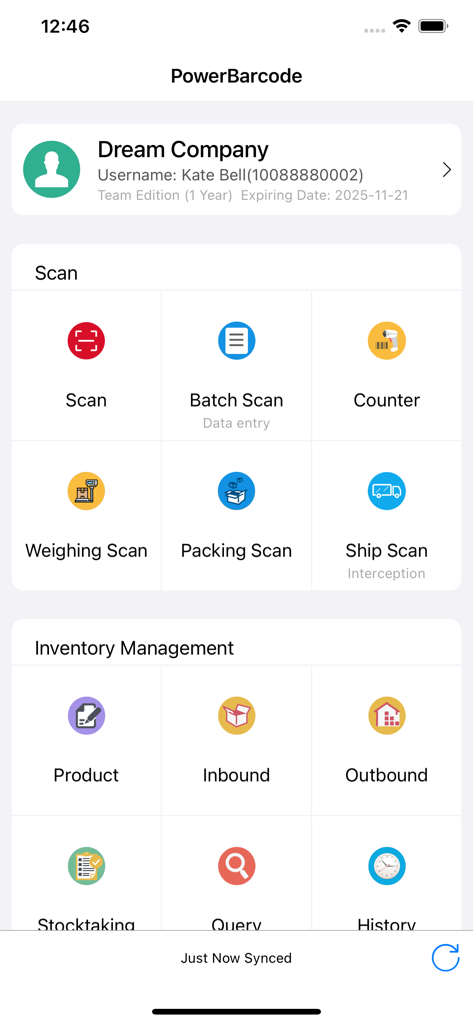
비즈니스를 위한 스캐닝 및 재고 관리 도구를 보여주는 Power Barcode Scanner 앱 대시보드

비즈니스를 위한 스캐닝 및 재고 관리 도구를 보여주는 Power Barcode Scanner 앱 대시보드

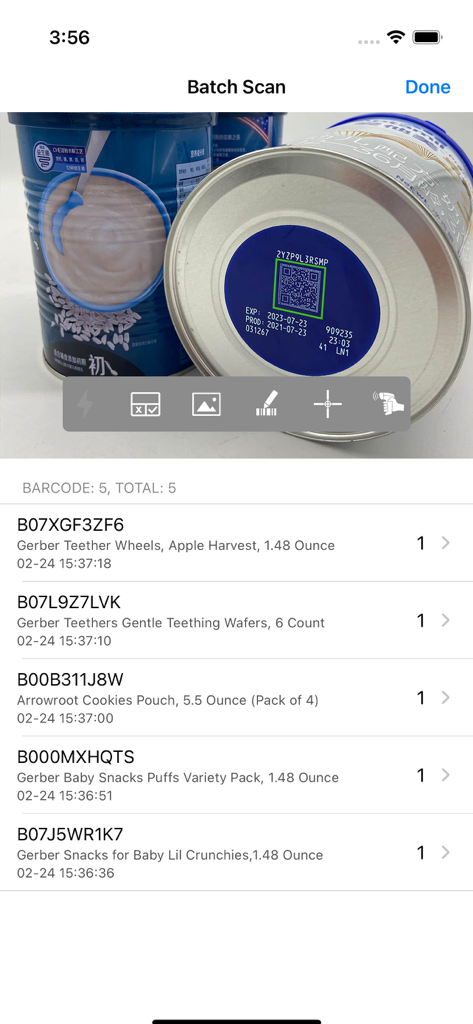
스캔된 유아용품 목록과 수량을 보여주는 배치 스캔 기능을 보여주는 Power Barcode Scanner 앱 인터페이스

스캔된 유아용품 목록과 수량을 보여주는 배치 스캔 기능을 보여주는 Power Barcode Scanner 앱 인터페이스

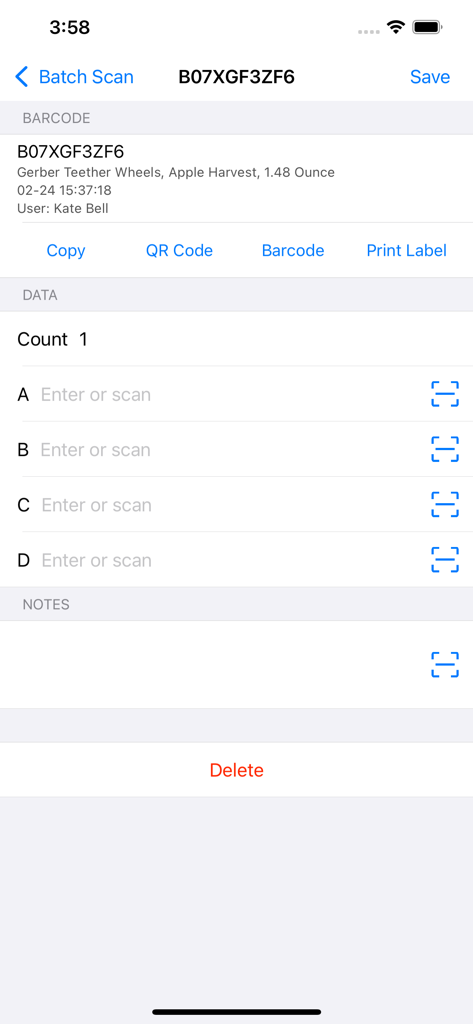
재고 관리를 위한 제품 세부 정보 및 데이터 입력 필드를 보여주는 Power Barcode Scanner 앱 스크린샷

재고 관리를 위한 제품 세부 정보 및 데이터 입력 필드를 보여주는 Power Barcode Scanner 앱 스크린샷

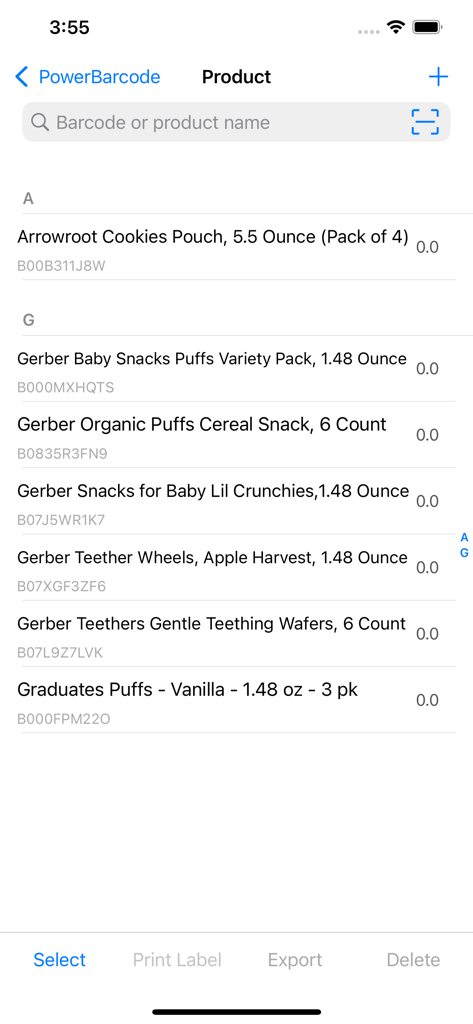
바코드 식별자와 관리 옵션이 있는 모바일 제품 재고 목록

바코드 식별자와 관리 옵션이 있는 모바일 제품 재고 목록

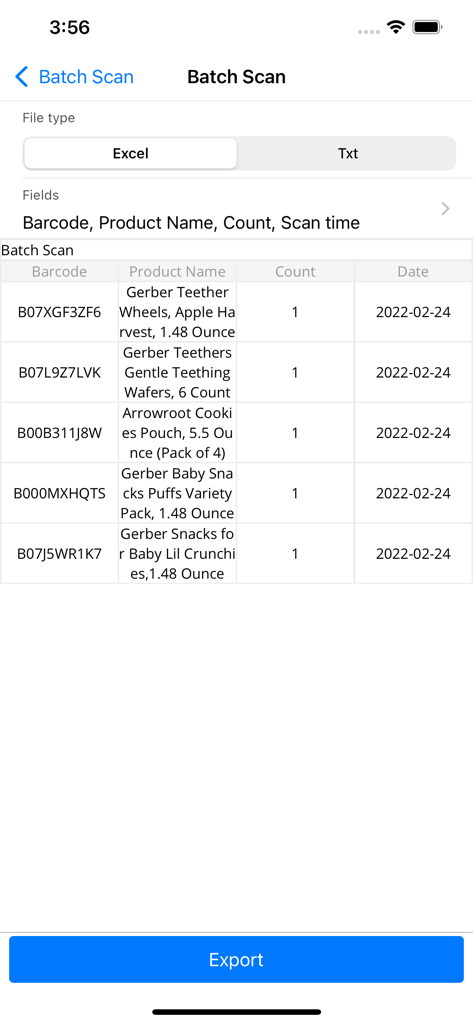
스캔된 제품 목록과 Excel 내보내기 옵션을 보여주는 Power Barcode Scanner 앱 배치 스캔 화면

스캔된 제품 목록과 Excel 내보내기 옵션을 보여주는 Power Barcode Scanner 앱 배치 스캔 화면

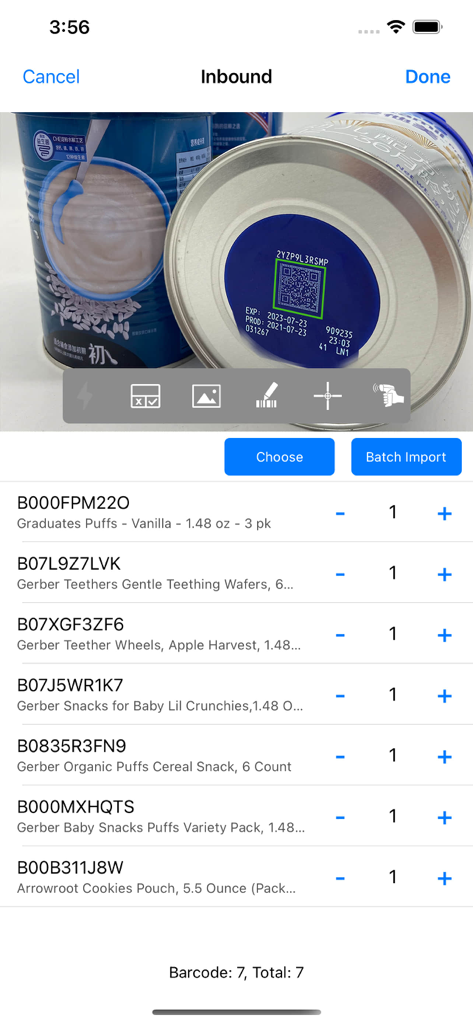
Power Barcode Scanner 앱에서 QR 코드 스캐닝 및 항목 목록과 함께 스캔된 유아용품 배치를 보여주는 입고 재고 화면

Power Barcode Scanner 앱에서 QR 코드 스캐닝 및 항목 목록과 함께 스캔된 유아용품 배치를 보여주는 입고 재고 화면

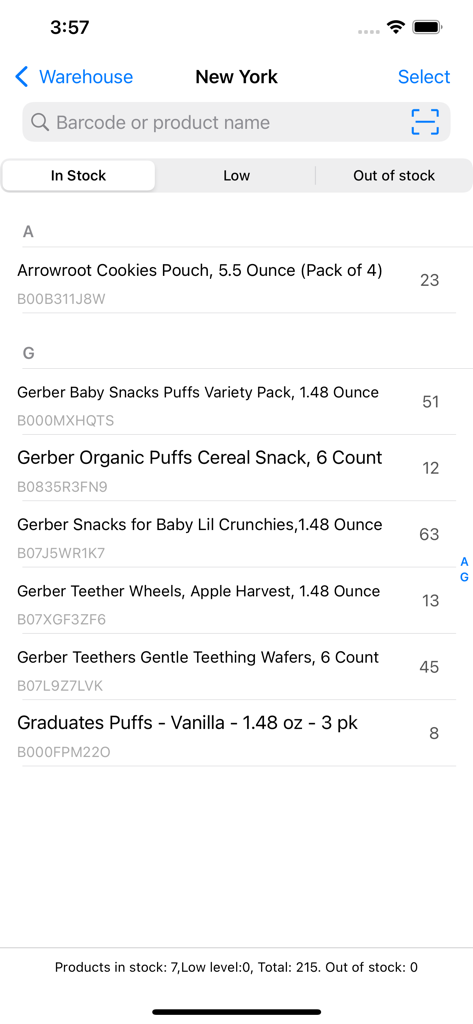
Power Barcode Scanner 앱에서 제품 이름, 수량 및 바코드 ID를 보여주는 모바일 재고 관리 화면

Power Barcode Scanner 앱에서 제품 이름, 수량 및 바코드 ID를 보여주는 모바일 재고 관리 화면

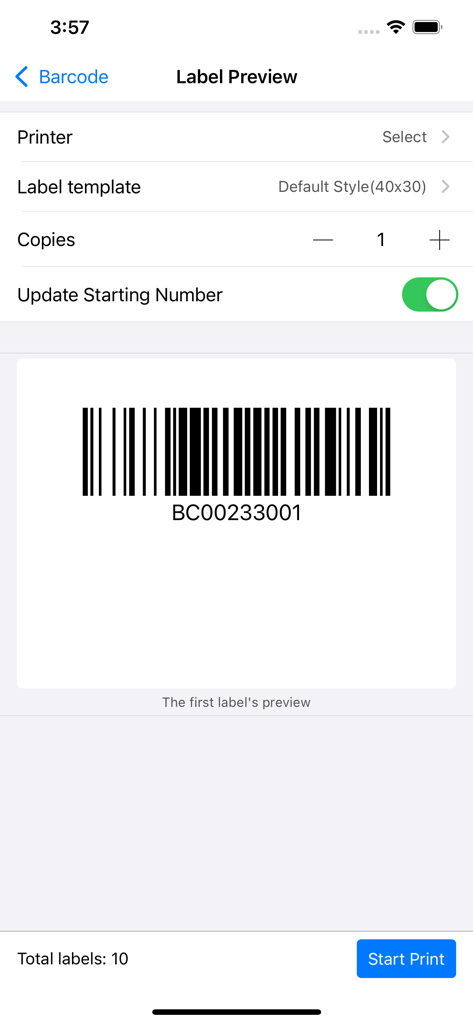
비즈니스 재고를 위한 생성된 바코드와 인쇄 설정을 보여주는 라벨 미리보기 화면

비즈니스 재고를 위한 생성된 바코드와 인쇄 설정을 보여주는 라벨 미리보기 화면

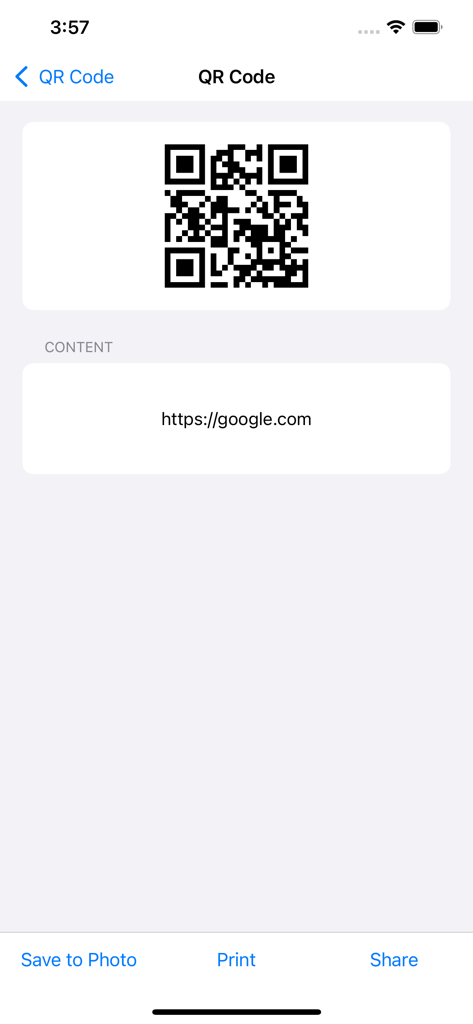
저장, 인쇄 및 공유 옵션이 있는 웹 링크에 대한 QR 코드 생성을 보여주는 Power Barcode Scanner 앱 인터페이스

저장, 인쇄 및 공유 옵션이 있는 웹 링크에 대한 QR 코드 생성을 보여주는 Power Barcode Scanner 앱 인터페이스

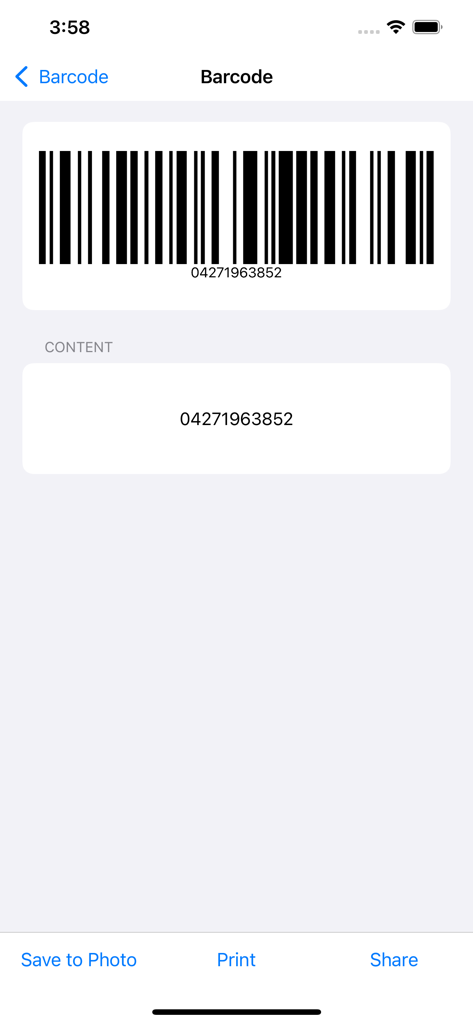
스캔된 바코드와 해당 숫자 내용 및 저장, 인쇄, 공유를 위한 액션 버튼을 표시하는 화면

스캔된 바코드와 해당 숫자 내용 및 저장, 인쇄, 공유를 위한 액션 버튼을 표시하는 화면

전문 스캐닝으로 비즈니스를 확장하세요

이 앱을 돋보이게 하는 도구, 509K+ 명의 사용자가 선택.

고속 배치 스캐닝

산업 등급 속도로 단일 세션에서 수백 개의 항목을 처리하세요. 고급 십자선은 혼잡한 창고에서도 항상 올바른 코드를 잡도록 보장합니다.

📊

원활한 Excel 및 CSV 내보내기

수동 오류를 제거하고 작업 시간을 절약하세요. 스캔한 데이터와 사용자 지정 제품 세부 정보를 전문 스프레드시트로 직접 내보내 즉시 재고 보고를 받으세요.

🖨️

A4 스티커 및 라벨 인쇄

기존 사무실 프린터를 사용하여 바코드 스티커를 생성하고 인쇄하세요. 창고를 완벽하게 정리하면서 전문 라벨 메이커의 높은 비용을 피하세요.

전 세계 사용자들에게 사랑받는 앱

Trusted by 509K+ 명이 이 앱을 사랑합니다.

"

"Power Barcode Scanner는 Amazon FBA 재고를 처리하는 방식을 완전히 바꿔 놓았습니다. 배치 스캐닝은 번개처럼 빠르고 모든 것을 바로 Excel로 내보낼 수 있어 매주 최소 5시간을 절약해 줍니다. 부업에 대한 최고의 투자입니다."

Jessica Miller
"

"기업 가격표 없이 전문적인 재고 솔루션이 필요했습니다. 십자선 정밀도는 밀집된 창고 랙에 완벽하며 A4 스티커 인쇄 기능은 훌륭한 비용 절감 효과를 제공합니다. iPad를 고급 산업 도구로 바꿔놓았습니다."

David Rodriguez

앱 소개

에 대해 알아야 할 모든 것 Power Barcode Scanner.

설명

Power Barcode is a super powerful barcode scanner and QR code scanner. The batch scanning feature helps you continuously scan a batch of barcodes/ QR codes and export them. The advanced Crosshair in screen center helps you identify the right barcode/QR code during scanning. The copy/export feature helps you export scanned barcode as text or excel file. Also, it is a barcode generator and QR code generator. Save generated barcodes and QR code images to Photos or export for print. The data entry feature helps you input custom information for a scanned barcode, such as quantity, product properties, customer name, tracking code, part-numbers. The inventory management application helps you do inventory management, warehouse management, assets management. The sticker print features helps you print barcodes and QR codes stickers with A4 paper printer. No need to buy a sticker printer, saves a lot :-). There are more features in this barcode solution app. Try it and you will love it. [Supported code type] • QR code • Code 128 • EAN-8 • EAN-13 • UPC-E • Aztec • PDF 417 • ITF-14 • Data Matrix • Interleaved 2 of 5 • Code 93 • Code 39 Power Barcode makes iPhone/iPad into a smart mobile scanner, which can be used to scan a variety of applications anytime, anywhere. People from different areas are use Power Barcode to improve their work efficiency every day. * Shops and supermarkets are using it to manage purchases, sales and inventory. * Production companies are using it to manage production, manage inventory, product traceability, and logistics tracking. * Agricultural food companies are using it to manage the traceability of green products. * The courier is using it to manage goods distribution and inventory management. * Micro-business entrepreneurs are using it to manage orders and shipments. * Accountant is using it to batch scan and register invoices and reimbursement forms. We are proud of serving so many people every day. [Contact us] Numob Technologies Email: support@numob.com [Subscriptions & Price] You can use this App for free. We also provide subscription Edition to offer advanced features, such as cloud data backup, team collaboration, enterprise custom apps. Payment will be charged to iTunes Account at confirmation of purchase. Subscription automatically renews unless auto-renew is turned off at least 24-hours before the end of the current period. Account will be charged for renewal within 24-hours prior to the end of the current period, and identify the cost of the renewal. Subscriptions may be managed by the user and auto-renewal may be turned off by going to the user's Account Settings after purchase. Any unused portion of a free trial period, if offered, will be forfeited when the user purchases a subscription to that publication, where applicable. If you turn off the auto-renew, you can still keep all your data on the device. [Terms & Policy] Terms of use: https://www.numob.com/#/terms-of-use/ Privacy policy: https://www.numob.com/#/privacy-policy/

최신 버전

4.1.5

크기

56.4 MB

출시일

2012년 8월 13일

고가의 하드웨어는 이제 그만—전문가처럼 스캔 시작

휴대폰을 고속 재고 도구로 전환하세요. 500,000개 이상의 비즈니스가 배치 스캔, Excel 내보내기, 4.8점 만점의 정확도로 재고 관리를 하고 있습니다.

다운로드: App Store