PureLibro: ebook reader

PureLibro: ebook reader

다운로드: App Store
Spark by MWM logo
로고: PureLibro: ebook reader

PureLibro: 책과 만화를 위한 최고의 올인원 리더

모든 형식을 지원하고, AI 기반 이미지 향상 기능과 개인 디지털 라이브러리를 위한 완벽한 개인 정보 보호로 폐쇄형 생태계에서 벗어나세요.

개발사

添欢 谢

카테고리

Books

다운로드

276K+

사용자 평점

4.8/5

총 평가 수

17K+

지원 언어

4

귀하의 라이브러리, 개선되다

이 인터페이스를 사용하는 276K+ 명의 사용자.

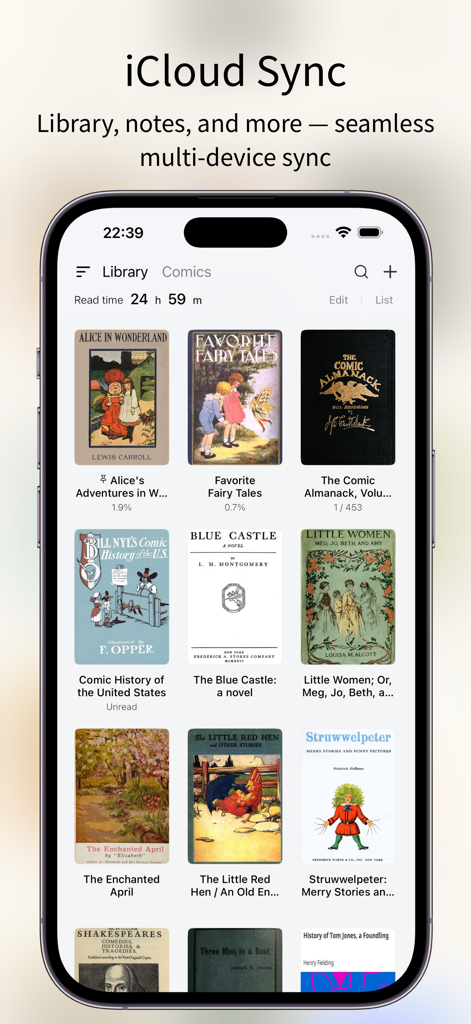
PureLibro 앱 인터페이스, iCloud 동기화 기능 및 디지털 도서 라이브러리 표시

PureLibro 앱 인터페이스, iCloud 동기화 기능 및 디지털 도서 라이브러리 표시

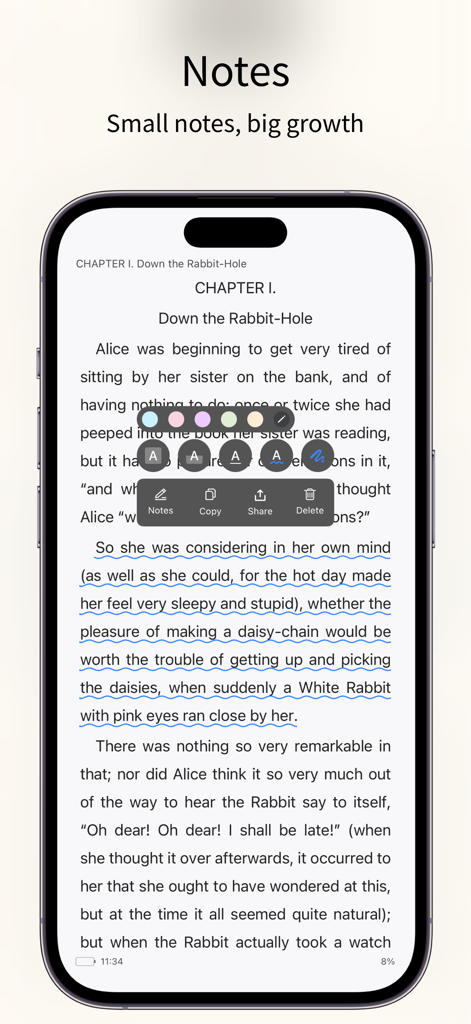
PureLibro 앱 인터페이스, 전자책 페이지에서 텍스트 주석 및 메모 도구 강조 표시

PureLibro 앱 인터페이스, 전자책 페이지에서 텍스트 주석 및 메모 도구 강조 표시

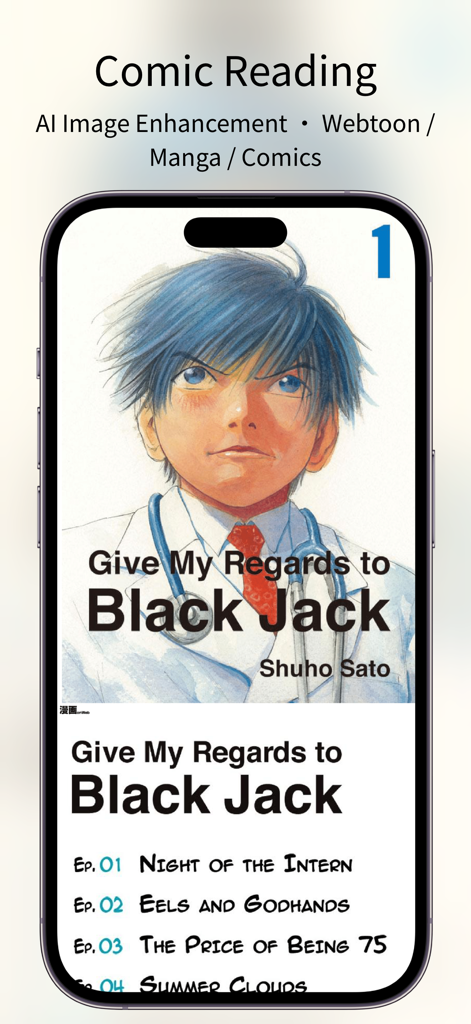
스마트폰에서 만화 읽기 및 AI 이미지 향상 기능이 있는 PureLibro 앱 인터페이스 표시

스마트폰에서 만화 읽기 및 AI 이미지 향상 기능이 있는 PureLibro 앱 인터페이스 표시

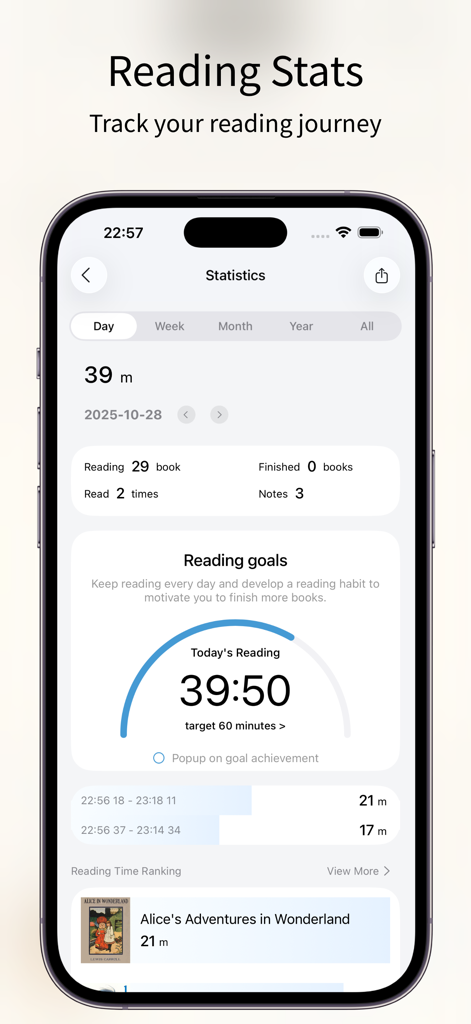
PureLibro 전자책 리더 앱 통계 화면, 독서 진행률 목표 및 기록 표시

PureLibro 전자책 리더 앱 통계 화면, 독서 진행률 목표 및 기록 표시

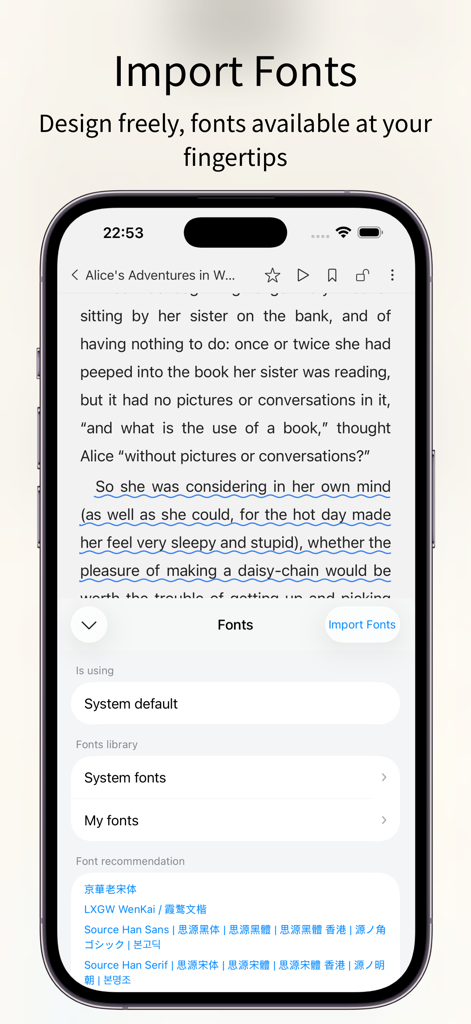
PureLibro 전자책 리더 앱 인터페이스, iPhone에서 사용자 정의 글꼴 가져오기 및 선택 설정 표시

PureLibro 전자책 리더 앱 인터페이스, iPhone에서 사용자 정의 글꼴 가져오기 및 선택 설정 표시

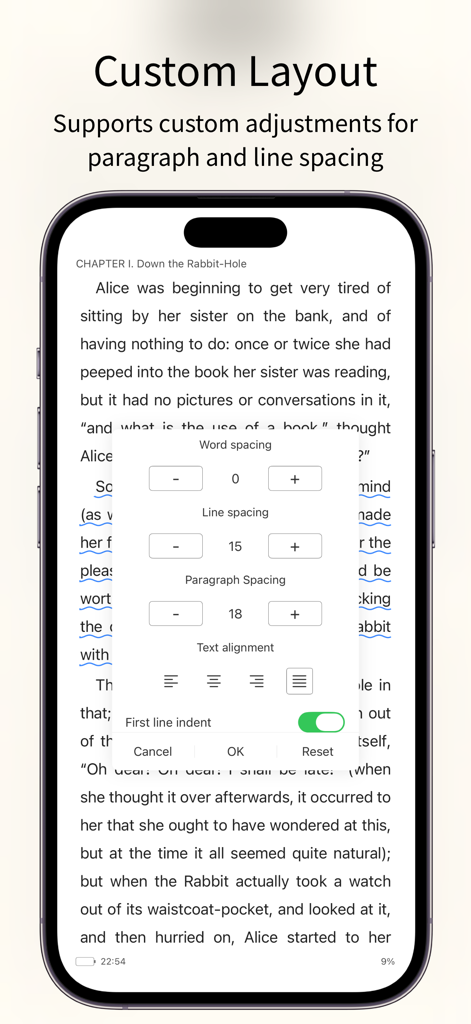
PureLibro 전자책 리더, 단어 간격, 줄 간격 및 단락 정렬에 대한 사용자 정의 레이아웃 설정 표시

PureLibro 전자책 리더, 단어 간격, 줄 간격 및 단락 정렬에 대한 사용자 정의 레이아웃 설정 표시

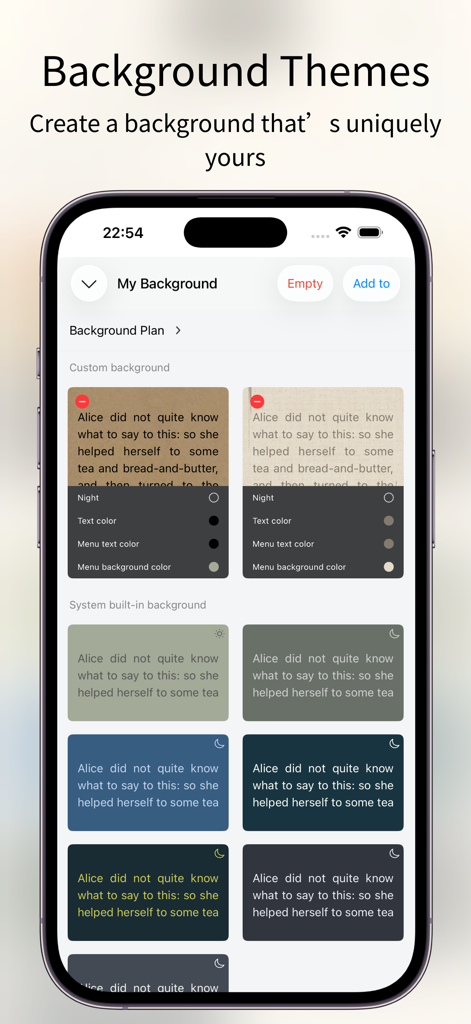
PureLibro 전자책 리더에서 사용자 정의 가능한 독서 배경 테마 및 색상 옵션

PureLibro 전자책 리더에서 사용자 정의 가능한 독서 배경 테마 및 색상 옵션

디지털 라이브러리 마스터하기

이 앱을 돋보이게 하는 도구, 276K+ 명의 사용자가 선택.

📚

보편적인 형식 지원

폐쇄형 생태계에서 벗어나세요. 파일을 다시 변환할 필요 없이 EPUB, AZW3, CBR, 심지어 ZIP/RAR 파일까지 원활하게 읽으세요.

🪄

AI 기반 만화

통합된 Waifu2x 및 Anime4K AI 업스케일링으로 만화에 생동감을 불어넣어 고해상도 디스플레이에서도 선명한 비주얼을 보장합니다.

🛡️

설계 기반 개인 정보 보호

귀하의 라이브러리는 귀하의 사업입니다. Face ID, 제스처 잠금 및 숨김 폴더로 민감한 컬렉션을 보호하여 독서 습관을 비공개로 유지하세요.

전 세계 사용자들에게 사랑받는 앱

Trusted by 276K+ 명이 이 앱을 사랑합니다.

"

"CBR 및 CBZ 지원은 완벽하지만, 진정한 마법은 AI 이미지 향상 기능입니다. iPad Retina 디스플레이에서 제 만화 컬렉션에 놀라운 선명도를 더해줍니다. 앱 스토어 최고의 만화 리더입니다."

Leo Marshall
"

"PureLibro는 DRM 없는 라이브러리를 관리하는 데 꼭 필요한 것이었습니다. 사용자 정의 글꼴부터 WebDAV 지원까지, 사용자 정의 수준이 비교할 수 없습니다. 또한, 개인 컬렉션을 위한 Face ID 보호 기능은 저에게 완전한 마음의 평화를 줍니다."

Elena Rodriguez

앱 소개

에 대해 알아야 할 모든 것 PureLibro: ebook reader.

설명

Feature Highlights – All for a Better Reading Experience 1. Supports a wide range of popular reading formats: TXT, EPUB, MOBI, AZW3, AZW4, AZW, CBZ, CBR, PDF, ZIP, RAR (DRM-free files only). 2. Comic reader: Supports ZIP, RAR, CBZ, and CBR comic formats. EPUB and MOBI files can also be switched to comic mode with one tap for an immersive image-based reading experience. 3. AI-powered image enhancement (supports Waifu2x / Anime4K, available in comic mode only). 4. iCloud sync: Automatically keeps your reading data consistent across devices. 5. Data backup: One-tap backup to cloud drives or other storage options—your reading data is always safe. 6. TXT file editing support. 7. Multiple import methods: WebDAV, cloud drives, Wi-Fi transfer, iCloud, and more. 8. Auto reading: Hands-free reading for a more relaxed experience. 9. Full customization: Adjust line spacing, paragraph layout, background images, and font colors to create your own reading style. 10. Eye-care interface: Night mode, page curl, slide, and scroll reading modes. Supports Simplified and Traditional Chinese. 11. Privacy protection: Password, gesture, and Face ID unlock supported. Books can be encrypted or hidden for extra privacy. 12. Reading statistics: Track reading time, frequency, and progress to stay motivated and achieve your reading goals. 13. Flexible library management: Custom groups, book renaming, and sorting for a clean and organized library. 14. Custom covers: Freely customize book covers (including TXT files) to personalize your library. 15. Automatic chapter detection: Instantly recognize chapters in TXT novels for a smoother reading experience. 16. Font support: Choose from system fonts or import your own custom fonts. 17. Text-to-speech support: System narration and Alibaba Cloud TTS with multiple voice options available. [Professional Version] Professional version benefits: After opening the professional version, you can use all professional advanced features during the service period and exempt from all advertising. Continuous monthly (one month), continuous quarterly (3 months), and continuous annual (one year) are automatic renewal services. The above product prices are based on actual prices. The price of purchasing the above products will be charged in your local currency according to the current exchange rate defined by iTunes, and payment will be deducted from the iTunes account when confirming the purchase. [Continuous monthly, quarterly, and annual services] If you subscribe to the continuous monthly, quarterly, or annual service, it is deemed that you authorize Window Reading to deduct the professional version service fee for the next billing cycle from your iTunes account (referred to as "account") when your professional version service subscription is about to expire. The deduction time is within 24 hours before the billing cycle. If the deduction fails due to insufficient balance in the account, Window Reading has the right to suspend or terminate your professional version service without prior notice. Regarding canceling the auto-renewal service that has been opened, on iOS devices, go to "Settings" → "iTunes Store and App Store" → select "Apple ID" → click "View Apple ID" → click "Subscription" on the account settings page → cancel subscription. Privacy policy: https://gitee.com/coder_to/luck/blob/master/App/Privacy_en.md Service terms and automatic renewal terms: https://gitee.com/coder_to/luck/blob/master/App/serviceForMembers_en.md Icon Design Studying icons created by Freepik - Flaticon

최신 버전

3.3.2

크기

39.3 MB

출시일

2021년 1월 15일

궁극의 디지털 라이브러리를 구축할 준비가 되셨나요?

오늘 276,000명 이상의 파워 독자들과 함께하세요. iOS에서 가장 개인적이고 사용자 정의 가능한 리더로 전자책, 만화, 문서를 완벽하게 제어하세요.

다운로드: App Store
FAQ

자주 묻는 질문

에 대해 알아야 할 모든 것 PureLibro: ebook reader

PureLibro는 어떤 독서 형식을 지원하나요?

PureLibro는 TXT, EPUB, MOBI, AZW3, AZW4, AZW, CBZ, CBR, PDF, ZIP, RAR(DRM 없는 파일만 해당) 등 다양한 독서 요구 사항을 지원합니다.

PureLibro는 만화 독서 기능을 제공하나요?

네, PureLibro는 ZIP, RAR, CBZ, CBR 형식을 지원하는 만화 리더입니다. 또한 PDF, EPUB, MOBI 파일을 한 번의 탭으로 만화 모드로 전환할 수 있습니다.

PureLibro는 장치 간 독서 데이터를 어떻게 동기화하나요?

PureLibro는 iCloud 동기화를 사용하여 모든 장치에서 독서 라이브러리, 메모 및 기타 데이터를 일관되고 원활하게 동기화 상태로 유지합니다.

PureLibro에서 독서 인터페이스를 사용자 지정할 수 있나요?

네, PureLibro는 완벽한 사용자 지정을 제공합니다. 사용자는 줄 간격, 단락 레이아웃, 배경 이미지, 글꼴 색상을 조정하고 야간 모드와 같은 다양한 눈 보호 모드 중에서 선택할 수 있습니다.

PureLibro는 사용자 개인 정보를 어떻게 보호하나요?

PureLibro는 개인 정보 보호를 최우선으로 합니다. 암호, 제스처 및 Face ID 잠금 해제를 지원하며, 사용자가 추가 기밀 유지를 위해 책을 암호화하거나 숨길 수 있습니다.

PureLibro Professional 버전의 장점은 무엇인가요?

PureLibro Professional 버전은 서비스 기간 동안 모든 고급 기능에 액세스할 수 있으며 모든 광고를 제거하여 독서 경험을 향상시킵니다.

PureLibro Professional 버전의 자동 갱신을 취소하는 방법은 무엇인가요?

iOS에서는 계정 페이지에서 "설정" → "iTunes Store 및 App Store" → "Apple ID" → "Apple ID 보기" → "구독"으로 이동한 다음 구독을 취소하십시오.

PureLibro는 텍스트 음성 변환 기능을 제공하나요?

네, PureLibro는 텍스트 음성 변환을 지원합니다. 여러 음성 옵션으로 시스템 내레이션 및 Alibaba Cloud TTS를 제공하여 청각적인 독서 경험을 제공합니다.

PureLibro는 독서 진행 상황 및 통계를 추적하나요?

네, PureLibro는 독서 통계를 추적합니다. 독서 시간, 빈도 및 진행 상황을 모니터링하여 사용자가 동기를 부여받고 독서 목표를 달성하도록 돕습니다.

PureLibro에 책을 가져오는 방법은 무엇인가요?

PureLibro는 여러 가져오기 방법을 제공합니다. WebDAV, 다양한 클라우드 드라이브, Wi-Fi 전송 및 iCloud가 포함되어 유연한 콘텐츠 획득을 보장합니다.

PureLibro에 사용자 지정 글꼴을 추가할 수 있나요?

네, PureLibro는 사용자 지정 글꼴을 지원합니다. 시스템 글꼴 중에서 선택하거나 사용자 지정 글꼴을 가져와 독서 경험을 개인화할 수 있습니다.

PureLibro에는 눈 보호 독서 모드가 있나요?

네, PureLibro에는 눈 보호 기능이 포함된 인터페이스가 있습니다. 편안한 독서를 위해 야간 모드, 페이지 넘김, 슬라이드 및 스크롤 독서 모드가 포함되어 있습니다.