Send fax with WiseFax

Send fax with WiseFax

다운로드: App Store다운로드: Google Play
Spark by MWM logo
로고: Send fax with WiseFax

WiseFax로 팩스 보내기: 휴대폰에서 구독 없이 팩스 보내는 방법

사용하지도 않는 월별 요금제에 돈을 낭비하지 마세요. 투명한 종량제 요금으로 240개 이상의 국가에 계약서, 의료 양식, 법률 문서를 안전하게 스캔하여 보내세요.

다운로드: App Store

개발사

VANAIA LLC

카테고리

Business

다운로드

8K+

사용자 평점

5.0/5

총 평가 수

0

지원 언어

2

손끝에서 팩스 보내기

이 인터페이스를 사용하는 8K+ 명의 사용자.

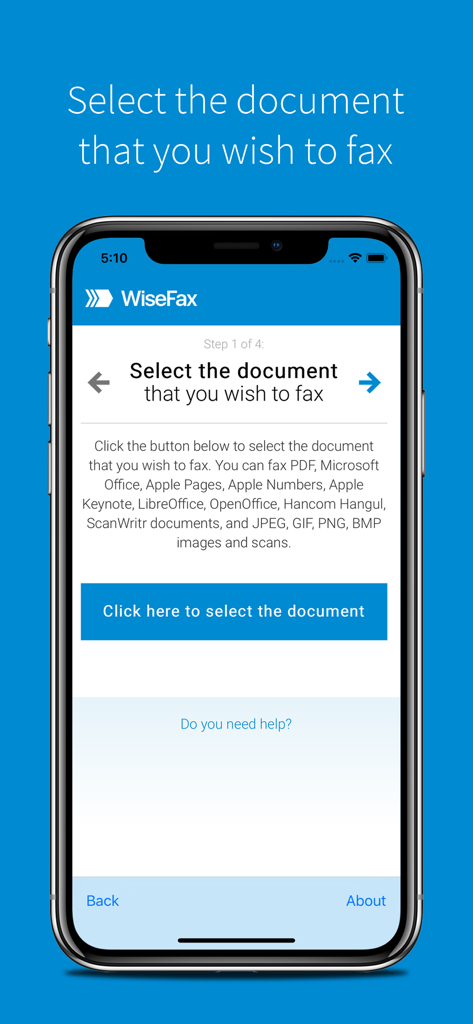
팩스 보낼 문서를 선택하는 첫 단계를 보여주는 WiseFax 모바일 앱 인터페이스

팩스 보낼 문서를 선택하는 첫 단계를 보여주는 WiseFax 모바일 앱 인터페이스

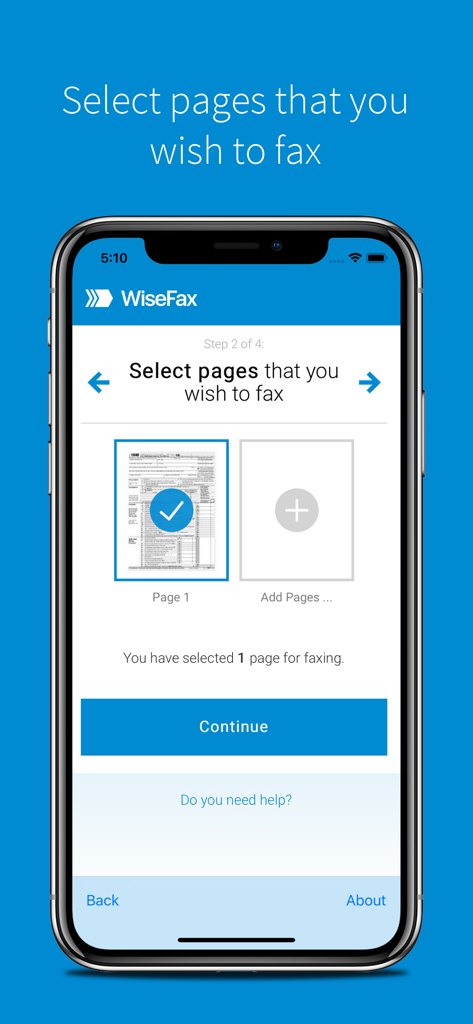
팩스 보낼 문서 페이지 선택을 보여주는 WiseFax 앱 인터페이스

팩스 보낼 문서 페이지 선택을 보여주는 WiseFax 앱 인터페이스

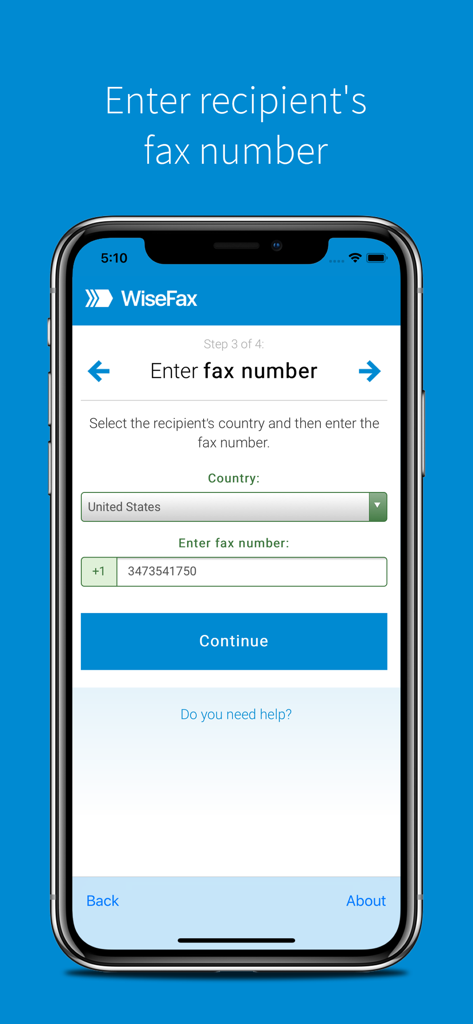
수신자의 국가와 팩스 번호를 입력하는 단계를 보여주는 WiseFax 모바일 앱 화면

수신자의 국가와 팩스 번호를 입력하는 단계를 보여주는 WiseFax 모바일 앱 화면

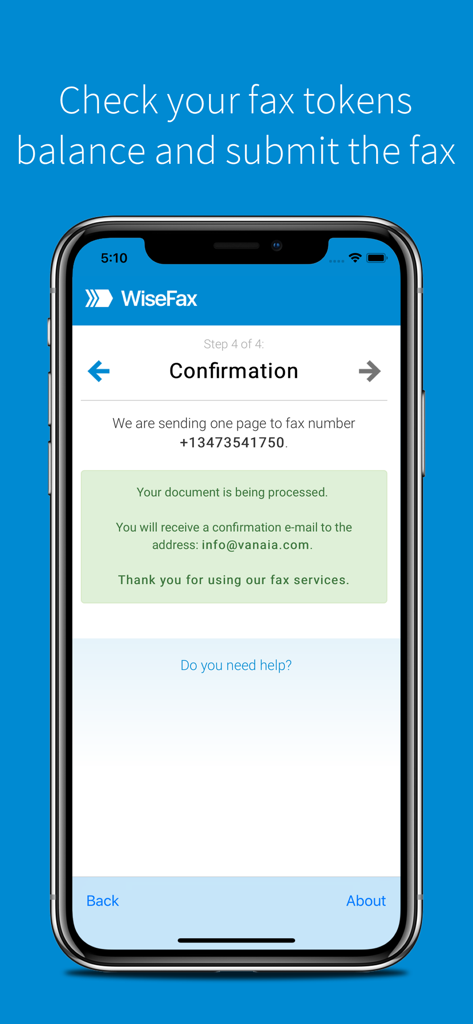
수신자 번호 및 이메일 확인 세부 정보와 함께 팩스 전송 성공을 보여주는 WiseFax 앱 확인 화면

수신자 번호 및 이메일 확인 세부 정보와 함께 팩스 전송 성공을 보여주는 WiseFax 앱 확인 화면

더 스마트하게, 더 쉽게 팩스 보내기

이 앱을 돋보이게 하는 도구, 8K+ 명의 사용자가 선택.

💸

구독은 전혀 없습니다

구독 피로를 없애세요. 당사의 투명한 종량제 모델은 실제로 보내는 페이지에 대해서만 비용을 지불한다는 것을 의미합니다.

📸

전문적인 스캔 품질

카메라를 사용하여 실제 문서를 선명한 팩스로 변환하세요. 당사의 AI는 가장자리를 감지하고 가독성을 자동으로 향상시킵니다.

즉시 배송 증명

도착했는지 추측하지 마세요. 팩스가 성공적으로 전송되는 순간 상세한 이메일 확인서와 디지털 사본을 받으세요.

전 세계 사용자들에게 사랑받는 앱

Trusted by 8K+ 명이 이 앱을 사랑합니다.

"

"법률 계약 때문에 일년에 한두 번만 팩스를 보내야 하는데, 다른 앱들은 모두 월별 구독을 강요해서 정말 지쳤었어요. WiseFax는 정말 구세주 같아요. 필요한 만큼만 비용을 지불했고, 문서 스캔 품질은 완벽했고, 즉시 확인 이메일을 받았어요. 정말 번거롭지 않아요."

사라 J., 프리랜서 디자이너
"

"실물 팩스기를 찾아다니지 않아도 보험 서류를 처리하는 것은 충분히 스트레스 받는 일입니다. 저는 WiseFax를 사용하여 아이패드에서 12페이지를 바로 스캔하여 보냈어요. 가장자리 감지 기능 덕분에 제 사진이 전문가가 스캔한 것처럼 보였고, '사용한 만큼 지불' 모델이 제가 찾던 바로 그거였습니다."

마이클 R., 주택 소유주

앱 소개

에 대해 알아야 할 모든 것 Send fax with WiseFax.

설명

Send fax online quickly and easily without subscription with WiseFax. Perfect efax solution! Send fax with WiseFax quickly and easily! You only need internet connection on your iPhone or iPad and send fax in four simple steps. Just add WiseFax app on your iPhone or iPad which will allow you to easy select documents you want to send to fax. Pay as you go, with no monthly or yearly subscription and send fax anywhere in the world. WiseFax supports numerous document and file formats such as Apple Pages, Apple Numbers and Apple Keynote documents and spreadsheets, PDF documents, Microsoft Office, OpenOffice and LibreOffice documents and spreadsheets, Hancom Hangul documents, ScanWritr documents, and JPEG, GIF, PNG, BMP images. You can also take a picture or scan a document and import it into WiseFax and send it to fax. When doing so WiseFax efficiently detects edges of your document using advanced edge detection algorithm and makes picture clearer with picture enhancement algorithm. This makes scanning easier and fax more readable. You can easily select which pages you want to fax. Displayed preview of the pages will look the same as they will come out on fax at recipient side. Type fax number and wait for response. Regardless if it was successful or no, you will get an email notification and in case send fax will be successful also full document copy. Send fax with WiseFax as simple as that. Try it, you’ll like it. Four easy steps of how to send fax with WiseFax are: 1. Upload your existing document from your mobile device. 2. Click and select pages that you want to fax. 3. Select among 240 countries where you want to send your fax to and type recipient's fax number. 4. Authenticate with your existing Google, Facebook, Windows Live account or create a new Vanaia account. Buy fax token, if you already didn’t do so, and send fax. Wait for fax status confirmation which you will receive to your e-mail.

최신 버전

2.3.1

크기

12.4 MB

출시일

2018년 3월 7일

지금 팩스를 보내세요 – 구독 불필요

사무용품점을 방문할 필요가 없는 수천 명의 전문가들과 함께하세요. 보내는 만큼만 지불하고, iPhone 또는 iPad에서 모든 문서에 대한 즉각적인 확인을 받으세요.

다운로드: App Store다운로드: Google Play