Yoink - Improved Drag and Drop

Yoink - Improved Drag and Drop

다운로드: App Store
Spark by MWM logo
로고: Yoink - Improved Drag and Drop

Yoink - iOS용 전문 드래그 앤 드롭 선반

멀티태스킹의 불편함을 없애세요. iPad와 iPhone에서 데스크톱급 워크플로우를 요구하는 고급 사용자를 위해 설계된 중앙 보관 영역에 파일, 이미지 및 스니펫을 수집하세요.

개발사

Matthias Gansrigler

카테고리

Productivity

다운로드

363K+

사용자 평점

4.7/5

총 평가 수

4K+

지원 언어

5

한눈에 보는 효율성

이 인터페이스를 사용하는 363K+ 명의 사용자.

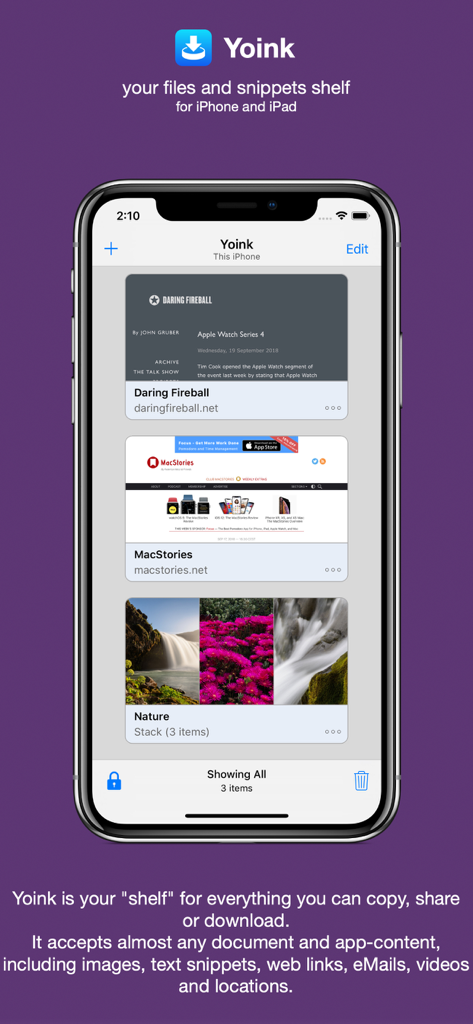
iPhone에서 Yoink 앱 인터페이스가 생산성 선반에 저장된 웹 링크와 자연 이미지 스택을 표시하고 있습니다.

iPhone에서 Yoink 앱 인터페이스가 생산성 선반에 저장된 웹 링크와 자연 이미지 스택을 표시하고 있습니다.

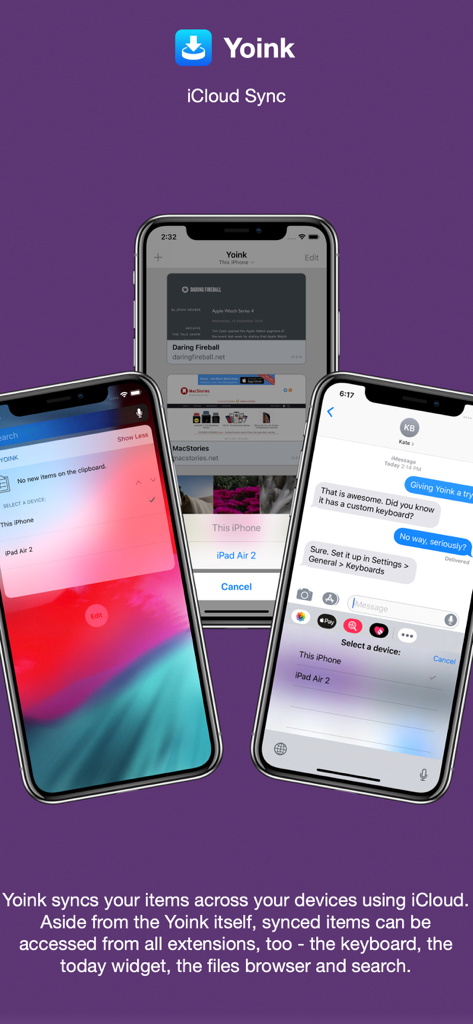
Yoink 앱이 위젯 및 맞춤형 키보드 통합을 포함하여 iPhone 화면 전반에 걸친 iCloud 동기화를 보여줍니다.

Yoink 앱이 위젯 및 맞춤형 키보드 통합을 포함하여 iPhone 화면 전반에 걸친 iCloud 동기화를 보여줍니다.

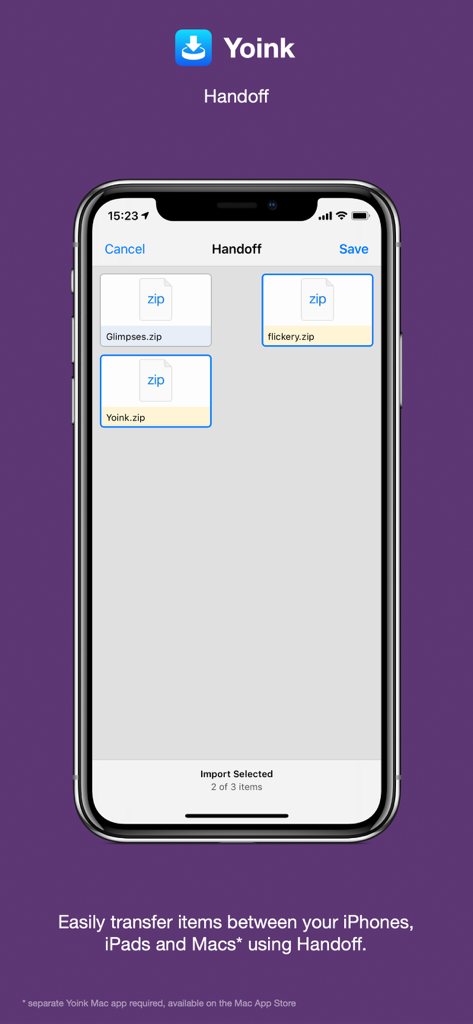
Yoink 앱 인터페이스가 Apple 기기 간에 zip 파일을 전송하는 Handoff 기능을 시연합니다.

Yoink 앱 인터페이스가 Apple 기기 간에 zip 파일을 전송하는 Handoff 기능을 시연합니다.

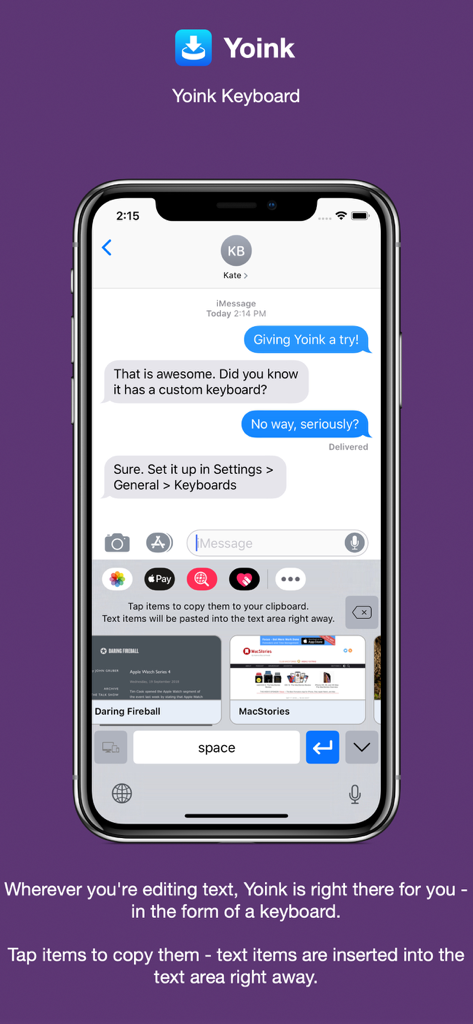
메시지에 빠르게 삽입할 수 있도록 저장된 텍스트 및 웹 스니펫을 보여주는 iPhone의 Yoink 맞춤형 키보드.

메시지에 빠르게 삽입할 수 있도록 저장된 텍스트 및 웹 스니펫을 보여주는 iPhone의 Yoink 맞춤형 키보드.

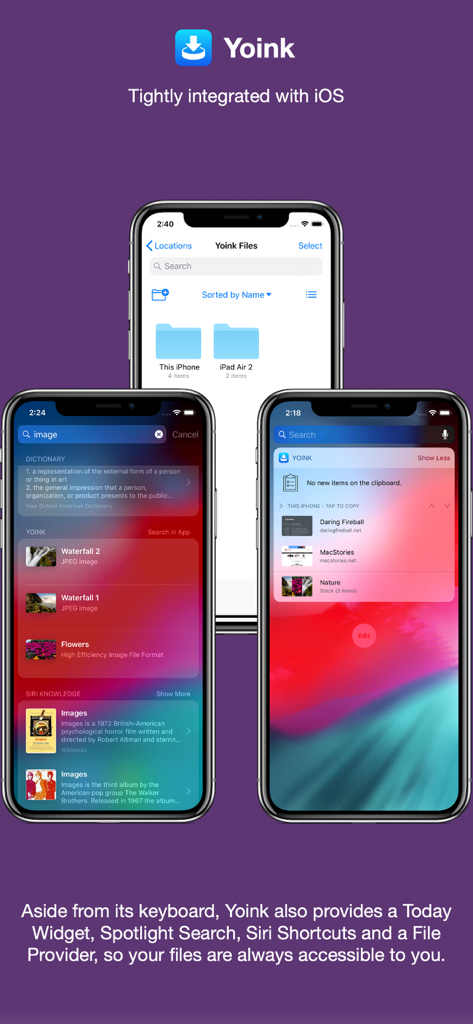
iOS Spotlight 검색, 오늘 위젯, 파일 앱과 통합된 Yoink를 보여주는 세 대의 iPhone.

iOS Spotlight 검색, 오늘 위젯, 파일 앱과 통합된 Yoink를 보여주는 세 대의 iPhone.

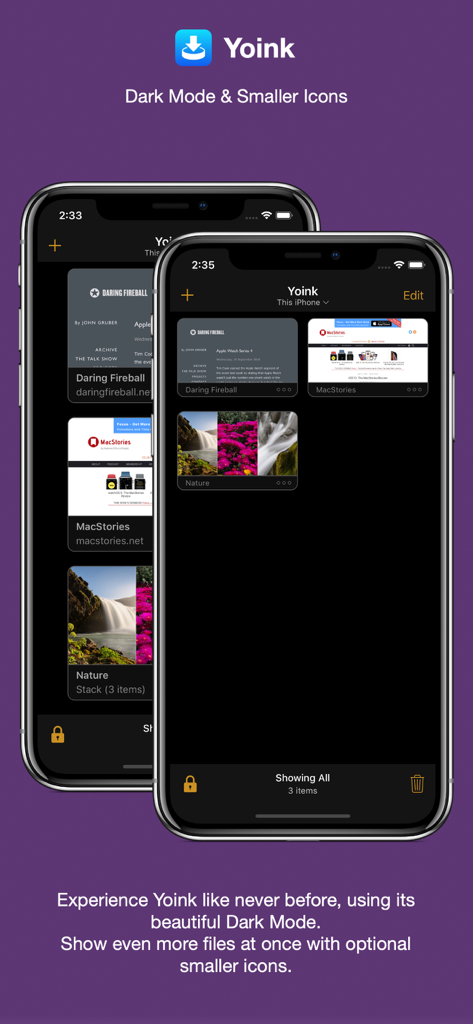
iPhone에서 다크 모드로 작동하는 Yoink 앱 인터페이스가 저장된 링크 및 이미지의 압축된 그리드를 보여줍니다.

iPhone에서 다크 모드로 작동하는 Yoink 앱 인터페이스가 저장된 링크 및 이미지의 압축된 그리드를 보여줍니다.

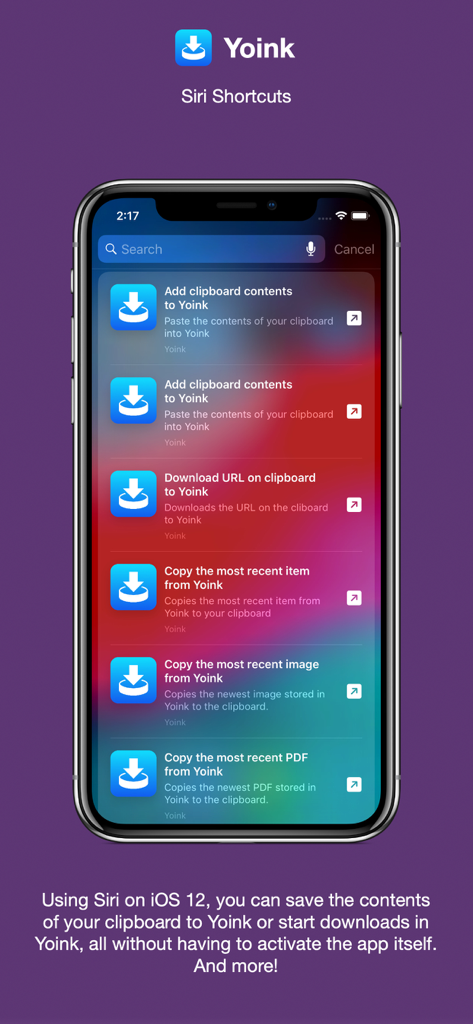
자동화된 생산성 워크플로우를 위한 Siri 단축어와 Yoink 앱 통합을 보여주는 iPhone 화면.

자동화된 생산성 워크플로우를 위한 Siri 단축어와 Yoink 앱 통합을 보여주는 iPhone 화면.

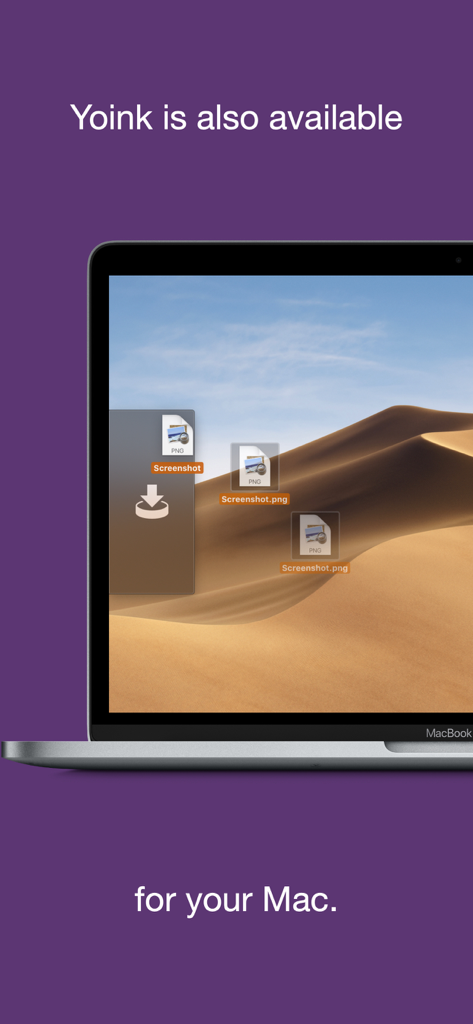
데스크톱 선반에 파일을 보여주는 macOS용 Yoink 생산성 앱 인터페이스.

데스크톱 선반에 파일을 보여주는 macOS용 Yoink 생산성 앱 인터페이스.

모바일 워크플로우를 향상시키세요

이 앱을 돋보이게 하는 도구, 363K+ 명의 사용자가 선택.

📥

iPad를 위한 궁극의 '선반'

작업하는 동안 파일, 링크 또는 텍스트를 임시 보관 영역으로 드래그한 다음, 준비가 되면 필요한 위치에 정확하게 드롭하세요.

📋

스마트 클립보드 모니터링

Yoink는 복사하거나 잘라낸 모든 것을 백그라운드에서 자동으로 저장하여 고급 사용자에게 지루한 '복사-전환-붙여넣기' 루프를 없애줍니다.

🔄

원활한 에코시스템 동기화

iCloud 및 Handoff를 사용하여 iPhone, iPad 및 Mac 간에 콘텐츠를 즉시 이동하여 진정으로 통합되고 유동적인 작업 공간을 만드세요.

전 세계 사용자들에게 사랑받는 앱

Trusted by 363K+ 명이 이 앱을 사랑합니다.

"

"iPad Pro를 주 워크스테이션으로 사용하는 그래픽 디자이너로서 Yoink는 제 워크플로우의 부족한 부분을 채워줍니다. Safari, Pinterest, 이메일에서 자산을 하나의 중앙 '선반'으로 모은 다음, 한 번에 디자인 앱으로 드래그할 수 있습니다. 앱 간을 오가는 마찰을 완전히 없애줍니다."

사라 밀러, 디지털 디자이너
"

"클립보드 모니터링 기능만으로도 Yoink는 그만한 가치가 있습니다. 저는 iPhone으로 이동 중에 자주 조사하는데, 복사된 모든 스니펫과 링크가 iPad에 자동으로 동기화되어 글을 시작할 때 바로 사용할 수 있다는 것은 엄청난 시간 절약입니다. iOS에서 실제 데스크톱을 사용하는 것과 가장 흡사합니다."

마커스 톰슨, 콘텐츠 전략가

앱 소개

에 대해 알아야 할 모든 것 Yoink - Improved Drag and Drop.

설명

Yoink for iPad and iPhone lets you easily and quickly store items you drag, copy, share or download for later use. This way, you can collect items in a central place without having to constantly move back and forth between your source- and destination applications. The app accepts virtually any file type, for example app-content like images from websites, text snippets, web urls, eMails and documents - no matter if you drag, copy, share or download them. Here's what users say about Yoink: "The best shelf app on iOS" - Igloouk, UK App Store "Most useful app in the iOS store. What a gem." - noway170, Austrian App Store "A godsend. Get this. Now." - mr chairboy, US App Store As a Slide-Over or Side-by-Side app on iPad, Yoink is always ready for you to drag something to it, no matter what app you're in. Just slide Yoink into view and conclude your drag operation. On iPhone, use Yoink's Share extension, or copy-paste items into Yoink. Items are stored in Yoink for later use, featuring rich previews for easy identification and full previews for most file types. Drags containing multiple items are combined into a Stack. Yoink comes with deep system integration: - Clipboard Monitor: Yoink's clipboard monitor saves everything you copy or cut, even when Yoink itself is in the background. Use the Picture-in-Picture overlay to select what type of data Yoink should save, as well as to pause or stop it at any time. - Picture-in-Picture for more than just videos: Among others, Yoink can show pictures, PDFs, eMails and even websites in the Picture-in-Picture overlay, and lets you scroll through pages of documents right there. - iCloud Sync Synchronize Yoink's items across your devices using iCloud - Handoff Transfer files between iPhones, iPads and Macs (separate Mac Yoink app required) using Handoff - Action/Share Extension Almost any item you can share via the system-wide Share sheet, you can send directly to Yoink from there - Keyboard Yoink has its own keyboard so that inserting items you've stored in Yoink is easy and quick, without having to launch Yoink. - Spotlight Integration Any item in Yoink can be found via Spotlight - and the search-results are draggable. - Today Widget Access Yoink's items and save the contents from your clipboard in Yoink from Notification Center - Shortcuts / Siri Suggestions Yoink offers you Siri Shortcuts and Suggestions so you can automate processes, like adding items from the clipboard to Yoink, or copying items from Yoink, as well as starting downloads in Yoink. - Files Integration Access Yoink's files from any app that supports iOS 11's document browser Here's what the press says about Yoink: "Yoink is the shelf app Apple should have made." - Federico Viticci, MacStories.net "Yoink is a must-have app" - Jeff Benjamin; 9to5mac.com "Indispensable for power users." - Craig Grannell; techradar.com

최신 버전

2.5.2

크기

14.2 MB

출시일

2017년 10월 12일

워크플로우를 마스터할 준비가 되셨나요?

앱 전환 피로를 멈추세요. 360,000명 이상의 고급 사용자와 함께 iPad와 iPhone에 걸맞은 전문 드래그 앤 드롭 선반을 제공하세요.

다운로드: App Store