Zoho Sheet—Spreadsheet on iPad

Zoho Sheet—Spreadsheet on iPad

다운로드: App Store
Spark by MWM logo
로고: Zoho Sheet—Spreadsheet on iPad
Zoho Sheet: iPad 파워 유저를 위한 전문 스프레드시트

iPad를 모바일 데이터 파워하우스로 바꾸세요. Excel 파일을 가져오고, AI로 실제 데이터를 스캔하고, 전문적인 워크플로우를 위해 설계된 안전하고 개인 정보 보호 우선 환경 내에서 실시간으로 협업하세요.

다운로드: App Store

개발사

Zoho Corporation

카테고리

Productivity

다운로드

14K+

사용자 평점

4.5/5

총 평가 수

300

지원 언어

32

모든 픽셀에 담긴 파워

이 인터페이스를 사용하는 14K+ 명의 사용자.

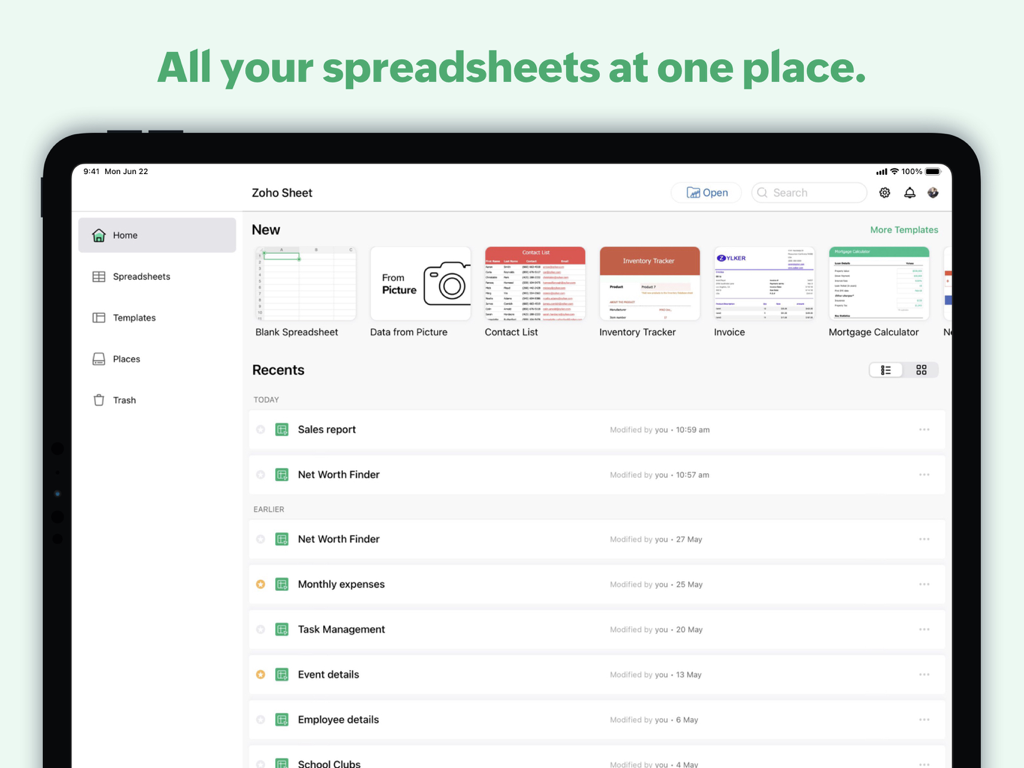
iPad의 Zoho Sheet 홈 화면, 스프레드시트 템플릿과 최근 문서 목록 표시

iPad의 Zoho Sheet 홈 화면, 스프레드시트 템플릿과 최근 문서 목록 표시

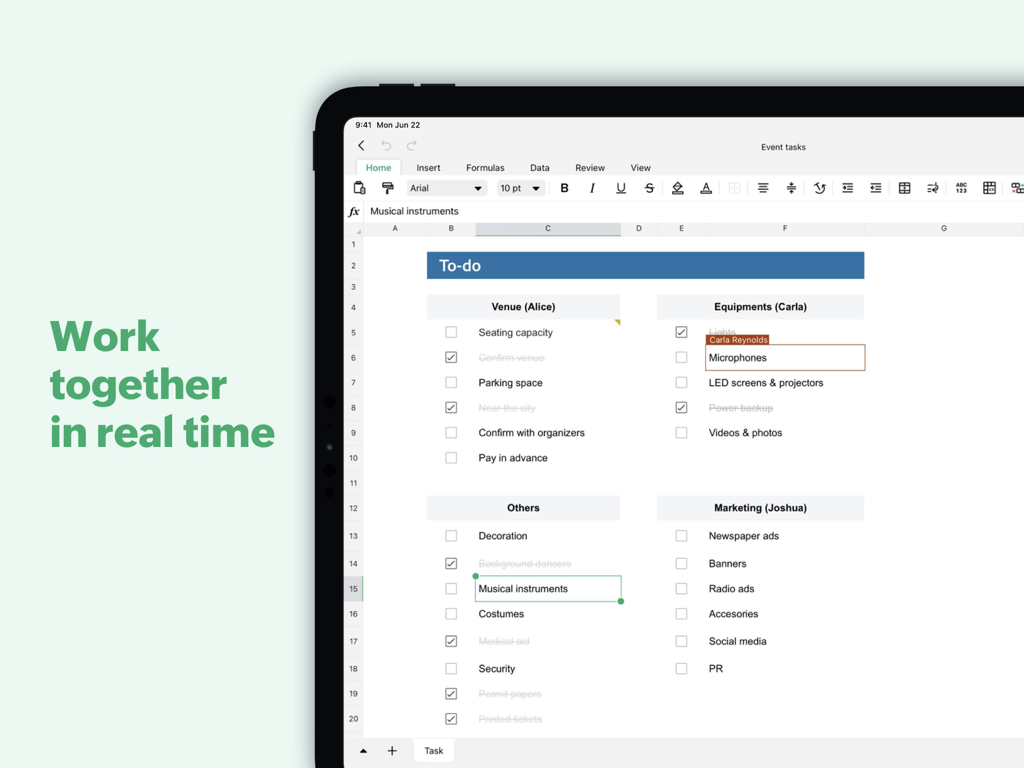
iPad용 Zoho Sheet에서 작업 스프레드시트의 실시간 협업

iPad용 Zoho Sheet에서 작업 스프레드시트의 실시간 협업

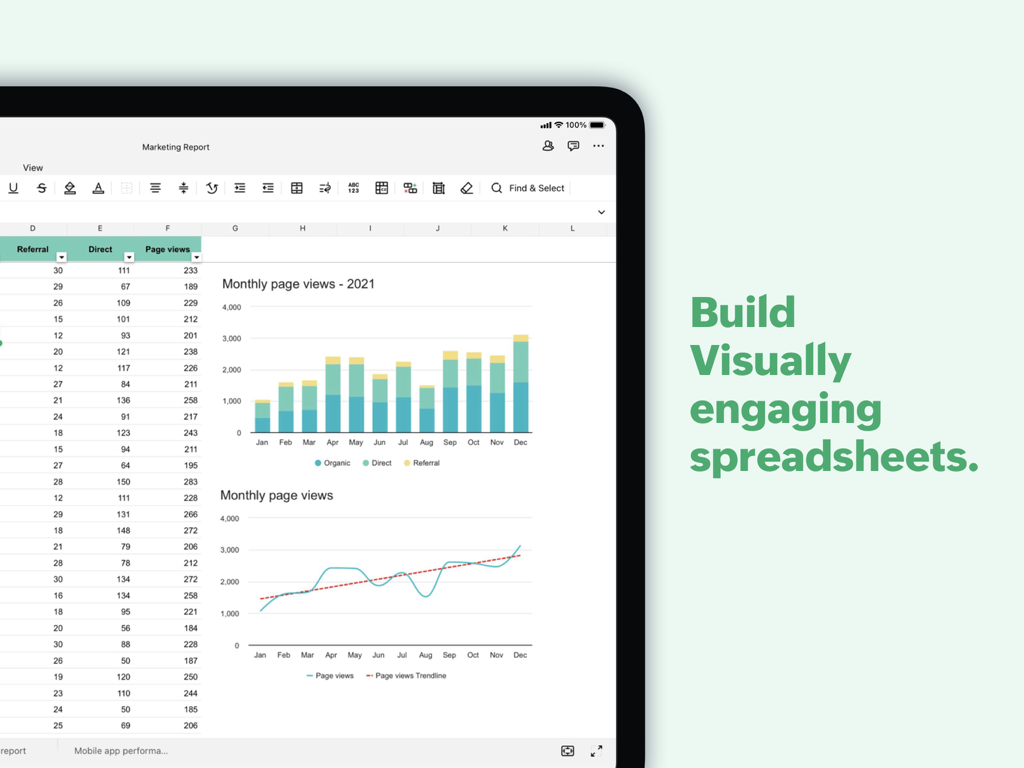
iPad의 Zoho Sheet에서 데이터 테이블과 시각적 차트가 포함된 마케팅 보고서 표시

iPad의 Zoho Sheet에서 데이터 테이블과 시각적 차트가 포함된 마케팅 보고서 표시

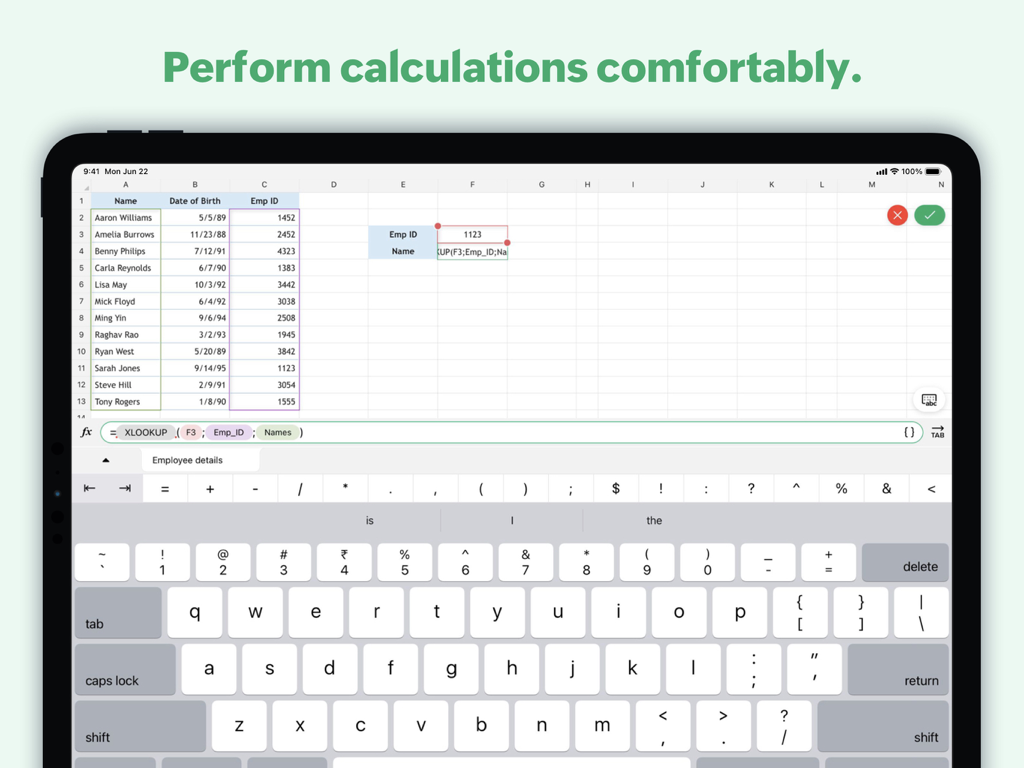
스프레드시트 수식과 사용자 지정 데이터 입력 키보드를 보여주는 iPad의 Zoho Sheet 인터페이스

스프레드시트 수식과 사용자 지정 데이터 입력 키보드를 보여주는 iPad의 Zoho Sheet 인터페이스

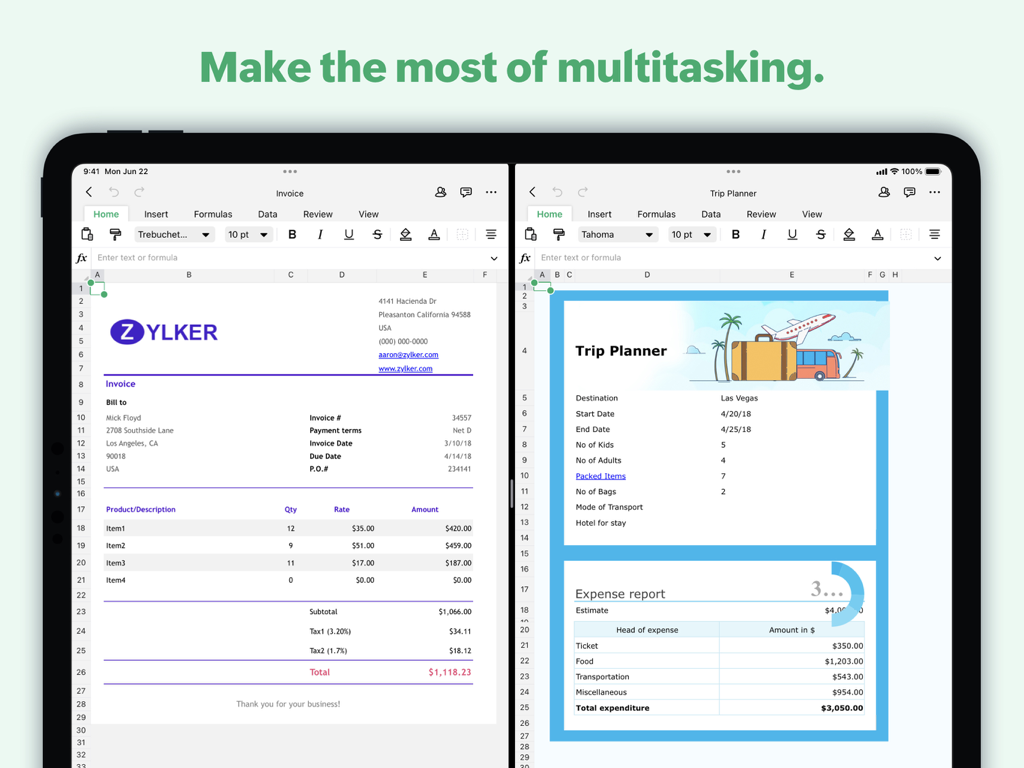
송장과 여행 계획을 동시에 작업하기 위해 분할 보기 기능을 사용하는 iPad의 Zoho Sheet 앱

송장과 여행 계획을 동시에 작업하기 위해 분할 보기 기능을 사용하는 iPad의 Zoho Sheet 앱

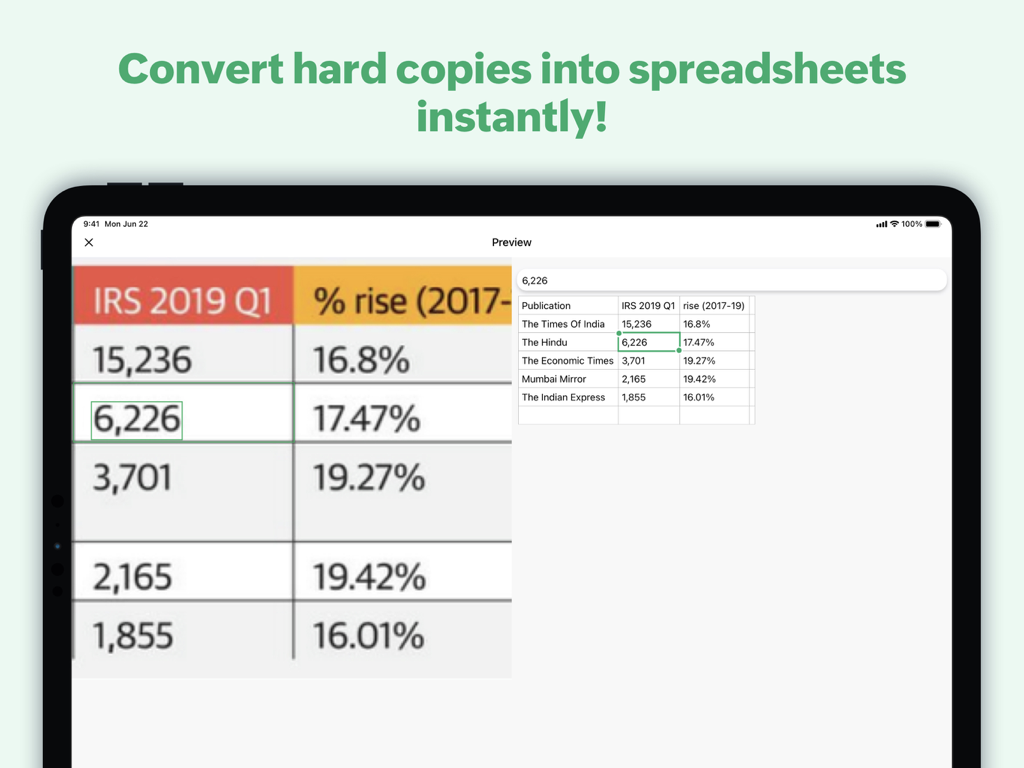
스캔 데이터 기능을 사용하여 인쇄된 테이블을 디지털 스프레드시트로 변환하는 iPad의 Zoho Sheet 기능 표시

스캔 데이터 기능을 사용하여 인쇄된 테이블을 디지털 스프레드시트로 변환하는 iPad의 Zoho Sheet 기능 표시

이동 중에도 데이터를 마스터하세요

이 앱을 돋보이게 하는 도구, 14K+ 명의 사용자가 선택.

🧠

AI 기반 인텔리전스

내장 AI인 Zia가 숫자를 분석하도록 하세요. 즉석에서 피벗 테이블을 생성하고 간단한 음성 명령을 사용하여 데이터 기반 답변을 얻으세요.

📸

즉석 데이터 입력

수동 타이핑은 그만하세요. iPad 카메라를 사용하여 인쇄된 보고서나 영수증을 스캔하고 몇 초 안에 편집 가능한 디지털 행으로 변환하세요.

🔒

개인 정보 보호 우선 협업

민감한 비즈니스 데이터가 판매되거나 광고에 사용되지 않는다는 사실을 알면서 @멘션 및 댓글을 통해 팀과 실시간으로 협업하세요.

전 세계 사용자들에게 사랑받는 앱

Trusted by 14K+ 명이 이 앱을 사랑합니다.

"

"항상 이동 중인 부동산 컨설턴트로서 '스캔 투 시트' 기능은 완전한 게임 체인저입니다. 부동산 비용 목록 사진을 찍으면 즉시 셀에 채워집니다. 게다가 고객 데이터가 광고용으로 판매되지 않는다는 사실을 알면 마음이 편안합니다."

Sarah Jenkins
"

"노트북을 iPad Pro로 바꾸었는데, Zoho Sheet는 '라이트' 버전처럼 느껴지지 않는 첫 번째 스프레드시트 앱입니다. Zia의 AI 피벗 테이블 제안은 고객 미팅 중에 몇 시간의 수동 분석을 절약해 줍니다. 빠르고 전문적이며 완벽하게 동기화됩니다."

Marcus Thorne

앱 소개

에 대해 알아야 할 모든 것 Zoho Sheet—Spreadsheet on iPad.

설명

Create a new spreadsheet or import an Excel file to work on, break down data with collaborators in real time, and share your spreadsheets with the free Zoho Sheet app for iPadOS. With this spreadsheet app on your iPad, you can: Import files from your device or cloud apps Bring in .csv, .tsv, and .xlsx files from your device and continue where you left off. You can also open, edit, and save spreadsheets from Dropbox and Box in Zoho Sheet or simply sync the changes back to your files stored in the cloud. Scan and insert data from pictures Save time on data entry with an effortless, two-step process. Scan data from printed materials or from images saved in your iPad Photos app. Preview and insert the data into your worksheets. Collaborate on your spreadsheets Track budgets, stocks, manage projects, create monthly reports, calendars, or generate charts for your next big presentation—all with the power of real-time collaboration. Add cell- or range-specific comments and use @mentions to tag collaborators for seamless teamwork. Export files Choose the optimal format for each spreadsheet and download them as Microsoft Excel (.xlsx, .xls), PDF or other supported file formats to access them offline, store hard copies, or share the finished results of your work. Analyze and visualize Crunch numbers with more than 350 functions and formulas and visualize your findings with more than 35 types of charts. Increase productivity with AI Get suggestions for analyzing your data and automatically generate charts and pivot tables instantly with Zia, our in-house artificial intelligence. Even better, use voice commands to ask Zia your data-related questions. Build spreadsheets faster with templates Solve your use cases quickly with our gallery of ready-made spreadsheet templates like inventory tracker, invoice, and more. Get a unified experience across devices Access and manage your spreadsheets with ease, whether you are on your iPad or using Zoho Sheet on the web. Your data is automatically synced every time you make a change, allowing you to switch between the two platforms whenever you want. Assure the privacy of your data Zoho prioritizes privacy because we know it's important to our users, especially in the productivity and collaboration app segment. We have never shared our users' information with anyone for advertising purposes, nor have we generated revenue by displaying ads from other sources. The Zoho advantage for businesses Zoho Sheet is part of the Zoho Office Suite, which also includes Writer, an online word processor, and Show, our online presentation software. This means when you sign up for Zoho Sheet, you'll get access to a full set of tools to manage your worksheets, presentations, and word documents in one place. It's even possible to integrate across apps to automatically add the latest data to the graphs in your upcoming presentation or report. Zoho's single sign-on account means you can easily access all the Zoho apps you need. Our ecosystem currently offers 55+ apps across business categories like sales, marketing, email and collaboration, finance, HR, and more. For more details visit: https://www.zoho.com/sheet/mobile.html If you have questions before you try the app or while using it, please write to us at ios-support@zohosheet.com.

최신 버전

3.0.19

크기

385.0 MB

출시일

2021년 1월 13일

iPad 워크플로우를 혁신할 준비가 되셨나요?

AI 기반 인사이트와 개인 정보 보호 중심 도구를 사용하는 수천 명의 모바일 우선 전문가들과 함께하세요. 지금 바로 무료로 더 스마트한 스프레드시트 경험을 시작하세요.

다운로드: App Store
FAQ

자주 묻는 질문

에 대해 알아야 할 모든 것 Zoho Sheet—Spreadsheet on iPad

Zoho Sheet for iPad란 무엇인가요?

Zoho Sheet는 무료 iPadOS 스프레드시트 앱입니다. 사용자는 데이터 스캔, AI 분석, 템플릿 사용과 같은 기능을 통해 향상된 생산성을 제공하는 스프레드시트를 생성, 가져오기, 편집 및 공동 작업할 수 있습니다.

기존 Excel 파일을 Zoho Sheet for iPad로 가져올 수 있나요?

예, Zoho Sheet for iPad를 사용하면 .xlsx, .xls, .csv 및 .tsv 파일을 기기 또는 Dropbox 및 Box와 같은 클라우드 서비스에서 가져올 수 있습니다. 그런 다음 편집하고 저장할 수 있습니다.

Zoho Sheet는 실시간 공동 작업을 지원하나요?

예, Zoho Sheet for iPad는 실시간 공동 작업을 지원합니다. 사용자는 예산을 추적하고, 프로젝트를 관리하고, 보고서를 작성하고, 원활한 팀워크를 위해 @멘션을 사용하여 셀 또는 범위별 주석을 추가할 수 있습니다.

Zoho Sheet는 데이터 입력을 어떻게 도와주나요?

Zoho Sheet는 iPad 사진 앱에 저장된 인쇄물이나 이미지의 데이터를 스캔하고 삽입할 수 있도록 하여 데이터 입력을 도와줍니다. 시간 절약을 위한 2단계 프로세스입니다.

Zoho Sheet에서 내보낼 수 있는 파일 형식은 무엇인가요?

Zoho Sheet는 Microsoft Excel(.xlsx, .xls) 및 PDF를 포함한 다양한 형식으로 스프레드시트를 내보낼 수 있습니다. 사용자는 오프라인 액세스, 인쇄물 또는 완료된 작업 공유에 최적화된 형식을 선택합니다.

Zoho Sheet for iPad에는 AI 기능이 포함되어 있나요?

예, Zoho Sheet는 자체 AI인 Zia를 통합합니다. Zia는 데이터 분석을 위한 제안을 제공하고, 차트와 피벗 테이블을 자동으로 생성하며, 데이터 관련 질문에 대한 음성 명령에 응답합니다.

Zoho Sheet 앱은 iPad에서 무료로 사용할 수 있나요?

예, iPadOS용 Zoho Sheet 앱은 무료입니다. 앱 설명에 명시된 대로 사용자는 비용 없이 스프레드시트를 생성, 가져오기 및 공동 작업할 수 있습니다.

Zoho Sheet는 사용자 데이터 개인 정보를 어떻게 보장하나요?

Zoho Sheet는 사용자 개인 정보를 우선시합니다. Zoho는 광고 목적으로 사용자 정보를 공유한 적이 없으며, 다른 출처의 광고를 표시하여 수익을 창출한 적도 없다고 밝혔습니다.

Zoho Sheet for iPad에서 템플릿을 사용할 수 있나요?

예, Zoho Sheet는 미리 만들어진 스프레드시트 템플릿 갤러리를 제공합니다. 재고 추적기 및 송장과 같은 이러한 템플릿은 사용자가 다양한 사용 사례를 신속하게 해결하는 데 도움이 됩니다.

Zoho Sheet는 iPad에서 멀티태스킹 기능을 제공하나요?

예, Zoho Sheet는 iPad에서 멀티태스킹을 지원합니다. 스크린샷 #5는 앱이 두 개의 별도 스프레드시트 문서를 나란히 실행하는 것을 보여주며, 여러 작업을 동시에 처리하는 능력을 보여줍니다.