Add Background Music To Video

Add Background Music To Video

Download on App Store
Spark by MWM logo
Logo of Add Background Music To Video

Add Background Music To Video: Transform Your Memories into Cinematic Masterpieces

Give your vacation clips, family dinners, and social stories the perfect vibe. Easily add soundtracks, record personal voiceovers, and apply professional audio effects with just a few taps.

Publisher

Mosaic S.r.l.

Category

Photo & Video

Downloads

20M+

User Rating

4.4/5

Total Ratings

45K+

Locales

12

A Glimpse of the Magic

Discover the interface used by 20M+ users.
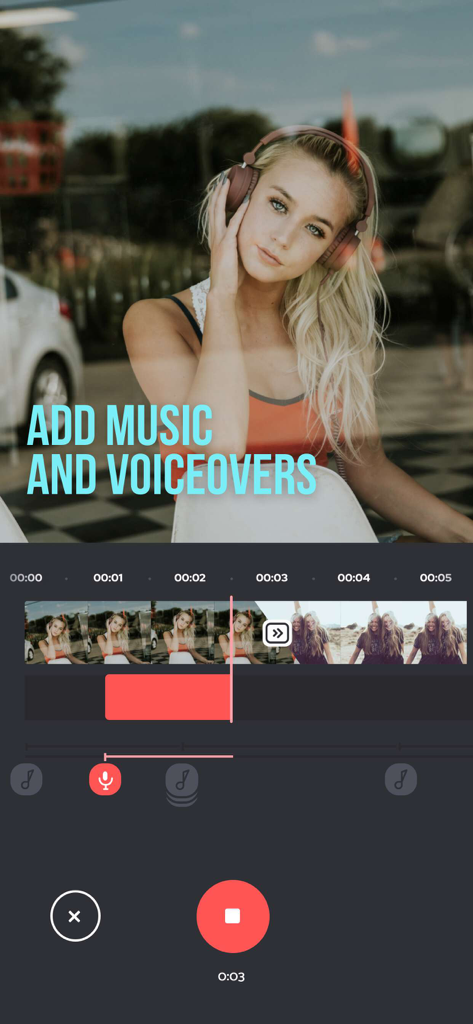
Mobile app interface for adding background music and recording voiceovers to videos

Mobile app interface for adding background music and recording voiceovers to videos

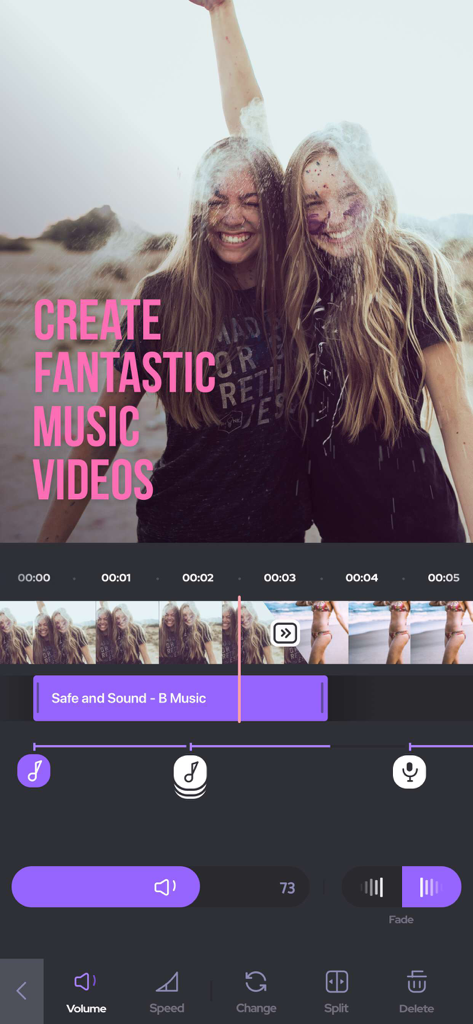
Video editing interface of the Add Background Music To Video app showing an audio track overlay on a video of two smiling friends at a color festival.

Video editing interface of the Add Background Music To Video app showing an audio track overlay on a video of two smiling friends at a color festival.

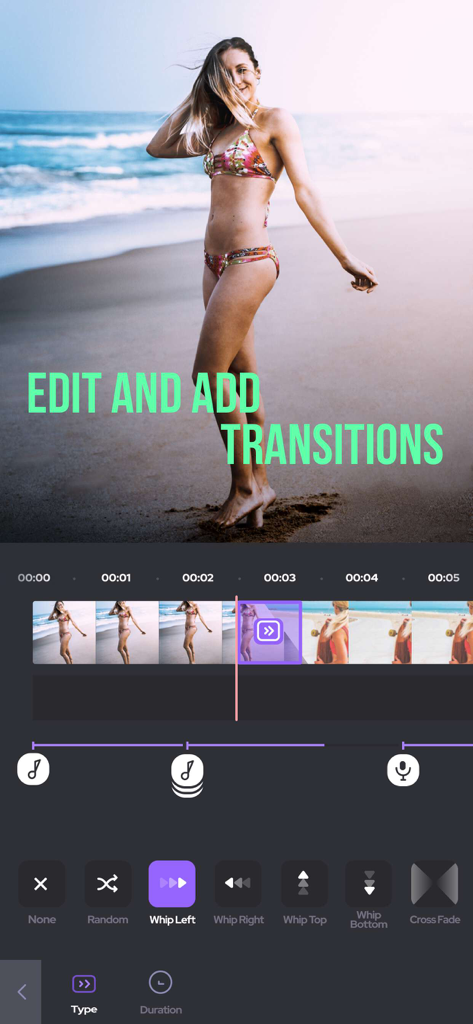
Smartphone screen showing the video editing interface with a selection of transitions like Whip Left and Whip Right

Smartphone screen showing the video editing interface with a selection of transitions like Whip Left and Whip Right

Screenshot of the Add Background Music app showing music categories like Summer and Romantic alongside a library of soundtracks

Screenshot of the Add Background Music app showing music categories like Summer and Romantic alongside a library of soundtracks

Transform Your Memories into Masterpieces

The tools that make this app stand out, trusted by 20M+ users.

🎵

The Perfect Soundtrack

Instantly elevate the vibe of your vacation or event videos by choosing from a wide range of high-quality music tracks.

🎙️

Narrate Your Journey

Add a personal touch to your memories with a voice-over, perfect for sharing the story behind your favorite moments.

Polished and Professional

Frame-by-frame trimming and smooth audio transitions ensure your content looks and sounds like it was made in a studio.

Loved by users worldwide

Trusted by 20M+ people who love this app.

"

"BackgroundMusic is a life-saver for my Instagram Reels. I can trim clips and add the perfect soundtrack in just a few taps. The UI is so sleek and intuitive that I actually enjoy the editing process now!"

Chloe L.
"

"This app made my daughter's birthday video so special. I was able to remove the loud background noise and add her favorite song with a sweet voiceover message. It is incredibly easy to use even for someone who is not tech-savvy."

Mark T.

About the app

Everything you need to know about Add Background Music To Video.

Description

Do you know what is missing from your vacation videos? The perfect background music! BackgroundMusic gives you countless options of soundtracks to add life to your videos and make them even more amazing. Do you want to add your narrative with a voice over? Do you want to remove unwanted parts and add awesome transitions to your videos? All of this possible with BackgroundMusic, as simple as a few taps. Everything you need to create masterpieces from your summer getaway, your birthday party and your lovely family dinner is waiting for you. Don’t hesitate, just select your videos from your gallery and start the magic! FEATURES: • Add music tracks to your videos • Record your own voice over • Trim and cut frame by frame to remove unwanted parts • Edit audio by trimming, adding fade-in and fade-out effects • Beautiful UI with stunning design • Save your edited videos or share on social media with a tap SUBSCRIPTION INFO: Subscribe to take advantage of the features described above. • Subscription length: Weekly • Your payment will be charged to your iTunes Account as soon as you confirm your purchase. • You can manage your subscriptions and turn off auto-renewal from your Account Settings after the purchase. • Your subscription will renew automatically, unless you turn off auto-renew at least 24 hours before the end of the current period. • The cost of renewal will be charged to your account in the 24 hours prior to the end of the current period. • When canceling a subscription, your subscription will stay active until the end of the period. Auto-renewal will be disabled, but the current subscription will not be refunded. • Any unused portion of a free trial period, if offered, will be forfeited when purchasing a subscription. Terms of service: https://support.bendingspoons.com/tos?app=1006639052 Privacy policy: https://bendingspoons.com/privacy.html?app=1006639052 Have a feature request you would like to see in a future version of the app? Do not hesitate to contact us at backgroundmusic@bendingspoons.com Disclaimer: You will be required to sign up for an auto-renewable In-App Purchase before you are able to access the app.

Latest Version

5.4.31

Size

104.6 MB

First Released

Jul 16, 2015

Ready to Make Your Videos Unforgettable?

Join 20 million creators and turn your favorite moments into cinematic stories with the perfect soundtrack. Start your creative journey today.

Download on App Store
FAQ

Frequently Asked Questions

Everything you need to know about Add Background Music To Video

What is the primary purpose of the Add Background Music To Video app?

The Add Background Music To Video app allows users to add background music to their videos and enhance them with voiceovers, trimming, cutting, and audio editing features.

Can users add music to videos with the Add Background Music To Video app?

Yes, the Add Background Music To Video app allows users to add music tracks to their videos. It provides countless soundtrack options and supports imported music.

Does Add Background Music To Video support recording voiceovers?

Yes, the Add Background Music To Video app includes a feature to record your own voice over directly within the application for video narration.

What video editing capabilities does the BackgroundMusic app offer?

The BackgroundMusic app provides trimming and cutting frame by frame, adding transitions, and editing audio with fade-in and fade-out effects to refine videos.

Can users save or share videos edited with the BackgroundMusic app?

Yes, users can save their edited videos to their device or share them directly on social media platforms with a single tap from the BackgroundMusic app.

Does the BackgroundMusic app require a subscription?

Yes, the BackgroundMusic app requires an auto-renewable In-App Purchase subscription to access its features. Payment is charged to the iTunes Account upon purchase.

How does subscription renewal work for the BackgroundMusic app?

The subscription for the BackgroundMusic app renews automatically unless auto-renew is turned off at least 24 hours before the current period ends. Renewal costs are charged 24 hours prior to expiration.

How do I cancel my BackgroundMusic app subscription?

You can manage your BackgroundMusic subscription and turn off auto-renewal from your Account Settings after purchase. The subscription remains active until the end of the paid period.

Is there a free trial for the Add Background Music To Video app?

If a free trial period is offered for the Add Background Music To Video app, any unused portion is forfeited when a subscription is purchased.

Where can I get music tracks for the Add Background Music To Video app?

The Add Background Music To Video app offers hundreds of soundtracks categorized by genre. Users can also import music or use tracks from iTunes.