Camo Studio – Stream & Record

Camo Studio – Stream & Record

Download on App Store
Spark by MWM logo
Logo of Camo Studio – Stream & Record
Camo Studio – Stream & Record: Your Professional Production Studio on iPad

Transform your iPad into a studio-grade command center. Stream console games to Twitch, record in 4K with pro overlays, and go live anywhere with the power of a desktop setup in your backpack.

Download on App Store

Publisher

Reincubate Ltd

Category

Photo & Video

Downloads

258K+

User Rating

4.6/5

Total Ratings

2K+

Locales

1

Your Studio, Anywhere

Discover the interface used by 258K+ users.
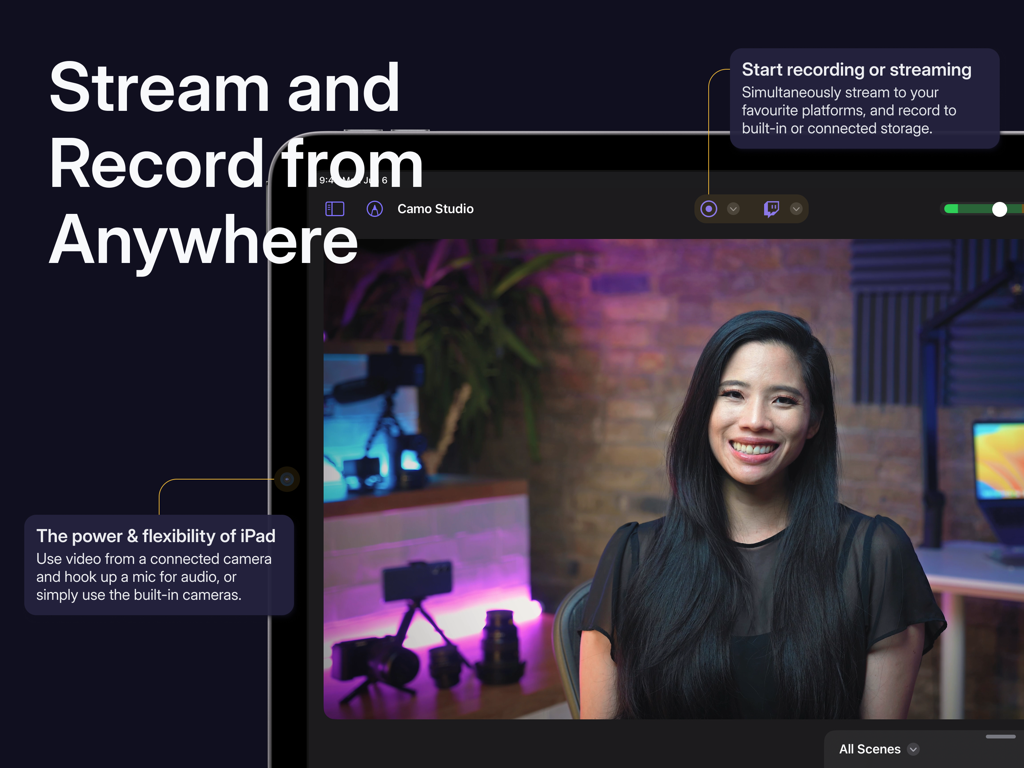
Camo Studio app interface on iPad showing live video stream and recording controls

Camo Studio app interface on iPad showing live video stream and recording controls

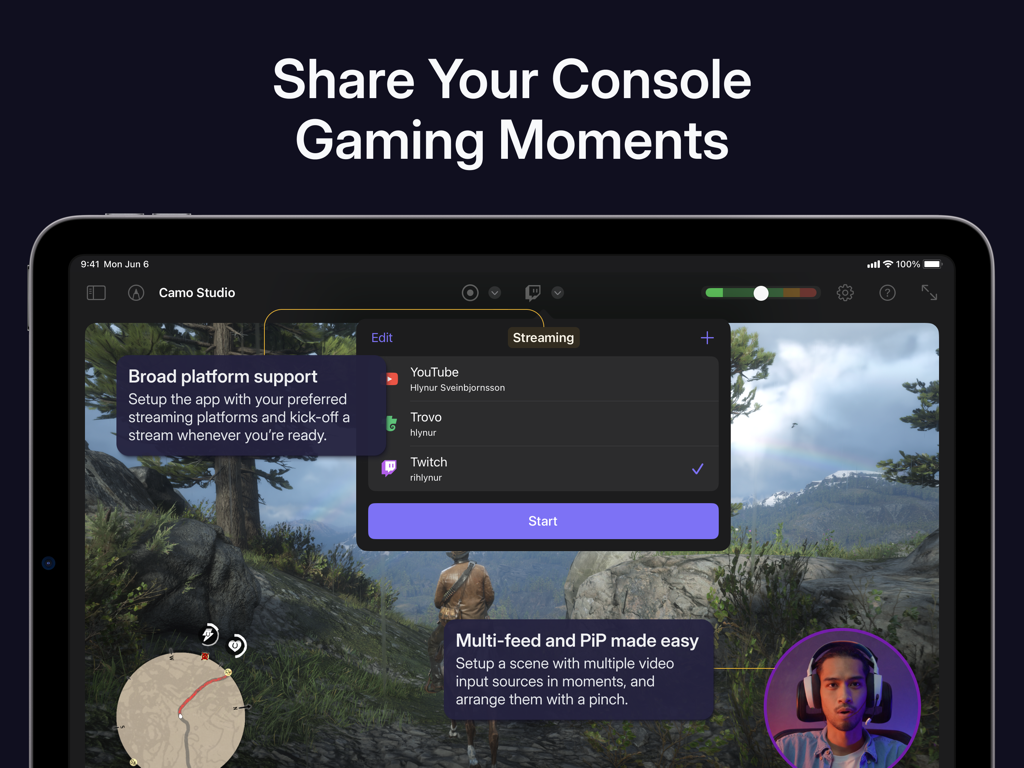
iPad interface of Camo Studio showing console gaming stream setup with platform options and picture-in-picture

iPad interface of Camo Studio showing console gaming stream setup with platform options and picture-in-picture

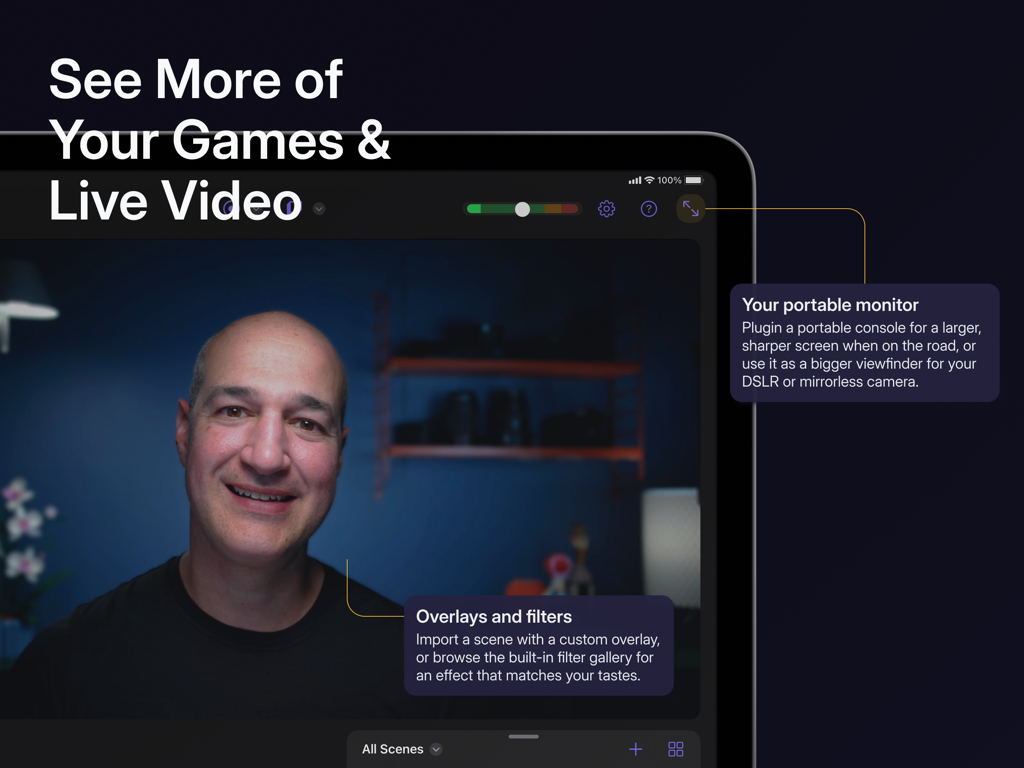
A person using Camo Studio on an iPad as a portable monitor for live video and gaming with custom overlays and filters.

A person using Camo Studio on an iPad as a portable monitor for live video and gaming with custom overlays and filters.

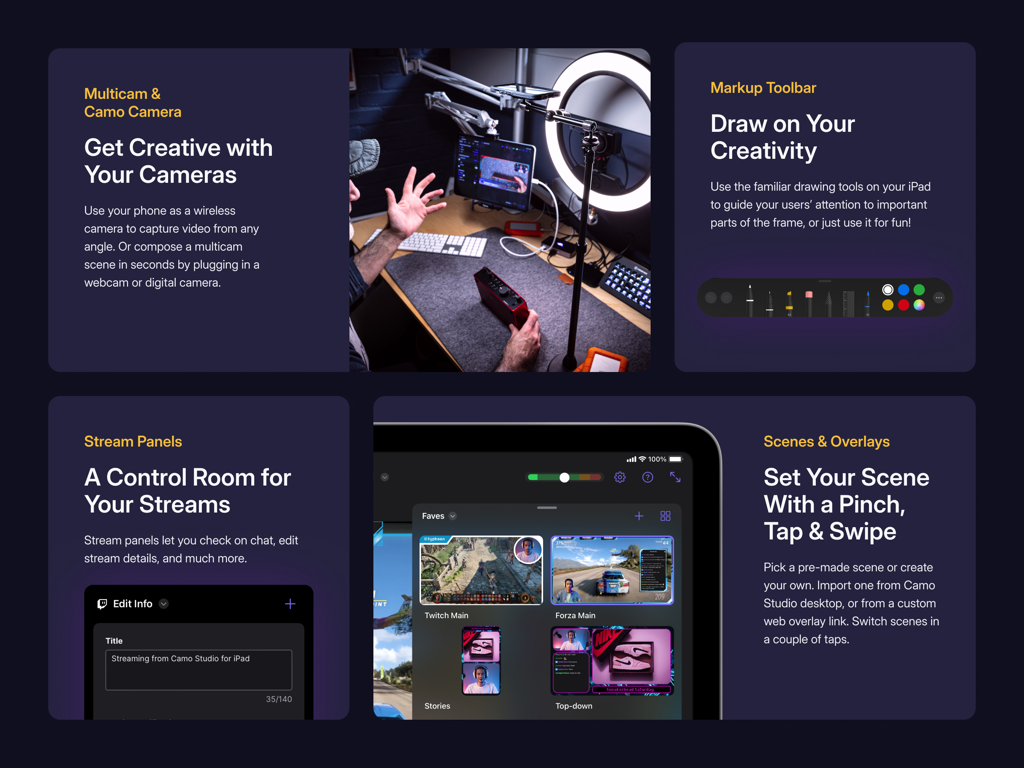
Camo Studio app interface showcasing multicam support stream panels and scene overlays

Camo Studio app interface showcasing multicam support stream panels and scene overlays

Everything You Need to Create Like a Pro

The tools that make this app stand out, trusted by 258K+ users.

🎮

The Ultimate Gaming Setup

Connect your console via a capture card to use your iPad as a sharp portable monitor while streaming live to your favorite platforms.

🎨

Pro Overlays & Scenes

Elevate your brand with web overlays from StreamElements and customize multiple scenes for a dynamic, interactive viewer experience.

🚀

AI-Powered Visuals

Stand out with cinematic background bokeh, intelligent auto-framing, and 4K recording that keeps the focus exactly where it belongs: on you.

Loved by users worldwide

Trusted by 258K+ people who love this app.

"

"Camo Studio has completely replaced my bulky PC setup for travel streams. Being able to use my iPad as a high-def monitor for my Switch while simultaneously broadcasting to Twitch with professional overlays is incredible. It is the most versatile tool in my creator kit."

Marcus T., Indie Streamer
"

"As a content creator who is always on the move, this app is a lifesaver. The 4K recording and built-in bokeh effects give my videos a cinematic look that used to require a mirrorless camera. The interface is intuitive, and the privacy-first local storage is a huge plus."

Elena R., Lifestyle Vlogger

About the app

Everything you need to know about Camo Studio – Stream & Record.

Description

Dive into streaming, or record your next video, in just a few taps – hone your scene, connect your camera, and start creating with ease – all directly from your iPad. Why not try the iPad version of the 2023 Apple Design Award finalist app today? — STREAM & RECORD FROM ANYWHERE — Connect a camera and mic to your iPad and start streaming on the move, and simultaneously record your video to built-in storage or a connected SD card for editing and uploading high-quality content later. — SHARE YOUR CONSOLE GAMING MOMENTS — Stream console games with a capture card to Twitch, YouTube, Trovo and more. Setup your scene with tactile controls that make multi-feed and PiP (picture-in-picture) simple to configure. Take your streams to another level with web overlays, and always stay in control with integrated stream controls. — SEE MORE OF YOUR GAMES & LIVE VIDEO — Connect your iPad to your portable console, such as a Nintendo Switch, via a dongle or USB hub and use it as a bigger, sharper screen to heighten your gaming experience when you’re on the road. Or, if you’re looking to get a better viewfinder for your camera, plug it into your iPad and use it as a video monitor through Camo Studio. — SWITCH UP YOUR SCENES — Quickly switch between a collection of built-in or custom scenes with a tap to help engage your audience or show a different shot. Each scene can be configured individually with different cameras, video and audio sources, and output profiles. — PRO STREAMS WITH WEB OVERLAYS — Imbue your streams with your personal aesthetic, or a professional touch, with support for web overlays from StreamElements, Streams Labs, Uno Overlays and more. Import template or custom web overlays, with live content, alerts, embedded control panels, and a wide array of other widgets. — A ONE-APP STREAM CONTROL CENTRE — Stay in touch with your chat, trigger in-stream events, and check on your mods, all through Camo Studio’s stream panels. Add exactly the panels you need – each is custom to the streaming service you use, and gives you powerful controls for your livestreams. — POWERFUL VIDEO ENHANCEMENTS & ADJUSTMENTS — Camo Studio comes loaded with functionality that helps you stand out. Easily apply a subtle “Bokeh” effect to your background, or replace it or remove it entirely! Adjust the framing and orientation of each input feed, including Auto-framing modes that help you stay in-shot. — MAKE THE MOST OF YOUR IPAD — Your iPad supports connecting a breadth peripherals, external devices and cameras; making Camo Studio for iPad the most versatile Camo experience yet. M1 and M2 powered iPads can even run Camo Studio in the background while streaming or recording, capturing the device’s screen at the same time, and can integrate with your Stream Deck. — SECURITY AND PRIVACY FIRST — Camo Studio transmits your video directly to the streaming services of your choosing, and all recordings are entirely local to your iPad, connected storage device or selected storage service. Your data is your business, not ours. — NOT ONLY BUT ALSO! — - Pro-quality video in a range of resolutions, including 4K UHD, 1080p HD, and 720p - Built-in galleries come preloaded with backgrounds and filters to try in your videos - Work in landscape or portrait orientations, great for TikTok-style shots at 9:16 aspect ratio - Use your iPad’s front and back cameras as part of your scene - Looks great in light and dark mode - No ads in the app, ever — WE’RE HERE TO HELP — With millions of users trying our apps over the last decade, Reincubate is one of the UK’s most-loved software companies. We’re fanatical about supporting our users, and we’d love to help you make the most of Camo Studio on your iPad. Reach out to us any time: support@reincubate.com — LEARN MORE — About us: https://reincubate.com/camo/ipad/ How to make the most of Camo: https://reincubate.com/support/camo-ipad/how-to-use-camo-ipad/ FAQ: https://reincubate.com/support/camo-ipad/camo-ipad-faq/

Latest Version

2.4.1

Size

112.1 MB

First Released

Sep 18, 2023

Ready to Level Up Your Content?

Join over 250,000 creators and turn your iPad into a professional broadcasting powerhouse. Experience the award-winning, 4K streaming studio that fits in your backpack.

Download on App Store
FAQ

Frequently Asked Questions

Everything you need to know about Camo Studio – Stream & Record

What is Camo Studio for iPad?

Camo Studio for iPad allows users to stream and record video, connect cameras and mics, and manage live content directly from their iPad. It was a 2023 Apple Design Award finalist.

Can Camo Studio record video directly on an iPad?

Yes, Camo Studio simultaneously records video to the iPad's built-in storage or a connected SD card while streaming. This enables high-quality content editing later.

Which platforms does Camo Studio support for streaming console games?

Camo Studio supports streaming console games to platforms including Twitch, YouTube, and Trovo. Users configure scenes with multi-feed and picture-in-picture options for their streams.

Can I use my iPad as a monitor with Camo Studio?

Yes, Camo Studio transforms your iPad into a portable monitor. Connect it to consoles like Nintendo Switch for a larger screen or to DSLR/mirrorless cameras for a better viewfinder.

Does Camo Studio support custom web overlays for streams?

Yes, Camo Studio supports web overlays from services such as StreamElements, Stream Labs, and Uno Overlays. Users import custom or template overlays with live content, alerts, and widgets.

What video enhancements are available in Camo Studio?

Camo Studio offers powerful video enhancements like 'Bokeh' background effect, background replacement or removal, and framing adjustments. It also includes auto-framing modes to keep subjects in shot.

Is my data private when using Camo Studio for streaming and recording?

Yes, Camo Studio prioritizes user privacy. It transmits video directly to selected streaming services, and all recordings remain local to the iPad or connected storage. Your data is not collected.

What video resolutions does Camo Studio support?

Camo Studio supports pro-quality video resolutions including 4K UHD, 1080p HD, and 720p. It also accommodates both landscape and portrait orientations for diverse content creation.

Can Camo Studio for iPad run in the background?

Yes, M1 and M2 powered iPads enable Camo Studio to run in the background during streaming or recording. This functionality also supports simultaneous screen capture from the device.

Does Camo Studio include ads?

No, Camo Studio for iPad does not feature any advertisements within the application, ensuring an uninterrupted user experience.