
Cisco Secure Client

Cisco Secure Client

Download on App Store
Spark by MWM logo
Logo of Cisco Secure Client

Cisco Secure Client: Seamlessly Secure Your Hybrid Workspace

The industry-standard for persistent, encrypted network connectivity. Access corporate resources, business email, and critical apps with the reliability and performance your professional day demands.

Publisher

Cisco

Category

Business

Downloads

14M+

User Rating

3.2/5

Total Ratings

8K+

Locales

1

Inside the Interface

Discover the interface used by 14M+ users.
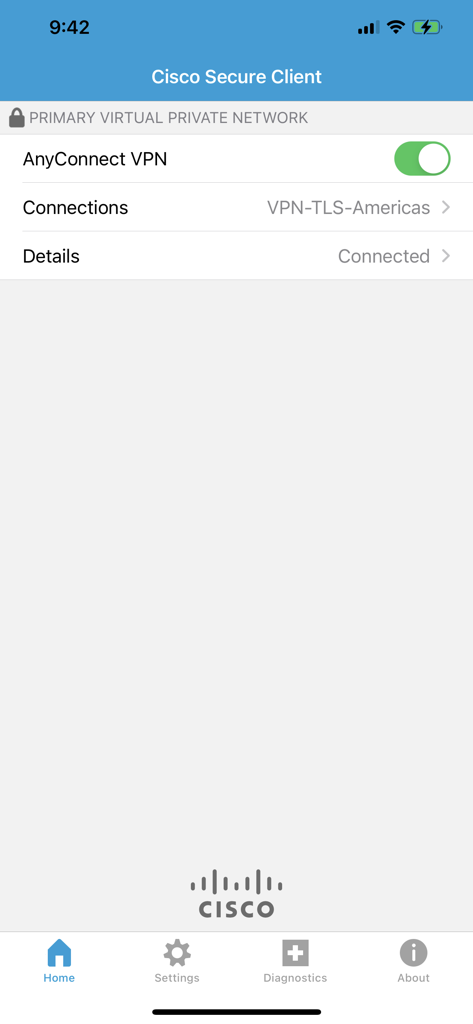
Cisco Secure Client app home screen showing a connected VPN status on an iPhone

Cisco Secure Client app home screen showing a connected VPN status on an iPhone

Enterprise-Grade Access for the Modern Professional

The tools that make this app stand out, trusted by 14M+ users.

🔄

Seamless Network Roaming

Maintain a persistent connection without manual restarts. Your VPN session automatically resumes as you transition between home Wi-Fi, public hotspots, and cellular data.

🛡️

Ironclad Security & Compliance

Protect sensitive corporate data with next-generation encryption and multi-factor authentication, ensuring you meet strict HIPAA, finance, or government security standards.

Optimized for Real-Time Work

Experience lag-free video calls and clear VoIP sessions. Our DTLS technology prioritizes latency-sensitive traffic so your meetings remain professional and uninterrupted.

Loved by users worldwide

Trusted by 14M+ people who love this app.

"

"The transition to the new Cisco Secure Client has been flawless. The DTLS support makes a noticeable difference for our VoIP calls and the network roaming is incredibly stable when switching between 5G and office Wi-Fi. It’s the most reliable VPN client I've used on iOS."

David L., Senior Network Engineer
"

"As someone who travels constantly for work, I need security that doesn't slow me down. This app connects instantly and keeps my corporate data safe even on public airport networks. It is simple, dependable, and absolutely essential for my remote workflow."

Sarah M., Project Director

About the app

Everything you need to know about Cisco Secure Client.

Description

This is the Cisco Secure Client (including AnyConnect VPN) application for Apple iOS. Please report any questions to ac-mobile-feedback@cisco.com. Please consult with your EMM/MDM vendor on configuration changes required to configure this new version if you are not setting it up manually. Samples at: https://community.cisco.com/t5/security-blogs/anyconnect-apple-ios-transition-to-apple-s-latest-vpn-framework/ba-p/3098264 LICENSING AND INFRASTRUCTURE REQUIREMENTS: You must have an active AnyConnect Plus, Apex or VPN Only term/contract to utilize this software. Use is no longer permitted for older Essentials/Premium with Mobile licensing. AnyConnect may never be used with non-Cisco servers. Trial AnyConnect Apex (ASA) licenses are available for administrators at www.cisco.com/go/license AnyConnect for iOS requires Cisco Adaptive Security Appliance (ASA) Boot image 8.0(4) or later. Per App VPN requires ASA 9.3(2) or later (5500-X/ASAv only) with Plus, Apex or VPN Only licensing and a minimum Apple iOS version of 10.x. For additional licensing questions, please contact ac-mobile-license-request (AT) cisco.com and include a copy of "show version" from your Cisco ASA. Ordering and Licensing Guide: https://www.cisco.com/c/en/us/products/collateral/security/anyconnect-secure-mobility-client/secure-client-og.html Cisco Secure Client (including AnyConnect VPN) provides reliable and easy-to-deploy encrypted network connectivity from any Apple iOS by delivering persistent corporate access for users on the go. Whether providing access to business email, a virtual desktop session, or most other iOS applications, AnyConnect enables business-critical application connectivity. Through the use of Datagram Transport Layer Security (DTLS), TCP-based applications and latency-sensitive traffic (such as voice over IP [VoIP]) are provided an optimized communication path to corporate resources. Additionally, the Cisco Secure Client support IPsec IKEv2 with Next Generation Encryption. Features: - Automatically adapts its tunneling to the most efficient method possible based on network constraints, using TLS and DTLS. - DTLS provides an optimized connection for TCP-based application access and latency-sensitive traffic, such as VoIP traffic - Network roaming capability allows connectivity to resume seamlessly after IP address change, loss of connectivity, or device standby - Wide Range of Authentication Options: RADIUS, RSA SecurID, Active Directory/Kerberos, Digital Certificates, LDAP, multifactor authentication - Supports certificate deployment using Apple iOS and AnyConnect integrated SCEP - Compatible with Apple iOS Connect On Demand VPN capability for automatic VPN connections when required by an application - Policies can be preconfigured or configured locally, and can be automatically updated from the VPN headend - Access to internal IPv4 and IPv6 network resources - Administrator-controlled split / full tunneling network access policy - Per App VPN (TCP and UDP) - MDM controlled If you are an end-user and have any issues or concerns, please contact your organization’s support department. If you are a System Administrator having difficulties configuring or utilizing the Application, please contact your designated support point of contact. Release Notes: https://www.cisco.com/c/en/us/support/security/anyconnect-secure-mobility-client/products-release-notes-list.html User Guide: https://www.cisco.com/c/en/us/support/security/anyconnect-secure-mobility-client/products-user-guide-list.html End user license: https://www.cisco.com/c/dam/en_us/about/doing_business/legal/seula/anyconnect-SEULA-v4x.pdf

Latest Version

5.1.11423

Size

24.7 MB

First Released

Jun 14, 2017

Seamless Connectivity. Absolute Security.

Empower your hybrid workspace with the trusted industry standard. Download Cisco Secure Client to access your corporate resources securely from any location.

Download on App Store
FAQ

Frequently Asked Questions

Everything you need to know about Cisco Secure Client

What is the Cisco Secure Client for iOS?

The Cisco Secure Client, including AnyConnect VPN, provides reliable and encrypted network connectivity for Apple iOS devices, delivering persistent corporate access for users. It supports business-critical application connectivity.

Does Cisco Secure Client support VPN on Apple iOS?

Yes, Cisco Secure Client includes AnyConnect VPN, enabling encrypted network connectivity from any Apple iOS device. It provides persistent corporate access for users on the go.

What licensing is required to use Cisco Secure Client (AnyConnect VPN)?

An active AnyConnect Plus, Apex, or VPN Only term/contract is required. Older Essentials/Premium with Mobile licensing are not permitted for use with Cisco Secure Client.

What Cisco ASA version is required for Cisco Secure Client on iOS?

Cisco Secure Client for iOS requires Cisco Adaptive Security Appliance (ASA) Boot image 8.0(4) or later. Per App VPN functionality requires ASA 9.3(2) or later.

What VPN tunneling methods does Cisco Secure Client use?

Cisco Secure Client automatically adapts its tunneling to the most efficient method possible based on network constraints, using TLS and DTLS for optimized connections.

Does Cisco Secure Client support multi-factor authentication (MFA)?

Yes, Cisco Secure Client supports a wide range of authentication options, including multi-factor authentication (MFA), RADIUS, RSA SecurID, Active Directory/Kerberos, Digital Certificates, and LDAP.

Can Cisco Secure Client automatically connect VPN on iOS?

Yes, Cisco Secure Client is compatible with Apple iOS Connect On Demand VPN capability for automatic VPN connections when an application requires it.

How can I confirm the VPN connection status in Cisco Secure Client?

The app displays 'PRIMARY VIRTUAL PRIVATE NETWORK' at the top and 'Connected' under 'Details' to confirm an active VPN connection. A green toggle for 'AnyConnect VPN' indicates it is active.