Ferrite Recording Studio

Ferrite Recording Studio

Download on App Store
Spark by MWM logo
Logo of Ferrite Recording Studio
Ferrite Recording Studio: Professional Multi-Track Audio Production in Your Pocket

Streamline your workflow with the award-winning mobile studio designed for podcasters, journalists, and voice-over artists. From streamlined recording to advanced multi-track editing with automated silence removal, create broadcast-quality content anywhere your story takes you.

Publisher

Wooji Juice Ltd

Category

Music

Downloads

625K+

User Rating

4.6/5

Total Ratings

100

Locales

5

See Your Sound

Discover the interface used by 625K+ users.
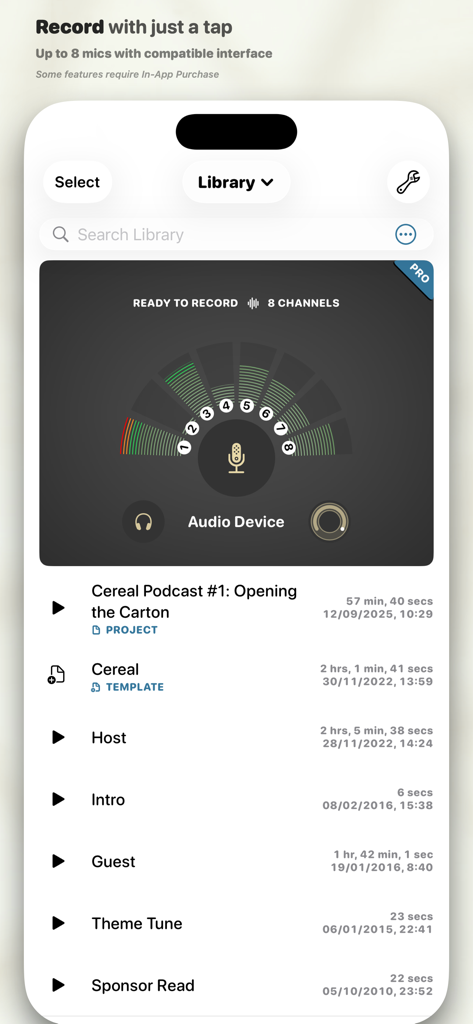
Ferrite Recording Studio app interface showing a list of podcast projects and an 8 channel audio recording meter

Ferrite Recording Studio app interface showing a list of podcast projects and an 8 channel audio recording meter

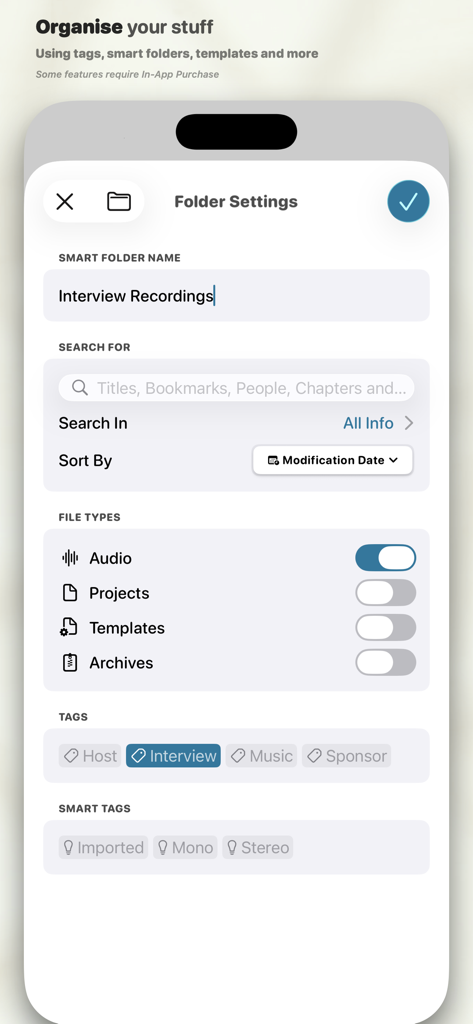
Interface of Ferrite Recording Studio showing smart folder settings with tags for interview recordings.

Interface of Ferrite Recording Studio showing smart folder settings with tags for interview recordings.

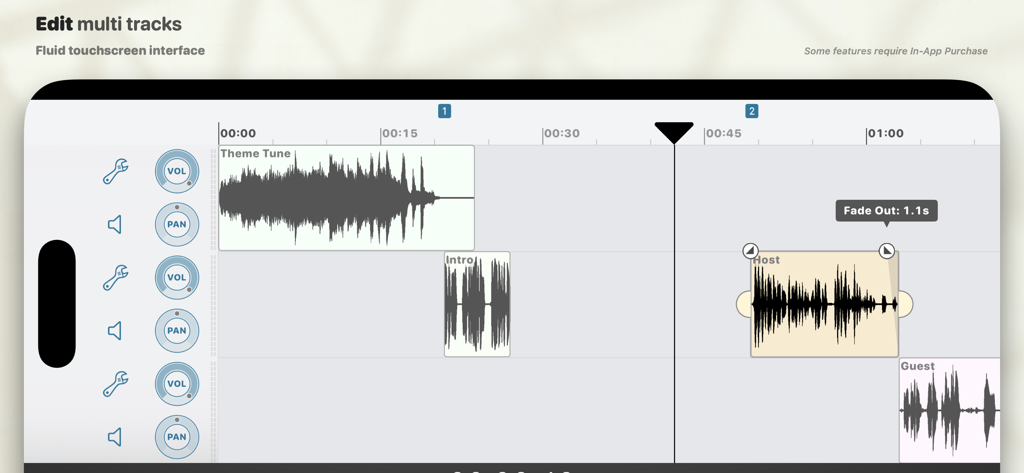
Multi-track audio editing timeline in Ferrite Recording Studio showing waveform clips for theme tune, host, and guest with volume and pan controls

Multi-track audio editing timeline in Ferrite Recording Studio showing waveform clips for theme tune, host, and guest with volume and pan controls

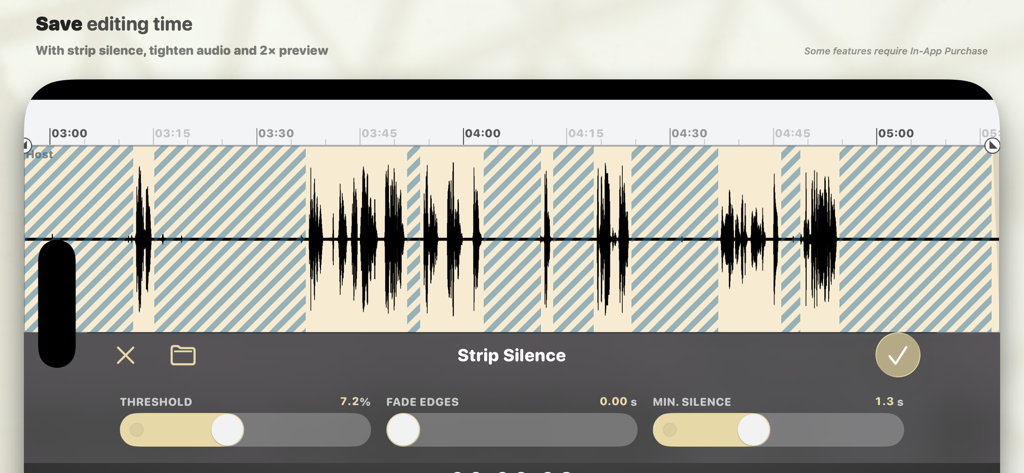
The Strip Silence feature in Ferrite Recording Studio app for automatic removal of silent gaps in audio recordings

The Strip Silence feature in Ferrite Recording Studio app for automatic removal of silent gaps in audio recordings

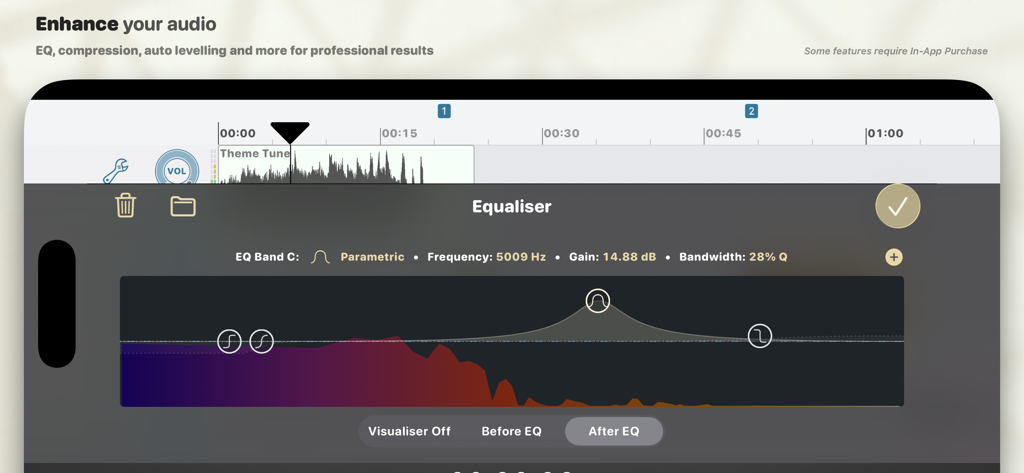
Professional parametric equalizer tool in Ferrite Recording Studio for mobile audio editing

Professional parametric equalizer tool in Ferrite Recording Studio for mobile audio editing

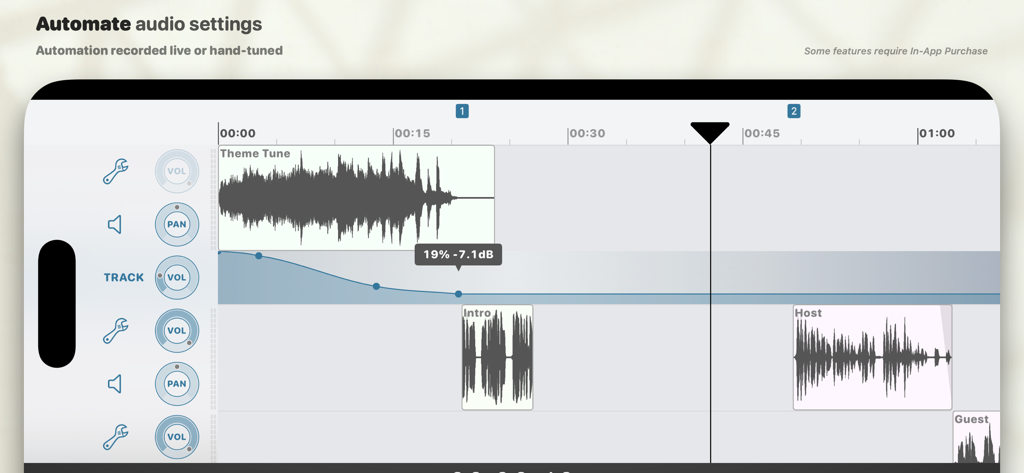
Multi-track audio editing interface showing volume automation curves for professional podcast production

Multi-track audio editing interface showing volume automation curves for professional podcast production

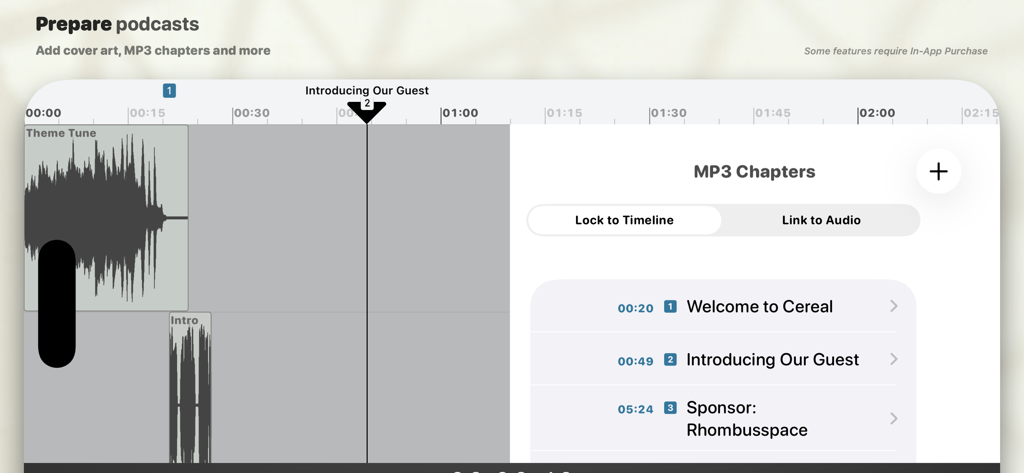
Interface of Ferrite Recording Studio showing the MP3 chapters editing tool with time-stamped titles for a podcast episode

Interface of Ferrite Recording Studio showing the MP3 chapters editing tool with time-stamped titles for a podcast episode

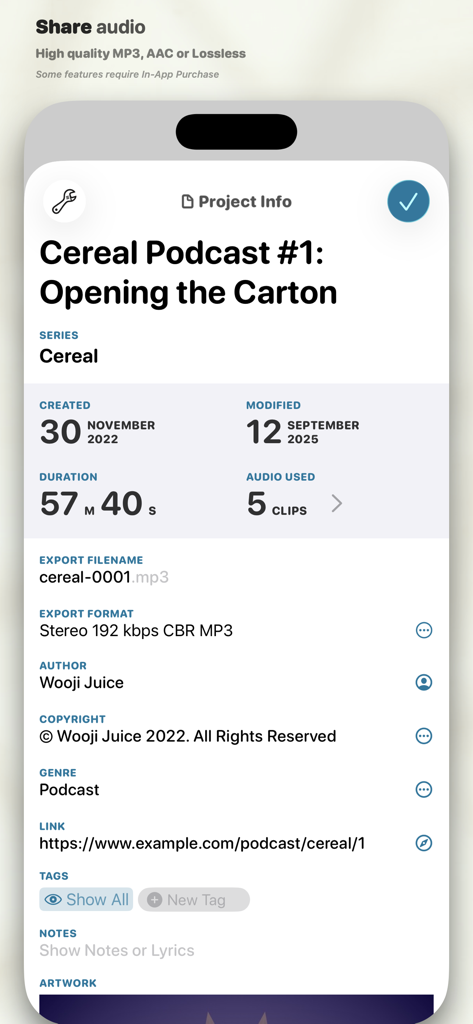
Project information screen in Ferrite Recording Studio showing podcast metadata and export settings

Project information screen in Ferrite Recording Studio showing podcast metadata and export settings

Power Your Production Anywhere

The tools that make this app stand out, trusted by 625K+ users.

✂️

Desktop Power, Touch Simplicity

Effortlessly manage multi-track projects with intuitive gestures. Slice, crop, and crossfade clips with a level of precision and speed that traditional mice can't match.

🎙️

Pro-Grade Polish, Automatically

Save hours of tedious editing. Use Strip Silence to instantly remove gaps and Automatic Ducking to perfectly balance background music with your voice.

🚀

Built for the Modern Creator

Master your multitasking with iPad Split View support. Record high-quality narration while reading your script side-by-side, all within a single, streamlined interface.

Loved by users worldwide

Trusted by 625K+ people who love this app.

"

"Ferrite has completely transformed my production workflow. The 'Strip Silence' and automatic ducking features save me hours of manual editing, allowing me to deliver broadcast-quality podcast episodes directly from my iPad while I'm traveling. It is truly a desktop-grade studio in my pocket."

Marcus Thorne, Independent Podcaster
"

"As a journalist, I need tools that are both powerful and reliable. The ability to use Split View to read my scripts while recording, combined with the incredible non-destructive editing and multi-month undo history, makes Ferrite the only app I trust for my long-form narration projects."

Sarah Jenkins, Freelance Radio Journalist

About the app

Everything you need to know about Ferrite Recording Studio.

Description

Ferrite is the award-winning app you need for creating podcasts, radio journalism, or other professional voice production work — lectures, speeches, voice-overs and more. It combines the ease-of-use of a “voice memo” audio recorder, with a versatile multi-track editing studio. Powerful tools like effects and automation are available when you need them. With time-saving features and a UI designed to get out of your way, people around the world are switching to Ferrite. — Streamlined Recording — Open Ferrite and with just one tap you’re recording. No fuss, and it won't break a sweat even with hours-long sessions. Just make sure your device has enough free space! Recording an interview and you want to highlight a few quotes? Have to take out some inappropriate language? Or just fluffed a sentence and need to fix it? Bookmark moments during your recording and they’ll be flagged up during edits, so you can jump right to them. Monitor levels with live recording meters, or listen through headphones. Tag your audio to find it quickly later. And of course you can import audio from your Music Library, iCloud, and other services such as Dropbox. Please note: the free version has limited duration for recording & editing projects. Upgrade to Pro and you can edit projects up to 24 hours long! — Editing is a Snip — Ferrite features full multi-track editing, from quick cuts, to producing a complete podcast or broadcast package. Zoom out to see hours at a glance, or zoom in all the way down to individual samples. Take a single clip, or a bunch, and arrange them in an editing project: move, crop, slice, fade in and out, or crossfade between clips just by overlapping them. You have full control over each track’s volume and panning, and can Mute or Solo as needed. And best of all, you needn’t fear trying out changes: Ferrite has great Undo/Redo — even if you quit the app and come back a month later, you can still undo all the way back to the moment you created your project! — Advanced Features — Need more? Ferrite also includes: • Automatic ducking: set tracks to “duck under” others (e.g. ducking music behind voiceovers). • Strip Silence: Carves away all the silent sections from a recording, making it easy to edit the remaining audio. • (iPad only) Split View and Slide Over support: Use Ferrite side-by-side with other apps. Recording a narration? Open another app with your script and place Ferrite down the side of the screen. Or open the User Guide in Safari on one side while you learn Ferrite on the other. With a single In-App Purchase, you can unlock many additional tools, including: • Preview at up to 2× speed • Prepare your audio for production with Noise Reduction and Auto Levelling. • Add professional effects to your tracks such as EQ, Noise Gate and Dynamic Range Compression, for projects that sound clean and engaging. • Automate volume, panning and effects settings so they vary over time, both on individual tracks and the final mix. • Tighten Audio can automatically take out awkward pauses and gaps. • Producing a podcast or series? Create a template to get each new episode off to a flying start. • Add cover art, chapters and more. • Found the perfect settings for an effect or tool? Save them as a Preset for re-use in other projects. • Audio Unit Extensions: if you have other apps installed that provide effects as Audio Unit Extensions, they’ll show up in Ferrite, where you can add them to tracks or projects. • Advanced search, smart folders, and template folders.

Latest Version

3.2.2

Size

24.9 MB

First Released

Nov 5, 2015

Your Professional Studio is Ready.

Join over 625,000 creators ditching the desk for an award-winning mobile workflow. Download Ferrite and start producing broadcast-quality audio on your iPhone or iPad today.

Download on App Store
FAQ

Frequently Asked Questions

Everything you need to know about Ferrite Recording Studio

What is Ferrite Recording Studio?

Ferrite Recording Studio is an award-winning app designed for creating podcasts, radio journalism, lectures, speeches, and voice-overs. It combines easy recording with versatile multi-track editing, offering powerful tools for professional audio production.

Does Ferrite Recording Studio offer multi-track editing?

Yes, Ferrite supports multi-track editing, allowing users to arrange multiple audio clips, adjust volume and panning, and apply fades and crossfades. This enables comprehensive podcast or broadcast package production.

Is there a limit on project duration in Ferrite Recording Studio?

Yes, the free version of Ferrite has limited duration for recording and editing projects. Upgrading to the Pro version unlocks the ability to edit projects up to 24 hours long.

Can I enhance audio quality with effects in Ferrite Recording Studio?

Yes, Ferrite Recording Studio provides advanced features like Noise Reduction, Auto Levelling, EQ, Noise Gate, and Dynamic Range Compression via an In-App Purchase to enhance audio quality for professional results.

How does Ferrite Recording Studio facilitate recording audio?

Ferrite offers streamlined recording with one-tap activation and the ability to handle hours-long sessions. Users can bookmark moments, monitor levels with live meters, and import audio from various sources like iCloud and Dropbox.

How can I organize my audio projects in Ferrite Recording Studio?

Yes, Ferrite allows the creation of smart folders and templates to organize recordings. Users can search by titles, bookmarks, people, and chapters, and filter by file types and custom tags.

Does Ferrite Recording Studio support automation of audio settings?

Yes, Ferrite supports audio automation, allowing users to automate volume, panning, and effects settings over time. This applies to individual tracks and the final mix for dynamic sound control.

Can Ferrite Recording Studio help remove silence from recordings?

Yes, Ferrite Recording Studio includes features such as 'Strip Silence' and 'Tighten Audio'. Strip Silence removes silent sections, and Tighten Audio automatically eliminates awkward pauses and gaps to save editing time.

Can I add chapters and cover art to my podcasts in Ferrite?

Yes, Ferrite allows users to prepare podcasts by adding cover art and creating MP3 chapters. This helps structure the audio content for listeners and adds professional polish.

Does Ferrite Recording Studio have an Undo/Redo function?

Yes, Ferrite Recording Studio features an extensive Undo/Redo history. This allows users to revert changes even after quitting the app and reopening it at a later date.