SoundLab - Audio Editor

SoundLab - Audio Editor

Download on App Store
Spark by MWM logo
Logo of SoundLab - Audio Editor

SoundLab: Pro 16-Track Audio Editor & Mobile Studio

Bring desktop-grade precision to your pocket. Record, mix, and separate vocals with local AI in a powerful, lossless workstation designed for musicians and podcasters.

Publisher

孛 刘

Category

Music

Downloads

4M+

User Rating

4.6/5

Total Ratings

26K+

Locales

12

A Pro Studio in Your Pocket

Discover the interface used by 4M+ users.
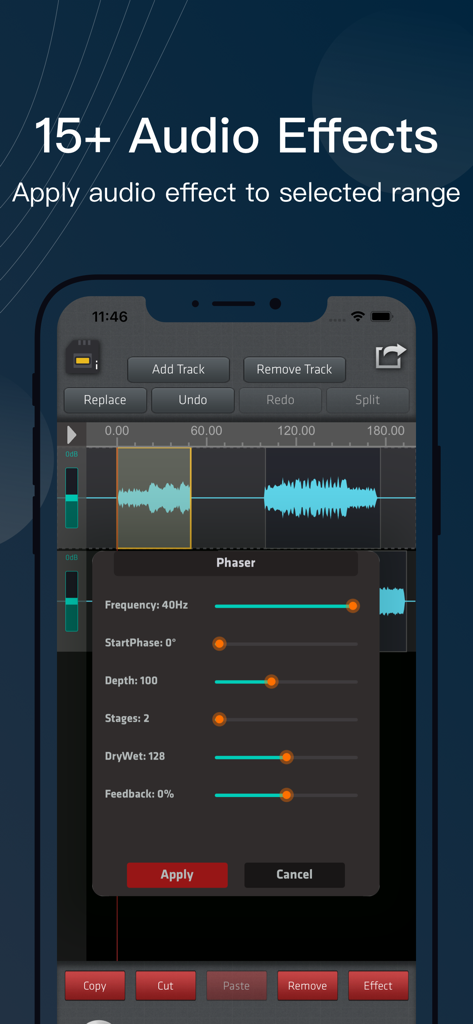
SoundLab mobile app interface showing a phaser effect applied to a selected audio track waveform

SoundLab mobile app interface showing a phaser effect applied to a selected audio track waveform

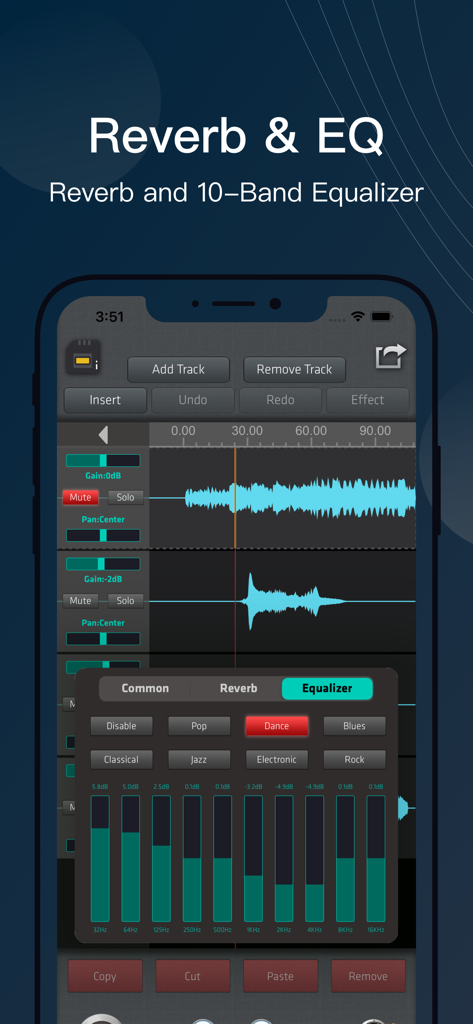
SoundLab mobile app 10-band equalizer and audio editing interface

SoundLab mobile app 10-band equalizer and audio editing interface

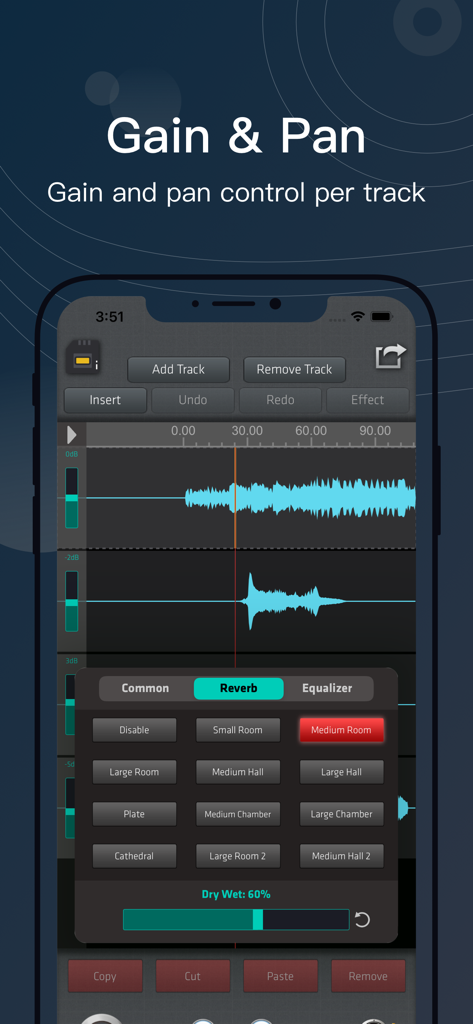
SoundLab multitrack audio editor showing gain and pan controls and reverb effects menu

SoundLab multitrack audio editor showing gain and pan controls and reverb effects menu

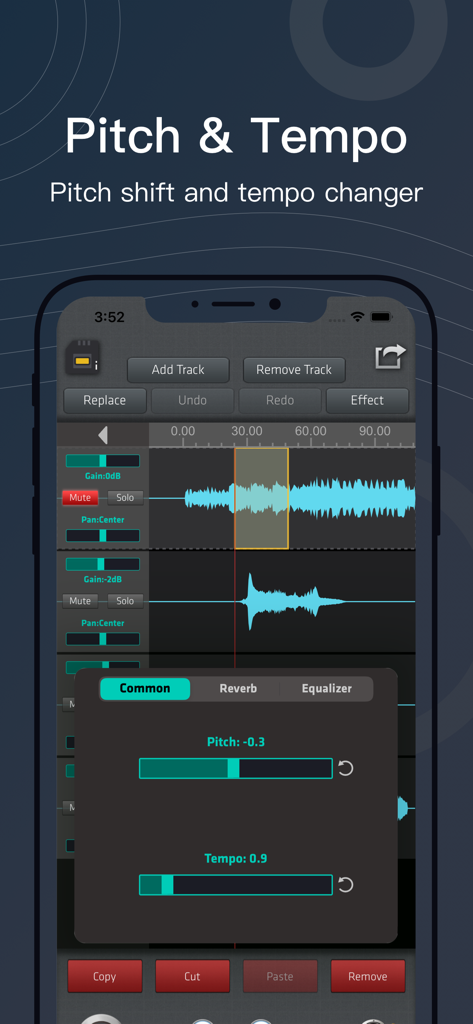
Interface of the SoundLab app showing pitch shift and tempo changer controls on multiple audio tracks

Interface of the SoundLab app showing pitch shift and tempo changer controls on multiple audio tracks

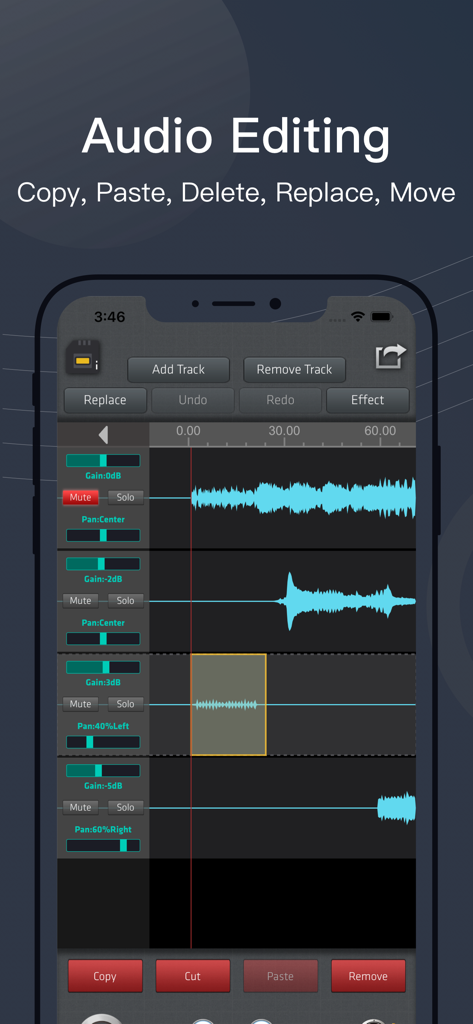
Multi track audio editing interface on SoundLab mobile app showing blue waveforms and mixing controls

Multi track audio editing interface on SoundLab mobile app showing blue waveforms and mixing controls

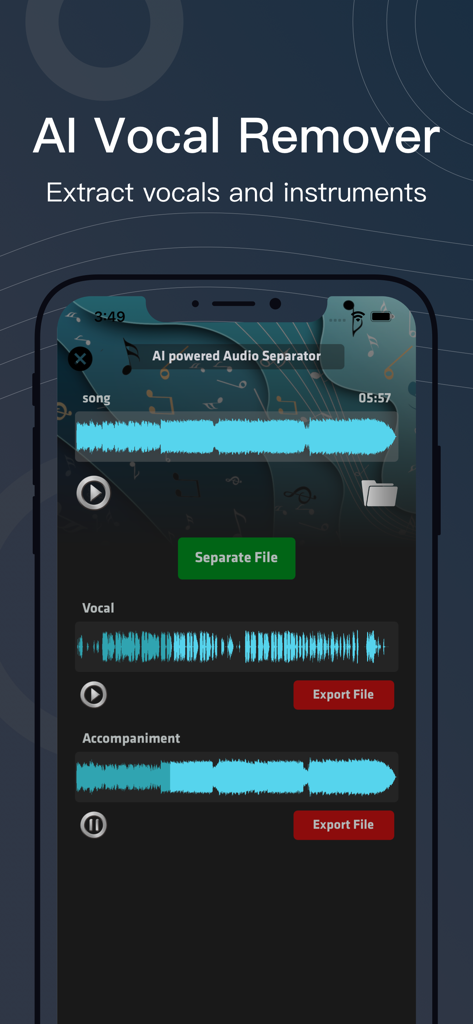
Interface of SoundLab app showing the AI vocal remover feature separating a song into vocal and accompaniment tracks

Interface of SoundLab app showing the AI vocal remover feature separating a song into vocal and accompaniment tracks

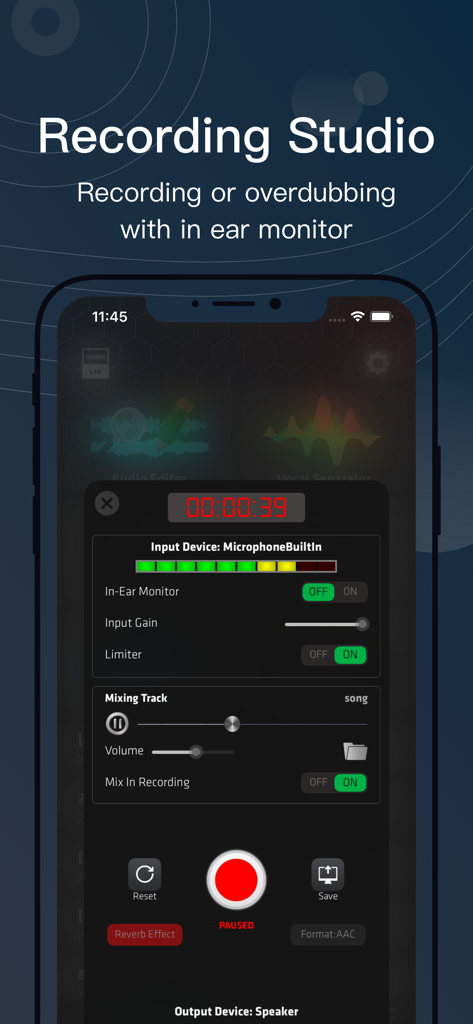
SoundLab app interface showing professional recording studio tools and audio levels on a smartphone

SoundLab app interface showing professional recording studio tools and audio levels on a smartphone

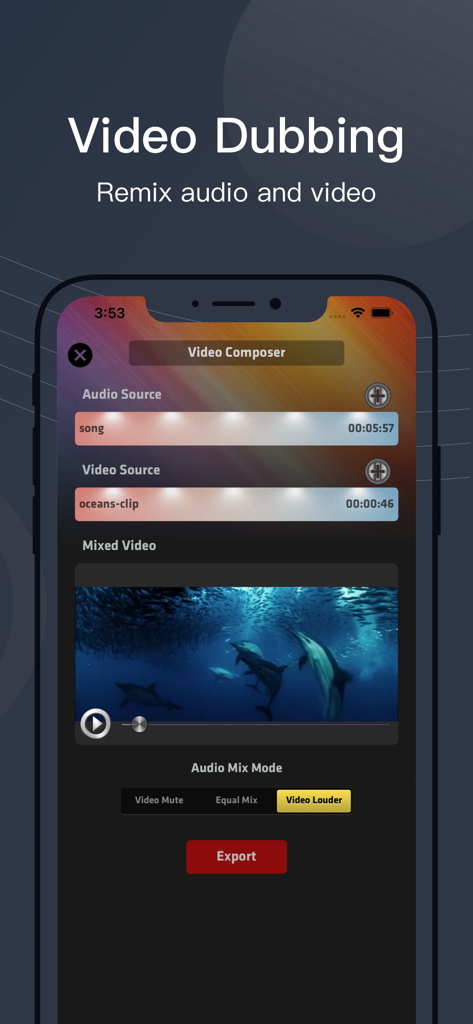
Interface of SoundLab app showing video dubbing and audio mixing features on an iPhone screen

Interface of SoundLab app showing video dubbing and audio mixing features on an iPhone screen

Desktop-Class Audio Power in Your Pocket

The tools that make this app stand out, trusted by 4M+ users.

🤖

Local AI Vocal Separation

Isolate vocals or instrumentals instantly using on-device machine learning. No waiting, no uploads, and total privacy for your creative projects.

🎚️

16-Track Pro Editing Engine

Master your mix with a powerful multi-track editor that supports millisecond-level precision, designed for those familiar with Audacity or Audition.

🎙️

Studio-Grade Mobile Recording

Connect external professional mics and use real-time monitoring to capture high-fidelity audio for podcasts or music sessions wherever you are.

Loved by users worldwide

Trusted by 4M+ people who love this app.

"

"The AI Vocal Separator is a complete game-changer for my song covers. Being able to isolate stems locally without waiting for cloud uploads saves me so much time. It is essentially a pro-grade DAW that fits in my pocket."

Marcus J., Independent Musician
"

"Finally, an audio editor that feels like Audacity on mobile! The millisecond-level waveform zoom and 16-track mixing are perfect for my podcast production. It is the most reliable toolbox I have found for editing high-quality audio on the go."

Sarah Chen, Podcast Producer

About the app

Everything you need to know about SoundLab - Audio Editor.

Description

SoundLab bring desktop grade audio editing to mobile, as a audio editor in your pocket with following features:
 • Audio Editor: includes a 16-track, over 20 audio effects, and lossless output formats, complemented by an intuitive waveform interface with smooth zoom support. • AI Vocal Separator: employs machine learning to isolate vocal and instrumental stems.
 No need to upload files or wait in line, all AI processing is done locally on your device. • Audio Recorder: Minimalist yet powerful, used to seize fleeting recording opportunities. Supports selecting input device, recording format, sample rate, channel mode, and bitrate. • Recording Studio: Supports in-ear monitor, input gain control, and anti-popping. You can add accompaniment tracks while recording. Compatible with various common professional external microphones on the market. • Video Composer: Minimalistic audio-video mixing function, helping you add video to your audio creations, create soundtrack videos. SoundLab is more than just an audio editor, it strives to meet various spontaneous scenarios in the process of music and podcast production, allowing you to start creating anytime, anywhere on your iPhone or iPad. 
We won't claim that it can replace a professional DAW, but when you need a simple and convenient toolbox, when you don't want to open your computer and wait for a heavyweight DAW to start for tens of seconds, it is definitely a reliable choice. SoundLab is perfect for: • Lovers of music • Podcast producer • Music students and teachers • Especially for users who are familiar with Audacity or Audition Feature Highlights: • Unbeatable audio editing and mixing engine: support copy, cut, paste, remove, trim, insert, replace, split, move, etc. with full undo/redo. Exclusive dither algorithm ensure all editing process will never introduce click sound. • Selection-based Effects: process any selected part instead of the entire track, over 20 audio effects: AI Vocal Separator, AI Noise Suppression, 10-Bands EQ, Reverb, Bass Boost, Amplify, Compressor, Change Pitch / Tempo, De-essing, Normalize, Fade In / Out, Phaser, Reverse, Silence Remover... • Master Effects: supports real-time adjustment of global output, including speed, pitch, reverb, and equalizer. The same project can be exported with different styles without the need for modification. • High performance waveform: supporting smooth scaling, enable editing within millisecond level range, help you tweak the details of tiny sound. • Support export AAC / ALAC / MP3 / FLAC / WAV format. All format supports write ID3 metadata and cover art, even for WAV file. SoundLab Pro subscription and permanent purchase unlock all PRO features and remove all ads. 
• Subscription is billed monthly or annually at the rate corresponding to the selected plan. In addition, a one-time permanent purchase will be offered if needed, which is not one of the subscription plan. Subscriptions or permanent purchases can be shared with up to 5 family members. • Subscription with a free trial period will automatically renew to a paid subscription unless auto-renewal is turned off. Payment will be charged to iTunes account at confirmation of purchase. Subscription automatically renews unless auto-renew is turned off at least 24 hours before the end of the current period. Account will be charged for renewal within 24 hours prior to the end of the current period, and identify the cost for the renewal. Subscriptions may be managed by the user and auto-renewal may be turned off going to the user’s Account Settings after purchase. Customer Support • You can contact us in app: Setting -> Contact Us • Official Website: https://www.castpeer.net • Youtube Channel: https://www.youtube.com/@soundlab-app

Latest Version

2.10.3

Size

174.5 MB

First Released

Aug 8, 2020

Your Desktop Studio, Now in Your Pocket

Stop waiting for your DAW to load. Join over 4 million creators and experience professional-grade audio editing with AI power, right on your iPhone or iPad.

Download on App Store
FAQ

Frequently Asked Questions

Everything you need to know about SoundLab - Audio Editor

What is SoundLab - Audio Editor?

SoundLab is a mobile audio editor for iPhone and iPad, offering desktop-grade features like 16-track editing, over 20 effects, an AI vocal separator, and a recording studio. It supports music and podcast production on the go.

Can SoundLab separate vocals from instrumentals?

Yes, SoundLab features an AI Vocal Separator that employs machine learning to isolate vocal and instrumental stems. This processing occurs locally on your device without needing uploads or waiting.

What audio effects are available in SoundLab?

SoundLab offers over 20 audio effects including AI Vocal Separator, AI Noise Suppression, 10-Bands EQ, Reverb, Bass Boost, Amplify, Compressor, Pitch/Tempo change, De-essing, Normalize, Fade In/Out, Phaser, Reverse, and Silence Remover.

Does SoundLab support multi-track audio editing?

Yes, SoundLab supports 16-track audio editing, providing an intuitive waveform interface with smooth zoom. It allows comprehensive editing actions like copy, cut, paste, remove, trim, insert, replace, split, and move with full undo/redo.

What export formats does SoundLab support?

SoundLab supports exporting audio in AAC, ALAC, MP3, FLAC, and WAV formats. All supported formats allow writing ID3 metadata and cover art, including WAV files.

Can SoundLab record audio?

Yes, SoundLab includes an Audio Recorder that is minimalist yet powerful. It supports selecting input devices, recording format, sample rate, channel mode, and bitrate for capturing audio.

Is there a SoundLab Pro subscription available?

Yes, a SoundLab Pro subscription or a permanent purchase unlocks all PRO features and removes ads. Subscriptions are billed monthly or annually and can be shared with up to 5 family members.

How does SoundLab handle video and audio mixing?

SoundLab features a Video Composer for minimalistic audio-video mixing. This function helps users add video to their audio creations and produce soundtrack videos directly within the app.

Does SoundLab offer real-time effects for global output?

Yes, SoundLab provides Master Effects for real-time adjustment of global output. Users can control speed, pitch, reverb, and equalizer, enabling different styles for the same project without modification.

Can I use external microphones with SoundLab?

Yes, SoundLab's Recording Studio is compatible with various common professional external microphones on the market. It supports features like in-ear monitoring and input gain control.