Money Manager Classic Lite

Money Manager Classic Lite

Download on App StoreDownload on Google Play
Spark by MWM logo
Logo of Money Manager Classic Lite

Money Manager Classic Lite: Precision Asset Management for the Methodical Mind

Master your finances with the power of double-entry bookkeeping. Experience total control through manual entry, detailed budget tracking, and professional-grade statistics without the need for bank syncing.

Download on App Store

Publisher

RealByte

Category

Finance

Downloads

100K+

User Rating

4.5/5

Total Ratings

0

Locales

10

Precision at a Glance

Discover the interface used by 100K+ users.

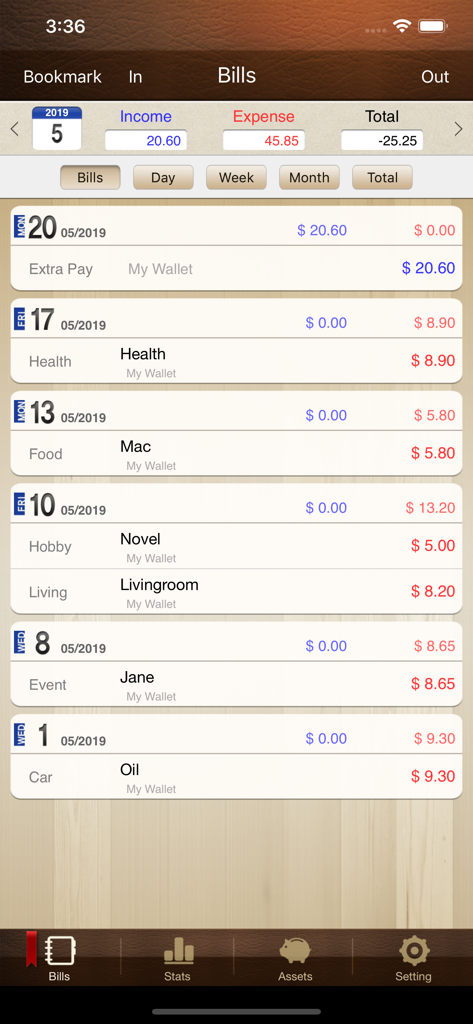
List of daily expenses and income in Money Manager Classic Lite app

List of daily expenses and income in Money Manager Classic Lite app

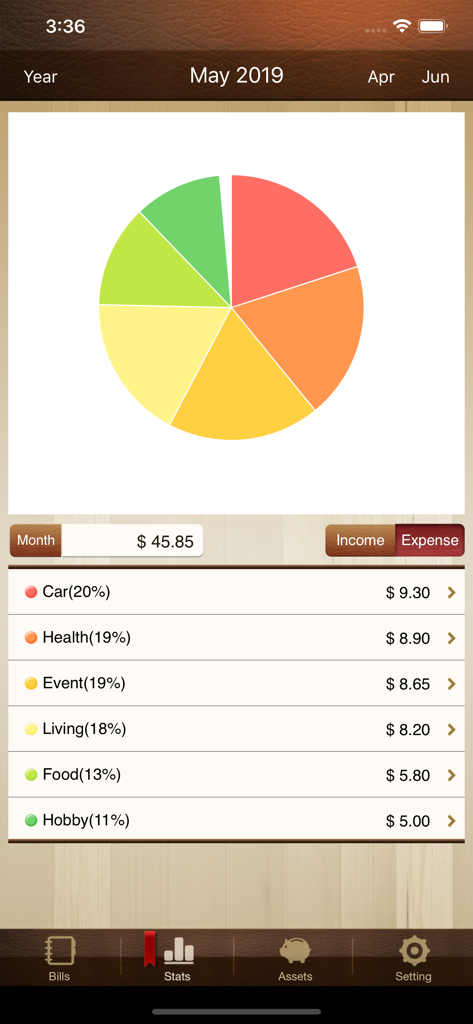
Monthly expense statistics with a pie chart and category breakdown in the Money Manager Classic Lite app

Monthly expense statistics with a pie chart and category breakdown in the Money Manager Classic Lite app

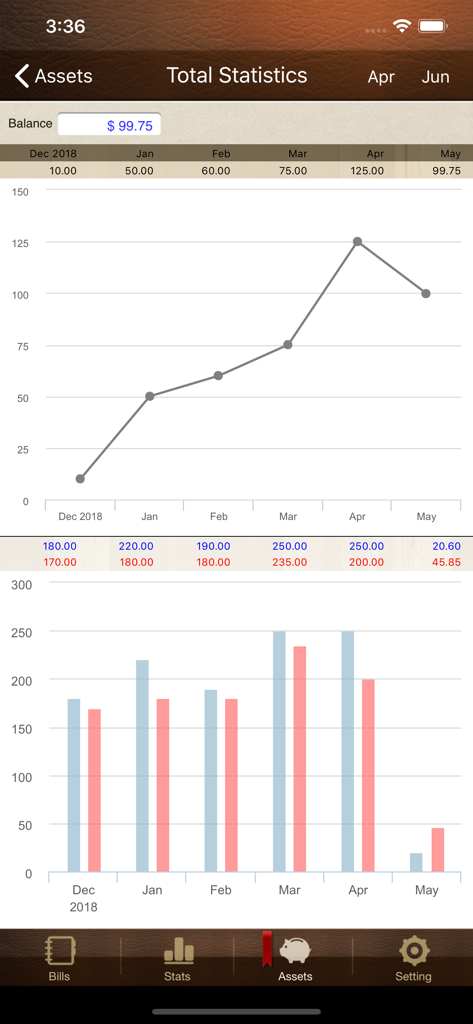
Total Statistics screen of Money Manager Classic Lite app showing asset trends and expense bar charts

Total Statistics screen of Money Manager Classic Lite app showing asset trends and expense bar charts

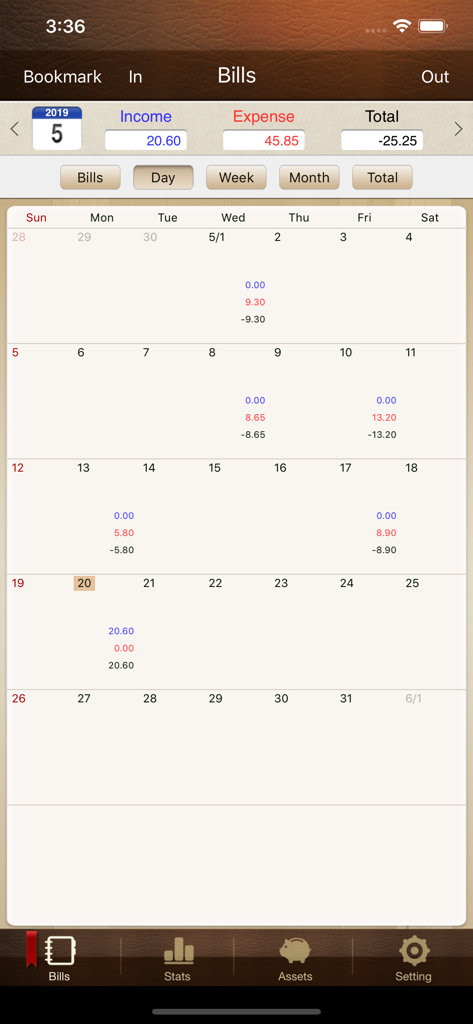
Monthly calendar interface in Money Manager Classic Lite showing daily income and expense totals

Monthly calendar interface in Money Manager Classic Lite showing daily income and expense totals

Take Full Command of Your Financial Balance

The tools that make this app stand out, trusted by 100K+ users.

⚖️

Double-Entry Bookkeeping

Go beyond simple tracking with a professional accounting system that records every move between your assets and expenses for 100% accuracy.

📊

Visual Data Insights

Transform your spending habits into actionable intelligence with instant category graphs and month-over-month asset comparisons.

📥

Excel Export & Data Portability

Your data remains yours. Seamlessly export your records to Excel for advanced desktop analysis or create secure backups for long-term control.

Loved by users worldwide

Trusted by 100K+ people who love this app.

"

"Finally, a finance app that respects the double-entry bookkeeping system! As a freelancer, I need to see exactly how money moves between my accounts, not just a list of transactions. The manual entry keeps me financially mindful, and the Excel export feature makes my monthly reporting incredibly simple. It is the most reliable tool in my professional kit."

David L.
"

"I have tried every flashy budget app on the market, but I always come back to Money Manager Classic. I value my privacy and don't want to link my bank accounts to third-party servers. This app gives me total control, and the credit card settlement date tracking is a game changer for avoiding interest. It is fast, secure, and does exactly what it promises."

Sarah K.

About the app

Everything you need to know about Money Manager Classic Lite.

Description

We provide two version for iOS (Money Manager Next, Money Manager Classic). Next version (Red Icon) is the later version which offers, even more, functionalities than Classic version (Brown Icon). That is why we recommend using Next version. Classic version is also good. “Money Manager Classic” is an optimized application for personal asset management. ※ Applying double entry bookkeeping It facilitates efficient asset management. It does not just record your money coming in and out of your account but deposits your money into your account as soon as your income is input and draws money from your account as soon as your expenditure is input. ※ Budget management function You can manage your budget. It shows your budget and expenditure by a graph so you can see the amount of your expenditure against your budget quickly. ※ Card / Debit Card management function Entering a settlement date, you can see payment amount and outstanding payment at asset tab. You can arrange the automatic debit by simply connecting your debit card with your account. ※ Passcode You can check passcode. You can safely manage your account book. ※ Transfer, direct debit and recurrence function Transfer between assets is possible, which makes your asset management more efficient. In addition, you can manage you salary, insurance, term deposit and loan more easily by setting automatic transfer and recurrence. ※ Instant statistics Based on the data entered, you can instantly see your expenditure by category and changes between each month. And you can see change of your assets and income/expenditure indicated by a graph as well. ※ Bookmark function You can easily input your frequent expenditures all at once by bookmarking them. ※ Backup / Restore You can make and view backup files in Excel file and backup / restore is possible. ※ Choice of currency – you can freely choose your currency. ※ Other functions - Change of starting date - Calculator function (Amount > upper right button) - Sub Category ON-OFF function

Latest Version

3.2.36

Size

46.4 MB

First Released

Jan 21, 2012

Take Full Control of Your Financial Future

Join over 100,000 disciplined users who prefer manual precision and professional double-entry bookkeeping over automated guesswork.

Download on App StoreDownload on Google Play