My Shift Planner - Calendar

My Shift Planner - Calendar

Download on App Store
Spark by MWM logo
Logo of My Shift Planner - Calendar

My Shift Planner: Master Your Schedule and Reclaim Your Life

The #1 color-coded calendar built for the unique needs of shift workers. Effortlessly manage complex rotas, track your earnings, and stay connected with family—all in one intuitive app.

Download on App Store

Publisher

MyBuzz Technologies Limited

Category

Productivity

Downloads

1M+

User Rating

4.8/5

Total Ratings

26K+

Locales

1

Control at a Glance

Discover the interface used by 1M+ users.

A color-coded monthly shift calendar for workers showing various shift patterns like day and night rotations

A color-coded monthly shift calendar for workers showing various shift patterns like day and night rotations

An illustration of various shift workers like nurses and police officers with a five star user testimonial for My Shift Planner app

An illustration of various shift workers like nurses and police officers with a five star user testimonial for My Shift Planner app

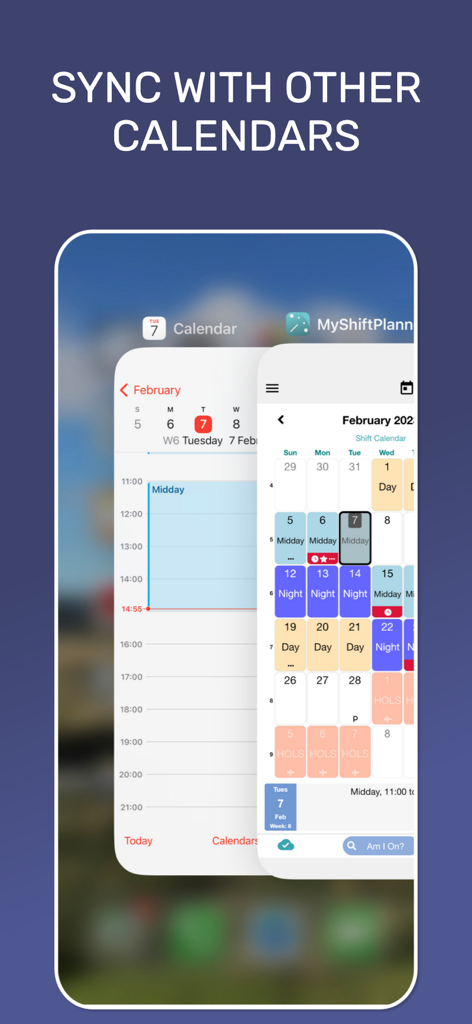
Sync My Shift Planner with other mobile calendars to manage work and personal schedules

Sync My Shift Planner with other mobile calendars to manage work and personal schedules

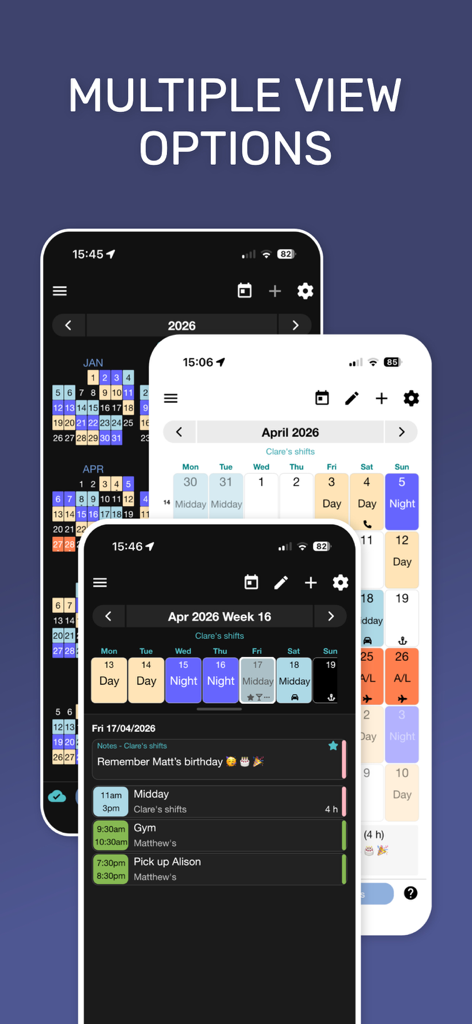
Multiple view options of the My Shift Planner app showing color coded work schedules and reminders

Multiple view options of the My Shift Planner app showing color coded work schedules and reminders

Smartphone screen displaying My Shift Planner app with a color coded monthly calendar and a shift reminder notification.

Smartphone screen displaying My Shift Planner app with a color coded monthly calendar and a shift reminder notification.

Interface of My Shift Planner app showing a list of built-in shift rotation patterns like two-two-two and week-on-week-off.

Interface of My Shift Planner app showing a list of built-in shift rotation patterns like two-two-two and week-on-week-off.

Customizing a shift work calendar with color-coded shift types and icons in the My Shift Planner app

Customizing a shift work calendar with color-coded shift types and icons in the My Shift Planner app

Interface of the My Shift Planner app showing shift pay settings and leave tracking features

Interface of the My Shift Planner app showing shift pay settings and leave tracking features

Color coded shift work calendar for April 2026 showing early late and training shifts with a button to connect to MyShiftManager.

Color coded shift work calendar for April 2026 showing early late and training shifts with a button to connect to MyShiftManager.

Color-coded shift work widgets on a mobile home screen displaying early late and night schedules

Color-coded shift work widgets on a mobile home screen displaying early late and night schedules

Master Your Shift Life

The tools that make this app stand out, trusted by 1M+ users.

🗓️

Smart Rota Automation

Instantly set up complex patterns like 4-on/4-off or DuPont schedules. Our high-contrast, color-coded view ends 'Shift Brain' by showing your entire month at a single glance.

💸

Earnings & Overtime Tracker

Take control of your paycheck. Log overtime hours, add custom pay rates for night differentials, and generate professional timesheets to ensure you are always paid what you've earned.

👨‍👩‍👧

Seamless Family Sync

Bridge the gap between your schedule and your loved ones. Sync your shifts to your device calendar and use live sharing so your family knows exactly when you're working, sleeping, or free.

Loved by users worldwide

Trusted by 1M+ people who love this app.

"

"Managing a rotating nursing schedule used to be a nightmare for my family life. My Shift Planner changed everything. The color-coded blocks let me see my entire month in seconds, and syncing it with my husband's calendar means no more missed school events or dinner plans. It is an absolute lifesaver for healthcare workers!"

Sarah Miller, Registered Nurse
"

"I have tried every calendar app out there, but none handle the DuPont schedule like this one. Being able to track my overtime and see my estimated pay directly in the app is huge. It is simple, reliable, and exactly what I need to stay organized between my 12-hour rotations."

James Peterson, Industrial Engineer

About the app

Everything you need to know about My Shift Planner - Calendar.

Description

MyShiftPlanner – The Ultimate Shift Work Calendar. Stay organised, save time and take control of your shift life with MyShiftPlanner, the #1 calendar app made just for shift workers. From nurses, drivers and retail workers to engineers, airline crew and paramedics, over 400,000 shift workers worldwide trust MyShiftPlanner to keep their work-life balance on track. PLAN YOUR SHIFTS *Simple, color-coded calendar built for shift work *Add or edit shifts in seconds *Supports all common rotas and patterns: **4 On / 4 Off **DuPont Schedule **Continental Pattern **Custom repeating or non-repeating shifts *Create your own shift names, colours and times *Add notes, reminders and alerts* *Now supports multiple patterns, even in the free version! TRACK HOURS, PAY & LEAVE *View total hours, overtime and annual leave* *Add custom pay rates to see estimated earnings* *Submit and download timesheets directly from the app *Add comments to your timesheets for managers or records* STAY IN SYNC *Connect with MyShiftManager to see real-time rota updates and colleague shifts *Sync your shifts with your device calendar* *Share your schedule by email or live sharing* *Stay up to date with reminders, even across devices MAKE IT YOUR OWN *Add 2 shifts per day or split shifts *Choose from Light or Dark Mode *Add public holidays, custom icons and notes *Supports iPhone and iPad *TouchID and FaceID security *Regular updates with new features and improvements UPGRADE TO PRO Support our small team and unlock even more tools: *Calendar sync with device calendars *Multiple rotas and shift patterns *Pay tracking and reports *Custom icons and calendar overlays *Leave tracking and reminders *Remove ads Why Shift Workers Love MyShiftPlanner “Perfect for tracking my shifts. I’ve used it for years!” “Makes complex rotas easy to follow.” “Simple, reliable and always improving.” Support & Links We’re a small UK team who care about helping shift workers manage life more easily. Need help? Contact us at support@myshiftplanner.co.uk – we’re here to help. • Privacy Policy: myshiftplanner.com/privacy-policy • Terms of Use: myshiftplanner.com/terms-and-conditions New in v6.4.5 Multiple patterns now available for all users and smarter timesheets with download and comments support. Plus bug fixes and quality improvements to keep your calendar running smoothly.

Latest Version

6.5

Size

165.6 MB

First Released

May 10, 2013

Take Back Control of Your Shift Life Today

Join over 400,000 professionals who trust MyShiftPlanner to simplify their rotas, track their earnings, and reclaim their time. Download now and see why we're the #1 choice for shift workers.

Download on App Store
FAQ

Frequently Asked Questions

Everything you need to know about My Shift Planner - Calendar

What is MyShiftPlanner?

MyShiftPlanner is the #1 calendar app for shift workers, designed to organize shifts, save time, and manage work-life balance. It tracks hours, pay, leave, and supports various complex shift patterns and rotas.

Does MyShiftPlanner support different shift patterns?

Yes, MyShiftPlanner supports all common rotas and patterns, including 4 On / 4 Off, DuPont Schedule, and Continental Pattern. Users can also create custom repeating or non-repeating shifts within the app.

Can I track my pay and hours with MyShiftPlanner?

Yes, MyShiftPlanner allows users to track total hours, overtime, and annual leave. You can add custom pay rates to view estimated earnings and submit or download timesheets directly from the app.

How do I share my schedule using MyShiftPlanner?

MyShiftPlanner enables users to share their schedule by email or through live sharing. It also offers functionality to sync your shifts with your device's native calendar.

Is MyShiftPlanner compatible with other calendar apps?

Yes, MyShiftPlanner syncs your shifts with your device calendar. Upgrading to the Pro version unlocks additional calendar synchronization features for seamless integration.

Can I customize the calendar appearance in MyShiftPlanner?

Yes, MyShiftPlanner offers extensive customization. Users can choose Light or Dark Mode, add public holidays, custom icons, and notes to personalize their calendar appearance.

What features are included in MyShiftPlanner Pro?

MyShiftPlanner Pro includes calendar sync with device calendars, multiple rotas, pay tracking and reports, custom icons and calendar overlays, leave tracking and reminders, and removes ads.

Does MyShiftPlanner provide security features?

Yes, MyShiftPlanner integrates security features for user access. It supports TouchID and FaceID, providing secure and convenient authentication for the application.

Can MyShiftPlanner send shift reminders?

Yes, MyShiftPlanner allows users to set notes, reminders, and alerts for their shifts. It provides notifications to help ensure users never miss a shift, even across multiple devices.

How does MyShiftPlanner help track leave?

MyShiftPlanner helps track annual leave and vacation taken. The Pro version offers enhanced leave tracking capabilities and reminders for comprehensive management of time off.

Does MyShiftPlanner connect with MyShiftManager?

Yes, MyShiftPlanner connects with MyShiftManager. This integration allows users to see real-time rota updates and view colleague shifts directly within the MyShiftPlanner app.