Supershift Shift Work Calendar

Supershift Shift Work Calendar

Download on App StoreDownload on Google Play
Spark by MWM logo
Logo of Supershift Shift Work Calendar

Supershift: Master Your Rotating Schedule and Track Every Dollar

The ultimate calendar built for healthcare, first responders, and the 24/7 workforce. Plan rotations years in advance, monitor your overtime earnings, and stay perfectly synced with your family’s schedule.

Publisher

Supershift GmbH

Category

Productivity

Downloads

5M+

User Rating

4.8/5

Total Ratings

128K+

Locales

13

Your Schedule, Visualized

Discover the interface used by 5M+ users.

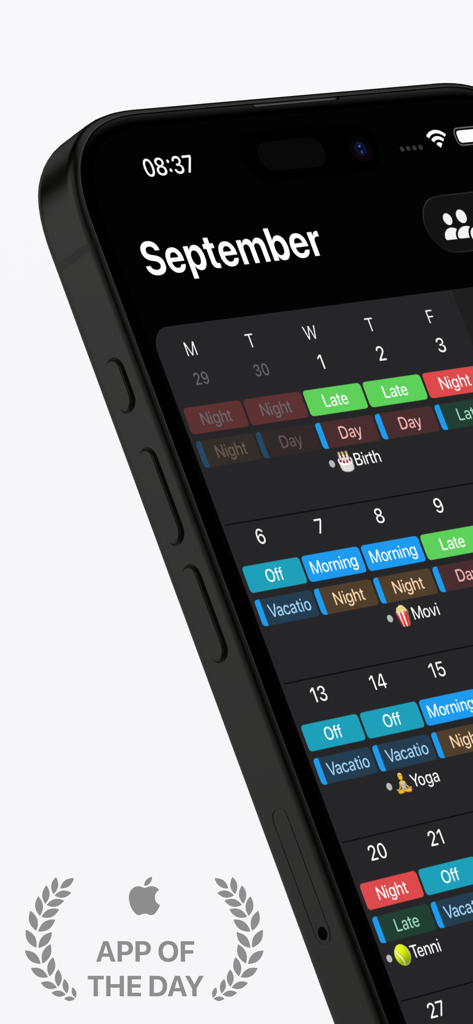
iPhone screen showing Supershift work calendar with color coded shifts in dark mode.

iPhone screen showing Supershift work calendar with color coded shifts in dark mode.

Supershift app interface displaying a color coded shift work calendar in dark mode with integration icons for Google and Apple calendars

Supershift app interface displaying a color coded shift work calendar in dark mode with integration icons for Google and Apple calendars

Interface of the Supershift app showing a shared monthly shift work calendar between two users Emma and David.

Interface of the Supershift app showing a shared monthly shift work calendar between two users Emma and David.

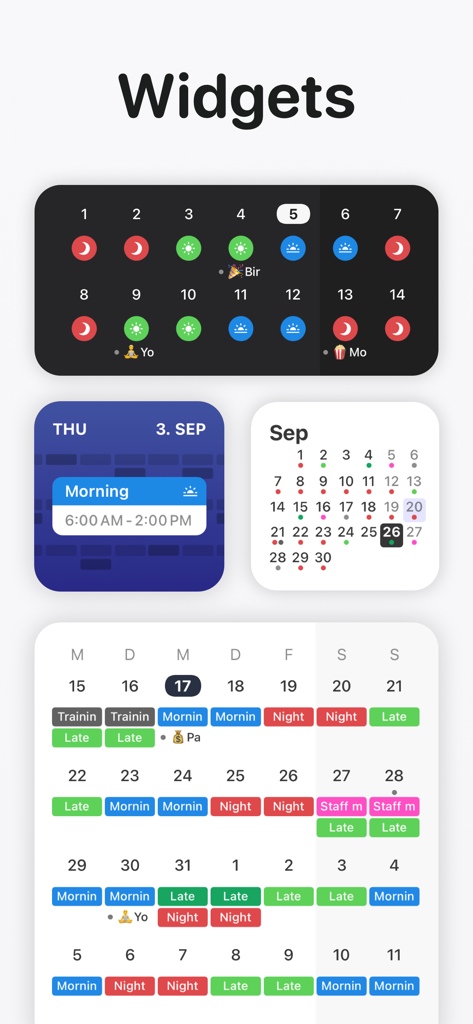
Preview of various iOS widgets from Supershift showing shift schedules with color coded icons and calendar views

Preview of various iOS widgets from Supershift showing shift schedules with color coded icons and calendar views

Reports screen in Supershift app showing hours worked and total earnings

Reports screen in Supershift app showing hours worked and total earnings

Interface showing how to create rotating shift schedules with color coded icons

Interface showing how to create rotating shift schedules with color coded icons

Interface showing calendar export options to sync shifts with external calendars like Google and iCloud

Interface showing calendar export options to sync shifts with external calendars like Google and iCloud

Supershift mobile app interface demonstrating how to share and print a shift work calendar as a PDF

Supershift mobile app interface demonstrating how to share and print a shift work calendar as a PDF

A yearly calendar view of the Supershift app displaying color coded work shifts

A yearly calendar view of the Supershift app displaying color coded work shifts

Take Full Control of Your Shift Life

The tools that make this app stand out, trusted by 5M+ users.

🔄

Master Your Rotation

Define your shift patterns once and visualize your schedule up to two years in advance. Plan vacations and family time with total certainty.

💰

Maximize Your Earnings

Automatically calculate overtime, shift differentials, and total earnings. Generate professional reports to ensure your paycheck is always accurate.

👨‍👩‍👧‍👦

Bridge the Social Gap

Easily export shifts to Google or iCloud calendars. Keep your 9-to-5 family and friends in sync so they always know when you're available.

Loved by users worldwide

Trusted by 5M+ people who love this app.

"

"As a nurse working rotating 12-hour shifts, this app is an absolute game-changer. The Apple Watch complication is perfect for checking how much time is left in my shift at a glance, and the earnings report helps me track my overtime accurately. It's the first calendar that actually understands my life."

Sarah M., Registered Nurse
"

"Being a firefighter means my schedule is anything but standard. Supershift allows me to program my rotation two years in advance, which is huge for family planning. I use the PDF export every month to sync up with my wife's office job so we can actually find time for vacations."

David K., Fire Captain

About the app

Everything you need to know about Supershift Shift Work Calendar.

Description

Supershift is great for keeping up with your shift working schedule and all other calendar events in between. With Supershift, scheduling is easy and quick, plus it works with the Apple Watch for a quick view. You can customize shifts with colors and icons and add as many shifts per day as you’d like. • REPORTS Create reports for earnings, hours per shifts, overtime and shift counting (e.g. vacation days). • DARK MODE A beautiful dark mode makes viewing your schedule at night more comfortable. • ROTATION Define rotations and apply them for up to 2 years in advance. • APPLE WATCH View current and upcoming shifts on the watch app and watch complications. The watch app includes countdown timers for time to start and time remaining. • WIDGET Widgets that can show day, 2 weeks, 4 weeks or agenda view. Supershift Pro features: • iOS CALENDAR EXPORT Export shifts to the iOS calendar (e.g. Google or iCloud calendar) to share your schedule with friends and family. • PDF EXPORT Create and share a PDF version of your monthly calendar. The PDF can be customized with title, times, breaks, duration, notes, location and total hours worked. • CLOUD SYNC Use cloud sync to keep all your iOS devices in sync. If you get a new iPhone or iPad cloud sync can be used to restore your data (requires iOS 10 or later). • iOS CALENDAR EVENTS Birthdays, appointments and other events from external calendars (e.g. Google or iCloud calendar) can be shown alongside your shifts. Privacy Policy: https://supershift.app/privacy.html Terms of Use: https://www.apple.com/legal/internet-services/itunes/dev/stdeula/

Latest Version

2026.2

Size

182.6 MB

First Released

Apr 21, 2016

Take Control of Your Shift Life Today

Join over 5 million professionals who simplify their rotations, track earnings, and sync their lives with the world's most powerful shift calendar.

Download on App StoreDownload on Google Play
FAQ

Frequently Asked Questions

Everything you need to know about Supershift Shift Work Calendar

What is Supershift Shift Work Calendar?

Supershift is a calendar application for managing shift work schedules and personal events. It offers features like customizable shifts, reports, and Apple Watch integration.

Can I customize shifts in Supershift Shift Work Calendar?

Yes, Supershift allows customization of shifts with colors and icons. Users can also add multiple shifts for any given day.

Does Supershift Shift Work Calendar have a dark mode?

Yes, Supershift includes a dark mode. This feature makes viewing schedules at night more comfortable for users.

How can I track earnings and hours in Supershift Shift Work Calendar?

Supershift allows users to create reports for earnings, hours per shift, overtime, and shift counting. This helps track work-related data efficiently.

Is Supershift Shift Work Calendar compatible with Apple Watch?

Yes, Supershift is compatible with Apple Watch. Users can view current and upcoming shifts, including countdown timers, on the watch app and complications.

Does Supershift Shift Work Calendar provide home screen widgets?

Yes, Supershift offers widgets for home screen display. These widgets can show day, 2 weeks, 4 weeks, or an agenda view of the schedule.

Can Supershift Pro export shifts to other calendar apps?

Yes, Supershift Pro allows exporting shifts to the iOS calendar, compatible with Google or iCloud. This feature helps share schedules with others.

Can Supershift Pro generate and share PDF calendars?

Yes, Supershift Pro enables users to create and share PDF versions of their monthly calendar. PDFs are customizable with various shift details.

Does Supershift Pro offer cloud synchronization across devices?

Yes, Supershift Pro features cloud sync to keep all iOS devices synchronized. This also facilitates data restoration when users get new devices.

What iOS version does Supershift's cloud sync require?

Supershift's cloud sync feature requires iOS 10 or later. This ensures proper functionality for synchronizing data across compatible devices.

How can I share my shift schedule with friends and family using Supershift?

Supershift Pro allows exporting shifts to the iOS calendar (e.g., Google or iCloud calendar). This enables users to easily share their schedule with friends and family.

Can I create rotating shift patterns in Supershift Shift Work Calendar?

Yes, Supershift supports defining rotations for shift patterns. Users can apply these rotations up to two years in advance for simplified scheduling.

Where can I view the privacy policy for Supershift?

The privacy policy for Supershift is available online. It can be accessed directly at https://supershift.app/privacy.html.