ok2fly

ok2fly

Download on App Store
Spark by MWM logo
Logo of ok2fly

ok2fly: Professional Airspace Intelligence for Compliant Drone Missions

Master Australian skies with real-time CASA safety rules, 4D NOTAMs, and precision temporal planning designed for both serious hobbyists and ReOC holders.

Publisher

BJA Consulting Pty Ltd

Category

Navigation

Downloads

43K+

User Rating

3.4/5

Total Ratings

0

Locales

1

Precision at a Glance

Discover the interface used by 43K+ users.
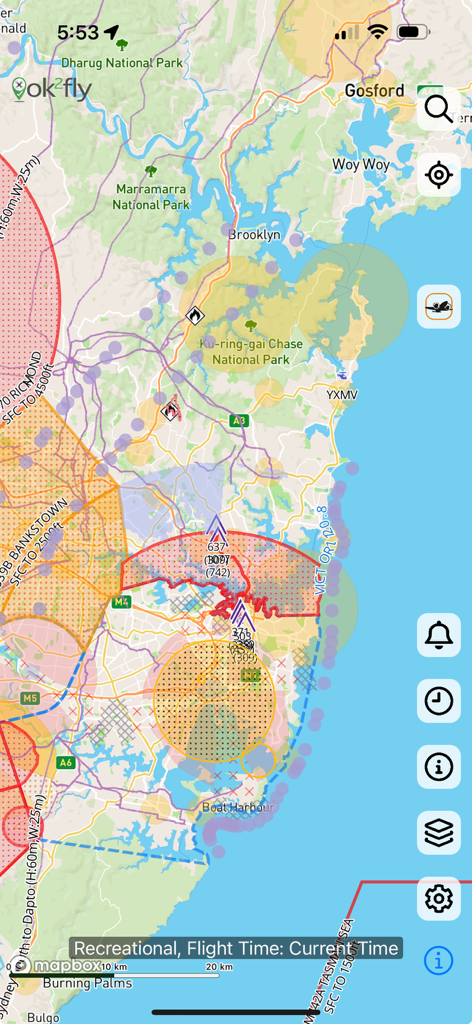
A detailed drone airspace map showing restricted flight zones and safety information in the ok2fly app

A detailed drone airspace map showing restricted flight zones and safety information in the ok2fly app

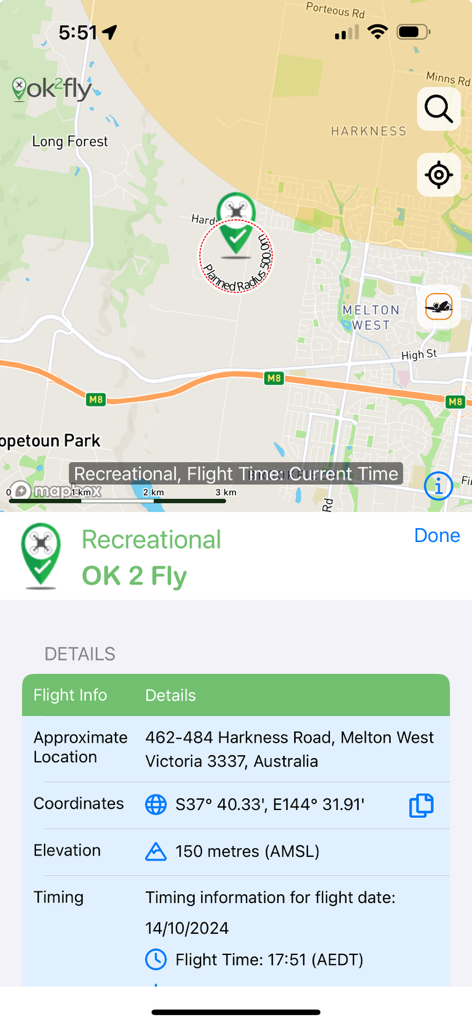
A screenshot of the ok2fly app showing a map and recreational drone flight planning details.

A screenshot of the ok2fly app showing a map and recreational drone flight planning details.

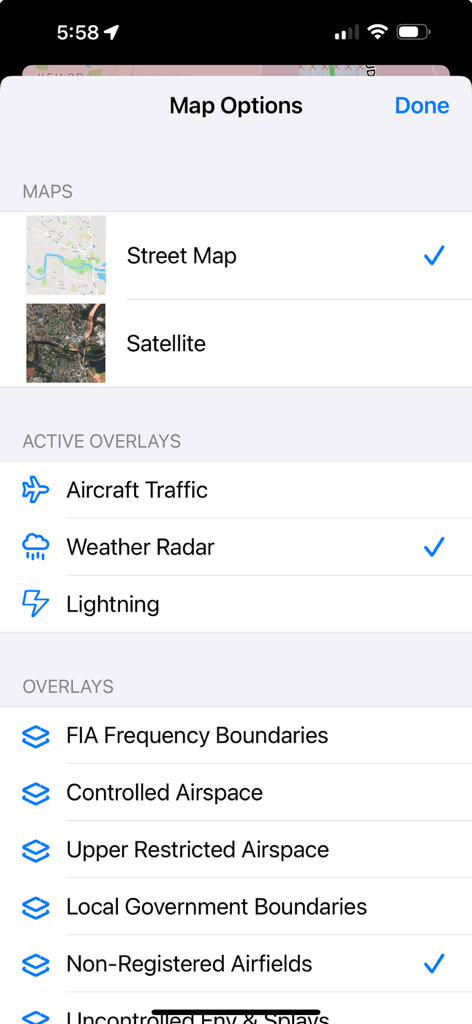
Map settings screen in the ok2fly app showing options for street maps satellite views and aviation overlays like weather radar and controlled airspace

Map settings screen in the ok2fly app showing options for street maps satellite views and aviation overlays like weather radar and controlled airspace

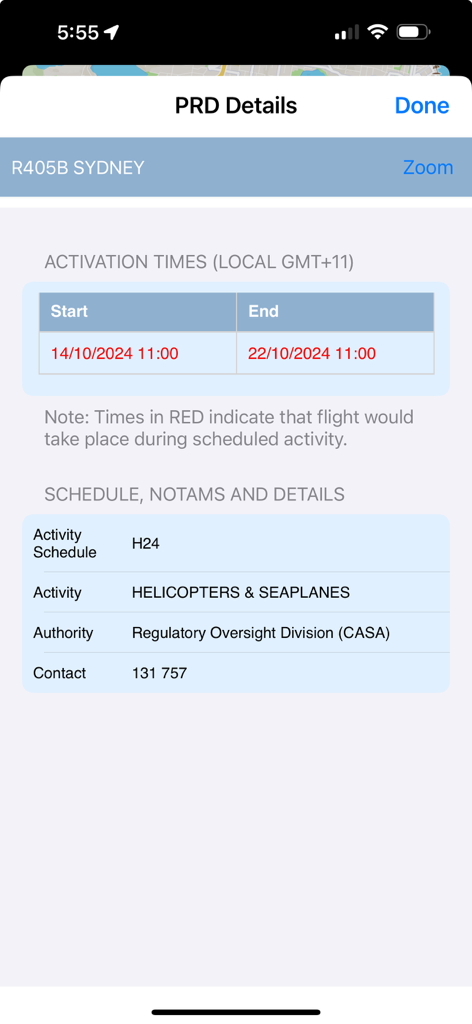
ok2fly app displaying PRD details for Sydney including activation times and helicopter activity schedules

ok2fly app displaying PRD details for Sydney including activation times and helicopter activity schedules

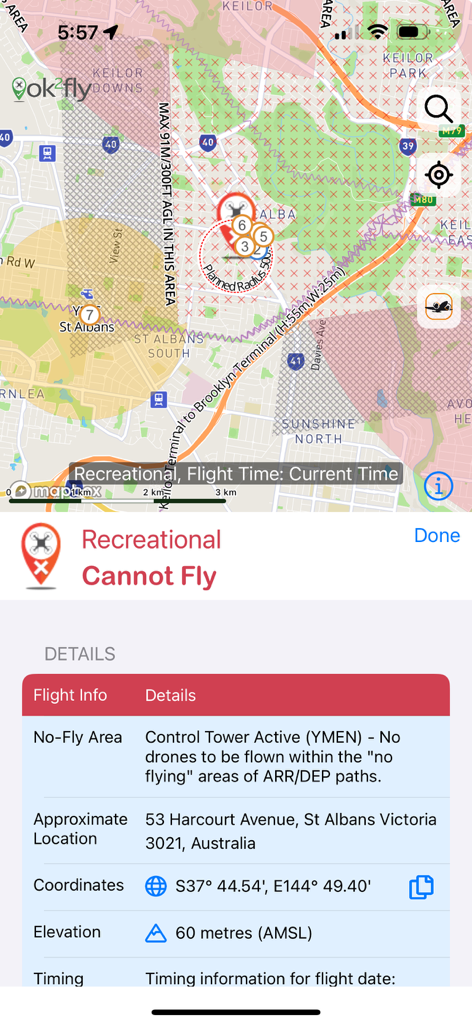
Screenshot of ok2fly app showing a drone no fly zone due to active control tower in Australia

Screenshot of ok2fly app showing a drone no fly zone due to active control tower in Australia

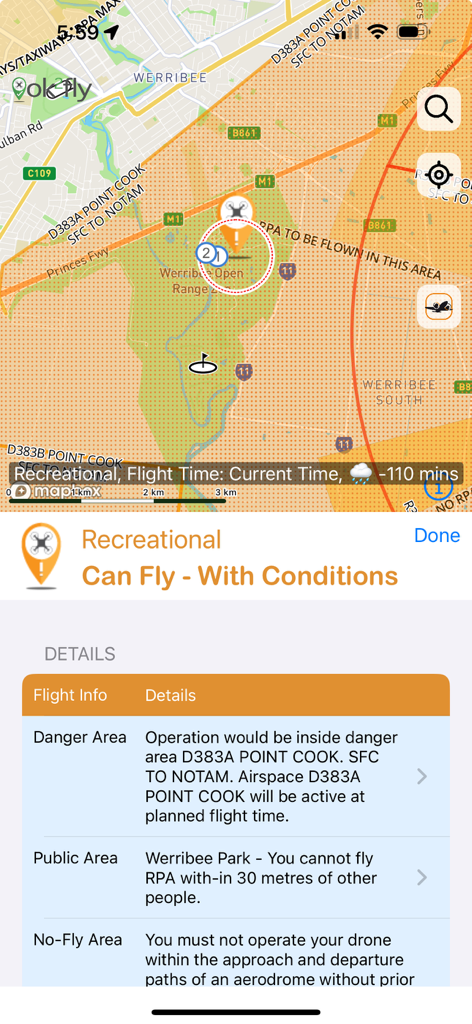
Screenshot of ok2fly app showing drone flight safety conditions and map for recreational pilots

Screenshot of ok2fly app showing drone flight safety conditions and map for recreational pilots

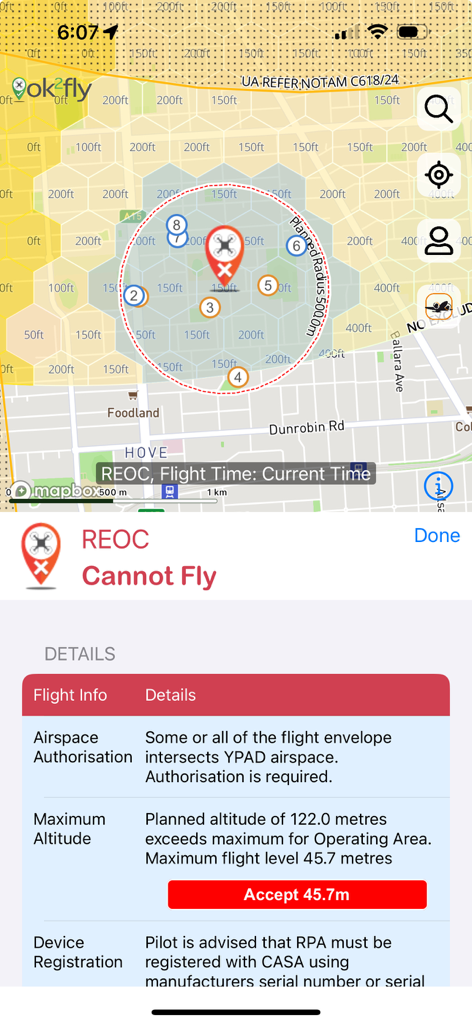
Screenshot of the ok2fly app displaying a restricted drone flight zone map and detailed safety warnings for REOC pilots.

Screenshot of the ok2fly app displaying a restricted drone flight zone map and detailed safety warnings for REOC pilots.

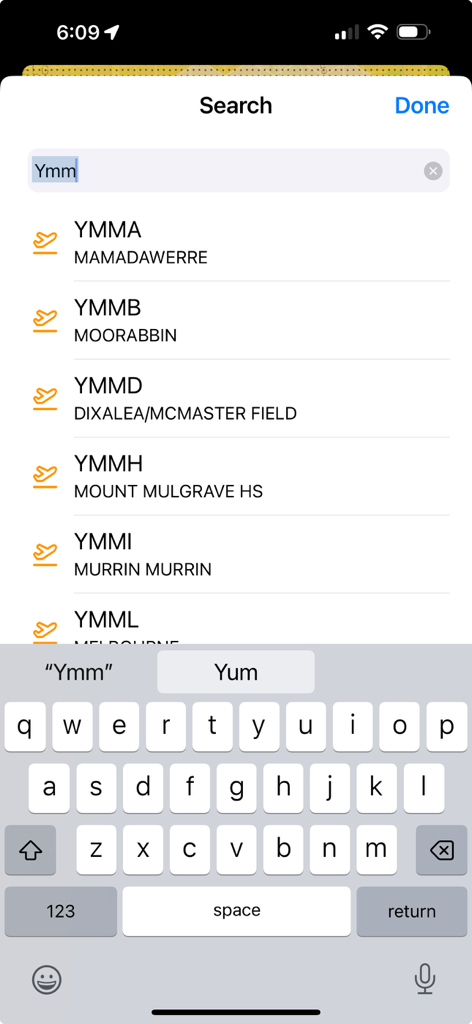
The ok2fly app search screen displaying a list of Australian airport codes and names

The ok2fly app search screen displaying a list of Australian airport codes and names

Plan Your Mission with Absolute Confidence

The tools that make this app stand out, trusted by 43K+ users.

🛡️

Official CASA-Integrated Compliance

Fly with total peace of mind using a tool fully integrated with the CASA RPAS Platform. Stay compliant with current safety rules and access official Airservices Australia authorization trials directly.

📍

Hyper-Local Situational Awareness

Get more than a 'green light'. Visualize 4D restricted airspace, airport envelopes, and real-time NOTAMs, alongside local landmarks like schools, prisons, and parks to avoid legal disputes.

🕒

Temporal Flight Planning

Eliminate guesswork by checking the operational environment for a specific time in the future. See how restricted areas and weather activate or deactivate 1 hour, 1 day, or 1 week from now.

Loved by users worldwide

Trusted by 43K+ people who love this app.

"

"As a commercial drone operator, ok2fly is my go-to for pre-flight planning. The integration with CASA rules and the detailed 4D NOTAM visualizations provide the level of professional situational awareness that my business demands. It is far more than just a safety map; it is an essential part of my professional toolkit."

Marcus Chen, Commercial UAV Pilot
"

"I love that I can check the airspace status for my upcoming weekend trips in advance. The way the map adjusts to reflect future flight times and highlights restricted areas like schools and prisons gives me total peace of mind. It's the only app I trust to keep my drone safe and my flights legal."

Sarah Jenkins, Aerial Photography Enthusiast

About the app

Everything you need to know about ok2fly.

Description

Whether you are a recreational drone pilot or a fully-fledged professional, ok2fly™ is the drone safety tool you need for you next drone mission. ok2fly boasts the following functions: 1. Detailed visualization of runway splays and airport envelopes - Splays and envelopes are clearly displayed so the pilot can identify boundaries between airspace inside and outside of the operational areas. 2. Extended radius review of the drone flight area - ok2fly will survey not only the location you will be flying from, but the immediate area around you - You can configure the visual flight radius to suit your planned flight operations 3. Street level vector map of the whole of Australia - The ok2fly vector map details standard street map information as well relevant aviation details such as obstacles, low level aviation activities and recreational sites - You overlay further information using the Layers option*. 4. Supports CASA RPAS Rules and Airspace Authorisation Trial - ok2fly is fully compliant with the CASA RPAS Safety Rules and fully integrated with the CASA RPAS Platform. - ok2fly was the first safety app to go live as part of the CASA / Airservices Australia Airspace Authorisation trial. 5. Detailed reporting beyond the basic “yes I can” or “no I can’t fly” - To get a more thorough understanding of the operational environment ok2fly will analyses the airspace surrounding your location - ok2fly will provide a location report detailing all known landmarks detected in the operational airspace 6. Configure to match your drone pilot qualifications - ok2lfy supports 4 CASA pilot types, namely Micro, Recreational, Commercial Excluded* and ReOC* - From the settings function, set the pilot type to match your qualifications* 7. Map adjusts to reflect activity at proposed flight time - If you are flying in 1-hour, 1-day or 1-week’s time, the operational environment may be different. - When you set the proposed time of your flight, ok2fly will reconfigure all time-based objects to reflect their status at that time. 8. Real-time activation and visualization of Restricted and Danger areas - ok2fly maintains an activity schedule for Restricted and Danger Area airspace and uses the schedule information to depict airspace as active or inactive. - When set to current time mode airspace activates and deactivates automatically as the time-of-day progresses - If you select a specific flight time, ok2fly will set the state of all airspace based on that time 9. Automatic visualisation of NOTAM activities effecting drone operations - Activities include planned drone flights, from surface to above activities such as Low Jet Routes and TRA - 4D objects are used to represent the activity and included in flight queries where they intersect geographically, vertically, and temporally 10. Continuously updated NAIPS NOTAM information - NOTAMS for Restricted and Danger airspace are available for inspection by the drone pilot* 11. Links to supplemental decision-making information - The Information function of ok2fly contains a selection of relevant links for drone pilots - Links to CASA, Airservices, BOM and AvSoft Australia are included 12. Radio frequency data for FIA and airport communications - Access supplemental airfield information for flight planning and mission communication purposes* 13. Additional aviation data to aid drone flight planning - ok2fly includes information on artefacts that aid with situational awareness including Schools, Local Parks, Beaches, Embassies, Prisons, Major Roads and Rail Lines. 14. Additional map overlays - Dynamic including Air Traffic, Weather and Lightning - Static overlays 15. Light & Dark display modes 16. AvSoft Australia is a CASA Part 175 approved data provider * Requires a paid subscription. Subscription includes AvPlan-EFB Standard Plus access. The term ok2fly™ is a trademark of AvSoft Australia Pty Ltd. See terms of use at https://www.apple.com/legal/internet-services/itunes/dev/stdeula/

Latest Version

1.6.0

Size

75.6 MB

First Released

Jan 12, 2022

Take Command of Your Next Drone Mission

Join 43,000+ pilots using Australia’s premier CASA-integrated safety tool. Get the professional-grade data you need to fly with absolute confidence and total compliance.

Download on App Store
FAQ

Frequently Asked Questions

Everything you need to know about ok2fly

What is ok2fly?

ok2fly is a drone safety tool that helps pilots plan missions, visualize airspace, and ensure compliance with regulations. It provides detailed maps and real-time operational environment analysis.

Does ok2fly show drone no-fly zones?

Yes, ok2fly provides detailed visualization of runway splays, airport envelopes, and automatically visualizes Restricted and Danger areas. It identifies no-fly zones based on active control towers.

How does ok2fly help with flight planning?

ok2fly surveys the immediate drone flight area with configurable radius, provides detailed location reports, and adjusts map information to reflect activity at the proposed flight time.

Is ok2fly compliant with CASA regulations for drone flights?

Yes, ok2fly is fully compliant with the CASA RPAS Safety Rules and integrates with the CASA RPAS Platform. It was part of the CASA / Airservices Australia Airspace Authorisation trial.

Can ok2fly provide a detailed flight report?

Yes, ok2fly analyzes the airspace surrounding your location and provides a detailed location report. This report includes all known landmarks detected in the operational airspace.

Does ok2fly indicate if I can fly my drone?

Yes, ok2fly provides clear indications such as "OK 2 Fly," "Cannot Fly," or "Can Fly - With Conditions" based on the analysis of the proposed flight area and selected pilot qualifications.

What map data does ok2fly provide for Australia?

ok2fly provides a street-level vector map of the whole of Australia. It details standard street information, aviation details like obstacles, low-level aviation activities, and recreational sites.

Can I add overlays to the map in ok2fly?

Yes, ok2fly supports additional map overlays, including dynamic options like Air Traffic, Weather, and Lightning. Static overlays such as FIA Frequency Boundaries and Controlled Airspace are also available.

Does ok2fly display real-time NOTAMs for drone operations?

Yes, ok2fly automatically visualizes NOTAM activities affecting drone operations. It also provides continuously updated NAIPS NOTAM information for Restricted and Danger airspace with a paid subscription.

Can I configure ok2fly for my specific drone pilot qualifications?

Yes, ok2fly supports four CASA pilot types: Micro, Recreational, Commercial Excluded, and ReOC. Users can set their pilot type from the settings function to match their qualifications.

Does ok2fly require a paid subscription for all features?

No, some advanced features in ok2fly require a paid subscription. These include Commercial Excluded and ReOC pilot types, Layers option, NAIPS NOTAM inspection, and radio frequency data.

What is included with an ok2fly paid subscription?

A paid ok2fly subscription includes access to features like Commercial Excluded/ReOC pilot types, advanced map layers, NAIPS NOTAM inspection, radio frequency data, and AvPlan-EFB Standard Plus access.

Does ok2fly offer different display modes?

Yes, ok2fly provides both Light and Dark display modes for user preference. Users can switch between these modes to optimize visibility in different lighting conditions.

Is AvSoft Australia, the provider of ok2fly, a certified data provider?

Yes, AvSoft Australia, the developer of ok2fly, is a CASA Part 175 approved data provider. This ensures the app's data is authoritative and compliant with aviation standards.