OMRON connect US/CAN/EMEA

OMRON connect US/CAN/EMEA

Download on App Store
Spark by MWM logo
Logo of OMRON connect US/CAN/EMEA
OMRON connect US/CAN/EMEA: Precision Heart Health Monitoring for a Safer, Longer Life

Effortlessly sync your blood pressure, EKG, and weight data to track your progress, receive vital alerts, and share clinical reports directly with your physician for total peace of mind.

Publisher

Omron Healthcare, Inc.

Category

Health & Fitness

Downloads

4M+

User Rating

4.5/5

Total Ratings

161K+

Locales

18

Your Health, Visualized

Discover the interface used by 4M+ users.
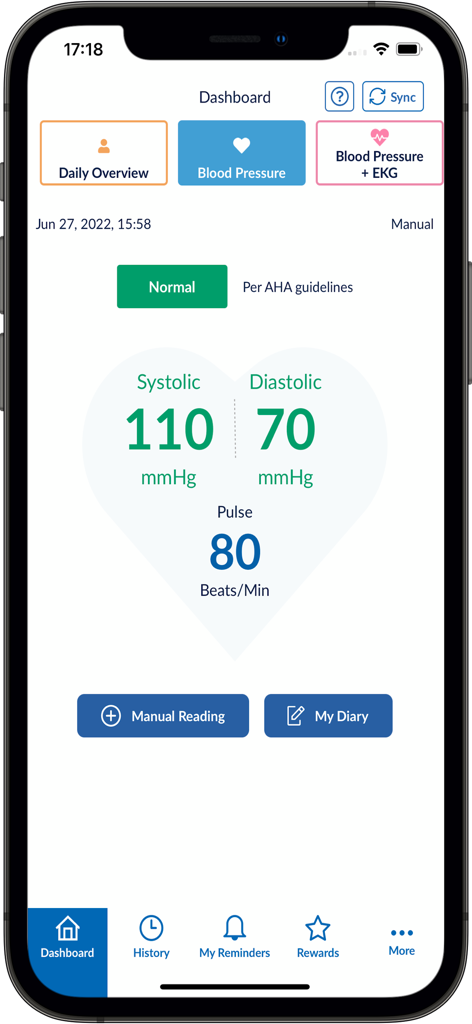
OMRON connect app dashboard showing normal blood pressure and pulse readings

OMRON connect app dashboard showing normal blood pressure and pulse readings

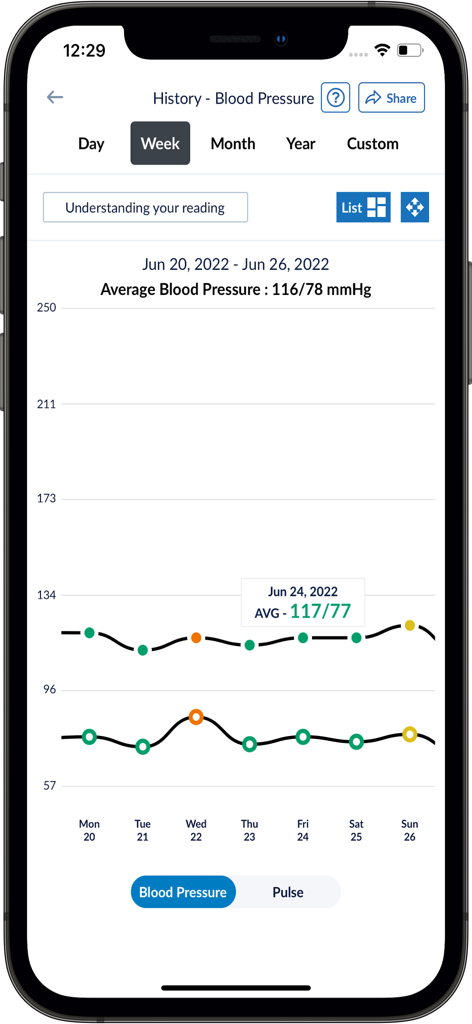
Weekly blood pressure history graph in the OMRON connect app showing trends and averages

Weekly blood pressure history graph in the OMRON connect app showing trends and averages

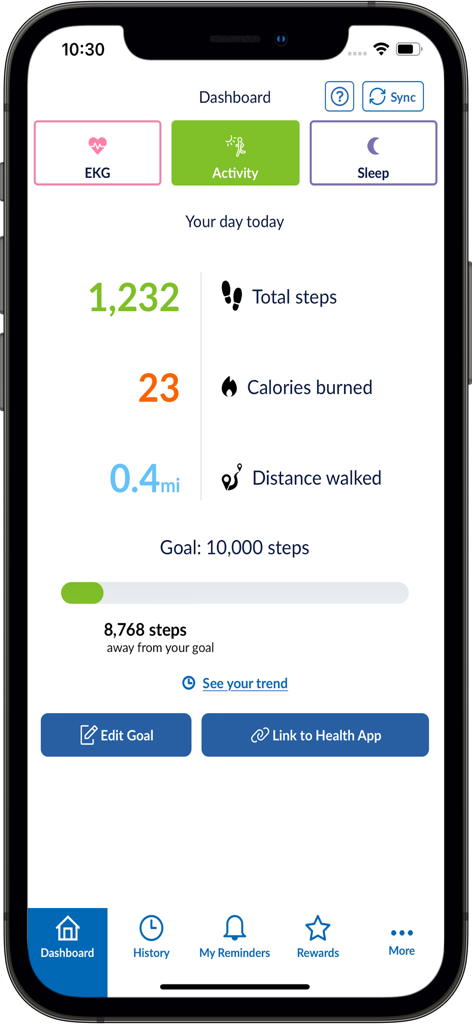
OMRON connect app dashboard displaying daily steps calories burned and fitness goals

OMRON connect app dashboard displaying daily steps calories burned and fitness goals

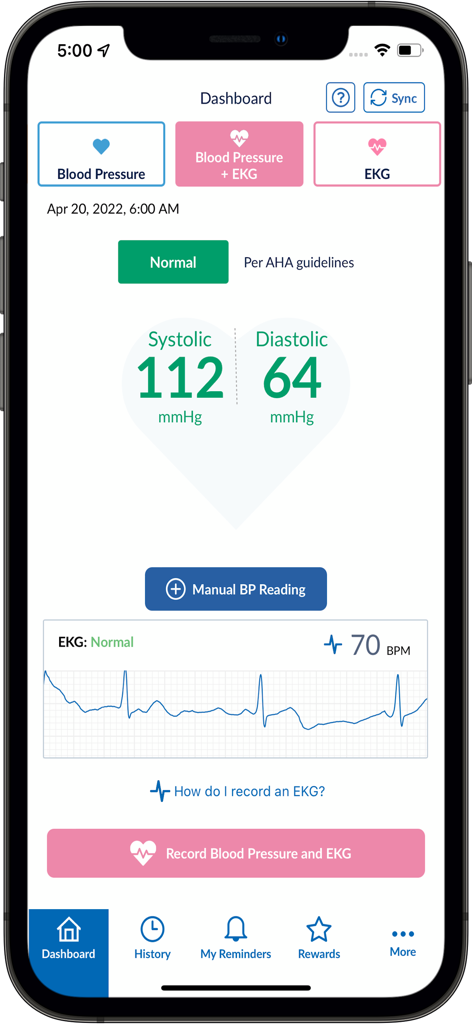
Omron Connect app dashboard showing normal blood pressure and EKG results

Omron Connect app dashboard showing normal blood pressure and EKG results

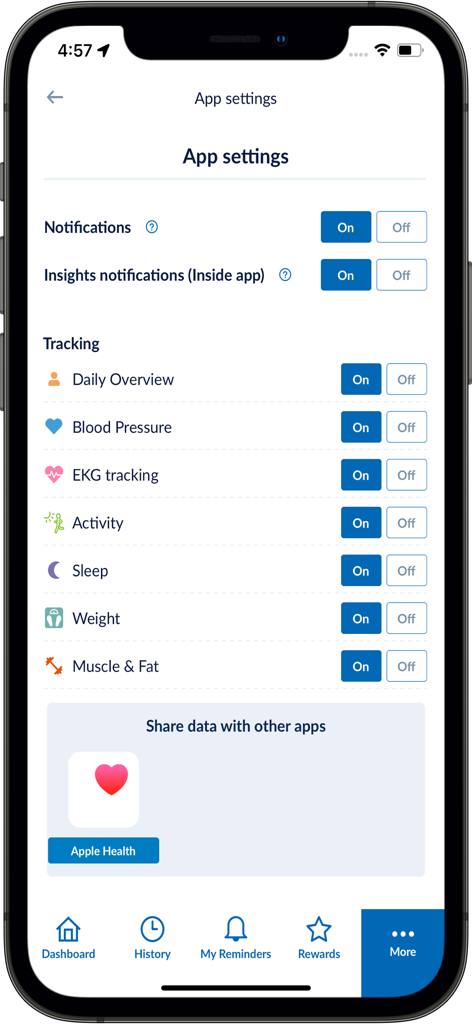
Settings screen of the OMRON connect app showing health tracking options and Apple Health integration

Settings screen of the OMRON connect app showing health tracking options and Apple Health integration

Master Your Heart Health with Clinical Precision

The tools that make this app stand out, trusted by 4M+ users.

📲

Seamless Bluetooth Syncing

Replace manual paper logs with automatic wireless transfers. Your readings move directly from your OMRON monitor to your smartphone for an error-free health history.

📊

Advanced Trend Monitoring

Visualize your blood pressure, weight, and sleep patterns over time. Detect notable changes early with clear charts designed for clinical accuracy.

👨‍⚕️

Doctor-Ready Health Reports

Empower your next check-up by instantly sharing detailed PDF reports with your medical team, keeping them informed of your progress between visits.

Loved by users worldwide

Trusted by 4M+ people who love this app.

"

"I used to manually log my readings in a notebook, but this app has made tracking my heart health effortless. The Bluetooth sync is fast, and being able to email a complete report to my cardiologist before my check-up has been a game-changer for my care."

Robert H., Retired Teacher
"

"Managing a high-stress job means I have to be proactive about my cardiovascular health. I love how the app integrates my BP readings with sleep and activity data. The premium insights helped me identify triggers I never would have noticed otherwise."

Elena S., Project Manager

About the app

Everything you need to know about OMRON connect US/CAN/EMEA.

Description

The OMRON connect US/CAN/EMEA app is an important part of our Going for Zero mission to eliminate heart attacks and strokes. Monitoring your blood pressure everyday can help make this vision a reality. The app makes it easy to view your health metrics anytime, anywhere. Syncing wirelessly to your smartphone or tablet, the OMRON connect US/CAN/EMEA app tracks your readings and daily measurements, giving you a more clear view of your overall health. Learn more at goingforzero.com The OMRON connect US/CAN/EMEA app provides a lot of free features for you to manage your heart health (some feature availability depends on device type) • Easily sync your readings to your smartphone via Bluetooth® • Email readings to family, physicians, or other health care professionals and share your progress • Keep track of your health history by storing and saving unlimited readings • Get a complete view of your blood pressure with systolic, diastolic and pulse readings • Receive alerts when notable changes in blood pressure are detected • Set physical activity goals and track your progress • Monitor the length and quality of your sleep • Monitor your weight and BMI (body mass index) • Access additional historical health data around sleep, weight, EKG, activity and more • Directly send readings to Apple® HealthKit In addition, the app provides the following premium features: • Gain insights into how the combination of your blood pressure, activity, sleep and weight may be affecting your heart health • Earn rewards for tracking your vitals and managing your health • Generate premium reports with more detailed information on vitals • Track medication to help rest assured that you will never miss a dose Never diagnose or treat yourself based on this system. ALWAYS consult with your physician. The following OMRON Blood Pressure Monitors can connect to this app: Complete™ Upper Arm Blood Pressure Monitor + EKG: BP 7900 Evolv® Upper Arm: BP7000 HeartGuide™: BP8000-M, BP8000-L 10 Series Upper Arm: BP786, BP786N, BP786CAN, BP786CANN, BP7450, BP7450CAN Wrist: BP653 7 Series Upper Arm: BP761, BP761N, BP761CAN, BP761CANN, BP7350, BP7350CAN Wrist: BP654, BP6350 5 Series Upper Arm: BP7250, BP7250CAN Platinum Upper Arm: BP5450 Gold Upper Arm: BP5350 Wrist: BP4350 Silver Upper Arm: BP5250 Miscellaneous BP769CAN BP Monitor BP300 (ReliOn) The following OMRON Body Composition Monitor will connect to this app: BCM-500 For a full list of compatible devices, visit OmronHealthcare.com/connected Please visit https://s3-us-west-2.amazonaws.com/ofs-terms-production-us/OCM/en-us/eula.html to view terms of use. Please visit https://www.omron-healthcare.com/notice-for-data-act to view Notice for Data Act.

Latest Version

8.2.1

Size

214.6 MB

First Released

Jan 3, 2017

Take Command of Your Heart Health Today

Join over 4 million users in the mission to eliminate heart attacks and strokes. Sync your OMRON device now to track vital trends and share doctor-ready reports instantly.

Download on App Store
FAQ

Frequently Asked Questions

Everything you need to know about OMRON connect US/CAN/EMEA

What is OMRON connect?

OMRON connect is an app for managing high blood pressure and tracking overall health. It syncs automatically with OMRON blood pressure monitors, weight scales, thermometers, and EKG devices, securely storing unlimited health data.

Which OMRON devices are compatible with the OMRON connect app?

OMRON connect supports OMRON blood pressure monitors, weight scales, thermometers, and EKG devices. Readings sync via Bluetooth®. Specific compatible device lists are available on regional OMRON healthcare websites.

Can OMRON connect track my daily activity and sleep?

Yes, OMRON connect tracks daily activity, including steps, calories burned, and distance walked. It also monitors sleep duration and quality, allowing users to set achievable goals.

Does OMRON connect integrate with Apple Health?

Yes, OMRON connect directly exchanges readings with Apple Health. This integration enables users to share health data between the OMRON connect app and the Apple Health platform seamlessly.

How can I view my blood pressure trends in OMRON connect?

OMRON connect displays blood pressure trends easily. Users can view data by day, week, month, year, or custom periods, showing average readings and graphical representations of their health over time.

Does OMRON connect provide alerts for health changes?

Yes, OMRON connect provides alerts for notable changes in health readings. This feature helps users stay informed about significant fluctuations detected in their monitored data from connected OMRON devices.

Can I share my health data from OMRON connect with my doctor?

Yes, OMRON connect allows sharing readings with doctors, caregivers, or family. Premium features also enable generating detailed reports specifically designed for healthcare providers.

Does OMRON connect offer premium features?

Yes, OMRON connect includes premium features. These offer deeper insights, such as understanding metric connections, medication tracking, generating detailed provider reports, and earning rewards for consistent health tracking.

Can I manually enter blood pressure readings into OMRON connect?

Yes, OMRON connect allows users to manually enter blood pressure readings directly within the app. A "Manual Reading" button is present on the dashboard for this purpose.