Signeasy-Sign Documents App

Signeasy-Sign Documents App

Download on App Store
Spark by MWM logo
Logo of Signeasy-Sign Documents App
Signeasy: The Simplest Way to Sign and Send Documents Anywhere

Join 10 million professionals using the most intuitive, legally binding e-signature app for iPhone, iPad, and Mac. Secure, HIPAA-compliant, and perfectly integrated with the cloud tools you use every day.

Publisher

Glykka LLC

Category

Productivity

Downloads

4M+

User Rating

4.8/5

Total Ratings

52K+

Locales

24

Efficiency in Motion

Discover the interface used by 4M+ users.
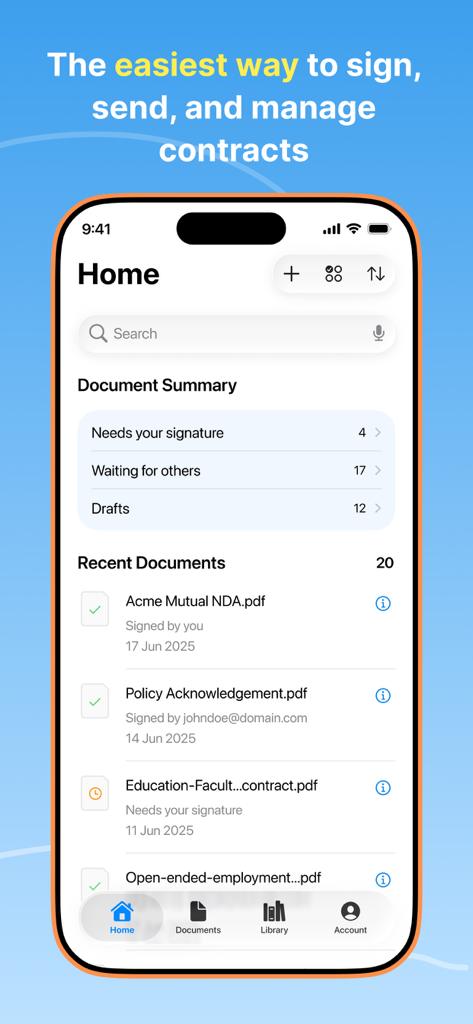
Signeasy app home screen showing document summary and recent contracts

Signeasy app home screen showing document summary and recent contracts

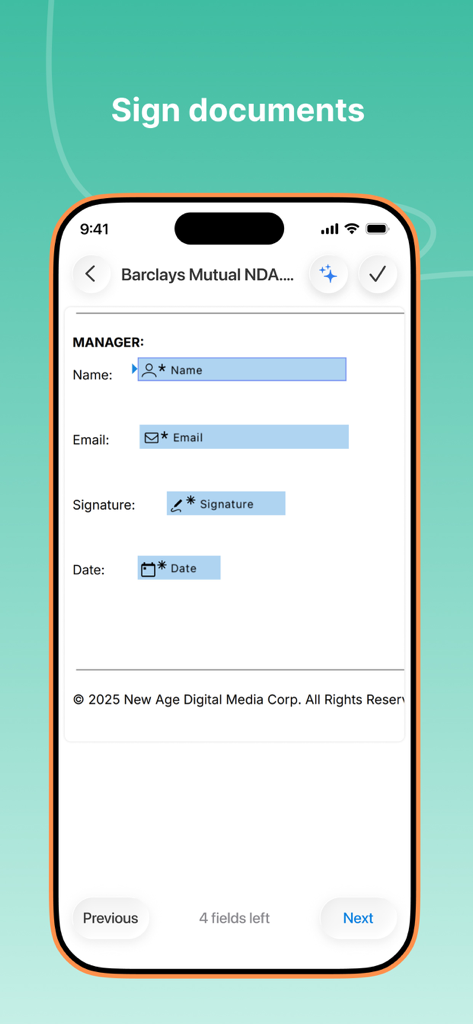
Signeasy mobile app interface showing fields to sign a digital document

Signeasy mobile app interface showing fields to sign a digital document

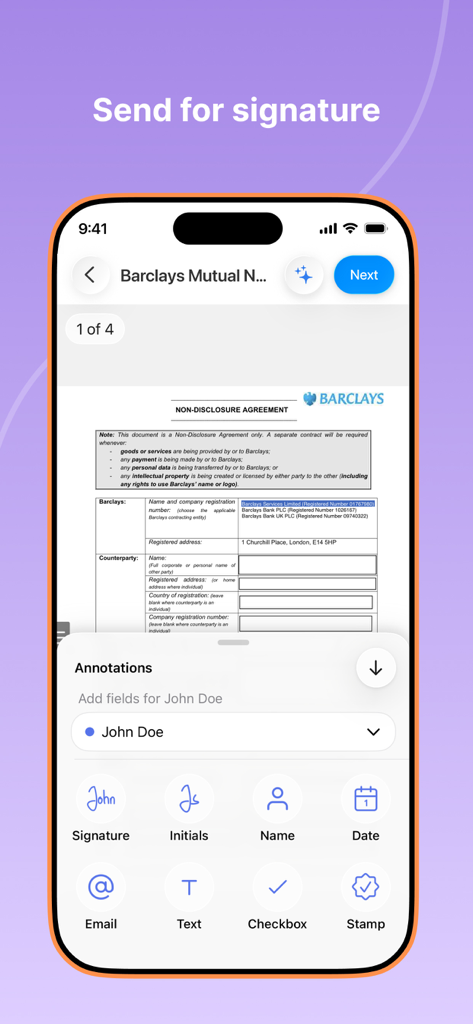
Signeasy mobile app interface showing a non-disclosure agreement with options to add signature and initials fields.

Signeasy mobile app interface showing a non-disclosure agreement with options to add signature and initials fields.

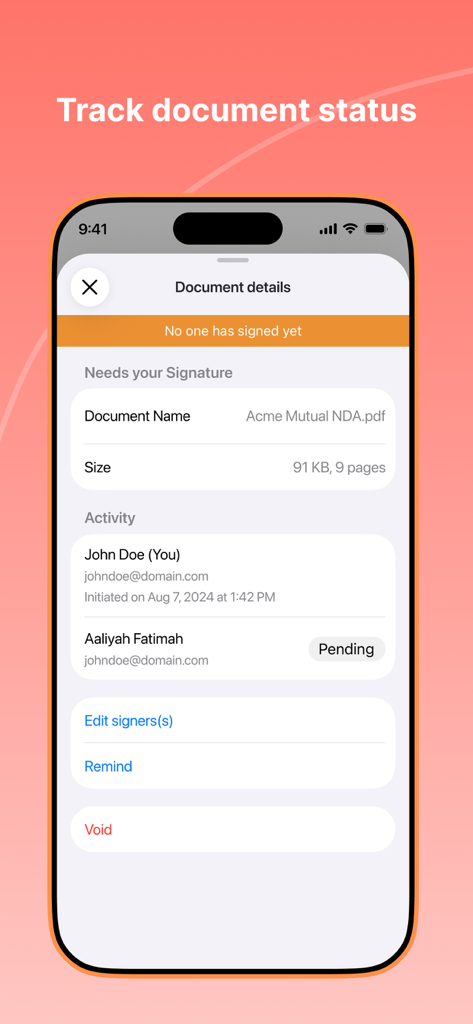
Signeasy mobile app interface showing document status and signature tracking for an NDA

Signeasy mobile app interface showing document status and signature tracking for an NDA

A collection of logos from companies that trust Signeasy including AngelList Rappi and David Yurman

A collection of logos from companies that trust Signeasy including AngelList Rappi and David Yurman

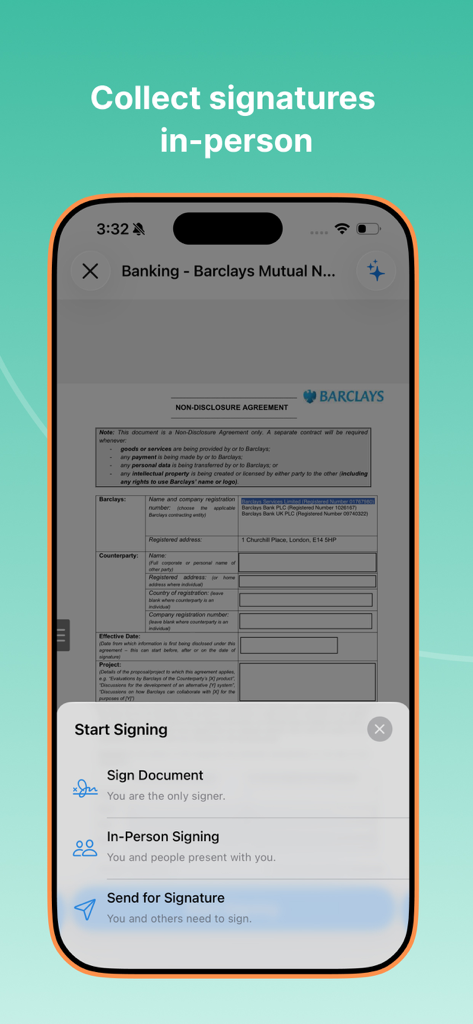
Signeasy mobile app interface showing options for in person document signing

Signeasy mobile app interface showing options for in person document signing

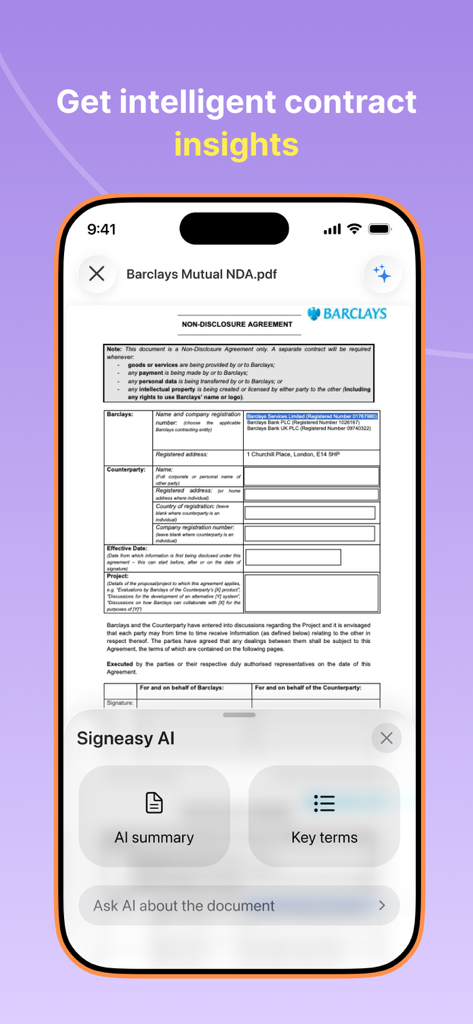
Signeasy app interface showing AI-powered contract summary and key terms analysis for a professional document.

Signeasy app interface showing AI-powered contract summary and key terms analysis for a professional document.

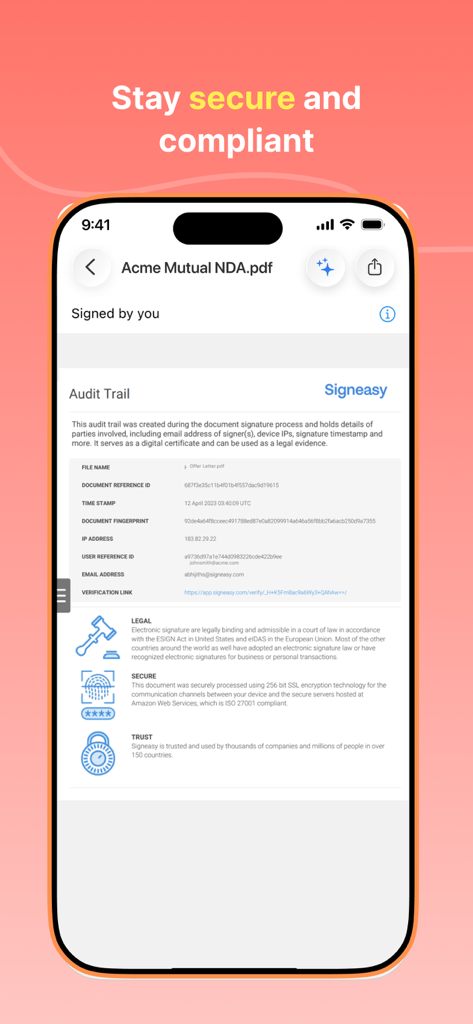
Signeasy mobile app interface displaying a document audit trail for security and legal compliance.

Signeasy mobile app interface displaying a document audit trail for security and legal compliance.

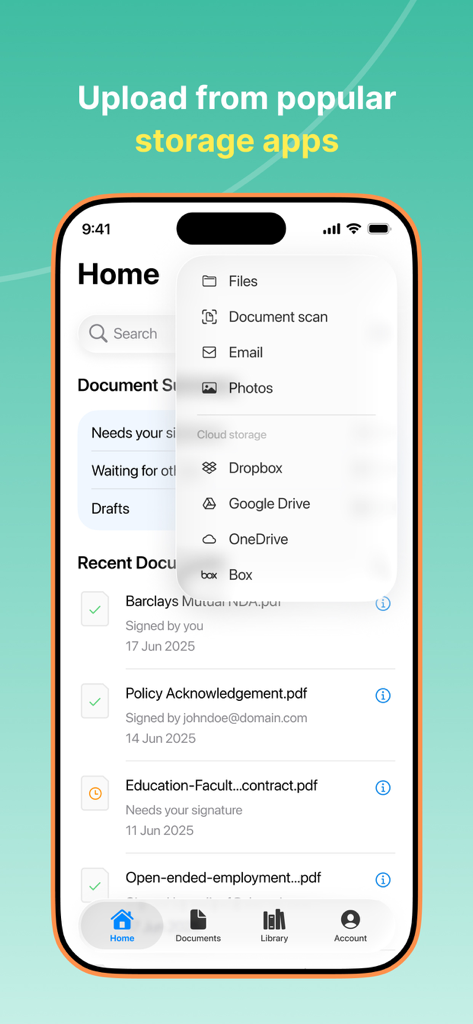
Signeasy mobile app screen showing options to upload documents from cloud storage and local files

Signeasy mobile app screen showing options to upload documents from cloud storage and local files

A collection of three five-star user reviews for the Signeasy app highlighting its convenience for signing documents on the go.

A collection of three five-star user reviews for the Signeasy app highlighting its convenience for signing documents on the go.

Close Deals Faster, Anywhere

The tools that make this app stand out, trusted by 4M+ users.

Mobile-First Signing

Execute documents on the go with your finger or Apple Pencil. No more waiting for a desktop—complete your paperwork from a coffee shop or between meetings.

🔐

Legally Binding & Secure

Gain peace of mind with bank-grade encryption and full compliance with ESIGN, HIPAA, and SOC2, complete with a detailed digital audit trail for every signature.

🔄

Universal Sync & Workflow

Import directly from Google Drive, Dropbox, or Outlook and sync across your iPhone, iPad, and Mac for a truly frictionless paperless experience.

Loved by users worldwide

Trusted by 4M+ people who love this app.

"

"Signeasy has completely changed how I close deals. I can send a contract while standing at a property and get it signed by my clients on the spot using the in-person feature. It is fast, secure, and looks incredibly professional on my iPad."

Marcus T., Real Estate Broker
"

"As a freelance designer, I used to dread the print-and-scan dance. Now I just import my contracts from Google Drive, add the signature fields, and send them off. The digital audit trail gives me peace of mind that everything is legally binding."

Sarah J., Creative Director

Review Analysis

Insights from user reviews.

Sentiment Score

21%
Negative

Summary

This app receives predominantly negative feedback, mainly due to pervasive subscription and billing issues, with many users reporting unexpected charges, unrecognized payments, and difficulty canceling. Critical functionality problems also surface, such as documents being deleted, signatures not appearing transparently, and the app failing to function post-payment. While some users appreciate the app's ease of use and its ability to streamline document workflow for business and travel, these positive aspects are largely overshadowed by the app's unreliable payment system and recurring technical glitches. There were no recurring version-specific bugs mentioned in the reviews.

Common Themes

Subscription and Billing Issues(26)
Core Functionality Problems(8)
Ease of Use(7)
Value for Money(5)
Document Workflow Efficiency(4)
Data Loss(3)
Customer Support(3)

About the app

Everything you need to know about Signeasy-Sign Documents App.

Description

Signeasy is the easiest way to sign and send documents for signature from your iPhones, iPads, and Macbooks. All signatures on Signeasy are legally binding and backed by a digital audit trail. With a 4.9-star App Store rating and 100 million contracts processed, Signeasy is the preferred eSignature app for individuals and businesses. Featured in Apple commercials across the globe, we are loved by over 48,000 businesses, 10 million users, and major press outlets alike: “Signeasy is a great tool for those always on the go.” - Forbes “If you deal with paperwork often, you’ll love this.” - The Next Web “Perfect for anyone who has a lot of paperwork to sign” - Inc. Signeasy is free to download and sign up for a 7-days trial. ● Works everywhere you work Signeasy works across all your devices — iPhone, iPad, and Mac, and with any document format (PDF, Word, Excel, JPG, PNG, and more). ● Truly global, it speaks your language Signeasy is used in 180 countries and supports 24 languages, including English, Spanish, Russian, Portuguese, Japanese, Italian, German, French, Finnish, Dutch, and Chinese. ● Integrates with your favorite cloud storage apps Import and save signed documents to your favorite cloud storage apps in Google Drive, Dropbox, Box, OneDrive, and more. ● Stay on top of your tasks with Signeasy widgets Get quick access to your Summary, Templates, and Pending document workflows. ● Sign via Shareable links and QR codes Collect signatures in bulk with a public signing link. Generate and share QR codes for contactless signing. **Signeasy supports all your eSignature needs** ● Sign documents Draw, scan, or import your signature. Upload documents and fill in signatures, initials, date, email, images, or any type of text like address, phone numbers, etc. ● Send documents for signature Add and assign fields to make it easy for your clients to fill and sign. Fields supported - Signature, Initials, Name, Date, Email, Text, Checkboxes. ● Collect in-person signatures Sign documents and collect others’ signatures in person on your iPhone or iPad to execute contracts faster. Security and Compliance Your data and information are secured with industry-standard SSL encryption. Signeasy is compliant with ESIGN, UETA, eIDAS, HIPAA, and SOC2. All documents are legally binding with a detailed digital audit trail, including the signer’s email address, device IP, and completion time. Additional features - Save and share frequently used documents as Templates - Offline editing and signature capabilities - Authentication via Face ID/Touch ID - Customize signature color, font size, and more - Integrates with your phone, Google, and Outlook contacts - Send reminders to your signers for faster signatures Post expiration of the free trial, upgrade in-app to one of the plans below. ● Essential - Sign unlimited documents - Send documents for signature (5 free docs per month) - Use across mobile and web - $99.99/year or $29.99/quarterly ● Pro - Sign and send unlimited documents for signature - Collect in-person signatures - 3 reusable templates - $179.99/year or $59.99/quarterly Experience Signeasy on the web: Powerful features like Usage reports, Admin Dashboard, Integrations, and more help growing businesses like yours simplify and automate the contract journey. Prices might vary based on your location. Subscriptions are charged to iTunes Account at confirmation of purchase. The subscription automatically renews unless canceled at least 24 hours before the end of the current period. You can turn off Auto-Renewal in the Account Settings after purchase. Join 48,000 organizations and 10 million+ users worldwide who trust Signeasy to close deals faster by eliminating paperwork. Download the Signeasy app now. Say hello: support@signeasy.com Privacy policy: www.signeasy.com/privacy Terms of use: www.signeasy.com/terms

Latest Version

18.1.3

Size

229.8 MB

First Released

Jul 20, 2010

Ready to Close Your Next Deal in Seconds?

Join 10 million mobile professionals who eliminate paperwork and sign securely on the go. Start your 7-day free trial today.

Download on App Store
FAQ

Frequently Asked Questions

Everything you need to know about Signeasy-Sign Documents App

Does Signeasy offer a free trial?

Yes, Signeasy is free to download and offers a 7-day free trial. Users can upgrade to a paid plan after the trial expires.

Are signatures made with Signeasy legally binding?

Yes, all signatures made with Signeasy are legally binding. They are backed by a detailed digital audit trail and comply with ESIGN, UETA, eIDAS, HIPAA, and SOC2 standards.

Which devices does Signeasy support?

Signeasy supports iPhones, iPads, and Mac devices. It works across all these devices for seamless document signing and management.

What document formats can Signeasy handle?

Signeasy handles various document formats including PDF, Word, Excel, JPG, and PNG. Users can sign and send these documents with ease.

Does Signeasy integrate with cloud storage providers?

Yes, Signeasy integrates with popular cloud storage apps such as Google Drive, Dropbox, Box, and OneDrive. Users can import and save signed documents directly.

Can I collect in-person signatures using Signeasy?

Yes, Signeasy allows users to collect in-person signatures directly on an iPhone or iPad. This feature helps to execute contracts faster.

What are the pricing plans for Signeasy?

Signeasy offers Essential and Pro plans after the trial. The Essential plan costs $99.99/year, and the Pro plan costs $179.99/year, with quarterly options available.

Is Signeasy secure and compliant with industry standards?

Yes, Signeasy secures data with industry-standard SSL encryption. It is compliant with ESIGN, UETA, eIDAS, HIPAA, and SOC2, ensuring legal and secure operations.

Does Signeasy provide a digital audit trail for documents?

Yes, Signeasy provides a detailed digital audit trail for every document. It includes the signer's email address, device IP, and completion time, ensuring legal validity.

Can I sign documents with Signeasy even when offline?

Yes, Signeasy offers offline editing and signature capabilities. Users can work on documents without an internet connection.

Does Signeasy include features for AI-powered contract insights?

Yes, Signeasy offers intelligent contract insights through Signeasy AI. This includes features like AI summary, key terms identification, and the ability to ask AI about documents.

What languages does the Signeasy app support?

Signeasy supports 24 languages, including English, Spanish, Russian, Portuguese, Japanese, Italian, German, French, Finnish, Dutch, and Chinese. It is used globally.

How do Signeasy subscriptions renew?

Signeasy subscriptions automatically renew unless canceled at least 24 hours before the current period ends. Users can turn off auto-renewal in Account Settings after purchase.

Can Signeasy help track and manage document workflows?

Yes, Signeasy helps track document status and manage workflows. It provides a summary of documents needing signatures, waiting for others, and drafts.

Can I send reminders to signers with Signeasy?

Yes, Signeasy allows users to send reminders to signers. This feature helps to ensure faster completion of signatures on documents.