
Uniarch Care



Protect your assets with peace of mind. Monitor live video, manage up to 6 NVRs, and receive instant security alerts directly on your device, anywhere in the world.
Publisher
Category
BusinessDownloads
130K+User Rating
Total Ratings
100Locales
29Discover the interface used by 130K+ users.
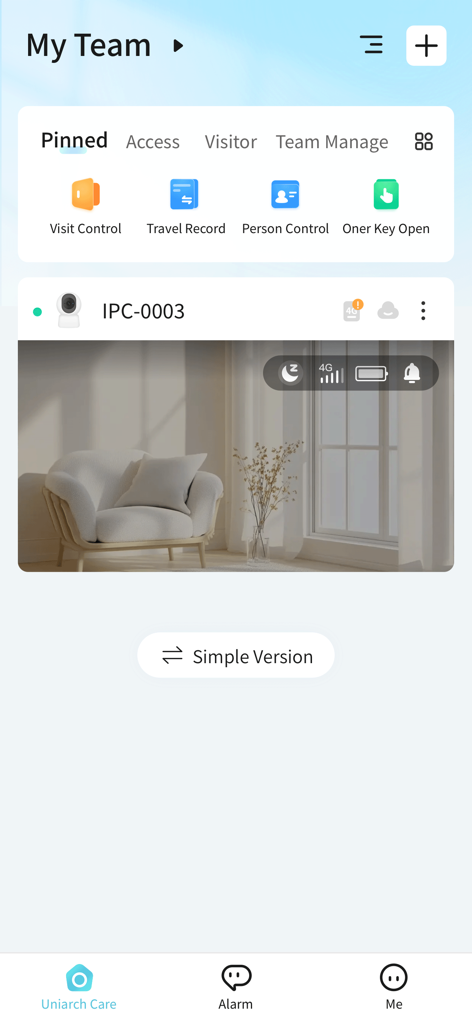
The tools that make this app stand out, trusted by 130K+ users.
Monitor up to 16 channels per NVR in real-time. Stay connected to your shop or home with crystal-clear video feeds directly on your mobile device.
Never miss a moment with smart push notifications. Receive immediate alarms the second activity is detected, allowing for rapid response to any incident.
Collaborate with your team or family. Securely share cloud devices and manage multiple locations through a single, intuitive interface.
Trusted by 130K+ people who love this app.
"Managing my three boutique locations used to be a headache until I started using Uniarch Care. I can quickly switch between my NVR feeds and check in on my staff from anywhere. The cloud sharing feature is a game-changer for giving my floor managers access without any hassle."
"I wanted a pro-level security setup for my home without the enterprise complexity. Uniarch Care delivers exactly that. The push notifications are instant when sensors pick up movement, and the iPad live view sits perfectly on my desk while I work. It is the peace of mind I was looking for."
Insights from user reviews.
Sentiment Score
Summary
The app receives predominantly negative feedback from users, largely stemming from persistent issues introduced by recent updates, which often break core functionalities like playback, recording access, and remote viewing. Many users report app crashes, performance slowdowns, and significant compatibility challenges with newer iOS versions, specifically mentioning iOS 16, issues on iPhone 10X Max, and even an inability to load on "Apple iOS 26.0.1" (likely a future version or typo). Further frustrations arise from the app unexpectedly switching to Chinese and a lack of language options. While a minority of users find the app easy to use with clear viewing capabilities, these positive aspects are overshadowed by widespread instability and critical feature malfunctions.
Common Themes
Everything you need to know about Uniarch Care.
Description
Latest Version
5.2512.61
Size
308.3 MB
First Released
Jun 12, 2019
Join 130,000+ business owners and residents who trust Uniarch Care for reliable, real-time monitoring. Download now to secure what matters most from anywhere.
Everything you need to know about Uniarch Care
The Uniarch Care App is a simplified mobile surveillance application for accessing Uniarch products, viewing live/recorded video, receiving alarms, sharing cloud devices, and managing files.
The Uniarch Care App is for small businesses and end-users. It supports scenarios with under 6 NVRs, each managing up to 16 channels, optimizing mobile surveillance for specific needs.
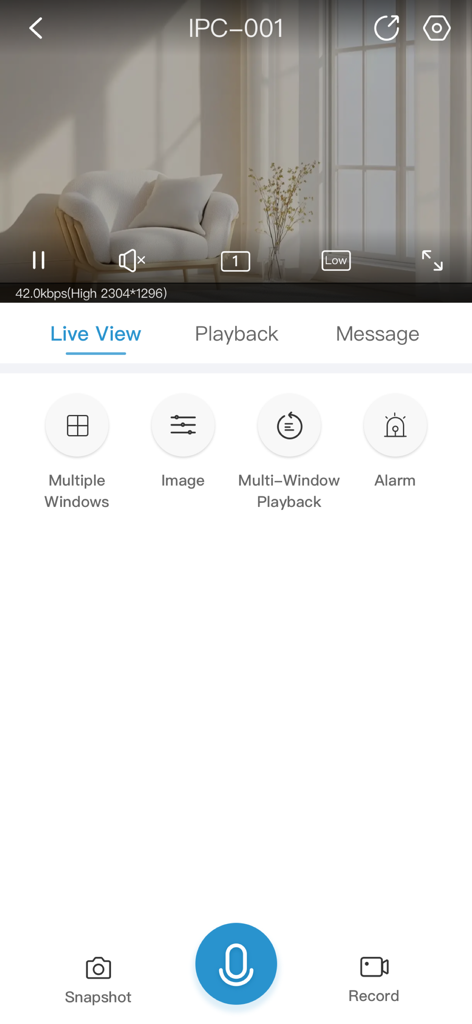
Yes, the Uniarch Care App allows viewing live video from connected Uniarch surveillance products. Screenshot #2 confirms this with a 'Live View' interface displaying active video playback capabilities.
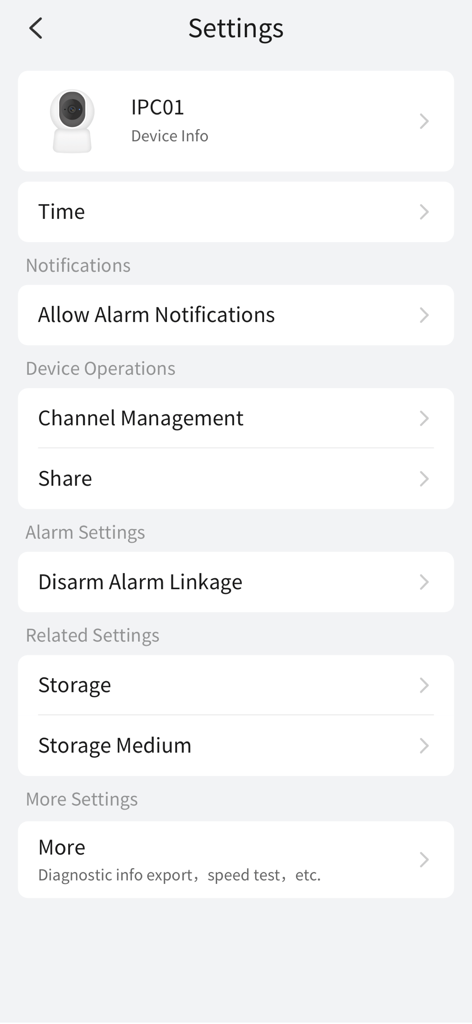
Yes, the Uniarch Care App receives alarms. Users can manage this feature directly through the 'Allow Alarm Notifications' setting found within the Settings menu, as evidenced in Screenshot #4.
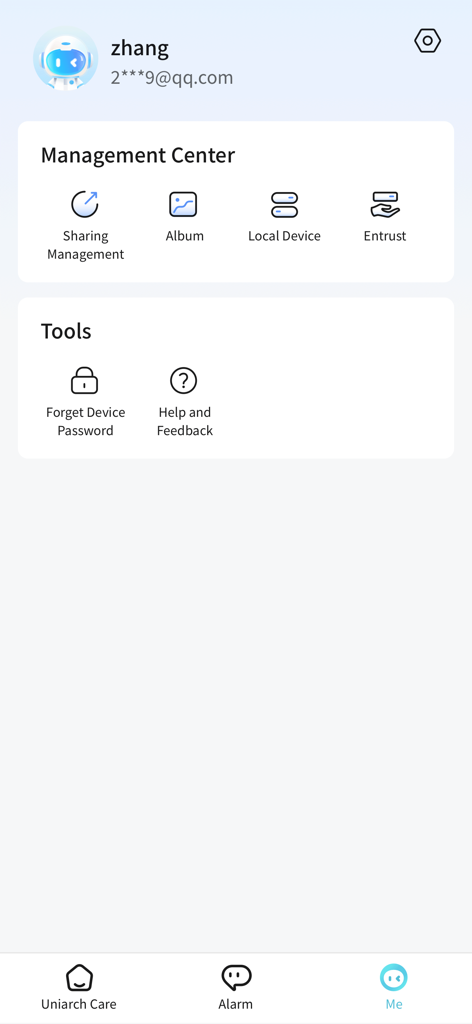
The Uniarch Care App enables sharing cloud devices. 'Sharing Management' is accessible from the 'Me' tab (Screenshot #3), and a 'Share' option is available within device settings (Screenshot #4).
Yes, the Uniarch Care App supports recorded video viewing. Screenshot #2 shows a 'Record' button, confirming recording capability. A 'Playback' tab is also present for accessing stored footage.
Users can reset a forgotten device password through the Uniarch Care App. The 'Forget Device Password' tool is conveniently located under the 'Tools' section within the 'Me' tab, as seen in Screenshot #3.
Yes, the Uniarch Care App provides storage settings. Screenshot #4 displays 'Storage' and 'Storage Medium' options, accessible under 'Related Settings' within the device configuration menu.
Apps with similar features and user experience

TP-Link Systems Inc.
Intelbras S.A. Ind. de Telecom. Elet. Brasileira
Intelbras S.A. Ind. de Telecom. Elet. Brasileira
On Hand Apps - FZCO
明军 顾
KONSTANTA, OOO Apps

健 冯

PRAMA INDIA PRIVATE LIMITED

Shenzhen Kean Digital Co. LTD.