Vernier Graphical Analysis

Vernier Graphical Analysis

Download on App Store
Spark by MWM logo
Logo of Vernier Graphical Analysis

Vernier Graphical Analysis: Precision Data Collection and Analysis for STEM

Empowering students and educators to wirelessly capture, visualize, and analyze experimental data in real-time. Transform your lab results into professional-grade reports with industry-leading graphing tools and seamless sensor integration.

Publisher

Vernier Software & Technology

Category

Education

Downloads

318K+

User Rating

2.1/5

Total Ratings

500

Locales

32

Science in Action

Discover the interface used by 318K+ users.
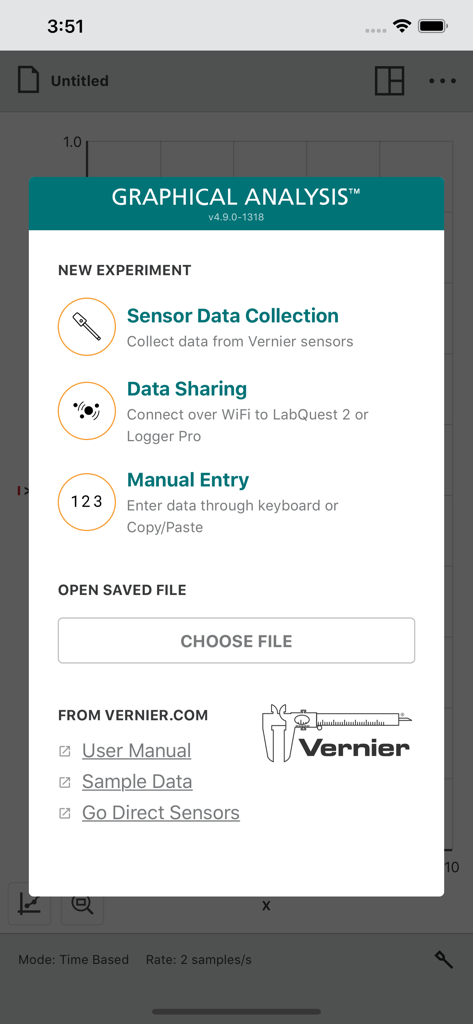
New experiment selection menu in the Vernier Graphical Analysis app showing data collection and sharing options.

New experiment selection menu in the Vernier Graphical Analysis app showing data collection and sharing options.

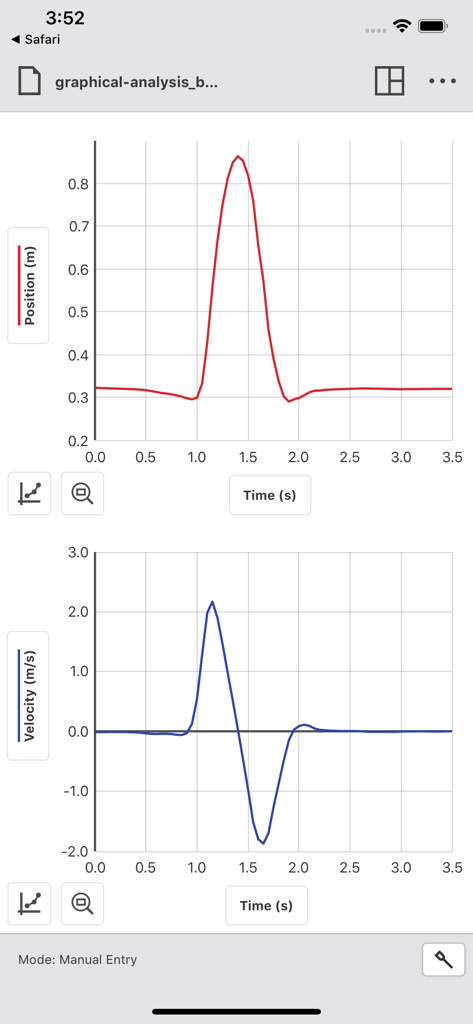
Position and velocity versus time graphs displayed in the Vernier Graphical Analysis app interface

Position and velocity versus time graphs displayed in the Vernier Graphical Analysis app interface

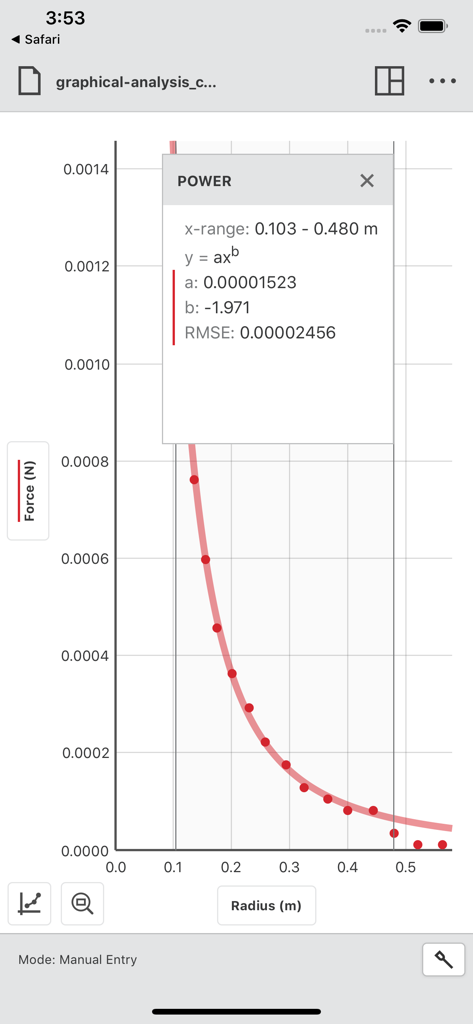
A graph of force versus radius showing a power curve fit and statistical analysis in the Vernier Graphical Analysis app

A graph of force versus radius showing a power curve fit and statistical analysis in the Vernier Graphical Analysis app

Master Your Science Labs with Ease

The tools that make this app stand out, trusted by 318K+ users.

📡

Wireless Data Collection

Connect instantly to Go Direct sensors via Bluetooth to track experiments without the clutter of tangled wires.

📈

Advanced Analysis Tools

Perform complex curve fits, view instantaneous rates of change, and calculate statistics with just a few taps.

📑

Effortless Lab Reporting

Export professional-grade graphs and CSV data directly to Google Sheets or your favorite lab report editor.

Loved by users worldwide

Trusted by 318K+ people who love this app.

"

"This app made my AP Physics labs so much easier. Connecting the Go Direct sensors via Bluetooth is seamless, and being able to export my graphs directly to Google Docs saved me hours on my lab reports. It's way better than manual graphing!"

Alex P., High School Student
"

"A must-have for modern science classrooms. The real-time data sharing between student iPads is a game changer for group experiments, and the curve-fit tools provide professional-level analysis that helps my students truly grasp complex concepts."

Dr. Sarah Miller, Physics Instructor

About the app

Everything you need to know about Vernier Graphical Analysis.

Description

Graphical Analysis™ is a tool for science students to collect, graph, and analyze data from Vernier sensors. Sensor data-collection support: • Vernier Go Direct® sensors - with Bluetooth® wireless technology • Vernier Go Wireless® Heart Rate and Go Wireless Exercise Heart Rate monitors • Vernier LabQuest® sensors used with a LabQuest Stream interface Additional experiment options: • Data Sharing via Wi-Fi connection to LabQuest 2 or Logger Pro® 3 • Manual Entry Note: Sensor data collection and Data Sharing require the purchase of hardware from Vernier Science Education. Manual entry of data can be performed without a hardware purchase. For more information on Data Sharing, visit http://www.vernier.com/css Key Features - Data Collection • Multi-sensor data-collection support • Time Based, Event Based, Drop Counting, and Photogate data-collection modes • Configurable data-collection rate and duration for time-based data collection • Optional triggering of time-based data collection based on sensor value • Customizable unit display on supported sensors • Sensor calibrations • Option to zero and reverse sensor readings • Graph match feature for use with motion detectors • Manual entry of data from keyboard and clipboard Key Features - Data Analysis • Display one, two, or three graphs simultaneously • View data in a table or show a graph and table side-by-side • Draw Predictions on a graph to uncover misconceptions • Examine, interpolate/extrapolate, and select data • Use Tangent tool to show instantaneous rates of change of the data • Find area under a curve using the Integral tool • Apply Statistics calculations to find mean, min, max, and standard deviation • Perform curve fits, including linear, quadratic, natural exponent, and more • Add calculated columns based on existing data to linearize data or investigate related concepts Key Features - Collaboration and Sharing • Create text annotations and add graph titles • Export graphs and data for printing and inclusion in lab reports • Export data in .CSV format for analysis of data in spreadsheet software such as Excel, Google Sheets, and Numbers • Adjust font sizes for easier viewing when presenting to your class Vernier Science Education has over 35 years of experience in providing effective learning resources for understanding experimental data in science and math classrooms. Graphical Analysis 4 is a part of the extensive system of sensors, interfaces, and data-collection software from Vernier for science and STEM education.

Latest Version

6.2.2

Size

58.3 MB

First Released

Aug 11, 2018

Ready to Elevate Your STEM Research?

Join over 318,000 students and educators. Connect your sensors to capture, analyze, and export professional-grade lab data in seconds.

Download on App Store