Audio Editor - Music editor

Audio Editor - Music editor

Download on App StoreDownload on Google Play
Spark by MWM logo
Logo of Audio Editor - Music editor

Audio Editor - Music editor: Professional Audio Power for Mobile Creators

From viral TikTok mashups to crystal-clear podcasts, master your sound with AI vocal separation, noise reduction, and studio-grade effects—all in one lightweight app that saves your storage.

Publisher

苏娟 陈

Category

Music

Downloads

8M+

User Rating

4.6/5

Total Ratings

129K+

Locales

17

A Glimpse Inside

Discover the interface used by 8M+ users.

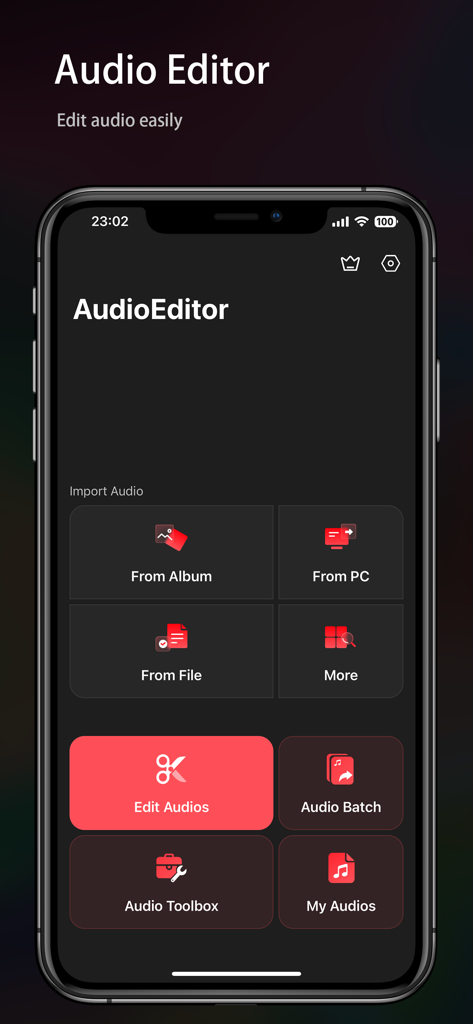
Main menu of Audio Editor app showing audio import and editing tools on a dark interface.

Main menu of Audio Editor app showing audio import and editing tools on a dark interface.

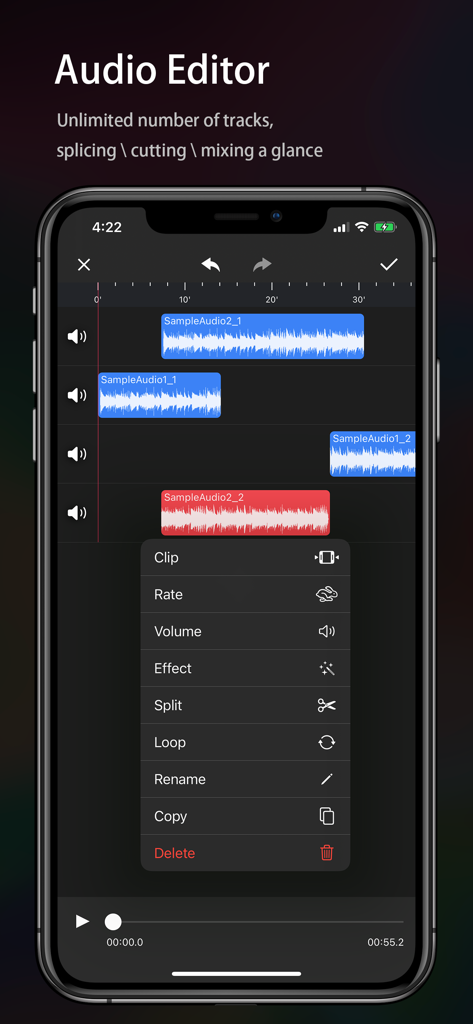
Mobile audio editor interface showing multiple sound tracks and a menu of editing tools like clip and split

Mobile audio editor interface showing multiple sound tracks and a menu of editing tools like clip and split

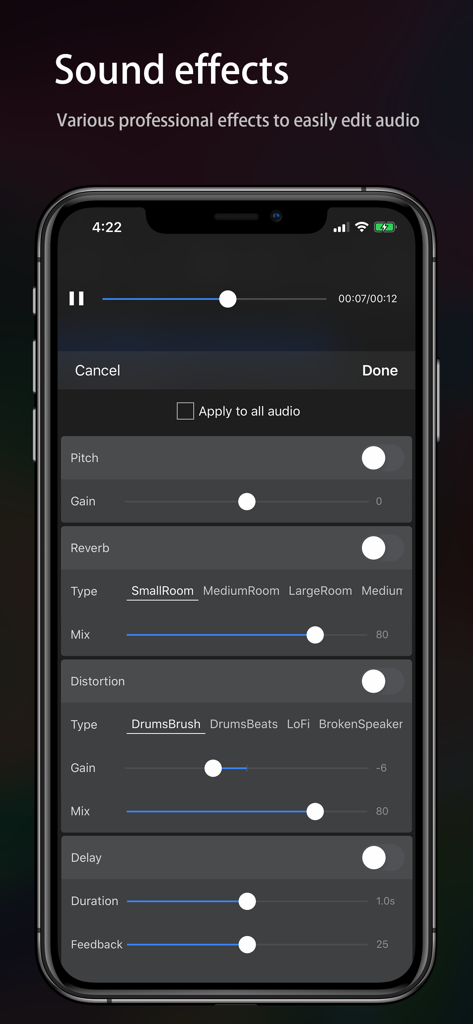
Interface of Audio Editor app featuring various sound effects like reverb and distortion.

Interface of Audio Editor app featuring various sound effects like reverb and distortion.

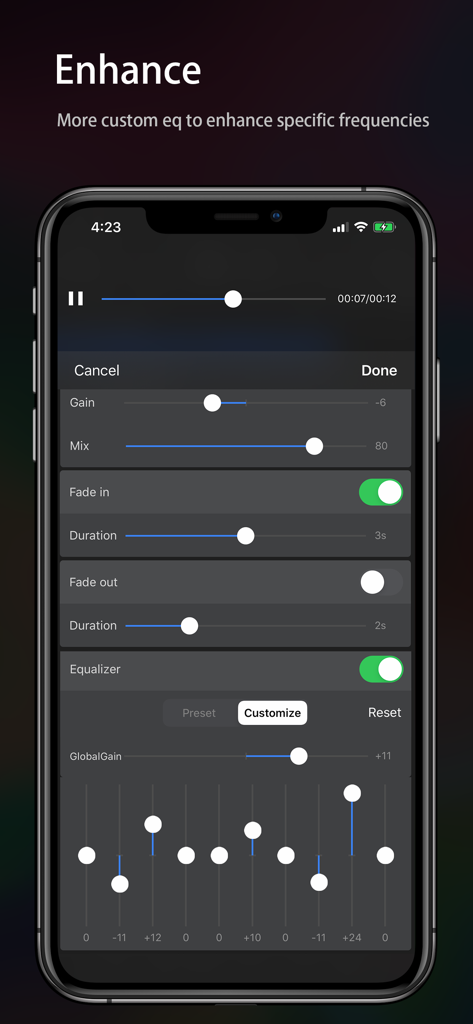
Custom equalizer and audio enhancement settings in the Audio Editor mobile app.

Custom equalizer and audio enhancement settings in the Audio Editor mobile app.

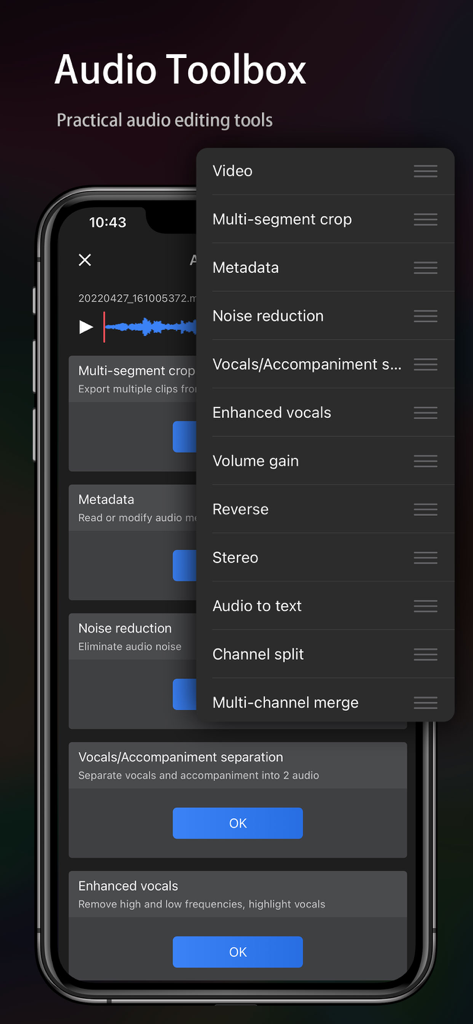
A mobile phone screen showing a list of practical audio editing tools in the Audio Editor app toolbox.

A mobile phone screen showing a list of practical audio editing tools in the Audio Editor app toolbox.

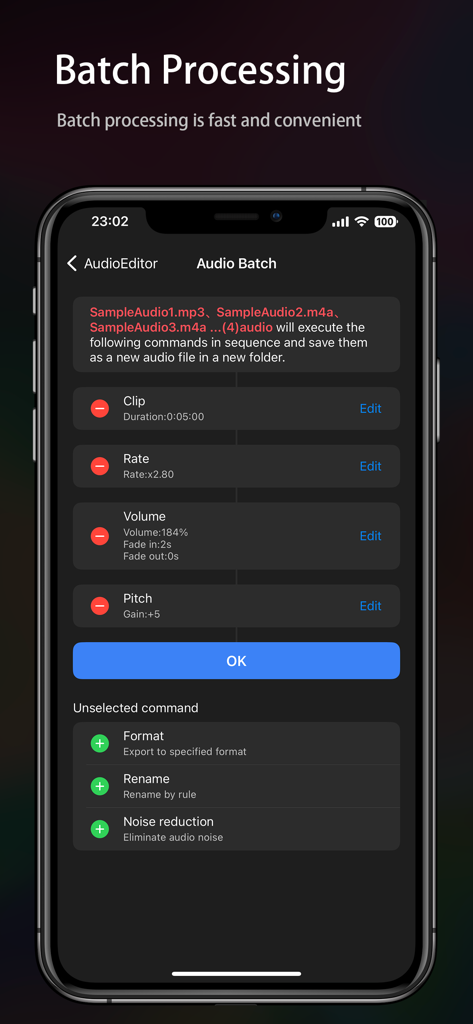
Mobile app interface showing batch processing tools for multiple audio files

Mobile app interface showing batch processing tools for multiple audio files

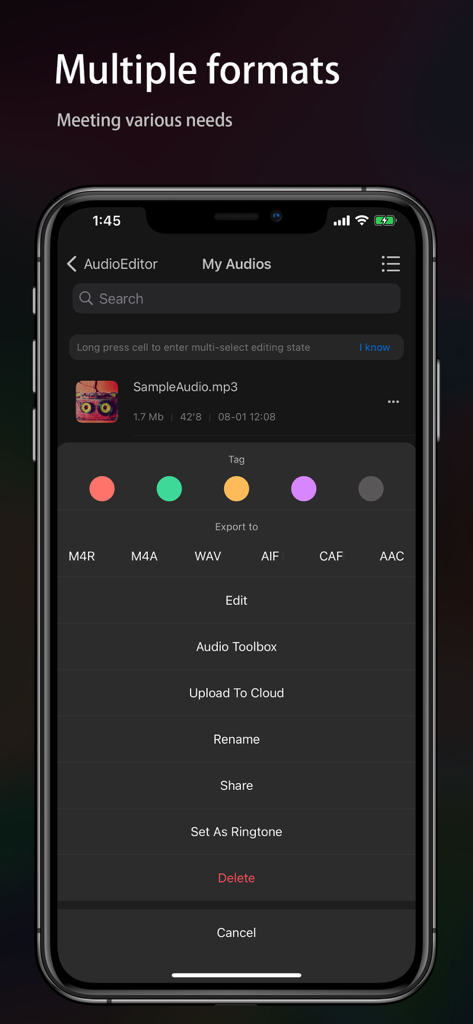
Audio Editor app interface showing multiple export formats and file management options

Audio Editor app interface showing multiple export formats and file management options

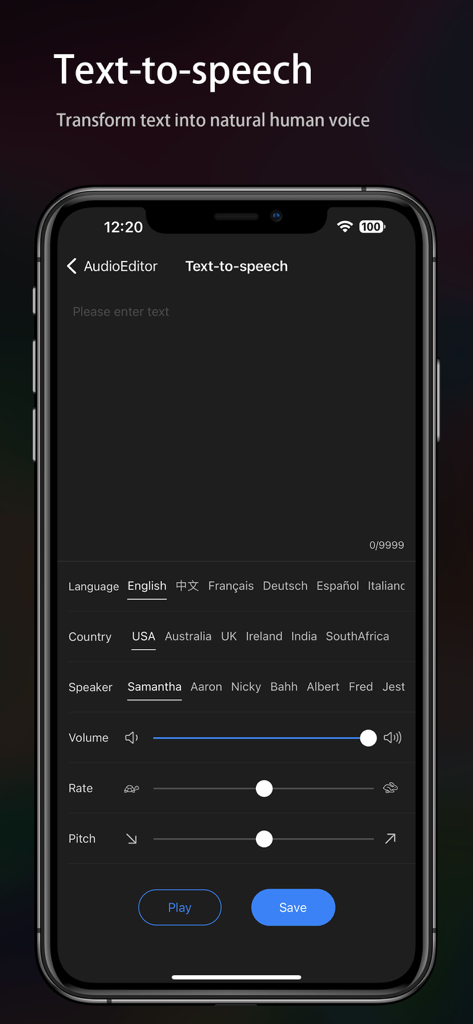
Mobile app interface showing text to speech settings with options for language country speaker and voice adjustment sliders

Mobile app interface showing text to speech settings with options for language country speaker and voice adjustment sliders

Everything You Need to Sound Professional

The tools that make this app stand out, trusted by 8M+ users.

🎙️

AI-Powered Vocal Separation

Instantly isolate vocals or remove background music with one tap. The ultimate tool for creating remixes, mashups, and high-impact social media content.

High-Speed Precision Editing

Splice, mix, and loop tracks with intuitive drag-and-drop controls. Get desktop-level results at one-third the storage size of other professional editing apps.

🎭

Viral Voice & Audio Effects

Transform your voice with pitch shifting, add studio reverb, or clean up recordings with pro noise reduction. Create the perfect audio vibe for your next video.

Loved by users worldwide

Trusted by 8M+ people who love this app.

"

"As a full-time content creator, I need tools that keep up with my fast-paced workflow. This app is the ultimate Swiss Army Knife for audio. The vocal separation and noise reduction features are professional-grade, yet so easy to use right on my iPhone. It has completely replaced my desktop software for quick social media edits!"

Marcus Chen
"

"Finally, an audio editor that doesn't eat up all my phone storage! I use it mostly for making custom ringtones and trimming voice memos for my projects. The interface is super intuitive, and the unlimited undo feature has saved me so many times. It is the most reliable utility tool in my creative folder."

Chloe Henderson

Review Analysis

Insights from user reviews.

Sentiment Score

34%
Negative

Summary

This audio editing app receives mixed feedback, with users praising its simple interface and effectiveness for basic tasks like merging, looping, cutting, and extracting audio. However, a significant number of users express strong dissatisfaction with its monetization strategy, citing numerous features being paywalled, high subscription costs, and intrusive advertisements that often block app usage. Multiple complaints also detail unexpected charges and even allegations of fraudulent activity and spyware. Furthermore, the app suffers from various technical bugs, including issues with saving panoramas, recognizing audio formats, and particularly, crashes and clipboard paste errors reported by iOS 26 users.

Common Themes

Basic Audio Editing Functionality(12)
Subscription & Pricing Model(10)
Unexpected Charges/Fraud(9)
Bugs & Technical Stability(8)
Advertising(3)
iOS 26 Compatibility(2)

About the app

Everything you need to know about Audio Editor - Music editor.

Description

[Audio Editor] A simple and powerful audio editing tool. It can complete the professional audio clips work easily on iPhone and iPad [Edit] -「Splicing and sound mixing」: One-key switching; support free drag, easy to operate -「 Record 」: Support wired or wireless (AirPods and Pro) earphones and in-ear monitor; support accompaniment play; -「 Cut」: Cut the audio fast and freely -「 Rate 」: 0.2 times ~ 4 times, control the playback speed freely -「 Balance 」: Support R-CH and L-CH settings -「 Fade 」: 1s~5s, set the fade-in fade-out as one wishes -「Loop」: Extend the audio "tile" to any duration [Effects] -「Pitch」: Rising and falling, change the voice into that of "Lolita" and "uncle" and so on within one second -「Reverb」: Room, living room and church, etc., switch the scenario as one wishes -「Distortion」: Electronic, echo and metal, etc., feel different audio -「Delay」: Support max 2s delay special-effects; a single can also have chorus -「Equalizer」: Bass boost and human voice resonance, etc., custom equalizer with 10 sections of frequency. It makes your audio voice clear, high pitch transparent and low pitch "rhythmic" [Characteristics] -「Audio Toolbox」: Noise reduction, vocal enhancement, vocal/accompaniment separation... -「Setting as ringtone」: Set the audio as the phone ringtone -「Format conversion」: Support many audio formats with free conversion, such as mp3, m4a, m4r, wav, aiff, etc. -「Audio import」: Support more than 6 ways to import audio: Video extract, WiFi, UTI, Apple music, file and clipboard -「Auto-draft」: Autosave the draft with more efficient re-editing -「Undo/Redo」: Support unlimited times of undo and redo -「Tag group」: Set the color mark to group the audio easily -「Delete/Withdraw」: Provide "repentance" operation after the audio is deleted * The APP is carefully optimized to offer comprehensive features at just one-third the size of similar products. It also includes a built-in storage management feature, allowing efficient file management and maintaining minimal storage usage. [Contact us] Gmail: chentom417@gmail.com Your suggestion is very important to me, you can contact me using the feedback in the app. Automatic renewal statement: 1. Payment: "Continuous monthly / year" products are auto-renewable products. After confirming the purchase, you will be charged from your Apple iTunes account; 2. Renewal: 24 hours before the expiration of your subscription period, Apple will automatically deduct the charge from your ITunes account, and the validity period of "Remove ads" will be automatically extended after success; 3. If you need to cancel the automatic renewal, please turn off the automatic renewal manually in the Apple ID account settings at least 24 hours before the subscription period expires. No charge will be made after closing. Terms of Service: http://common.iuuapp.com/terms_service_env1_audio.html Privacy Policy: http://common.iuuapp.com/privacypolicyv1_audio.html

Latest Version

2.0.27

Size

57.5 MB

First Released

Jan 2, 2020

Join 8 Million Creators and Master Your Sound Today

Download the lightweight, all-in-one audio toolbox. Splicing, vocal separation, and pro-effects—get professional results in seconds, right from your pocket.

Download on App StoreDownload on Google Play
FAQ

Frequently Asked Questions

Everything you need to know about Audio Editor - Music editor
What is the "Audio Editor - Music editor" app?

The "Audio Editor - Music editor" is a simple and powerful audio editing tool for iPhone and iPad. It enables professional audio clip work, including editing, applying effects, and utilizing various audio characteristics.

What devices does the "Audio Editor - Music editor" app support?

The "Audio Editor - Music editor" app supports both iPhone and iPad devices. It is designed to complete professional audio clips work on these Apple mobile platforms.

Can the "Audio Editor" app record audio?

Yes, the "Audio Editor" app can record audio. It supports recording with wired or wireless earphones, including AirPods and AirPods Pro, and allows accompaniment playback during recording.

Does the "Audio Editor - Music editor" app include special sound effects?

Yes, the "Audio Editor - Music editor" app includes special sound effects like Pitch, Reverb, Distortion, Delay, and a 10-section Equalizer. These effects modify audio characteristics like voice, space, and tone.

How can users import audio into the "Audio Editor" app?

The "Audio Editor" app supports over six ways to import audio, including video extract, WiFi transfer, UTI, Apple Music, files, and clipboard. This ensures versatile audio source integration.

Can "Audio Editor - Music editor" convert audio formats?

Yes, the "Audio Editor - Music editor" app can convert audio formats. It supports free conversion among various formats such as mp3, m4a, m4r, wav, and aiff.

Does the "Audio Editor" app offer noise reduction?

Yes, the "Audio Editor" app offers a noise reduction feature within its Audio Toolbox. This tool helps eliminate unwanted audio noise, enhancing sound clarity.

Can "Audio Editor - Music editor" separate vocals from accompaniment?

Yes, the "Audio Editor - Music editor" app can separate vocals and accompaniment. This feature is available in the Audio Toolbox, allowing users to isolate voice tracks.

How does the auto-renewal feature work for "Audio Editor - Music editor" subscriptions?

The "Audio Editor - Music editor" subscription is auto-renewable monthly or yearly. Payment is charged to your Apple iTunes account, and renewal automatically occurs 24 hours before the subscription expires.

How can users cancel an "Audio Editor - Music editor" subscription?

Users must manually turn off automatic renewal in their Apple ID account settings at least 24 hours before the subscription period expires. No charge occurs after closing the renewal.

Does the "Audio Editor" app support text-to-speech?

Yes, the "Audio Editor" app supports text-to-speech conversion. This feature transforms text into natural human voice, with options for language, country, speaker, volume, rate, and pitch.

Can I apply multiple effects or edits to several audio files at once in Audio Editor?

Yes, the Audio Editor app offers batch processing. This feature allows users to apply multiple commands, such as clipping, rate adjustment, volume, and pitch changes, to several audio files simultaneously.