Lifebox: Storage & Backup

Lifebox: Storage & Backup

Download on App StoreDownload on Google Play
Spark by MWM logo
Logo of Lifebox: Storage & Backup

Lifebox: Storage & Backup – Save Every Memory Without Ever Running Out of Space

Stop worrying about 'Storage Full' warnings. Lifebox automatically backs up your photos, organizes your memories with AI, and clears space on your phone in one tap—keeping your family's precious moments safe and accessible anywhere.

Publisher

LIFECELL BULUT COZUMLERI ANONIM SIRKETI

Category

Productivity

Downloads

3M+

User Rating

4.6/5

Total Ratings

166K+

Locales

11

Your Life, Organized

Discover the interface used by 3M+ users.
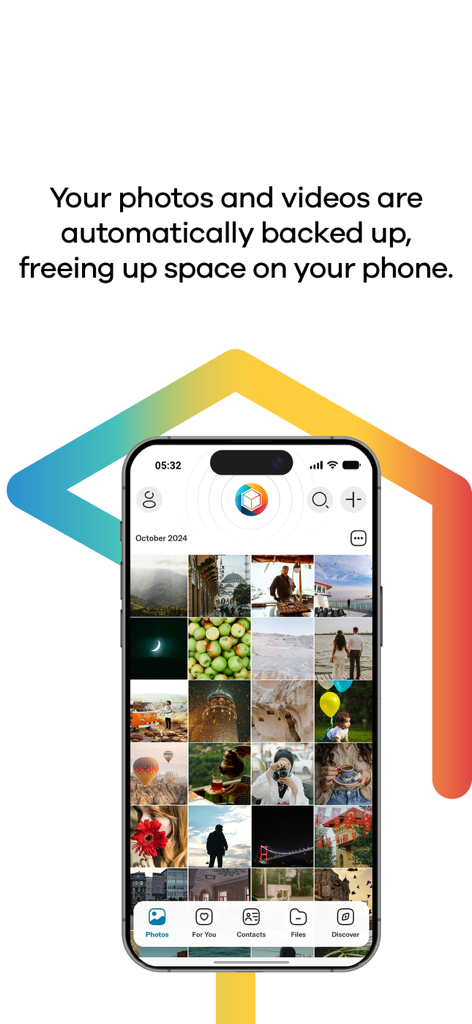
Lifebox app interface on a smartphone showing a photo gallery and automatic backup feature text

Lifebox app interface on a smartphone showing a photo gallery and automatic backup feature text

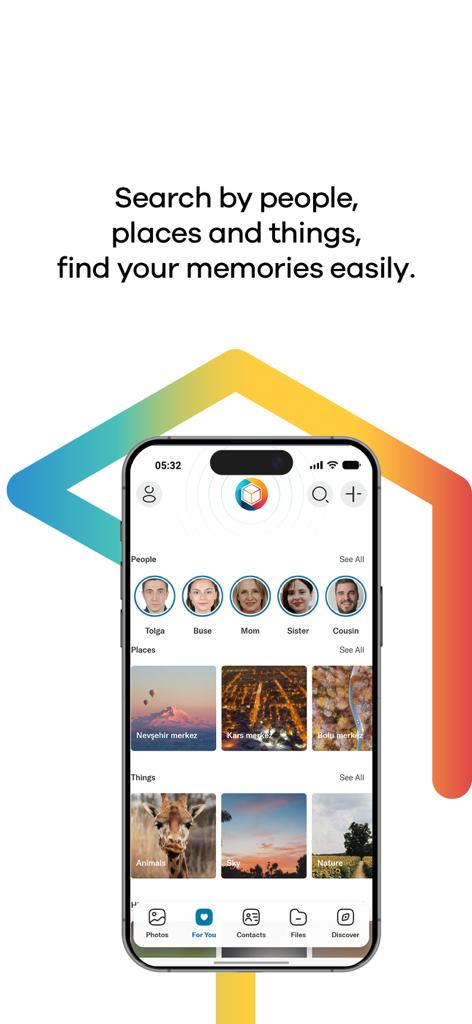
Lifebox app interface showing automatic grouping of photos by people places and things

Lifebox app interface showing automatic grouping of photos by people places and things

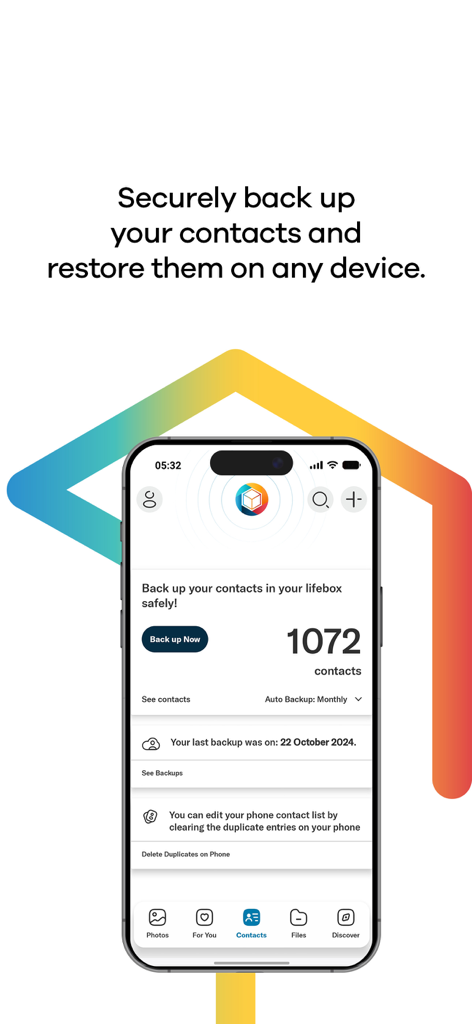
Lifebox mobile app screen showing contact backup status and duplicate contact removal features

Lifebox mobile app screen showing contact backup status and duplicate contact removal features

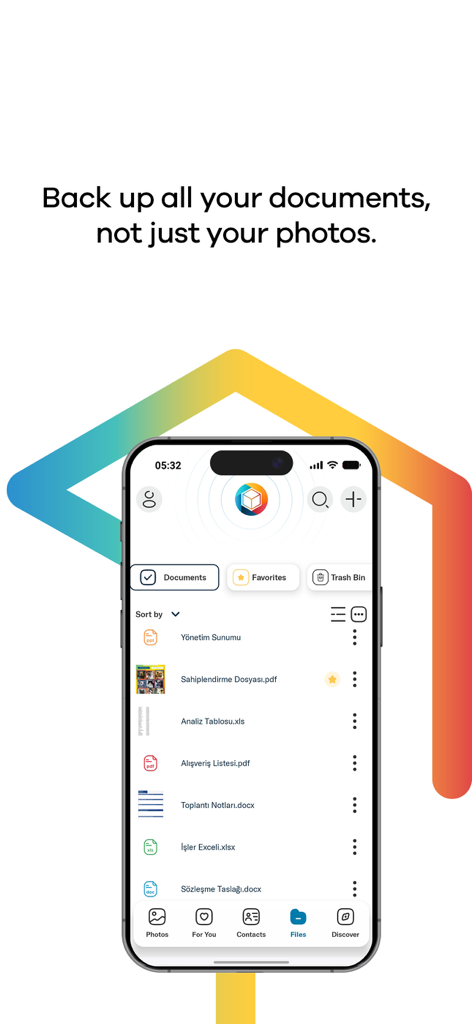
Lifebox app interface showing a list of backed up documents like PDFs and Word files on an iPhone

Lifebox app interface showing a list of backed up documents like PDFs and Word files on an iPhone

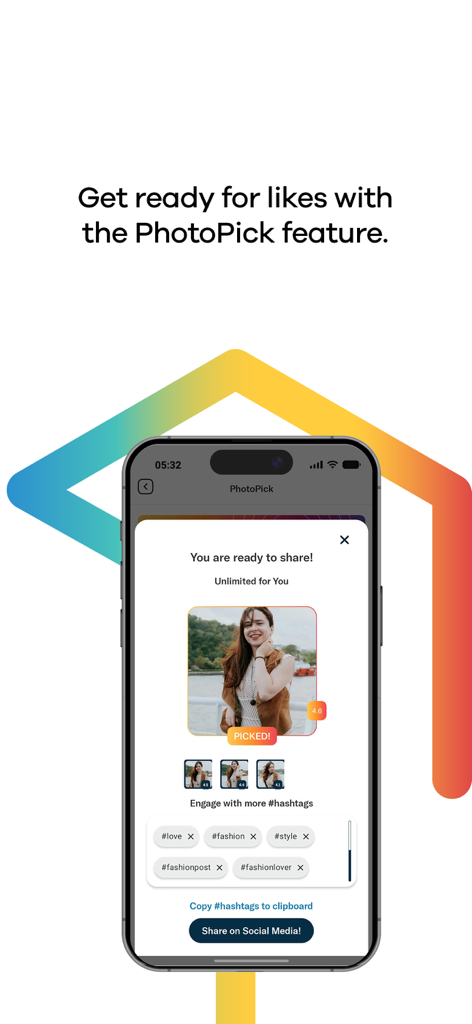
Interface of Lifebox app showing the PhotoPick feature with a selected photo and suggested social media hashtags

Interface of Lifebox app showing the PhotoPick feature with a selected photo and suggested social media hashtags

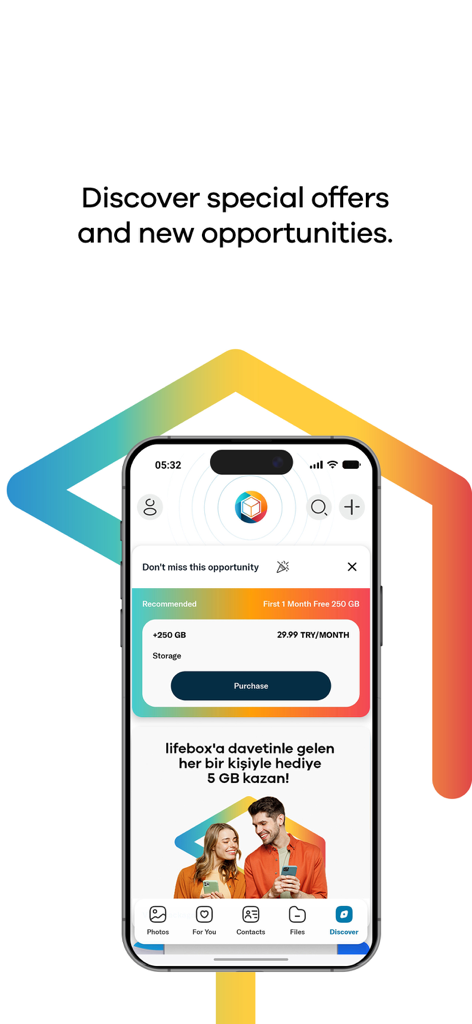
Lifebox app discover screen showing premium storage plans and referral rewards for extra cloud space.

Lifebox app discover screen showing premium storage plans and referral rewards for extra cloud space.

Never Lose a Moment to 'Storage Full' Again

The tools that make this app stand out, trusted by 3M+ users.

🚀

Instant Space Liberation

Back up your gallery automatically and clear gigabytes with a single tap, making room for thousands of new family memories.

📸

AI-Powered Memory Assistant

Skip the manual sorting. Our AI automatically groups your photos by people and places, making it easy to find that one perfect shot in seconds.

🛡️

Total Digital Peace of Mind

Secure your life with contact backups and Face ID protection, ensuring your sentimental history is safe even if your phone is lost or damaged.

Loved by users worldwide

Trusted by 3M+ people who love this app.

"

"I was constantly hitting that 'Storage Full' warning right when I wanted to record my kids' milestones. Lifebox has been a lifesaver. The face recognition automatically groups photos of my children, and I love being able to clear my phone memory with one tap knowing every memory is safe in original quality."

Sarah Jenkins
"

"Finally, a storage app that actually understands social media users. The feature that archives my Instagram and Facebook posts automatically is brilliant. It is so easy to edit my travel photos with the built-in filters and then show them off on the big screen using the Apple TV app."

Marcus Reed

About the app

Everything you need to know about Lifebox: Storage & Backup.

Description

lifebox - Backup & Storage The best thing that can happen to your phone is lifebox! If you don't like the ‘storage full’ warning, lifebox is just for you. Here's what you can do with lifebox: Automatic backup of the memories : With the auto-sync feature, your memories are backed up in lifebox instantly with cellular data or WiFi. All memories are safely stored automatically. Back Up Your Contacts: You can back up your contacts in lifebox and store them safely. Thus, if something happens to your phone, you can access them immediately. Group Your Photos with Face and Image Recognition: Lifebox recognizes people, objects and places in your photos with face&image recognition and groups them for you. So you don't have to worry about searching for a photo. Free up space: You can delete the memories you backed up on lifebox from your phone with a single button, so you can make room for new memories in your phone memory. Automatic Stories: You can create fun stories and share them easily with your loved ones. Lifebox also creates automatic stories, collages and videos, crowning the most beautiful memories of you! We did not forget your photos in social media: You can archive photos you share on Facebook and Instagram to lifebox. Smart and Secure Login: Depending on the model of your phone, you can use touch id, face id, or password to make it more secure. Photo Editing: With photo editing feature, you can make your photos more attractive with special filters, effects and frames, and you can add entertainment with caps and stickers. Reach your lifebox from anywhere!: All the photos, videos and files you have stored in your lifebox can be accessed quickly from your smartphone, tablet, Apple TV, TV + and PC. If you have a Lifebox Premium account, you can benefit from the additional features of Premium, and you will have the best lifebox experience! Delete Duplicated Contacts: Lifebox saves you the trouble of deleting recurring contacts one by one! You can find the copied contacts in the phone book and delete the repeats with a single button, and you can find a solution to the chaos in your contact list. Face and Object Recognition: With Premium membership, you can use Face&Image Recognition feature in all of your photos unlimited. Original Quality Storage: If you have a lifebox Premium membership, all the photos and videos you upload will be kept in original quality. Frequently Asked Questions: https://mylifebox.com/#!/faq/ Terms of Use: https://mylifebox.com/termsofuse Confidentiality and Security: https://mylifebox.com/portal/policy/ - Subscriptions are renewed on a monthly basis. - Fees are charged upon your iTunes account. - Subscriptions are renewed on a monthly basis unless auto-renewal option is off . Subscriptions are not renewed if subscription is cancelled within 24 hours before the renewal date. - The account may be charged within 24 hours before the subscription renewal date is due. The fees are reflected as they are shown on the in-app purchase screen. - Subscriptions are managed by the user and/or can be closed via using the settings section under My Account. - The subscriptions can not be terminated within a month following the last fee withdrawal for the service. - Free 5 GB package will be added on your monthly subsciption package as the subscription fee begins. - Continued use of GPS running in the background can dramatically decrease battery life.

Latest Version

40.3

Size

124.8 MB

First Released

Oct 21, 2013

Ready to Free Up Space for Your Next Big Moment?

Stop letting the 'Storage Full' warning hold you back. Join over 3 million users who trust Lifebox to protect their family photos, organize their digital lives, and keep every memory safe in original quality.

Download on App StoreDownload on Google Play
FAQ

Frequently Asked Questions

Everything you need to know about Lifebox: Storage & Backup

Does Lifebox automatically back up photos and videos?

Yes, Lifebox automatically backs up photos and videos using cellular data or WiFi. All memories are stored safely and instantly.

Can Lifebox free up space on my phone?

Yes, Lifebox enables users to delete backed-up memories from their phone with a single button. This action frees up internal storage for new content.

Does Lifebox offer contact backup?

Yes, Lifebox securely backs up contacts. Users can access their contacts immediately if their phone is lost or damaged.

How does Lifebox organize photos?

Lifebox organizes photos using face and image recognition. It groups pictures by people, objects, and places, simplifying the search for specific memories.

Can Lifebox Premium remove duplicate contacts?

Yes, Lifebox Premium identifies and deletes duplicated contacts in the phone book with a single button. This feature helps organize the contact list effectively.

Which devices support Lifebox access?

Users access their Lifebox files from smartphones, tablets, Apple TV, TV +, and PC. All stored photos, videos, and files are available quickly.

How do Lifebox subscriptions renew?

Lifebox subscriptions renew automatically on a monthly basis. Fees are charged to the iTunes account, unless auto-renewal is manually turned off.

Is free storage included with Lifebox subscriptions?

Yes, a free 5 GB package is added to the monthly subscription package. This bonus activates once the subscription fee begins.

What login security options does Lifebox provide?

Lifebox provides smart and secure login options. These include Touch ID, Face ID, or password, tailored to the phone's model for enhanced security.

Does Lifebox back up documents?

Yes, Lifebox backs up various document types in addition to photos and videos. This includes PDF, Excel, and Word files.

Can Lifebox archive photos from social media platforms?

Yes, Lifebox allows users to archive photos shared on Facebook and Instagram. These memories are then stored within their Lifebox account.

Does Lifebox offer photo editing tools?

Yes, Lifebox includes a photo editing feature. Users can apply special filters, effects, frames, caps, and stickers to enhance their photos.

Does Lifebox Premium store media in original quality?

Yes, a Lifebox Premium membership ensures all uploaded photos and videos are stored in their original quality. This preserves media fidelity.

Is there a referral bonus for inviting friends to Lifebox?

Yes, Lifebox offers a bonus. Users receive 5 GB of storage for every person they successfully invite to join Lifebox.