Notation Pad-Sheet Music Score

Notation Pad-Sheet Music Score

Download on App StoreDownload on Google Play
Spark by MWM logo
Logo of Notation Pad-Sheet Music Score

Notation Pad-Sheet Music Score: Compose and Edit Music Wherever Inspiration Strikes

The ultimate mobile workstation for composers and students. Create, playback, and export professional-grade scores with 100+ instruments and seamless MusicXML integration.

Publisher

嵩 张

Category

Music

Downloads

2M+

User Rating

4.4/5

Total Ratings

7K+

Locales

5

Your Score, Visualized

Discover the interface used by 2M+ users.

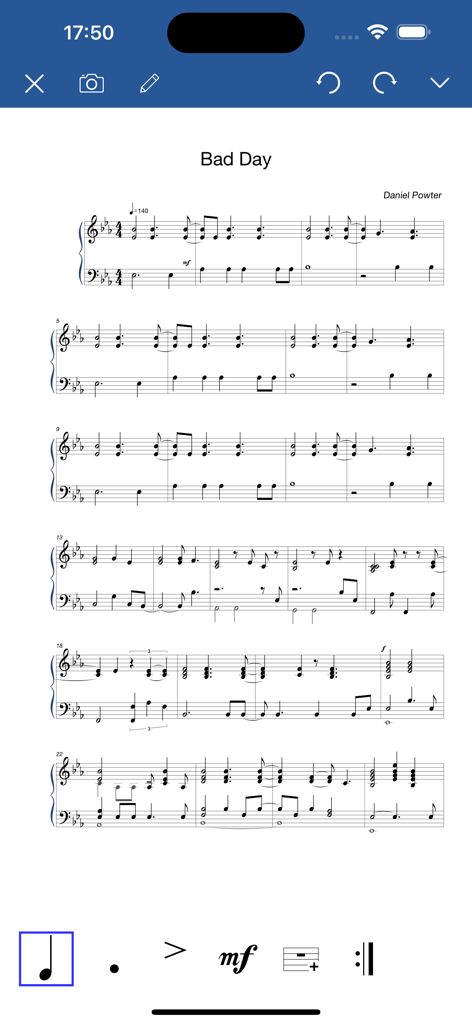
Interface of the Notation Pad app showing a piano sheet music score for the song Bad Day

Interface of the Notation Pad app showing a piano sheet music score for the song Bad Day

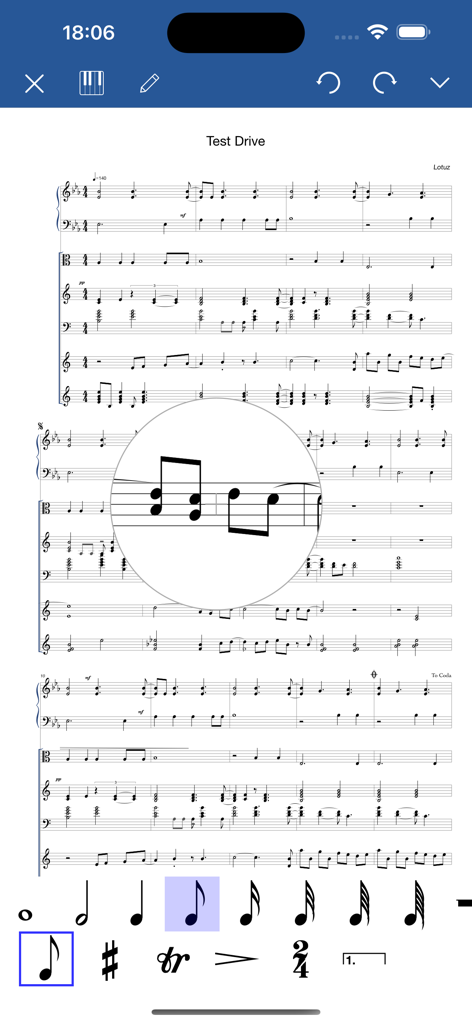
Music notation editor interface with multiple staves and note selection tools.

Music notation editor interface with multiple staves and note selection tools.

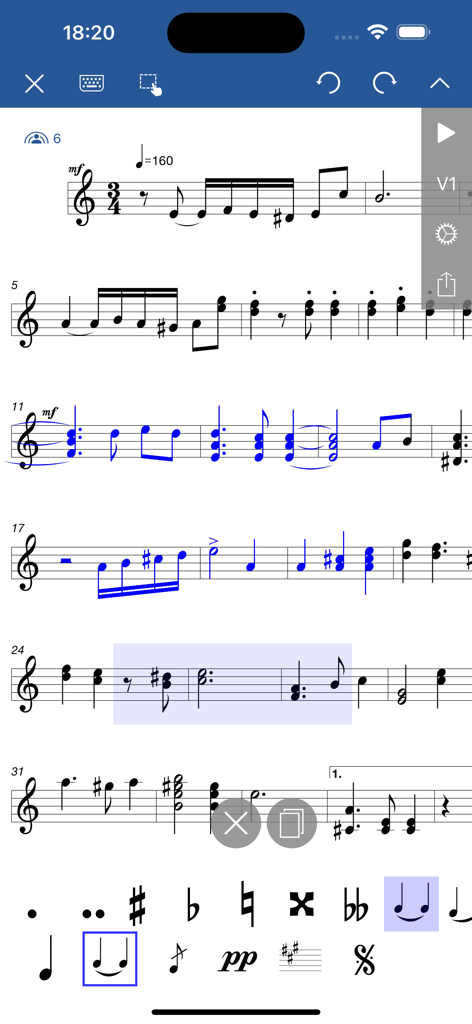
Interface of a mobile app for music notation showing a sheet music score being edited with musical symbols and tools

Interface of a mobile app for music notation showing a sheet music score being edited with musical symbols and tools

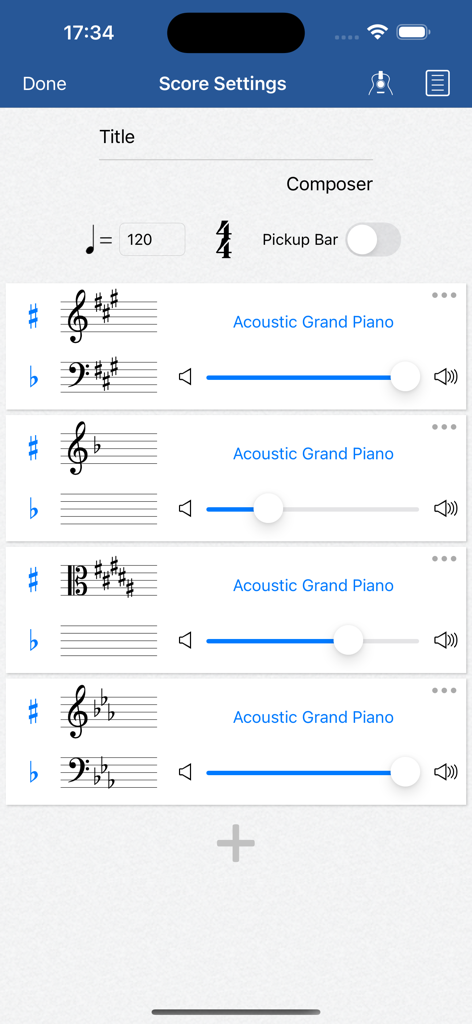
Score settings screen in Notation Pad app displaying tempo controls and multiple instrument tracks with volume sliders

Score settings screen in Notation Pad app displaying tempo controls and multiple instrument tracks with volume sliders

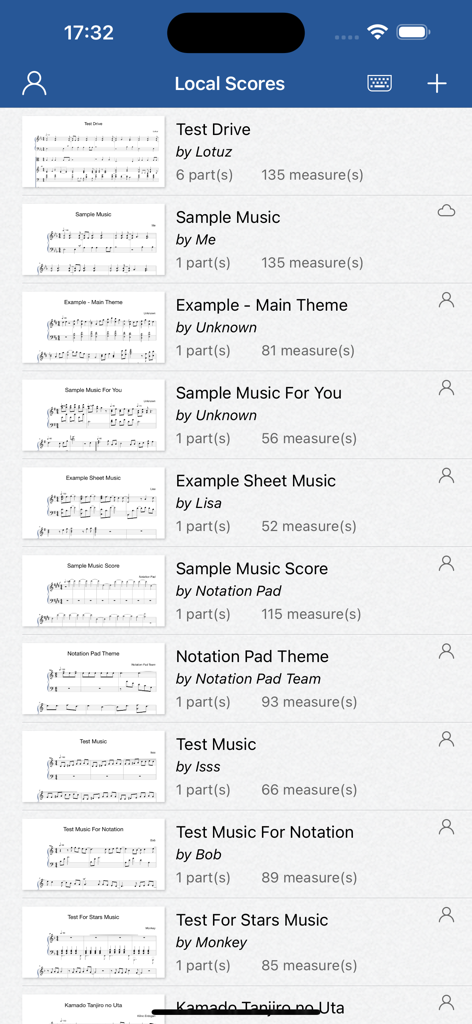
A library view of saved sheet music scores and compositions within the Notation Pad app interface.

A library view of saved sheet music scores and compositions within the Notation Pad app interface.

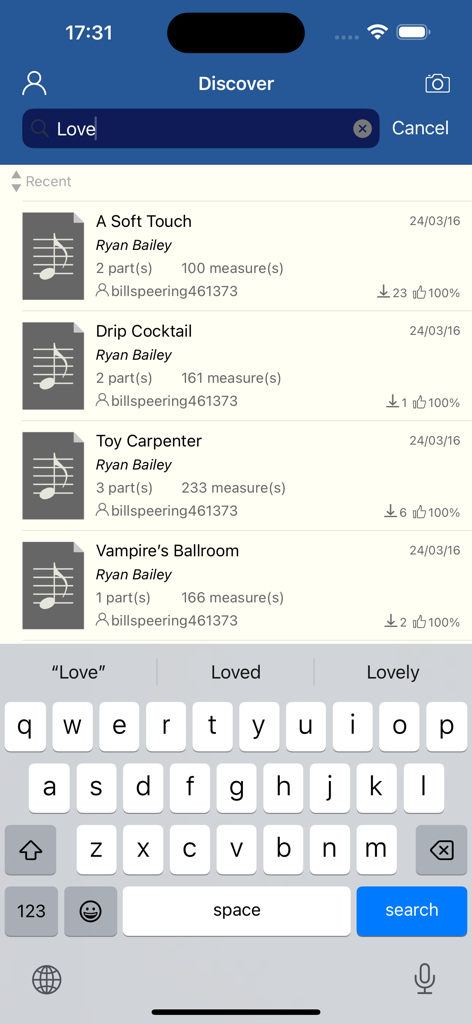
A list of musical scores on the discover screen of the Notation Pad app

A list of musical scores on the discover screen of the Notation Pad app

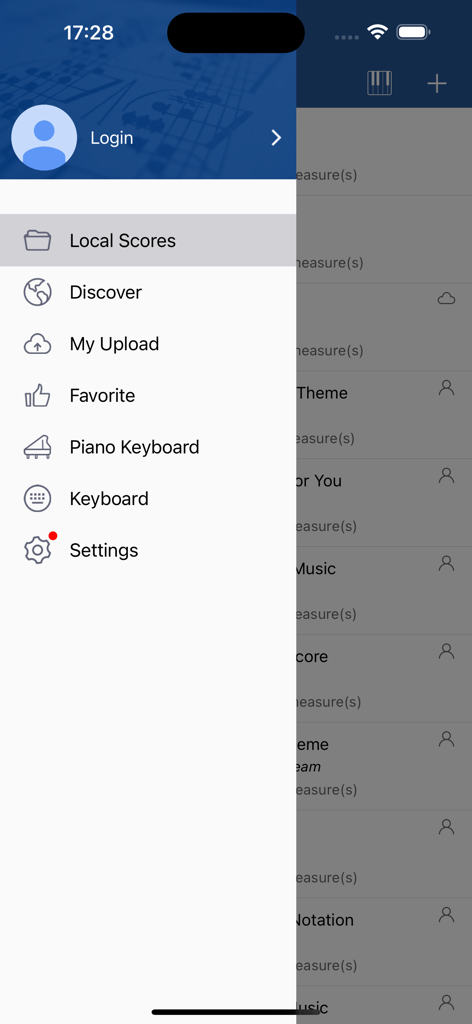
Navigation drawer of the Notation Pad app showing menu options like Local Scores, Discover, and Settings

Navigation drawer of the Notation Pad app showing menu options like Local Scores, Discover, and Settings

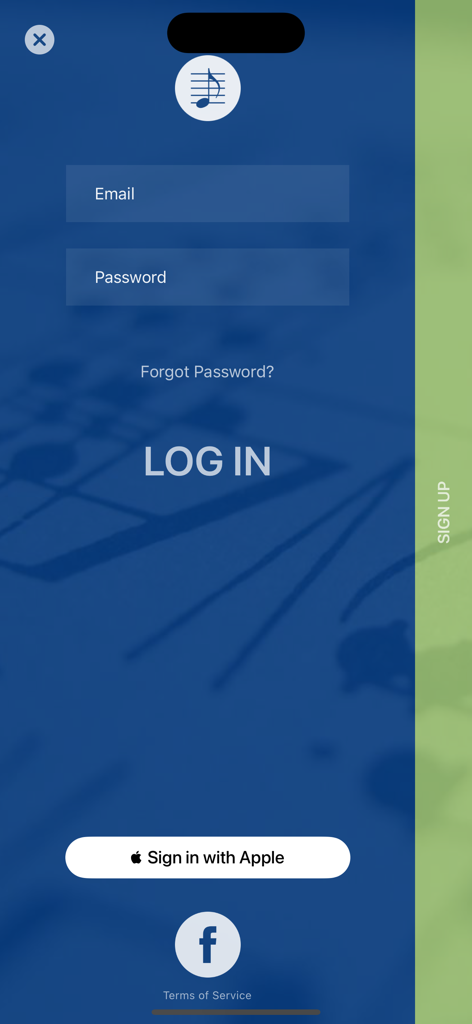
Login screen for Notation Pad app showing email and social sign in options

Login screen for Notation Pad app showing email and social sign in options

Compose Without Limits

The tools that make this app stand out, trusted by 2M+ users.

💡

Capture Instant Inspiration

Don't let a melody escape you. Use the intuitive touch-to-write interface to record complex scores with up to 8 staves the moment creativity strikes.

🎼

Professional Export Suite

Seamlessly integrate into your professional workflow with MusicXML, MIDI, and PDF exports, ensuring your work is ready for Finale, Sibelius, or the conductor's stand.

👥

Real-Time Collaboration

Compose together across distances. Use SharePlay to edit and refine scores with bandmates or students in real-time, making feedback instant and productive.

Loved by users worldwide

Trusted by 2M+ people who love this app.

"

"As a composition major, Notation Pad is a lifesaver. I can start a complex score on the bus using just my iPad and then export the MusicXML directly into Finale once I am back at the lab. The interface is incredibly intuitive for handling accidentals and tuplets."

Sarah M., Music Student
"

"Finally, a notation app that does not feel like a chore! I use it to draft arrangements for my jazz quartet on the fly. The playback quality is impressive, and the SharePlay feature has completely changed how I collaborate with my co-writer in real-time."

David L., Freelance Composer

About the app

Everything you need to know about Notation Pad-Sheet Music Score.

Description

A sheet music creator and music notation editor on iOS. For any music lover or composer, Notation Pad gives you the ability to read, compose, edit, playback music scores and write lyrics. With it you can be a talented composer and great sheet music maker anywhere. As long as you have a little knowledge of sheet music, you can write music composition simply by touching and moving. You could use it as your songbook or scoresheet. It is also designed for a beginner who wants to learn music score, music notes and tablature. It can handle ensemble, choir or symphony score, also it supports for a single track piano score. With the help of it you could easily record the flashes of inspiration wherever they strike. Are you ready to compose music in a simple way? ----------------------- Features: -Realtime multi-person collaborative editing via SharePlay. -Export/Import the industry-popular MusicXML file format, allowing for exchanging sheet music with other software (Finale, Sibelius, Encore, MuseScore, etc). -Export MIDI file. -Export PNG image and PDF document. -High quality sound for playback. -Support editing up to 8 staff at the same time. -Support over 100 kinds of musical instrument. Piano, organ, guitar, violin, sax, flute, brass, bass, etc. -Support multi-voice. -A great lyric app. ----------------------- Supported notation: *A variety of music note types, from whole note to 128th note and dotted note *Chord, staff, track *Treble, alto and bass clef *Edit lyrics *A variety of time signatures *All standard key signatures *Adjustable tempo *All accidentals (sharps, flats, double sharps, double flats, and naturals) *Tie, slur, and tuplet *Many types of ornament *A wide range of dynamics ----------------------- UNLIMITED ACCESS SUBSCRIPTION - Support up to 8 staff - Config parts(add, delete, reorder) - Change key for each part - Change beat type and tempo - Config clef for each staff - Config sound for each part - No watermark image export - No Ads - Support 2nd voice part - Transpose instruments - Pickup bar - Import data file - Edit downloaded music score - Unlock all 100+ instruments - The subscription is $6.99 weekly with trial - Payment will be charged to iTunes Account at confirmation of purchase - Subscription automatically renews unless auto-renew is turned off at least 24-hours before the end of the current period - Account will be charged for renewal within 24-hours prior to the end of the current period, and identify the cost of the renewal - Subscriptions may be managed by the user and auto-renewal may be turned off by going to the user's Account Settings after purchase - Any unused portion of a free trial period, if offered, will be forfeited when the user purchases a subscription to that service, where applicable - Terms of use: https://service.notationpad.com/terms_service.html

Latest Version

2.1.6

Size

161.9 MB

First Released

Mar 21, 2016

Ready to Compose Your Next Masterpiece?

Join over 2 million musicians who turn their inspiration into professional sheet music. Download Notation Pad today to write, collaborate via SharePlay, and export industry-standard MusicXML files on the go.

Download on App StoreDownload on Google Play
FAQ

Frequently Asked Questions

Everything you need to know about Notation Pad-Sheet Music Score
What is Notation Pad-Sheet Music Score?

Notation Pad-Sheet Music Score is an iOS app for creating, editing, and playing back sheet music. It functions as a music notation editor, enabling users to compose, write lyrics, and manage scores with various instruments and notation types.

Can Notation Pad-Sheet Music Score export music files and images?

Yes, Notation Pad-Sheet Music Score exports MusicXML, MIDI, PNG images, and PDF documents. This allows for comprehensive sharing and use with other software like Finale, Sibelius, Encore, and MuseScore.

Does Notation Pad-Sheet Music Score support collaborative editing?

Yes, Notation Pad-Sheet Music Score supports real-time multi-person collaborative editing. This advanced feature is available via SharePlay, enabling multiple users to compose and edit music scores together simultaneously.

What musical instruments are available in Notation Pad-Sheet Music Score?

Notation Pad-Sheet Music Score supports over 100 musical instruments, including piano, organ, guitar, violin, sax, flute, and bass. Unlimited access unlocks the full range of instruments for users.

What is the price of the Notation Pad-Sheet Music Score subscription?

The unlimited access subscription for Notation Pad-Sheet Music Score costs $6.99 weekly. This subscription includes a trial period, with payment charged to the iTunes Account upon purchase confirmation.

Can Notation Pad-Sheet Music Score handle multiple staff for composition?

Yes, Notation Pad-Sheet Music Score handles multiple staff. It supports editing up to 8 staff at the same time, making it suitable for ensemble, choir, or symphony scores. This feature is part of the unlimited access.

What specific music notation does Notation Pad-Sheet Music Score support?

Notation Pad-Sheet Music Score supports notes (whole to 128th, dotted), chords, staff, clefs (treble, alto, bass), lyrics, time/key signatures, tempo, accidentals (sharps, flats), ties, slur, tuplets, ornaments, and dynamics.

Does Notation Pad-Sheet Music Score include lyric editing capabilities?

Yes, Notation Pad-Sheet Music Score includes comprehensive lyric editing capabilities. It functions as a lyric app, allowing users to compose and integrate lyrics directly within their music scores effortlessly.

Does Notation Pad-Sheet Music Score remove ads with a subscription?

Yes, the unlimited access subscription for Notation Pad-Sheet Music Score removes all advertisements. Subscribers enjoy an uninterrupted and ad-free experience while composing and editing music.

Can Notation Pad-Sheet Music Score import existing MusicXML files?

Yes, Notation Pad-Sheet Music Score imports existing MusicXML file formats. This feature facilitates easy exchange of sheet music data with other professional notation software, enhancing workflow and compatibility.

How to manage auto-renewal for Notation Pad-Sheet Music Score subscription?

Users manage auto-renewal for Notation Pad-Sheet Music Score subscription via iTunes Account Settings post-purchase. Auto-renewal must be turned off at least 24 hours before the current period ends to prevent charges.

Is Notation Pad-Sheet Music Score suitable for music beginners?

Yes, Notation Pad-Sheet Music Score is designed for beginners learning music scores, notes, and tablature. Users can compose music simply by touching and moving elements, even with minimal sheet music knowledge.

Does Notation Pad-Sheet Music Score offer high-quality audio playback?

Yes, Notation Pad-Sheet Music Score offers high-quality sound for playback. This feature ensures compositions sound clear and professional, aiding in the review and refinement of musical pieces.

Can Notation Pad-Sheet Music Score change the key for each part?

Yes, Notation Pad-Sheet Music Score allows users to change the key for each individual part. This feature is available with the unlimited access subscription, offering flexible composition control.

Is it possible to reorder parts in Notation Pad-Sheet Music Score?

Yes, Notation Pad-Sheet Music Score allows users to reorder parts within a composition. This functionality is part of the unlimited access subscription, providing organizational flexibility for complex scores.

Does Notation Pad-Sheet Music Score support multi-voice composition?

Yes, Notation Pad-Sheet Music Score supports multi-voice composition. This feature allows for creating complex musical textures with multiple independent melodic lines within a single staff, including a 2nd voice part with subscription.