Qlone 3D Scanner

Qlone 3D Scanner

Download on App StoreDownload on Google Play
Spark by MWM logo
Logo of Qlone 3D Scanner

Qlone 3D Scanner: Turn Real Objects into Pro-Quality 3D Models

The ultimate mobile toolkit for 3D printing, AR creation, and STEM. Scan anything with your phone, edit in-app, and export to any platform with a one-time purchase—no subscriptions required.

Download on App Store

Publisher

EyeCue Vision Technologies LTD

Category

Graphics & Design

Downloads

1M+

User Rating

3.9/5

Total Ratings

1K+

Locales

17

Reality Captured in 3D

Discover the interface used by 1M+ users.
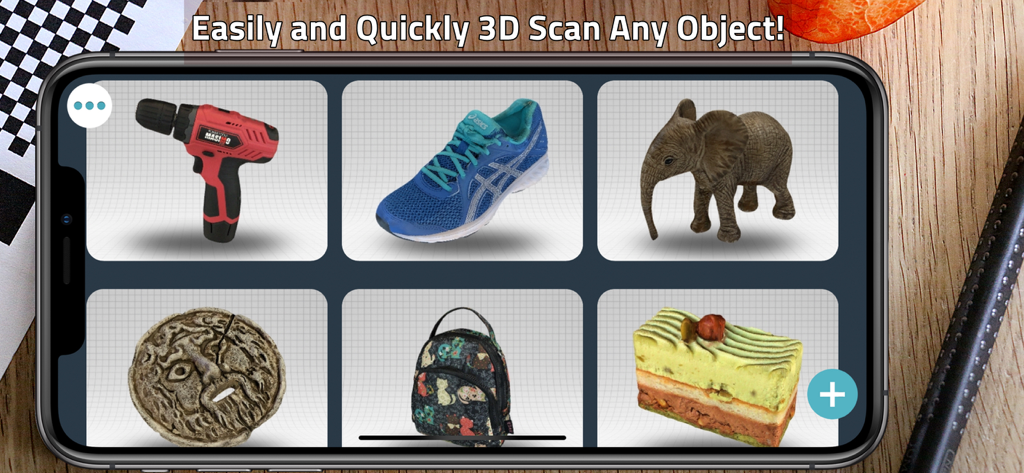
A gallery of diverse 3D scanned models including a power drill, a sneaker, and an elephant on a mobile app interface.

A gallery of diverse 3D scanned models including a power drill, a sneaker, and an elephant on a mobile app interface.

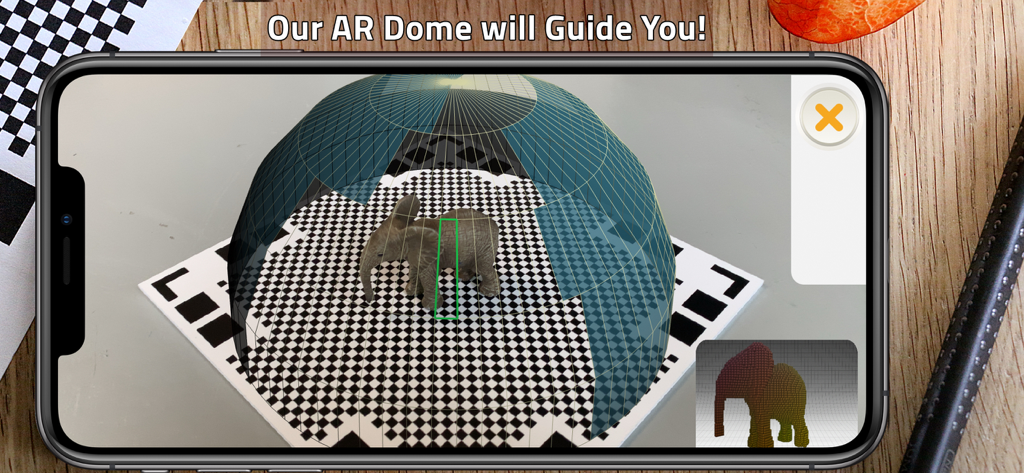
Smartphone screen showing the Qlone 3D scanner app using its AR dome to guide the scanning of a small elephant figurine on a checkered mat

Smartphone screen showing the Qlone 3D scanner app using its AR dome to guide the scanning of a small elephant figurine on a checkered mat

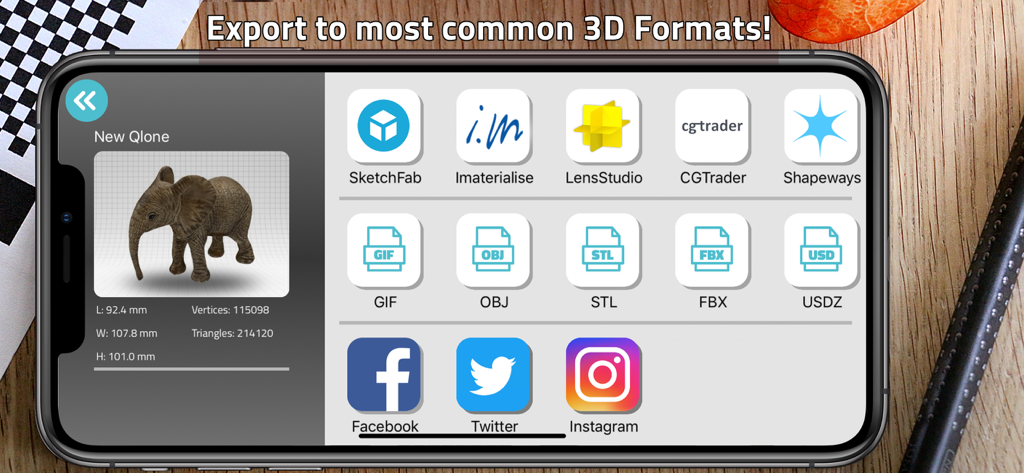
Interface of Qlone 3D Scanner app showing export options for 3D models into OBJ STL and USDZ formats

Interface of Qlone 3D Scanner app showing export options for 3D models into OBJ STL and USDZ formats

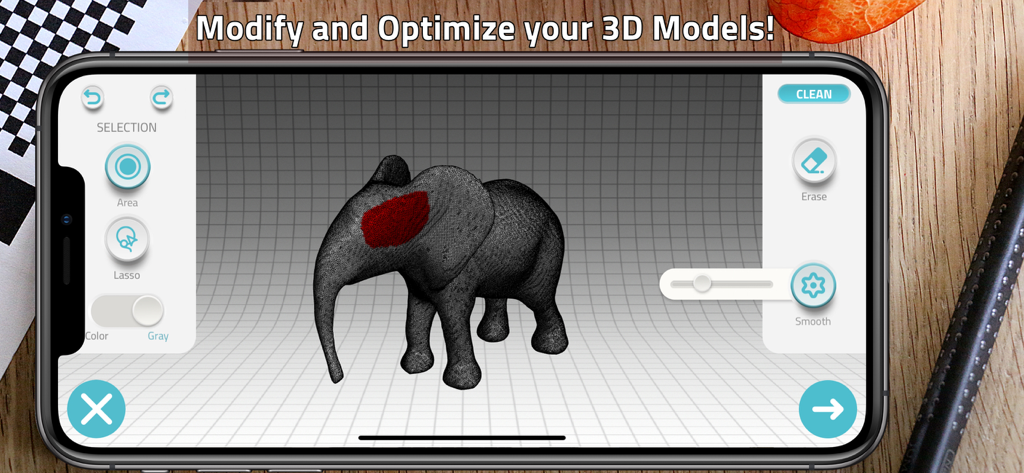
Smartphone screen showing the Qlone 3D Scanner app interface for modifying and optimizing a 3D elephant model

Smartphone screen showing the Qlone 3D Scanner app interface for modifying and optimizing a 3D elephant model

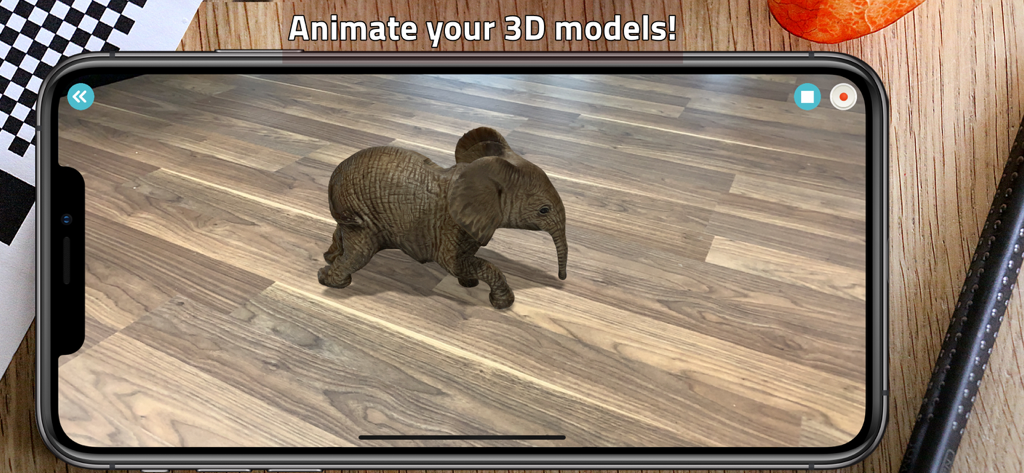
An augmented reality view of a 3D scanned elephant model animated on a wooden floor using the Qlone app.

An augmented reality view of a 3D scanned elephant model animated on a wooden floor using the Qlone app.

Turn Physical Objects into Digital Assets

The tools that make this app stand out, trusted by 1M+ users.

🎯

Instant AR Capture

Guided by our patented AR dome, scan objects in real-time with 4K resolution. No waiting and no expensive equipment—just professional results from your iPhone.

🛠️

On-Device Studio

Clean, sculpt, and texture your models directly in the app. Optimize meshes for 3D printing or use automatic rigging to bring your scans to life with AR animation.

🚀

Universal Export

Seamlessly export to STL, OBJ, or USDZ for 3D printers, game engines, and AR/VR. Enjoy a one-time premium upgrade—no monthly subscription fatigue.

Loved by users worldwide

Trusted by 1M+ people who love this app.

"

"Qlone has completely transformed my 3D printing workflow. The ability to scan a physical part and export a clean STL file directly from my iPhone is incredible. Plus, the one-time purchase model is a breath of fresh air compared to other subscription-heavy apps."

Marcus V.
"

"I use Qlone in my STEM lab to introduce students to 3D modeling. The AR dome makes the scanning process intuitive, and the real-time processing allows us to complete projects within a single class period. It is easily the most accessible tool for any modern classroom."

Dr. Elena R.

Review Analysis

Insights from user reviews.

Sentiment Score

10%
Negative

Summary

The app receives overwhelmingly negative feedback from users, primarily due to its aggressive monetization strategy and a critical lack of a free trial, which prevents users from testing core functionalities before purchase. Many reviews highlight intrusive "buy premium" ads and countdown timers, including persistent notifications in the Dynamic Island on newer iPhones (like the iPhone 17 Pro), even after the app is closed. Furthermore, users frequently report poor and imprecise 3D scan quality, with results often deemed unsuitable for 3D printing. While some users appreciate the user-friendly interface, local processing, and easy transfer to Mac, these positive aspects are overshadowed by the pervasive issues related to forced payments and low-quality output.

Common Themes

User-Friendly Interface(2)
Export & Transfer(1)
Local Processing(1)
Speed(1)
Scan Quality Options(1)
Premium Impression(1)

About the app

Everything you need to know about Qlone 3D Scanner.

Description

Qlone is an all-in-one 3D scanner app. We have made it easy and fast to create 3D models from real objects, edit them with built-in editing tools and seamlessly export the result to popular platforms, 3D file formats and 3D printers. You can even animate your models in Augmented Reality! A perfect tool for AR/VR content creation, 3D Printing, STEM Education, eCommerce showcase and many other uses. SCANNING If you choose to scan with the Qlone mat, simply print it from the included mat file, place your object in the middle of the mat and let the AR dome guide you through the scanning process. You can also scan the object from two different angles and it will be automatically merged for a better overall result which includes areas such as the bottom of the object. You can now also scan without a mat in two different modes - AR mode which makes it easy to scan with our familiar AR dome or Photo mode, which takes higher quality 4K images in both manual or automatic modes. When scanning with the mat, there is no waiting time, all processing is done in real time on your phone in seconds. In the new option to scan without a mat, processing is done in minutes on our blazing fast Qlone Cloud but we value your privacy so we don't store or view any of your models! MODIFYING With the integrated tools in the app you can optimize and modify your 3D model without needing to export them to other sophisticated software. Texture - Change the Brightness, Saturation and Sharpness of the 3D model. Pick colors from the scanned object and apply them by painting directly on the 3D model. Blur areas or transitions for smoother results. Clean - Fill holes in the model, erase unwanted areas such as the background surface or smooth certain parts. Sculpt - Improve or alter the shape of your object by pressing or pulling a selected area and adjust the transition. Shape - Fix the orientation, enhance the mesh details or set the scale size of your model for 3D printing. You can also simplify the mesh for lower file size export. Art - Turn your object into scaled cubes or meshed objects of art, ready to be printed. AR View + ANIMATION: You can beam your 3D models back to reality and bring them to life with automatic rigging and animation. EXPORTING and IMPORTING: Export your model directly to platforms like SketchFab, i.materialise, Lens Studio, Shapeways and CGTrader. Models can be exported in a variety of formats for use in other 3D tools – OBJ, STL, FBX, USDZ, GLB (Binary glTF) which includes animation, PLY, X3D.  Share your models with friends as an image, video or GIF through Facebook, Twitter, Instagram, WhatsApp, Email and iMessage. You can import any 3D model into Qlone. Import in any 3D format (40+ formats) to view, modify or bring it to life in AR with our automatic animation! PREMIUM UPGRADE (ONE-TIME PURCHASE): Qlone is free to download and scan but exporting the 3D models, AR view with Animations and scanning in 4K resolution are premium features that require an upgrade to premium. Such upgrade is a one-time purchase fee and is not based on an annoying subscription. Also, there is a new premium feature that allows scanning without a mat! Since processing for scanning without the mat takes place on our Qlone Cloud, when you upgrade to premium you unlock this new option and receive 50 cloud credits for 50 such scans. You can later purchase more credits in highly affordable packs if needed. When you upgrade to premium, all models in your gallery and future models will be unlocked for unlimited exports in any format and it will work across all your Apple devices. PRIVACY POLICY: http://eyecue-tech.com/index.php?option=com_content&view=article&id=143 TERMS OF USE: http://eyecue-tech.com/index.php?option=com_content&view=article&id=142

Latest Version

6.5.7

Size

130.9 MB

First Released

Jun 15, 2017

Professional 3D Scanning. Zero Subscriptions.

Join over 1 million makers, educators, and entrepreneurs. Scan in 4K, edit with ease, and export to any platform with a single one-time purchase.

Download on App StoreDownload on Google Play
FAQ

Frequently Asked Questions

Everything you need to know about Qlone 3D Scanner

What is Qlone 3D Scanner?

Qlone 3D Scanner is an all-in-one app that creates 3D models from real objects. It features built-in editing tools, supports export to popular platforms and formats, and enables Augmented Reality animation.

How does Qlone scan objects?

Qlone scans objects using either a printed mat with an AR dome guide or mat-free modes like AR and Photo. Mat scanning processes on-device, while mat-free scanning uses the Qlone Cloud.

Can I edit 3D models within the Qlone app?

Yes, Qlone includes integrated tools for optimizing and modifying 3D models. Users can adjust texture, clean unwanted areas, sculpt shapes, fix orientation, and set print scales directly in the app.

What file formats does Qlone support for exporting 3D models?

Qlone supports exporting 3D models in various formats, including OBJ, STL, FBX, USDZ, GLB (with animation), PLY, and X3D. It also exports to platforms like SketchFab and Shapeways.

Is Qlone 3D Scanner a free app?

Qlone is free to download and allows scanning. However, premium features like exporting 3D models, AR view with animations, 4K scanning, and mat-free scanning require a one-time purchase.

What premium features does the Qlone upgrade unlock?

The Qlone premium upgrade unlocks 3D model exports, AR view with animations, 4K scanning, and mat-free scanning (with 50 cloud credits). It is a one-time purchase valid across Apple devices.

Can Qlone animate 3D models in Augmented Reality?

Yes, Qlone can animate 3D models in Augmented Reality. Users can beam their creations back to reality and bring them to life using automatic rigging and animation features within the app.

Does Qlone store my 3D models on its cloud?

No, Qlone values user privacy. While mat-free scanning uses the Qlone Cloud for processing, the company states it does not store or view any of your models.

Does Qlone allow importing existing 3D models?

Qlone allows importing any 3D model. It supports over 40 3D formats for users to view, modify, or animate them in AR within the app.

What types of objects can I scan with Qlone?

Qlone can scan various real objects, as demonstrated in the app's gallery view. Examples include drills, shoes, elephants, and other items.