
Xiaomi Earbuds



Bring flagship customization to your iOS device. Fine-tune your EQ, personalize touch gestures, and manage noise cancellation to unlock the full potential of your high-performance audio.
Publisher
Category
UtilitiesDownloads
4M+User Rating
Total Ratings
65K+Locales
48Discover the interface used by 4M+ users.
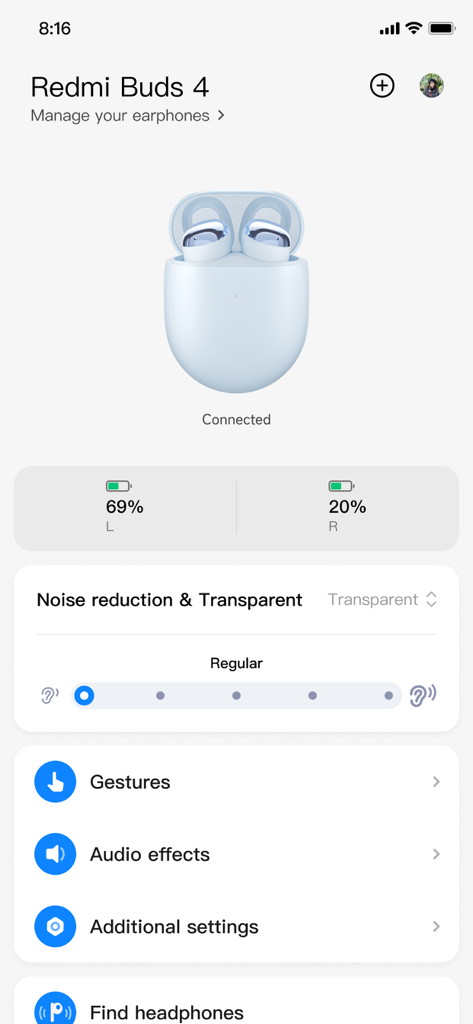
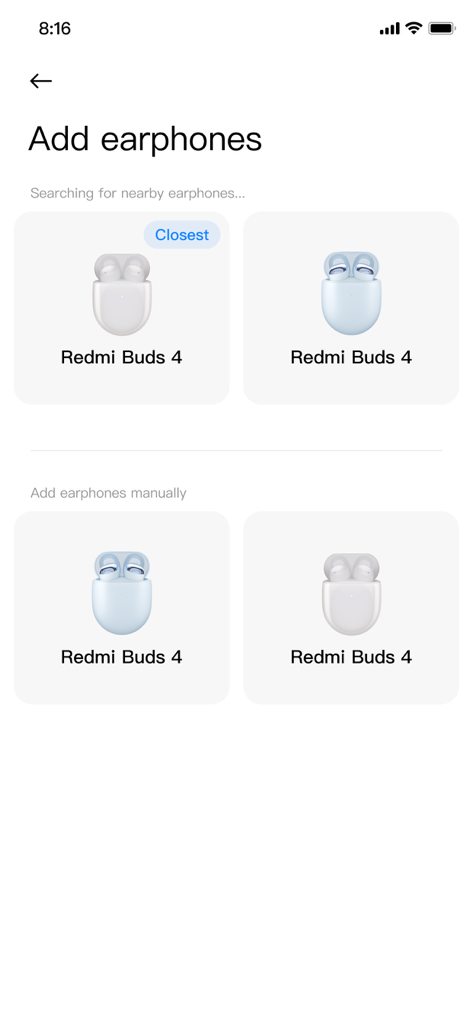
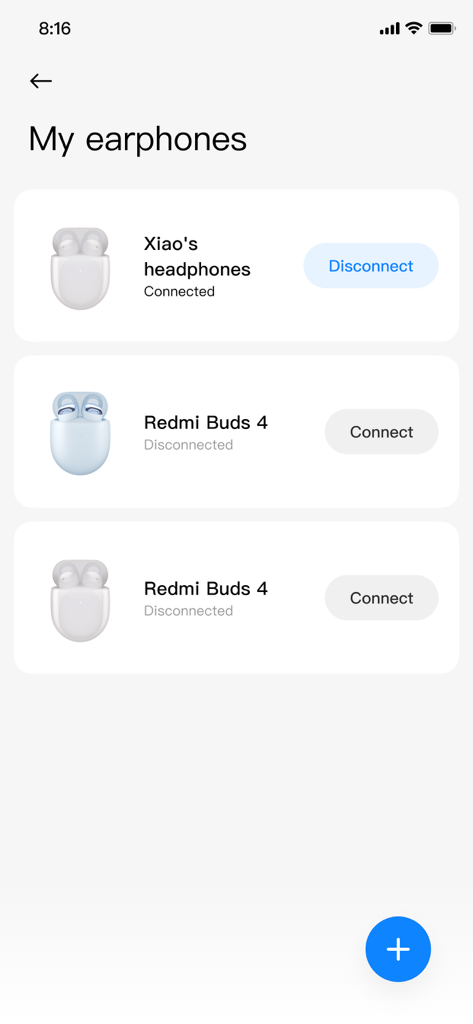
The tools that make this app stand out, trusted by 4M+ users.
Take total control of your hardware. Remap taps and long-presses to navigate your music and calls exactly how you like it.
Instantly toggle between Active Noise Cancellation and Transparency modes to adapt to your commute or office environment.
Monitor granular battery levels, keep your hardware optimized with firmware updates, and locate misplaced buds in seconds.
Trusted by 4M+ people who love this app.
"Finally, an app that gives me total control over my audio experience on iOS. I was tired of the 'Apple Tax' and these Xiaomi buds paired with this app are a game changer. The gesture remapping and firmware updates are seamless, making my budget setup feel like a premium flagship experience."
"As a student on a budget, I needed high-quality noise cancellation without the $250 price tag. This app makes my Xiaomi earbuds feel like part of the Apple ecosystem. The battery monitoring is precise, and the custom EQ profiles helped me find the perfect sound for my study playlists."
Everything you need to know about Xiaomi Earbuds.
Description
Latest Version
1.23.1
Size
113.0 MB
First Released
Mar 28, 2023
Join over 4 million smart savers. Customize your gestures, fine-tune your sound, and keep your gear updated for a premium audio experience without the Apple price tag.
Everything you need to know about Xiaomi Earbuds
The Xiaomi Earbuds app is used to manage and customize your Xiaomi earbuds. It provides controls for various functions and settings for connected devices.
Yes, the Xiaomi Earbuds app displays the battery levels for both the left and right earbuds. This allows users to monitor their charge status directly.
Yes, the Xiaomi Earbuds app includes controls for noise reduction and transparent modes. Users can adjust these settings to their preference within the app.
You can connect new earphones by navigating to the 'Add earphones' section. The app searches for nearby devices, or you can add them manually.
Yes, the Xiaomi Earbuds app provides a 'Gestures' section. This feature allows users to customize the touch controls for their connected earbuds.
Yes, the Xiaomi Earbuds app manages multiple earphone devices. Users can see a list of their earphones, connect disconnected ones, and disconnect connected ones.
Apps with similar features and user experience

Bose Corporation

Marshall Group AB (publ)

Harman International Industries

Bose Corporation

Bose Corporation

Harman International Industries

Power Mobile Life LLC

Harman International Industries

Shenzhen Shokz Co., Ltd.