AutoCAD

AutoCAD

ダウンロード: App Store
Spark by MWM logo
ロゴ: AutoCAD

AutoCAD: どこで仕事をしていても、高精度な製図とDWGデザインを

業界標準のパワーを現場に届けます。モバイルで図面を表示、編集、注釈を付け、シームレスなクラウド統合とオフラインアクセスにより、オフィスと現場のギャップを埋めます。

開発元

Autodesk

カテゴリ

Productivity

ダウンロード

10M+

ユーザー評価

4.2/5

評価数

61K+

対応言語

12

ポケットの中の精度

このインターフェースを利用する 10M+ 人のユーザー.

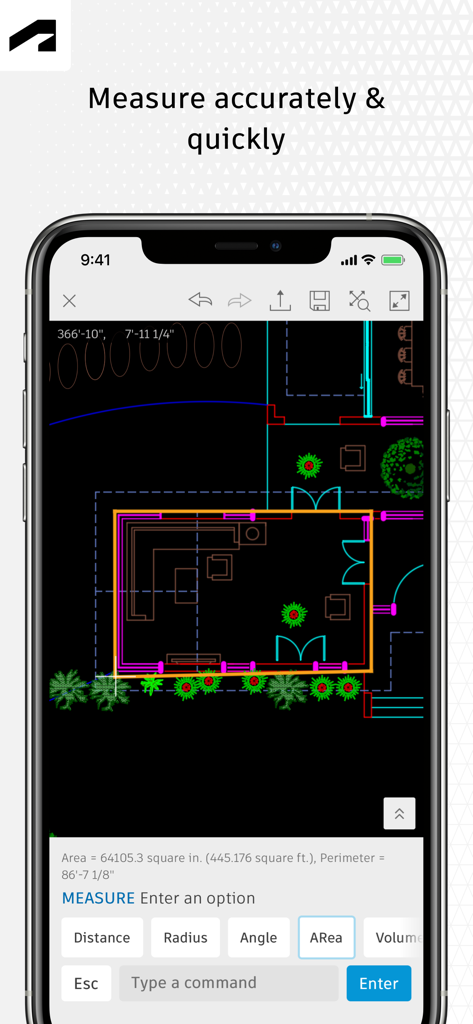
AutoCADモバイルアプリのインターフェースには、スマートフォン画面に測定ツールがアクティブになった2D間取り図が表示されています。

AutoCADモバイルアプリのインターフェースには、スマートフォン画面に測定ツールがアクティブになった2D間取り図が表示されています。

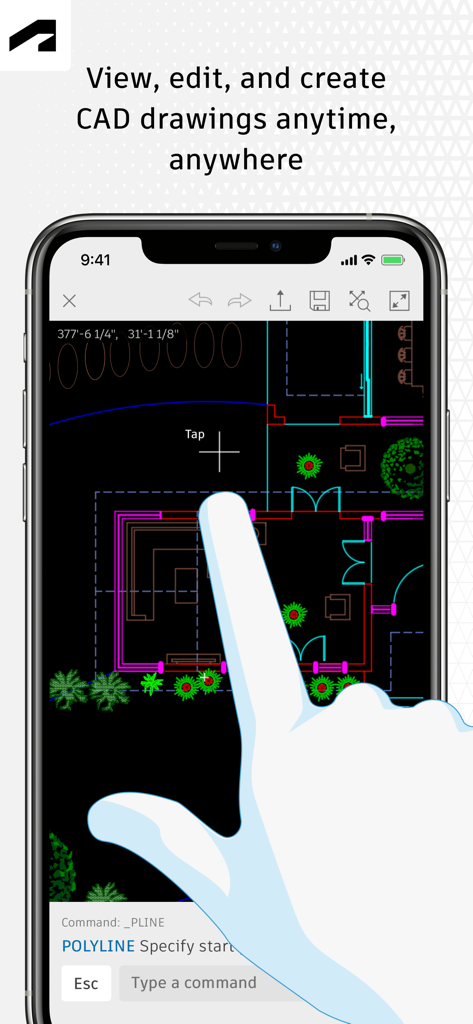
AutoCADモバイルアプリのユーザーインターフェースには、スマートフォンで編集中の2D間取り図が表示されています。

AutoCADモバイルアプリのユーザーインターフェースには、スマートフォンで編集中の2D間取り図が表示されています。

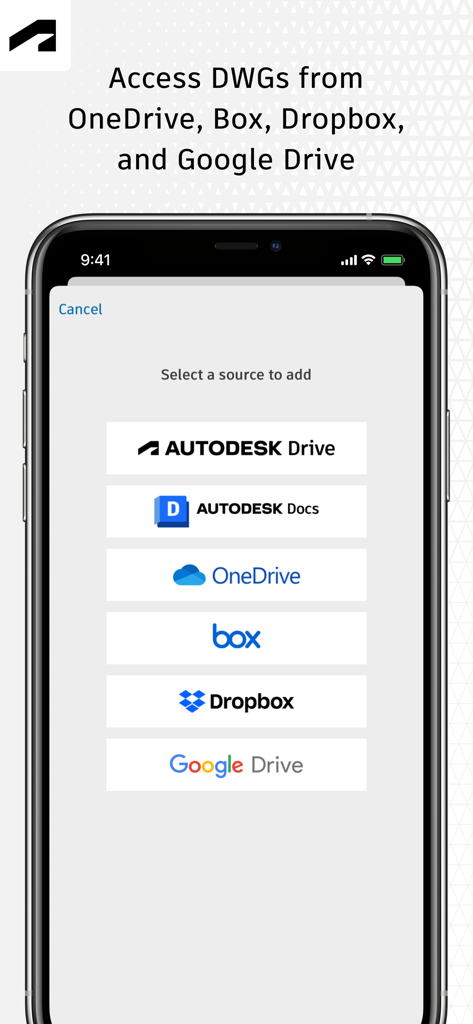
AutoCADモバイルアプリの画面には、OneDrive、Dropbox、Google DriveなどのクラウドサービスからDWGファイルにアクセスするためのオプションが表示されています。

AutoCADモバイルアプリの画面には、OneDrive、Dropbox、Google DriveなどのクラウドサービスからDWGファイルにアクセスするためのオプションが表示されています。

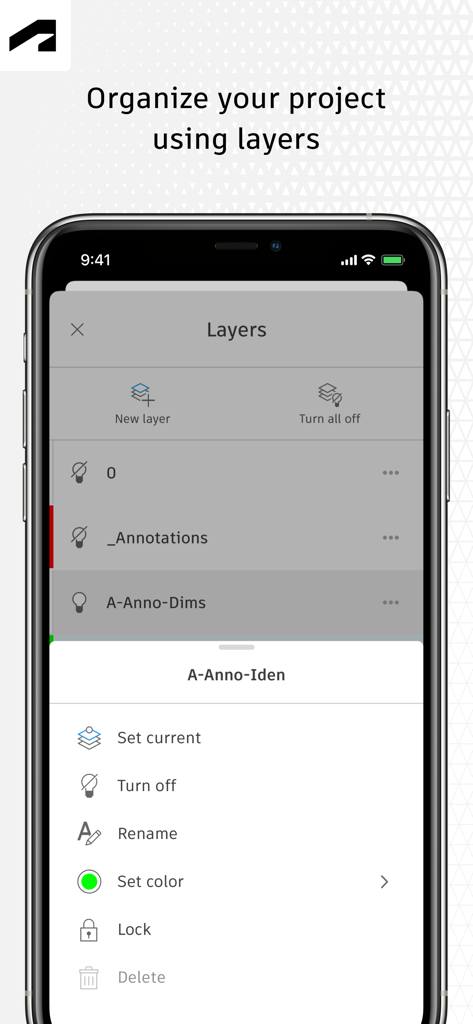
AutoCADモバイルアプリのインターフェースには、プロジェクトレイヤーの整理および管理ツールが表示されています。

AutoCADモバイルアプリのインターフェースには、プロジェクトレイヤーの整理および管理ツールが表示されています。

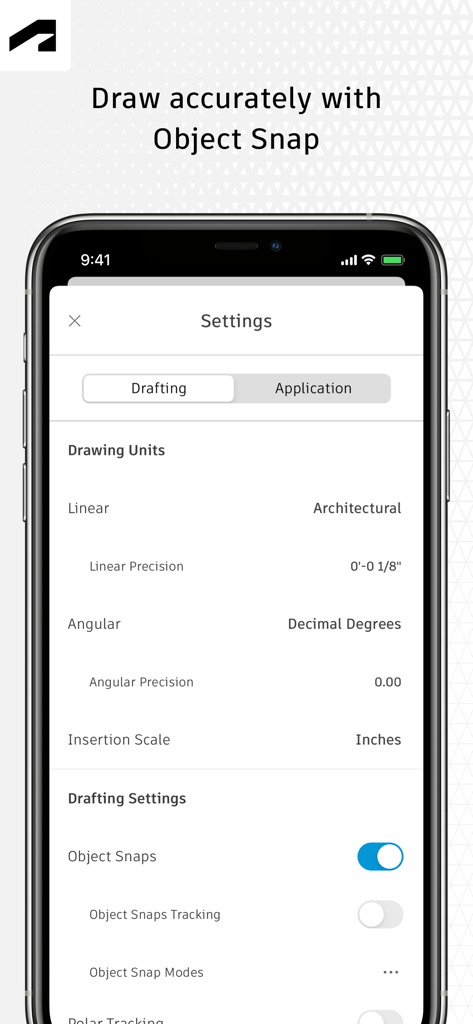
AutoCADモバイルアプリの設定画面には、精度描画のための製図単位とオブジェクトスナップオプションが表示されています。

AutoCADモバイルアプリの設定画面には、精度描画のための製図単位とオブジェクトスナップオプションが表示されています。

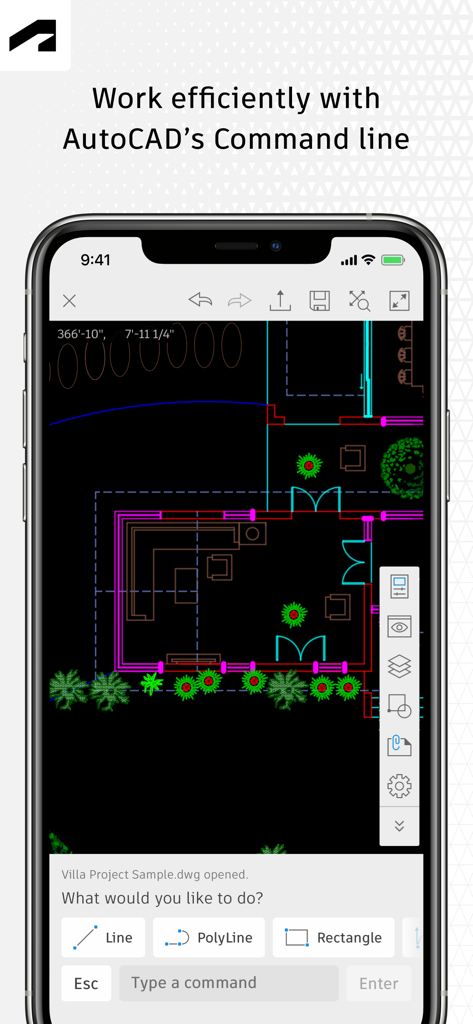
AutoCADモバイルアプリの建築間取り図とコマンドラインツール。

AutoCADモバイルアプリの建築間取り図とコマンドラインツール。

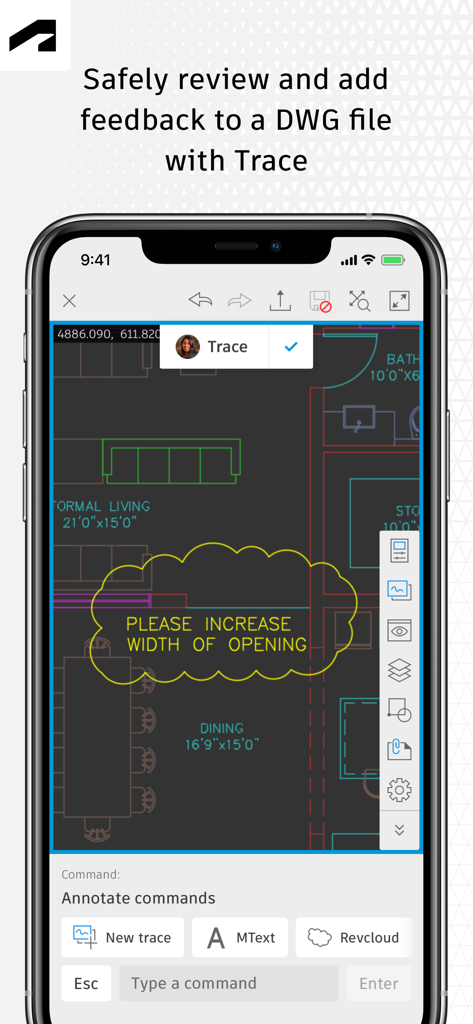
AutoCADモバイルアプリのトレース機能で、DWG図面のレビューとマークアップができます。

AutoCADモバイルアプリのトレース機能で、DWG図面のレビューとマークアップができます。

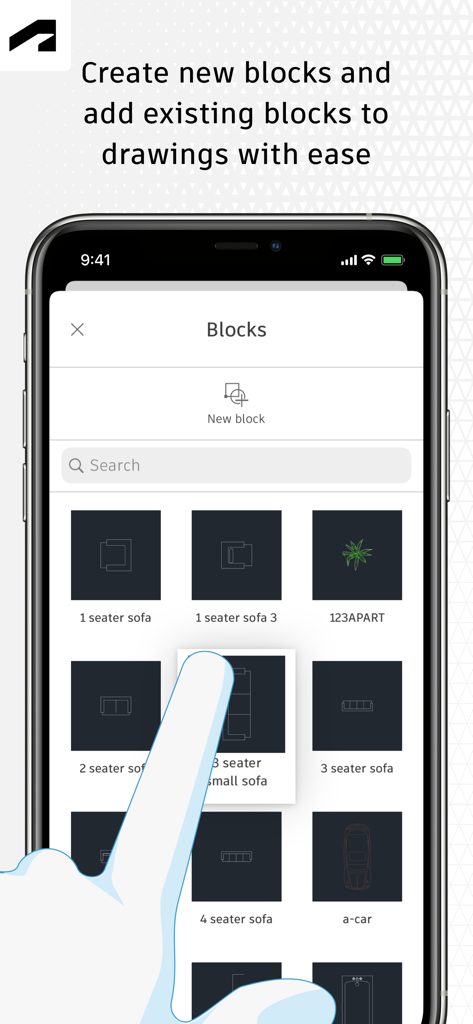
AutoCADモバイルアプリのインターフェースには、家具や車のアイコンを含むブロックライブラリが表示されています。

AutoCADモバイルアプリのインターフェースには、家具や車のアイコンを含むブロックライブラリが表示されています。

プロフェッショナルのためのスタジオが、現場用に再構築されました

このアプリを際立たせるツール、 10M+ 人のユーザーが選択.

🏗️

図面はもう現場に持ち込まない

重いロール紙なしで、DWGライブラリ全体にアクセスできます。遠隔地でオフライン作業を行い、オンラインに戻ると変更が自動的に同期されます。

📏

高精度な製図

使い慣れたAutoCADツールで、プロフェッショナルな基準を維持します。ピクセルパーフェクトな精度でジオメトリを作成、編集、測定し、建設開始前にすべての寸法が正しいことを確認します。

☁️

シームレスなクラウドコラボレーション

Autodesk Drive、OneDrive、Dropboxに直接接続できます。リアルタイムのマークアップと注釈をチームと共有し、エラーを減らし、プロジェクトのライフサイクルを加速します。

世界中のユーザーに愛されています

Trusted by 10M+ 人がこのアプリを愛用しています.

"

"スタジオとクライアントとのミーティングの間を常に移動している建築家として、このアプリはゲームチェンジャーです。iPad ProとApple Pencilで使うのは、自然で正確に感じられます。重い青焼きロールを持ち歩かずに、DWGファイルにすばやく編集を加えたり、クライアントにデザインを見せたりできます。Google Driveとのシームレスな統合により、常に最新バージョンで作業していることが保証されます。"

Sarah Jensen
"

"現場のプロジェクトマネージャーにとって、これは必須のツールです。私はしばしば、携帯サービスが全くない地下室や遠隔地で作業するため、オフラインモードは救世主です。現場で距離を測定し、変更をマークアップし、オンラインに戻るとすべて同期できます。これにより、現場と製図チーム間のコミュニケーションエラーが大幅に削減されました。"

Marcus Rivera

レビュー分析

ユーザーレビューの分析.

感情スコア

20%
ネガティブ

概要

The AutoCAD mobile app receives largely negative feedback from users, primarily due to persistent issues with login and frequent crashes, especially when opening DWG files or after recent updates. Many users find the application frustratingly slow and report significant battery drain on various devices, including newer models like the iPhone 13 Pro and iPad Pro. Furthermore, critical functionalities expected from a CAD software, such as robust offline capabilities, a comprehensive copy-paste feature, and full 3D viewing, are noted as missing or severely limited, pushing some users to seek alternatives. Several version-specific bugs are also reported, including the app not opening on iOS 15.8 and login keyboard issues on iOS 18.5.

主なテーマ

Missing/Limited Features(19)
Login & Account Creation(12)
App Stability & Crashes(8)
Cost & Subscription Model(7)
iPad/Mobile Optimization(4)
Performance & Battery Drain(2)
Offline Capability(2)

アプリについて

について知っておくべきこと AutoCAD.

説明

The official AutoCAD app. View & edit CAD drawings anytime, anywhere! Essential drafting and design capabilities for your everyday needs: Autodesk® AutoCAD® Web on mobile is a trusted solution that gives you access to the core AutoCAD commands that you need for light editing and generating fundamental designs, all at an attractive price. AutoCAD Web subscription plans are available in the following options: • Monthly for $9.99 • Yearly for $99.99 • Included free with AutoCAD and AutoCAD LT subscriptions Use familiar AutoCAD drafting tools on your mobile device in a simplified interface, allowing you to access, create, and update DWG™ files anytime, anywhere. 30 day trial: Enjoy a fully functional free trial of AutoCAD Web for 30 days. After the trial is completed, you can access limited read-only functionality without a paid subscription. Current AutoCAD or AutoCAD LT desktop subscribers: Sign in with your Autodesk account to access AutoCAD Web on mobile. Key Benefits: • Work offline on your projects without an Internet connection and sync later • Safeguard drawings in your Autodesk account or with your own external accounts • Collaborate in real time with team members and reduce mistakes • Replace blueprints at job sites with drawings on mobile • Simplify workflows by opening DWG files directly from Autodesk Drive, Autodesk Docs, Microsoft OneDrive, Box, Dropbox, or Google Drive. Features: • 2D file viewing • Create, edit, and share 2D drawings • Work offline and sync your changes once back online • Insert blocks from your DWG drawing • Manage layers and layer visibility • Drafting and geometry editing tools • Annotation and markup tools • Measure distance, angle, area, and radius • View and edit DWG files from your internal storage, email, or from the cloud • View coordinates and properties All new users have access to a free trial of AutoCAD Web for 30 days. Subscriptions will be charged to your credit card through your Apple ID. Subscriptions are automatically renewed unless cancelled at least 24-hours before the end of the current period. You will not be able to cancel a subscription during the active period. Manage your subscriptions in Account Settings after purchase. *Free products and services are subject to the Autodesk Terms of Use at https://www.autodesk.com/company/terms-of-use/en/general-terms Learn more: Autodesk Website: https://www.autodesk.com/products/autocad-web Term of Use: https://www.autodesk.com/company/legal-notices-trademarks/terms-of-service-autodesk360-web-services/autodesk-autocad-mobile-terms-of-service AutoCAD Service is not provided to children under the age of 14, and users under 14 cannot use this Service.

最新バージョン

6.20.1

サイズ

522.1 MB

リリース日

2010年9月29日

図面を持ち歩こう、紙はもういらない

移動中のプロフェッショナルのための公式AutoCADアプリ。信頼の精度でDWGファイルをオフラインで表示、編集、マークアップできます。今すぐ30日間の無料トライアルを開始してください。

ダウンロード: App Store
FAQ

よくある質問

について知っておくべきこと AutoCAD

AutoCADモバイルアプリとは何ですか?

AutoCADアプリは、DWG™ファイルサポートを含む、CAD図面の表示、編集、作成のための公式Autodeskソリューションです。モバイルデバイスで、基本的な製図および設計機能を提供します。

AutoCADアプリは無料トライアルを提供していますか?

はい、新規ユーザーはAutoCAD Webの全機能が利用できる30日間の無料トライアルをお楽しみいただけます。トライアル終了後、有料サブスクリプションなしでは限定的な読み取り専用機能が利用可能になります。

AutoCAD Webサブスクリプションの料金はいくらですか?

AutoCAD Webの月額サブスクリプションは9.99ドル、年額サブスクリプションは99.99ドルです。既存のAutoCADおよびAutoCAD LTデスクトップサブスクリプションには、このサービスが無料で含まれています。

AutoCADモバイルアプリはオフラインで使用できますか?

はい、AutoCADアプリでは、インターネット接続なしでプロジェクトをオフラインで作業できます。オフラインで行われた変更は、デバイスがオンラインに戻ったときに同期されます。

AutoCADアプリはどのクラウドストレージサービスと連携しますか?

AutoCADアプリは、Autodesk Drive、Autodesk Docs、Microsoft OneDrive、Box、Dropbox、Google DriveからDWGファイルを直接開くことで、ワークフローを簡素化します。

AutoCADモバイルアプリでオブジェクトを測定できますか?

はい、AutoCADアプリにはさまざまな測定ツールが含まれています。ユーザーは、図面内で直接距離、角度、面積、半径を測定できます。

AutoCADアプリは図面の整理のためにレイヤーをサポートしていますか?

はい、AutoCADアプリはレイヤー管理をサポートしています。ユーザーは、アプリケーション内でレイヤーを管理し、その表示を制御することでプロジェクトを整理できます。

AutoCAD Webサブスクリプションの更新とキャンセルはどうなりますか?

AutoCAD Webサブスクリプションは、現在の期間が終了する少なくとも24時間前までにキャンセルされない限り、自動的に更新されます。アクティブなサブスクリプション期間中のキャンセルはできません。

AutoCADサービスの使用に年齢制限はありますか?

いいえ、AutoCADサービスは14歳未満の子供には提供されていません。14歳未満のユーザーはこのサービスを使用できません。