BenguFarm Mobile

BenguFarm Mobile

ダウンロード: App Store
Spark by MWM logo
ロゴ: BenguFarm Mobile

BenguFarm Mobile:クラッシュからフィールドまで、精密な家畜管理

二重入力をなくし、自信を持って群れを管理しましょう。EIDリーダーとのシームレスな統合とPC同期により、オフラインで体重、健康記録、血統データを記録できます。

ダウンロード: App Store

開発元

Tim Pauw

カテゴリ

Business

ダウンロード

5K+

ユーザー評価

1.0/5

評価数

0

対応言語

-

あなたの群れ、可視化

このインターフェースを利用する 5K+ 人のユーザー.

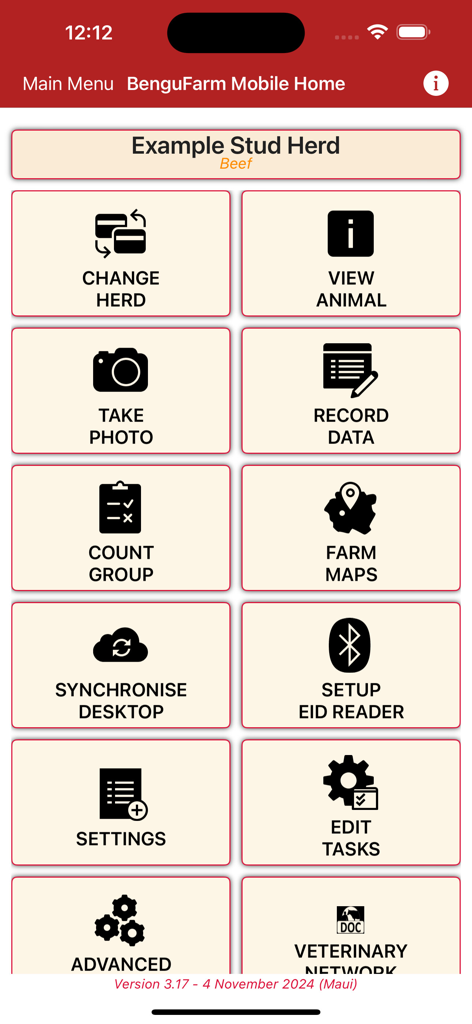
家畜・群管理のメインメニューを表示するBenguFarm Mobileアプリのホーム画面

家畜・群管理のメインメニューを表示するBenguFarm Mobileアプリのホーム画面

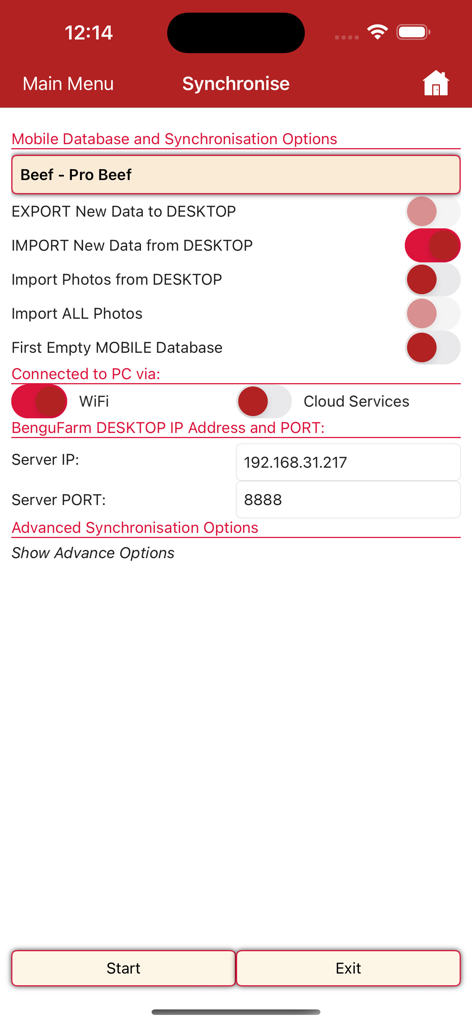
モバイルとデスクトップ間のデータ転送オプションを表示する、家畜管理用のBenguFarm Mobileアプリの同期メニュー。

モバイルとデスクトップ間のデータ転送オプションを表示する、家畜管理用のBenguFarm Mobileアプリの同期メニュー。

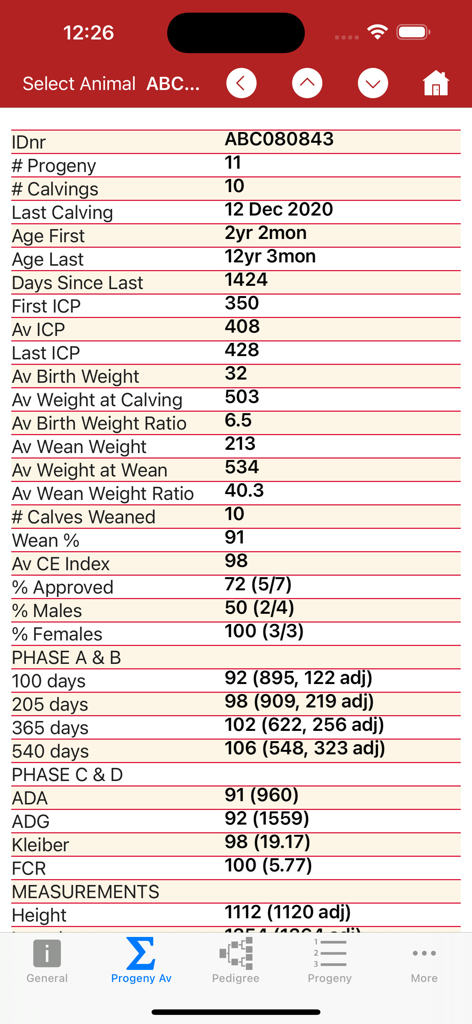
個々の動物の詳細な子孫とパフォーマンス統計を表示するBenguFarm Mobileアプリのインターフェース

個々の動物の詳細な子孫とパフォーマンス統計を表示するBenguFarm Mobileアプリのインターフェース

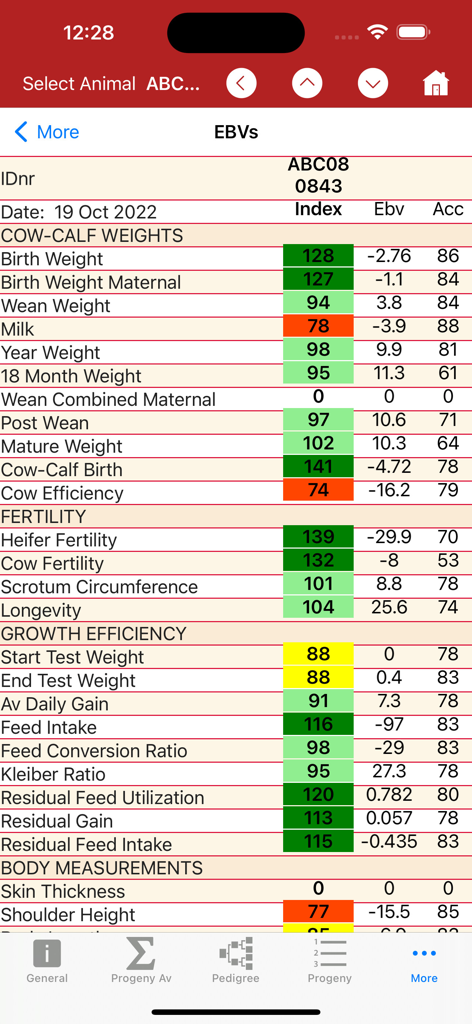
牛の体重、繁殖力、成長効率の推定繁殖価を示すBenguFarm Mobileアプリの詳細な家畜データ画面

牛の体重、繁殖力、成長効率の推定繁殖価を示すBenguFarm Mobileアプリの詳細な家畜データ画面

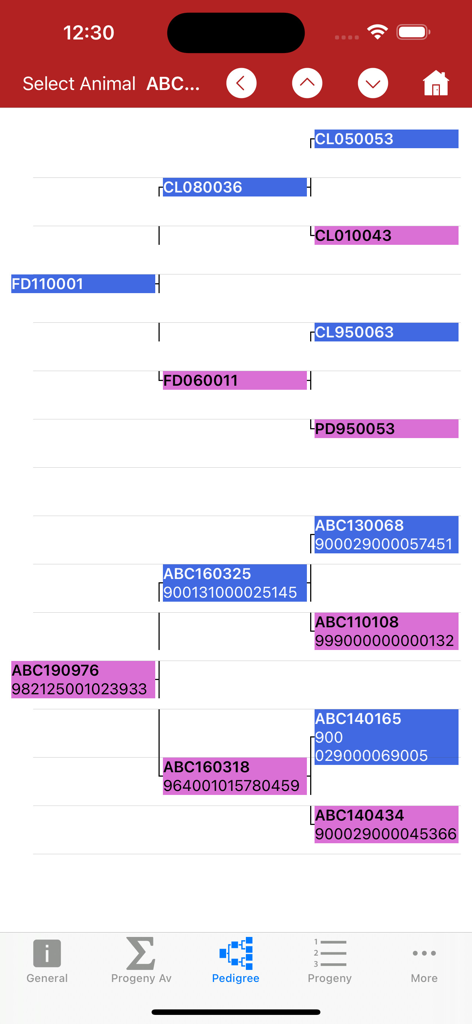
BenguFarm Mobileアプリの家畜の祖先履歴と識別番号を示す血統ツリー

BenguFarm Mobileアプリの家畜の祖先履歴と識別番号を示す血統ツリー

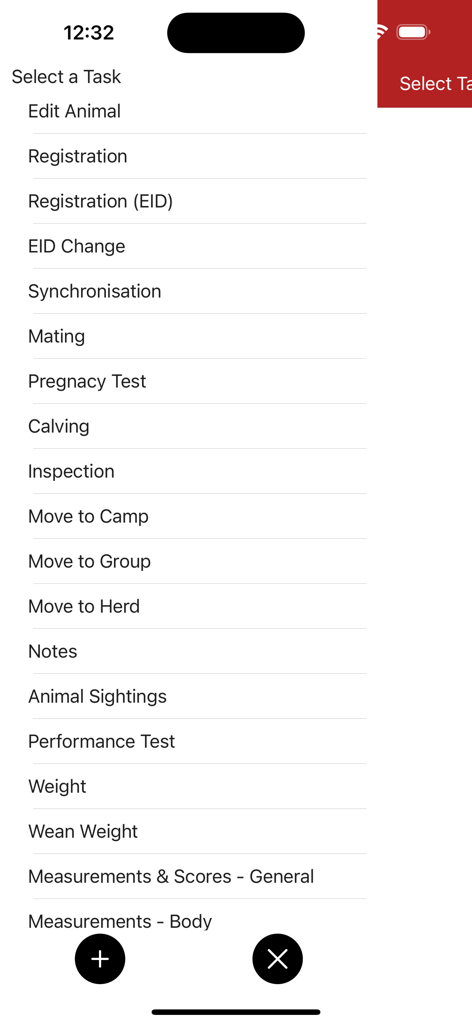
動物登録や健康記録など、BenguFarm Mobileアプリの家畜管理タスクのリスト

動物登録や健康記録など、BenguFarm Mobileアプリの家畜管理タスクのリスト

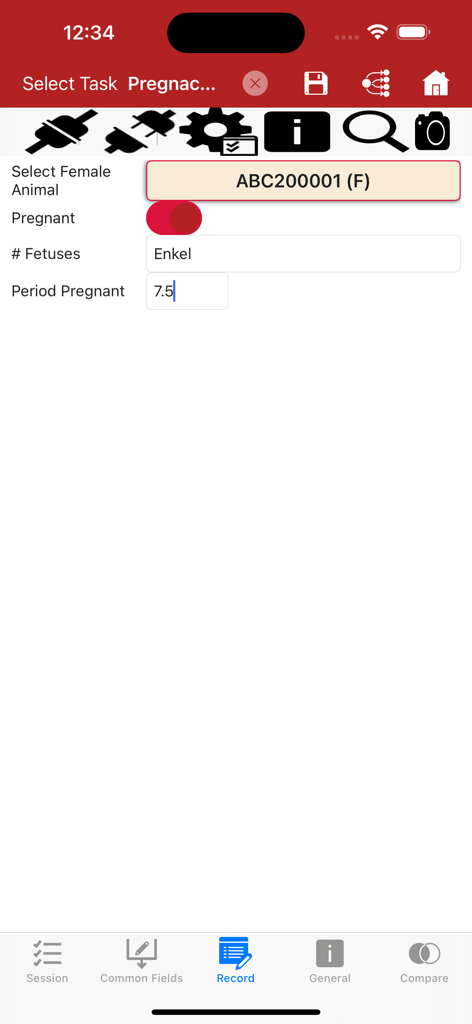
胎児数や妊娠期間を含む家畜の妊娠検査データを記録するためのBenguFarm Mobileアプリ画面

胎児数や妊娠期間を含む家畜の妊娠検査データを記録するためのBenguFarm Mobileアプリ画面

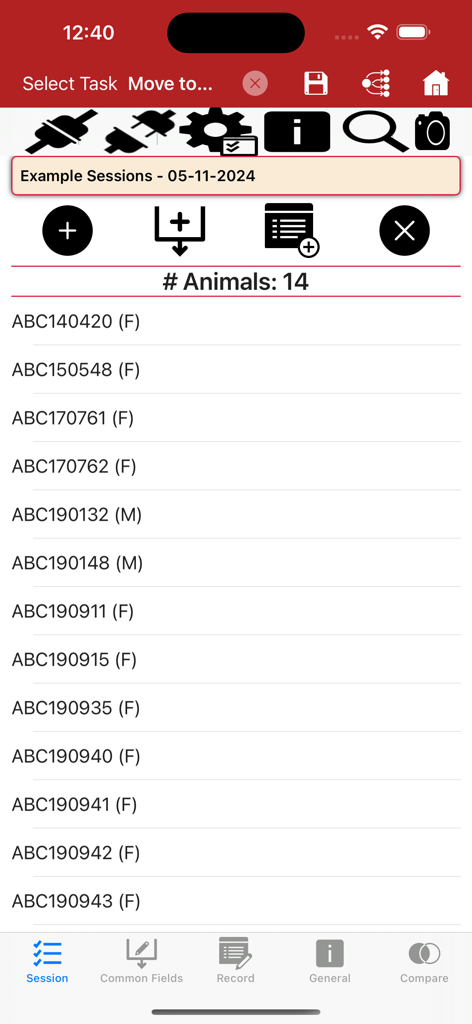
データキャプチャセッション内の動物IDのリストを表示するBenguFarm Mobileアプリインターフェース

データキャプチャセッション内の動物IDのリストを表示するBenguFarm Mobileアプリインターフェース

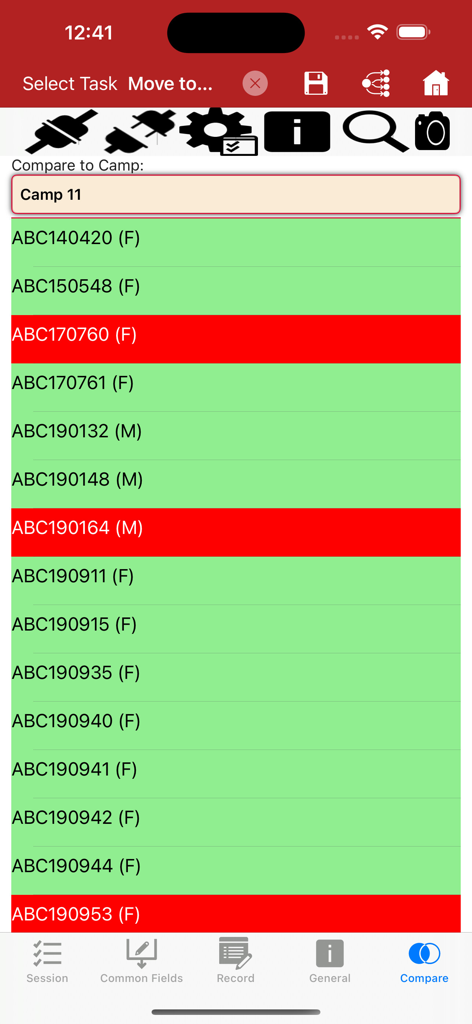
キャンプ比較のために色分けされた動物リストを表示するBenguFarm Mobile家畜管理アプリインターフェース

キャンプ比較のために色分けされた動物リストを表示するBenguFarm Mobile家畜管理アプリインターフェース

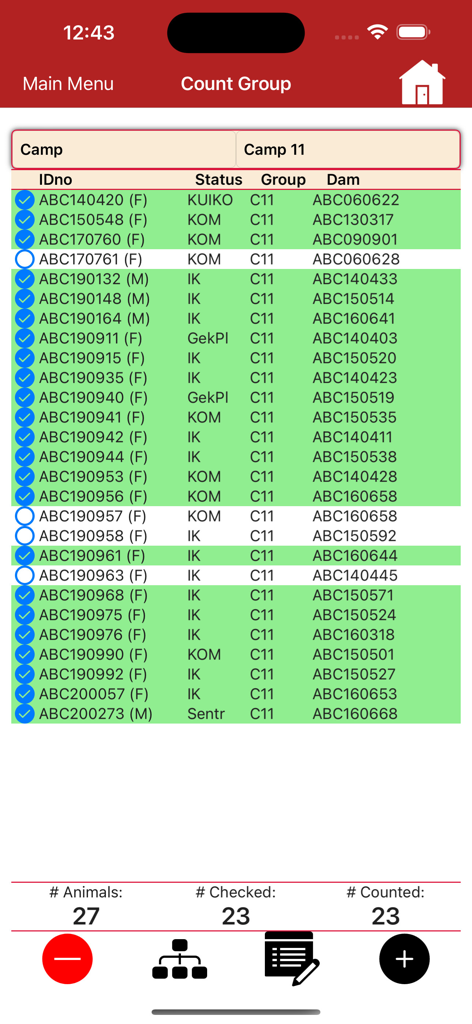
動物IDと追跡ステータスを表示するBenguFarm Mobile家畜カウントグループインターフェース

動物IDと追跡ステータスを表示するBenguFarm Mobile家畜カウントグループインターフェース

フィールドから群れをマスターする

このアプリを際立たせるツール、 5K+ 人のユーザーが選択.

📵

100%オフラインデータキャプチャ

信号がなくても、遠隔地の牧草地や金属製の小屋で体重、治療、出生を記録できます。 ranch officeに戻れば、データは完全に同期されます。

🐂

ポケットの中の動物の履歴

チョーク(締め付け装置)で即座に淘汰または繁殖の決定を下しましょう。すべての動物の完全な血統、繁殖記録、パフォーマンス特性をその場で利用できます。

📶

シームレスなEID統合

Bluetooth経由でTruTestまたはAgridentリーダーに直接接続します。イヤータグをスキャンして記録を即座に呼び出し、高速セッション中の手入力エラーを排除します。

世界中のユーザーに愛されています

Trusted by 5K+ 人がこのアプリを愛用しています.

"

"BenguFarm Mobileは、チョーク(締め付け装置)での牛の取り扱い方を完全に変えました。TruTest EIDリーダーとの統合により、手入力や散らかったノートは不要になりました。 ranch officeに戻ってWi-Fiに接続すれば、すべてが完璧に同期されます。私たちの牧場の効率とデータの正確性にとって、これはまさにゲームチェンジャーです。"

Garrett Thompson, Commercial Cattle Producer
"

"スタッドブリーダーであるためには、細心の注意を払った記録保持が必要であり、このアプリはそれをシームレスにします。フィールドで、セルサービスがゼロの状況でも、動物の完全な血統とパフォーマンス履歴をすぐに確認できます。授乳期のために独自の記録画面をカスタマイズできることは、整理整頓を保つためにまさに必要としていたものでした。"

Sarah Jenkins, Pedigree Sheep Breeder

アプリについて

について知っておくべきこと BenguFarm Mobile.

説明

BenguFarm-MOBILE for iOS is a mobile application installed independently of BenguFarm on a iPhone or iPad. BenguFarm-MOBILE is to function side-by-side with BEEF/SHEEP & GOATS/GAME module and is used to lookup animal data in the field as well as to capture new animal data. BenguFarm-MOBILE can be used for more than one herd (e.g. stud and commercial), whether the herds are on the same or different databases. Please note that a user must have a BenguFarm license for the applicable BenguFarm module (BEEF and/or SHEEP & GOATS and/or GAME module) to be able to use the BenguFarm-MOBILE. Capture Data on your Smartphone or Tablet BenguFarm-MOBILE's primary function is to record data at the crush, the scale, the kraal or in the field on a iPhone or iPad. Secondly, to look up animalsí information when and where the need arises. Data exchange between BenguFarm-MOBILE and BenguFarm on a PC/laptop is done via a synchronisation function. Animal Data and Photos in your Pocket Data on a user's BenguFarm can be sent from his on his PC/laptop to BenguFarm-MOBILE on his smartphone or tablet. This data can then be viewed and, if needed, edited in the app on the smartphone or tablet. Data such as general animal information, reproduction data, weights, performance test data, traits, breeding values, performance of progeny, pedigree and health data can be viewed. BenguFarm-MOBILE can be used to capture all important data and animal photos on the spot while working with animals. Data that can be captured include new animals (registration), matings, pregnancy tests, calvings/lambings, weights, general notes, vaccinations, camp/group movements, wool data (sheep), illnesses, treatments, inspections, sightings, measurements, procedures, sales and deaths and camp activities (e.g. feed or lick put out). Please note that recording of data on BenguFarm-MOBILE does not need Internet access. Recording is done off-line. User customisable recording screens (Tasks) An important feature of BenguFarm-MOBILE is its user-friendliness. Each data capturing screen is rendered according to a task definition. These task definitions can be changed by a user to his/her specific needs. Fields can be added or removed and even the order of the fields can be changed. In addition, fields can be marked as common fields. When a new session for a task (e.g. pregnancy tests) is started, such common fields only need to be completed once and will be recorded automatically for all animals during the session. Fields can also be temporarily disabled for a specific session. In addition to the default list of tasks, a user can also set up their own tasks. Integration with TruTest EID Readers BenguFarm-MOBILE integrates with the TruTest SRS2 & XRS2 and Agrident AWR250, AWR300 & APR600 EID readers in both the animal data view as well as data capturing screens. Sessions, Entering Multiple Data and Camp Comparisons A user may select to enable session recording when capturing data. When a session is enabled, all the animals for which data is captured, are placed in the selected session. Such a session can either be used to capture additional information, by entering the applicable fields and then clicking a single button to create records for all the animals in the session. Secondly the animals in the selected session can be compared to the animals in a camp with differences displayed in a color coded manner. Synchronise with BenguFarm on your Computer When finished with recording, the information recorded on BenguFarm-MOBILE can be synchronised with the BenguFarm database to bring the data on the PC/laptop(s) up to date. With synchronisation, data recorded in BenguFarm on the PC/laptop is also updated on BenguFarm-MOBILE. Synchronisation of data can be done via Wi-Fi, Internet or a USB connection, depending on which method is available and the method preferred by the user.

最新バージョン

3.0.39

サイズ

132.0 MB

リリース日

2019年12月4日

牧場のデータを、チョーク(締め付け装置)で活用しましょう

手作業の書類作成をやめ、フィールドで情報に基づいた意思決定を始めましょう。今すぐBenguFarm Mobileをダウンロードして、デスクトップ管理ソフトウェアの究極のコンパニオンを体験してください。

ダウンロード: App Store
FAQ

よくある質問

について知っておくべきこと BenguFarm Mobile

BenguFarm-MOBILEはどのようにインストールしますか?

iOS版BenguFarm-MOBILEは、iPhoneまたはiPadに個別にインストールされます。BenguFarmのBEEF/SHEEP & GOATS/GAMEモジュールと連携して機能します。

BenguFarm-MOBILEを使用するには、既存のBenguFarmライセンスが必要ですか?

はい、BenguFarm-MOBILEを動作させるには、該当するモジュール(BEEF、SHEEP & GOATS、またはGAME)の有効なBenguFarmライセンスが必要です。

BenguFarm-MOBILEで複数の家畜群を管理できますか?

はい、BenguFarm-MOBILEは、異なるデータベース上にある場合でも、種牛群と商業群を含む複数の家畜群のデータを管理できます。

BenguFarm-MOBILEでは、フィールドでどのようなデータをキャプチャできますか?

BenguFarm-MOBILEは、新しい家畜登録、交配、妊娠検査、体重、ワクチン接種、移動、病気、写真を直接フィールドでキャプチャします。

BenguFarm-MOBILEでデータを記録するためにインターネットアクセスは必要ですか?

いいえ、BenguFarm-MOBILEはオフラインでデータを記録します。フィールドで情報をキャプチャするためにインターネットアクセスは必要ありません。

BenguFarm-MOBILEはPCとどのようにデータを同期しますか?

BenguFarm-MOBILEは、Wi-Fi、インターネット、またはUSB接続を介してPC/ラップトップ上のBenguFarmとデータを同期します。これにより、モバイルアプリとデスクトップソフトウェアの両方のデータが更新されます。

BenguFarm-MOBILEでデータ記録画面をカスタマイズできますか?

はい、ユーザーは特定のニーズに合わせて、フィールドを追加、削除、または並べ替えることで、記録画面(タスク)をカスタマイズできます。

どのEIDリーダーがBenguFarm-MOBILEと統合されていますか?

BenguFarm-MOBILEは、TruTest SRS2 & XRS2およびAgrident AWR250、AWR300 & APR600 EIDリーダーと統合されています。

BenguFarm-MOBILEで家畜の血統情報を表示できますか?

はい、BenguFarm-MOBILEは詳細な血統データを家畜に表示し、ユーザーはアプリ内で直接表示できます。

データキャプチャのためにBenguFarm-MOBILEでセッションはどのように機能しますか?

ユーザーはセッション記録を有効にして、データキャプチャのために家畜をグループ化できます。これにより、そのセッション内の追加情報を入力したり、家畜をキャンプと比較したりできます。