Canon DPP Express

Canon DPP Express

ダウンロード: App Store
Spark by MWM logo
ロゴ: Canon DPP Express

Canon DPP Express:外出先でのプロフェッショナルなRAW編集

iPadとiPhoneをパワフルなモバイル現像室に変えましょう。キヤノン独自の優れた色再現技術、ネイティブなCR3サポート、直感的なタッチコントロール、そして現代のプロフェッショナルワークフロー向けに設計されたハイダイナミックレンジ処理を体験してください。

ダウンロード: App Store

開発元

Canon Inc.

カテゴリ

Photo & Video

ダウンロード

487K+

ユーザー評価

4.6/5

評価数

6K+

対応言語

12

手の中のRAWパワー

このインターフェースを利用する 487K+ 人のユーザー.

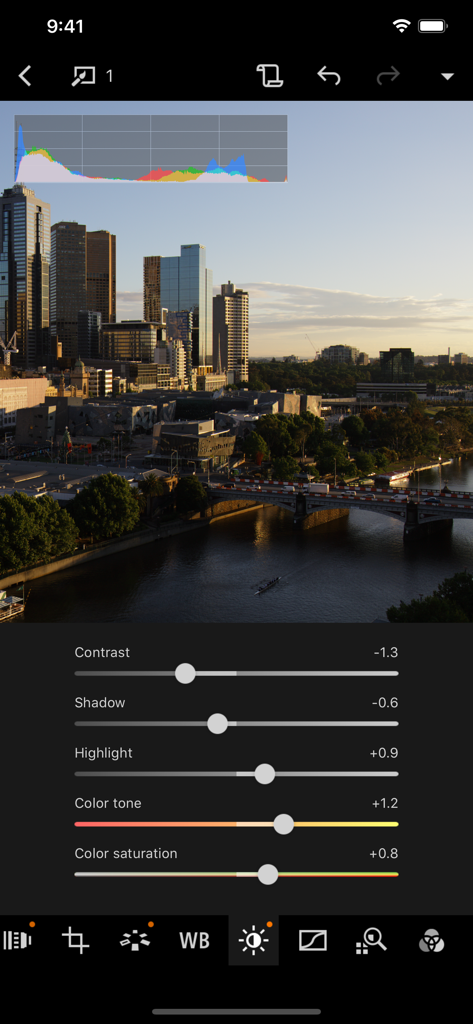
Canon DPP Expressアプリのインターフェース。スライダーと都市の景観を背景に、プロフェッショナルなRAW写真編集が表示されています。

Canon DPP Expressアプリのインターフェース。スライダーと都市の景観を背景に、プロフェッショナルなRAW写真編集が表示されています。

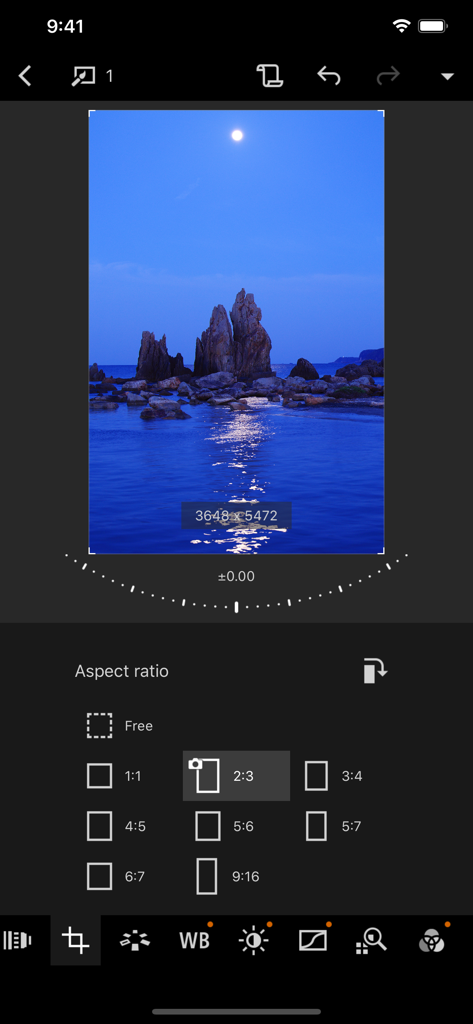
Canon DPP Expressアプリのインターフェース。風景写真のアスペクト比選択とトリミングツールが表示されています。

Canon DPP Expressアプリのインターフェース。風景写真のアスペクト比選択とトリミングツールが表示されています。

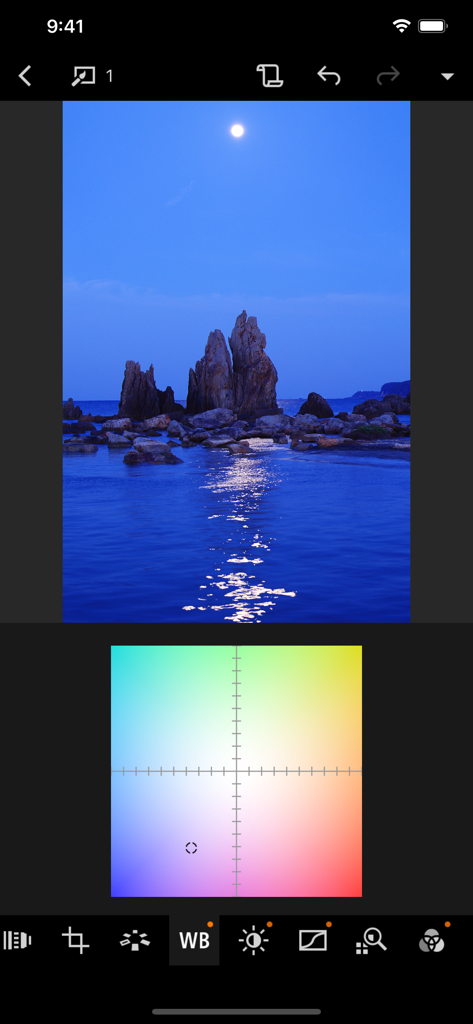
Canon DPP Expressモバイル写真編集アプリのホワイトバランス調整グリッド。

Canon DPP Expressモバイル写真編集アプリのホワイトバランス調整グリッド。

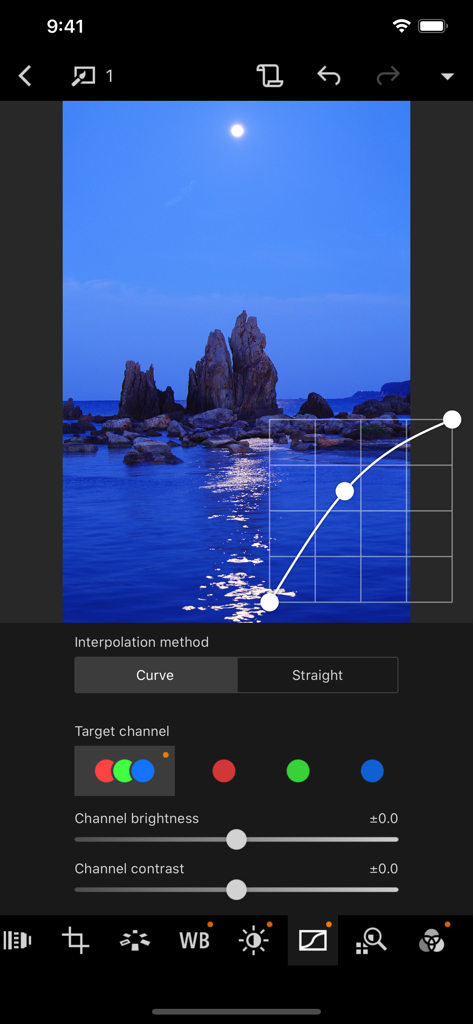
Canon DPP Expressアプリのトーンカーブ調整インターフェース。夜景の写真が編集されています。

Canon DPP Expressアプリのトーンカーブ調整インターフェース。夜景の写真が編集されています。

プロフェッショナルなRAWのパワーをどこへでも

このアプリを際立たせるツール、 487K+ 人のユーザーが選択.

📸

ネイティブRAWの精度

キヤノン独自の優れた色再現技術でCR3およびCR2ファイルを処理し、デスクトップと同じ高品質な結果をモバイルに最適化して提供します。

プロ級の高速モバイルワークフロー

ノートパソコンは不要です。カメラから画像を直接転送し、現場で編集することで、完璧なショットをクライアントやソーシャルメディアに即座に提供できます。

HDR PQ & XDRサポート

フルダイナミックレンジを視覚化しましょう。Super Retina XDRおよびLiquid Retina XDRディスプレイのパワーを活用し、正確な露出とカラーグレーディングを実現します。

世界中のユーザーに愛されています

Trusted by 487K+ 人がこのアプリを愛用しています.

"

"風景写真家として、長いハイキングでノートパソコンを持ち歩くのは負担です。Canon DPP Expressは、私のiPad ProでCR3ファイルを信じられないほどの精度で直接処理することを可能にします。色再現技術はまさにキヤノンに期待するものだし、HDR PQサポートのおかげでXDRディスプレイで私のショットが際立ちます。"

Marcus Chen
"

"このアプリは私のウェディングワークフローを完全に変革しました。披露宴が終わる前に、高品質でプロが編集したRAWプレビューをクライアントに送ることができるようになりました。タッチ最適化されたインターフェースは非常に直感的で、エクスポートにウォーターマークがないことは私のブランドにとって画期的なことです。"

Elena Rodriguez

レビュー分析

ユーザーレビューの分析.

感情スコア

26%
ネガティブ

概要

Most users express significant dissatisfaction with the app, primarily due to its mandatory subscription model for a raw converter, which many feel is egregious given the high cost of Canon cameras and the desktop version being free. Users frequently criticize the app for its limited functionality compared to the PC version, including lack of DLO support, missing filters, and an inability to undo changes. There are also widespread complaints about poor camera compatibility, with many popular older models like the 5D Mark II/III, 7D Mark II, M6, 77D, and 1200D not being supported, alongside frustrating import/export processes for RAW and HEIF files, and a lack of proper photo management features like search and sort. Despite these significant drawbacks, a few users did find the app's editing capabilities for exposure, color, and focus to be effective and time-saving, and some praised its ease of use.

主なテーマ

Subscription Model(22)
Missing Features(11)
Import/Export Functionality(11)
Camera Compatibility(8)
Ease of Use(6)
Editing Capabilities(3)

アプリについて

について知っておくべきこと Canon DPP Express.

説明

Canon Digital Photo Professional Express (Canon DPP Express) is an iPad/iPhone application to color edit RAW images with intuitive touch operation to be converted to JPEG file afterwards. To continue using all Digital Photo Professional Express features, you must complete the (paid) subscription process. When you purchase the subscription, - Your image adjustments will be recorded. - You will be able to export images without watermarks. [Key Features] - Adjust RAW images freely. - Quickly and easily adjust RAW images anywhere, any time. - Save multiple adjustment patterns and compare the results on a single RAW image. - Use the change history function to readjust images until you achieve the perfect result. - Save adjusted images to your Camera Roll in JPEG format. " [Compatible Formats] RAW(CR3/CR2 ), JPEG, HEIF (10 bit) * Not compatible with .CRW or video file formats. CR3/HEIF (10bit) images can now be displayed and saved in HDR PQ. The supported displays are as follows: - iPad - Ultra Retina XDR - Liquid Retina XDR - iPhone - Super Retina XDR - Super Retina HD Note that the actual displayed image depends on the display performance. [Image Input] Via Camera Connect : RAW(CR3/CR2), JPEG, HEIF (10 bit) Import from Camera Roll: [RAW (CR3/CR2), JPEG], [HEIF (10 bit) *excluding EOS 5D Mark IV/EOS R] * Image data is saved in the app. In addtion, devices with iOS 12.1 and later can import CR3 files from the Camera Roll. *HEIF (10-bit) files and RAW images shot with [HDR PQ settings] enabled can be imported using linked mode with the Canon camera app Canon Camera Connect . *RAW burst files cannot be imported to smart devices. Extract the CR3 images from the RAW burst file in advance on the camera side, and then import them to the smart device. [Compatible Camera Models] For compatible models and features, please refer to the following website. https://ssw.imaging-saas.canon/app/app.html?app=dppex [System requirement] iOS 17 / 18 / 26 iPadOS 17 / 18 / 26 [Important Notes] Payment will be charged to your Apple ID account at the time of purchase confirmation. If you do not cancel at least 24 hours before the end of the current period, the subscription will automatically renew, and charges will continue. You can manage and cancel your subscriptions by going to your account settings on the App Store after purchase. - If you uninstall the app, all image data imported from your camera will be erased. - If application does not operate properly, try again after shutting down the application. - Visit your local Canon Web pages for more details. https://ssw.imaging-saas.canon/app/app.html?app=dppex Terms and conditions https://www.apple.com/legal/internet-services/itunes/dev/stdeula/

最新バージョン

1.12.10

サイズ

114.0 MB

リリース日

2018年10月9日

どこでもRAWワークフローを向上させる

何千人ものキヤノン写真家が、iPadとiPhoneをプロフェッショナルな編集スイートに変えています。Canon DPP Expressをダウンロードして、外出先でCR3ファイルをマスターしましょう。

ダウンロード: App Store
FAQ

よくある質問

について知っておくべきこと Canon DPP Express

Canon DPP Expressとは何ですか?

Canon Digital Photo Professional Express(Canon DPP Express)は、直感的なタッチ操作でRAW画像のカラー編集を行い、JPEGファイルに変換するためのiPad/iPhoneアプリケーションです。

Canon DPP Expressはどの画像フォーマットをサポートしていますか?

Canon DPP Expressは、RAW(CR3/CR2)、JPEG、HEIF(10ビット)フォーマットをサポートしています。.CRWやビデオファイルフォーマットはサポートされていません。

Canon DPP ExpressはRAW画像の編集をサポートしていますか?

はい、Canon DPP Expressを使用すると、iPad/iPhoneデバイスでRAW画像を自由かつ迅速に調整できます。CR3およびCR2 RAWフォーマットをサポートしています。

Canon DPP Expressのどの機能に有料サブスクリプションが必要ですか?

Canon DPP Expressの有料サブスクリプションにより、記録された画像調整が可能になり、透かしなしで画像をエクスポートできます。

Canon DPP Expressはサブスクリプションの更新をどのように扱いますか?

Canon DPP Expressのサブスクリプションは自動的に更新されます。請求を防ぐためには、現在の期間が終了する少なくとも24時間前までにキャンセルする必要があります。管理はApp Storeのアカウント設定で行います。

Canon DPP Expressは画像のコントラストと彩度を調整できますか?

はい、Canon DPP Expressは、画像のコントラスト、シャドウ、ハイライト、カラー、彩度を調整するためのスライダーを提供します。

Canon DPP Expressで画像の縦横比を変更できますか?

はい、Canon DPP Expressでは画像の縦横比を変更できます。オプションには、Free、1:1、2:3、3:4、4:5、5:6、6:7、9:16があります。

Canon DPP Expressのシステム要件は何ですか?

Canon DPP Expressには、iOS 17、18、または26、およびiPadOS 17、18、または26が必要です。

カメラロールからCR3ファイルをCanon DPP Expressにインポートできますか?

はい、iOS 12.1以降を実行しているデバイスでは、カメラロールから直接Canon DPP ExpressにCR3ファイルをインポートできます。

Canon DPP Expressは編集した画像をどのように保存しますか?

Canon DPP Expressは、調整された画像をJPEG形式でカメラロールに保存します。この変換は、RAW画像をカラー編集した後に行われます。

Canon DPP Expressはホワイトバランス調整を提供していますか?

はい、Canon DPP Expressは、カラーグリッドを使用したホワイトバランス調整を提供し、画像のカラー温度を正確に制御できます。

Canon DPP Expressは画像のカーブ調整を許可していますか?

はい、Canon DPP Expressは、「Curve」または「Straight」補間方法のオプションと、個々の「Target channel」の明るさとコントラストの制御によるカーブ調整を許可しています。