Clip Studio Paint

Clip Studio Paint

ダウンロード: App Storeダウンロード: Google Play
Spark by MWM logo
ロゴ: Clip Studio Paint

Clip Studio Paint:イラスト、マンガ、Webtoonのプロフェッショナルチョイス

iPadでデスクトップクラスのパワーを体験してください。高度な3D人体デッサン人形から業界をリードするコミックツールまで、最も汎用性の高いデジタルアートスタジオで、何百万人ものアーティストが自身のスキルを向上させるのに参加しましょう。

ダウンロード: App Store

開発元

CELSYS,Inc.

カテゴリ

Graphics & Design

ダウンロード

6M+

ユーザー評価

4.6/5

評価数

106K+

対応言語

11

プロフェッショナルのためのキャンバス

このインターフェースを利用する 6M+ 人のユーザー.

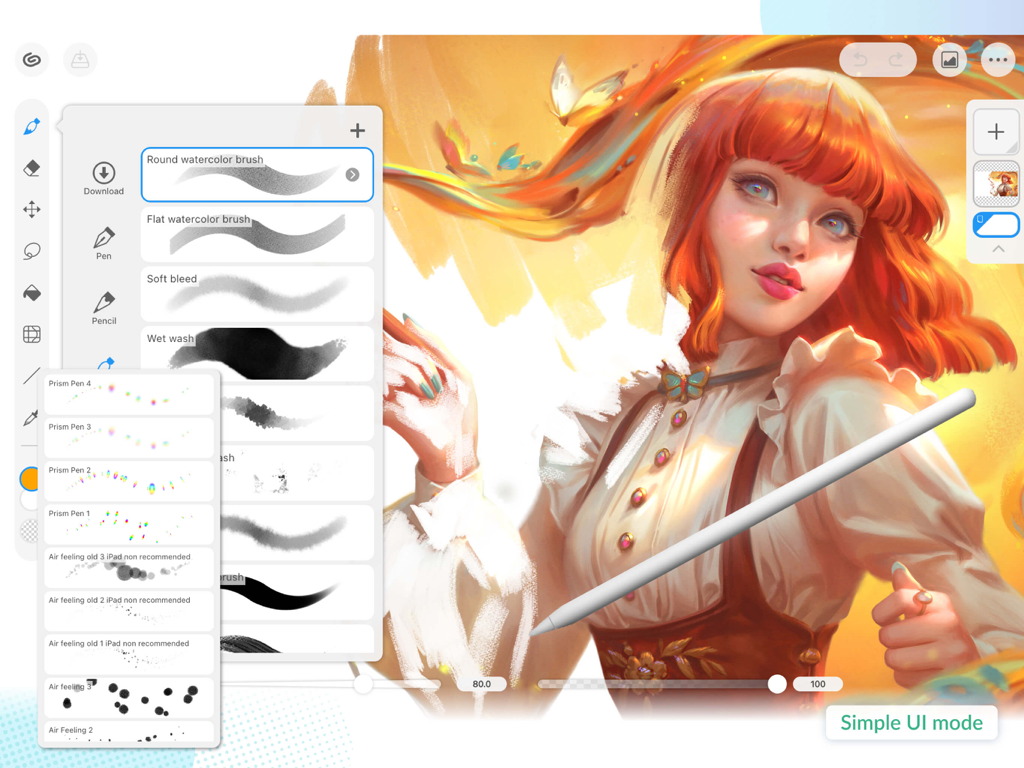
Clip Studio Paintのインターフェース。iPad上のブラシ選択メニューとシンプルなUIモードを表示。

Clip Studio Paintのインターフェース。iPad上のブラシ選択メニューとシンプルなUIモードを表示。

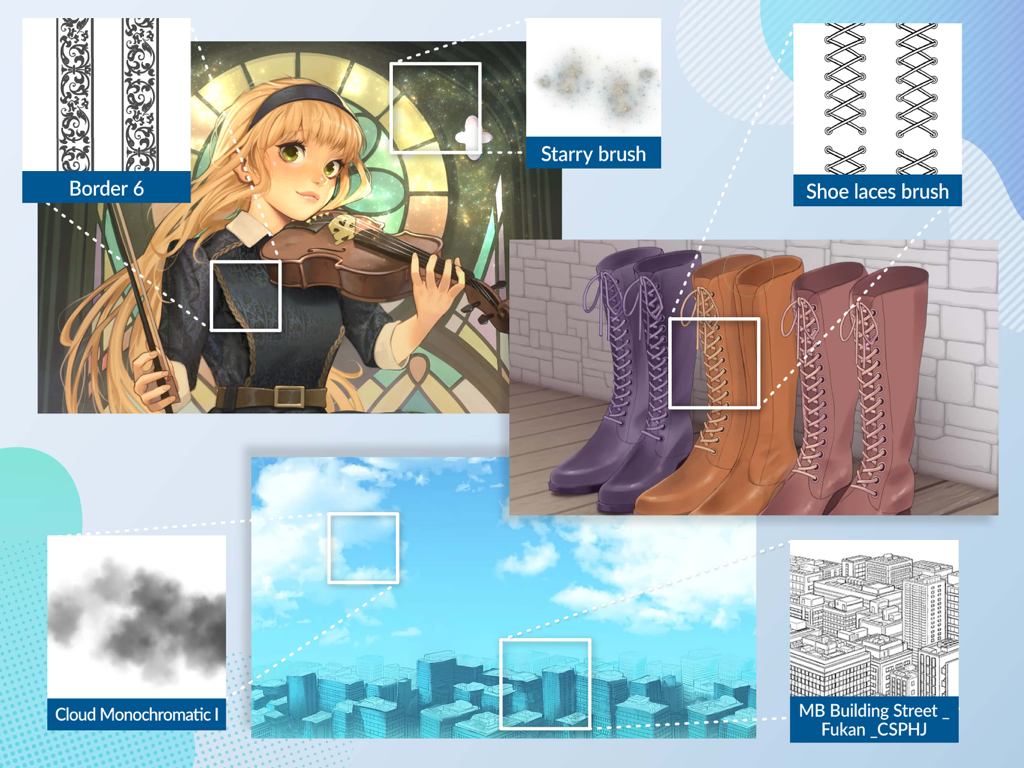
Clip Studio Paintのデジタルアートブラシと、パターンや3D都市モデルを含む背景アセットのショーケース。

Clip Studio Paintのデジタルアートブラシと、パターンや3D都市モデルを含む背景アセットのショーケース。

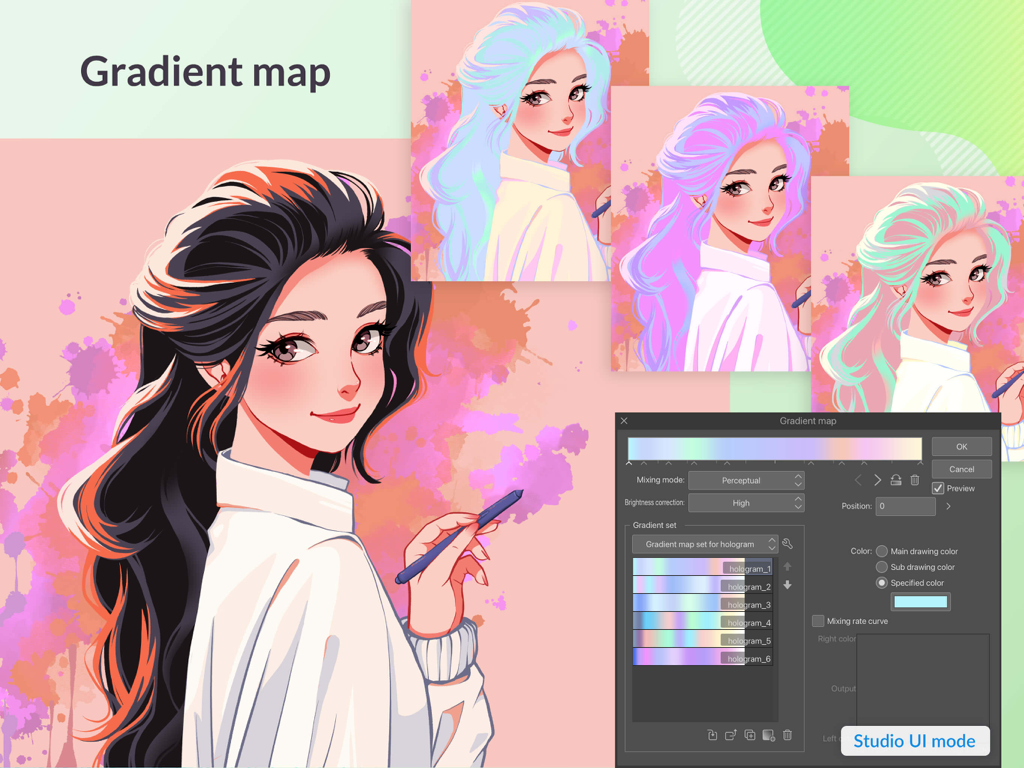
Clip Studio Paintのグラデーションマップツールを使用して、ホログラフィックな髪の色を持つアニメキャラクターイラスト。

Clip Studio Paintのグラデーションマップツールを使用して、ホログラフィックな髪の色を持つアニメキャラクターイラスト。

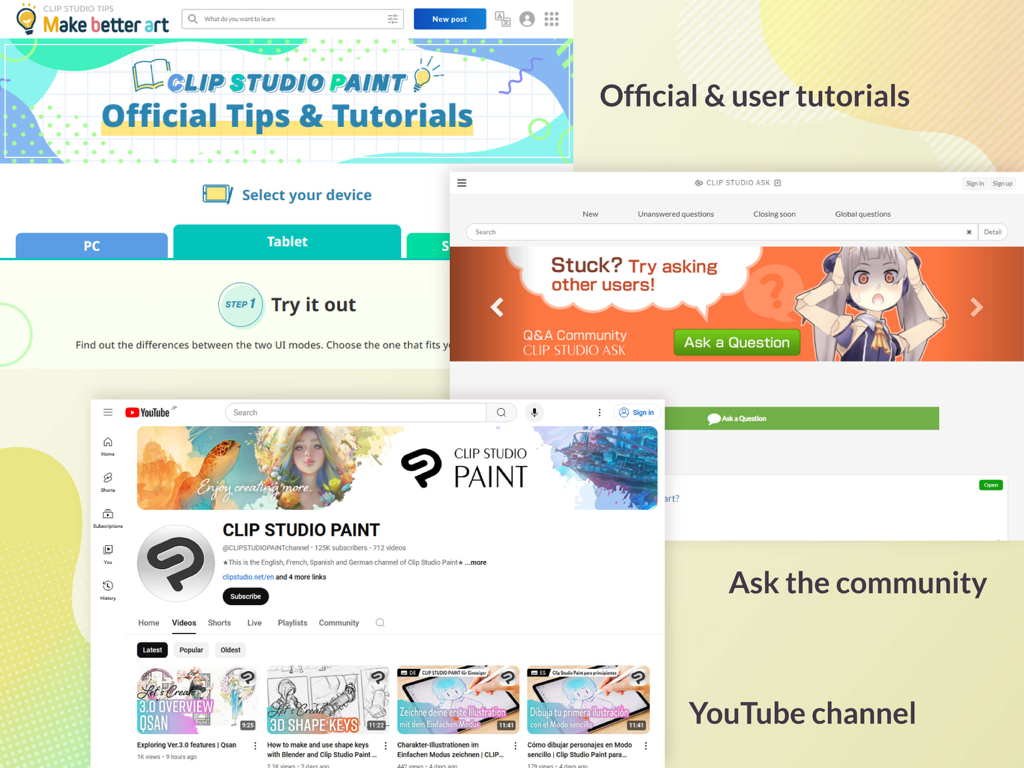
Clip Studio Paintの学習リソースを示すスクリーンショット。公式チュートリアル、コミュニティQ&Aフォーラム、YouTubeチャンネルが含まれる。

Clip Studio Paintの学習リソースを示すスクリーンショット。公式チュートリアル、コミュニティQ&Aフォーラム、YouTubeチャンネルが含まれる。

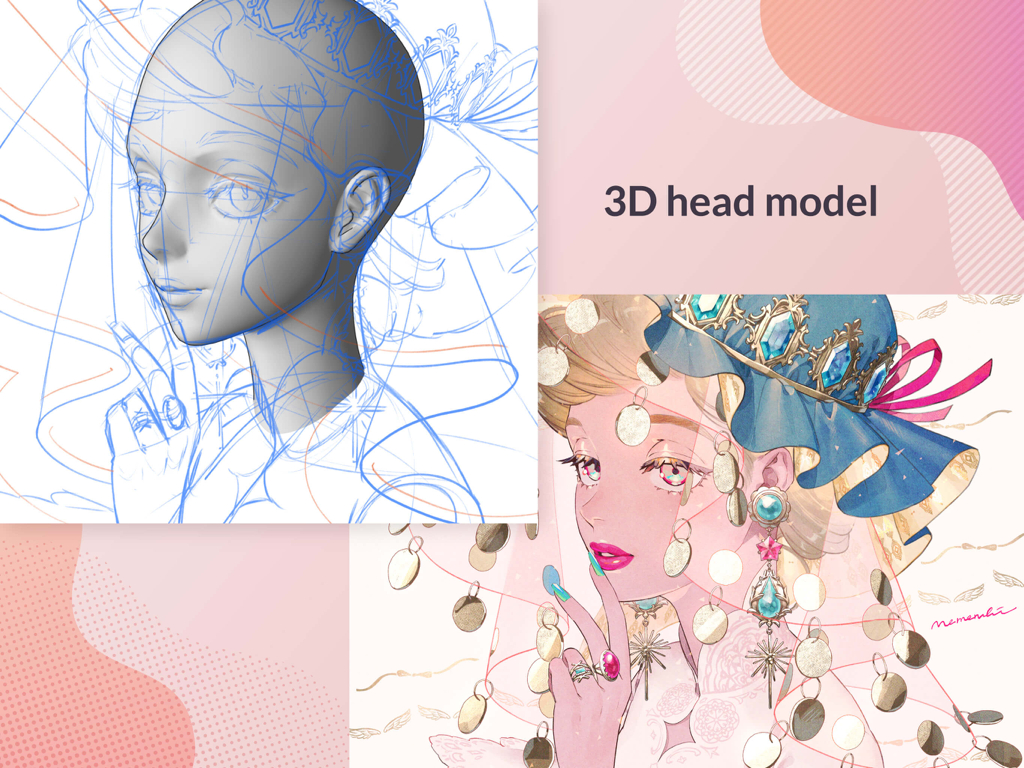
Clip Studio Paintで3Dヘッドモデルのリファレンスと、完成したキャラクターイラスト。

Clip Studio Paintで3Dヘッドモデルのリファレンスと、完成したキャラクターイラスト。

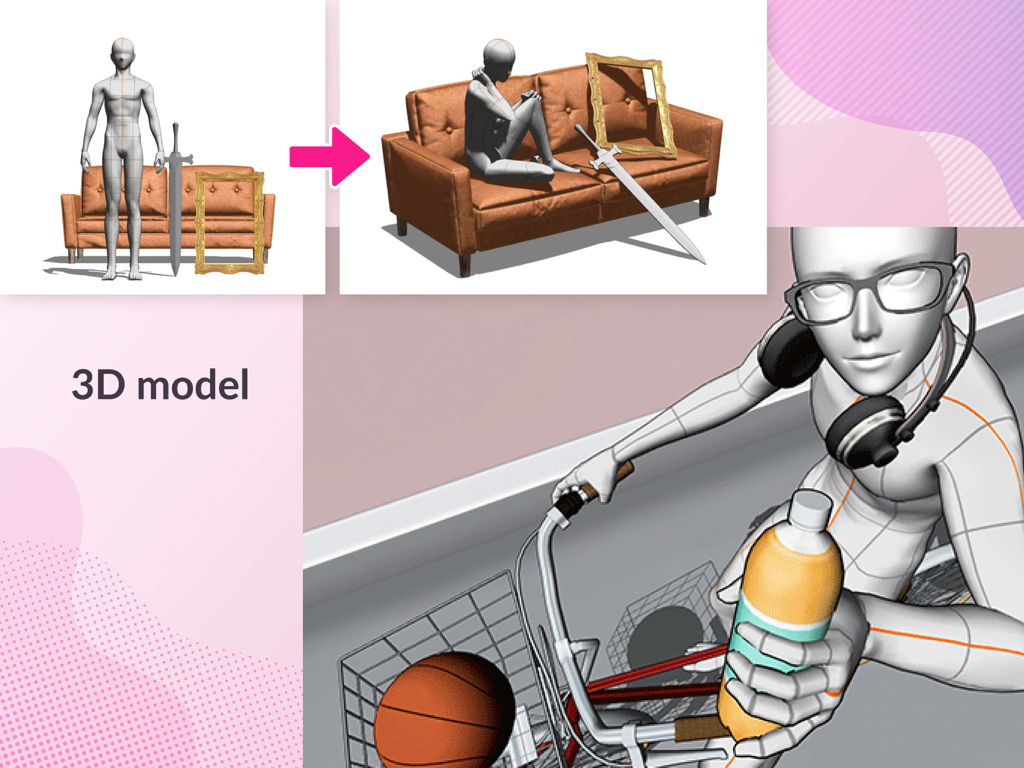
Clip Studio Paintで3Dポーズ可能なフィギュアと描画リファレンス。

Clip Studio Paintで3Dポーズ可能なフィギュアと描画リファレンス。

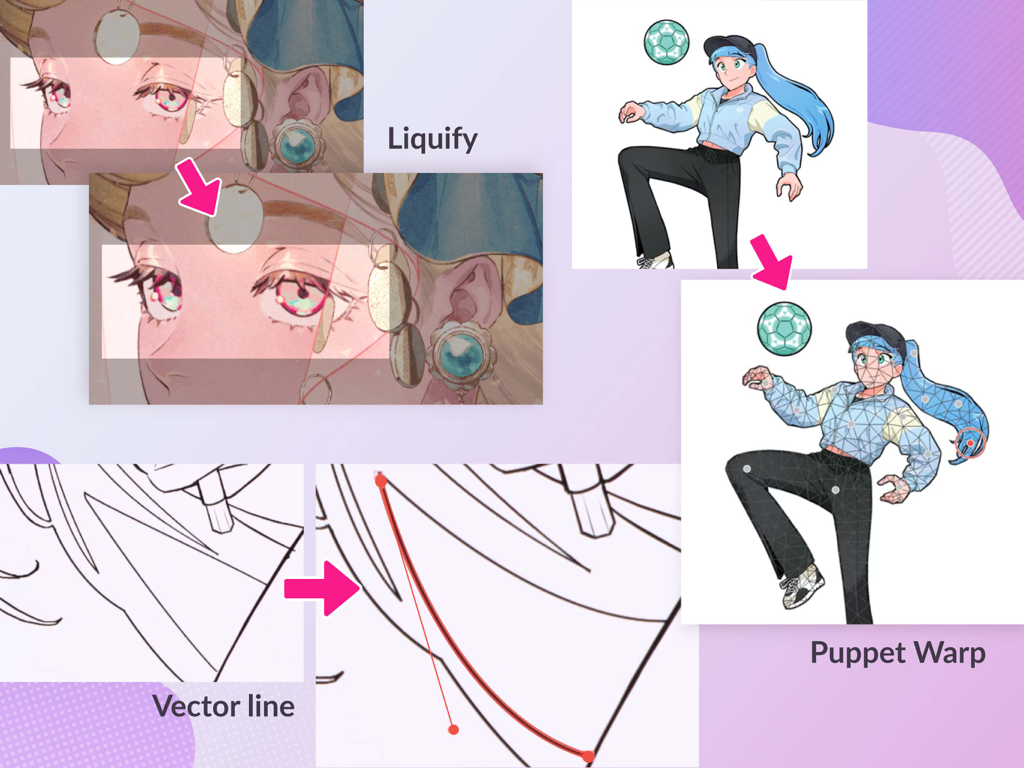
アニメイラストにおける、Clip Studio Paintの高度な機能(ゆがみ、ベクター線操作、パペットワープ)を表示。

アニメイラストにおける、Clip Studio Paintの高度な機能(ゆがみ、ベクター線操作、パペットワープ)を表示。

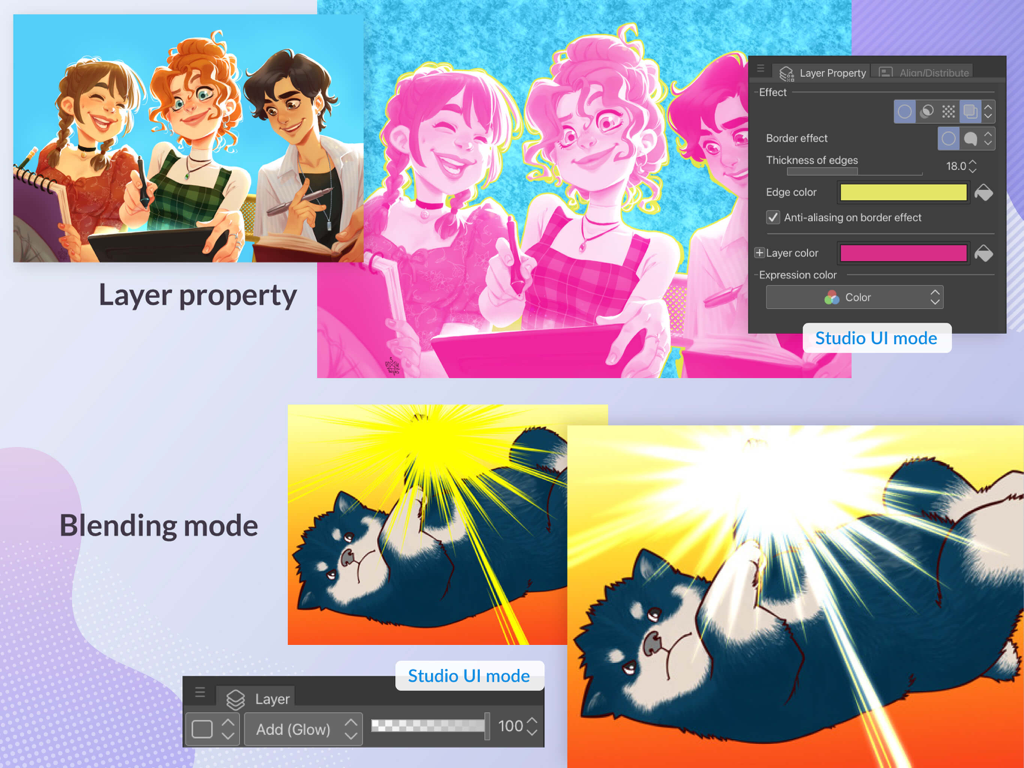
Clip Studio Paintのインターフェース。Studio UIモードでレイヤープロパティとブレンドモード機能を表示。

Clip Studio Paintのインターフェース。Studio UIモードでレイヤープロパティとブレンドモード機能を表示。

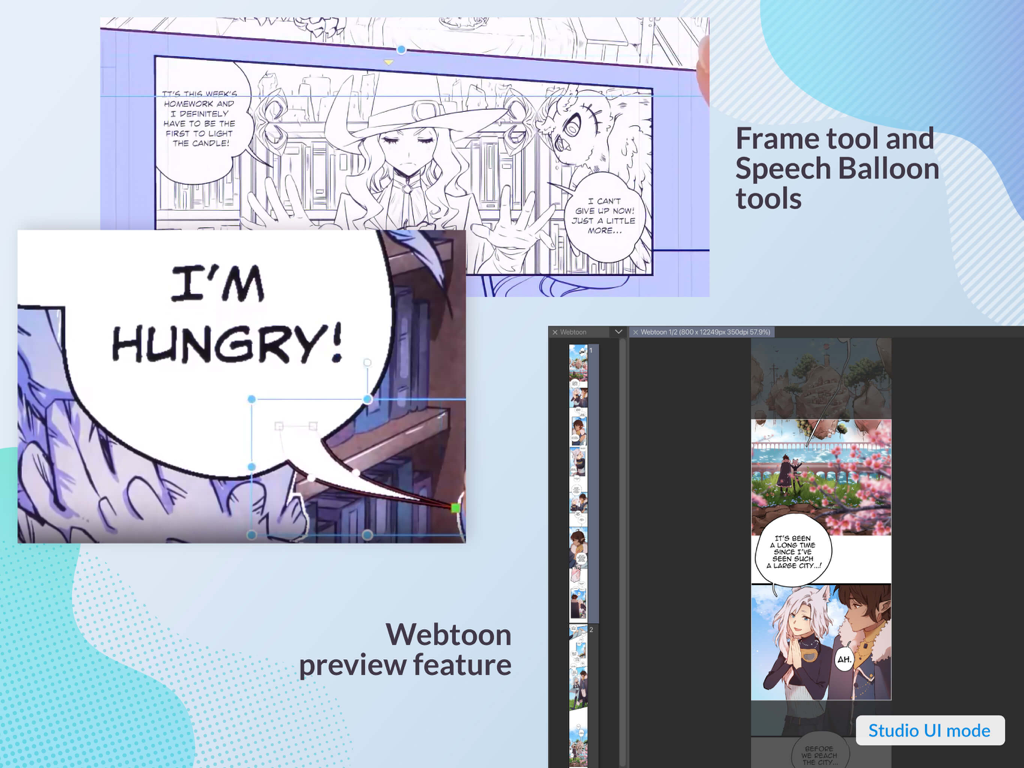
Clip Studio Paintのインターフェースで、Webtoonプレビューとセリフバブルツールを表示。

Clip Studio Paintのインターフェースで、Webtoonプレビューとセリフバブルツールを表示。

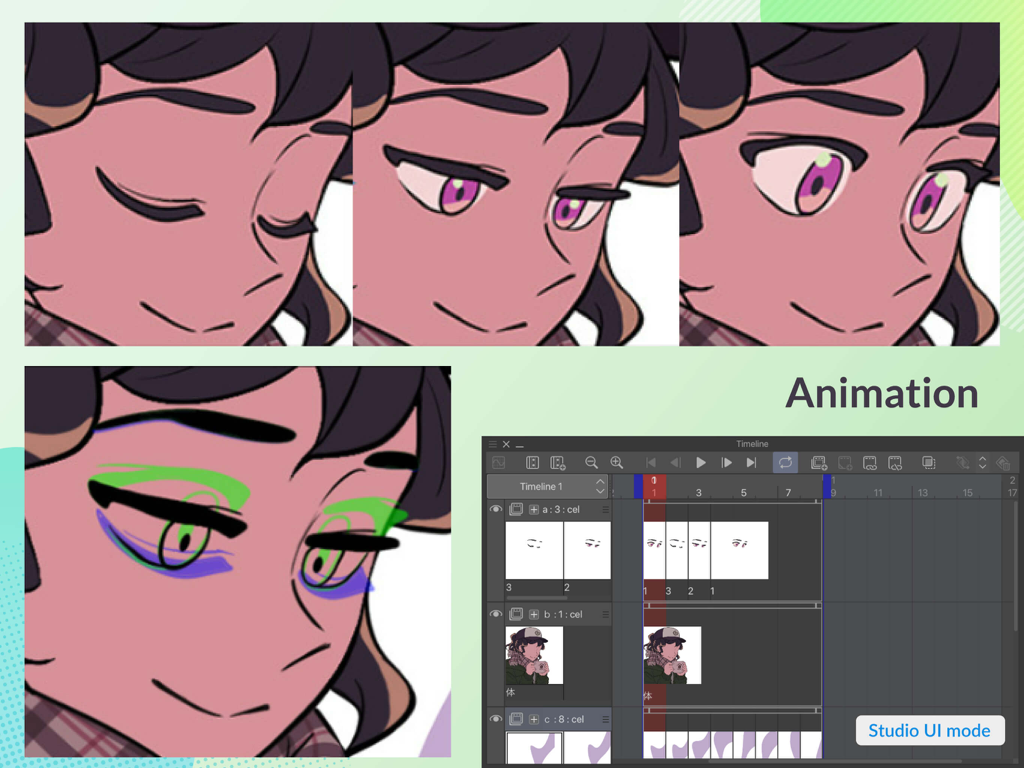
Clip Studio Paintで、プロのアニメーションタイムラインとキャラクターフレームを表示。オニオンスキン機能を示す。

Clip Studio Paintで、プロのアニメーションタイムラインとキャラクターフレームを表示。オニオンスキン機能を示す。

あなたのクリエイティブな旅のためのプロフェッショナルツール

このアプリを際立たせるツール、 6M+ 人のユーザーが選択.

📐

3Dデッサン人形ですべてのポーズをマスター

キャラクターアートの完璧なリファレンスとして機能する、完全にカスタマイズ可能な3Dデッサン人形を使用して、複雑なポーズとパースを完璧に仕上げましょう。

🖼️

究極のWebtoon&コミックスイート

大量の連載制作のために設計された、コマ、セリフ、効果線に特化したツールで、ストーリーテリングを効率化しましょう。

無限のコミュニティアセット

何千ものアーティストが作成したブラシ、3D背景、テクスチャの常に成長しているライブラリにアクセスして、ワークフローをスピードアップし、スタイルを強化しましょう。

世界中のユーザーに愛されています

Trusted by 6M+ 人がこのアプリを愛用しています.

"

"Clip Studio Paintは、私のWebtoonワークフローにとって絶対的なゲームチェンジャーです。特化したコマツールと3Dデッサン人形は、解剖学とパースのフラストレーションから私を何時間も救ってくれます。iPad Proで必要としていたデスクトップクラスの体験です。"

Elena R., Webtoon イラストレーター
"

"フリーランスのキャラクターアーティストとして、私はあらゆる描画アプリを試しましたが、ここにあるブラシエンジンとアセットライブラリに匹敵するものはありません。クラウド経由で作業を同期し、外出先でプログレードのベクターレイヤーを使用できる機能により、私のコミッションワークは大幅にスピードアップしました。"

Marcus T., デジタルコンセプトアーティスト

アプリについて

について知っておくべきこと Clip Studio Paint.

説明

Start drawing and painting in a free 30-day trial. ・Up to 3 months free with your first plan ・Subscribe for the time you want to use it. Get all the latest features, materials, and cloud storage (10 GB)! *Please note that after your trial, you will need to make an in-app payment to save and export. Clip Studio Paint makes drawing a piece of cake, in any style! Whether you are a beginner or a pro, Clip Studio Paint will improve your creative experience while helping you grow. Now with new, powerful features! Unlimited amount of brushes at your fingertips to recreate any style - Use brushes with the same textures as real art materials - Adjust details such as brush shape and paper quality to your liking - Make unique colors with realistic color mixing, like traditional paints - Draw with transparency to erase, so no need to switch brushes Countless artist-made materials - Level up your art with free materials, for backgrounds and more - Discover community-made brushes from creators worldwide - Add details with materials like frills and more Coloring made easy - Easily color even with line gaps using the magnetic lasso tool - Lock transparency to paint over layers without affecting other areas - Set light source and shadow position with Shading Assist - Instantly reference and apply colors from an image to your art using Color Match - Enhance your art with filters like Chromatic Aberration, Retro Film, Pencil, and more Learn alongside other creators - Loads of official tutorials and creator tips available - Watch tutorials on our YouTube channel, for step-by-step advice - Ask questions on the Clip Studio Ask community Create the perfect reference with 3D models - Use 3D drawing figures to help with drawing anatomy - Customize character face and body models with beginner-friendly tools - Attach 3D objects like hats and shoes to characters for more specific references - Use 3D shapes to draw perspective - Use snap to quickly place objects on your canvas Adjust after you draw - Liquify to make adjustments to the balance of your illustrations - Mesh Transformation allows you to transform to different shapes - Change up the poses of your character drawings with Puppet warp - Non-destructive color adjustment layers to get your art just right - Gradient maps give color to your grayscale illustrations Stress-free layer features - Assign colors and make multiple columns of layers to browse them at a glance - Enjoy the freedom of masking and clipping on multiple layers to edit and move your work - Add various effects to apply to the layer in a non-destructive way The ultimate comic creation app - All the tools you need for comic creation, from storyboard to finishing touches - Panel frames, speech balloons, text, effect lines, and screen tones in an instant - Make data for prints, web comics, manga, or webtoons (6 GB+ memory recommended) - Manage multi-page projects Professional animation, on any device - Use all the same tools as animation studios - Unique features allow you to draw your frames as you like - Enjoy a pencil and paper look and feel, but digitally - Expand your drawings to 4K resolution without losing quality by saving it as vector data ●Grade features ・PRO: All the tools you need to create stunning illustrations & short animations ・EX: All the above + multi-page functionality for comic/manga artists and unlimited animation frames *Clip Studio account needed to buy a plan. ● Target Devices and Specifications ・Minimum free storage space: 3GB, 4GB recommended ・Recommended display size: 10.5"+ Please see the following for supported devices. https://support.clip-studio.com/en-us/faq/articles/20200153 Supported pressure-sensitive pens ・Apple Pencil ● In-app purchases ・Required to save the canvas and export it to various file formats on iPad. Note: You will be charged to the Apple ID used for subscription. Terms of Service https://www.celsys.com/en/information/csp/

最新バージョン

4.2.5

サイズ

563.7 MB

リリース日

2017年11月7日

最初のスケッチから最後のコマまで

600万人のクリエイターに加わり、情熱をプロフェッショナルに変えましょう。今すぐ30日間の無料トライアルを開始し、iPadでイラスト、マンガ、アニメーションの究極のスタジオを体験してください。

ダウンロード: App Storeダウンロード: Google Play
FAQ

よくある質問

について知っておくべきこと Clip Studio Paint

Clip Studio Paintとは何ですか?

Clip Studio Paintは、イラスト、マンガ、コミック、アニメーションの作成に特化した高度な描画およびペイントアプリケーションです。初心者からプロフェッショナルまで、創造的な体験を向上させるためのツールを提供します。

Clip Studio Paintの無料トライアルはありますか?

はい、Clip Studio Paintでは30日間の無料トライアルを提供しています。また、初回プランのサブスクリプションで最大3ヶ月無料になる場合もあります。

Clip Studio Paintは描画参考用の3Dモデルをサポートしていますか?

はい、Clip Studio Paintは3Dモデルをサポートしています。解剖学の参考のために3D描画フィギュアを使用したり、キャラクターモデルをカスタマイズしたり、特定の参考資料のために帽子などのオブジェクトを配置したりすることができます。

Clip Studio Paintでコミックやマンガを作成できますか?

はい、Clip Studio Paintは究極のコミック作成アプリです。ストーリーボード、コマ枠、セリフ、テキスト、効果線、印刷またはWeb用のトーンなどのツールを提供します。

Clip Studio Paint PROとEXの違いは何ですか?

Clip Studio Paint PROは、イラストと短編アニメーション用です。EXはPROの全機能に加え、コミック/マンガ用の複数ページ機能と無制限のアニメーションフレームを備えています。

Clip Studio Paintは様々なブラシや素材を提供していますか?

はい、Clip Studio Paintはリアルな質感を持つ無限のブラシを提供しています。また、多様なスタイルに対応する、アーティストが作成した無数の素材やコミュニティ製のブラシも提供しています。

Clip Studio Paintで作成した描画を後から調整できますか?

はい、Clip Studio Paintには、イラストのバランス調整のための「ゆがみ」、形状調整のための「メッシュ変形」、キャラクターのポーズ変更のための「パペットワープ」などのツールが含まれています。非破壊的なカラー調整レイヤーも利用可能です。

Clip Studio Paintの最小デバイス仕様は何ですか?

Clip Studio Paintには、最低3GBの空き容量(4GB推奨)と、10.5インチ以上のディスプレイサイズが推奨されます。

Clip Studio Paintで作品を保存するためにアプリ内購入が必要ですか?

はい、無料トライアル終了後、Clip Studio Paint、特にiPad版では、キャンバスの保存やエクスポートのためにアプリ内課金またはサブスクリプションが必要です。

Clip Studio Paintはアニメーション機能を提供していますか?

はい、Clip Studio Paintはプロフェッショナルなアニメーションツールを提供しています。ユーザーはデジタルでフレームを描画し、鉛筆と紙のような外観を実現し、最大4K解像度までのベクトルデータを保存できます。