Ferrite Recording Studio

Ferrite Recording Studio

ダウンロード: App Store
Spark by MWM logo
ロゴ: Ferrite Recording Studio
Ferrite Recording Studio:ポケットに入るプロ仕様のマルチトラック・オーディオ制作

ポッドキャスター、ジャーナリスト、ボイスオーバーアーティスト向けに設計された、数々の受賞歴を誇るモバイルスタジオでワークフローを効率化しましょう。効率的なレコーディングから、自動無音除去機能を備えた高度なマルチトラック編集まで、ストーリーが生まれる場所ならどこでも放送クオリティのコンテンツを作成できます。

ダウンロード: App Store

開発元

Wooji Juice Ltd

カテゴリ

Music

ダウンロード

625K+

ユーザー評価

4.6/5

評価数

100

対応言語

5

サウンドを可視化する

このインターフェースを利用する 625K+ 人のユーザー.

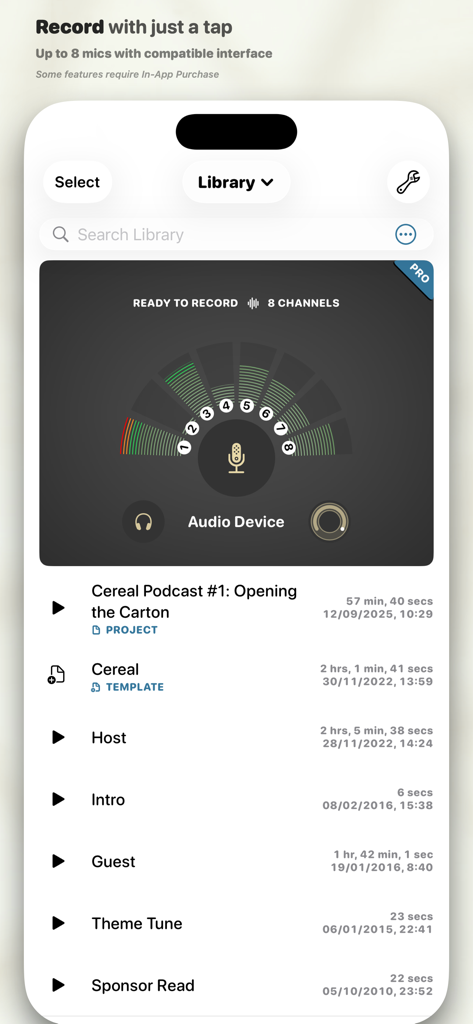
ポッドキャストのプロジェクトリストと8チャンネルの録音メーターを表示する、Ferrite Recording Studioアプリのインターフェース

ポッドキャストのプロジェクトリストと8チャンネルの録音メーターを表示する、Ferrite Recording Studioアプリのインターフェース

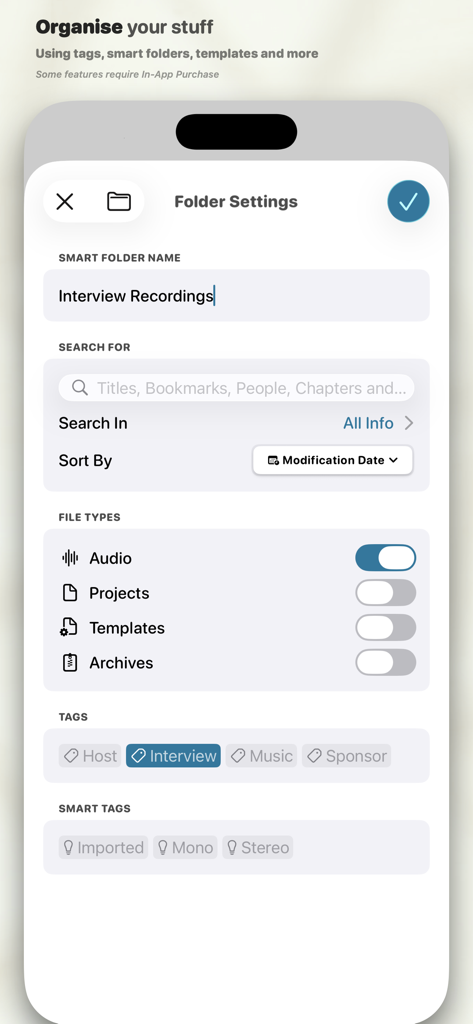
インタビュー録音用のタグが付いたスマートフォルダー設定を表示する、Ferrite Recording Studioのインターフェース

インタビュー録音用のタグが付いたスマートフォルダー設定を表示する、Ferrite Recording Studioのインターフェース

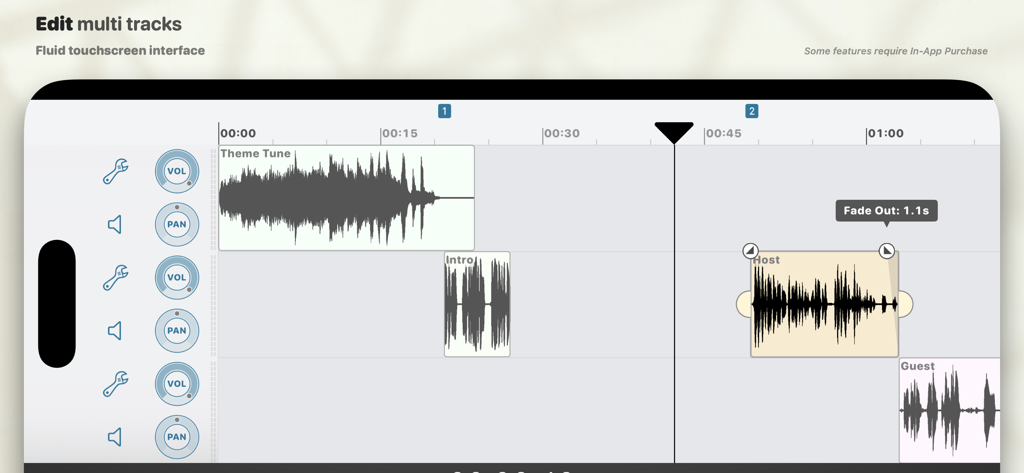
テーマ曲、ホスト、ゲストの波形クリップと、音量およびパンのコントロールを表示する、Ferrite Recording Studioのマルチトラック・オーディオ編集タイムライン

テーマ曲、ホスト、ゲストの波形クリップと、音量およびパンのコントロールを表示する、Ferrite Recording Studioのマルチトラック・オーディオ編集タイムライン

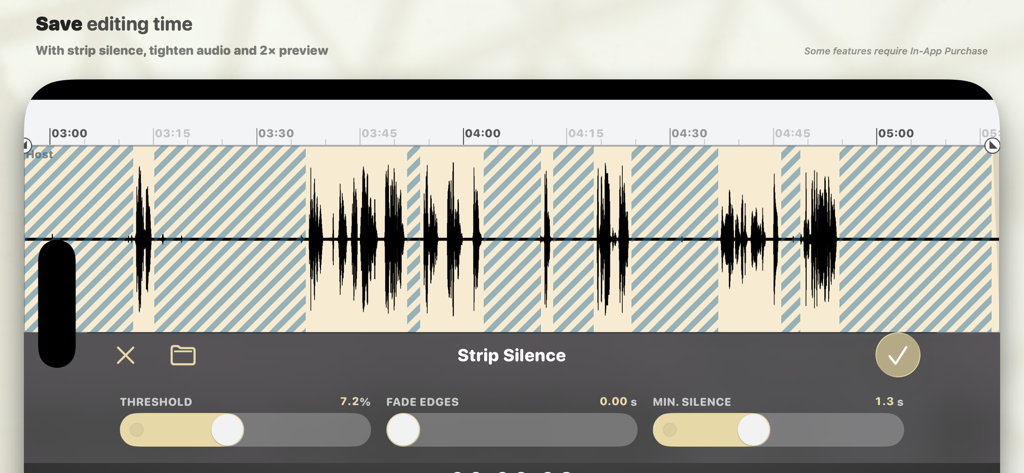
オーディオ録音内の無音部分を自動的に除去する、Ferrite Recording Studioアプリの「Strip Silence」機能

オーディオ録音内の無音部分を自動的に除去する、Ferrite Recording Studioアプリの「Strip Silence」機能

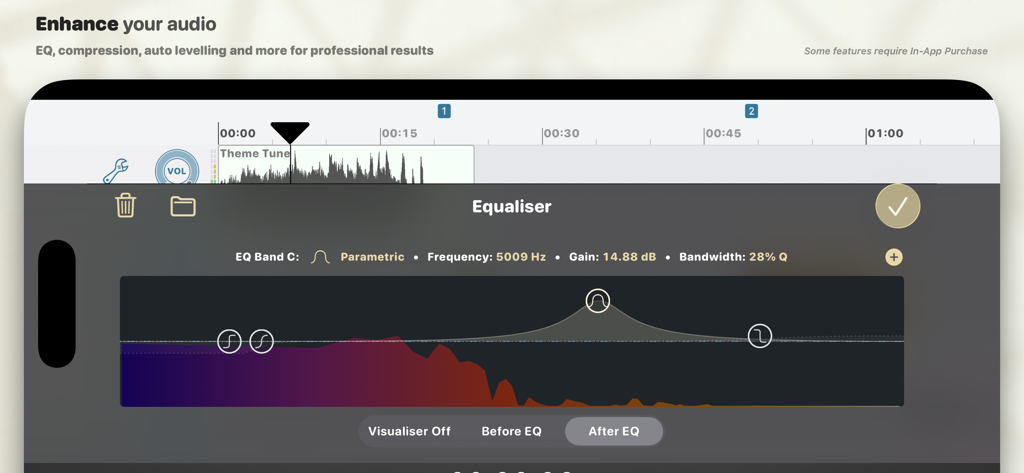
モバイルオーディオ編集用の、Ferrite Recording Studioにあるプロ仕様のパラメトリック・イコライザー・ツール

モバイルオーディオ編集用の、Ferrite Recording Studioにあるプロ仕様のパラメトリック・イコライザー・ツール

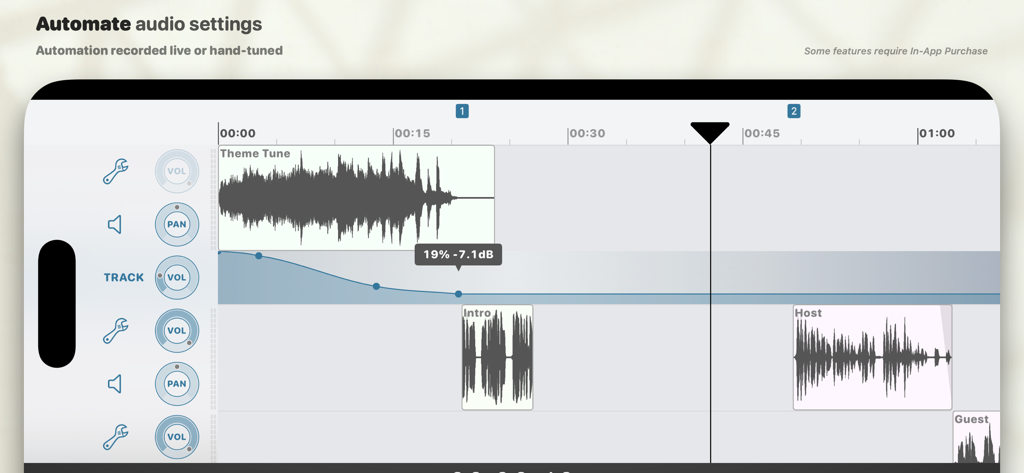
プロ仕様のポッドキャスト制作のための、ボリューム・オートメーション曲線を表示するマルチトラック・オーディオ編集インターフェース

プロ仕様のポッドキャスト制作のための、ボリューム・オートメーション曲線を表示するマルチトラック・オーディオ編集インターフェース

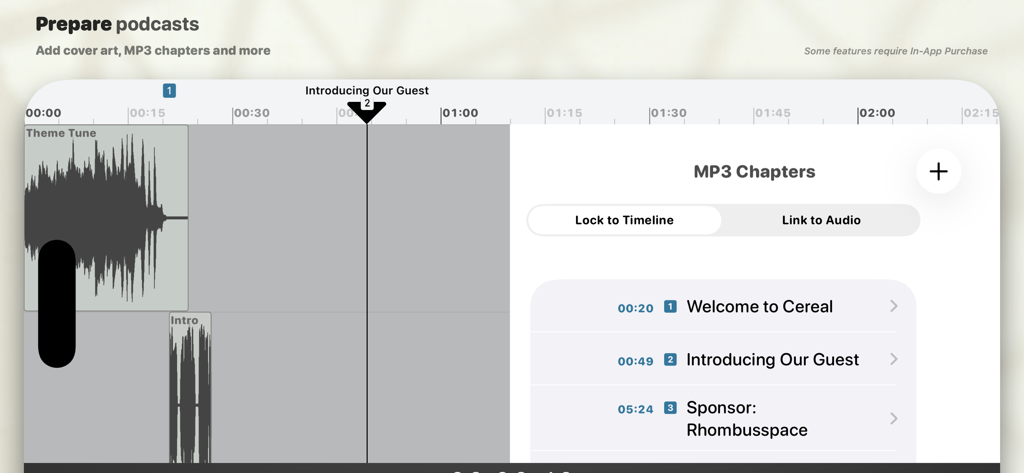
ポッドキャスト・エピソードのタイムスタンプ付きタイトルを備えた、MP3チャプター編集ツールを表示するFerrite Recording Studioのインターフェース

ポッドキャスト・エピソードのタイムスタンプ付きタイトルを備えた、MP3チャプター編集ツールを表示するFerrite Recording Studioのインターフェース

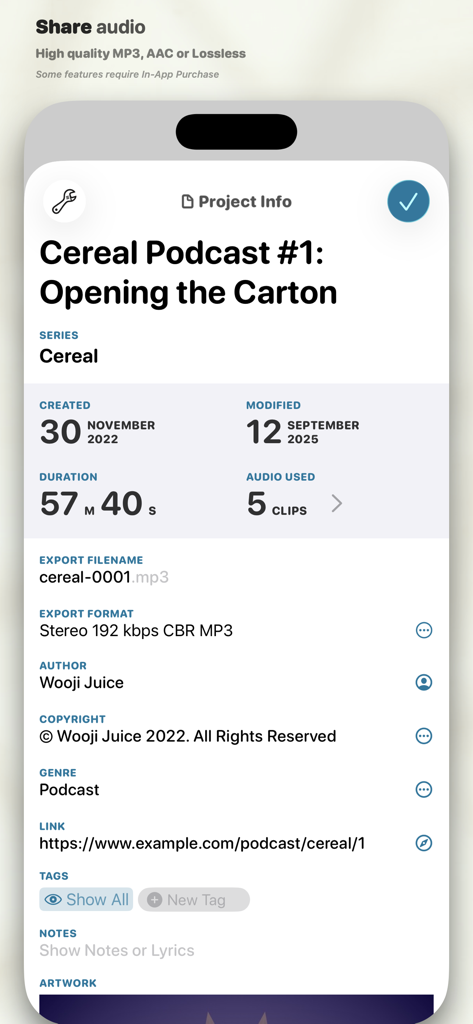
ポッドキャストのメタデータと書き出し設定を表示する、Ferrite Recording Studioのプロジェクト情報画面

ポッドキャストのメタデータと書き出し設定を表示する、Ferrite Recording Studioのプロジェクト情報画面

どこでも本格的な制作を

このアプリを際立たせるツール、 625K+ 人のユーザーが選択.

✂️

デスクトップのパワーを、タッチ操作のシンプルさで

直感的なジェスチャーでマルチトラック・プロジェクトを簡単に管理。従来のマウスでは不可能な精度とスピードで、クリップのスライス、クロップ、クロスフェードが可能です。

🎙️

プロ級の仕上げを、自動で

退屈な編集時間を大幅に短縮。「Strip Silence」で瞬時に無音部分を削除し、「Automatic Ducking」でBGMと声を完璧にバランス調整します。

🚀

現代のクリエイターのために

iPadのSplit View(スプリットビュー)対応でマルチタスクを使いこなしましょう。単一の効率的なインターフェース内で、台本を読みながら高品質なナレーションを録音できます。

世界中のユーザーに愛されています

Trusted by 625K+ 人がこのアプリを愛用しています.

"

"Ferriteは私の制作ワークフローを完全に変えてくれました。「Strip Silence」や自動ダッキング機能により、手作業での編集時間が数時間も短縮され、旅行中でもiPadから直接放送クオリティのポッドキャスト・エピソードを配信できます。まさにポケットに入るデスクトップ級のスタジオです。"

マーカス・ソーン、独立系ポッドキャスター
"

"ジャーナリストとして、パワフルかつ信頼性の高いツールが必要です。Split Viewで台本を読みながら録音できる機能に加え、素晴らしい非破壊編集と数ヶ月に及ぶ取り消し履歴(Undo history)を備えたFerriteは、私の長編ナレーション・プロジェクトにおいて唯一信頼できるアプリです。"

サラ・ジェンキンス、フリーランス・ラジオジャーナリスト

アプリについて

について知っておくべきこと Ferrite Recording Studio.

説明

Ferrite is the award-winning app you need for creating podcasts, radio journalism, or other professional voice production work — lectures, speeches, voice-overs and more. It combines the ease-of-use of a “voice memo” audio recorder, with a versatile multi-track editing studio. Powerful tools like effects and automation are available when you need them. With time-saving features and a UI designed to get out of your way, people around the world are switching to Ferrite. — Streamlined Recording — Open Ferrite and with just one tap you’re recording. No fuss, and it won't break a sweat even with hours-long sessions. Just make sure your device has enough free space! Recording an interview and you want to highlight a few quotes? Have to take out some inappropriate language? Or just fluffed a sentence and need to fix it? Bookmark moments during your recording and they’ll be flagged up during edits, so you can jump right to them. Monitor levels with live recording meters, or listen through headphones. Tag your audio to find it quickly later. And of course you can import audio from your Music Library, iCloud, and other services such as Dropbox. Please note: the free version has limited duration for recording & editing projects. Upgrade to Pro and you can edit projects up to 24 hours long! — Editing is a Snip — Ferrite features full multi-track editing, from quick cuts, to producing a complete podcast or broadcast package. Zoom out to see hours at a glance, or zoom in all the way down to individual samples. Take a single clip, or a bunch, and arrange them in an editing project: move, crop, slice, fade in and out, or crossfade between clips just by overlapping them. You have full control over each track’s volume and panning, and can Mute or Solo as needed. And best of all, you needn’t fear trying out changes: Ferrite has great Undo/Redo — even if you quit the app and come back a month later, you can still undo all the way back to the moment you created your project! — Advanced Features — Need more? Ferrite also includes: • Automatic ducking: set tracks to “duck under” others (e.g. ducking music behind voiceovers). • Strip Silence: Carves away all the silent sections from a recording, making it easy to edit the remaining audio. • (iPad only) Split View and Slide Over support: Use Ferrite side-by-side with other apps. Recording a narration? Open another app with your script and place Ferrite down the side of the screen. Or open the User Guide in Safari on one side while you learn Ferrite on the other. With a single In-App Purchase, you can unlock many additional tools, including: • Preview at up to 2× speed • Prepare your audio for production with Noise Reduction and Auto Levelling. • Add professional effects to your tracks such as EQ, Noise Gate and Dynamic Range Compression, for projects that sound clean and engaging. • Automate volume, panning and effects settings so they vary over time, both on individual tracks and the final mix. • Tighten Audio can automatically take out awkward pauses and gaps. • Producing a podcast or series? Create a template to get each new episode off to a flying start. • Add cover art, chapters and more. • Found the perfect settings for an effect or tool? Save them as a Preset for re-use in other projects. • Audio Unit Extensions: if you have other apps installed that provide effects as Audio Unit Extensions, they’ll show up in Ferrite, where you can add them to tracks or projects. • Advanced search, smart folders, and template folders.

最新バージョン

3.2.2

サイズ

24.9 MB

リリース日

2015年11月5日

プロ仕様のスタジオをその手に。

デスクを離れ、数々の賞に輝くモバイルワークフローを採用した62万5,000人以上のクリエイターの仲間入りをしましょう。今すぐFerriteをダウンロードして、iPhoneやiPadで放送クオリティのオーディオ制作を始めましょう。

ダウンロード: App Store
FAQ

よくある質問

について知っておくべきこと Ferrite Recording Studio

Ferrite Recording Studioとは何ですか?

Ferrite Recording Studioは、ポッドキャスト、ラジオジャーナリズム、講義、スピーチ、ボイスオーバーの作成のために設計された受賞歴のあるアプリです。簡単な録音と多機能なマルチトラック編集を組み合わせ、プロフェッショナルなオーディオ制作のための強力なツールを提供します。

Ferrite Recording Studioはマルチトラック編集に対応していますか?

はい、Ferriteはマルチトラック編集をサポートしており、複数のオーディオクリップを配置したり、音量やパンを調整したり、フェードやクロスフェードを適用したりできます。これにより、包括的なポッドキャストや放送パッケージの制作が可能になります。

Ferrite Recording Studioのプロジェクト期間に制限はありますか?

はい、Ferriteの無料版では、録音および編集プロジェクトの期間に制限があります。Proバージョンにアップグレードすると、最大24時間のプロジェクトを編集できるようになります。

Ferrite Recording Studioでエフェクトを使用してオーディオ品質を向上できますか?

はい、Ferrite Recording Studioは、ノイズリダクション、自動レベリング、EQ、ノイズゲート、ダイナミックレンジコンプレッションなどの高度な機能(アプリ内購入経由)を提供し、プロフェッショナルな結果を得るためにオーディオ品質を向上させます。

Ferrite Recording Studioはどのようにオーディオ録音を容易にしますか?

Ferriteは、ワンタップで録音を開始し、数時間におよぶセッションを処理できる、合理化された録音機能を提供します。ユーザーは瞬間をブックマークしたり、ライブメーターでレベルを監視したり、iCloudやDropboxなどのさまざまなソースからオーディオをインポートしたりできます。

Ferrite Recording Studioでオーディオプロジェクトをどのように整理できますか?

はい、Ferriteではスマートフォルダやテンプレートを作成して録音を整理できます。ユーザーはタイトル、ブックマーク、人物、チャプターで検索したり、ファイルタイプやカスタムタグでフィルタリングしたりできます。

Ferrite Recording Studioはオーディオ設定の自動化をサポートしていますか?

はい、Ferriteはオーディオオートメーションをサポートしており、ユーザーは時間とともに音量、パン、エフェクト設定を自動化できます。これは、個々のトラックと最終ミックスに適用され、ダイナミックなサウンドコントロールを実現します。

Ferrite Recording Studioは録音から無音部分を削除するのに役立ちますか?

はい、Ferrite Recording Studioには「Strip Silence」(無音部分を削除)や「Tighten Audio」(不自然なポーズやギャップを自動的に排除)などの機能が含まれており、編集時間を節約できます。

ポッドキャストにチャプターやカバーアートを追加できますか?

はい、Ferriteでは、カバーアートを追加し、MP3チャプターを作成してポッドキャストを準備できます。これにより、リスナー向けのオーディオコンテンツを構造化し、プロフェッショナルな仕上がりを加えることができます。

Ferrite Recording Studioには元に戻す/やり直し機能がありますか?

はい、Ferrite Recording Studioは、包括的な元に戻す/やり直し履歴を備えています。これにより、ユーザーはアプリを終了して後で再度開いた後でも、変更を元に戻すことができます。