Notion: Music Notation and Tab

Notion: Music Notation and Tab

ダウンロード: App Store
Spark by MWM logo
ロゴ: Notion: Music Notation and Tab
Notion:楽譜作成とタブ譜

指先でプロの作曲を。あなたの創造性を解き放ちましょう。直感的な手書き認識から、世界クラスのロンドン交響楽団のサウンドまで、iPhone、iPad、Macで楽譜を簡単に作成・同期できます。

ダウンロード: App Store

開発元

PreSonus Audio Electronics, Inc.

カテゴリ

Music

ダウンロード

563K+

ユーザー評価

2.8/5

評価数

600

対応言語

9

思考から楽譜へ

このインターフェースを利用する 563K+ 人のユーザー.

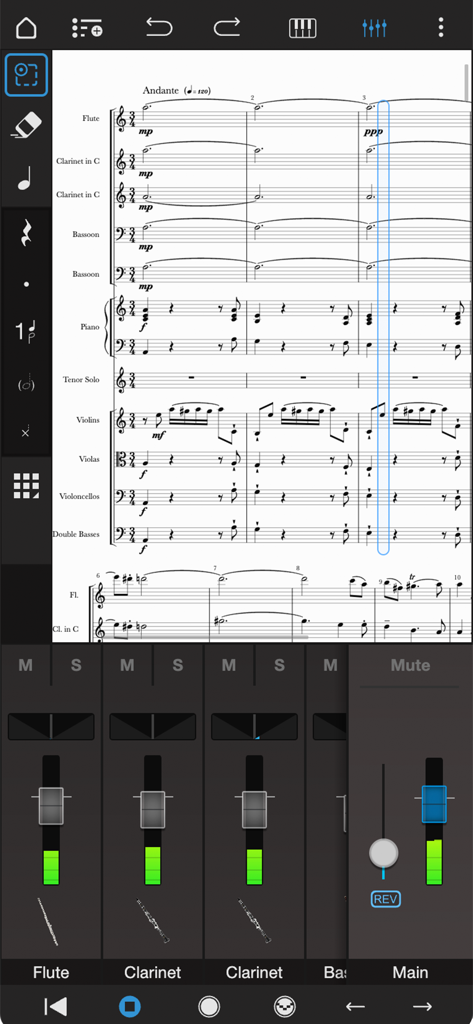
Notion Mobileのプロフェッショナルなオーケストラスコア編集およびオーディオミキサーインターフェース。

Notion Mobileのプロフェッショナルなオーケストラスコア編集およびオーディオミキサーインターフェース。

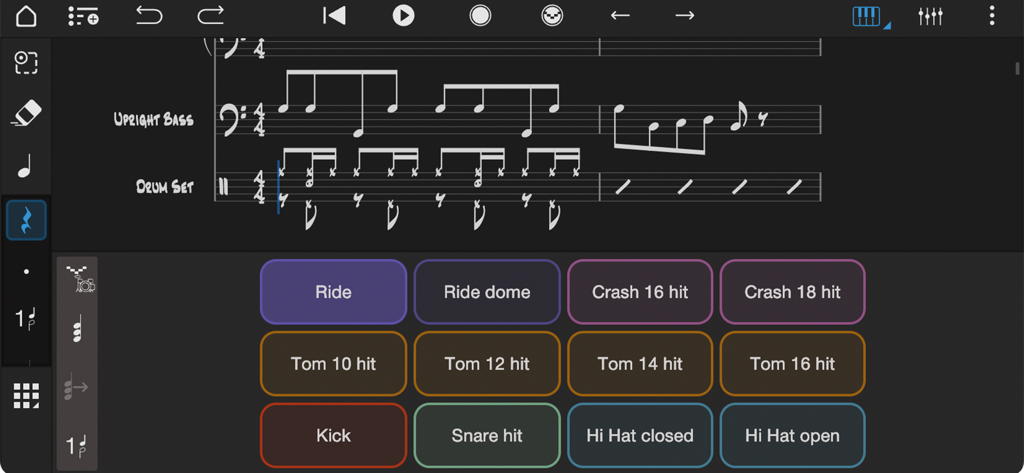
Notion音楽アプリのインターフェース。アップライトベースとドラムの楽譜とともに、ドラムパッドコントローラーを表示しています。

Notion音楽アプリのインターフェース。アップライトベースとドラムの楽譜とともに、ドラムパッドコントローラーを表示しています。

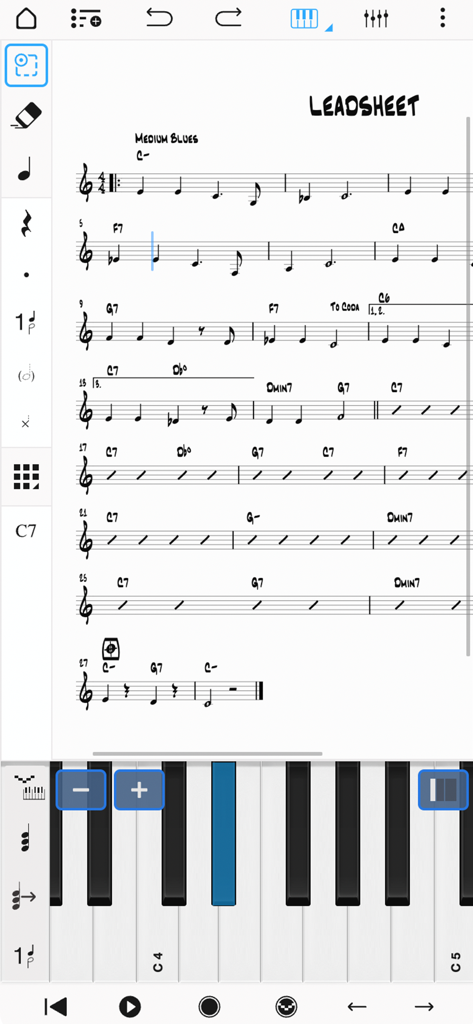
Notion Mobileアプリのインターフェース。音符入力用の仮想ピアノキーボードを備えた、楽譜のリードシートを表示しています。

Notion Mobileアプリのインターフェース。音符入力用の仮想ピアノキーボードを備えた、楽譜のリードシートを表示しています。

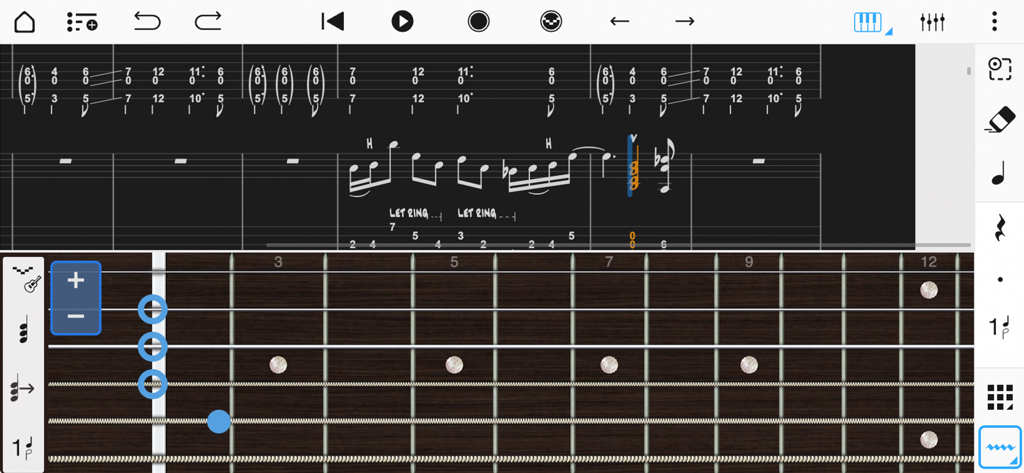
音符入力用の仮想フレットボードを備えた、音楽記譜法とギタータブ譜のインターフェース。Notion Mobile。

音符入力用の仮想フレットボードを備えた、音楽記譜法とギタータブ譜のインターフェース。Notion Mobile。

プロフェッショナルな作曲を、どこでも

このアプリを際立たせるツール、 563K+ 人のユーザーが選択.

✍️

自然な手書き入力

あなたのやり方で音楽を書きましょう。Apple Pencilを使って、直接五線譜に音符を描き、高度な認識エンジンがプロのデジタル記譜に変換するのを見てください。

🎻

伝説的な音質

ロンドン交響楽団による演奏で、あなたの作品を体験しましょう。象徴的なアビイ・ロード・スタジオで録音されたリアルなオーディオサンプルを使用して、驚くほどリアルな再生をお楽しみください。

🔄

シームレスなプロフェッショナルワークフロー

制限なく作曲しましょう。iPhoneで始め、iPadで洗練させ、Studio OneまたはNotion Desktopとシームレスに同期して、あなたの傑作を完成させましょう。

世界中のユーザーに愛されています

Trusted by 563K+ 人がこのアプリを愛用しています.

"

"プロの映画作曲家として、ひらめきはデスクから離れているときに訪れることがよくあります。Notion Mobileは私のワークフローを完全に変えました。ロンドン交響楽団のサンプルのおかげで、私の下書きは信じられないほど素晴らしいサウンドになり、Studio Oneとのシームレスな同期により、電車の中でシーケンスを開始し、スタジオでビートを逃すことなく完成させることができます。"

Julian M., メディアコンポーザー
"

"これまであらゆる記譜アプリを試しましたが、Notionの手書き認識に勝るものはありません。Apple Pencilを使って直接五線譜に音楽を書くのは、伝統的な楽譜用紙と同じ感覚でありながら、デジタルスタジオのパワーを備えています。私の音楽理論のクラスや作曲プロジェクトにとって、最も不可欠なツールになりました。"

Sarah L., 音楽パフォーマンス学生

アプリについて

について知っておくべきこと Notion: Music Notation and Tab.

説明

With over 10 years in the App Store, Notion Mobile is a free, award-winning music composition tool for iOS, iPadOS®, macOS and more! You’ll effortlessly create dynamic compositions in traditional musical notation or guitar tablature with its intuitive touch-based interface and incredibly broad editing capabilities. With a user-friendly interface and simple interactive piano keyboard, fretboard, drum pad, and even optional Handwriting Recognition, Notion Mobile makes it easy to get started composing your music. You can also hear your music performed with the most realistic playback possible, using real audio samples recorded by the London Symphony Orchestra at Abbey Road Studios. Notion Mobile is a native cross-platform app, meaning you can write anywhere on any device without requiring a constant Internet connection. And when you’re back online, you’ll be able to sync your work across multiple devices — either through your preferred cloud provider, or through the optional wireless transfer between PreSonus applications on any device. Start your work on one device and finish it on another. Once you are happy with your creation you can share the Notion file, or export as MIDI, MusicXML, PDF or as an audio file. Compose, edit, and play back your music performed with real piano and orchestral samples recorded by the London Symphony Orchestra at Abbey Road Studios — along with outstanding sampled guitar, bass, drums and other popular instruments. And when you’re ready for more sounds, you’ll find the extensive library of Notion Add-on Soundsets to purchase as part of the Feature Bundle. To save space, the initial app download contains just piano — you can then manage which of the bundled Soundsets to have on your device or keep in the cloud, just tap on Sound Installation. Notion has been featured in various Apple campaigns including the 2014 YourVerse television commercials and has won several awards, including a prestigious music industry NAMM TEC Award for Best Smartphone/Tablet App. What you get: Notion Mobile includes unlimited staves, comprehensive editing features and core orchestral and rhythm section Soundsets — all for free. You can optionally register (also for free!) to unlock an additional Soundset (containing Solo Strings, Classical Saxophones and Glockenspiel), and the multivoice function that allows writing in up to 4 voices per staff. Then for the full experience, either sign in with your Studio One+ membership or purchase the Notion Feature Bundle. This unlocks Handwriting Recognition, Layout Controls, all the Expansion Soundsets (including many auxiliary instruments and additional articulations and effects), additional audio export formats (m4a, OPUS, FLAC) and direct file transfer between any PreSonus application running on the same network (including Notion Mobile, Notion Desktop, and Studio One.) Free: Unlimited staves All editing features Core Soundsets Export as MusicXML, Compressed MusicXML, MIDI, PDF, wav, mp3 Welcome Pack (register for free): Soundset including Solo Strings, Glockenspiel, Classical Saxophones Additionally write for voices 3 and 4 in a single staff Feature Bundle (in-app purchase or sign in with Studio One+): Handwriting Recognition, powered by MyScript Available on iPhone, iPad and macOS (macOS with supporting graphics tablet or using Sidecar with compatible iPad) Automatic pen vs. finger recognition to switch between handwriting and edit mode Pressure-sensitive support for Apple Pencil Adjustable timer for Handwriting Recognition Override handwriting timer by double tapping Apple Pencil (2nd Gen) Layout Control All Expansion Soundsets Additional audio export formats (m4a, OPUS, FLAC) Direct file transfer between any PreSonus application running on the same network (including Notion Mobile, Notion Desktop, and Studio One)

最新バージョン

3.5.1

サイズ

146.0 MB

リリース日

2011年12月16日

ひらめきの瞬間を、いつでもどこでも作曲。

受賞歴のある記譜ツール、手書き認識、そして伝説的なロンドン交響楽団のサウンドを使用する50万人以上のミュージシャンに加わりましょう。今すぐNotion Mobileを無料でダウンロード。

ダウンロード: App Store
FAQ

よくある質問

について知っておくべきこと Notion: Music Notation and Tab

Fender Notion: Music & Tab の料金はいくらですか?

Fender Notion: Music & Tab は無料でダウンロードして使用でき、無制限の五線譜とコアサウンドセットを提供します。手書き認識や拡張サウンドセットなどの追加機能は、アプリ内購入のフィーチャーバンドルまたは Fender Studio Pro+ メンバーシップを通じて利用できます。

Fender Notion: Music & Tab とは何ですか?

Fender Notion: Music & Tab は、iOS、iPadOS、macOS 向けの受賞歴のある音楽制作ツールです。直感的なタッチベースのインターフェースを使用して、従来の楽譜またはギタータブ譜でダイナミックな作曲を作成できます。

Fender Notion でギタータブ譜を使用して作曲できますか?

はい、Fender Notion: Music & Tab を使用すると、ギタータブ譜で簡単にダイナミックな作曲を作成できます。このアプリは、ギタータブ譜の入力と編集のための専用インターフェースを提供します。

Fender Notion は手書き認識をサポートしていますか?

はい、Fender Notion: Music & Tab は MyScript を搭載した手書き認識を提供します。この機能はフィーチャーバンドルの 1 つであり、互換性のあるデバイスで筆圧感知入力用の Apple Pencil をサポートしています。

Fender Notion は再生にどのようなサウンドサンプルを使用していますか?

Fender Notion は、アビイ・ロード・スタジオでロンドン交響楽団によって録音された実際のオーディオサンプルを使用して、リアルな再生を提供します。また、サンプリングされたギター、ベース、ドラム、その他の人気のある楽器も含まれており、包括的な作曲が可能です。

Fender Notion は複数のデバイス間で音楽を同期できますか?

はい、Fender Notion: Music & Tab は、複数のデバイス間で作業を同期することをサポートしています。ユーザーは、好みのクラウドプロバイダーを介して、または任意のデバイス上のアプリケーション間でオプションのワイヤレス転送を介してこれを実現できます。

Fender Notion で利用できるエクスポート形式は何ですか?

Fender Notion では、作曲を MIDI、MusicXML、PDF、WAV、MP3 ファイルとして無料でエクスポートできます。フィーチャーバンドルには、M4A、OPUS、FLAC などの追加のオーディオ形式が含まれています。

Fender Notion はクロスプラットフォームアプリケーションですか?

はい、Fender Notion: Music & Tab はネイティブのクロスプラットフォームアプリケーションです。ユーザーは、常にインターネットに接続する必要なく、さまざまなデバイス(iOS、iPadOS、macOS を含む)で音楽を作成できます。

Fender Notion には作曲用のドラムパッドが含まれていますか?

はい、Fender Notion: Music & Tab にはインタラクティブなドラムパッドが含まれています。この機能により、アプリケーション内で直接さまざまな楽器のヒットでドラムパートを簡単に作曲できます。

Fender Notion はオフラインで使用できますか?

はい、Fender Notion: Music & Tab はオフラインで機能します。ネイティブのクロスプラットフォームアプリであり、ユーザーは常にインターネットに接続する必要なく、どこでも任意のデバイスで音楽を作成できます。