Parental Control App - Kidsee

Parental Control App - Kidsee

ダウンロード: App Store
Spark by MWM logo
ロゴ: Parental Control App - Kidsee

Kidsee:スクリーンタイムの戦いを終わらせ、子供たちを安全に

現代の親のためのオールインワンデジタルアシスタント。リアルタイムの位置情報を追跡し、アプリをブロックし、直感的なダッシュボードで家事を稼いだスクリーンタイムに変えましょう。

ダウンロード: App Store

開発元

Alenrom sp. z o.o.

カテゴリ

Lifestyle

ダウンロード

208K+

ユーザー評価

4.7/5

評価数

4K+

対応言語

39

一目でわかる安全性

このインターフェースを利用する 208K+ 人のユーザー.

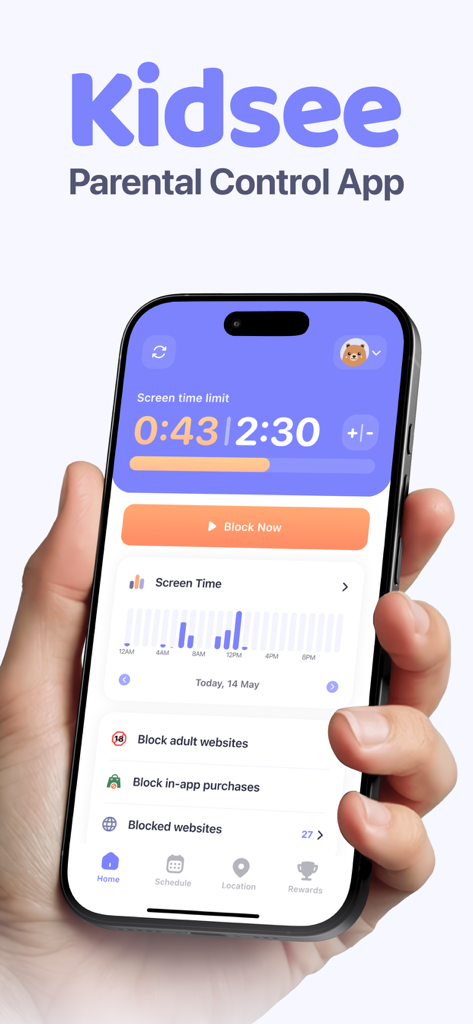
Kidseeペアレンタルコントロールアプリのダッシュボードが表示されたiPhone画面、スクリーンタイム制限とアプリブロック機能付き

Kidseeペアレンタルコントロールアプリのダッシュボードが表示されたiPhone画面、スクリーンタイム制限とアプリブロック機能付き

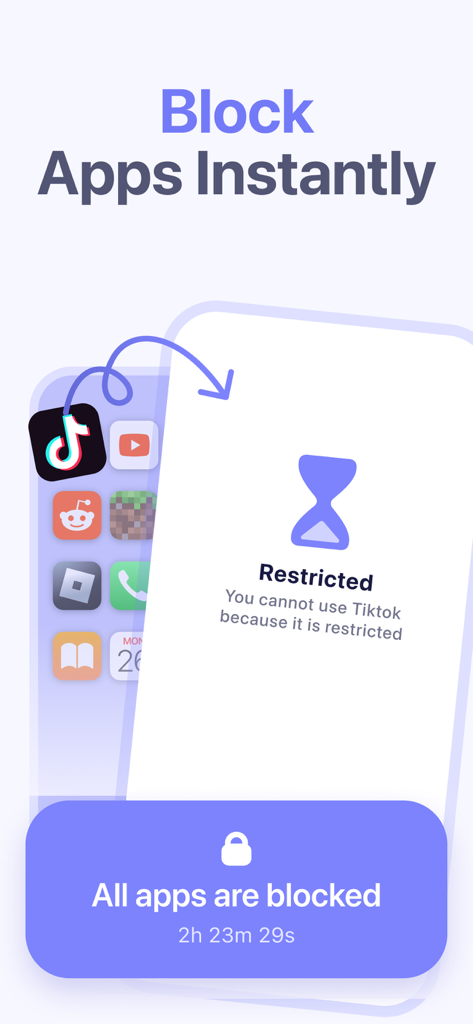
TikTokなどのアプリケーションをブロックするKidseeアプリの機能を示すスマートフォン画面

TikTokなどのアプリケーションをブロックするKidseeアプリの機能を示すスマートフォン画面

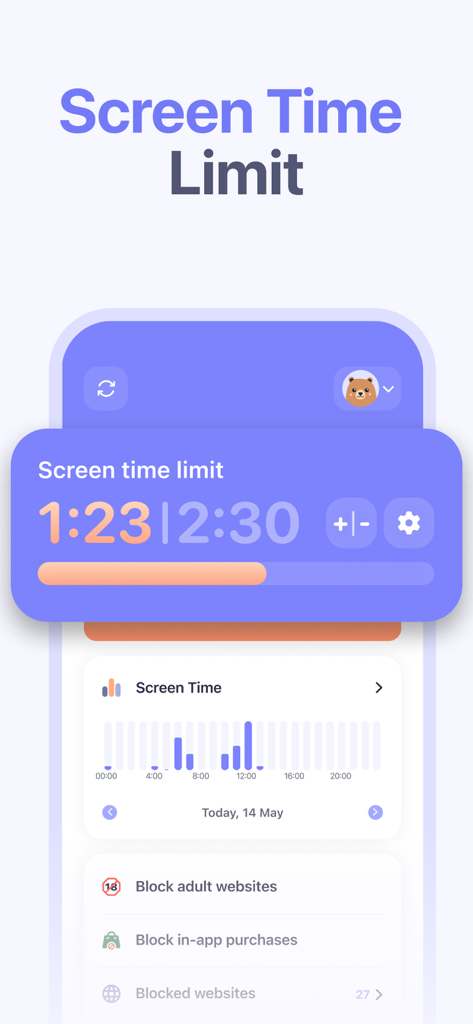
Kidseeアプリのダッシュボードに、スクリーンタイム制限、毎日の使用統計グラフ、ウェブサイトブロックコントロールが表示されています。

Kidseeアプリのダッシュボードに、スクリーンタイム制限、毎日の使用統計グラフ、ウェブサイトブロックコントロールが表示されています。

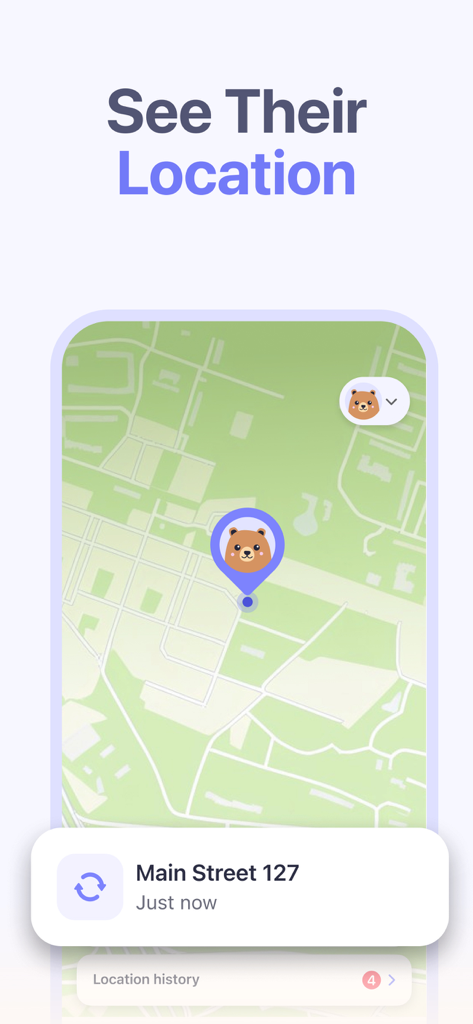
地図インターフェースで子供のリアルタイム位置情報追跡を表示するKidseeペアレンタルコントロールアプリ

地図インターフェースで子供のリアルタイム位置情報追跡を表示するKidseeペアレンタルコントロールアプリ

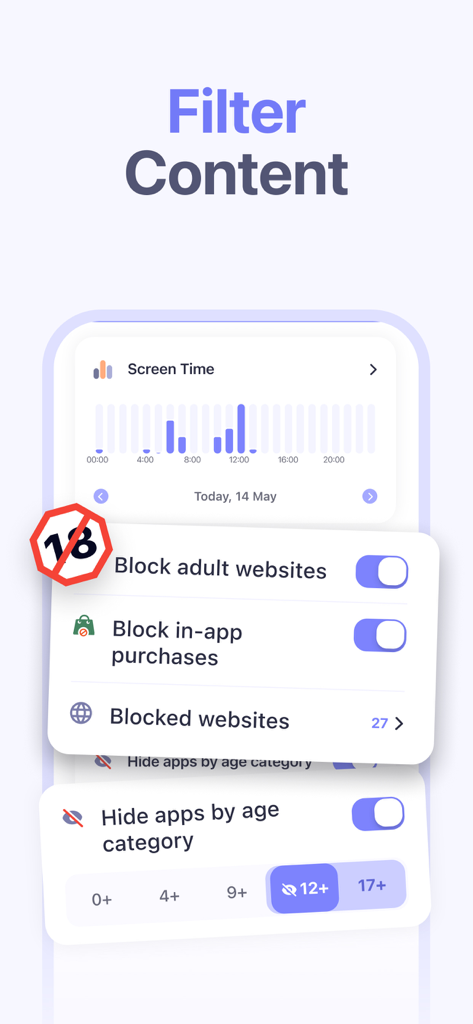
Kidseeアプリのインターフェースに、成人向けウェブサイトをブロックし、年齢カテゴリ別にアプリを非表示にする設定が表示されています

Kidseeアプリのインターフェースに、成人向けウェブサイトをブロックし、年齢カテゴリ別にアプリを非表示にする設定が表示されています

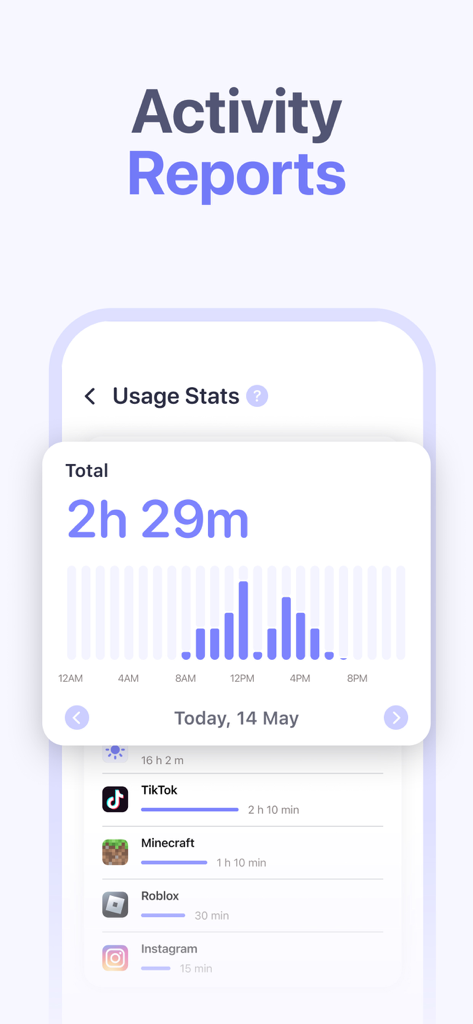
Kidseeアプリのダッシュボードに、TikTokやRobloxなどのアプリの毎日のスクリーンタイム使用状況とアクティビティレポートが表示されています。

Kidseeアプリのダッシュボードに、TikTokやRobloxなどのアプリの毎日のスクリーンタイム使用状況とアクティビティレポートが表示されています。

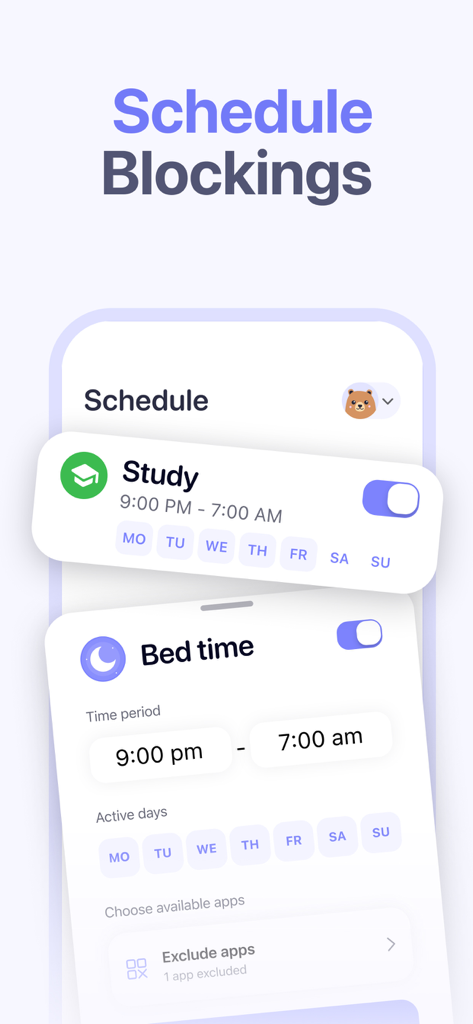
Kidseeアプリのインターフェースに、勉強時間と就寝時間のスケジュールブロック機能が表示されています

Kidseeアプリのインターフェースに、勉強時間と就寝時間のスケジュールブロック機能が表示されています

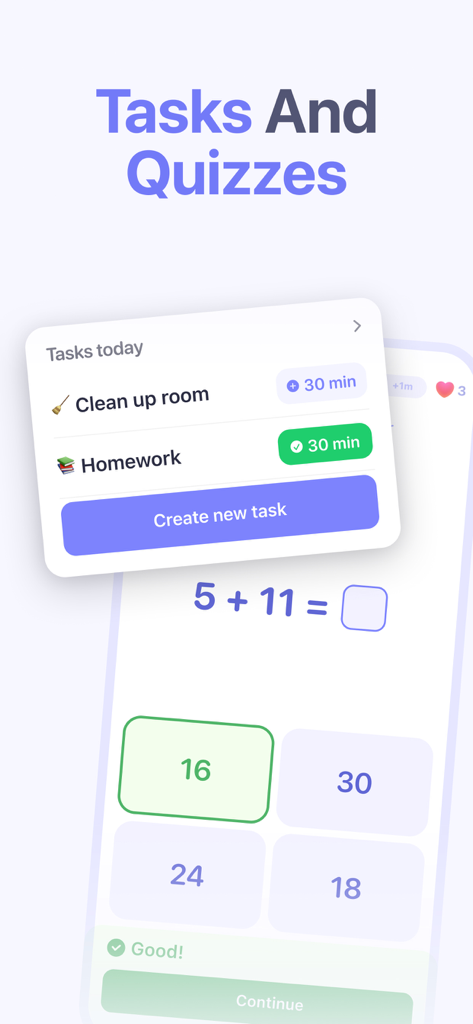
Kidseeアプリのインターフェースに、子供がスクリーンタイムの報酬を獲得するための毎日のタスクと数学クイズが表示されています

Kidseeアプリのインターフェースに、子供がスクリーンタイムの報酬を獲得するための毎日のタスクと数学クイズが表示されています

バランスの取れた子供時代のためのスマートな境界線

このアプリを際立たせるツール、 208K+ 人のユーザーが選択.

報酬ベースの責任

家事や宿題を報酬に変えましょう。子供たちがタスクを完了することで追加のスクリーンタイムを獲得できるようにし、無意識のスクロールよりも勤勉の価値を教えましょう。

📍

リアルタイムの安心

子供たちが探索する自由を与え、あなたは情報を得続けます。学校や友達の家への道中で子供たちが安全であることを確認するために、子供のライブ位置情報とルート履歴を追跡します。

スクリーンタイムの戦いを終わらせる

自動化された制限で「悪者」になるのをやめましょう。学校や就寝時間のためのアプリなしの時間スケジュールを設定し、自分のデバイスからワンタップで気を散らすアプリをブロックします。

世界中のユーザーに愛されています

Trusted by 208K+ 人がこのアプリを愛用しています.

"

"ついに、スクリーンタイムの戦いを報酬システムに変えるアプリが登場しました!私の8歳の娘は、マインクラフトの時間を稼ぐために、今では家事を手伝うことを求めています。iPhoneから両方の子どものスケジュールを管理できるようになったことは、私の毎日の正気にとって完全にゲームチェンジャーでした。"

サラ・ジェンキンス
"

"リアルタイムの位置情報追跡は、息子が学校から歩いて帰宅する際に、私に多くの安心感を与えてくれます。授業時間中に気を散らすアプリをブロックしながら、教育用ツールを使わせることができるのが気に入っています。安全性とデジタル独立性の完璧なバランスです。"

デビッド・トンプソン

レビュー分析

ユーザーレビューの分析.

感情スコア

25%
ネガティブ

概要

The app receives overwhelmingly negative feedback due to pervasive issues with its core functionality, such as unreliable screen time limits, inconsistent locking/unlocking mechanisms, and general operational failures. Many users express frustration over billing, citing unexpected charges, features locked behind paywalls, and the app not working even after payment, leading to a perceived poor value for money. Additional concerns include children easily bypassing controls, app instability, difficulties with initial setup, and inaccurate location tracking. While the app's parental control concept and responsive customer support are occasionally praised, these positive aspects are largely overshadowed by its significant technical problems.

主なテーマ

Core Functionality Issues(20)
Subscription & Pricing(10)
Screen Time Management(9)
App Stability(6)
Child Bypass(4)
Monitoring Capabilities(2)
Customer Support(1)

アプリについて

について知っておくべきこと Parental Control App - Kidsee.

説明

Kidsee is your trusted parental control assistant. It is an innovative app designed to keep your children safe and in control of their mobile device usage. A handy screen time tracker that helps parents see how much time their child spends playing games, in apps and on social media. Kidsee allows you to set time limits for your kids on various apps and games. Key features: - Monitoring Multiple Devices: Now you can track screen time and digital activity for not just one, but multiple children simultaneously. Manage all your children's devices from one parent phone by creating individual profiles for each child and setting personalized limits for each device. - Location Tracking: Monitor your child's real-time location and view their route history to ensure their safety. - Device Synchronization: Connect your child's devices to yours to access the information they need. Create and edit their profiles to customize settings for each child. - Set time limits: Define time limits for phone use by day of the week to keep a balance between fun and responsibilities. - Block apps: Block unwanted apps so your child can focus on school and other important tasks. - Usage Statistics: View detailed app usage statistics to understand your child's digital habits. Know which apps your child is using, at what time, and for how long. - Motivational Tasks: Create useful tasks for your child — for example, do homework, clean their room or help a younger sibling. For completing tasks, kids get extra screen time, which helps form responsible behavior and encourages good habits. - Push notifications: Receive notifications when usage time limits are reached to stay up to date with your child's activity. Kidsee is your trusted assistant in creating a safe and balanced digital world for kids! Installing Kidsee is an important step toward fostering responsible technology users. Download Kidsee and provide your children with a safe digital environment! Welcome to Kidsee! The app offers subscriptions - Payment for the subscription will be charged to your Apple ID account upon confirmation of purchase. - Subscriptions automatically renew unless auto-renewal is turned off at least 24 hours before the end of the current period. - Your account will be charged for renewal within 24 hours before the end of the current period, at the rate of the renewal. - You can manage subscriptions and turn off auto-renewal after purchase by going to the App Store account settings. - Subscriptions can be canceled at any time in your Apple ID settings. All prices include applicable local sales taxes. - If a trial period is offered, after the 3-day trial, the subscription will automatically renew at the regular rate unless canceled before the end of the 3-day trial period. - Any unused portion of the free trial period, if offered, will be forfeited when purchasing a subscription. If you have any technical issues, questions, or suggestions, you can always contact Kidsee support via email: support@kidsee.app Privacy Policy: https://www.kidsee.app/terms-and-conditions/privacy-policy Terms of Use: https://www.kidsee.app/terms-and-conditions/terms-of-use

最新バージョン

15.3

サイズ

156.6 MB

リリース日

2024年11月16日

今日のスクリーンタイムの戦いを終わらせる

20万以上の保護者がKidseeを利用して、健康的な習慣を奨励し、安全を確保し、家族のデジタルライフにバランスを取り戻しています。3日間の無料トライアルを今すぐ開始してください。

ダウンロード: App Store
FAQ

よくある質問

について知っておくべきこと Parental Control App - Kidsee

Kidseeアプリとは何ですか?

Kidseeは、子供たちの安全を守るために設計された革新的なペアレンタルコントロールアプリです。スクリーンタイムの追跡、アプリのブロック、位置情報の監視、そして責任あるデジタル習慣の奨励を通じて、モバイルデバイスの使用を管理するのに役立ちます。

Kidseeで子供の位置情報を追跡できますか?

はい、Kidseeはリアルタイムの位置情報追跡を提供します。保護者は、子供の現在の位置を監視し、アプリ内で直接ルート履歴を表示して、子供の安全を確保できます。

Kidseeでは保護者がスクリーンタイムの制限を設定できますか?

はい、Kidseeでは保護者が様々なアプリやゲームに対して子供の1日のスクリーンタイム制限を設定できます。この機能は、使用時間の境界を定義することで、楽しみと責任のバランスをとるのに役立ちます。

Kidseeはアプリの使用管理にどのように役立ちますか?

Kidseeを使用すると、保護者は不要なアプリをブロックして、子供たちの集中を助けることができます。また、子供たちがどのアプリを、いつ、どれくらいの時間使用しているかを示す詳細な使用状況統計も提供します。

Kidseeアプリは複数の子供のデバイスを監視できますか?

はい、Kidseeは複数のデバイスを同時に監視することをサポートしています。保護者は子供一人ひとりに個別のプロファイルを作成し、パーソナライズされた制限で1つの保護者用電話からすべてのデバイスを管理できます。

Kidseeは子供向けのモチベーション機能を提供していますか?

はい、Kidseeには「モチベーションタスク」が含まれています。子供たちは、宿題や片付けなどのタスクを完了することで追加のスクリーンタイムを獲得でき、責任ある行動と良い習慣を奨励します。

Kidseeのサブスクリプションはどのように機能しますか?

Kidseeはサブスクリプションを提供しており、購入確認時にApple IDに料金が請求されます。期間終了の24時間前までに自動更新をオフにしない限り、サブスクリプションは自動的に更新されます。

Kidseeのサブスクリプションをキャンセルできますか?

はい、Kidseeのサブスクリプションはいつでもキャンセルできます。購入後、Apple IDのアカウント設定でサブスクリプションを管理し、自動更新をオフにしてください。

Kidseeは無料トライアル期間を提供していますか?

はい、Kidseeは3日間の無料トライアルを提供する場合があります。この期間終了後、トライアル終了前にキャンセルしない限り、サブスクリプションは通常の料金で自動的に更新されます。

Kidseeはアプリの使用状況についてどのようなアクティビティレポートを生成しますか?

Kidseeは詳細なアプリ使用状況の統計レポートを生成します。これらのレポートは、子供がどのアプリを、いつ、どれくらいの時間使用しているかを示し、デジタル習慣についての洞察を提供します。

Kidseeはアダルトコンテンツやウェブサイトをブロックできますか?

はい、Kidseeでは保護者がアダルトウェブサイトをブロックすることでコンテンツをフィルタリングできます。この機能は、より安全なデジタル環境の作成を助け、子供たちのオンライン保護を保証します。

Kidseeサポートに連絡するにはどうすればよいですか?

技術的な問題、質問、または提案については、メールでKidseeサポートに連絡できます。サポートのメールアドレスはsupport@kidsee.appです。

Kidseeはアプリのブロックをスケジュールできますか?

はい、Kidseeはアプリのブロックをスケジュールする機能を提供しています。保護者は、特定のアプリが制限される1日の特定の時間帯または週の期間を定義できます。

Kidseeでアプリ内購入をブロックできますか?

はい、Kidseeはアプリ内購入をブロックするオプションを提供しています。この機能は、保護者が支出を管理し、子供による不正な取引を防ぐのに役立ちます。

Kidseeはスクリーンタイム制限について保護者に通知しますか?

はい、Kidseeはプッシュ通知を送信します。子供が使用時間制限に達すると、保護者はアラートを受け取り、子供の活動について最新情報を把握できます。