Address Label Creator

Address Label Creator

다운로드: App Store
Spark by MWM logo
로고: Address Label Creator
주소 라벨 생성기: 완벽하게 정렬된 전문 라벨

편지 병합의 번거로움에서 벗어나세요. Mac 또는 iPad에서 Avery 용지에 딱 맞는 정밀한 정렬로 멋진 맞춤형 주소 및 배송 라벨을 디자인할 수 있습니다. 소규모 비즈니스, Etsy 판매자 및 정돈된 가정을 위해 완벽합니다.

다운로드: App Store

개발사

Gilbert Hansen

카테고리

Business

다운로드

17K+

사용자 평점

1.6/5

총 평가 수

0

지원 언어

1

완벽함의 미리보기

이 인터페이스를 사용하는 17K+ 명의 사용자.

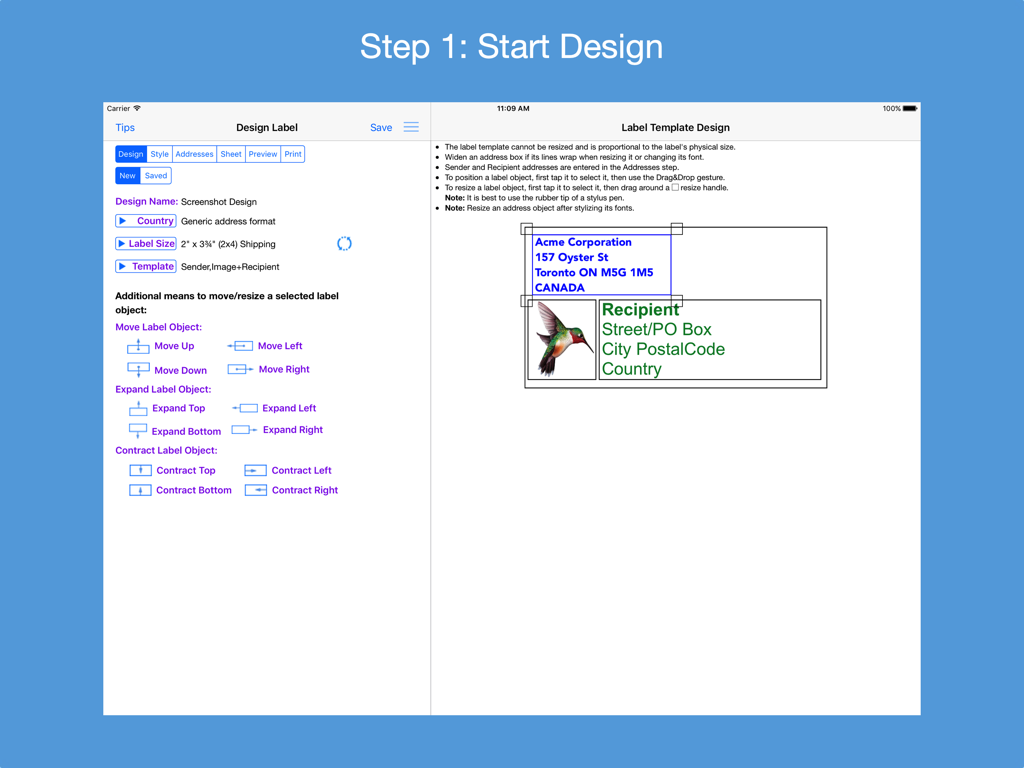
디자인 도구와 라벨 템플릿 미리보기를 보여주는 주소 라벨 생성기의 iPad 인터페이스.

디자인 도구와 라벨 템플릿 미리보기를 보여주는 주소 라벨 생성기의 iPad 인터페이스.

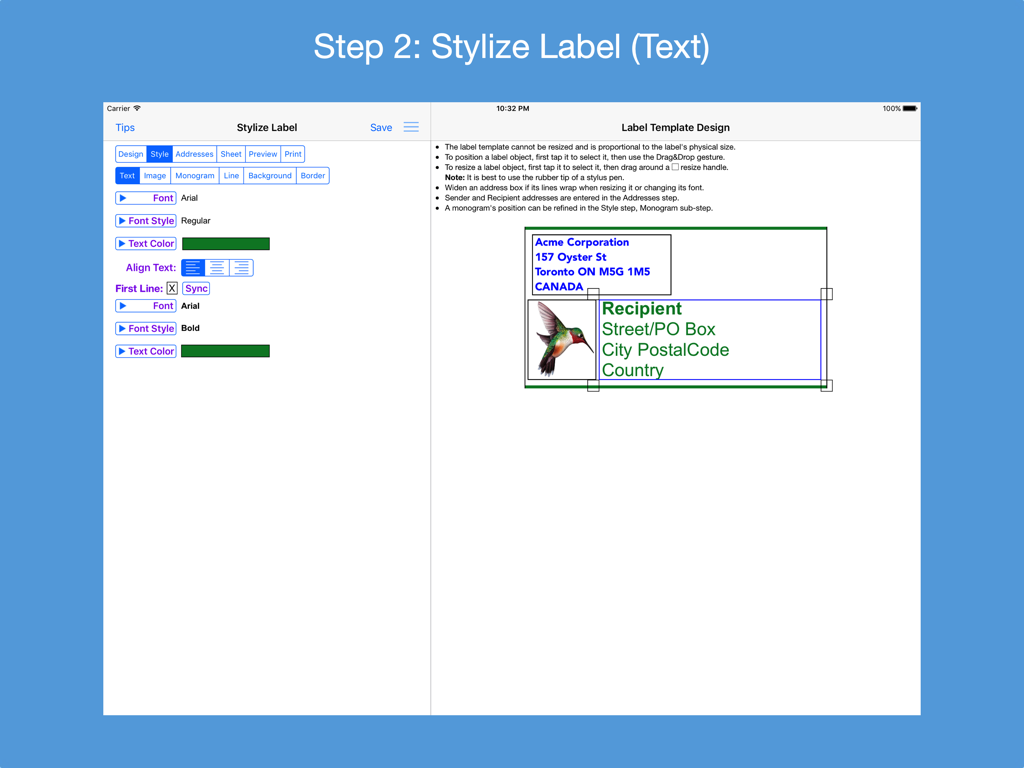
미리보기와 함께 라벨 텍스트 스타일을 지정하는 주소 라벨 생성기 앱의 2단계를 보여주는 iPad 스크린샷

미리보기와 함께 라벨 텍스트 스타일을 지정하는 주소 라벨 생성기 앱의 2단계를 보여주는 iPad 스크린샷

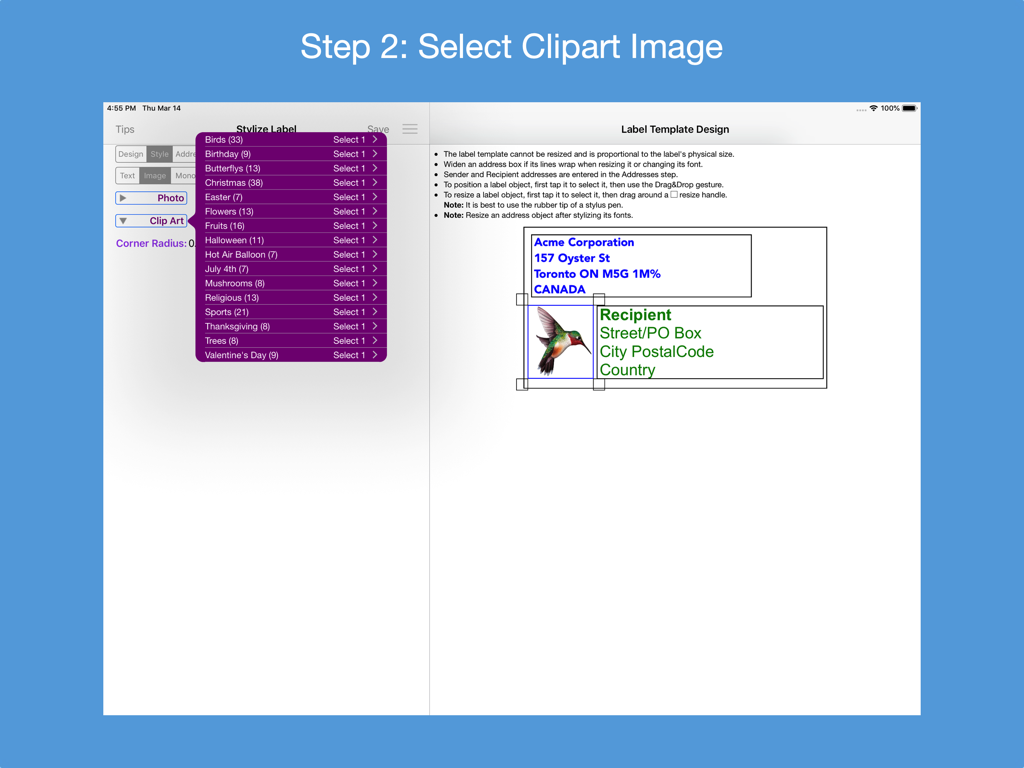
벌새 일러스트레이션이 포함된 맞춤형 주소 라벨 디자인을 위한 클립아트 선택 화면을 보여주는 iPad 앱 인터페이스

벌새 일러스트레이션이 포함된 맞춤형 주소 라벨 디자인을 위한 클립아트 선택 화면을 보여주는 iPad 앱 인터페이스

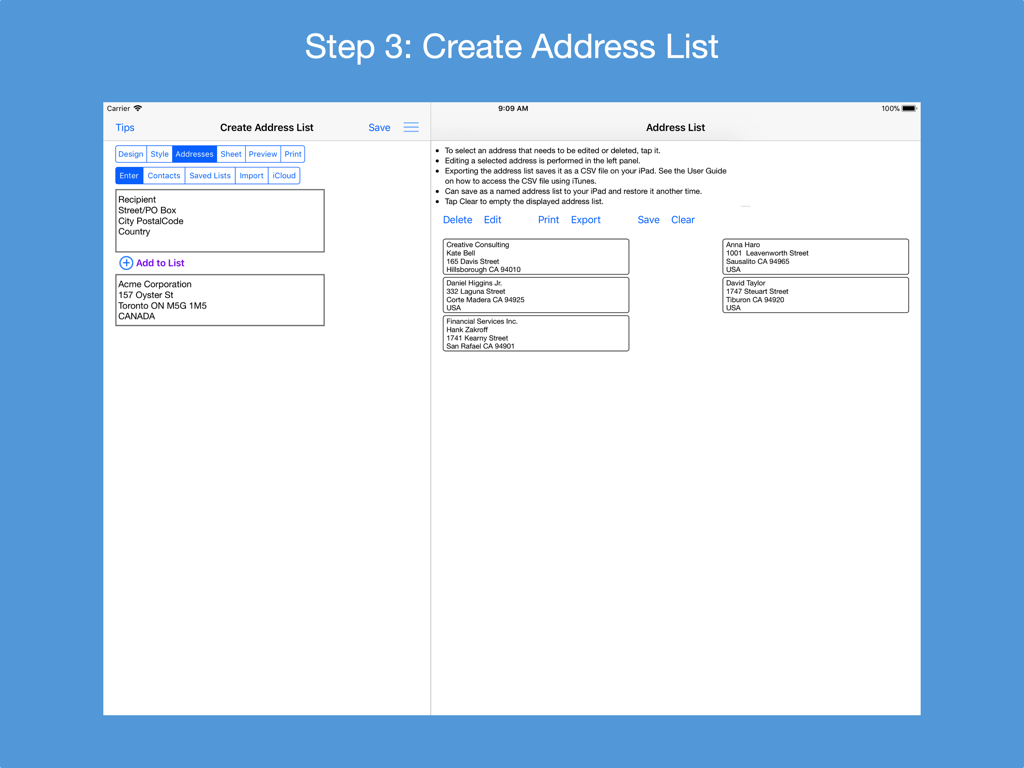
iPad에서 주소 목록을 생성하고 관리하는 인터페이스를 보여주는 주소 라벨 생성기 앱의 스크린샷.

iPad에서 주소 목록을 생성하고 관리하는 인터페이스를 보여주는 주소 라벨 생성기 앱의 스크린샷.

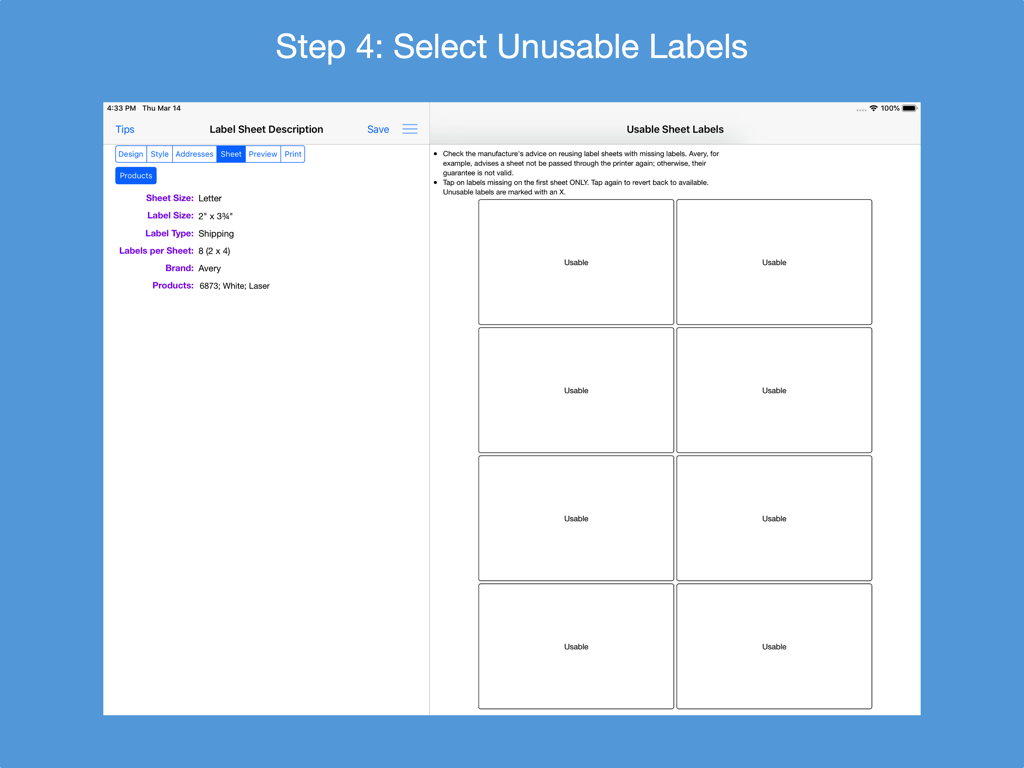
주소 라벨 생성기 앱에서 배송 용지의 사용 가능한 라벨과 사용 불가능한 라벨을 표시하는 인터페이스

주소 라벨 생성기 앱에서 배송 용지의 사용 가능한 라벨과 사용 불가능한 라벨을 표시하는 인터페이스

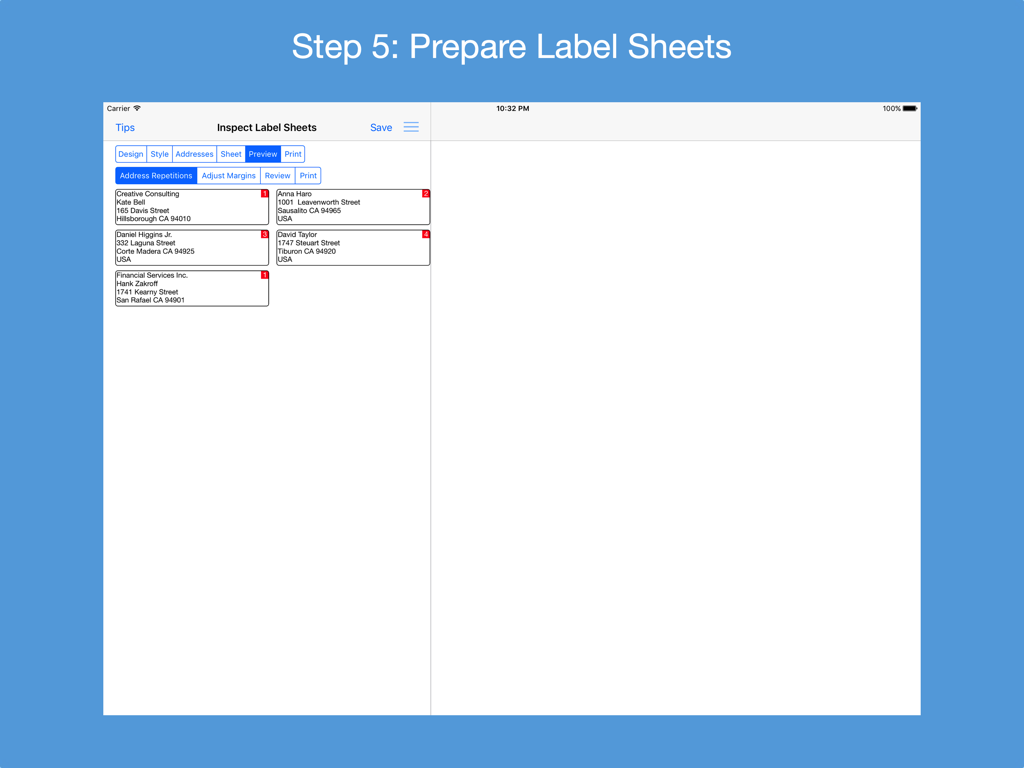
iPad에서 주소 미리보기와 함께 라벨 용지 준비 단계를 보여주는 주소 라벨 생성기 앱 인터페이스.

iPad에서 주소 미리보기와 함께 라벨 용지 준비 단계를 보여주는 주소 라벨 생성기 앱 인터페이스.

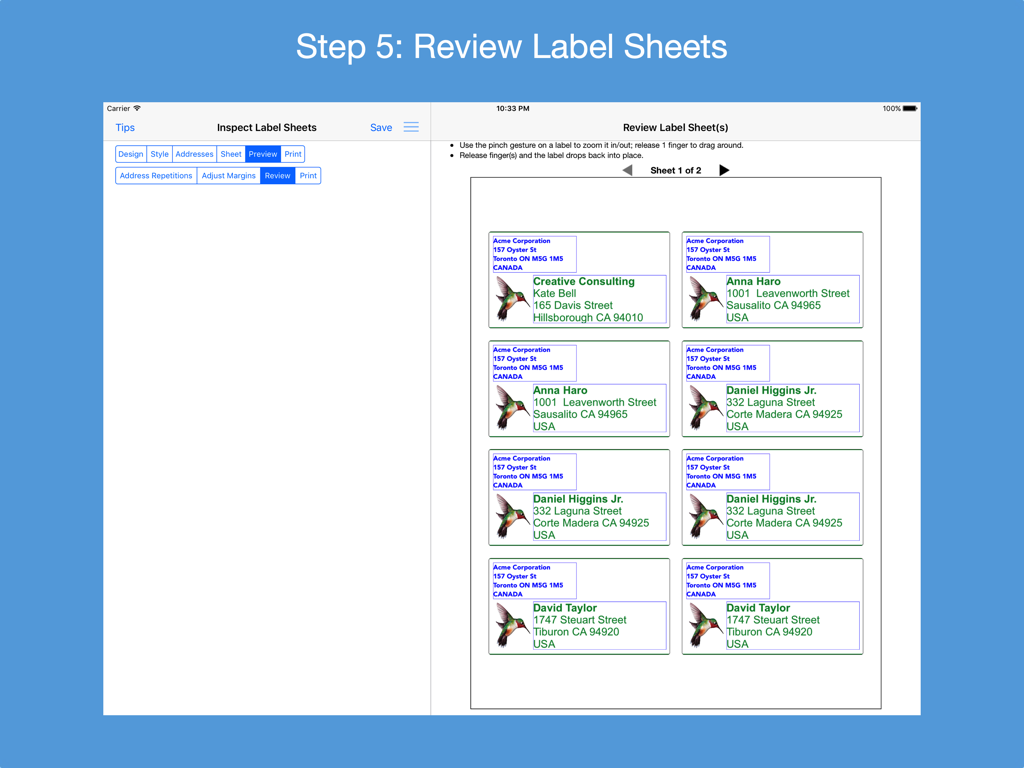
여러 개의 맞춤형 주소 라벨이 포함된 인쇄 가능한 용지 미리보기를 보여주는 iPad 화면

여러 개의 맞춤형 주소 라벨이 포함된 인쇄 가능한 용지 미리보기를 보여주는 iPad 화면

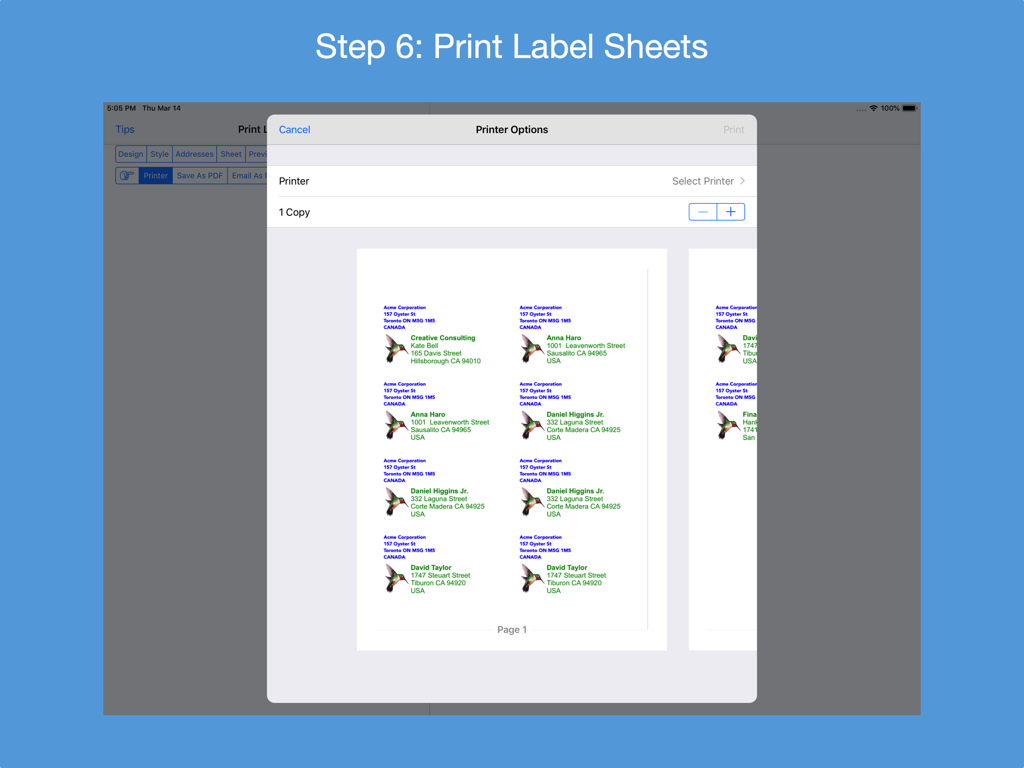
일러스트레이션이 포함된 맞춤형 주소 라벨 미리보기를 보여주는 iPad의 주소 라벨 생성기 앱 프린터 옵션 화면

일러스트레이션이 포함된 맞춤형 주소 라벨 미리보기를 보여주는 iPad의 주소 라벨 생성기 앱 프린터 옵션 화면

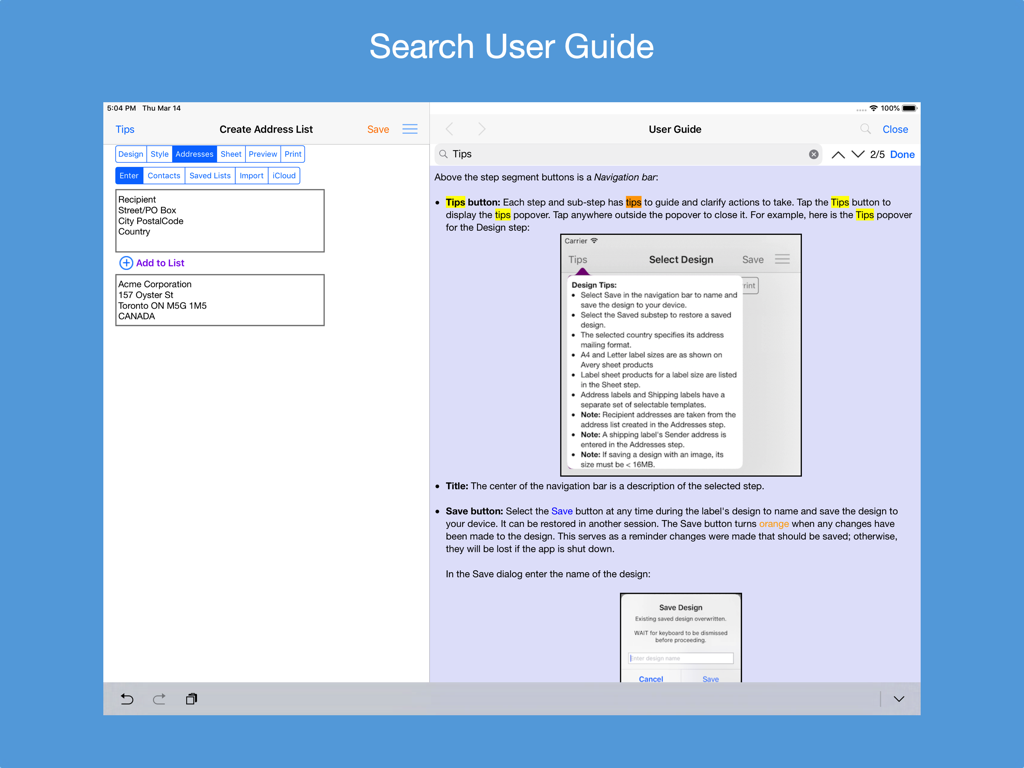
iPad의 주소 라벨 생성기 앱에서 주소 목록 생성 화면 옆에 검색 가능한 사용자 가이드를 보여주는 스크린샷.

iPad의 주소 라벨 생성기 앱에서 주소 목록 생성 화면 옆에 검색 가능한 사용자 가이드를 보여주는 스크린샷.

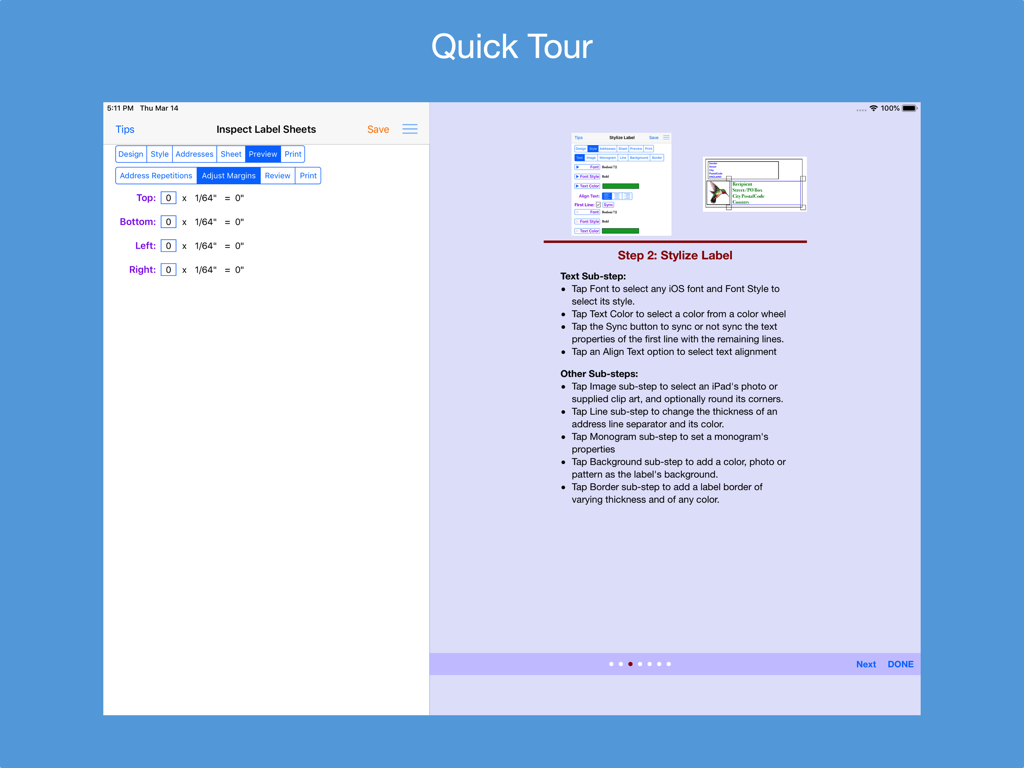
여백 조정 설정 및 스타일링 지침을 보여주는 주소 라벨 생성기의 빠른 둘러보기 화면

여백 조정 설정 및 스타일링 지침을 보여주는 주소 라벨 생성기의 빠른 둘러보기 화면

전문적인 라벨링을 손쉽게

이 앱을 돋보이게 하는 도구, 17K+ 명의 사용자가 선택.

🎯

완벽한 인쇄 정렬

용지 낭비의 좌절감을 끝내세요. 여백을 미세 조정하고 레이아웃 미리보기를 사용하여 Avery 및 표준 US 용지의 모든 라벨이 완벽하게 정렬되도록 합니다.

스마트 주소 가져오기

수동 입력을 건너뛰세요. 연락처, CSV 스프레드시트 또는 iCloud 파일을 간편하게 가져와 몇 번의 탭만으로 수백 개의 라벨을 생성할 수 있습니다.

🎨

맞춤형 브랜드 스타일링

전문적인 모노그램, 맞춤형 글꼴, 로고 통합을 통해 소규모 비즈니스나 가정 정리의 품격을 높이고 고급스러운 룩을 완성하세요.

전 세계 사용자들에게 사랑받는 앱

Trusted by 17K+ 명이 이 앱을 사랑합니다.

"

"마침내 제 소규모 비즈니스에 실제로 도움이 되는 솔루션을 찾았습니다! iPad에서 이 앱을 사용해 Etsy 주문용 브랜드 배송 라벨을 인쇄합니다. CSV 가져오기가 매끄럽고, 여백 조정 도구 덕분에 낭비되는 Avery 용지 비용을 많이 아꼈습니다."

Sarah Jenkins, 소규모 비즈니스 소유자
"

"저희 가족의 모든 연말연시 카드에 이 앱을 사용했는데 결과가 정말 멋졌습니다. 맞춤형 글꼴을 선택하고 모노그램을 추가할 수 있어 우편물이 돋보였습니다. 미리보기 모드 덕분에 첫 시도에 모든 라벨이 완벽하게 정렬되었습니다. 정리를 중요하게 생각하는 분들에게 필수 아이템입니다."

Michael Thompson, 가족 코디네이터

앱 소개

에 대해 알아야 할 모든 것 Address Label Creator.

설명

Design custom address and shipping labels from predefined templates. Populate label sheet with addresses from an address list constructed from manual entries, contacts, saved lists and/or spreadsheets, each with its own repetition count. Preview the label sheets before printing. Save design and address list to device. Supports all Avery A4 and Letter return address, address and shipping label products plus all Unistat and Herma rectangular A4 label products. Features: * Step-by-step workflow, each with 1 or more sub-steps: STEP 1: Start new design or restore saved design * Select a country postal format from a list of 58 countries * Select an A4 or Letter return address, address or shipping label size * Turn an address label into a shipping label and vice versa * Select a provided label template * Position and resize label objects using gestures and/or buttons STEP 2: Stylize label * Use any available iOS font or supplied font and its font styles * Text can be any color selected from a color wheel or entered as a hexadecimal value * The first line of text can have its own text properties distinct from those of the remaining lines * Select images from device photos or supplied clip art * Select monogram's font, letter and color, and optionally encase in a circle or oval frame * A shipping address line separator can be of varying thickness and of any color * An optional label background can be any color, device photo or supplied pattern of varying opacity. The pattern can be scaled. * An optional label border can be of varying thickness and of any color STEP 3: Construct address list * Build a list of addresses by 1) entering them manually; 2) selecting contacts with addresses; 3) selecting a saved address list; 4) importing addresses in a CSV file on iPad; 5) importing addresses in a CSV file on iCloud Drive and/or 6) exporting an address spreadsheet as a CSV file and transferring it to the app. * Manage address list - edit or delete an address; print, export to a CSV spreadsheet or clear the list * Save address list to device; restore later STEP 4: Examine label sheet’s product specifications; mark unusable labels on 1st sheet STEP 5: Preview label sheets * Specify how many times each address is to be replicated on the label sheets * Adjust sheet margins when printed results are not perfectly aligned * Review label sheets for alignment accuracy before printing to label sheet * Print outlined labels and overlay on label sheet to check label content lines up correctly STEP 6: Print label sheets to an AirPrint enabled printer, save to a PDF file or e-mail as a PDF for printing later or elsewhere. PDF needed for borderless printing. * The User Guide provides instructions on how to best print the label PDF file and do borderless printing. * Save design to device and restore another time * Detailed User Guide with FAQs within app and on support website verusapps.com. Within the app it can be searched for keywords and phrases. * The Quick Guide and Quick Tour, viewable on-demand, provide a way to quickly learn how to use the app. The app requires permission to access Contacts and Photos on the device; otherwise, an address cannot be selected from Contacts and a label image cannot be selected from Photos. Send e-mail to support@verusapps.com to report issues, make improvement suggestions or ask questions. The app's Privacy Policy is available at http://verusapps.com/index.php/privacy-policy-for-address-label-creator/

최신 버전

4.8.0

크기

179.3 MB

출시일

2016년 9월 23일

번거로움 없이 전문적인 라벨을 인쇄할 준비가 되셨나요?

매번 완벽한 정렬을 위해 주소 라벨 생성기를 신뢰하는 17,000명 이상의 기업가 및 가정 정리 전문가들과 함께하세요. 지금 iPad 또는 Mac에서 시작해 보세요.

다운로드: App Store