Authenticator App ℗

Authenticator App ℗

다운로드: App Store
Spark by MWM logo
로고: Authenticator App ℗

인증 앱 ℗: 전문가급 2FA 및 비밀번호 관리로 디지털 세상을 안전하게 보호하세요

온라인 신원을 보호하는 가장 안전하고 직관적인 방법. 암호화된 iCloud 백업을 통해 iPhone, iPad 및 Apple Watch에서 원활하게 동기화하여 완벽한 마음의 평화와 잠금 위험 제로를 경험하세요.

개발사

RHO DEVELOPERS LLC

카테고리

Productivity

다운로드

303K+

사용자 평점

4.5/5

총 평가 수

700

지원 언어

7

한눈에 보는 보안

이 인터페이스를 사용하는 303K+ 명의 사용자.

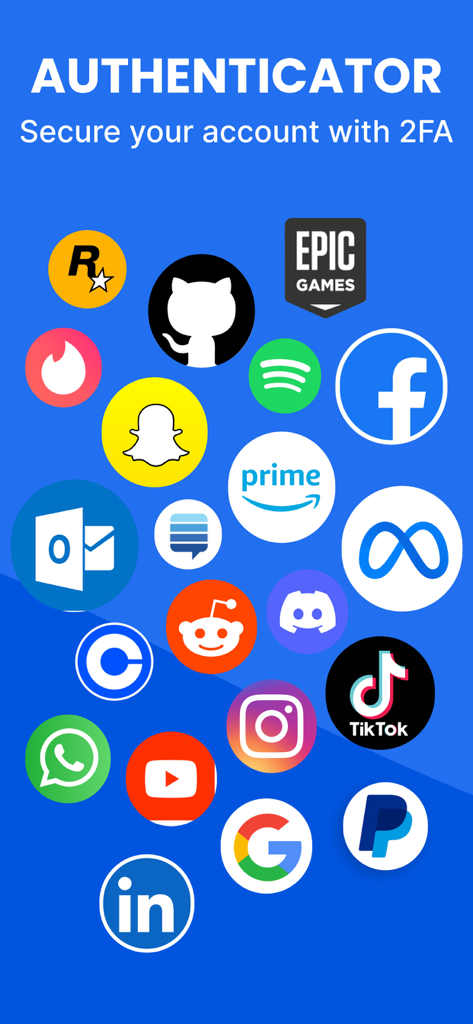
인증 앱에서 2단계 인증을 지원하는 Facebook, Google, TikTok과 같은 인기 플랫폼 아이콘 모음

인증 앱에서 2단계 인증을 지원하는 Facebook, Google, TikTok과 같은 인기 플랫폼 아이콘 모음

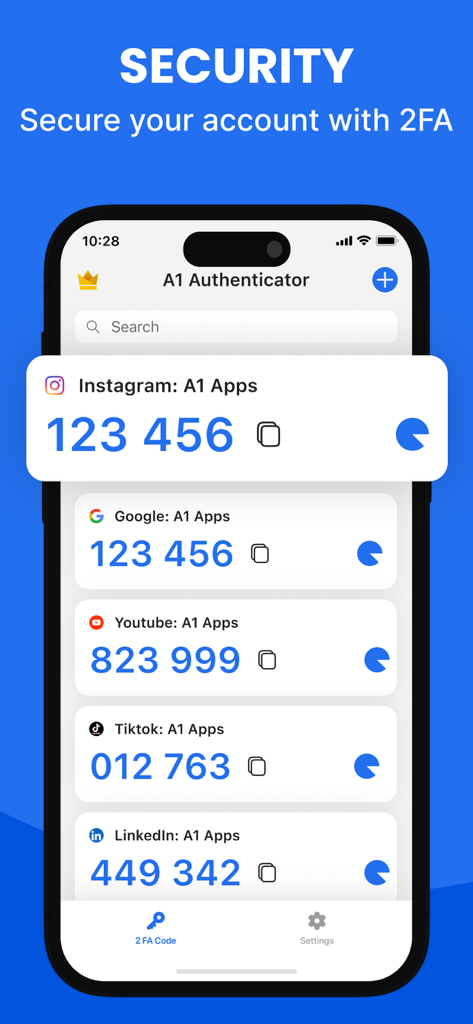
Instagram, Google, TikTok과 같은 계정에 대한 다양한 2FA 인증 코드를 표시하는 스마트폰 화면.

Instagram, Google, TikTok과 같은 계정에 대한 다양한 2FA 인증 코드를 표시하는 스마트폰 화면.

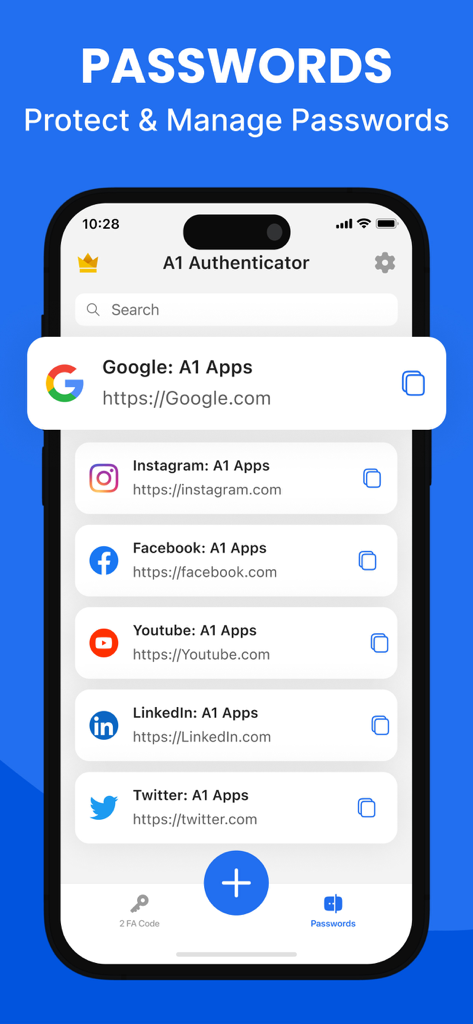
저장된 소셜 미디어 계정 목록이 있는 인증 앱의 비밀번호 관리 기능을 보여주는 스마트폰 디스플레이.

저장된 소셜 미디어 계정 목록이 있는 인증 앱의 비밀번호 관리 기능을 보여주는 스마트폰 디스플레이.

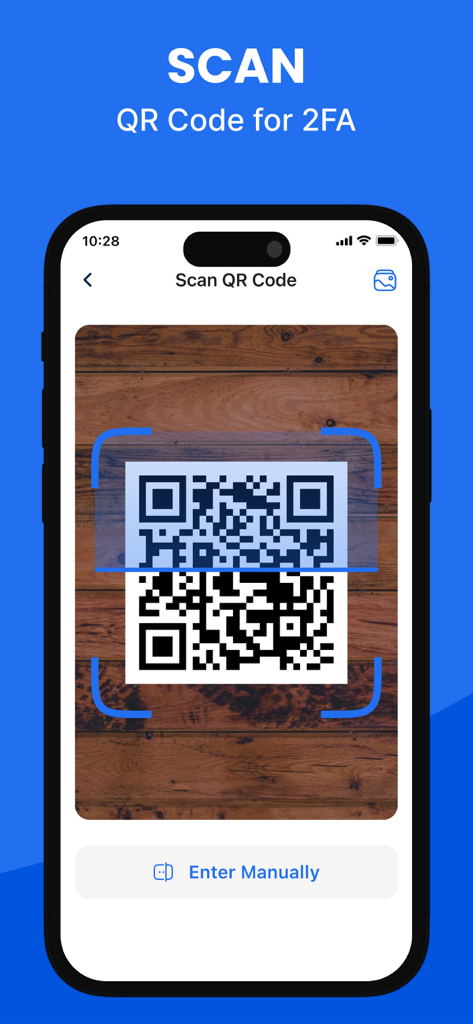
인증 앱에서 2단계 인증 설정을 위해 QR 코드를 스캔하는 iPhone.

인증 앱에서 2단계 인증 설정을 위해 QR 코드를 스캔하는 iPhone.

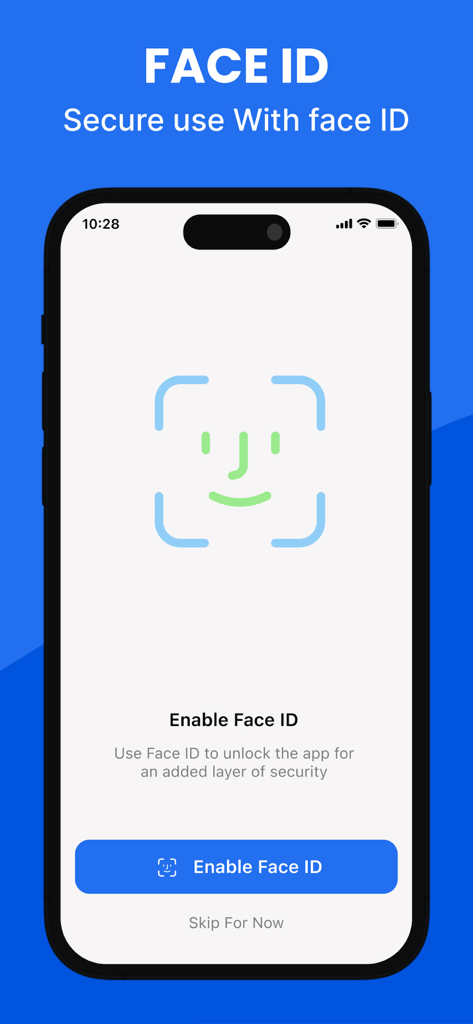
인증 앱의 Face ID 생체 인식 보안 설정 화면

인증 앱의 Face ID 생체 인식 보안 설정 화면

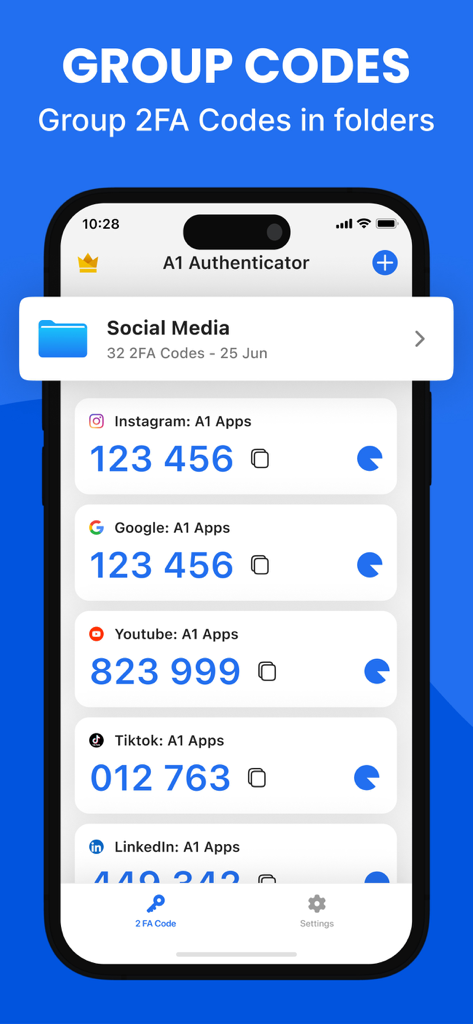
인증 앱의 스크린샷으로 소셜 미디어 폴더로 구성된 2FA 코드 표시

인증 앱의 스크린샷으로 소셜 미디어 폴더로 구성된 2FA 코드 표시

금고 수준의 보안, 당신을 위해 단순화되었습니다

이 앱을 돋보이게 하는 도구, 303K+ 명의 사용자가 선택.

어디서든 즉시 액세스

홈 화면 위젯 또는 Apple Watch를 사용하여 순식간에 인증하세요. 휴대폰을 뒤지는 것을 멈추고 전문적인 흐름을 유지하세요.

☁️

제로 지식 iCloud 동기화

다시는 액세스를 잃을까 걱정하지 마세요. 2FA 키는 종단 간 암호화되어 개인 iCloud에 자동으로 백업되므로 기기 업그레이드가 용이합니다.

📂

올인원 보안 허브

여러 앱을 버리세요. FaceID와 군사 등급 암호화로 보호되는 정리된 폴더에서 복잡한 비밀번호와 2FA 코드를 관리하세요.

전 세계 사용자들에게 사랑받는 앱

Trusted by 303K+ 명이 이 앱을 사랑합니다.

"

"드디어 휴대폰을 바꿀 때 당황하지 않게 해주는 인증 앱입니다! iCloud 백업과 Apple Watch 지원은 제 워크플로우에 혁신을 가져왔습니다. 업무를 멈추지 않고 손목에서 바로 코드를 가져올 수 있습니다. 제가 사용해 본 가장 원활한 보안 도구입니다."

Sarah J., Creative Director
"

"업무 및 개인 계정을 폴더로 구성할 수 있다는 점이 마음에 듭니다. 사용자 정의 아이콘 덕분에 올바른 코드를 즉시 찾을 수 있습니다. 또한 하나의 암호화된 앱에서 비밀번호 관리자와 2FA를 사용할 수 있어 디지털 라이프가 완전히 깔끔해졌습니다. FaceID 보호 기능 덕분에 진정한 마음의 평화를 얻었습니다."

David L., Software Engineer

앱 소개

에 대해 알아야 할 모든 것 Authenticator App ℗.

설명

Authenticator App – Secure Accounts and Passwords Authenticator App helps you protect your accounts from unauthorized access by adding an extra layer of security through two-factor and multi-factor authentication. Easily manage your 2FA codes, passwords, and login credentials with a user-friendly, encrypted system built for security and privacy. Secure & Private All of your data in Authenticator App is always encrypted locally and in iCloud, ensuring that only you can access it. Our end-to-end encryption means that not even we can see your codes or passwords. Built-in Password Manager Authenticator App is more than just a 2FA authenticator. Store and manage all your passwords in one secure place. Get instant alerts for leaked credentials and breaches, along with detailed password health reports to keep your accounts safe and organized. 2FA Encrypted Backup Automatically back up your 2FA codes, secret keys, and passwords to iCloud with secure encryption. Easily restore access when switching devices or sync across multiple devices for seamless access. Sync Across Devices Keep your authentication codes and passwords synchronized across all your devices. Once linked to your online accounts, the app securely shares your data across iPhone, iPad, and other supported devices. Import From Other Apps Switching to Authenticator App is simple. Import your 2FA codes from apps like Microsoft Authenticator or Google Authenticator using QR code scanning or CSV file upload — all in just one tap. Export Anytime Need a backup? Easily export all your 2FA codes and accounts from Authenticator App via QR code or CSV file. Your data, your control. Quick Access with Home Screen Widget View and copy your 2FA codes instantly from your device’s Home Screen using the Authenticator App widget — enabling faster, one-tap authentication without opening the app. Apple Watch Support Access your 2FA codes directly on your Apple Watch. Whether you’re logging in on your computer or phone, your watch gives you instant access to your authentication codes without reaching for another device. A seamless way to stay secure on the go. Organize with Folders Create folders to categorize your 2FA accounts and passwords. Easily manage, move, and sort your data with a simple drag-and-drop interface. Custom Icons Quickly recognize your accounts by assigning custom or auto-detected service icons. Authenticator App automatically fetches icons for easy identification. App Lock & Biometric Security Protect your app with a 4-digit PIN, Face ID, or Touch ID. Enable auto-lock after inactivity to ensure only you can access your authenticator codes and password manager securely. Supports All Major Services Compatible with thousands of platforms including Google, Facebook, Instagram, Amazon, Microsoft, Twitter, Dropbox, Reddit, PayPal, Zoom, Uber, and more. Download Authenticator App Today Take control of your online security and protect your digital life with the most secure and user-friendly Authenticator App-2FA & Password Manager. Start now and keep your accounts safe from unauthorised access. Privacy Policy: https://sites.google.com/a1apps.co/privacypolicy-aiauthenticator/home Terms of Use: https://blog.a1apps.co/terms-of-use-a1-authenticator/

최신 버전

1.1.26

크기

175.9 MB

출시일

2024년 7월 10일

완벽한 자신감으로 디지털 라이프를 안전하게 보호하세요

군사 등급 암호화와 Apple 스타일의 단순성이 완벽하게 조화를 이루는 경험을 하세요. 계정 잠금 또는 비밀번호 분실에 대해 더 이상 걱정하지 않는 300,000명 이상의 전문가들과 함께하세요.

다운로드: App Store
FAQ

자주 묻는 질문

에 대해 알아야 할 모든 것 Authenticator App ℗

Authenticator App ℗란 무엇인가요?

Authenticator App ℗는 2단계 및 다단계 인증으로 계정을 보호합니다. 사용자 친화적이고 암호화된 개인 정보 보호 중심 시스템을 사용하여 2FA 코드, 비밀번호 및 로그인 자격 증명을 안전하게 관리합니다.

Authenticator App ℗는 안전하고 비공개인가요?

예, Authenticator App ℗는 종단 간 암호화를 사용하여 모든 데이터를 로컬 및 iCloud에 암호화합니다. 이를 통해 귀하만이 코드와 비밀번호에 액세스할 수 있어 완전한 개인 정보 보호와 보안을 보장합니다.

Authenticator App ℗에 비밀번호 관리자가 포함되어 있나요?

예, Authenticator App ℗에는 비밀번호 관리자가 내장되어 있습니다. 모든 비밀번호를 저장 및 관리하고, 유출된 자격 증명에 대한 경고를 제공하며, 계정 안전 강화를 위한 비밀번호 상태 보고서를 제공합니다.

Authenticator App ℗에서 2FA 코드를 백업할 수 있나요?

예, Authenticator App ℗는 안전한 암호화를 사용하여 iCloud에 2FA 코드, 비밀 키 및 비밀번호를 자동으로 백업합니다. 이를 통해 여러 장치에서 쉽게 복원하고 원활하게 액세스할 수 있습니다.

Authenticator App ℗는 장치 간에 동기화되나요?

예, Authenticator App ℗는 모든 장치에서 인증 코드와 비밀번호를 동기화합니다. 온라인 계정이 연결되면 iPhone, iPad 및 기타 지원되는 장치 전체에서 데이터가 안전하게 공유됩니다.

Authenticator App ℗로 2FA 코드를 가져오려면 어떻게 해야 하나요?

사용자는 Microsoft 또는 Google Authenticator와 같은 다른 앱에서 Authenticator App ℗로 2FA 코드를 가져올 수 있습니다. 이는 QR 코드 스캔 또는 CSV 파일 업로드를 통해 한 번의 탭으로 쉽게 수행할 수 있습니다.

Authenticator App ℗에서 2FA 코드를 내보낼 수 있나요?

예, Authenticator App ℗를 사용하면 모든 2FA 코드와 계정을 내보낼 수 있습니다. QR 코드 또는 CSV 파일을 통해 수행할 수 있으며 완전한 데이터 제어 및 백업 기능을 제공합니다.

Authenticator App ℗에 홈 화면 위젯이 있나요?

예, Authenticator App ℗는 홈 화면 위젯을 제공합니다. 이를 통해 앱을 열지 않고도 장치의 홈 화면에서 직접 2FA 코드를 즉시 보고 복사할 수 있어 더 빠르고 한 번의 탭으로 인증할 수 있습니다.

Authenticator App ℗는 Apple Watch와 호환되나요?

예, Authenticator App ℗는 Apple Watch를 지원합니다. 사용자는 시계에서 직접 2FA 코드에 액세스할 수 있어 다른 장치를 가져올 필요 없이 즉시 인증 액세스를 제공합니다.

Authenticator App ℗에서 계정을 어떻게 구성할 수 있나요?

Authenticator App ℗는 사용자가 2FA 계정 및 비밀번호를 폴더로 구성할 수 있도록 합니다. 간단한 드래그 앤 드롭 인터페이스를 통해 데이터를 효율적으로 관리, 이동 및 정렬할 수 있습니다.

Authenticator App ℗는 계정에 사용자 지정 아이콘을 지원하나요?

예, Authenticator App ℗는 사용자 지정 아이콘을 지원하고 서비스 아이콘을 자동으로 가져옵니다. 이 기능은 앱 내에서 간소화된 관리를 위해 계정을 빠르게 인식하는 데 도움이 됩니다.

Authenticator App ℗는 애플리케이션 자체를 어떻게 보호하나요?

Authenticator App ℗는 4자리 PIN, Face ID 또는 Touch ID로 액세스를 보호합니다. 또한 비활성 후 자동 잠금 기능이 포함되어 있어 승인된 사용자만 코드 및 비밀번호 관리자에 액세스할 수 있습니다.

Authenticator App ℗는 2FA에 어떤 서비스를 지원하나요?

Authenticator App ℗는 2FA에 수천 개의 플랫폼을 지원합니다. 여기에는 Google, Facebook, Instagram, Amazon, Microsoft, Twitter, Dropbox, Reddit, PayPal, Zoom 및 Uber와 같은 주요 서비스가 포함됩니다.