BenguFarm Mobile

BenguFarm Mobile

다운로드: App Store
Spark by MWM logo
로고: BenguFarm Mobile

BenguFarm 모바일: 크러시에서 현장까지 정밀 가축 관리

이중 입력을 없애고 자신 있게 무리를 관리하세요. EID 판독기 통합 및 PC 동기화 기능을 통해 오프라인 상태에서도 체중, 건강 기록 및 혈통 데이터를 캡처할 수 있습니다.

다운로드: App Store

개발사

Tim Pauw

카테고리

Business

다운로드

5K+

사용자 평점

1.0/5

총 평가 수

0

지원 언어

-

당신의 무리, 시각화되다

이 인터페이스를 사용하는 5K+ 명의 사용자.

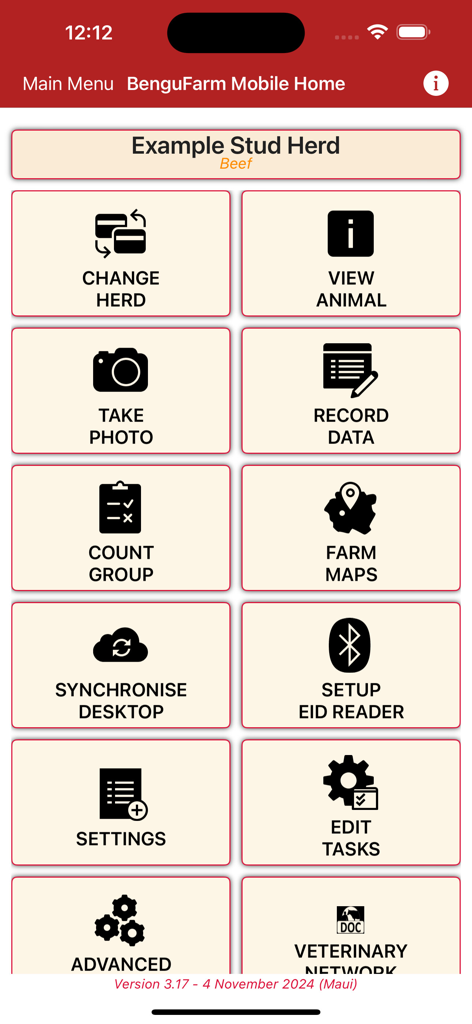
BenguFarm 모바일 앱 홈 화면, 가축 및 무리 관리를 위한 메인 메뉴 표시

BenguFarm 모바일 앱 홈 화면, 가축 및 무리 관리를 위한 메인 메뉴 표시

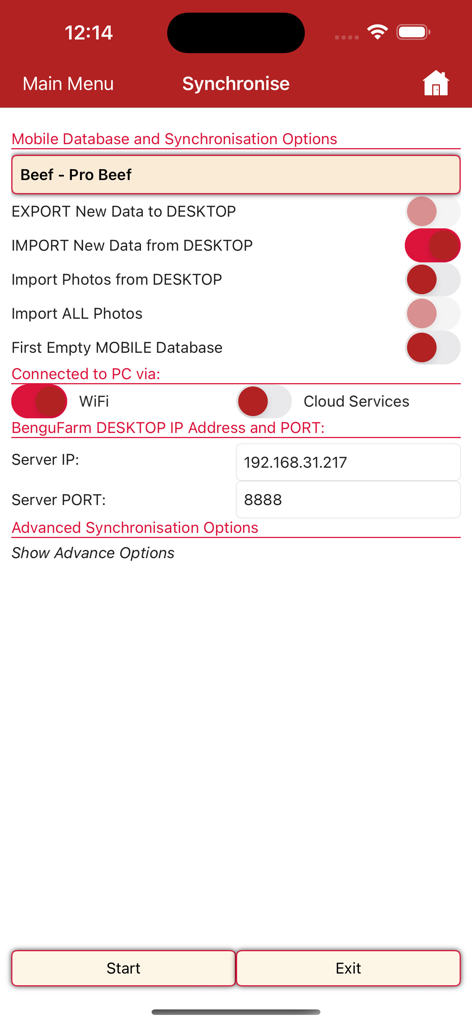
BenguFarm 모바일 앱의 가축 관리를 위한 동기화 메뉴, 모바일 및 데스크톱 간 데이터 전송 옵션 표시

BenguFarm 모바일 앱의 가축 관리를 위한 동기화 메뉴, 모바일 및 데스크톱 간 데이터 전송 옵션 표시

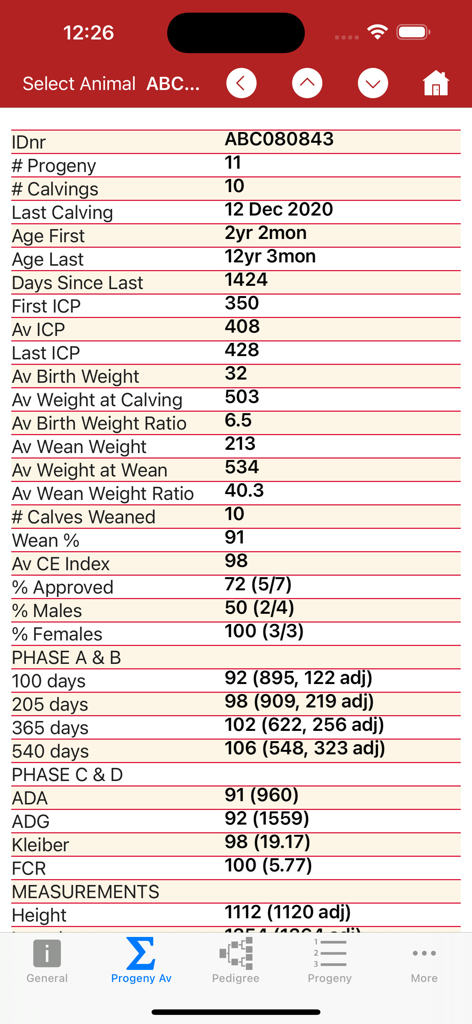
BenguFarm 모바일 앱 인터페이스, 개별 동물의 상세한 후손 및 성능 통계 표시

BenguFarm 모바일 앱 인터페이스, 개별 동물의 상세한 후손 및 성능 통계 표시

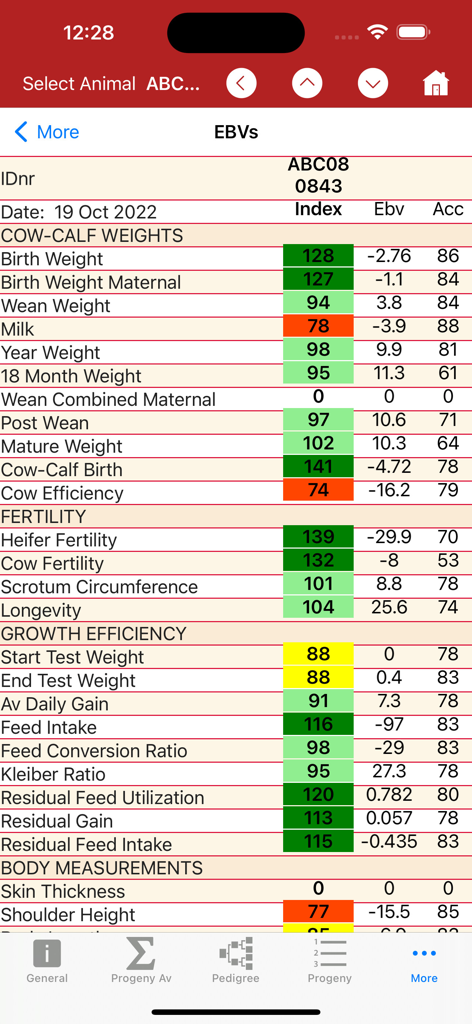
BenguFarm 모바일 앱의 상세 가축 데이터 화면, 소 체중 번식력 및 성장 효율성에 대한 추정 번식 가치 표시

BenguFarm 모바일 앱의 상세 가축 데이터 화면, 소 체중 번식력 및 성장 효율성에 대한 추정 번식 가치 표시

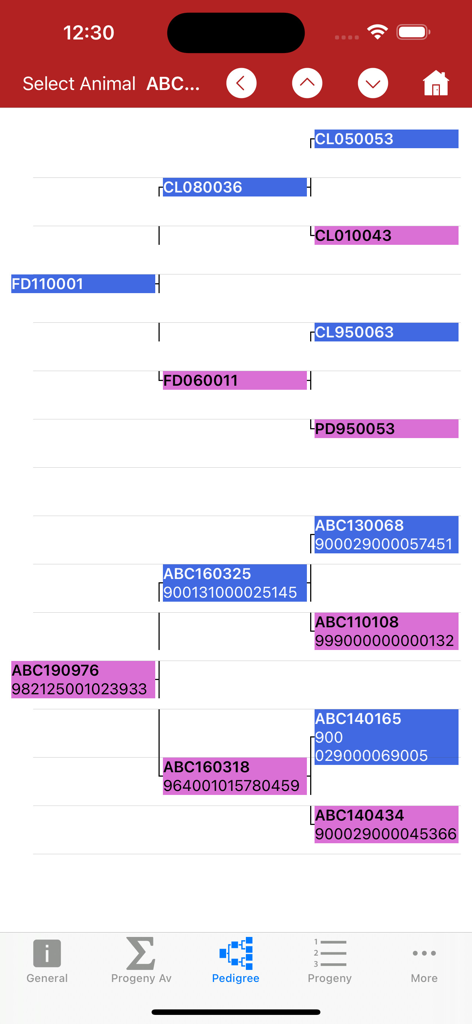
BenguFarm 모바일 앱의 가축 혈통 트리, 조상 이력 및 식별 번호 표시

BenguFarm 모바일 앱의 가축 혈통 트리, 조상 이력 및 식별 번호 표시

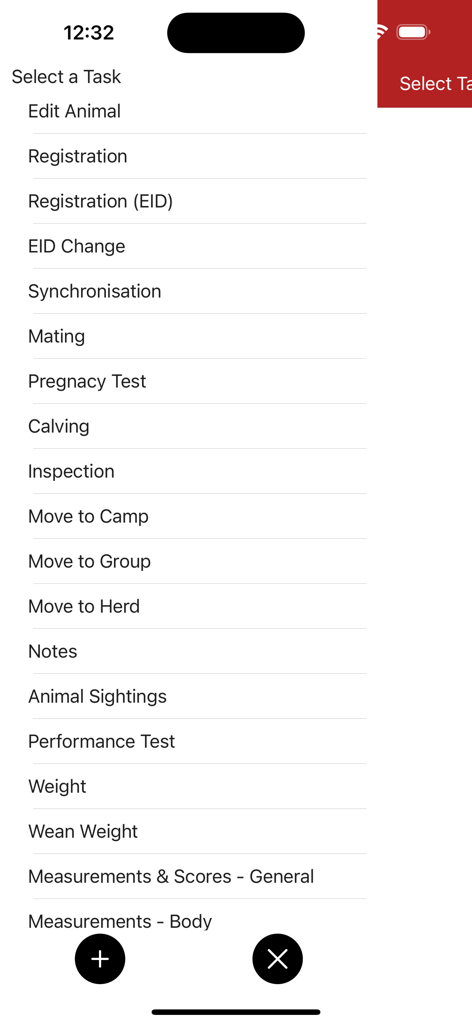
BenguFarm 모바일 앱의 동물 등록 및 건강 기록을 포함한 가축 관리 작업 목록

BenguFarm 모바일 앱의 동물 등록 및 건강 기록을 포함한 가축 관리 작업 목록

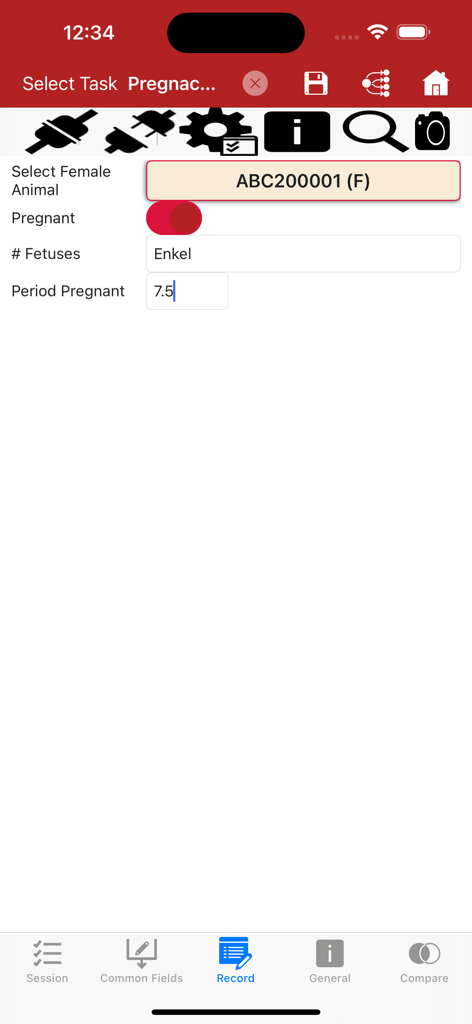
BenguFarm 모바일 앱의 쌍태아 수 및 임신 기간을 포함한 가축 임신 검사 데이터 기록 화면

BenguFarm 모바일 앱의 쌍태아 수 및 임신 기간을 포함한 가축 임신 검사 데이터 기록 화면

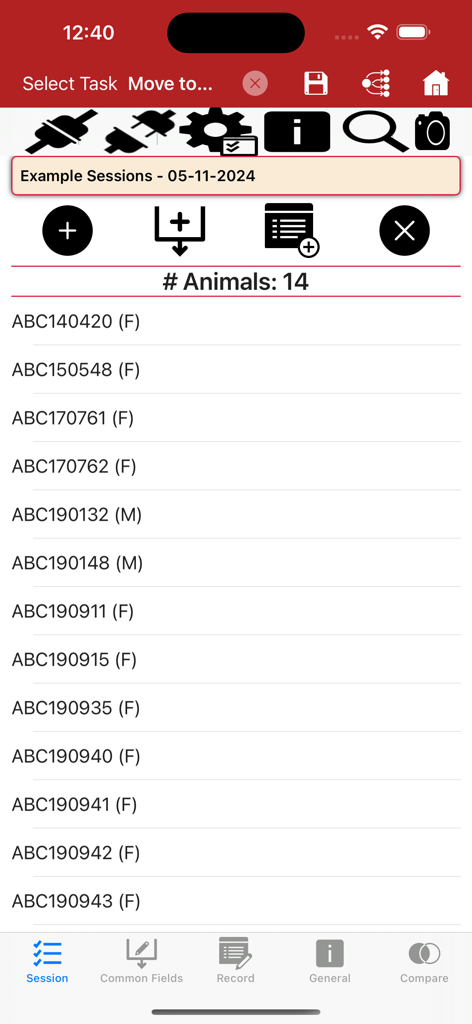
BenguFarm 모바일 앱 인터페이스, 데이터 캡처 세션 내 동물 식별 번호 목록 표시

BenguFarm 모바일 앱 인터페이스, 데이터 캡처 세션 내 동물 식별 번호 목록 표시

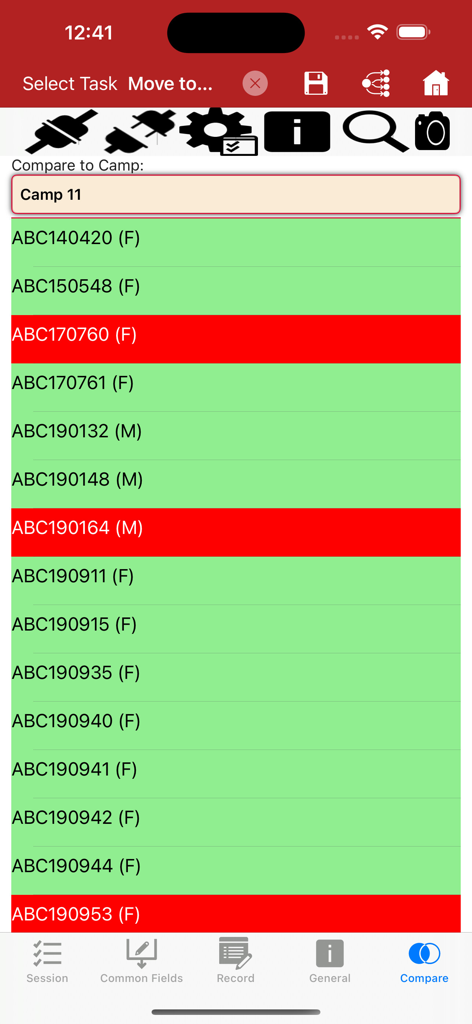
BenguFarm 모바일 가축 관리 앱 인터페이스, 캠프 비교를 위해 색상으로 구분된 동물 목록 표시

BenguFarm 모바일 가축 관리 앱 인터페이스, 캠프 비교를 위해 색상으로 구분된 동물 목록 표시

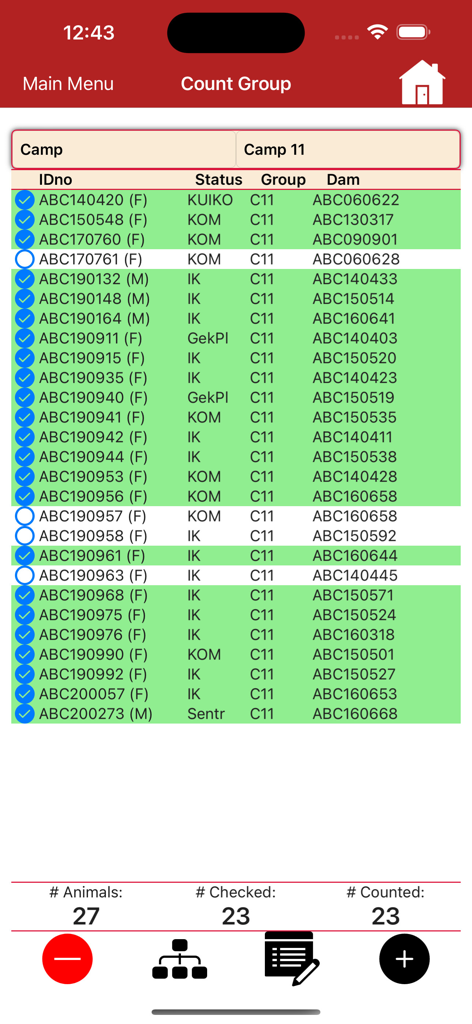
BenguFarm 모바일 가축 수 그룹 인터페이스, 동물 ID 및 추적 상태 표시

BenguFarm 모바일 가축 수 그룹 인터페이스, 동물 ID 및 추적 상태 표시

현장에서 무리를 완벽하게 관리하세요

이 앱을 돋보이게 하는 도구, 5K+ 명의 사용자가 선택.

📵

100% 오프라인 데이터 캡처

신호 없이도 외딴 목초지나 철제 축사에서 체중, 치료, 출생 기록을 남길 수 있습니다. 목장 사무실로 돌아오면 데이터가 완벽하게 동기화됩니다.

🐂

주머니 속 동물 이력

현장에서 즉시 도태 또는 번식 결정을 내리세요. 현장에서 모든 동물의 전체 혈통, 번식 기록 및 성능 특성에 액세스하세요.

📶

원활한 EID 통합

Bluetooth를 통해 TruTest 또는 Agrident 판독기에 직접 연결하세요. 귀 태그를 스캔하여 즉시 기록을 불러오고 고속 작업 중에 수동 입력 오류를 제거하세요.

전 세계 사용자들에게 사랑받는 앱

Trusted by 5K+ 명이 이 앱을 사랑합니다.

"

"BenguFarm 모바일은 크러시에서 소를 처리하는 방식을 완전히 바꿔 놓았습니다. TruTest EID 판독기와 통합하면 더 이상 수동 데이터 입력이나 지저분한 수첩이 필요 없습니다. Wi-Fi로 돌아오면 모든 것이 사무실 PC로 완벽하게 동기화됩니다. 우리 목장의 효율성과 데이터 정확성을 위한 완전한 게임 체인저입니다."

Garrett Thompson, 상업용 소 사육사
"

"종축 육종가에게는 꼼꼼한 기록 관리가 필요하며 이 앱은 이를 완벽하게 처리해 줍니다. 휴대폰 서비스가 전혀 없는 현장에서도 동물의 전체 혈통 및 성능 이력을 즉시 확인할 수 있습니다. 번식철을 위한 사용자 지정 기록 화면을 만들 수 있다는 점은 조직을 유지하는 데 정확히 필요한 것이었습니다."

Sarah Jenkins, 혈통 양 사육사

앱 소개

에 대해 알아야 할 모든 것 BenguFarm Mobile.

설명

BenguFarm-MOBILE for iOS is a mobile application installed independently of BenguFarm on a iPhone or iPad. BenguFarm-MOBILE is to function side-by-side with BEEF/SHEEP & GOATS/GAME module and is used to lookup animal data in the field as well as to capture new animal data. BenguFarm-MOBILE can be used for more than one herd (e.g. stud and commercial), whether the herds are on the same or different databases. Please note that a user must have a BenguFarm license for the applicable BenguFarm module (BEEF and/or SHEEP & GOATS and/or GAME module) to be able to use the BenguFarm-MOBILE. Capture Data on your Smartphone or Tablet BenguFarm-MOBILE's primary function is to record data at the crush, the scale, the kraal or in the field on a iPhone or iPad. Secondly, to look up animalsí information when and where the need arises. Data exchange between BenguFarm-MOBILE and BenguFarm on a PC/laptop is done via a synchronisation function. Animal Data and Photos in your Pocket Data on a user's BenguFarm can be sent from his on his PC/laptop to BenguFarm-MOBILE on his smartphone or tablet. This data can then be viewed and, if needed, edited in the app on the smartphone or tablet. Data such as general animal information, reproduction data, weights, performance test data, traits, breeding values, performance of progeny, pedigree and health data can be viewed. BenguFarm-MOBILE can be used to capture all important data and animal photos on the spot while working with animals. Data that can be captured include new animals (registration), matings, pregnancy tests, calvings/lambings, weights, general notes, vaccinations, camp/group movements, wool data (sheep), illnesses, treatments, inspections, sightings, measurements, procedures, sales and deaths and camp activities (e.g. feed or lick put out). Please note that recording of data on BenguFarm-MOBILE does not need Internet access. Recording is done off-line. User customisable recording screens (Tasks) An important feature of BenguFarm-MOBILE is its user-friendliness. Each data capturing screen is rendered according to a task definition. These task definitions can be changed by a user to his/her specific needs. Fields can be added or removed and even the order of the fields can be changed. In addition, fields can be marked as common fields. When a new session for a task (e.g. pregnancy tests) is started, such common fields only need to be completed once and will be recorded automatically for all animals during the session. Fields can also be temporarily disabled for a specific session. In addition to the default list of tasks, a user can also set up their own tasks. Integration with TruTest EID Readers BenguFarm-MOBILE integrates with the TruTest SRS2 & XRS2 and Agrident AWR250, AWR300 & APR600 EID readers in both the animal data view as well as data capturing screens. Sessions, Entering Multiple Data and Camp Comparisons A user may select to enable session recording when capturing data. When a session is enabled, all the animals for which data is captured, are placed in the selected session. Such a session can either be used to capture additional information, by entering the applicable fields and then clicking a single button to create records for all the animals in the session. Secondly the animals in the selected session can be compared to the animals in a camp with differences displayed in a color coded manner. Synchronise with BenguFarm on your Computer When finished with recording, the information recorded on BenguFarm-MOBILE can be synchronised with the BenguFarm database to bring the data on the PC/laptop(s) up to date. With synchronisation, data recorded in BenguFarm on the PC/laptop is also updated on BenguFarm-MOBILE. Synchronisation of data can be done via Wi-Fi, Internet or a USB connection, depending on which method is available and the method preferred by the user.

최신 버전

3.0.39

크기

132.0 MB

출시일

2019년 12월 4일

목장 데이터를 현장에서 바로 활용하세요

수동 서류 작업을 중단하고 현장에서 정보에 입각한 결정을 내리기 시작하세요. 지금 BenguFarm 모바일을 다운로드하고 데스크톱 관리 소프트웨어의 궁극적인 동반자를 경험하세요.

다운로드: App Store
FAQ

자주 묻는 질문

에 대해 알아야 할 모든 것 BenguFarm Mobile

BenguFarm-MOBILE은 어떻게 설치하나요?

iOS용 BenguFarm-MOBILE은 iPhone 또는 iPad에 독립적으로 설치됩니다. BenguFarm의 BEEF/SHEEP & GOATS/GAME 모듈과 함께 작동합니다.

BenguFarm-MOBILE은 기존 BenguFarm 라이선스가 필요합니까?

예, BenguFarm-MOBILE이 작동하려면 해당 모듈(BEEF, SHEEP & GOATS 또는 GAME)에 대한 유효한 BenguFarm 라이선스가 필요합니다.

BenguFarm-MOBILE로 여러 가축 무리를 관리할 수 있습니까?

예, BenguFarm-MOBILE은 서로 다른 데이터베이스에 있더라도 종축 및 상업용 무리를 포함한 여러 무리의 데이터를 관리할 수 있습니다.

BenguFarm-MOBILE은 현장에서 어떤 데이터를 캡처할 수 있나요?

BenguFarm-MOBILE은 새로운 가축 등록, 교배, 임신 테스트, 체중, 예방 접종, 이동, 질병 및 사진을 현장에서 직접 캡처합니다.

BenguFarm-MOBILE 데이터 기록에 인터넷 접속이 필요합니까?

아니요, BenguFarm-MOBILE은 오프라인으로 데이터를 기록합니다. 현장에서 정보를 캡처하는 데 인터넷 접속이 필요하지 않습니다.

BenguFarm-MOBILE은 PC와 데이터를 어떻게 동기화하나요?

BenguFarm-MOBILE은 Wi-Fi, 인터넷 또는 USB 연결을 통해 PC/노트북의 BenguFarm과 데이터를 동기화합니다. 이렇게 하면 모바일 앱과 데스크톱 소프트웨어의 데이터가 모두 업데이트됩니다.

BenguFarm-MOBILE에서 데이터 기록 화면을 사용자 정의할 수 있습니까?

예, 사용자는 특정 요구에 맞게 필드를 추가, 제거 또는 재정렬하여 기록 화면(작업)을 사용자 정의할 수 있습니다.

어떤 EID 판독기가 BenguFarm-MOBILE과 통합되나요?

BenguFarm-MOBILE은 TruTest SRS2 & XRS2 및 Agrident AWR250, AWR300 & APR600 EID 판독기와 통합됩니다.

BenguFarm-MOBILE에서 가축 계보 정보를 표시할 수 있습니까?

예, BenguFarm-MOBILE은 가축의 상세한 계보 데이터를 표시하며, 사용자는 앱 내에서 직접 볼 수 있습니다.

데이터 캡처를 위한 BenguFarm-MOBILE의 세션은 어떻게 작동하나요?

사용자는 세션 기록을 활성화하여 데이터 캡처를 위해 가축을 그룹화할 수 있습니다. 이렇게 하면 해당 세션 내에서 추가 정보를 입력하거나 가축을 캠프와 비교할 수 있습니다.