Canon DPP Express

Canon DPP Express

다운로드: App Store
Spark by MWM logo
로고: Canon DPP Express

Canon DPP Express: 이동 중에도 전문가급 RAW 편집

iPad와 iPhone을 강력한 모바일 암실로 바꿔보세요. 현대적인 전문가 워크플로우를 위해 설계된 기본 CR3 지원, 직관적인 터치 컨트롤, 고다이내믹레인지 처리로 캐논의 전설적인 색상 과학을 경험하세요.

개발사

Canon Inc.

카테고리

Photo & Video

다운로드

487K+

사용자 평점

4.6/5

총 평가 수

6K+

지원 언어

12

손안의 RAW 파워

이 인터페이스를 사용하는 487K+ 명의 사용자.

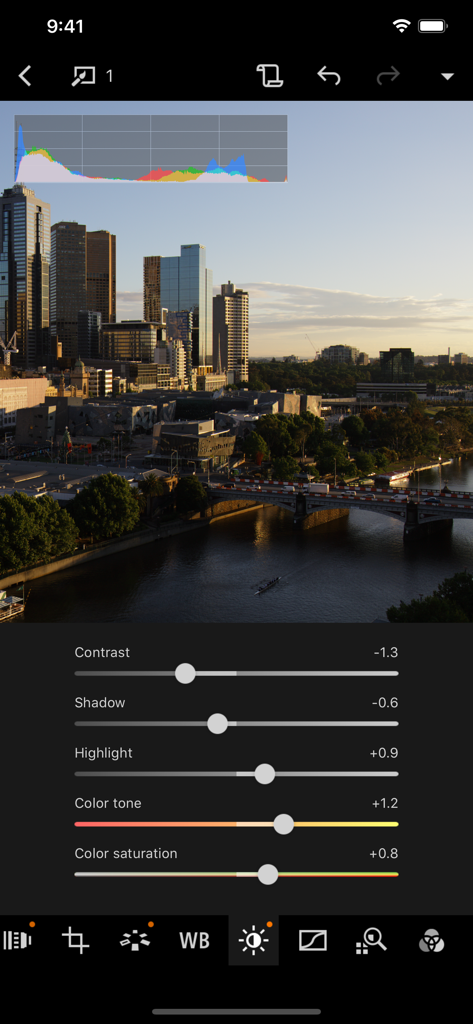
슬라이더와 도시 풍경 배경이 있는 전문 RAW 사진 편집을 보여주는 Canon DPP Express 앱 인터페이스

슬라이더와 도시 풍경 배경이 있는 전문 RAW 사진 편집을 보여주는 Canon DPP Express 앱 인터페이스

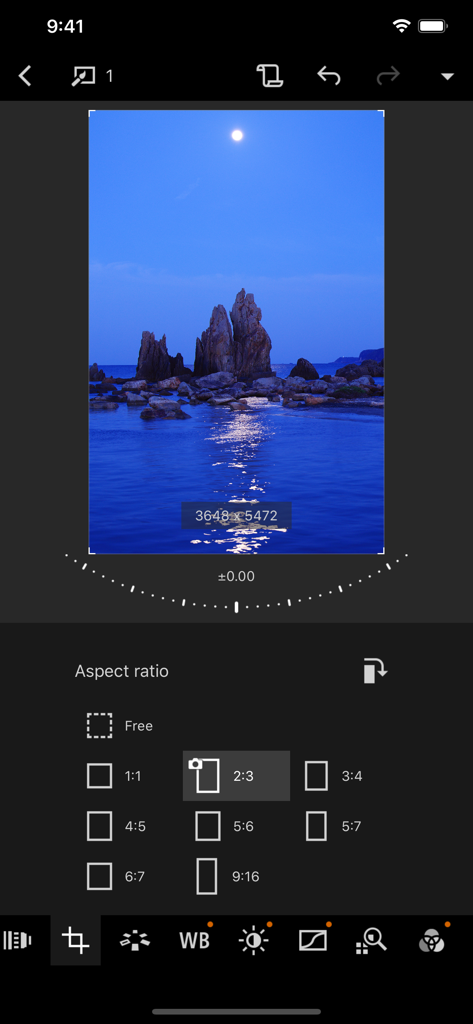
풍경 사진의 가로세로 비율 선택 및 자르기 도구를 보여주는 Canon DPP Express 앱 인터페이스

풍경 사진의 가로세로 비율 선택 및 자르기 도구를 보여주는 Canon DPP Express 앱 인터페이스

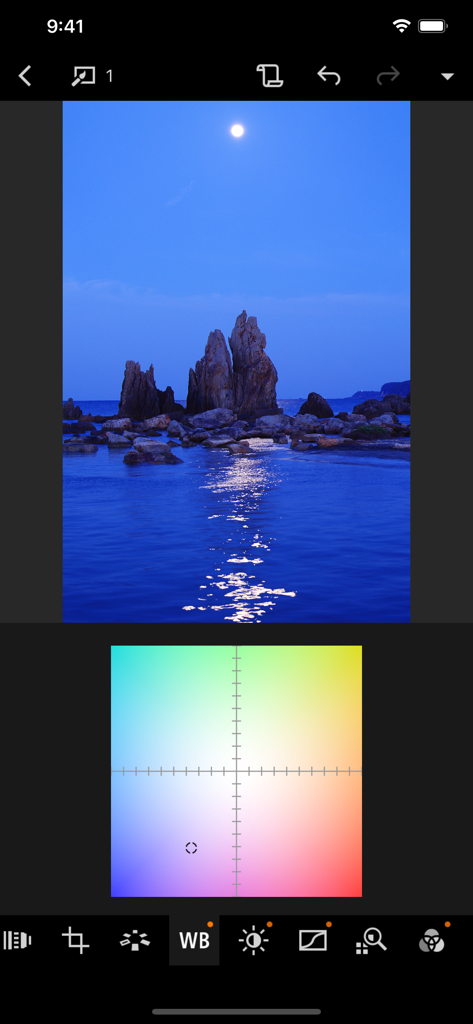
Canon DPP Express 모바일 사진 편집기의 화이트 밸런스 조정 그리드

Canon DPP Express 모바일 사진 편집기의 화이트 밸런스 조정 그리드

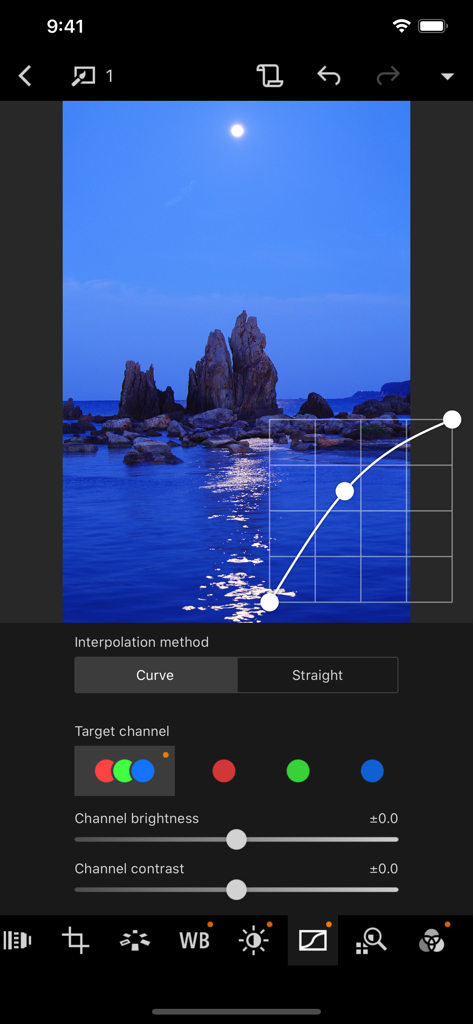
야경 사진을 편집하는 Canon DPP Express 앱의 톤 커브 조정 인터페이스

야경 사진을 편집하는 Canon DPP Express 앱의 톤 커브 조정 인터페이스

어디서든 전문가급 RAW 파워

이 앱을 돋보이게 하는 도구, 487K+ 명의 사용자가 선택.

📸

네이티브 RAW 정밀도

캐논의 전설적인 색상 과학으로 CR3 및 CR2 파일을 처리하여 데스크탑과 동일한 고품질 결과를 모바일에 최적화하여 제공합니다.

전문가급 모바일 워크플로우 속도

노트북은 건너뛰세요. 카메라에서 이미지를 직접 전송하고 현장에서 편집하여 완벽한 사진을 고객이나 소셜 미디어에 즉시 전달할 수 있습니다.

HDR PQ 및 XDR 지원

전체 다이내믹 레인지를 시각화하세요. Super Retina XDR 및 Liquid Retina XDR 디스플레이의 성능을 활용하여 정밀한 노출 및 색상 그레이딩을 구현하세요.

전 세계 사용자들에게 사랑받는 앱

Trusted by 487K+ 명이 이 앱을 사랑합니다.

"

"풍경 사진작가로서 긴 하이킹에 노트북을 들고 가는 것은 부담스러웠습니다. Canon DPP Express 덕분에 iPad Pro에서 CR3 파일을 놀라운 정확도로 직접 처리할 수 있게 되었습니다. 색상 과학은 제가 캐논에 기대했던 그대로이며, HDR PQ 지원은 XDR 디스플레이에서 제 사진을 돋보이게 합니다."

마커스 첸
"

"이 앱은 저의 웨딩 워크플로우를 완전히 혁신시켰습니다. 이제 리셉션이 끝나기도 전에 고품질의 전문적으로 편집된 RAW 미리보기를 고객에게 보낼 수 있습니다. 터치에 최적화된 인터페이스는 매우 직관적이며, 내보내기 시 워터마크가 없는 것은 제 브랜드에 큰 변화를 가져왔습니다."

엘레나 로드리게스

리뷰 분석

사용자 리뷰 인사이트.

감정 점수

26%
부정적

요약

Most users express significant dissatisfaction with the app, primarily due to its mandatory subscription model for a raw converter, which many feel is egregious given the high cost of Canon cameras and the desktop version being free. Users frequently criticize the app for its limited functionality compared to the PC version, including lack of DLO support, missing filters, and an inability to undo changes. There are also widespread complaints about poor camera compatibility, with many popular older models like the 5D Mark II/III, 7D Mark II, M6, 77D, and 1200D not being supported, alongside frustrating import/export processes for RAW and HEIF files, and a lack of proper photo management features like search and sort. Despite these significant drawbacks, a few users did find the app's editing capabilities for exposure, color, and focus to be effective and time-saving, and some praised its ease of use.

주요 테마

Subscription Model(22)
Missing Features(11)
Import/Export Functionality(11)
Camera Compatibility(8)
Ease of Use(6)
Editing Capabilities(3)

앱 소개

에 대해 알아야 할 모든 것 Canon DPP Express.

설명

Canon Digital Photo Professional Express (Canon DPP Express) is an iPad/iPhone application to color edit RAW images with intuitive touch operation to be converted to JPEG file afterwards. To continue using all Digital Photo Professional Express features, you must complete the (paid) subscription process. When you purchase the subscription, - Your image adjustments will be recorded. - You will be able to export images without watermarks. [Key Features] - Adjust RAW images freely. - Quickly and easily adjust RAW images anywhere, any time. - Save multiple adjustment patterns and compare the results on a single RAW image. - Use the change history function to readjust images until you achieve the perfect result. - Save adjusted images to your Camera Roll in JPEG format. " [Compatible Formats] RAW(CR3/CR2 ), JPEG, HEIF (10 bit) * Not compatible with .CRW or video file formats. CR3/HEIF (10bit) images can now be displayed and saved in HDR PQ. The supported displays are as follows: - iPad - Ultra Retina XDR - Liquid Retina XDR - iPhone - Super Retina XDR - Super Retina HD Note that the actual displayed image depends on the display performance. [Image Input] Via Camera Connect : RAW(CR3/CR2), JPEG, HEIF (10 bit) Import from Camera Roll: [RAW (CR3/CR2), JPEG], [HEIF (10 bit) *excluding EOS 5D Mark IV/EOS R] * Image data is saved in the app. In addtion, devices with iOS 12.1 and later can import CR3 files from the Camera Roll. *HEIF (10-bit) files and RAW images shot with [HDR PQ settings] enabled can be imported using linked mode with the Canon camera app Canon Camera Connect . *RAW burst files cannot be imported to smart devices. Extract the CR3 images from the RAW burst file in advance on the camera side, and then import them to the smart device. [Compatible Camera Models] For compatible models and features, please refer to the following website. https://ssw.imaging-saas.canon/app/app.html?app=dppex [System requirement] iOS 17 / 18 / 26 iPadOS 17 / 18 / 26 [Important Notes] Payment will be charged to your Apple ID account at the time of purchase confirmation. If you do not cancel at least 24 hours before the end of the current period, the subscription will automatically renew, and charges will continue. You can manage and cancel your subscriptions by going to your account settings on the App Store after purchase. - If you uninstall the app, all image data imported from your camera will be erased. - If application does not operate properly, try again after shutting down the application. - Visit your local Canon Web pages for more details. https://ssw.imaging-saas.canon/app/app.html?app=dppex Terms and conditions https://www.apple.com/legal/internet-services/itunes/dev/stdeula/

최신 버전

1.12.10

크기

114.0 MB

출시일

2018년 10월 9일

어디서든 RAW 워크플로우를 향상시키세요

수많은 캐논 사진가들과 함께 iPad와 iPhone을 전문가급 편집 스위트로 전환하세요. Canon DPP Express를 다운로드하고 이동 중에도 CR3 파일을 마스터하세요.

다운로드: App Store
FAQ

자주 묻는 질문

에 대해 알아야 할 모든 것 Canon DPP Express

Canon DPP Express란 무엇인가요?

Canon Digital Photo Professional Express (Canon DPP Express)는 직관적인 터치 조작으로 RAW 이미지를 색상 편집하고 JPEG 파일로 변환하는 iPad/iPhone 애플리케이션입니다.

Canon DPP Express는 어떤 이미지 형식을 지원하나요?

Canon DPP Express는 RAW (CR3/CR2), JPEG, HEIF (10비트) 형식을 지원합니다. .CRW 또는 비디오 파일 형식은 지원하지 않습니다.

Canon DPP Express는 RAW 이미지 편집을 지원하나요?

예, Canon DPP Express를 사용하면 iPad/iPhone 장치에서 RAW 이미지를 자유롭고 빠르게 조정할 수 있습니다. CR3 및 CR2 RAW 형식을 지원합니다.

Canon DPP Express에서 유료 구독이 필요한 기능은 무엇인가요?

Canon DPP Express 유료 구독을 통해 녹화된 이미지 조정을 활성화하고 워터마크 없이 이미지를 내보낼 수 있습니다.

Canon DPP Express는 구독 갱신을 어떻게 처리하나요?

Canon DPP Express 구독은 자동으로 갱신됩니다. 요금이 부과되는 것을 방지하려면 현재 기간이 끝나기 최소 24시간 전에 취소해야 합니다. 관리는 App Store 계정 설정에서 이루어집니다.

Canon DPP Express에서 이미지 대비 및 채도를 조정할 수 있나요?

예, Canon DPP Express는 이미지 대비, 그림자, 밝은 영역, 색조, 색 채도를 조정하는 슬라이더를 제공합니다.

사용자는 Canon DPP Express에서 이미지의 종횡비를 변경할 수 있나요?

예, Canon DPP Express를 사용하면 이미지 종횡비를 변경할 수 있습니다. 옵션에는 Free, 1:1, 2:3, 3:4, 4:5, 5:6, 6:7, 9:16이 있습니다.

Canon DPP Express의 시스템 요구 사항은 무엇인가요?

Canon DPP Express는 iOS 17, 18, 26 및 iPadOS 17, 18, 26이 필요합니다.

내 카메라 롤에서 CR3 파일을 Canon DPP Express로 가져올 수 있나요?

예, iOS 12.1 이상을 실행하는 장치는 카메라 롤에서 Canon DPP Express로 CR3 파일을 직접 가져올 수 있습니다.

Canon DPP Express는 편집된 이미지를 어떻게 저장하나요?

Canon DPP Express는 조정된 이미지를 JPEG 형식으로 카메라 롤에 저장합니다. 이 변환은 RAW 이미지를 색상 편집한 후에 발생합니다.

Canon DPP Express는 흰색 균형 조정을 제공하나요?

예, Canon DPP Express는 컬러 그리드를 사용하여 흰색 균형 조정을 제공하여 이미지의 색 온도를 정밀하게 제어합니다.

Canon DPP Express에서 이미지 곡선 조정을 할 수 있나요?

예, Canon DPP Express는 '곡선' 또는 '직선' 보간 방법 옵션과 개별 '대상 채널' 밝기 및 대비 제어를 통해 곡선 조정을 허용합니다.