Focos

Focos

다운로드: App Store
Spark by MWM logo
로고: Focos

Focos: iPhone을 위한 DSLR급 사진 촬영 재해석

어떤 사진이든 전문가 수준의 보케 효과와 3D 조명을 구현하세요. 촬영 후 초점을 다시 맞추고, 컴퓨테이셔널 사진 기술의 힘으로 모바일 사진을 영화 같은 걸작으로 변모시키세요.

개발사

Mosaic S.r.l.

카테고리

Photo & Video

다운로드

32M+

사용자 평점

4.7/5

총 평가 수

326K+

지원 언어

34

전문가급 사진, 시각화

이 인터페이스를 사용하는 32M+ 명의 사용자.

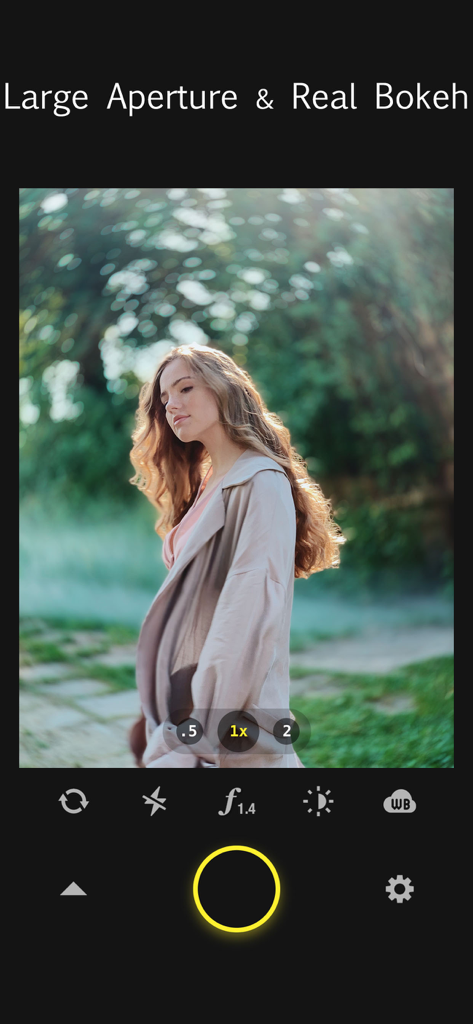
Focos 앱 인터페이스가 인물 사진에 대구경 조리개와 실제 보케 효과를 시연하는 모습

Focos 앱 인터페이스가 인물 사진에 대구경 조리개와 실제 보케 효과를 시연하는 모습

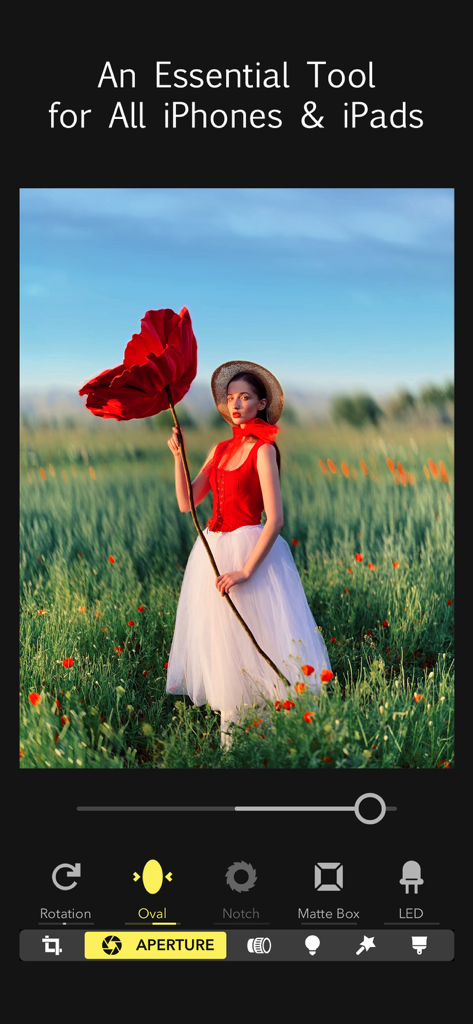
Focos 앱 인터페이스가 들판에 있는 여성의 인물 사진에서 조리개 및 보케 조정을 보여주는 모습

Focos 앱 인터페이스가 들판에 있는 여성의 인물 사진에서 조리개 및 보케 조정을 보여주는 모습

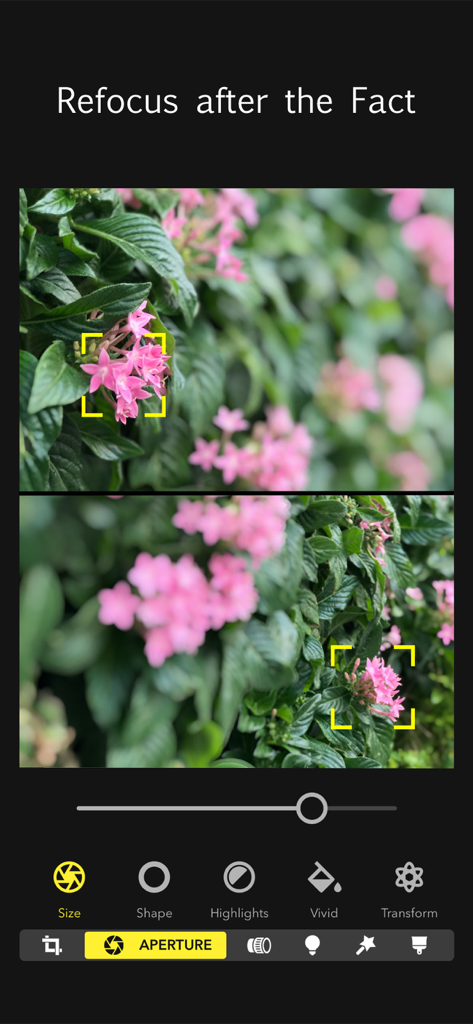
Focos 앱 인터페이스가 분홍색 꽃에 두 개의 다른 초점 지점으로 촬영 후 다시 초점 맞추기 기능을 보여주는 모습.

Focos 앱 인터페이스가 분홍색 꽃에 두 개의 다른 초점 지점으로 촬영 후 다시 초점 맞추기 기능을 보여주는 모습.

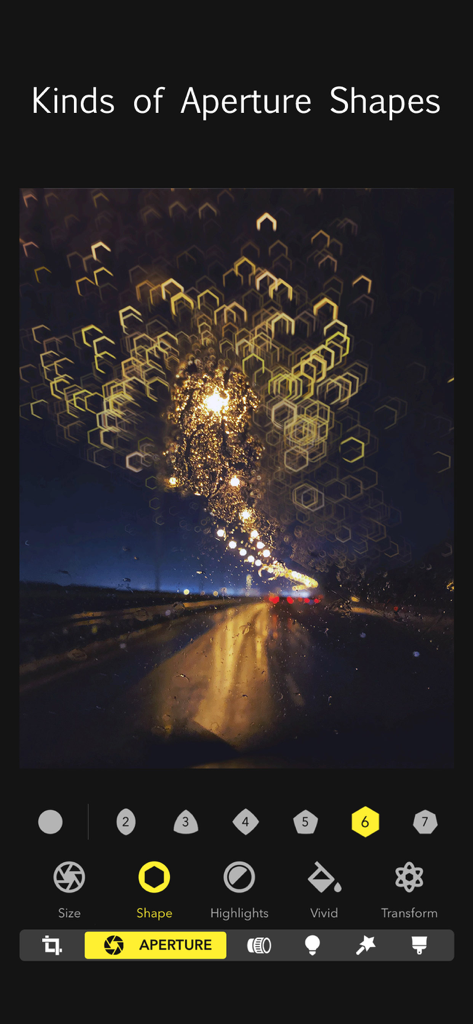
Focos 앱의 조리개 모양 도구를 사용하여 육각형 보케 하이라이트로 편집된 밤길 사진.

Focos 앱의 조리개 모양 도구를 사용하여 육각형 보케 하이라이트로 편집된 밤길 사진.

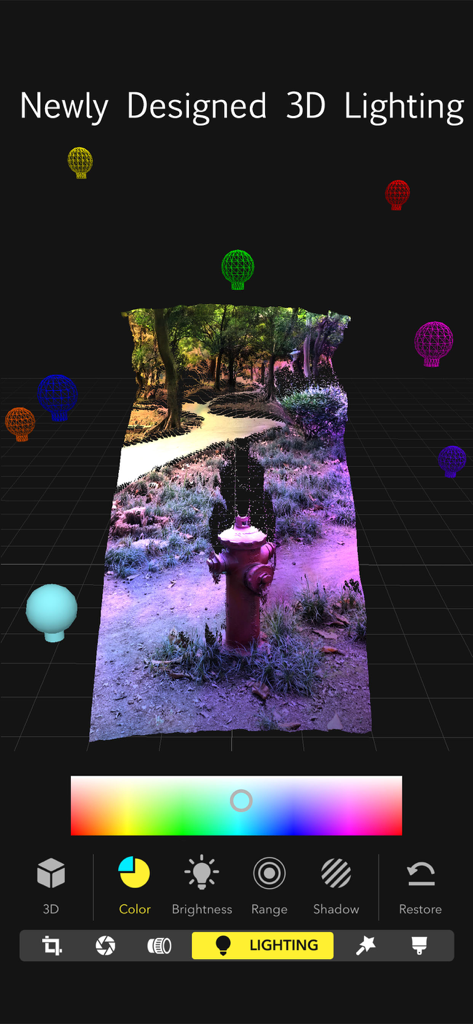
Focos 앱 인터페이스가 깊이 매핑된 공원 사진 위에 색상 조명 소스를 사용한 3D 조명 기능을 보여주는 모습

Focos 앱 인터페이스가 깊이 매핑된 공원 사진 위에 색상 조명 소스를 사용한 3D 조명 기능을 보여주는 모습

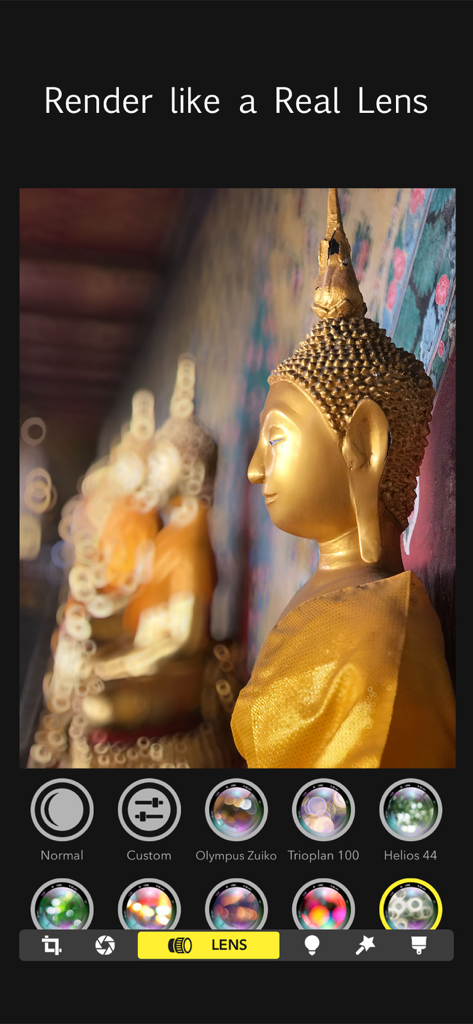
Focos 앱 인터페이스가 황금 불상 사진에 전문가급 보케 효과를 만들기 위한 렌즈 시뮬레이션 옵션을 표시하는 모습.

Focos 앱 인터페이스가 황금 불상 사진에 전문가급 보케 효과를 만들기 위한 렌즈 시뮬레이션 옵션을 표시하는 모습.

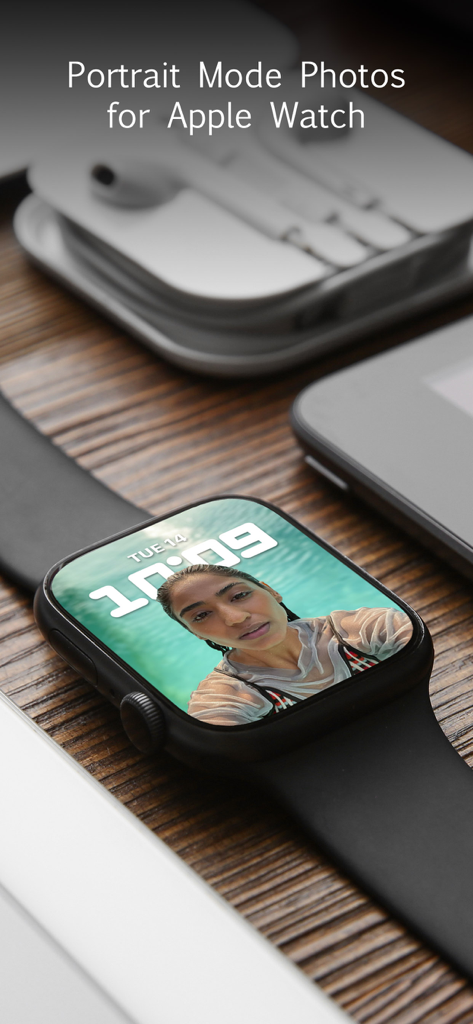
나무 표면에 놓인 Apple Watch가 인물 사진 모드 사진을 시계 페이스로 표시하는 모습

나무 표면에 놓인 Apple Watch가 인물 사진 모드 사진을 시계 페이스로 표시하는 모습

주머니 속 전문가급 사진 스튜디오

이 앱을 돋보이게 하는 도구, 32M+ 명의 사용자가 선택.

🎯

먼저 초점을 맞추고, 나중에 다듬으세요

흐릿한 피사체 때문에 순간을 놓치지 마세요. 라이트 필드 기술을 사용하여 촬영한 지 한참 후에도 어떤 사진이든 초점을 변경할 수 있습니다.

완벽한 보케 마스터하기

무거운 렌즈는 잊으세요. 대구경 조리개와 전문 렌즈 특성을 시뮬레이션하여 부드럽고 예술적인 배경 흐림 효과를 즉시 만들어 보세요.

💡

3D 스튜디오 조명

평면적인 필터를 넘어섭니다. 실제 3D 공간에 여러 광원을 추가하여 피사체를 강조하고, 전문가 수준의 정밀도로 조명 문제를 해결하세요.

전 세계 사용자들에게 사랑받는 앱

Trusted by 32M+ 명이 이 앱을 사랑합니다.

"

"전문 사진작가로서 얕은 심도 때문에 무거운 DSLR을 항상 가지고 다녔습니다. Focos는 제 작업 방식을 완전히 바꿔놓았습니다. 촬영 후 조리개와 렌즈 특성을 조절할 수 있다는 점은 정말 놀랍습니다. 최고급 단렌즈의 부드러운 보케를 진정으로 시뮬레이션하는 유일한 앱입니다."

Marcus J.
"

"오래된 어떤 사진이든 몇 초 만에 전문가급 인물 사진으로 바꿀 수 있다는 점이 너무 좋습니다! 3D 조명 기능은 인스타그램 피드에 혁신을 가져왔고, 필요한 곳에 정확히 하이라이트를 추가할 수 있게 해줍니다. 제 iPhone 사진이 마치 전문 스튜디오에서 촬영한 것처럼 보이게 해요."

Elena S.

리뷰 분석

사용자 리뷰 인사이트.

감정 점수

27%
부정적

요약

General feedback for the app is overwhelmingly negative, primarily driven by a drastic shift in its monetization model from free or one-time purchase to expensive, mandatory subscriptions for core functionality and even saving photos. Many users lament the loss of previously free features and report various critical bugs, such as distorted editing tools when zooming, inaccurate touch recognition (especially after iOS 26 updates), and exported images saving at reduced resolution or without proper depth maps. Several users also reported billing and refund issues, including being charged after cancellation or having lifetime purchases invalidated. Despite these significant drawbacks, a limited number of users still commend the app for its effective and high-quality depth focus editing capabilities, when they function correctly.

주요 테마

Subscription Pricing(35)
Loss of Free Features(15)
Previous App Quality(10)
Editing Tool Bugs(9)
Depth Focus Feature(5)
Billing & Refund Issues(5)
Export Quality Issues(3)

앱 소개

에 대해 알아야 할 모든 것 Focos.

설명

Focos is a big step into the future of computational photography and light-field camera, bringing DSLR-like photography to your iPhone and iPad Pro, with beautiful bokeh effects usually achievable only with professional large aperture cameras. With the technology of computational photography, you can make unlimited changes to your photos, focus after the fact, change the aperture repeatedly, and add multiple lights in 3D space, exceeding the limits of any editing tools you’ve known before. The creative potential unleashed by Focos is endless. The Verge, "Focos has long been one of the most ambitious photo-editing apps on iOS, turning any photo into a 'portrait mode'-style image with fully adjustable depth of field, no matter what kind of camera you took it with." MAIN FEATURES - Take photos with shallow depth of field, without manually painting or making selections. - The AI engine can calculate depth of field automatically for all photos. - True 3D imaging. - Simulate large apertures to create real bokeh effects normally only possible with DSLR cameras and expensive lenses. - Import all existing photos and customize the bokeh effect. - Re-focus portrait photos that have already been taken, with a simple tap. - Choose from various simulated aperture diaphragms to generate different bokeh spot effects. - Professional options to simulate lens characteristics, such as creamy, bilinear, swirly, and reflex effects, and more. - Visualize the depth of areas within your portrait photos in a 3D view, and intuitively add depth filters. - Add multiple lights in a 3D space, and adjust the color, brightness and so on for each light. - Check the portrait picture in the real world with augmented reality technique. - It is possible to patch the depth map precisely on iPad with Apple Pencil. - Intuitive and easy to use, with built-in video tutorials. - An essential tool for all iPhones and iPads. Do you have questions or suggestions? Contact us via support @ focos . me.

최신 버전

2.11.36

크기

329.8 MB

출시일

2017년 10월 31일

전문가급 사진 촬영, 무거운 렌즈는 필요 없습니다

3,200만 명 이상의 크리에이터와 함께 iPhone을 DSLR로 만드세요. Focos를 다운로드하여 전문가급 보케, 3D 조명, 그리고 촬영 후 초점 조절의 마법을 경험하세요.

다운로드: App Store
FAQ

자주 묻는 질문

에 대해 알아야 할 모든 것 Focos

Focos란 무엇인가요?

Focos는 DSLR과 같은 사진 촬영 기능을 iPhone 및 iPad Pro에서 구현하는 컴퓨테이셔널 포토그래피 앱입니다. 촬영 후 보케 효과, 초점 조절, 다중 조명 3D 공간 편집을 가능하게 합니다. 앱을 통해 사진을 무제한으로 수정할 수 있습니다.

Focos는 이미 촬영된 사진의 초점을 조절할 수 있나요?

네, Focos는 이미 촬영된 인물 사진의 초점을 간단한 탭으로 다시 조절할 수 있습니다. 촬영 후에도 초점을 조절할 수 있는 기능을 제공하여 기존 편집의 한계를 뛰어넘습니다.

Focos는 자동으로 피사계 심도를 계산하나요?

네, Focos의 AI 엔진은 모든 사진의 피사계 심도를 자동으로 계산합니다. 이 기능 덕분에 사용자는 수동으로 칠하거나 선택할 필요 없이 얕은 피사계 심도를 얻을 수 있습니다.

Focos는 다양한 조리개 모양을 시뮬레이션할 수 있나요?

네, Focos는 다양한 시뮬레이션된 조리개 다이어프램 중에서 선택하여 다른 보케 스팟 효과를 생성할 수 있습니다. 앱에는 창의적인 제어를 위한 여러 조리개 모양이 있습니다.

Focos는 3D 조명 효과를 지원하나요?

네, Focos는 사용자가 3D 공간에 여러 개의 조명을 추가할 수 있도록 합니다. 사용자는 각 개별 광원의 색상, 밝기 및 기타 속성을 직관적으로 조정할 수 있습니다.

Focos는 iPad Pro 및 Apple Pencil과 호환되나요?

Focos는 실제 카메라 렌즈 특성을 시뮬레이션할 수 있나요?

네, Focos는 실제 렌즈 특성을 시뮬레이션하는 전문적인 옵션을 제공합니다. 여기에는 Olympus Zuiko 또는 Helios 44와 같은 고가 렌즈에서 볼 수 있는 크리미, 빌리니어, 스월리, 리플렉스 효과가 포함됩니다.

Focos는 모든 iOS 장치의 필수 도구인가요?

네, Focos는 모든 iPhone 및 iPad의 필수 도구로 설계되었습니다. 이 Apple 모바일 장치 전반에 걸쳐 강력한 컴퓨테이셔널 포토그래피 및 편집 기능을 확장합니다.