iDesign

iDesign

다운로드: App Store
Spark by MWM logo
로고: iDesign

iDesign: 전문 2D 벡터 드로잉 및 기술 디자인

iPhone 및 iPad에서 정밀 드래프팅을 구현하세요. 오프셋 터치 컨트롤, 인치 단위, 모바일 전문가를 위해 설계된 전문적인 벡터 도구를 사용하여 건축 레이아웃 및 일러스트를 제작하세요.

다운로드: App Store

개발사

TouchAware Limited

카테고리

Productivity

다운로드

269K+

사용자 평점

3.2/5

총 평가 수

800

지원 언어

8

모든 픽셀의 정밀함

이 인터페이스를 사용하는 269K+ 명의 사용자.

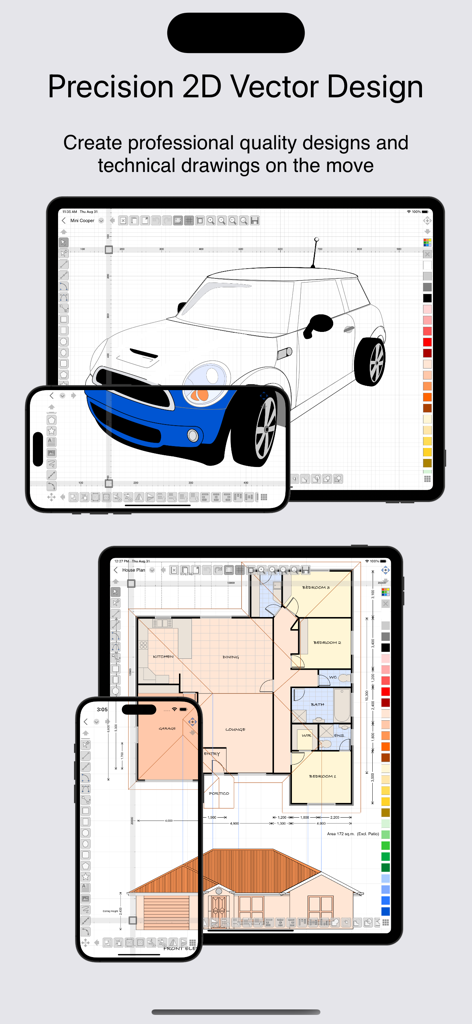
iDesign 앱이 iPad와 iPhone에서 2D 벡터 자동차 일러스트 및 건축 평면도를 보여주는 모습.

iDesign 앱이 iPad와 iPhone에서 2D 벡터 자동차 일러스트 및 건축 평면도를 보여주는 모습.

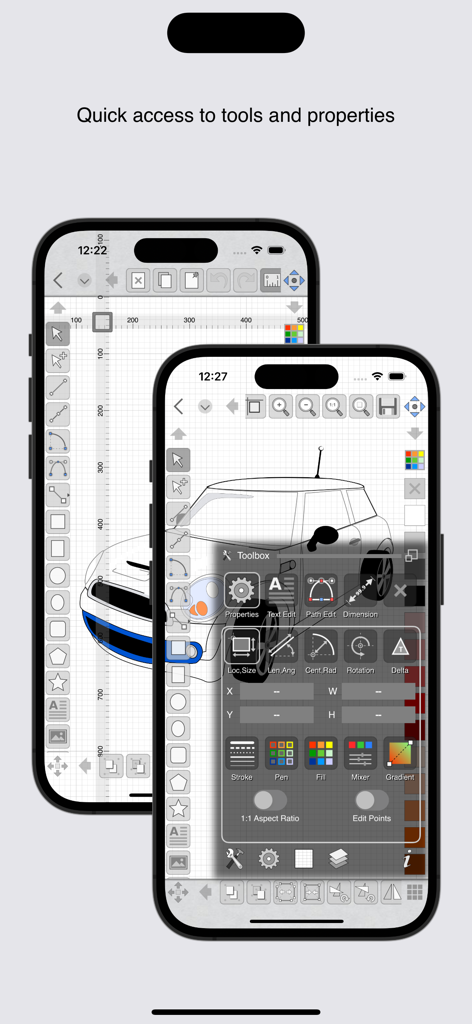
iDesign 앱 인터페이스가 표시된 두 대의 iPhone. 자동차 그림과 디자인 도구에 빠르게 액세스할 수 있는 툴박스 오버레이가 있습니다.

iDesign 앱 인터페이스가 표시된 두 대의 iPhone. 자동차 그림과 디자인 도구에 빠르게 액세스할 수 있는 툴박스 오버레이가 있습니다.

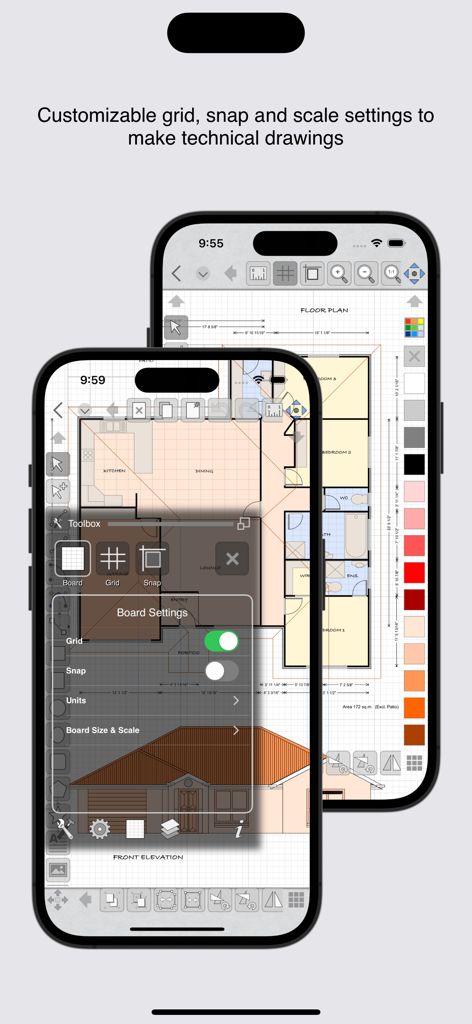
iPhone의 iDesign 앱 인터페이스에서 기술 도면 평면도와 격자 설정이 표시되는 모습.

iPhone의 iDesign 앱 인터페이스에서 기술 도면 평면도와 격자 설정이 표시되는 모습.

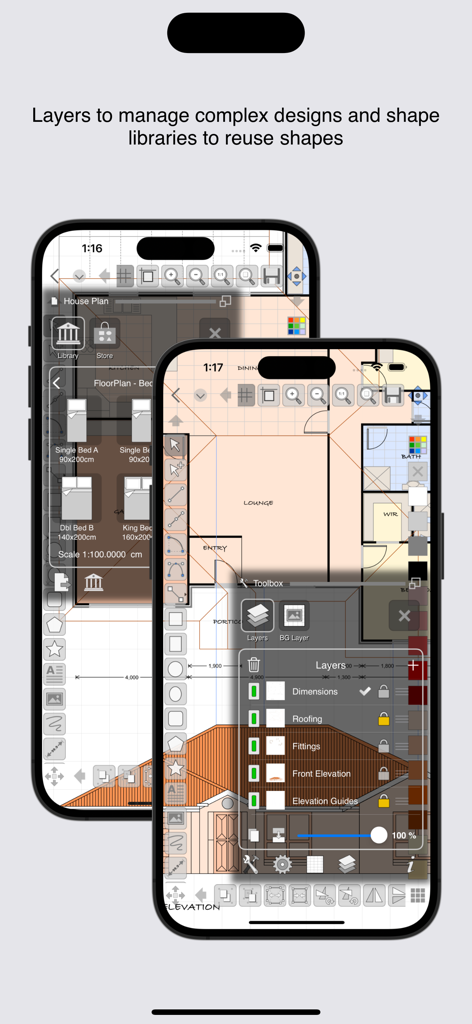
iDesign 모바일 앱 인터페이스에서 레이어 패널과 모양 라이브러리를 사용하여 평면도 디자인이 표시되는 모습.

iDesign 모바일 앱 인터페이스에서 레이어 패널과 모양 라이브러리를 사용하여 평면도 디자인이 표시되는 모습.

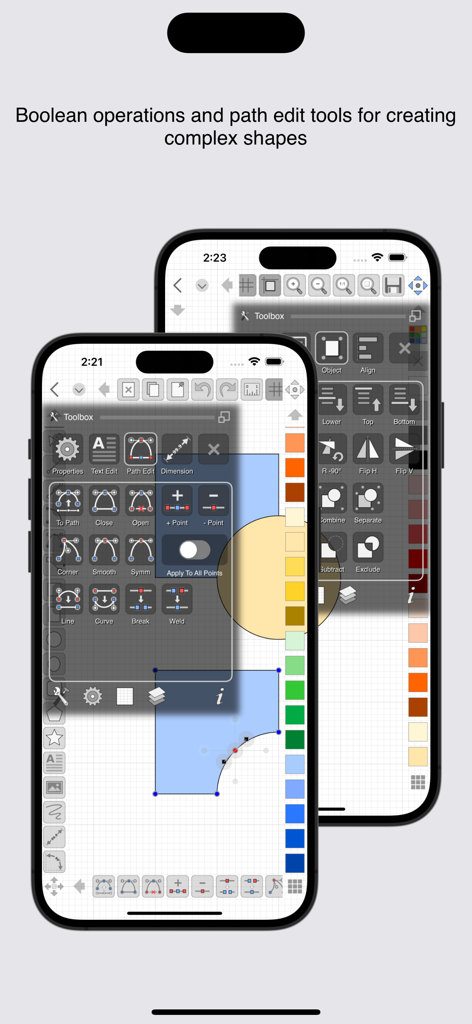
iPhone의 iDesign 앱 인터페이스에서 기술 벡터 드로잉을 위한 경로 편집 및 부울 연산 도구가 표시되는 모습.

iPhone의 iDesign 앱 인터페이스에서 기술 벡터 드로잉을 위한 경로 편집 및 부울 연산 도구가 표시되는 모습.

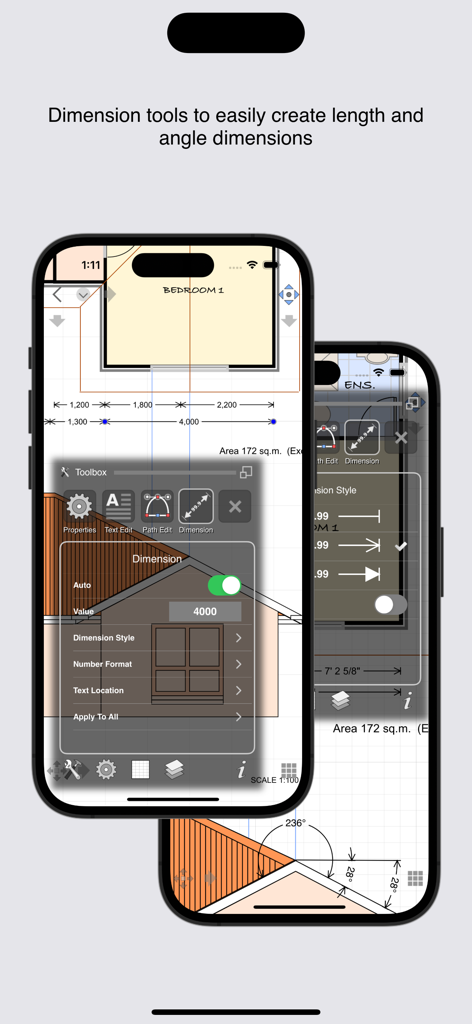
iPhone의 iDesign 모바일 앱 인터페이스에서 건축 및 기술 도면을 위한 길이 및 각도 치수 도구가 표시되는 모습.

iPhone의 iDesign 모바일 앱 인터페이스에서 건축 및 기술 도면을 위한 길이 및 각도 치수 도구가 표시되는 모습.

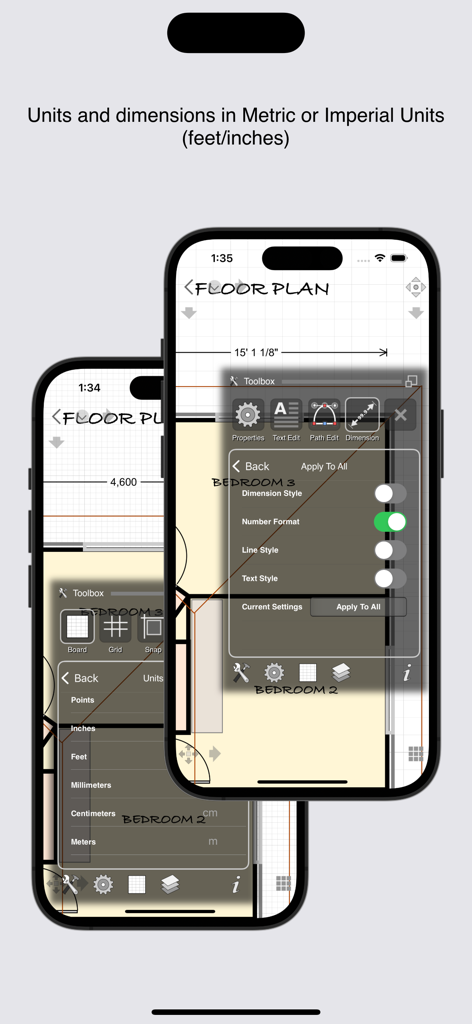
iDesign 모바일 앱에 iPhone에서 미터법 및 인치 단위 평면도에 대한 단위 설정 및 치수 옵션이 표시되는 모습.

iDesign 모바일 앱에 iPhone에서 미터법 및 인치 단위 평면도에 대한 단위 설정 및 치수 옵션이 표시되는 모습.

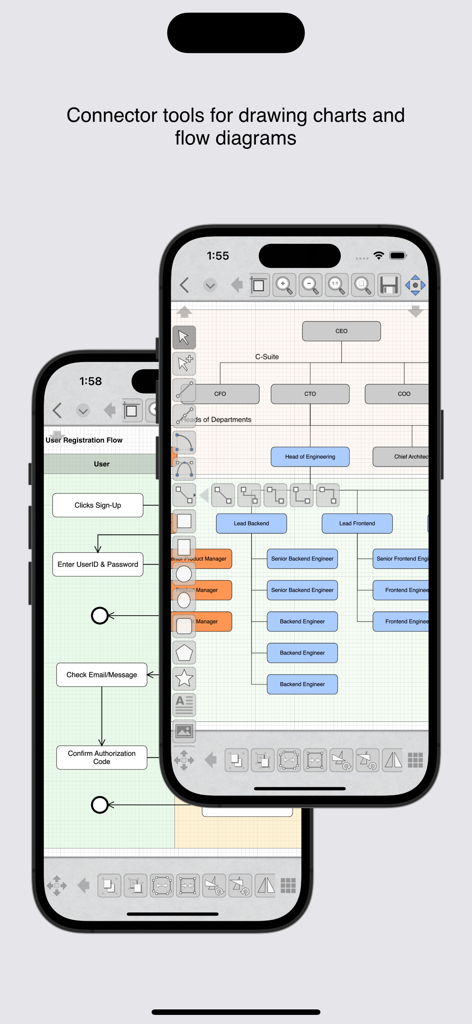
iPhone에서 커넥터 도구를 사용하여 조직도 및 순서도를 그리기 위한 iDesign 앱 인터페이스.

iPhone에서 커넥터 도구를 사용하여 조직도 및 순서도를 그리기 위한 iDesign 앱 인터페이스.

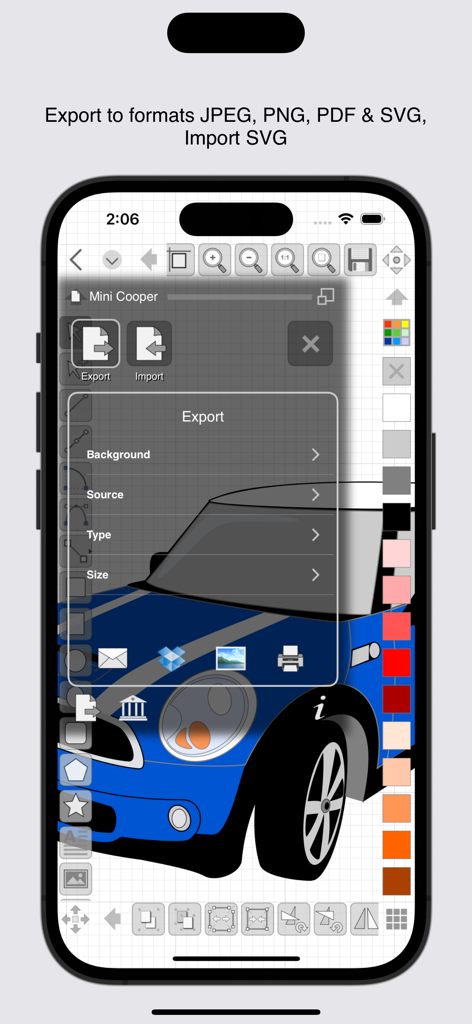
iPhone의 iDesign 앱 인터페이스에서 JPEG, PNG, PDF 및 SVG 형식에 대한 내보내기 옵션이 표시되는 모습.

iPhone의 iDesign 앱 인터페이스에서 JPEG, PNG, PDF 및 SVG 형식에 대한 내보내기 옵션이 표시되는 모습.

이동 중에도 전문가 수준의 정밀함

이 앱을 돋보이게 하는 도구, 269K+ 명의 사용자가 선택.

🎯

시야를 가리지 않는 정밀함

고유한 오프셋 핸들과 이동(nudge) 컨트롤을 사용하면 손가락으로 시야를 가리지 않고 정확하게 그리는 부분을 확인할 수 있습니다.

📐

건축 수준의 도구

피트, 인치, 분수 단위로 자신 있게 디자인하세요. 동적 격자와 고급 치수 도구가 지원됩니다.

🚀

전문가용 내보내기 및 데스크톱 동기화

iCloud 동기화와 SVG, PDF 및 전문 형식으로의 고품질 내보내기를 통해 프로젝트를 현장에서 사무실로 원활하게 이동하세요.

전 세계 사용자들에게 사랑받는 앱

Trusted by 269K+ 명이 이 앱을 사랑합니다.

"

"오프셋 컨트롤로 얻는 정밀함은 타의 추종을 불허합니다. 이제 손으로 시야를 가리지 않고 iPad에서 상세한 부지 도면을 그릴 수 있습니다. 또한, 피트 및 인치 단위의 기본 지원은 미국 기반의 건축 프로젝트에 있어 엄청난 시간 절약입니다."

Sarah Jenkins, 인테리어 건축가
"

"iDesign 덕분에 대부분의 제작 프로젝트에서 데스크톱 CAD 소프트웨어를 대체할 수 있었습니다. SVG 내보내기는 CNC 기계와 완벽하게 작동하며, 스냅 도구를 사용하면 톱을 만지기 전에 목공 디자인의 모든 조인트가 완벽하게 정렬됩니다."

David Miller, DIY 목공예가

리뷰 분석

사용자 리뷰 인사이트.

감정 점수

13%
부정적

요약

The app receives overwhelmingly negative feedback, primarily due to its abrupt transition to a subscription-based model. Many long-term users who had previously purchased the app outright feel betrayed, describing the change as a "scam" or "theft" as they can no longer access their work or full functionality without subscribing. Users also expressed frustration over the inability to revert to an older, paid version. Despite this controversy, some users acknowledge the app's strong capabilities for 2D technical drawings, its useful features, and well-designed interface, with at least one user reporting great developer support. However, others pointed out functionality gaps like poor palm rejection, issues with object snapping, and a lack of direct measurement input.

주요 테마

App Capabilities(6)
2D Technical Drawing(3)
User Interface(2)
Value for Money(2)
Developer Support(1)
Comparison to Alternatives(1)

앱 소개

에 대해 알아야 할 모든 것 iDesign.

설명

Precision 2D vector drawing and design on the iPad & iPhone. Make professional quality designs, illustrations and technical drawings on the move using your fingers at last! iDesign has unique features and offset controls which allows you to draw accurately with your finger not getting in the way or blocking your view. Full feature compatibility and automatic sync of designs via iCloud with XDesign (Mac version). User Guide (PDF) available at www.touchaware.com/apps/idesign/userguide FEATURES - A universal app for both iPad and iPhone which adapts to the native screen size of the device. - An unobtrusive icon based visual and context driven user interface with a full screen board view - Toolbars and panels with easy access to frequently used functions for a fast work flow Standard Tools & Functions - Line, polyline, square, rectangle, circle, arc, ellipse, polygons, stars & path tools - Copy and paste selected shapes and groups - Group and ungroup shapes hierarchically to create complex designs - Edit points, convert shapes to path, close shapes, add and remove points, break, weld, explode and join - Precise rotation with ability to rotate at user defined center - Object alignment tools - Fill color and pen color swatches with opacity controls, custom RGB mixer - Stroke width, line style, line caps and corner join styles, arrow ends and dash patters - Text insertion with fonts, styles, sizes, paragraph alignments, multilingual, rotate/resize - Set a background image for tracing/marking over it - Insert images, copy, paste, move, resize and position them accordingly - Multilevel Undo/Redo for all edit operations - Create multiple layers to organize & separate design components - Connector tools for drawing charts and flow diagrams Unique Features for Touch Based Editing - Offset handles for moving and positioning without your finger blocking the view - Nudge controls, allows precise movement of selected shapes or selected points - Delta transformations to apply incremental values by keyboard Advanced Tools for Graphics Design - Advanced path editing options for corner, smooth and symmetric control points, straighten and curve segments - Text to path conversion - Boolean operations on shapes, unite, intersect, subtract, exclude - Freehand drawing, auto smoothened paths - Gradients / color blends Advanced Tools for Technical Drawing - Circle and Arc tool based on center, start/end point, radius and angle of arc - Dimensioning tools, length as well as angular with customisable settings - Support for Feet+Inches+Fractions (U.S & older unit system)
- Architectural formatting option for Dimensions
- Dynamic grid supporting feet, inches and inch fractions at different zoom levels Units & Board Setup - Support for standard and custom board sizes. - Set a drawing scale - Full set of standard unit systems. - Unit aware Grid with customisable settings - Snap to grid, snap to object and points - Unit aware rulers Shape libraries to organise and reuse shapes - Add, remove and organise shapes in your own libraries - A set of standard shapes for creating floor plans included Export/Import & Print - Export designs to JPEG, PNG, PDF & SVG formats - Import SVG files - Share your designs with other iDesign users via Email - Dropbox support for Export, Import - AirPrint Support iDesign is available as a monthly or yearly subscription and includes a free trial period that begins once your purchase has been confirmed with your Apple ID account. At the end of the trial your subscription will start and renew automatically. Your Apple ID account will be charged for the upcoming period unless you disable auto-renew or cancel your subscription in your Account Settings at least 24-hours prior to the end of the current period. Terms of Use: http://www.touchaware.com/apps/termsofuse Privacy policy: http://www.touchaware.com/apps/privacy

최신 버전

4.2

크기

80.7 MB

출시일

2010년 4월 23일

데스크톱 수준의 정밀함으로 다음 프로젝트를 마스터하세요

손가락으로 화면을 가리는 불편함에서 벗어나세요. 정확한 건축 드래프팅, 인치 단위 지원, iPad, iPhone, Mac 간 원활한 iCloud 동기화를 위해 iDesign을 사용하는 수천 명의 모바일 전문가와 함께하세요. 오늘 무료 체험을 시작하세요.

다운로드: App Store